

dsh-skin
Manifest valid★ 17Skin switcher + custom wallpaper for DeepSeek Harness (dsh): curated --dsw-alias-* palettes, translucent wallpaper with opacity/blur controls, persisted per browser (like Codex themes) — switch skin / custom background plugin
dsh-skin
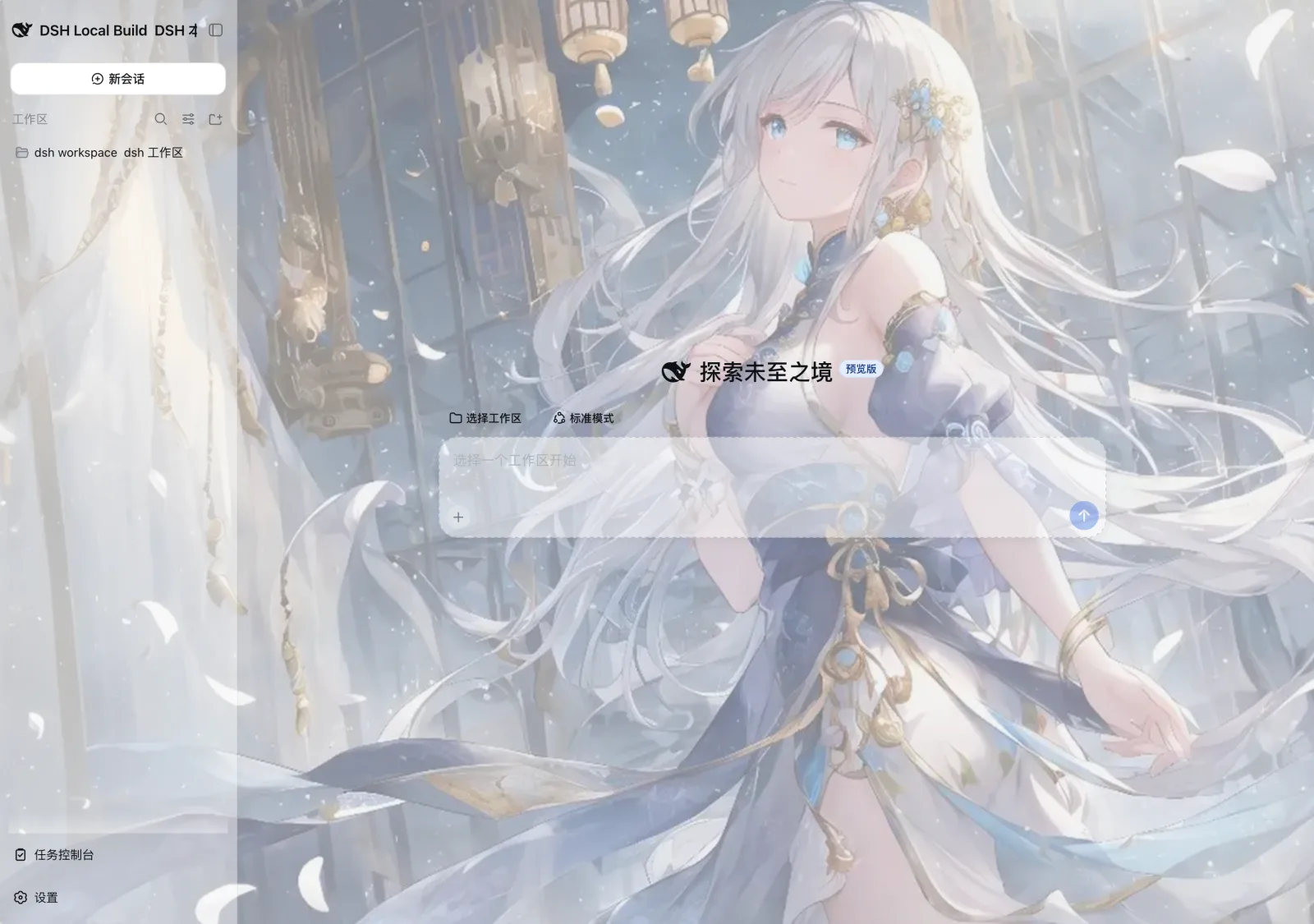
Skin switcher + custom wallpaper + 奶龙桌宠(desktop pet with sticker pack) for DeepSeek Harness — a "change the skin" feature in the spirit of Codex themes. It registers a curated catalog of palettes into DSH's built-in theme runtime and adds three rows to Settings → General (below the built-in Appearance row):
- 皮肤 / Skins — pick one of 7 curated palettes (or 默认 / Default to follow the built-in appearance).
- 背景图片 / Wallpaper — local image, or paste an image/video URL; opacity, blur, and fit (cover / contain / stretch / tile).
- 奶龙桌宠 / Pet — a floating, draggable yellow-dragon desktop pet with an 8-mood sticker pack (表情包). It follows the agent's running state (idle → thinking → working → done → sleeping), blinks while idle, falls asleep when idle too long, can be dragged anywhere (position remembered), and shows a 🎨 sticker panel where you can pick any mood manually. Toggle it, resize it, or reset its position from the settings row.
Both choices persist across reloads (localStorage). A saved third-party skin is re-applied once on boot (DSH only persists system/light/dark itself).
How it works
DSH's theme system is token-based: the web shell ships --dsw-* design tokens,
and ThemeRuntime lets third-party plugins register themes that override the
alias layer (--dsw-alias-*) per color scheme. This package is a regular
dual-face plugin:
- Host half (
lib/index.js) — adsh.bundlepatch layer that inserts one loader entry (skin); a no-opapply, exactly like the shipped ui-* packages. - Browser half (
lib/client.js) — adsh.clientbundle (served at/plugins/dsh-skin/client.js) that:- registers 7 curated skins via
ctx.theme.register(...); - restores the saved skin id and applies it with
ctx.theme.setTheme(...); - renders the wallpaper as a fixed backdrop layer (
z-index: -1) and stacks a token override (ctx.theme.overrideTokens) that makes the main canvas (--dsw-alias-bg-base) and sidebar (--dsw-specific-sidebar-fill) translucent, so the image shows through while inner surfaces (cards, inputs, bubbles) stay opaque and readable; - keeps the slot stores in sync with
theme/change(and re-shades the wallpaper when the active skin or light/dark scheme changes); - mounts both rows into
settings.general.item; - mounts the desktop pet (a fixed, draggable element with inline-SVG
stickers) and watches the agent's running state through
ctx.get("sessions").list()to switch moods.
- registers 7 curated skins via
Each skin sets its colorScheme (light/dark), which drives
body[data-ds-dark-theme], plus alias-token overrides applied as inline custom
properties on <body> by ui-layout's ThemePresenter.
Skins
| id | scheme | vibe |
|---|---|---|
skin-ocean | dark | DeepSeek-blue deep sea |
skin-graphite | dark | neutral monochrome |
skin-forest | dark | green calm |
skin-sunset | dark | warm purple |
skin-midnight | dark | pure black OLED |
skin-paper | light | warm paper |
skin-sakura | light | pink accents |
Ids are namespaced (skin-*) so they do not collide with official @deepseek-ai/dsh-client-ui-console themes (sakura, graphite). Saved unprefixed ids are migrated on read.
Picking 默认 / Default reverts to the built-in appearance (follow system) and clears the stored skin.
Wallpaper
In Settings → General → 背景图片 / Wallpaper:- 选择图片 / Choose image — pick a local image (≤ 2MB, stored as a data URL, kept in this browser only). Local video files are not uploaded; paste a URL instead.
- 网址 / URL — paste http(s) / data image or video (mp4/webm/ogv/mov). blob is rejected (dies on reload). No extra media server.
- 显示方式 / Fit — cover / contain / stretch / tile.
- 界面遮罩 / UI wash and 模糊 / Blur sliders (rAF-coalesced; no crash). Higher wash = more solid UI.
- 移除 / Remove clears it.
The wallpaper lives on a z-index: -1 fixed layer, so it is only visible
through the translucent main canvas and sidebar; message surfaces keep their
solid backgrounds for readability. It also follows your active skin's tint
(switching skins re-shades the translucent surfaces).
奶龙桌宠 / Pet
In Settings → General → 奶龙桌宠 / Pet you can show/hide the pet, resize it (64–180 px) and reset its position. Behavior:
- Status moods — the dragon follows the agent:
thinkingwhen a turn starts,workingwhile it runs,done(with sparkles) when it finishes, then back toidle. Left idle too long it falls asleep (sleeping, Zzz). - Sticker pack (表情包) — hover the pet and open 🎨: 8 moods to pick (idle / happy / thinking / working / done / sad / surprised / sleeping). Clicking the pet also cycles to a random sticker for a few seconds.
- Draggable — drag it anywhere; the position is remembered
(
dsh-skin:pet-pos). Reset it from the settings row. - Zero assets — every sticker is inline SVG (original hand-drawn art in a
Nai-Long style, not the licensed character), so the bundle stays dependency-
free and crisp at any size.
preview.htmlin the repo shows the full pack.
Persistence
Choices are stored in localStorage (dsh-skin:skin, dsh-skin:wallpaper,
dsh-skin:wallpaper-opacity, dsh-skin:wallpaper-blur, dsh-skin:wallpaper-fit,
dsh-skin:pet-enabled, dsh-skin:pet-size, dsh-skin:pet-pos).
DSH's Host settings wire only exposes an allowlisted set of namespaces to
browser clients (WEB_SETTINGS_NAMESPACES in dsh-host-apiproxy), so a
third-party namespace would answer settings-not-exposed; the product itself
keeps remote browser preferences process-local, and localStorage matches that
boundary for a visual preference while surviving reloads on the same origin.
Install
From anywhere, add the package to the web profile:
dsh plugin --profile web add -w /path/to/dsh-skin
The
-wflag is required: every profile ships apnpm-workspace.yaml, so pnpm 9 treats the profile directory as a workspace root and refuses a bareaddwithERR_PNPM_ADDING_TO_ROOT.
This runs pnpm in ~/.dsh/profiles/web, installs the package, and appends it
to dsh.profile.bundles (its patch layer inserts the skin loader entry).
The running web server must be restarted to pick up the new bundle layer:
# stop the running instance, then:
dsh web
Open Settings → General to use the skins, wallpaper and pet.
Publishing (npm)
DSH (rc.6) has no separate plugin marketplace — the plugin distribution
channel is the npm registry. A package that declares dsh.bundle (host patch
layer) and dsh.client (browser bundle) is exactly what dsh plugin --profile <name> add <package> installs, so publishing this package to npm is
what "上架" means today:
- Pick a unique name (scoped names are safer, e.g.
@yourscope/dsh-skin) and fill inauthor,repository,keywords, and a CHANGELOG. - Make sure
filesshipslib/index.js,lib/client.js,lib/types,cordis.patch.yml(already configured). - Publish to the official npm registry (this machine's default registry is
a mirror — publishing to a mirror does not reach npmjs):
npm publish --registry https://registry.npmjs.org - Users install with:
then restartdsh plugin --profile web add -w @yourscope/dsh-skindsh web.
Known platform boundaries to document for users: browser-side preferences are
stored in localStorage (third-party settings namespaces are not exposed over
the wire yet), and the client bundle may only require module-table entities
(platform seeds + registered client bundles).
Development
The client bundle is written directly in the __ModuleLoader__ bundle format
(the same shape tsdown emits for the shipped ui-* packages), so no build step
is required. lib/client.js may require only module-table entities: platform
seed words (react, react/jsx-runtime, …) and registered client bundles
(@deepseek-ai/dsh-client-runtime/client, @deepseek-ai/dsh-client-ui-theme/client,
…). After editing, restart the web server (bundle content is re-hashed and
served with a new rev; loader entries are rescanned at boot).
Compatibility
Versions
| Latest version | Published | Size |
|---|---|---|
| 0.2.0 | — | — |
| 0.4.0 | — | — |
| 0.4.1 | — | — |
Comments
Loading…
Similar plugins
 3
3No screenshots
by SLin-code
DSH自定义壁纸/皮肤插件——Custom wallpapers and translucent skins for DeepSeek Harness Web
★ 91
MIT
TypeScript
Sep 17, 2026
dsh plugin --profile web add dsh-custom-skin✦
No screenshots
by RexCue
Wallpaper skin for the DeepSeek Harness (dsh) web UI: image background with opacity, mask and blur controls.
★ 4
↓ 358/wk
JavaScript
Aug 14, 2026
dsh plugin --profile web add dsh-wallpaper 8
8No screenshots
by iasiv5
DeepSeek Harness Web 界面主题/皮肤管理插件,可切换多种视觉风格。
★ 3
MIT
JavaScript
Oct 28, 2026
dsh plugin --profile web add @iasiv5/dsh-skinsby zoyluoblue
Wallpaper theming plugin for DeepSeek Harness (dsh): upload images in Settings and use one as the web UI background, with readability veil, blur, and fill controls
★ 0
MIT
TypeScript
Aug 18, 2026
dsh plugin --profile web add @zoytown/dsh-avatarby Vim0x3c
DeepSeek Harness 外观定制插件:八套内置主题 + 自定义壁纸(透明度/模糊),Host 设置持久化 | Appearance plugin for dsh web
★ 4
TypeScript
Aug 20, 2026
dsh plugin --profile web add dsh-skin-appearanceby iasiv5
DeepSeek Harness Web 界面主题/皮肤管理插件,可切换多种视觉风格。(本仓库后续更新提交至:https://github.com/iasiv5/dsh-skins)
★ 0
↓ 48/wk
MIT
JavaScript
Sep 6, 2026
dsh plugin --profile web add dsh-skins