
dsh-workspace-git-badge
Identifieddsh-git-badge
Git status badges for DeepSeek Harness

Why
Most agent workflow failures happen quietly: branches drift, uncommitted files are left behind, and approved PRs or failed builds sit unnoticed. This plugin brings repository awareness directly into your workflow:
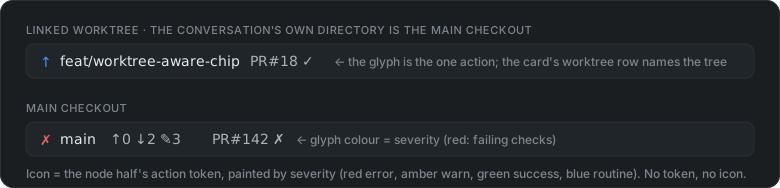
- At-a-glance session status: branch, file counts and PR/CI state on the input box. When the session is working in a linked
git worktree, the badge follows that tree rather than the main checkout.
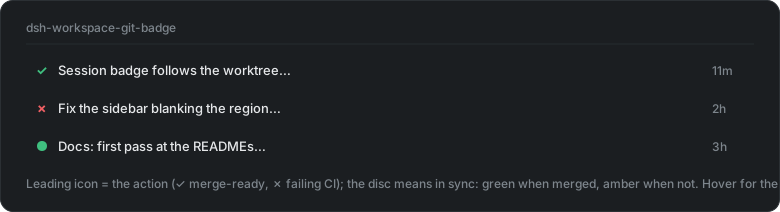
- Actionable session overview: pinpoints the session requiring attention (
merge,fix CI,resolve) without a context switch.
Both are updated within seconds of any commit, checkout, stage or file edit — including inside a linked worktree for safe isolation of parallel dhs working session.
Install
Use the puging market place or manually install using
dsh plugin --profile web add dsh-git-badge     # marketplace Install does this step
npx dsh-git-badge apply                        # sidebar badges need this one manual step
Then restart the web process and refresh the browser:
-
without the
apply, the input chip works but the sidebar session rows stay off — hover the chip for a reminder; -
applypatches the installed DSH package in place (anchor-guarded — it refuses to write anything unless every anchor block matches exactly once).npx dsh-git-badge statusalways tells you which state you are in. -
Make it automatic: the package's
postinstallruns the same guarded apply at install time — but pnpm blocks dependency scripts until you allow them (that boundary belongs to you, not the package). To default it to yes on a machine, allow the package once in the profile:cd ~/.dsh/profiles/web && pnpm approve-builds # pick dsh-git-badge # or add to pnpm-workspace.yaml: allowBuilds: { "dsh-git-badge": true }
After that, every later install/upgrade of the plugin applies the seam itself; only the restart stays manual.
Sidebar technical details
Sidebar session-row tokens need a seam the workspace browser does not declare upstream yet (discussion #5092). The patcher ships inside the package — no clone needed:
npx dsh-git-badge apply     # patch the installed DSH in place, then restart dsh web
npx dsh-git-badge status    # patched / out of date / patchable / upstream-landed / drift
npx dsh-git-badge revert    # restore the bytes as found before patching
(If you have this repo cloned, seam/apply.sh runs the same tool.)
Notes:
- The patch lives in
node_modules, so a DSH reinstall/update reverts it — re-run the patcher afterwards. - The patch is anchor-based (
seam/anchors.js): it patches the installed file in place and refuses to write anything unless every anchor block is found exactly once — it never blind-overwrites an update. A DSH release only needs work from you if it moved one of the anchored code blocks;statusnames the anchor that moved. - Once upstream ships the seam itself,
applybecomes a no-op and the npm-installed plugin picks it up with no changes on your side.
Details, safety rails and the upstream proposal are in SEAM.md /
PR.md.
Testing
See TESTING.md — clean-profile boot (customer simulation), the
seam apply/revert procedure, and the gotchas list. cd dsh-git-badge && npm test
runs the whole suite (parser, real temp repositories, resolution, SSE, the
watcher, every gh degradation path and the rendered surfaces) with no DSH, no
network and no restart.
Worktrees
A worktree isolates each session to ensure it does not step on another sessions work, e.g., change or delete the branch, modify the same file.
The challenge
A DSH session remembers the directory it was created in and that value can't be changed. After moving a session to a worktree there is no native method for the status badge to identify which worktree the session maps to. This means the status badge reports the wrong branch, the wrong counts, the wrong pull request.
The solution
When we switch to a worktree, we create an entry in the register, that is stored on disk. To ensure this is done properly we use the included worktree skill
Requirements
- Node.js ≥ 20,
giton PATH - DSH with the
webprofile (any install) ghon PATH, authenticated, for the PR/CI token and the row'smerge/reviewactions — otherwise those are silently absent and everything else still works
License
Comments
Loading…
From the same category
by awesome-dsh-plugin
A curated list of plugins for DeepSeek Harness (dsh) · DeepSeek Harness 插件精选列表
★ 21.6k
CC0-1.0
Python
Oct 29, 2026
by 0xsline
DeepSeek Harness (DSH) ecosystem: curated plugins, tools, and infrastructure from dsh-external/hub and the public dsh-plugin topic.
★ 1.3k
CC0-1.0
Python
Oct 16, 2026
by Yuuyuko-uu
DSH 鱼的记忆:给会话一份会淡忘的长期记忆,每条都带时间
★ 404
MIT
JavaScript
Oct 30, 2026
dsh plugin --profile web add dsh-fish-memoryby xiajiajun516
DeepSeek Harness (DSH) backup & restore plugin — export, import, migrate and sync your complete DSH configuration, plugins, MCP servers, skills and workspace. One-click migration to another machine.
★ 277
MIT
TypeScript
Oct 29, 2026
dsh plugin --profile web add dsh-config-managerby pax-beehive
Open-source CLI, schemas, resolver, and DSH agent tools for DSH Plugin Hub
★ 276
MIT
TypeScript
Oct 20, 2026
by ECNU
DBLP and arXiv literature search, BibTeX retrieval and full-text acquisition with session-owned background jobs; an EduWork-maintained fork of SihanLv/dsh-literature.
★ 261
MIT
JavaScript
Oct 30, 2026