

dsh-nezha
Manifest validConnect Nezha monitoring's MCP server to DeepSeek Harness, with a visual settings page for endpoint and PAT.
dsh-nezha


English | 简体中文
A DeepSeek Harness (DSH) plugin that connects the built-in MCP server of Nezha Monitoring V2. Once installed, the agent gets a set of mcp__nezha__* tools for inspecting servers, running one-shot commands, reading and writing server files, and minting large-file transfer URLs. The dashboard URL, PAT, enable state, and tool refresh are all managed from the plugin detail page in the DSH Web UI. The settings page follows the interaction design of dsh-grok-search: a connection route, a test-connection dialog, and grouped server/tool views.
Current version:
0.2.0· License: MIT · Requirements: DSH>=0.2.1-rc.2, Node.js>=22, Nezha V2 withenable_mcpenabled
Contents
- Features
- Interface
- Requirements
- Installation
- First-time setup
- Tool names
- PAT scopes
- Security
- Available tools
- Troubleshooting
- Development
- Release process
- License
Features
- Connects to the Nezha dashboard MCP endpoint:
POST /mcpwithAuthorization: Bearer nzp_...authentication. - On startup or after saving settings, runs MCP
initialize,notifications/initialized, andtools/list, then registers the Nezha tools in DSH. - Tools are always exposed as
mcp__nezha__<tool>, for examplemcp__nezha__server_listandmcp__nezha__fs_read. - Provides a visual connection page inside the DSH plugin detail page: status pill, connection route, collapsible server and tool groups, config path with a copy button.
- Ships a Connection settings dialog (URL, PAT, timeout, enable switch, clear token) and a Test connection dialog (URL → MCP handshake → tool list → server overview); testing never saves configuration.
- After connecting, reads
server.liston a best-effort basis to show server online counts and the server list; a dedicated refresh button updates them without reconnecting MCP. - Turns connection, authentication, permission, 404, rate-limit, and timeout failures into readable error messages.
- No runtime dependencies and no build step; the PAT is stored in the DSH credential store and the plain settings file never contains secrets.
- Accepts both JSON and SSE MCP response bodies; Nezha currently uses request/response POST mode, so no long-lived SSE session is required.
- The UI is available in English and Chinese and follows the DSH locale.
Interface
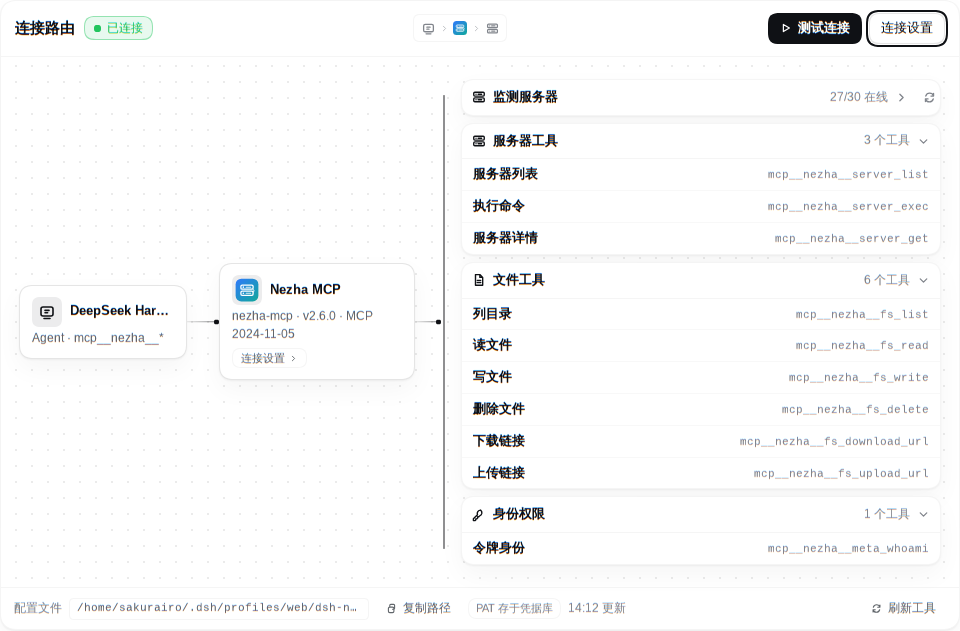
0.2.0 light theme · Connection route: DSH → Nezha MCP → server and tool groups · click to enlarge
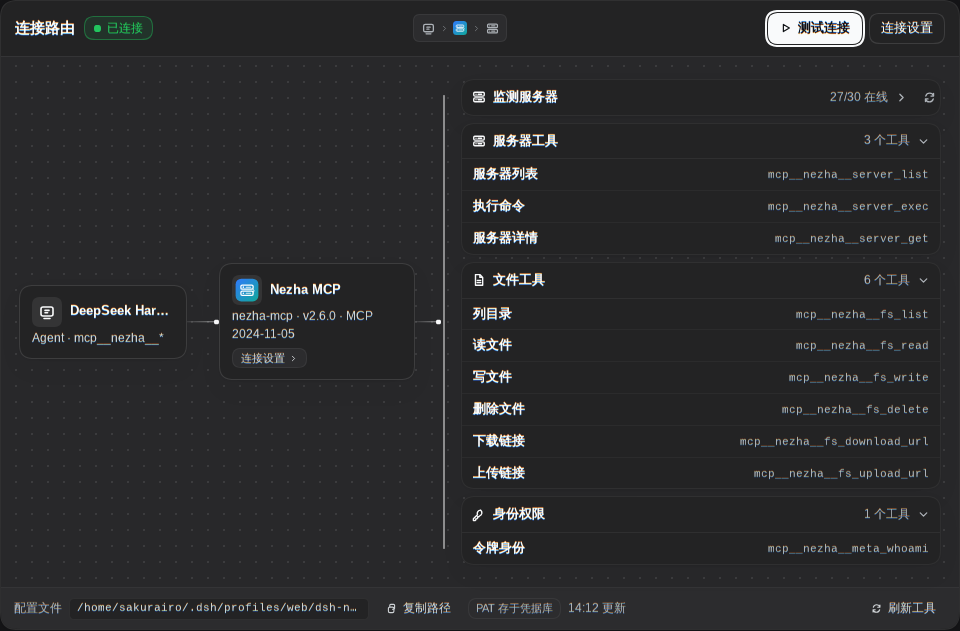
0.2.0 dark theme · The same route automatically adapts to the dark palette · click to enlarge
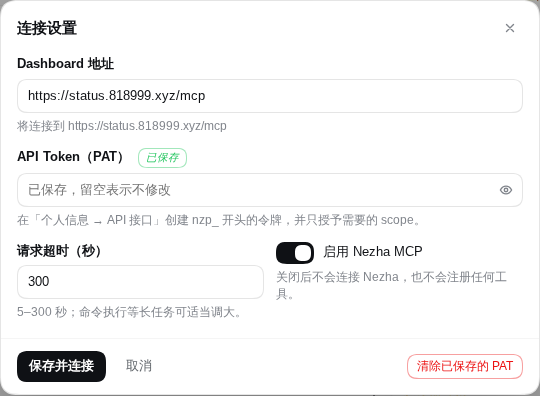
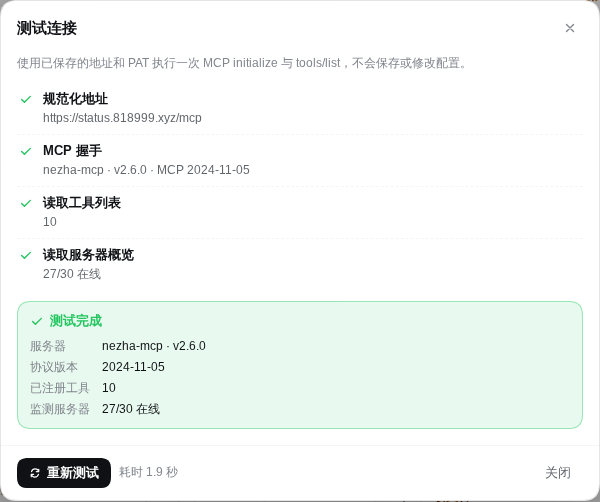
Connection settings and test-connection dialogs · the test is read-only · click to enlarge
The configuration area on the plugin detail page has three parts:
- Connection route: DeepSeek Harness on the left, the Nezha MCP node in the middle (click it to open connection settings), and expandable Monitored servers plus tool groups (server tools, file tools, identity/permissions) on the right. When connected, the wires light up and the view shows the online server count and tool counts.
- Connection settings dialog: dashboard URL (with a live preview of the final
/mcpendpoint), API token (show/hide, saved marker, clear), request timeout, and the enable switch. - Test connection dialog: validates URL normalization, MCP handshake, tool list, and server overview in order, with error-code-specific suggestions on failure.
The footer shows the settings file path (copyable), a note about where the PAT is stored, and Refresh tools. The detail-page documentation area uses curated guides (docs/plugin-detail.en.md / docs/plugin-detail.zh.md); this README remains the full reference.
Light and dark themes follow DSH automatically, and the route stacks vertically on narrow screens.
Requirements
| Item | Requirement |
|---|---|
| DeepSeek Harness | >=0.2.1-rc.2 (see engines.dsh in package.json) |
| Node.js | >=22 (needed for development and packing; the DSH runtime bundles its own Node) |
| Nezha | Nezha Monitoring V2 with enable_mcp: true in the dashboard configuration |
| Authentication | A Nezha API token (PAT) starting with nzp_; a browser login JWT is not accepted |
| Network | The DSH host must reach the dashboard's /mcp endpoint over HTTP(S) |
| Reverse proxy | Allows POST /mcp, forwards the Authorization header, and accepts request bodies of at least 8 MiB |
Nezha disables MCP by default. Enable it in the dashboard configuration file or admin settings first:
enable_mcp: true
Restart or reload the dashboard afterwards so /mcp becomes available.
Installation
This release is distributed as a .tgz attached to the GitHub Release and as a local directory. It is not published to npm yet; once it is, you can install it by package name from the DSH plugin page.
From a local directory (recommended for development and personal use)
- Clone or download this repository onto the host running DSH, for example
/path/to/dsh-nezha. - Open the Plugins page in the DSH Web UI and choose to add a plugin.
- Enter the absolute path of the directory, for example
/path/to/dsh-nezha, in "package name or location", then install it and keep it enabled. - If the page reports
restart-required, restart DSH and reopen the plugin detail page.
From a local .tgz
Use this for pinned versions or offline environments:
npm pack
The command produces dsh-nezha-0.2.0.tgz in the repository root. In the DSH plugin page, choose to install a local bundle and point it at that .tgz file. The plugin has no external dependencies, so no dependency build scripts are needed during installation.
From npm (after publication)
Once published to npm, enter dsh-nezha in "package name or location" on the DSH plugin page to install it by package name.
After installation, a Nezha MCP / 哪吒 MCP entry with its icon should appear in the plugin list.
First-time setup
-
Open the Plugins page in DSH and open the
dsh-nezhadetail page. -
In the plugin configuration area (the
plugins.bundle.configslot), fill in:Field Description Dashboard URL Nezha dashboard address. You can enter https://nezha.example.com,https://nezha.example.com/nezha, or the fullhttps://nezha.example.com/mcp; the plugin normalizes it to/mcp. Do not include credentials, query parameters, or a URL fragment.API token / PAT A Nezha API token starting with nzp_. On save it is written to the DSH credential recorddsh-nezha/token, never to the plain settings file. Leave it blank to keep the saved token.Enable When off, the plugin does not connect to Nezha and registers no tools. Timeout Timeout for a single MCP request, 5–300 seconds, default 60 seconds. Raise it for long-running server.execcalls and make sure the reverse proxy timeout is long enough too. -
Click Test connection and then Start test. The test uses the saved URL and PAT (regardless of whether the form is open), runs one
initializeandtools/list, and never saves configuration or executes commands or file operations. The dialog reports the server name, version, protocol version, tool count, and server overview. -
Click Save and connect. The plugin saves the URL, enable state, and timeout to the profile settings file, writes the PAT to the DSH credential store, then reconnects and refreshes tools; the connection route then shows server online counts and tool groups.
-
If you later change the PAT scopes, the Nezha server allow list, or the Nezha version, click Refresh tools to reconnect and re-read
tools/list. To update only the online status, expand Monitored servers and click the refresh button; no reconnection is needed. -
To revoke the saved PAT, open Connection settings, click Clear saved PAT, and save; the status returns to the unconfigured state.
After saving, the agent can use the mcp__nezha__* tools. The tool list comes from the current Nezha instance's tools/list response, so available tools may differ slightly between Nezha versions.
Tool names
DSH registers Nezha's raw tool names as:
mcp__nezha__<tool>
Nezha tool names contain dots (for example server.list). The plugin replaces dots and other invalid characters with underscores, so the exposed names are:
| Nezha tool | DSH tool name |
|---|---|
meta.whoami | mcp__nezha__meta_whoami |
server.list | mcp__nezha__server_list |
server.get | mcp__nezha__server_get |
server.exec | mcp__nezha__server_exec |
fs.list | mcp__nezha__fs_list |
fs.read | mcp__nezha__fs_read |
fs.write | mcp__nezha__fs_write |
fs.delete | mcp__nezha__fs_delete |
fs.download_url | mcp__nezha__fs_download_url |
fs.upload_url | mcp__nezha__fs_upload_url |
If a sanitized name exceeds 64 characters, the plugin appends a short hash suffix to avoid collisions. The official tool names in the table above are unaffected in normal cases.
PAT scopes
Create a dedicated token on the Nezha dashboard's API / API Token (PAT) page, select the required scopes and server ID allow list, and set an expiry. /mcp only accepts API tokens; it does not accept browser login JWTs, cookies, or OAuth sessions.
Official documentation:
Tool-to-scope mapping:
| Scope | Tools |
|---|---|
| Any valid PAT | meta.whoami |
nezha:inventory:read | server.list |
nezha:server:read | server.get, fs.list, fs.read, fs.download_url |
nezha:server:exec | server.exec |
nezha:server:write | fs.write, fs.upload_url |
nezha:server:delete | fs.delete |
Follow the principle of least privilege:
- Monitoring and inspection only: grant
nezha:inventory:readandnezha:server:read. - Add
nezha:server:execonly if remote command execution is needed. - Add
nezha:server:writeandnezha:server:deleteonly if files must be modified or deleted. - For tokens that include
nezha:server:exec,nezha:server:write, ornezha:server:delete, set a server ID allow list and a short expiry.
Security
- Where the PAT lives: the PAT is stored in the DSH credential record
dsh-nezha/tokenwith typeapi-key. The settings page only shows whether a token is configured; it never displays the token value. - Plain configuration: non-secret settings are written to
<profile>/dsh-nezha/settings.jsonunder the active profile directory (the directory pointed to by the DSHDSH_PROFILE_DIRenvironment variable). The file only containsurl,enabled, andtimeoutMs; it never contains the PAT. - File permissions: the plugin creates the
dsh-nezhadirectory with mode0700and writessettings.jsonatomically with mode0600. Protect the DSH profile directory, backups, and credential store accordingly. - Transport security: use HTTPS in production and never send the PAT in plain text over public networks. Restrict the reverse proxy to trusted sources and forward
Authorizationcorrectly. - High-risk tools:
server.execruns commands on monitored servers;fs.write,fs.delete, andfs.upload_urlmodify or delete files. Grant only the scopes you need and rely on DSH's tool permission and confirmation mechanisms. - Temporary transfer URLs:
fs.download_urlandfs.upload_urlmint one-time URLs that expire after about 300 seconds by default, with a 100 MiB file limit. Unused URLs stop working after the token is revoked or Nezha disables MCP. - Revocation: when the plugin is no longer needed, revoke or delete the PAT in Nezha and clear the saved token in the plugin settings page.
Available tools
| Tool | Scope | Purpose |
|---|---|---|
meta.whoami | Any valid PAT | Show the current user, admin state, token ID, scopes, and server allow list. |
server.list | nezha:inventory:read | List the servers visible to the current token. |
server.get | nezha:server:read | Read a single server's Host, State, GeoIP, and similar snapshot data. |
server.exec | nezha:server:exec | Run a non-interactive one-shot command on a target server; 30 seconds by default, 300 seconds maximum. |
fs.list | nezha:server:read | List a directory's contents. |
fs.read | nezha:server:read | Read a file or a byte range; suited to small files and log excerpts. |
fs.write | nezha:server:write | Write a file atomically, with optional if_match_sha256 optimistic locking. |
fs.delete | nezha:server:delete | Delete a file or directory; use recursive for non-empty directories. |
fs.download_url | nezha:server:read | Mint a one-time download URL for files up to 100 MiB. |
fs.upload_url | nezha:server:write | Mint a one-time upload URL for files up to 100 MiB. |
Actual tool parameters come from the inputSchema returned by Nezha; the plugin registers them as DSH tool parameters and fills in a top-level object type when it is missing.
Troubleshooting
401 / authentication failed
- The PAT is invalid, expired, revoked, or was copied with extra whitespace.
- A browser login JWT, cookie, or OAuth session was used by mistake;
/mcponly accepts API tokens starting withnzp_. - Create a new PAT in Nezha, enter it in the plugin settings, and click Save and connect.
403 / forbidden
- The PAT lacks the scope required by the tool (see PAT scopes).
- The PAT's server allow list does not include the target server, or the current user has no permission on that server.
- After adjusting scopes or the allow list, click Refresh tools and retry the tool call.
404 / MCP endpoint not found
- The URL does not point at
/mcp. The plugin appends/mcpautomatically, but make sure the dashboard is actually served at that path and not under some other reverse-proxy sub-path. - Nezha does not have
enable_mcp: true, or the dashboard was not restarted after changing it. - The reverse proxy does not forward
/mcpto Nezha, or it blocksPOST. - Nezha returns 405 for
GET /mcpandDELETE /mcpby design; this plugin only usesPOST /mcp.
Connection timeouts / network errors
- Check DNS, TLS certificates, firewalls, and the reverse proxy so that the DSH host can reach the dashboard.
- The reverse proxy should forward
Authorization, allowPOST, raise the request body limit to at least 8 MiB, and set a read timeout long enough for long-runningserver.execcalls. - The plugin's default request timeout is 60 seconds; the settings page allows up to 300 seconds. Nezha's
server.execitself defaults to 30 seconds and allows up to 300 seconds. - With self-signed certificates, configure a trusted CA for the DSH process (for example
NODE_EXTRA_CA_CERTS) instead of disabling TLS verification.
429 / rate limited
Nezha limits each token to roughly 10 requests per second and 120 per minute by default. Reduce concurrency or retry later; split high-frequency inspection into separate tasks.
Empty tool list or missing tools
- Click Test connection first to confirm that
initializeandtools/listsucceed. - Confirm the plugin is enabled and its status is
connected; saving or refreshing re-registers tools. - Check the PAT scopes; tools may appear in the list while calls without the right scope still fail.
- If DSH reports
restart-required, restart DSH.
dashboard_host / temporary transfer URL failures
fs.download_url and fs.upload_url depend on Nezha's dashboard_host configuration. If you see an error such as MCP transfer URL host is not an operator-declared dashboard host:
- Set
dashboard_hostin the dashboard configuration to a domain orIP[:port]reachable by MCP clients, withouthttp://,https://, or a path. - Do not use a NAT service hostname; make sure DSH can reach the address.
- If HTTPS terminates at the reverse proxy, forward
X-Forwarded-Proto: https, otherwise temporary URLs may be minted with an HTTP address. - Temporary URLs are single-use and expire after about 300 seconds (600 seconds maximum); the file limit is 100 MiB.
Development
Node.js >=22 is required. There are no runtime dependencies and no build step.
# Validate package.json, cordis.patch.yml, locales, the icon, and JS syntax
npm run check

# Run the node:test suite
npm test

# Run check and test together
npm run test:all

# Inspect the npm package contents without producing a tarball
npm run pack:check
scripts/check.mjs uses only Node built-ins and has no third-party dependencies. It validates:
- the
name,version,license,engines,exports,files,dsh, andscriptsfields inpackage.json; - the
dsh-nezhaline inserted bycordis.patch.yml; meta.titleandmeta.descriptioninlocale/en.jsonandlocale/zh.json, plus the curated documents referenced bymeta.detail(they must exist and be published with the package);- the English and Chinese READMEs, including the language switcher and the README published in
files; - that
icon.svgexists, starts with<svg, and is no larger than 256 KiB; - the syntax of every
.js/.mjs/.cjsfile in the repository (skippingnode_modules).
The check does not fail when test files are absent; npm test runs node --test test/*.test.js, so new tests go in test/.
Directory layout:
.
├── src/
│   ├── index.js          # host plugin entry, settings service, tool registration
│   ├── mcp.js            # Nezha MCP client and endpoint/error handling
│   ├── tool-bridge.js    # adapts Nezha tools to DSH ToolDefinitions
│   ├── settings-store.js # non-secret settings persistence
│   ├── descriptors.js    # settings page Remote descriptors
│   └── typert.host.js    # Typert host type description
├── client.js             # web settings page (plugins.bundle.config) and detail badge (plugins.detail.badge)
├── cordis.patch.yml      # DSH bundle patch
├── docs/
│   ├── plugin-detail.en.md # curated plugin detail guide (English)
│   ├── plugin-detail.zh.md # curated plugin detail guide (Chinese)
│   └── images/           # README screenshots (not published to npm)
├── locale/               # English/Chinese display metadata (with meta.detail)
├── icon.svg              # plugin icon
├── scripts/check.mjs     # repository self-check
└── test/                 # node:test suites
To verify against a local Nezha instance, enable enable_mcp, create a test PAT, enter the URL and token on the plugin settings page, click Test connection, and then make read-only calls with mcp__nezha__meta_whoami or mcp__nezha__server_list. Never use a production token to test server.exec, fs.write, or fs.delete.
Release process
-
Update the
versionfield inpackage.jsonand record the changes inCHANGELOG.md. -
Commit the changes, push
main, and create a tag that matches the version:git tag v0.2.0 git push origin v0.2.0 -
Pushing a tag that starts with
vtriggers.github/workflows/release.yml, which:- fails unless the tag equals
v+ theversioninpackage.json; - runs
npm run checkandnpm test; - runs
npm packand verifies the produceddsh-nezha-<version>.tgz; - reads the matching
CHANGELOG.mdsection as release notes and prepends it to the auto-generated notes; - creates or updates the GitHub Release with the
.tgzasset, and marks it Latest only when the tag is newer than the current latest release; re-running the workflow re-uploads the asset safely.
- fails unless the tag equals
-
The release workflow declares
contents: writeto create the release; it does not runnpm publish.
.github/workflows/ci.yml runs on pushes to main and on pull requests targeting main, using Node.js 22 and 24 to run npm run check, npm test, and npm pack --dry-run.
License
MIT © 2026 kaecho
Comments
Loading…
Similar plugins
by zhengjy01
MCP server manager for DeepSeek Harness: add, edit, enable and test stdio / Streamable HTTP MCP servers from the Web settings page and from agent tools, connected and disconnected at runtime without restarting DSH
★ 0
MIT
JavaScript
Sep 29, 2026
dsh plugin --profile web add @zhengjunyao/dsh-mcp-managerby fatefgo2050
Scan and display locally registered MCP tools in the DeepSeek Harness settings page.
★ 0
MIT
JavaScript
Sep 21, 2026
dsh plugin --profile web add dsh-mcp-scannerby CoderKuo
Manage the MCP servers of a DeepSeek Harness profile: status, switch, edit, export; add from the official MCP Registry, by hand (tested first), or with AI; find local software that can be connected
★ 3
↓ 118/wk
MIT
JavaScript
Oct 14, 2026
dsh plugin --profile web add dsh-mcp-consoleby ZnonEn
DeepSeek Harness (DSH) 插件:在桌面端设置页里管理 MCP 服务器 —— 新增/编辑/删除/启停 + 运行状态,直接读写 profile 的 cordis.patch.yml,零依赖。
★ 0
MIT
JavaScript
Oct 24, 2026
dsh plugin --profile web add dsh-mcp-managerby ArvinQi
DeepSeek Harness 的 MCP 服务器管理插件:可视化界面管理 + 按需热注入,OAuth 鉴权支持,环境变量配置。
★ 40
↓ 1.1k/wk
MIT
JavaScript
Nov 21, 2026
dsh plugin --profile web add dsh-mcpby bobleer
MCP server that lets any agent discover, install, and run DeepSeek Harness plugins (topic: dsh-plugin).
★ 3
MIT
TypeScript
Aug 13, 2026
dsh plugin --profile web add deepseek-harness-plugin-mcp