
dsh-subagent-fold
IdentifiedFolds the built-in subagent dropdown into History / Today / Previous / Current groups by usage batch, keeping the current batch expanded; the original header is left untouched.
@dsh-external/dsh-subagent-fold




给 DeepSeek Harness(DSH)用的子代理下拉折叠:把子代理按「使用批次」收进 历史 / 今日 / 上次 / 本次 四组,本次始终展开,其余可折叠。
不改原版头部、不新增入口——只在官方「子代理」下拉里加分组,按钮和布局一个都没动。
怎么用
- 打开:点官方「子代理」按钮(原版也支持悬停展开,插件不干预)。
- 看分组:最下面是「本次 N」标签 + 本次批次(始终展开);上面依次是「上次 N / 今日 N / 历史 N」。
- 折叠:点任一分组头即展开/收起,标题只显示「名称 + 条数」。
- 子代理会话内同样生效:打开某个子代理会话时,它头部的上级/目录下拉也按同一规则分组。
- 删除子代理:每行尾部有「⋯」→「删除子智能体」,二次确认后删除(运行中会先停止)。删除后该行隐藏,「N 个子智能体」计数同步减。
| 分组 | 含义 | 默认 |
|---|---|---|
| 本次 | 最近一次使用子代理产生的那一批(并行发起算同一批) | 始终展开 |
| 上次 | 上一次使用子代理产生的那一批 | 折叠 |
| 今日 | 今天其余批次 | 折叠 |
| 历史 | 今天之前 | 折叠 |
「批次」按子代理创建时间聚合,间隔 ≤ 120 秒视为同一批。
效果示意
子代理下拉
├ 历史 12        ← 折叠(点开)
├ 今日 5         ← 折叠
├ 上次 2         ← 折叠
└ 本次 3         ← 标签 + 始终展开
   ├ 任务 A      运行中
   ├ 任务 B
   └ 任务 C
截图(前后对比)
| 之前(51 条平铺) | 之后(分组折叠) |
|---|---|
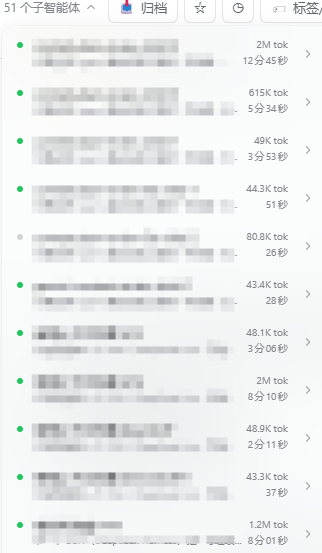 | 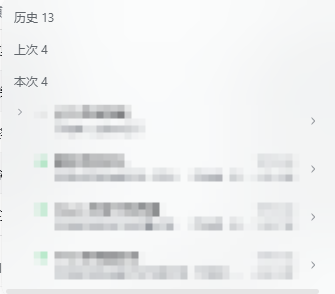 |
安装
npm(推荐)
已发布到 npm,一条命令装进 profile(会写依赖与 bundles):
dsh plugin --profile desktop add dsh-subagent-fold
或手动:
cd "$env:USERPROFILE\.dsh\profiles\desktop"
pnpm add dsh-subagent-fold
然后在 profile 的 package.json 登记:
{
  "dependencies": { "dsh-subagent-fold": "^0.0.3" },
  "dsh": { "profile": { "bundles": ["dsh-subagent-fold"] } }
}
完成后完全退出并重开 DSH。
最快(离线包):跑安装脚本
解压后运行(自动写 dependencies + dsh.profile.bundles,并备份 profile 的 package.json):
node tools/install.cjs --profile desktop          # 安装
node tools/install.cjs --dry-run                  # 只预览
node tools/install.cjs --uninstall --profile desktop  # 卸载
然后完全退出并重开 DSH。
方式一:标准 bundle(推荐)
把本包放进目标 profile 并登记,然后完全退出并重开 DSH:
cd "$env:USERPROFILE\.dsh\profiles\<profile>"
pnpm add "<本仓库路径或解压目录>"
在该 profile 的 package.json 登记:
{
  "dependencies": { "@dsh-external/dsh-subagent-fold": "link:<本仓库路径>" },
  "dsh": { "profile": { "bundles": ["@dsh-external/dsh-subagent-fold"] } }
}
方式二:手动解压
把 package.json、cordis.patch.yml、lib/ 放到
<profile>/node_modules/@dsh-external/dsh-subagent-fold/,再按上面登记 dependencies 与 dsh.profile.bundles,重启。
卸载
从 dependencies 与 dsh.profile.bundles 移除本包,删除 node_modules/@dsh-external/dsh-subagent-fold,重启。
兼容性
- DSH 桌面版(Electron)0.2.x,实测 0.2.1-rc.2。
- 纯客户端插件,不依赖 super-injector 等热加载工具;标准 bundle 安装即可用全部功能。
- 不采集数据、不发起网络请求。
文件结构
package.json        # 插件声明(bundle patch + client)
cordis.patch.yml    # 装配补丁:向组合树插入一条插件条目
lib/index.js        # 宿主半(空实现)
lib/client.js       # 客户端半:菜单分组与折叠(手写,零构建)
开发
lib/client.js 为手写 CJS bundle(window.__ModuleLoader__.load),无构建步骤。改完保存后 Ctrl+R 刷新页面即可加载。
已知限制
- 依赖官方下拉的
role="tree" / role="treeitem"语义锚点;官方若改结构需适配。 - 折叠条插在原生菜单内,极端重渲染/虚拟化可能短暂移除,插件有 1s 兜底重挂。
- 悬停展开是官方行为,插件不拦截;点击开/关由插件处理。
许可
BSD-3-Clause
@dsh-external/dsh-subagent-fold (English)
A subagent-dropdown folding plugin for DeepSeek Harness (DSH). Subagents are grouped by usage batch into History / Today / Previous / Current; Current is always expanded, the rest are collapsible.
No header replacement, no new entry point — it only adds grouping inside the built-in Subagent dropdown.
Usage
- Open the built-in Subagent button (native hover-open is untouched).
- The bottom shows a "Current N" label plus the current batch (always expanded); above it are Previous N / Today N / History N.
- Click any group header to expand/collapse; headers show only "name + count".
- Also works inside a subagent session: its header (parent/directory dropdown) is grouped the same way.
- Delete a subagent: the trailing ⋯ on each row opens "Delete subagent" (confirmed twice; a running one is stopped first). The row disappears and the "N subagents" count decreases accordingly.
| Group | Meaning | Default |
|---|---|---|
| Current | the most recent batch of subagents (parallel spawns = one batch) | always expanded |
| Previous | the batch before that | collapsed |
| Today | other batches from today | collapsed |
| History | anything before today | collapsed |
A "batch" is clustered by creation time; a gap of ≤ 120 s counts as the same batch.
Screenshots
| Before (51 flat rows) | After (grouped & folded) |
|---|---|
| |
Install
npm (recommended)
Published to npm — one command installs it into the profile (writes dependency + bundles):
dsh plugin --profile desktop add dsh-subagent-fold
Or manually:
cd "$DSH_HOME/profiles/desktop"
pnpm add dsh-subagent-fold
Then register in the profile's package.json:
{
  "dependencies": { "dsh-subagent-fold": "^0.0.3" },
  "dsh": { "profile": { "bundles": ["dsh-subagent-fold"] } }
}
Fully quit and reopen DSH.
Fastest (offline package): run the installer
After extracting, run (it writes dependencies + dsh.profile.bundles and backs up the profile package.json):
node tools/install.cjs --profile desktop          # install
node tools/install.cjs --dry-run                  # preview only
node tools/install.cjs --uninstall --profile desktop  # uninstall
Then fully quit and reopen DSH.
Standard bundle (recommended)
cd "$DSH_HOME/profiles/<profile>"
pnpm add "<path-or-extracted-dir>"
Then register in that profile's package.json:
{
  "dependencies": { "@dsh-external/dsh-subagent-fold": "link:<path>" },
  "dsh": { "profile": { "bundles": ["@dsh-external/dsh-subagent-fold"] } }
}
Fully quit and reopen DSH.
Uninstall
Remove the package from dependencies and dsh.profile.bundles, delete node_modules/@dsh-external/dsh-subagent-fold, restart.
Compatibility
- DSH desktop (Electron) 0.2.x (tested on 0.2.1-rc.2).
- Pure client plugin; no hot-reload tool (super-injector) required.
- No telemetry, no network requests.
Layout
package.json        # manifest (bundle patch + client)
cordis.patch.yml    # assembly patch (inserts one entry)
lib/index.js        # host half (no-op)
lib/client.js       # client half: grouping & folding (hand-written, no build)
Known limitations
- Relies on the built-in dropdown's
role="tree" / "treeitem"semantics. - The fold header is injected into the native menu; extreme re-renders may briefly remove it (1s re-assert fallback).
- Native hover-open is left as-is; click open/close is handled by the plugin.
License
BSD-3-Clause
Comments
Loading…
Similar plugins
by hu669293657
Adds deliverable-file buttons to the end of each agent turn (opens files with the OS default app) and a floating dot rail for jumping between conversation turns.
★ 0
MIT
JavaScript
Aug 29, 2026
dsh plugin --profile web add dsh-turn-toolsby ayuanwong
长任务,不刷屏:关键进度清晰可见,完成后自动折叠,详情随时展开。 Long agent tasks, without transcript clutter: focused progress, auto-folded history, details on demand.
★ 14
↓ 293.2k/wk
BSD-3-Clause
TypeScript
Aug 16, 2026
dsh plugin --profile web add @deepseek-ai/dsh-baseAdds a Branch Chat tab to dsh-better-sidebar that opens independent archived sessions with a head/middle/tail context digest and the same tools as the main agent.
★ 0
dsh plugin --profile web add @kuanfu0430/dsh-sidebar-branch-chatby uigdwunm
Groups each DSH Web turn's thinking, tool calls and context into an expandable process box that shows the latest two items by default, while keeping user dialogue, interactive questions and final answ
★ 1
MIT
TypeScript
Sep 14, 2026
dsh plugin --profile web add dsh-process-foldKeeps notes as local Markdown files grouped by directory under a root folder you choose, with a sidebar page, AGENTS-style rule files surfaced as writing context, and six agent tools.
★ 0
dsh plugin --profile web add dsh-notesby Zenjibad
Extends the DSH web chat drag-and-drop to accept every file type: non-image files are saved into the active session workspace so the agent can read and use them.
★ 1
MIT
TypeScript
Sep 10, 2026
dsh plugin --profile web add dsh-drop-any-file