
dsh-zcode-ui
Manifest valid★ 1DSH ZCode UI — Change the DeepSeek Harness Web interface to a ZCode style: sidebar, workspace session tree, global search, and turn navigation. A ZCode-styled sidebar, workspace session tree, global search, and turn navigation skin for DSH Web.


DSH ZCode UI
A ZCode-style visual skin for DeepSeek Harness (DSH) Web — sidebar, workspace session tree, global search, turn navigation
简体中文 · Changelog · Apache-2.0



[!IMPORTANT] This is a personal, community-maintained project. It carries no official endorsement. It is not a DeepSeek AI product, and it is not an official plugin of any kind — it is maintained by one individual (
jungenius-stack) in their own time. It is a fork of the open-source project MichengAI/dsh-codex-ui (Apache-2.0), and its design values are taken from zai-org/ZCode (Apache-2.0). "DeepSeek", "DeepSeek Harness" and "ZCode" are the property of their respective owners; the names are used here only to describe compatibility and design provenance.
[!WARNING] Beta — this is an early test build. The interface and behaviour still change quickly, and the rough edges are listed openly in
docs/KNOWN-ISSUES.md. Corrections and improvement suggestions are genuinely welcome — please open an issue. The most useful report is short: what you expected, what happened, and a screenshot if the problem is visual.
DSH ZCode UI repaints the DSH Web interface in ZCode's (Zhipu / Zai) visual language: the sidebar, the workspace session tree, the header search, and the composer all adopt ZCode geometry, palette, and iconography — in both light and dark themes.
The skin itself changes nothing else. Everything it draws flows through DSH's own SlotRegistry slots and ctx public services, and it never writes conversation records.
One thing worth stating plainly, because the paragraph above used to overstate it: this package is a fork of dsh-codex-ui and also carries upstream's non-visual features — a dependency panel that can run pnpm and rewrite node_modules, session moves between workspaces, and "open in file manager". They are inherited rather than written here, and they are what the About page exposes. You can simply not use them, but they do ship in this package. See Scope and permissions.
What you get
| Area | What the skin does |
|---|---|
| Layout | ZCode sidebar geometry — 8px radii, 32px rows, px-2 / py-3 / gap-1 spacing, 150–200ms ease-out motion, seven-step type scale |
| Colour | Full Zai Light / Zai Dark palettes written into DSH's --dsw-* token layer; official regions (title bar, session list, buttons, menus, composer shell) recolour as one piece |
| Icons | Lucide (the same icon library ZCode uses) for sidebar navigation and row actions |
| Theme | Follows the host's own light/dark preference via body[data-ds-dark-theme]; light canvas #f8f8f8, dark canvas #161616 |
| Sidebar behaviour | Pin / group / drag-reorder projects and conversations, unread and running indicators, header search over sessions + settings + quick actions, rename / archive / fork / copy / delete, turn navigation in long conversations, Up/Down recall of previous input |
Screenshots
The two images at the top of this page are the light and dark sidebar + workspace tree. A few more views.
Project names, conversation titles and the balance figures in every screenshot are demo data — the captures are sanitised before committing so no real workspace ever appears in this repository.
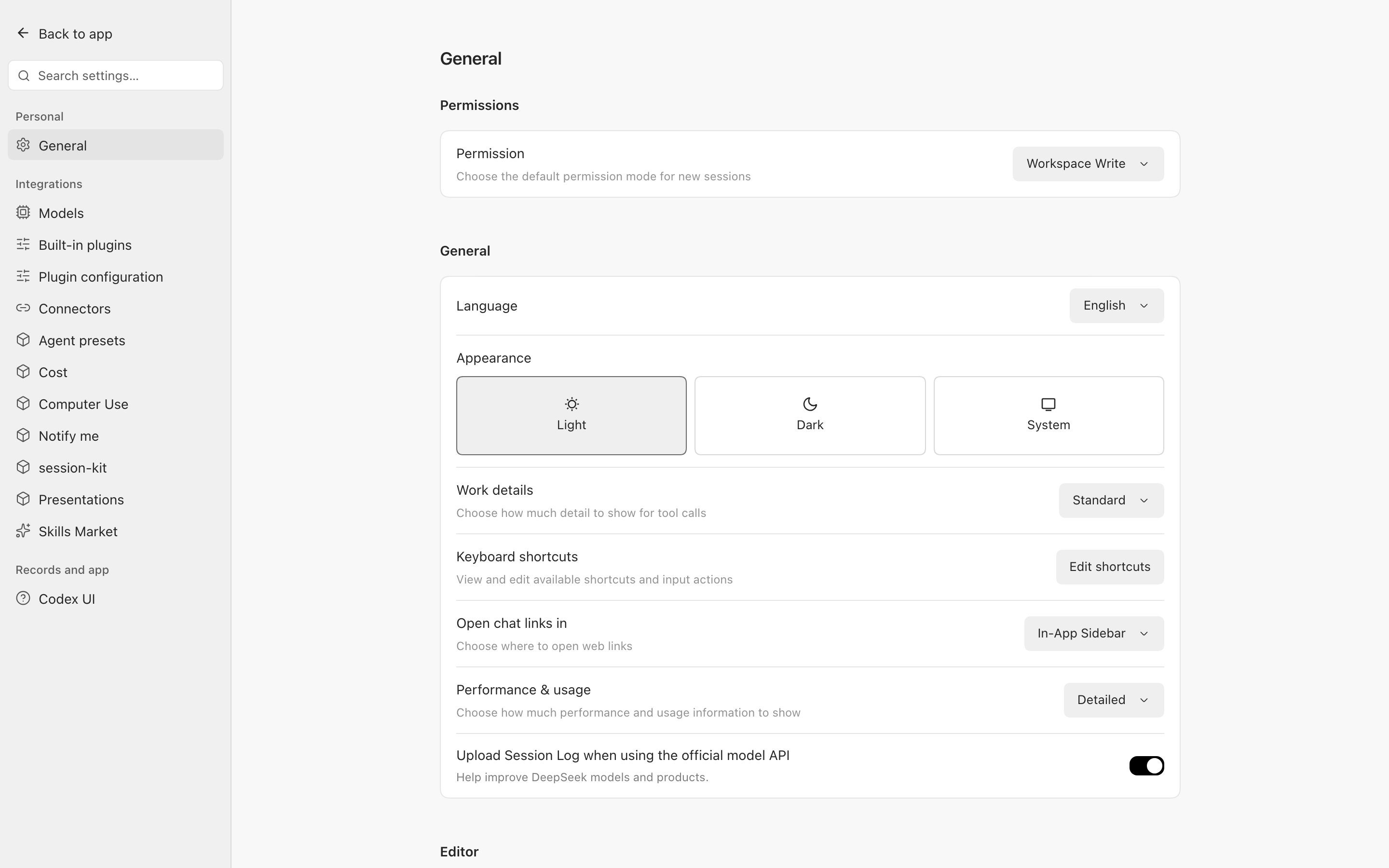
Settings page — selected states are neutral, matching the sidebar (no blue leftovers from the host defaults):
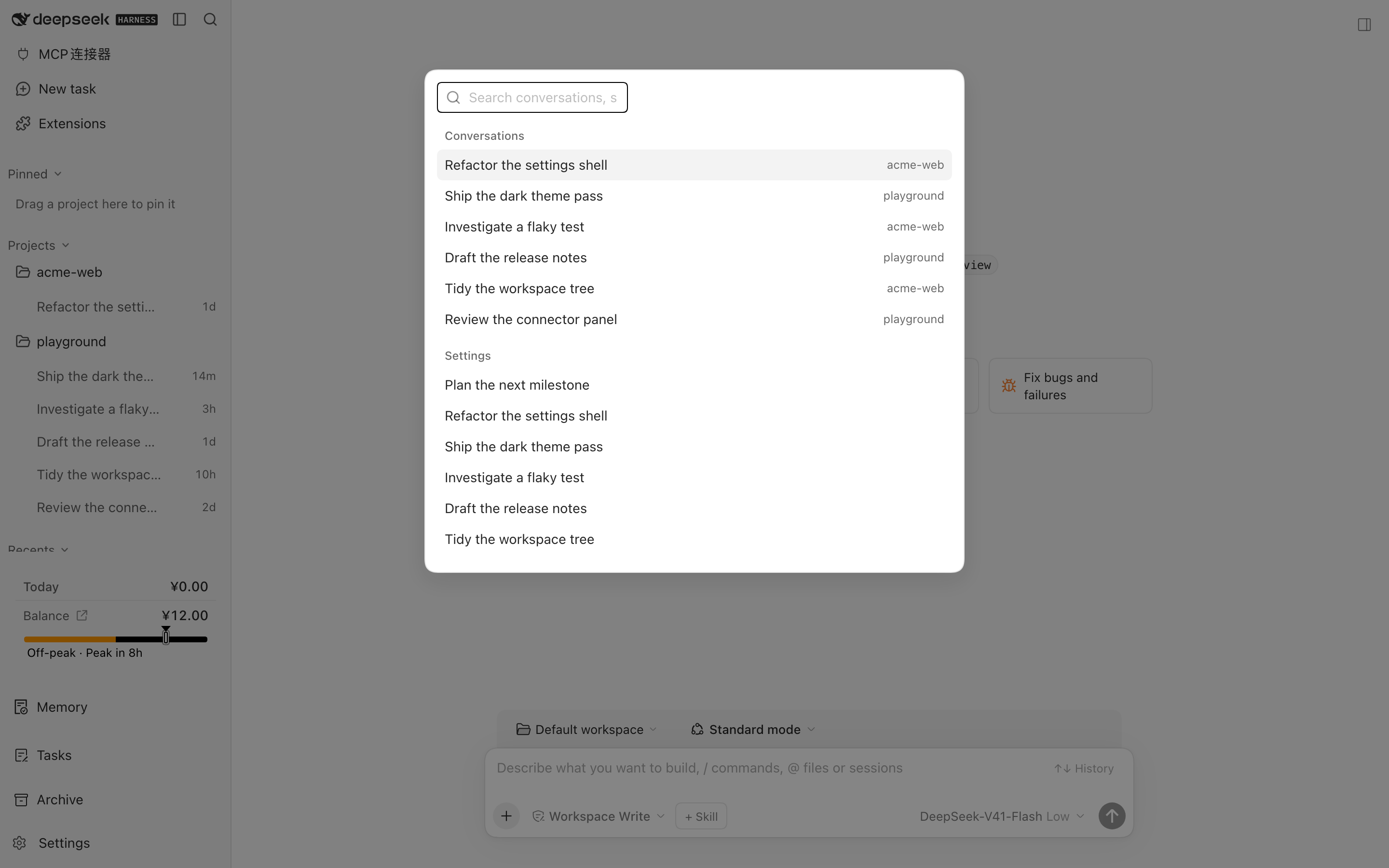
Header search across conversations and settings:
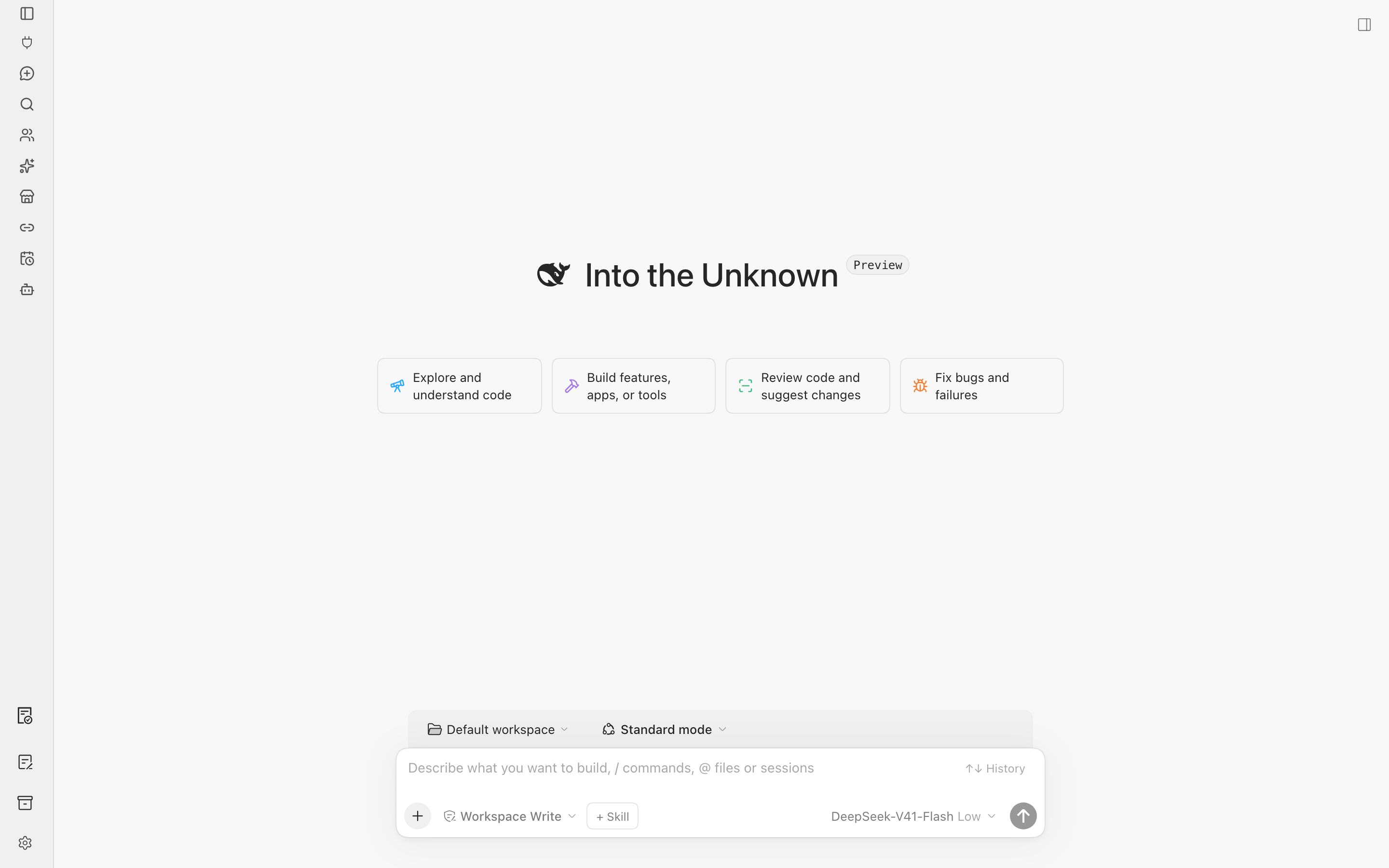
Collapsed rail — icon-only, with tooltips on hover:
How it differs from upstream
This fork keeps upstream's interaction scaffolding and data layer, and adds:
- The ZCode skin itself — 174
--dsw-*tokens per theme (light and dark) plus 21 structural tokens, 195 unique token names in total. Every token consumed anywhere insrc/is covered by the maps; thetoken-coverageassertion fails the build if that ever stops being true. - Theme single-source-of-truth — the host attribute is the only signal. No
prefers-color-schemefallback, which used to split the sidebar and the content area when the host was light but the OS was dark. - Fixes found by looking at the real interface, not by reading code: session hover card trimmed to the title only, send button rendered in the real primary colour (
--dcu-primaryis now defined at:rootso the composer — which lives outside.dcu-root— can resolve it), a "back to conversation" entry when a global panel is open, self-drawn sidebar separator lines removed, marquee title clipping, footer separation, and shorter empty-state cards. - A verification stack that actually runs on this machine — see Verification. Upstream's browser-based layout scripts had never been executed here before (the Chromium binary was missing), which is how five stale assertions stayed hidden.
Scope and permissions
A skin should not need a permissions conversation. This one does, because it is a fork and inherited more than visuals. Being explicit is cheaper than being trusted by accident.
| Capability | Reachable from | Touches |
|---|---|---|
| Recolour the UI | always, on install | DSH's --dsw-* token layer and this plugin's own stylesheets. No data. |
| Sidebar / session tree / search | always, on install | Renders through official slots. Reads session and workspace lists; never writes conversation records. |
| Dependency panel | the About page, on click | Runs pnpm, rewrites node_modules and pnpm-workspace.yaml in the active workspace. |
| Move session to workspace | the session context menu | Rewrites that session's artifact files. |
| Open in file manager | file path menus | Opens the OS file manager. Read-only. |
| Five REST endpoints | the plugin's own UI only | Serves the four features above; authenticated per session. |
Everything in the lower four rows is inherited from dsh-codex-ui and is also exposed on the About page inside DSH. If you only want the skin, nothing here runs unless you click it.
Requirements
- A working DeepSeek Harness Web installation with
dshon yourPATH. Examples below use thewebprofile; substitute your own profile name. - Host compatibility. Peer dependencies declare the
@deepseek-ai/dsh-client-*range>=0.1.6-alpha.2 <0.3.0-0; development is pinned to0.2.0-rc.2. The heavy gate (pnpm gate:host) packs the plugin, installs it into an isolatedDSH_HOME, and exercises the realdshbinary found on the machine — override it withDCU_DSH_BIN. - Node.js
^22.19.0 || >=24.0.0if you build from source. - ⚠️ On macOS, do not put DSH's bundled Node 24 first on
PATHwhen building or testing: it cannot load therolldownnative binding (code signature ... different Team IDs) andvitest/tsdownwill fail. Any other Node 22.22.x works.
Install
The package is not published to the npm registry. Install it straight from GitHub instead —
dsh plugin forwards its arguments to pnpm, which resolves github:<owner>/<repo> natively:
dsh plugin --profile web add github:jungenius-stack/dsh-zcode-ui
lib/ is committed and the package defines no prepare script, so nothing is compiled during install.
Ask an agent to install it (recommended)
Paste this into any agent that can run terminal commands on your computer:
Install the DSH plugin dsh-zcode-ui into my local web profile by running:
dsh plugin --profile web add github:jungenius-stack/dsh-zcode-ui
Then run dsh --profile web --dump-config, confirm the configuration includes zcode-ui, and explain how to reload DSH and start using the skin.
Install manually
[Console]::OutputEncoding = [System.Text.Encoding]::UTF8
$OutputEncoding = [System.Text.Encoding]::UTF8
dsh plugin --profile web add github:jungenius-stack/dsh-zcode-ui
dsh --profile web --dump-config
Restart DSH Web and hard-refresh the browser (usually Ctrl+Shift+R). The new sidebar is the sign that the skin is live. Disabling or uninstalling the plugin restores the official interface.
Install from a local clone (unreleased changes)
[Console]::OutputEncoding = [System.Text.Encoding]::UTF8
$OutputEncoding = [System.Text.Encoding]::UTF8
git clone https://github.com/jungenius-stack/dsh-zcode-ui.git
Set-Location .\dsh-zcode-ui
pnpm install --frozen-lockfile
pnpm build
dsh plugin --profile web add .
dsh --profile web --dump-config
lib/ is committed, so a clone is usable without building — but rebuild after any change to src/. If your pnpm and Node versions disagree, npm install followed by npm run build is an equivalent fallback.
Usage
Once DSH Web is reloaded, the left navigation is rendered by this plugin.
| Goal | Action |
|---|---|
| Start a conversation | New task, or the + / New conversation action on a workspace |
| Find something | Type in the header search field; pick a session, a settings page, or a quick action |
| Collapse the sidebar | The header panel button; the expand control stays on the collapsed rail |
| Return from a global panel | With a panel open, Back to conversation appears directly under the panel entry |
| Pin a project | Drag it into Pinned, or use Pin project in its menu |
| Manage a conversation | Its menu: rename, pin, mark unread, archive, fork, copy, delete |
| Reuse earlier input | Press Up/Down in an empty composer to recall input from this workspace |
| Jump between turns | The turn marks to the left of the current conversation |
FAQ
Nothing changed after installing.
Check that the profile you installed into is the one actually running DSH Web, then restart DSH Web and hard-refresh the browser (Ctrl+Shift+R). dsh --profile web --dump-config should list zcode-ui. If that profile's cordis.patch.yml still carries disabled: true for ui-sidebar or ui-settings-general, delete those rows and reload.
Does it touch my conversations, workspaces, or files?
Not by itself. The skin only recolours the interface through DSH's --dsw-* token layer and renders the sidebar through official slots and public services. It never writes conversation records, and removing a project from the sidebar does not delete its folder.
Two inherited features do touch files, but only when you explicitly use them: the dependency panel runs pnpm and can rewrite node_modules, and "move session to workspace" rewrites that session's artifacts. See Scope and permissions.
Can I use it next to other DSH plugins?
Yes. It coexists with the other plugins in your profile. Note that four interface issues reported from real use turned out to belong to the cost-meter and context-pilot plugins rather than this one — they are documented in docs/KNOWN-ISSUES.md.
Why are three assertions skipped?
They validate the upstream monorepo's release contracts (packages/, .github/workflows/), which do not exist in this single-package fork. The files are kept with an explicit SKIP block instead of being deleted — see Known limitations.
Is this an official plugin? No. It is a personal project with no endorsement from anyone (see the notice at the top).
Verification
Four layers, all runnable locally. npm run gate chains them (~55s) and the pre-push hook runs it automatically:
| Layer | Command | What it covers |
|---|---|---|
| Types | npm run typecheck | tsc --noEmit over src and tests |
| Unit / integration | npm run test:unit | 47 files, 311 tests |
| Contract assertions | node tests/run-assertions.mjs | 38 scripts — 35 pass, 3 intentionally skipped |
| Real-browser layout | npm run test:layout | 12 Chromium scripts measuring real geometry, interaction, contrast and overflow |
npm run gate:host is the heavy tier: it packs the plugin, installs it into an isolated DSH_HOME, starts a real dsh web, and runs three live-host scripts (about 1–2 minutes). Use it when you touch slots, injection, or the install flow.
The layout scripts need Playwright's Chromium once: ./node_modules/.bin/playwright install chromium.
Known limitations
Recorded honestly in docs/KNOWN-ISSUES.md — the file is the source of truth, and everything below is expanded there:
- Three assertions are skipped on purpose. They validate the upstream monorepo's release contracts (
packages/,.github/workflows/), which do not exist in this single-package fork. The files are kept with an explicitSKIPblock rather than deleted, so "test missing" and "problem solved" stay distinguishable. - Four of the seven interface issues reported from real use are not this plugin's. They were traced to the cost-meter and context-pilot plugins (duplicate cost display, cramped status bar) and to a host-built-in control; they are documented, not silently ignored.
- Two upstream open issues (#40, #41) were probed and did not reproduce at four window sizes on macOS. Non-macOS platforms, real display scaling, and full-screen/split-screen remain untested.
- No CI. The gate runs locally and on push via the
pre-pushhook. The localnode_modulesis hand-patched to work around atsdowndependency gap; a cleannpm installmay need that reapplied.
References and acknowledgements
This plugin would not exist without these projects:
| Project | Role here |
|---|---|
| MichengAI/dsh-codex-ui (Apache-2.0) | Fork parent — the sidebar, workspace session tree, search, turn navigation, settings skeleton, test tooling, and data-layer approach all come from here. This fork is 1.1.34 of it, plus the ZCode skin and the fixes listed above. |
| zai-org/ZCode (Apache-2.0) | Design source — palette, geometry, icon choices, and motion values were extracted from it (cross-checked against v3.15.1). |
| DeepSeek Harness | The host application this plugin plugs into. |
| Lucide | Icon set used for the sidebar. |
In-repo archives worth reading:
docs/ZCODE-DESIGN.md— the design specification extracted from ZCode.docs/KNOWN-ISSUES.md— known issues, skipped assertions, environment leftovers, release checklist.docs/UPSTREAM-CHANGELOG.md— the upstream changelog up to the fork point.CONTRIBUTING.md— how to build, verify, and submit changes.
Feedback and contributing
This is a beta maintained by one person, so feedback is the main way it improves.
- Something wrong or ugly? Open an issue — say what you expected, what happened instead, and attach a screenshot if it is visual. Screenshots of the sidebar and the composer are the most useful.
- Idea or improvement? Same place. Issues are fine for suggestions; there is no separate process.
- Want to send a change? See CONTRIBUTING.md —
pnpm gatemust pass before a pull request is worth opening. - Before reporting, please skim
docs/KNOWN-ISSUES.md: the known limitations are already written down there, including which issues are not this plugin's.
Development
pnpm install --frozen-lockfile
pnpm build          # tsc --noEmit && tsdown  → lib/
pnpm gate           # typecheck + assertions + vitest + 11 browser scripts
pnpm gate:host      # isolated real-host compatibility tier
Every script is a plain package.json entry, so npm run build / npm run gate behave identically.
After changing src, rebuild before installing or committing. New features should reuse existing DSH slots and public services; do not depend on private host DOM or write conversation records.
License
Apache License 2.0, the same licence as the upstream scaffolding and the ZCode design source. Upstream copyright and attribution notices are retained.
Comments
Loading…