
dsh-zen
Manifest validZen Mode view tab and foreground time tracker for DeepSeek Harness: while the agent works, a calm conversation view shows running/done status, your latest user message, live activity hints and the fin
dsh-zen
A Zen Mode view tab + foreground time tracker for DeepSeek Harness (DSH).
While an agent works in the background, switch to the Zen tab and get a calm, minimal surface: a status message, your latest user message, and one line of statistics — no tool calls, no reasoning rows, no noise. Zen also tracks how much of your "running" time was spent actually watching the screen, and reports a daily / weekly Zen score.
Screenshots
| Zen view (while generating) | Zen view (done) | Zen settings |
|---|---|---|
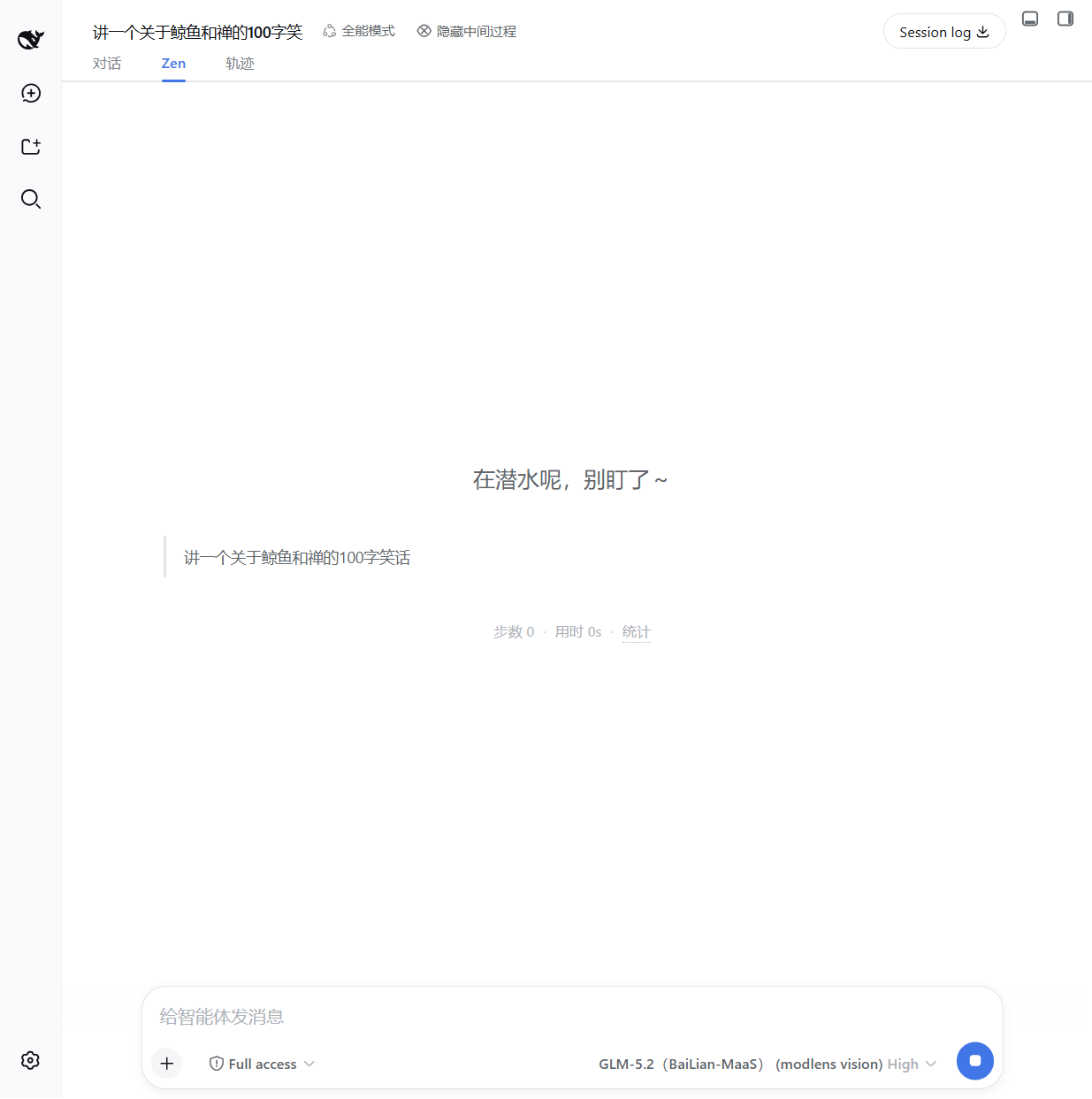 | 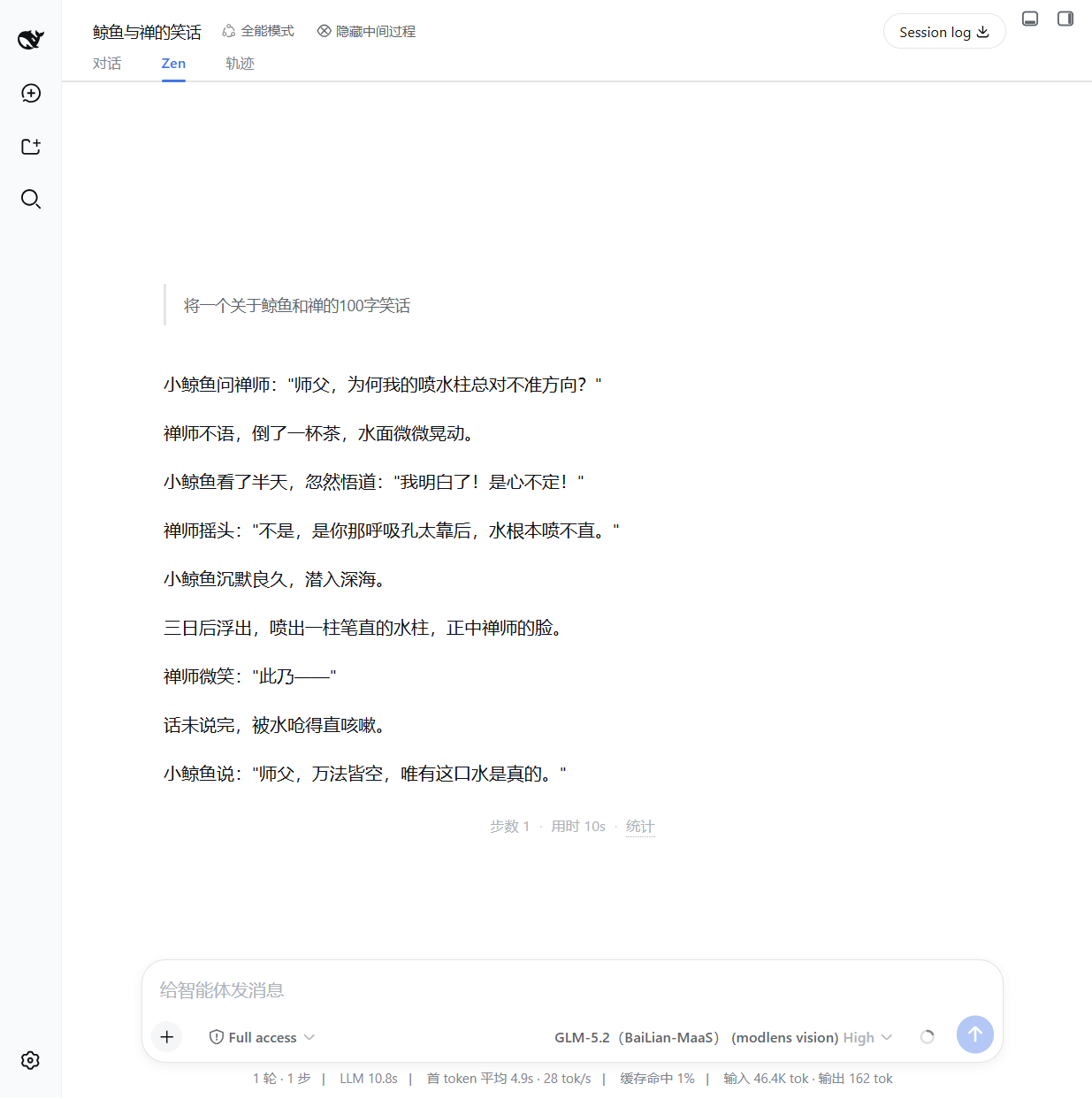 | 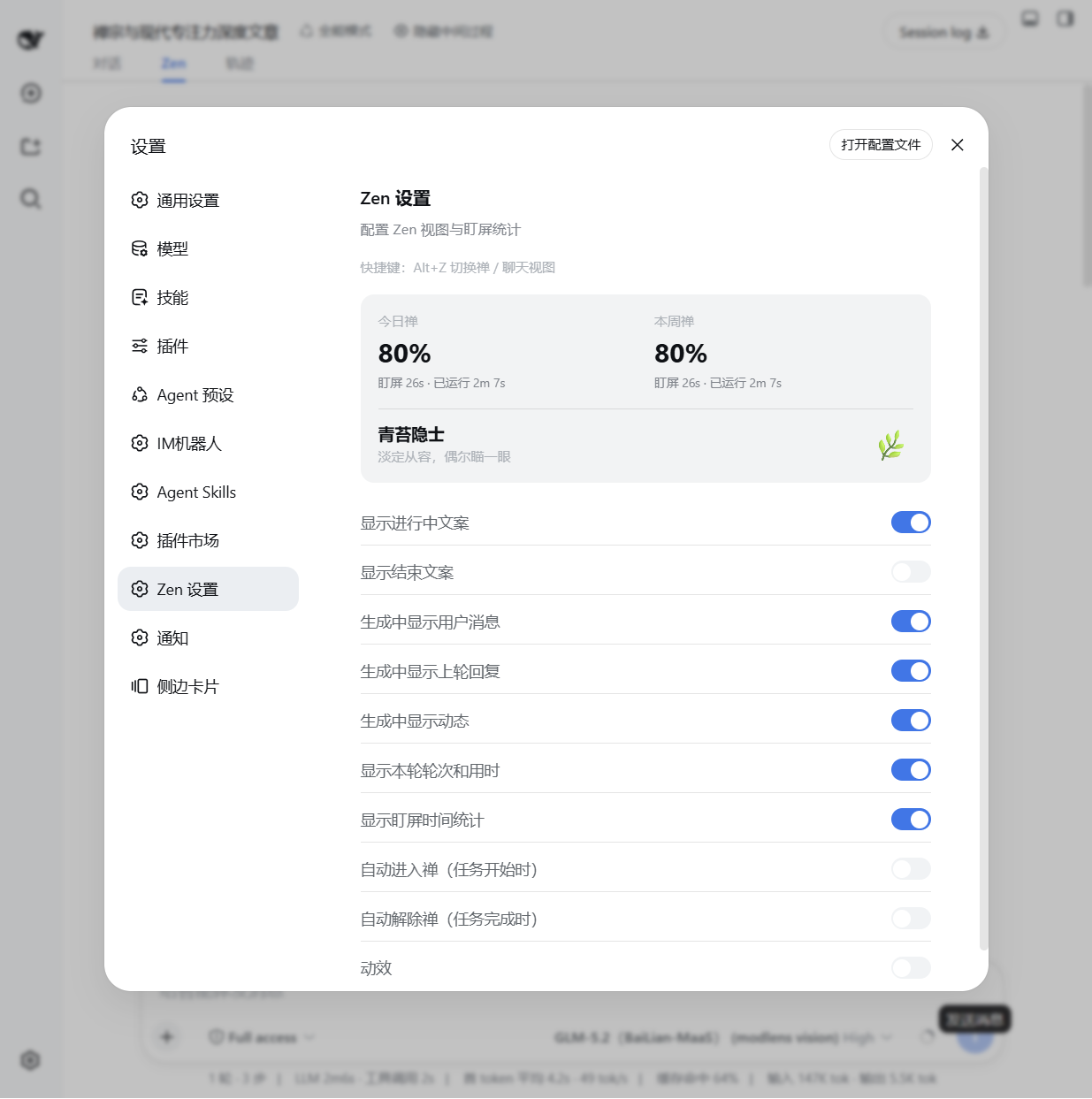 |
Features
- Zen view tab — a dedicated
conversation.viewtab (对话 / Zen / 轨迹), showing:- running / done status message (configurable, with or without the second-line description)
- your user message (while generating), the previous round's reply and live activity hints
- the final AI reply rendered with markdown
- one-line turn stats:
步数 N · 用时 Nm · 统计
- Foreground time tracker — records foreground (visible window) vs. total running time
per session, persisted in
localStorage. Daily / weekly Zen score (100% − 盯屏比例) is shown in the settings panel. - Chat hide toggle — a header button (
隐藏中间过程) that hides tool-call, command, context, compaction, reasoning rows, etc. from the chat view via CSS. - Auto enter / exit Zen — optional: auto-switch to the Zen tab when a task starts, and back to chat when it completes.
- Shortcut — press
Alt+Zto toggle between the Zen and chat views from anywhere. - Animation toggle — disable all entry animations/transitions in Zen view if you prefer instant rendering.
Install
This plugin is distributed as a DSH bundle. It requires a Web-capable profile (the default
web profile).
From a Git repository (recommended)
dsh plugin --profile web add github:john-walks-slow/dsh-zen#<40-character-commit>
Then restart dsh web. The bundle patch (cordis.patch.yml) inserts the zen row
into the profile's composition, and the Web client is served from the committed lib/client.js.
Prefer pinning the exact commit hash; a floating branch can be force-pushed. See docs/PUBLISHING.md for the catalog submission flow.
From npm (once published)
dsh plugin --profile web add @johnnren/dsh-zen
Usage
- Open any conversation in the DSH Web GUI.
- Click the Zen tab (or press
Alt+Z) to switch to the Zen view. - Optionally use the 隐藏中间过程 button in the session header to collapse intermediate process nodes in the chat view.
- Open Settings → Zen 设置 to configure what is shown:
- 显示进行中标题 / 显示进行中副标题 / 显示结束标题 — status message title/subtitle on/off
- 生成中显示用户消息 / 生成中显示上轮回复 / 生成中显示动态 — hints shown while generating
- 显示本轮轮次和用时 — the
步数 N · 用时 Nmline - 显示盯屏时间统计 — the foreground stats tooltip
- 自动进入禅 / 自动解除禅 — auto view switching on task start / complete
- 动效 — entry animations on/off
The settings panel also shows your 今日禅 / 本周禅 scores and the current Zen level.
Development
npm install
npm run build        # bundle src/client.ts + src/index.ts → lib/, deploy into web profile
npm run typecheck    # tsc --noEmit against the local shims in src/dts-shim.d.ts
The deploy target is $DSH_HOME/profiles/web/node_modules (default ~/.dsh). Client-only
changes need a page refresh; host-side changes need a DSH restart.
Repository layout
├── src/
│   ├── client.ts            # Web client: slots, settings section, shortcuts
│   ├── index.ts             # Host face (empty apply; bundle row only)
│   ├── foreground-tracker.ts# Foreground time tracking + persistence
│   ├── zen-settings.ts      # Settings store + migration
│   ├── locales.ts           # zh / en dictionaries
│   └── components/          # ZenView, ChatHideToggle, ZenSettingsSection
├── lib/                     # Committed build artifacts (client factory bundle + host)
├── assets/icon.svg          # Plugin icon
├── cordis.patch.yml         # Bundle patch: inserts the zen row
├── build.mjs                # esbuild bundler + deploy
└── docs/                    # Screenshots and publishing guide
Compatibility
- Requires DeepSeek Harness with the Web client module system (default
webprofile). - Slot contracts used:
conversation.view,conversation.session.header.actions,settings.section. Verify against your Harness version's source snapshot if upgrading. - Zero permissions: no network requests, no file system access, no external
services — the host face is an empty
apply()and all data stays in browserlocalStorage(dsh.zen.*). 无网络请求、无文件写入、无外部服务、无遥测。
Uninstall
dsh plugin --profile web remove @johnnren/dsh-zen
Or remove the row from the profile composition. Stored stats/settings in localStorage
can be cleared by deleting keys prefixed dsh.zen..
License
MIT — see LICENSE.
Comments
Loading…
Similar plugins
Persona wardrobe for DeepSeek Harness: save multiple personas, apply them globally or per workspace, with a master switch, an adjustable API balance guard, and a lazy token-loving tired mode that spea
★ 0
dsh plugin --profile web add dsh-guiseby john-walks-slow
wait_subagent tool for DeepSeek Harness: block until a background continuable subagent settles and return its stop reason and closing message — event-driven, zero polling.
★ 0
MIT
JavaScript
Sep 19, 2026
dsh plugin --profile web add dsh-wait-subagentby Kanadego
Heartbeat loop for DeepSeek Harness: every 20 minutes (by default) the agent wakes on its own to keep a local profile of your interests and preferences, search the web for things you care about, and k
★ 11
↓ 954/wk
MIT
TypeScript
Oct 10, 2026
dsh plugin --profile web add @kanadego/dsh-heartbeatby YEYEYEYESHIFU
Results-only toggle for the DeepSeek Harness Web GUI: hides thinking and tool-call process, keeps one live status line while the agent works, with a per-turn trace line and a settings row. zh-CN/en.
★ 3
↓ 127/wk
MIT
JavaScript
Sep 17, 2026
dsh plugin --profile web add dsh-result-only-viewby duanyunlun
DeepSeek Harness(DSH)对话互通插件:同一进程里的对话可以互相发现、直接发消息、盯进度、设护栏——不用先绑定,也不用开子代理。多对话协作 / 跨会话通信 / 监工。Peer messaging, supervision & tool guards between conversations.
★ 0
MIT
JavaScript
Sep 17, 2026
dsh plugin --profile web add dsh-conversation-linkPatched fork of the DeepSeek Harness wallet/control center: peak-clock and billing for the renamed deepseek-flash model, model-pool-driven pricing sync, and a persisted synced table.
★ 0
MIT
JavaScript
dsh plugin --profile web add deepseek-harness-wallet-patched