

dsh-island-bridge
DiscoveredmacOS 灵动岛桥接:把 DeepSeek Harness 的会话状态与待审批操作投影到原生 SwiftUI 刘海面板,在岛上直接裁决与跳转
dsh-island-bridge
把 DeepSeek Harness 的会话状态与待审批操作,投影到 macOS 刘海上的原生灵动岛——审批在岛上直接裁决,点一行跳回那个对话。




这解决什么问题
并行开几个 Agent 会话时,人常常不在 DSH 窗口前:
- 审批看不见 → 工具审批积压在会话里,Agent 空转等人;
- 任务找不回 → 切走再回来,要靠回忆哪个会话在跑、跑到哪了;
- 现有手段不够 → 系统通知(如 dsh-notify-me)无法就地裁决,网页浮层被窗口遮挡就消失。
dsh-island-bridge 用一颗系统级、原生、数据不出本机的悬浮面板同时盖住这两件事。
| 方案 | 任何 App 前台可见 | 可就地裁决 | 数据出本机 |
|---|---|---|---|
| 系统通知中心 | ✓ | ✗ 第三方 App 不支持交互按钮 | 视实现 |
| DSH 页面内浮层 | ✗ 窗口被遮挡即不可见 | ✓ | ✓ |
| 云中继 + 手机推送 | ✓ | ✓ | ✗ 经第三方云 |
| 本项目(原生刘海面板) | ✓ | ✓ | ✓ 仅 stdio / 同源路由 |
截图
| 待审批 | 并行任务 |
|---|---|
|  |
| 单个任务 | 完成提示 |
|---|---|
 |  |
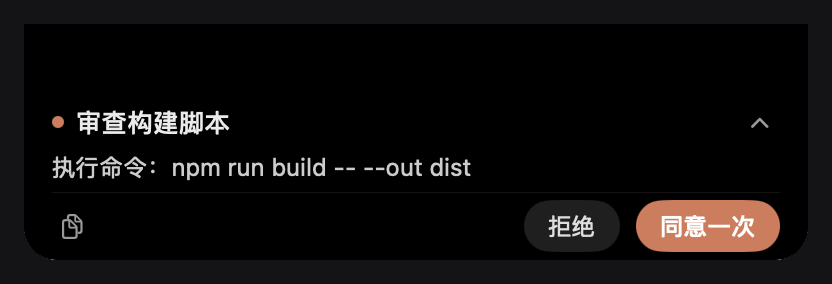
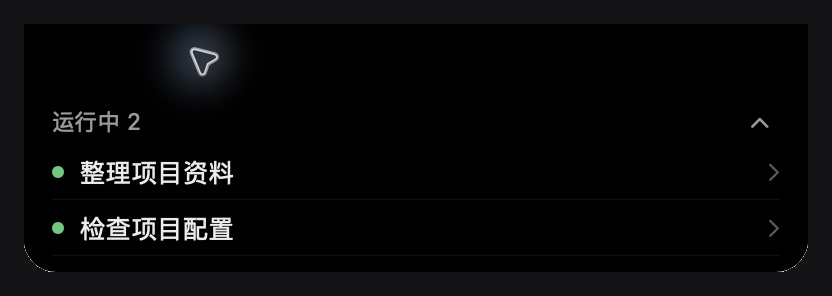
截图取自原生面板本身(Retina 2x):审批时整颗岛只显示待交互内容,正文可滚动、按钮钉在底部;无待交互时显示运行会话行,会话结束后在同一个岛上出一条 24pt 完成提示。
特性
- 审批不漏,岛上即决:
allowed-once/rejected与原审批瀑布动词一致,不产生额外权限语义。 - 审批独占:只要有待交互,整颗岛只显示审批(来源、队列、完整正文、按钮),不夹带运行任务与完成提示。
- 全文可读:正文在岛内滚动,不截断;按钮钉在底部,不会被正文滚走。
- 点击即达:点任务行或审批来源 → 唤醒 DSH 并精确打开对应会话(不经窗口猜测)。
- 完成提示:会话结束时同一岛上出一条 24pt 单行提示,3 秒后自动收回,连续完成不叠窗。
- 单实例、可自愈:宿主只托管一个 helper 进程;崩溃重启有退避与预算,迟到事件不影响新进程。
- 更完整的任务标题:默认会话名展示完整首条消息,手动或模型生成的名称保留;任务列表按文字在392–560pt间自适应加宽,长标题末尾省略并悬停查看全文。
- 动态高度:1 项 96pt / 2 项 124pt / 3 项 152pt,上限 178pt 后内部滚动。
工作原理
flowchart LR
  subgraph DSH["DSH 桌面端进程"]
    AW["审批瀑布<br/>approval/request<br/>user-questions/request"]
    ST["会话状态<br/>agents · sessions · projections"]
    BR["dsh-island-bridge<br/>lib/index.js"]
    CL["桌面客户端<br/>lib/client.js"]
    RT["同源已鉴权路由<br/>/api/island-navigation/*"]
  end
  subgraph NATIVE["原生 helper(Swift)"]
    P["NSPanel 刘海面板"]
  end

  AW -- "answerer(prepend + global)" --> BR
  ST -- "快照" --> BR
  BR -- "stdin JSON 行" --> P
  P -- "decision / open" --> BR
  BR -- "settle → 原审批动词" --> AW
  P -- "点击任务行" --> CL
  CL --> RT --> P
  CL -- "uiWorkspace.openSession" --> DSH
- 桥接以 answerer 身份加入审批瀑布,岛上裁决与本地 UI 竞速,本地先答就用本地结果。提问只镜像到岛上并跳回 DSH 回答;答案、取消和超时保持 DSH 原有语义,交互结束立即清理岛上的提示。
- 面板通过 stdio JSON 行与宿主机通信;helper 二进制首次运行时由
swiftc编译并按源码哈希缓存。 - 导航复用 DSH 已有的同源、已鉴权 Fetch 通道,不新开端口、不注册公网入口。
环境要求
| 项 | 要求 |
|---|---|
| 系统 | macOS 14+(Apple Silicon 优先;需要带刘海的屏幕效果最佳) |
| DSH | 桌面端 >= 0.2.1-rc.2 |
| 工具链 | Xcode Command Line Tools(首次运行 swiftc 编译原生面板):xcode-select --install |
| Node | ≥ 22(DSH 自带运行时即可,仅测试与脚本用到) |
安装
桌面端(推荐)
在 DSH 的插件管理页里从 GitHub 安装 JiayangSUNwinter/dsh-island-bridge,然后重启 DSH。
命令行
# 从 GitHub 安装
dsh plugin --profile desktop add github:JiayangSUNwinter/dsh-island-bridge

# 或从本地仓库根目录安装(开发用)
dsh plugin --profile desktop add link:"$PWD"
装完重启 DSH。本仓库按 awesome-dsh-plugin 的收录要求组织(dsh.bundle manifest、screenshots.json、分类与描述),收录后也能在 DSH Market 里一键安装。dsh plugin 会把参数转发给 pnpm,并在成功后把包名写进 profile 的 dsh.profile.bundles;本包的 cordis.patch.yml 经 dsh.bundle.patch 声明,作为组合层随该 bundle 加载。
手动注册(插件列表里看不到、或宿主日志没有 [island-bridge] 时)
以桌面 profile 为例,三处都要在,缺一不生效:
-
包目录可被解析:
~/.dsh/profiles/desktop/node_modules/dsh-island-bridge指向仓库(软链或file:依赖); -
~/.dsh/profiles/desktop/package.json的dsh.profile.bundles含"dsh-island-bridge"; -
~/.dsh/profiles/desktop/cordis.patch.yml末尾追加:- insert: - id: island-bridge name: 'dsh-island-bridge'
改完重启 DSH。卸载时逆向删除这三项并重启。
安装位置与运行时文件:
$DSH_HOME/dsh-island-bridge/island-helper        # 首次启动自动编译的原生面板
$DSH_HOME/dsh-island-bridge/island-helper.sha256 # 源码哈希缓存,源码变了自动重编
使用
| 操作 | 效果 |
|---|---|
| 点常驻区(绿点 / 橙点) | 展开岛,显示任务列表或审批卡 |
| 点顶部收起 / 点岛外 | 收起;同一审批的状态刷新不会再弹开,新审批仍会展开 |
| 「同意一次」/「拒绝」 | 回传与原审批动词一致的裁决,4 秒未确认允许重试 |
| 「在 DSH 回答」(提问卡) | 打开对应会话去回答,不会被当成工具权限批准 |
| 点任务行 / 审批来源标题 | 唤醒 DSH 并打开该会话(不产生裁决) |
| 复制按钮 | 复制审批全文 |
配置
| 环境变量 | 默认 | 说明 |
|---|---|---|
DSH_ISLAND_DEBUG | 未设置 | 设为 1 后写入诊断日志 $DSH_HOME/dsh-island-bridge/bridge-debug.log |
DSH_HOME | ~/.dsh | DSH 数据目录,决定 helper 二进制与日志位置 |
隐私与安全
- 数据源是 DSH 进程内的官方接缝(审批瀑布、会话 store),不抓屏、不 hook 其他进程、不解析日志。
- 与面板的通信只有 stdio;导航走 DSH 已有的同源已鉴权路由,不监听端口、不联网、无遥测。
- 面板是只读状态 + 审批裁决 + 跳转,v1 不含内容输入,不能替你在会话里发 prompt。
- 诊断日志默认关闭;开启后只落在本机
$DSH_HOME下。
故障排查
| 现象 | 处理 |
|---|---|
| 岛上没有面板 | 看 DSH 日志里的 [island-bridge] 输出;确认 swiftc 可用(swiftc --version) |
找不到 swiftc | xcode-select --install 后重启 DSH |
| 升级插件后面板行为没变 | 重启 DSH,桥接会按源码哈希重新编译 helper |
| 点任务行只唤醒窗口、不跳会话 | 导航只在桌面端(dsh-app: 协议)生效,普通浏览器不消费 |
| 装完插件列表里没有 | 重跑一次 dsh plugin --profile desktop add …,并确认 profile 的 dsh.profile.bundles 含 dsh-island-bridge |
开发
npm test                      # 23 项 Node/进程/窗口/导航测试 + 55 条原生断言(需 macOS + Xcode CLT)
npm run check                 # 只做语法检查
npm run build:helper -- --out ./build   # 手动编译原生面板到本地 build/
测试直接从源码编译 helper,无第三方依赖;原生断言通过 tests/core-regressions.swift 注入并与面板代码同进程运行。原生集成测试统一使用 --test-protocol:保留实际模型和窗口几何检查,窗口不可见且不安装鼠标监听,不会在桌面弹出“配置检查”等测试提示或与正式岛重叠。可见演示需显式使用 --demo。
目录结构:
.
├─ lib/index.js           # 宿主半边:审批 answerer、快照推送、helper 托管
├─ lib/registry.js        # 待交互注册表(permission / ask_user_question)
├─ lib/helper-host.js     # 单实例 helper 监督(合并重启、退避预算)
├─ lib/navigation.js      # 桌面端导航的 wait/ack 路由
├─ lib/client.js          # 桌面客户端半边:收到 open 命令后精确打开会话
├─ helper/island-helper.swift  # 原生 NSPanel 面板(AppKit + SwiftUI)
├─ cordis.patch.yml       # bundle 组合层:向宿主插入 island-bridge 服务
├─ tests/                 # Node 测试 + Swift 原生断言
└─ docs/                  # 产品需求、显示规格、修复与验收记录
已知限制
- 仅 macOS;Windows / Linux 不做支持(
package.json已声明os: darwin)。 - 只投影运行中的根会话;子代理不单独成行。
- v1 为只读状态 + 审批裁决 + 跳转,不含内容输入;手机端 / 远程推送不在范围内。
- 首次安装需要本机编译(约数秒到一分钟),之后按哈希复用二进制。
路线图
- 多显示器与不同刘海尺寸的锚定微调
- 会话完成提示聚合与静音时段
- 可配置的展开快捷键与岛体主题
- 拖拽排序 / 钉住常驻任务
文档
许可
MIT © 2026 JiayangSUNwinter
English
dsh-island-bridge projects DeepSeek Harness session state and pending approvals onto a native macOS notch panel, so you can approve or reject tool calls without switching back to DSH, and click any row to jump straight into that conversation.
- Local only: data flows over stdio plus DSH's existing same-origin, authenticated routes. No ports, no network, no telemetry.
- Approvals first: while anything is pending the island shows only the pending queue with the full body and the same
allowed-once/rejectedverbs as DSH itself. - Requirements: macOS 14+, DSH desktop
>= 0.2.1-rc.2, Xcode Command Line Tools.
dsh plugin --profile desktop add github:JiayangSUNwinter/dsh-island-bridge
Licensed under MIT.
Comments
Loading…
Similar plugins
by cdxiaodong
把 DeepSeek Harness(DSH) agent 实时状态桥接到 CodeIsland 刘海面板 — sessions/tools/approvals on the Dynamic Island
★ 9
Swift
Aug 17, 2026
dsh plugin --profile web add dsh-islandFloating desktop chat panel for DeepSeek Harness — global-hotkey access to sessions, models, and tool approvals while you work in other apps. MacOS/Windows.
★ 1
MIT
TypeScript
dsh plugin --profile web add dsh-quorfloatby JMOKSZ
Feishu (Lark) entry point for DeepSeek Harness: drive dsh agents from a Feishu bot with streaming cards, ask/approval buttons and attachments.
★ 5
MIT
JavaScript
Oct 8, 2026
dsh plugin --profile web add @jmoksz/lark-bridgeby acebang0303
One-click create, update or remove the DeepSeek Harness desktop shortcut with switchable custom icons and a draggable whale button.
★ 2
NOASSERTION
JavaScript
Aug 18, 2026
dsh plugin --profile web add dsh-quick-launchby Kickstartparty3459
Run live iOS simulators and your real iPhone over USB inside DeepSeek Harness conversations with 22 agent tools, MJPEG previews, and SwiftUI hot reload.
★ 0
MIT
TypeScript
Oct 13, 2026
dsh plugin --profile web add @zseven-w/dsh-iosby moyu-good
🕊️ Run a full DeepSeek Harness coding agent inside Feishu/Lark — native thinking process (CoT), interactive approval cards, live reactions, slash commands, WS long-connection. No public callback URL.
★ 6
↓ 243/wk
BSD-3-Clause
TypeScript
Sep 29, 2026
dsh plugin --profile web add @moyu-good/dsh-lark-bridge