
dsh-device-badge
Manifest validFor users running Harness on more than one machine, shows the identity of the terminal DSH is installed on, right in the sidebar account row — so you can tell at a glance which device's chat you are l
dsh-device-badge
在 DeepSeek Harness 侧边栏账号行,一眼看出这台机器是谁。
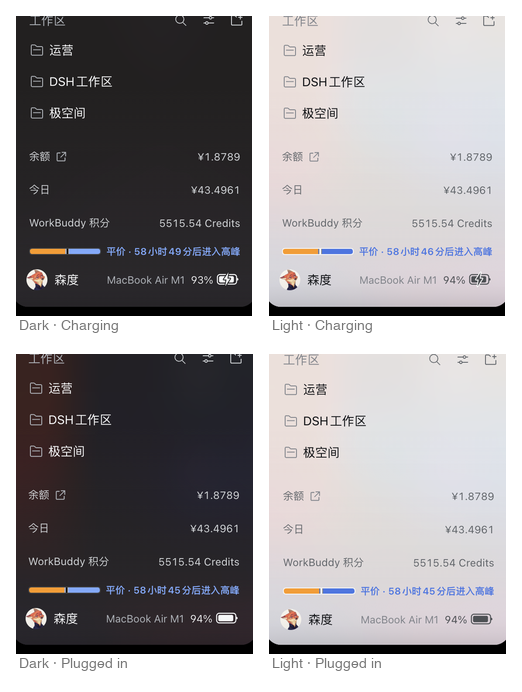
针对多设备安装 Harness 的用户,这个插件可以在侧边栏账号行,显示 DSH 所在终端机器的身份标识,便于清楚地知道对应的是哪台设备的聊天界面。笔记本设备为了更好掌握用电情况,采用显示机型、电量百分比的方案,设计上用的是 macOS 风格充电图标;iMac、Mac mini、Windows 台式机与 NAS(群晖、极空间、绿联、飞牛)则显示对应的线性设备图标。空间不足时会按完整型号、产品简称、仅图标逐级降级,鼠标悬停可随时查看完整型号。
为什么需要它
同时开着几台机器的时候,最容易搞混的就是「我现在操作的到底是哪一台」。侧栏底部本来就有一行账号信息,把机器贴在那儿,不用切窗口、不用打开系统信息,扫一眼就知道。
笔记本还会顺带告诉你电量够不够、要不要插电。
它能识别什么
| 设备类型 | 显示内容 | 品牌 / 型号 |
|---|---|---|
| 笔记本 | 机型 + 电量百分比 + 电池图标 充电时叠加闪电,接电未充显示插头 | MacBook Air / MacBook Pro、Windows 笔记本 |
| iMac | 机型 + iMac 图标 | 苹果一体机 |
| Mac mini | 机型 + Mac mini 图标 | 苹果迷你主机 |
| Windows 台式机 | 机型 + 台式机图标 | 立式机箱造型 |
| NAS | 机型 + 品牌图标 | 极空间、绿联、飞牛、群晖 |
只有笔记本会显示电量百分比——台式机和 NAS 没有电池,不会出现「—%」这类无意义的占位。
电池显示细节
笔记本的电池图标按 macOS 菜单栏的观感绘制:
- 放电中 — 电池壳 + 随电量变化的填充,一眼看出还剩多少
- 充电中 — 叠加闪电符号,闪电上下探出电池壳,与电池之间留出镂空缝隙
- 接电未充 — 显示插头符号,同样上下探出电池壳
闪电和插头都是实心图形 + 背景色镂空缝隙,不是描边——缝隙是真正被挖空的,露出的是面板背景本身,所以任何主题、任何背景渐变下都正确。
低电量时图标会转为警示色,提醒你插电。
空间不够时自动降级
侧栏那一行还要放头像和账号名,窄窗口下不一定塞得下完整型号。徽标会先让步,按三级降级:
| 级别 | 显示 | 示例 |
|---|---|---|
| 2 · 完整 | 机型 + 百分比 + 图标 | MacBook Air M1 48% 🔋 |
| 1 · 简称 | 产品家族名 + 百分比 + 图标 | MacBook 48% 🔋 |
| 0 · 仅图标 | 笔记本保留百分比,其它设备只留图标 | 48% 🔋 / 🖥 |
各设备的简称:
| 完整型号 | 简称 |
|---|---|
MacBook Air M1 / MacBook Pro M3 | MacBook |
iMac (24-inch, M1, 2021) | iMac |
Mac mini (M1, 2020) | Mac mini |
| Windows 台式机型号 | Windows |
群晖 DS920+ | 群晖 |
极空间 Z423 | 极空间 |
绿联 DX4600 | 绿联 |
飞牛 fnOS | 飞牛 |
账号名永远不会被这个插件压缩。 用户名本来就由 Harness 自己管理(
flex:1+min-width:0+ 省略号),徽标不修改它一个字节——空间不足时是徽标先降级,而不是让名字变短。宽度判断用
canvas.measureText()按真实字体度量计算,不按字符数估算,所以中英文混排也能准确判断。
悬停查看完整型号
鼠标移到徽标上,会显示完整信息——即使已经被降级成简称或只剩图标:
MacBook Air (M1, 2020) · 71% · 充电中 1:38 · MacBookAir10,1
外观与交互
- 排序:机型名 → 电量百分比 → 图标,贴合侧栏那一行的阅读节奏
- 字体:Apple 系统字体(
-apple-system/ SF Pro Text / PingFang SC),与 macOS 界面一致 - 主题:浅色模式用深色线条、深色模式用白色线条,跟随界面自动切换
- 收起时隐藏:侧栏折叠成 56px 图标栏时自动隐藏,避免遮挡头像
- 避让其它插件:页脚出现别的状态控件(例如移动网关的「重新连接中」)并压到徽标时,徽标自动隐藏,冲突消失后自动恢复
安装
dsh plugin --profile <你的profile> add github:JhanSu/dsh-device-badge
桌面端也可在 设置 → 插件 中通过插件管理器安装。装好后刷新页面即可。
数据来源与隐私
完全本地运行:不联网、不上传、不写盘。
| 平台 | 读取内容 |
|---|---|
| macOS | pmset -g batt(电量 / 充电状态 / 剩余时间)、sysctl -n hw.model(机型代号) |
| Linux | /sys/class/power_supply/*(电池)、/sys/class/dmi/id/*(厂商与型号)、/etc/os-release |
| Windows | Win32_Battery(电量)、Win32_ComputerSystem(型号) |
不读取:序列号、硬件 UUID、Provisioning UDID、账号信息、任何用户文件。
宿主路由 /api/device-badge/status 仅监听回环地址,并要求有效的 DSH 登录会话(通过 connection.requestRejection 校验)——外部无法访问。
刷新机制
- 浏览器 Battery API 事件(主路径):插拔电源、电量变化时立即响应
- 20 秒兜底轮询:用于不支持该 API 的浏览器,以及剩余时间的文字递减
宿主侧缓存 1 秒,并支持 ?fresh=1 强制刷新。
许可证
MIT
Comments
Loading…
Similar plugins
by chendaleiQ
Codex-style macOS notifications + Dock unread badge for the DeepSeek Harness desktop app (click the banner to jump back to the session)
★ 0
MIT
JavaScript
Nov 8, 2026
dsh plugin --profile web add dsh-plugin-desktop-notifyby Willmylife
Adds a connection-test panel under Settings -> Models: reads the deployment's model catalog and probes each configured model with one minimal chat round-trip (a short "ping" with a small output cap) t
★ 1
MIT
JavaScript
Oct 30, 2026
dsh plugin --profile web add dsh-model-connection-testmacOS compact sidebar for DeepSeek Harness: four equal action buttons instead of the brand row, plus a denser workspace and conversation list.
★ 0
MIT
JavaScript
dsh plugin --profile web add dsh-sidebar-compact-macosWindows-native computer use for DeepSeek Harness: two tools drive and read any desktop app. One batch call runs find, click, type, key, read, wait and screenshot steps in a single engine pass, so a ta
★ 0
dsh plugin --profile web add dsh-win-computer-useby deluo
在 dsh(DeepSeek Harness)会话头部展示模型厂商余额/用量徽标的插件:内置 DeepSeek 余额、MiniMax Token Plan 与智谱 GLM Coding Plan 配额,适配器架构支持接入更多厂商;host 侧按轮次取数,经 SSE 同步到浏览器。
★ 0
MIT
TypeScript
Aug 23, 2026
dsh plugin --profile web add dsh-usage-displayby yijiezhong
On-screen test-progress HUD for DSH — a click-through panel drawn over the app under test, showing each step's expectation vs actual and whether the waiting human may take back the mouse and keyboard.
★ 1
MIT
Swift
Oct 21, 2026
dsh plugin --profile web add dsh-testhud