

dsh-plugin-relay
Manifest validDeepSeek Harness (dsh) plugin that routes model traffic through any new-api-family relay panel (one-api / new-api / Veloera / done-hub / ...)
dsh-plugin-relay
A DeepSeek Harness (dsh) plugin that connects dsh to any new-api-family relay panel (one-api / new-api / Veloera / done-hub / ...). Everything lives in dsh's Plugins panel — no CLI, no config files to hand-edit, and no panel-specific defaults baked in. Since v0.6.0 you can connect several panels at once — each one is its own model provider inside dsh, selectable side by side in the model picker.
Features
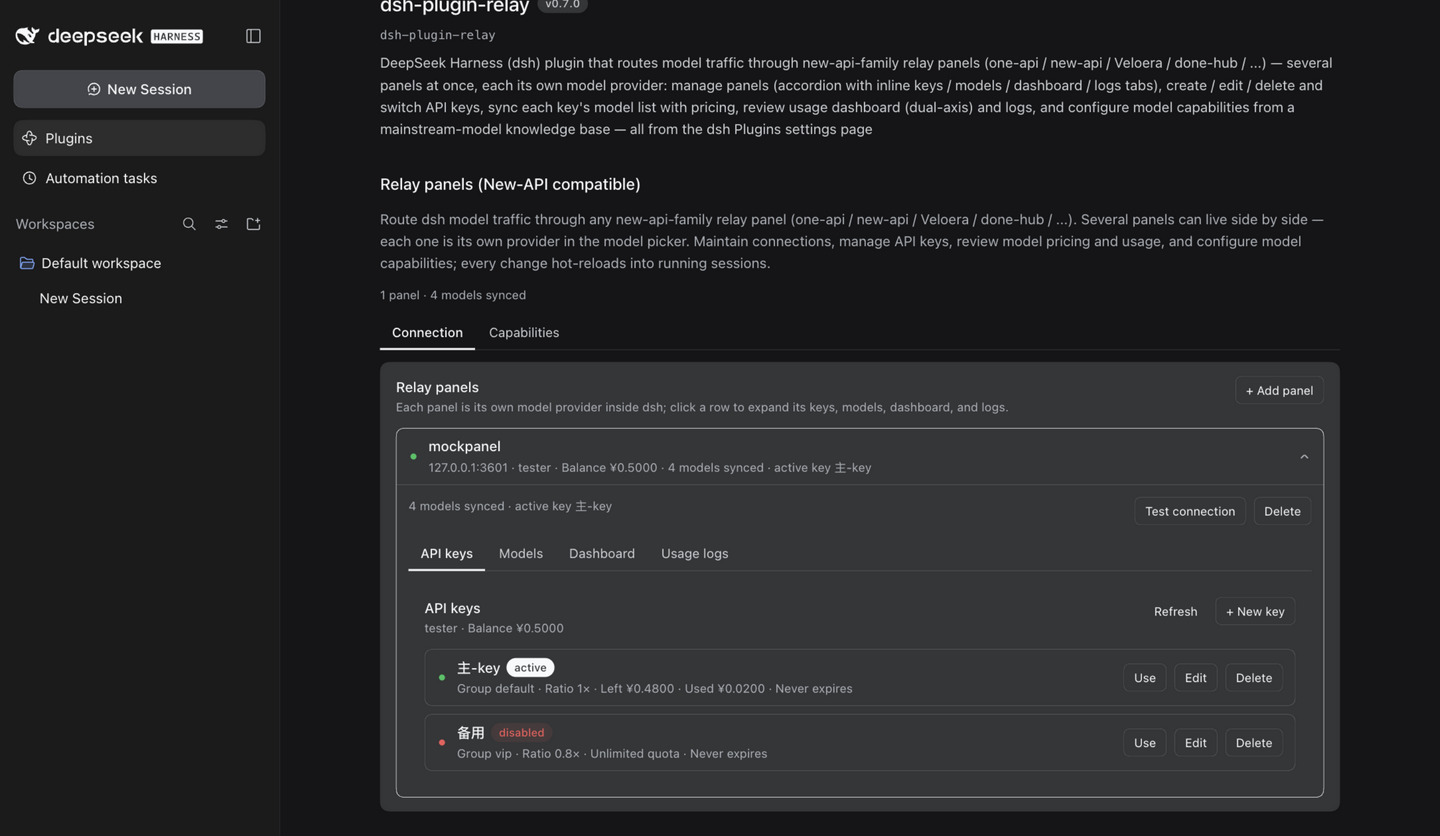
- Panels — the Connection tab is an accordion: every connected panel is a collapsible row (account, balance, synced models, active key at a glance — the account line fills in lazily, so one unreachable panel never blocks the list), and expanding it folds the panel's four sub-tabs (API keys / models / dashboard / usage logs) inline; at most one panel is expanded at a time. New panels are added with Add panel: name (immutable after creation — it names the dsh model provider too), base URL, access token (write-only), and user ID — there is no edit form; changing a connection means delete + re-create. Each panel gets a Test connection button that classifies failures readably: unreachable network, invalid token, or user-ID mismatch. The delete dialog warns about capability overrides being removed and about dsh's default model pointing at the panel.
- API keys (per panel) — create, edit (name / group / quota / expiry / enable-disable), delete, and switch with one click on Use. Editing happens in place like the official Models page: the row expands into an editor card (one card at a time), Apply writes immediately and keeps the card open on failure, and deletions confirm in a dialog. Key material never crosses to the browser — creation responses are stripped server-side, and create and set active runs the regular switch flow so the secret only enters the credential store.
- Models (per panel) — the models the active key can call with pricing, covering all three billing dialects of the panel family: per-token USD prices ($/1M tokens), fixed per-call prices, and classic ratio pricing (model ratio × group ratio). Refreshing the list syncs it into dsh so running sessions pick it up immediately.
- Dashboard (per panel) — balance, today's spend, totals, and a hand-drawn SVG stacked per-model usage chart with a spend / tokens / dual-axis metric toggle (dual mode: spend bars on the left axis plus a daily token-total line on the right axis), 7 / 14 / 30-day range pills, Top-N folding (models past the top 7 merge into one grey「Other」series), and a click-to-hide legend; the four summary cards always sit in one row. Panels keep only recent usage buckets, so sparse data renders as a readable empty state.
- Usage logs (per panel) — panel request logs with a usage/RPM/TPM header, time / model / key / group filters (applied on query), and per-request usage including cache and reasoning tokens plus first-response time.
- Capabilities — combines a preset knowledge base (fetched at runtime from models.dev mainstream models — first-party author providers, models released within the last year, dialogue models only — auto-refreshed once a day and cached in dsh's local storage; a Refresh presets button forces an immediate update) with your own entries and per-panel per-id overrides. Every section edits in place like the official Models page — one row expands into an editor card, Done saves immediately, there is no global save button. Context windows and output limits accept
128K/1Mshorthand (1024-based) with a live conversion hint. Matching follows layered rules: override → knowledge base (exact → case-fold → stripped variant suffix → version-separator swap → unique variant completion → curated aliases), with approximate hits marked and the matched name shown under the model id. The platform-model section groups models by panel, each with a coverage indicator whose segments are clickable to filter that panel's list by source (preset / knowledge / override / unconfigured). - Multi-panel — every panel is an independent pi-ai provider (
openai-completionsat<panel>/v1with its own credential reference), so dsh sessions see all panels' models at once, namespaced by provider. Deleting a panel removes its provider, its capability overrides, and its credential reference; the global knowledge base survives. - Hot reload — credentials, model catalog, and capability config all go through the dsh settings/credentials services; a running session applies them on its next request, no restart. The plugin does not manage a default model — pick one in dsh itself.
Screenshots
| Connection (panel list) | API keys | Models |
|---|---|---|
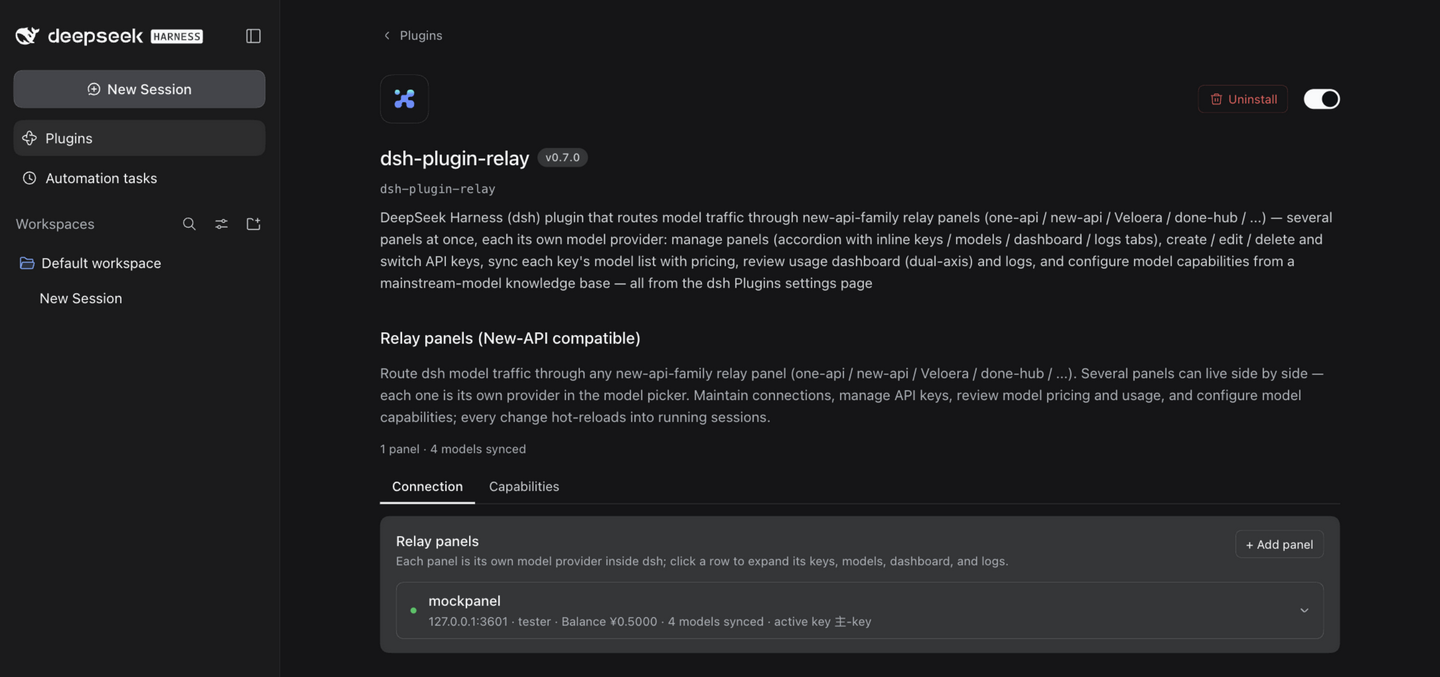 | | 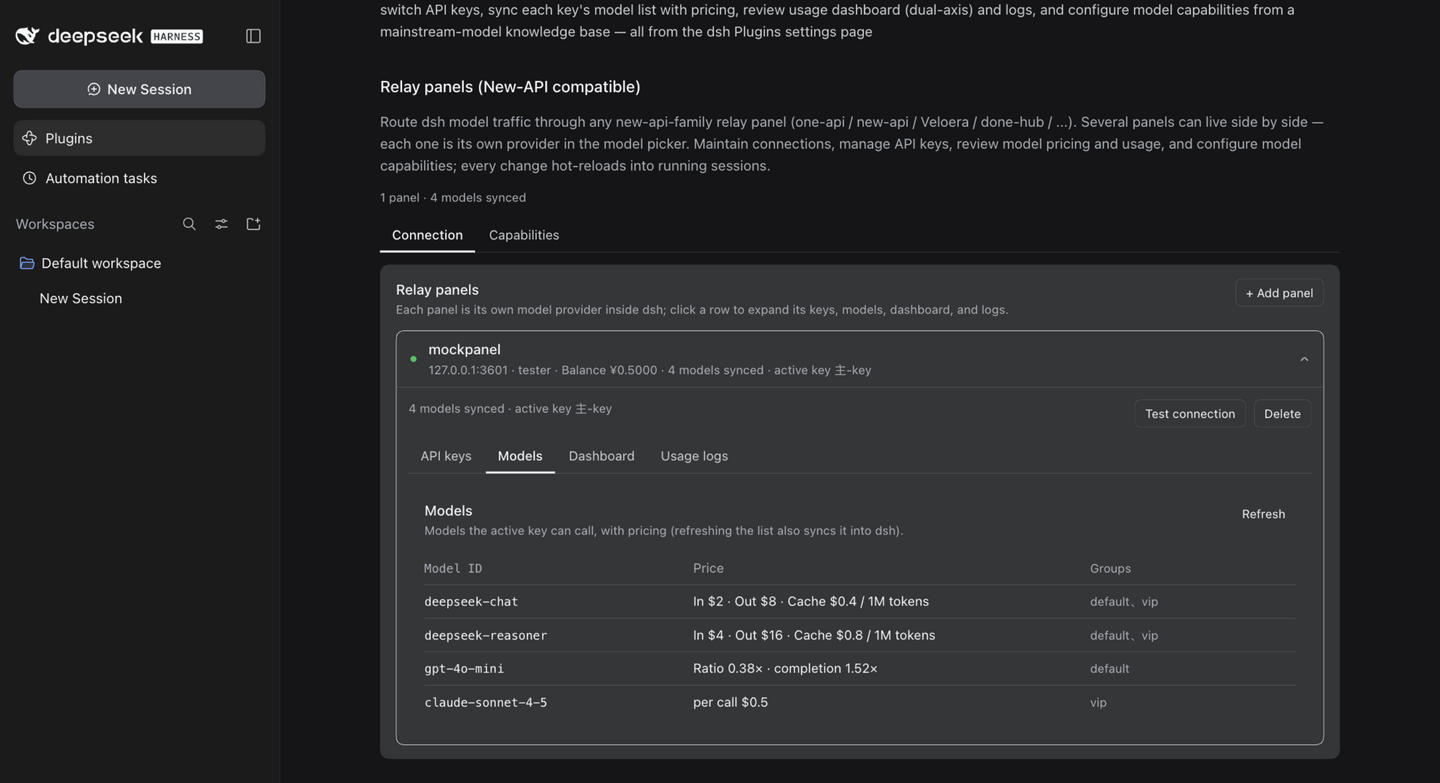 |
| Dashboard | Usage logs | Capabilities |
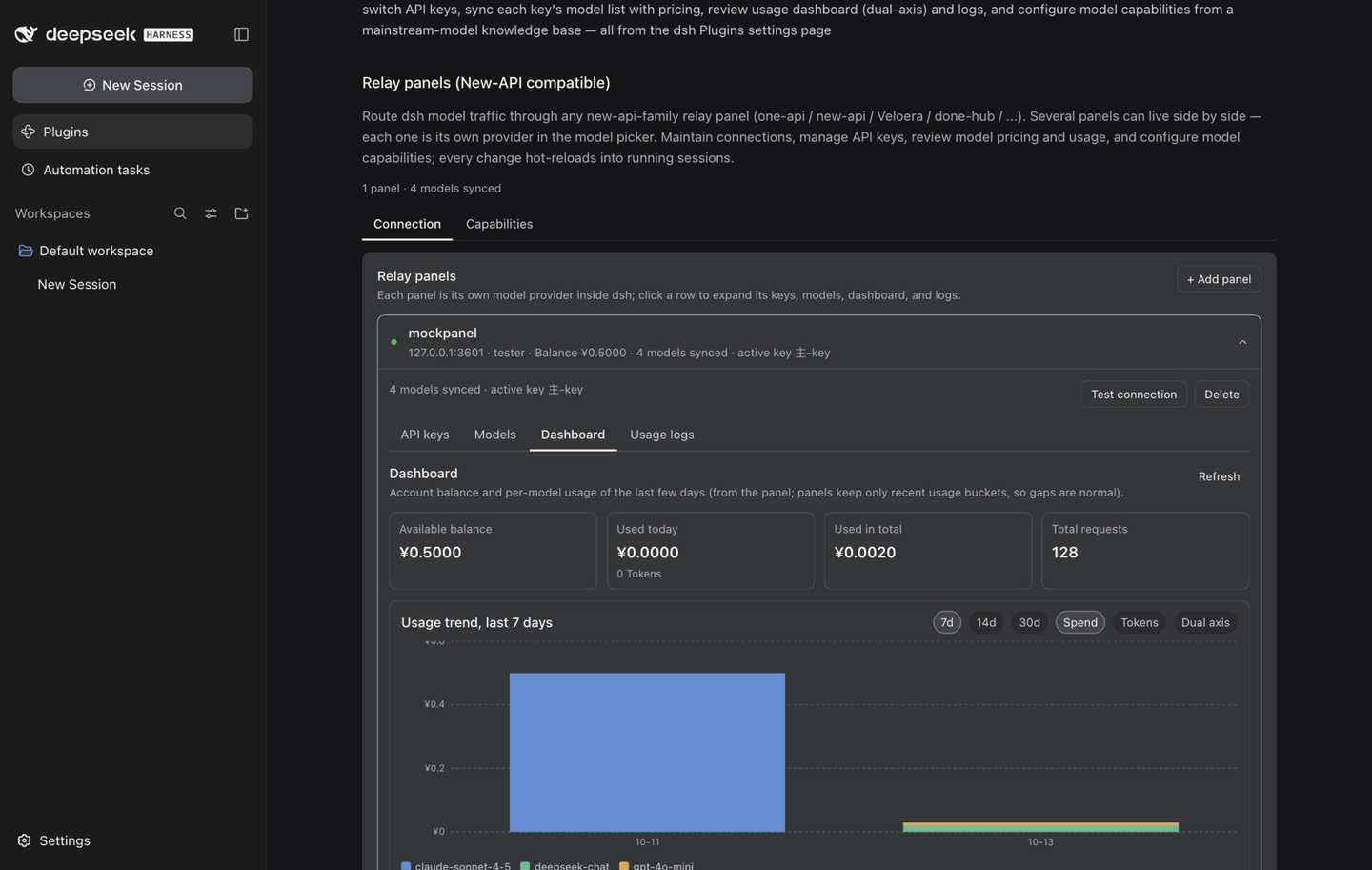 | 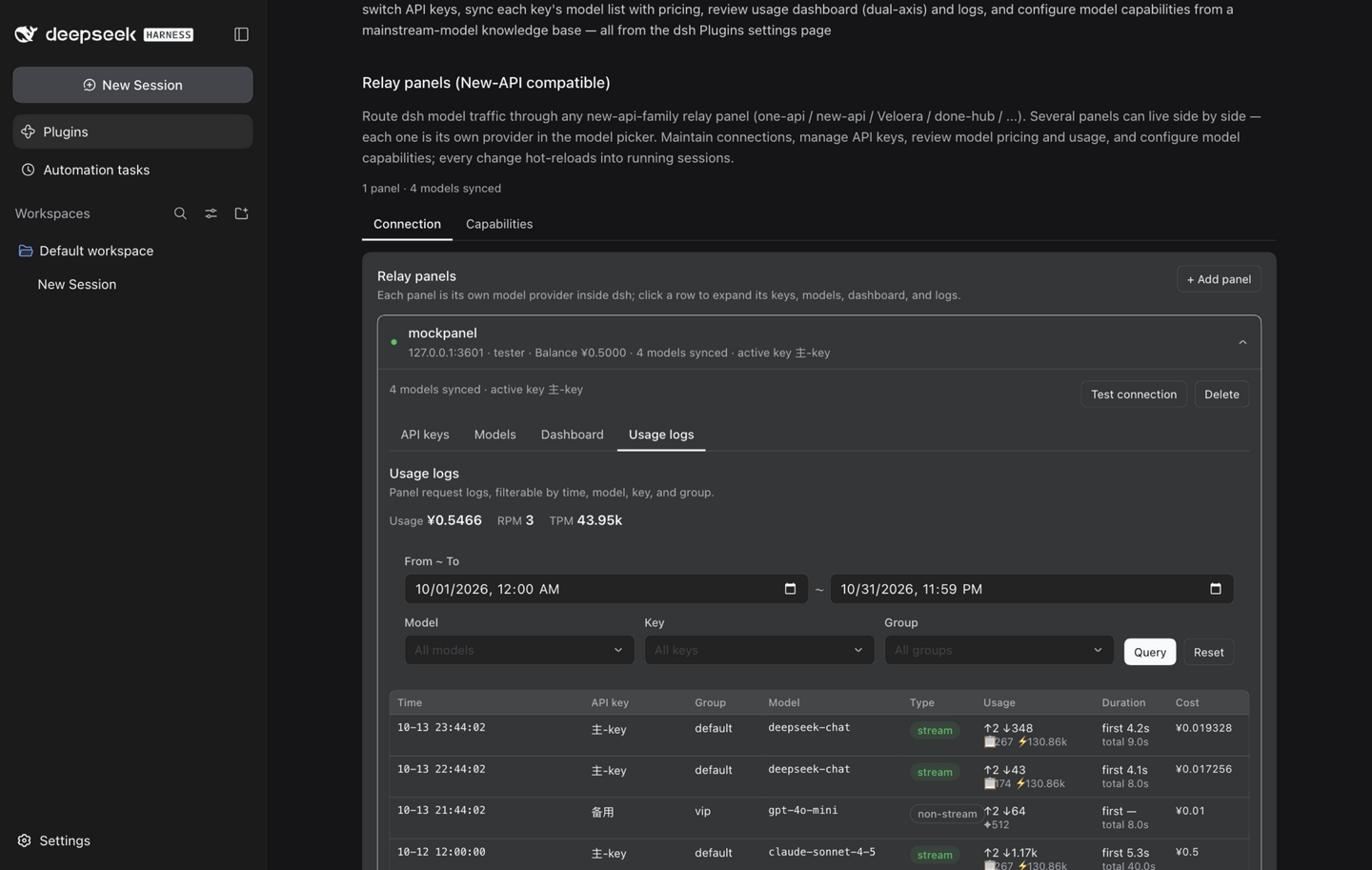 | 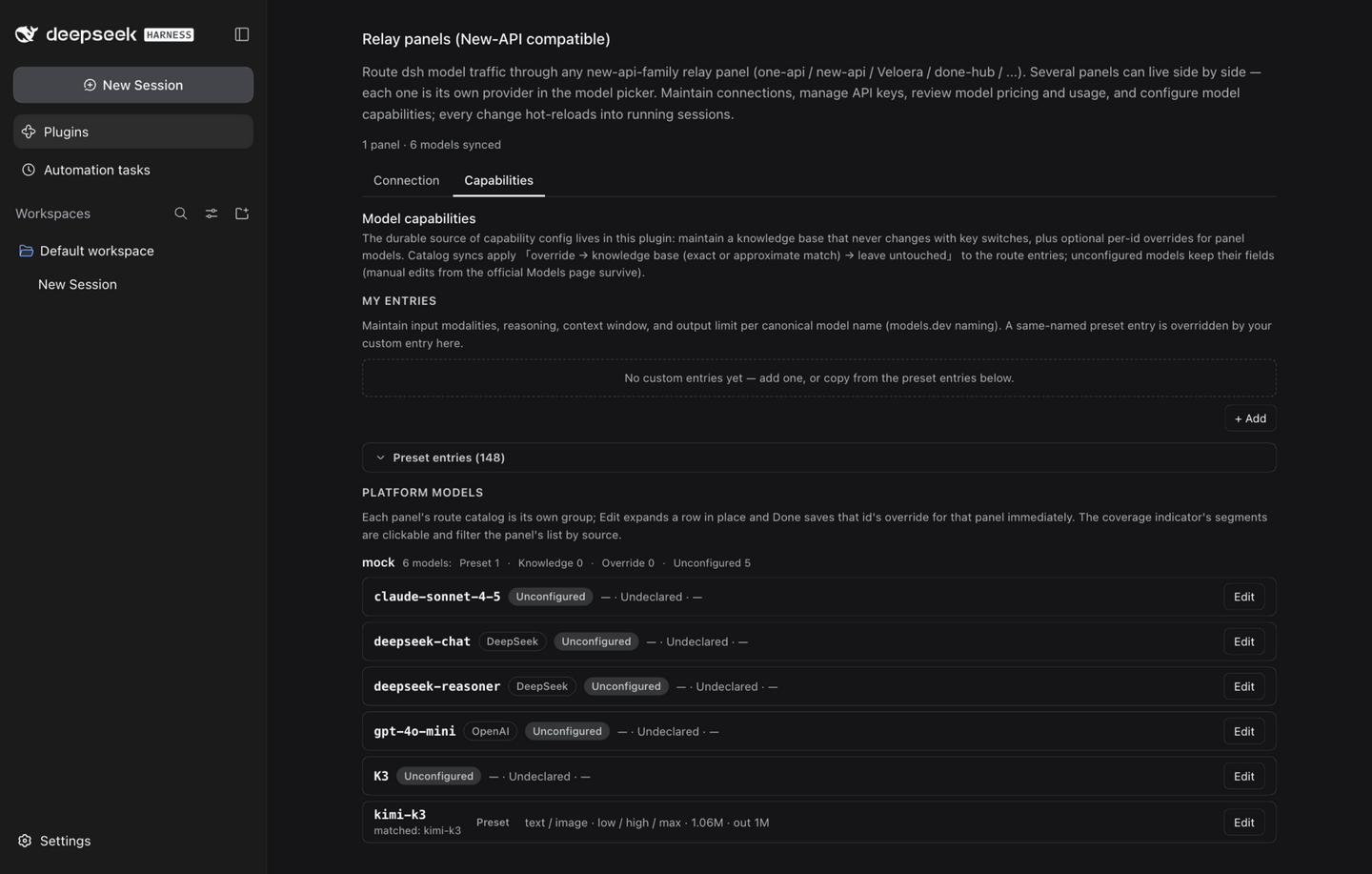 |
Install
Requires dsh ≥ 0.2.1-alpha.2, Node ≥ 20, and pnpm on PATH (dsh installs plugins through pnpm).
# from npm (once published)
dsh plugin --profile web add dsh-plugin-relay

# or from a local clone
npm install && npm run build
dsh plugin --profile web add /path/to/dsh-plugin-relay
Install into the headless profile the same way (--profile headless) if you use headless sessions. Then restart dsh web and open the Plugins panel → Relay.
Usage
- Open Settings → Relay → Connection, press Add panel, and fill in a name (letters/digits/
_/-, ≤32 chars — it becomes the model provider's name), the panel origin (no/v1suffix), the access token from the panel's personal page (client token / access token), and the user ID shown on the same page. Test connection verifies the trio before you commit to keys. - Click the panel's row to expand it inline. On API keys, create a key if you don't have one (or press Use on an existing one). The plugin writes the key into the dsh credential store, builds the panel's model route, and syncs the key's model catalog. Repeat for as many panels as you like — they all stay live side by side.
- On Models, review pricing per model; refreshing keeps dsh's route catalog in step with what the key can actually call.
- On Dashboard and Usage logs, keep an eye on balance and consumption; both read the panel's reporting APIs read-only.
- On Capabilities (main page), browse the preset entries (searchable, collapsed by default) and copy any of them into My entries when you need a tweak; the presets fetch automatically from models.dev on first use (once a day afterwards), and Refresh presets re-fetches immediately, re-applying the values to every panel's catalog. Context windows and output limits take
131072,128K, or1Malike. Edit a platform-model card only when a specific id needs different values — Done saves it right away for that panel.
How it works
- The plugin's state is its composition entry's config (a
panelsdict with each panel's connection fields — the access token is a secret field redacted on the wire — plus the global knowledge base and per-panel override groups; all fields are hot-editable.volatile()fields of the profile patch), it serves/api/relay/{state,panels,panels-create,panels-delete,account,connection-test,keys,keys-create,keys-update,keys-delete,use,models,capabilities,model-info,knowledge-refresh,dashboard,logs,logs-stat,logs-meta}inside dsh's authenticated web fence. - On first key switch per panel it writes the panel's pi-ai route profile (
api: openai-completions,baseURL: <panel>/v1,apiKeyEnv: RELAY_API_KEY_<PANEL>, merged model catalog) into thellm-pi-aientry's config — dsh hot-reloads routes, so no restart. The API key itself resolves per request from the panel's credential reference. - Catalog sync merges by model id: manual edits of surviving ids are preserved; ids the key lost are removed, so dsh only offers models the key can call. Capability fields on the entries are derived state: each sync, each capability save, and each preset refresh replays the overrides → knowledge base (yours first, then the preset layer) over them. Only fields the plugin holds config for are written — anything you edit on the official Models page for unconfigured ids survives.
- Capability saves are directed operations (
catalogSet/catalogDelete/overrideSet/overrideDeletewith the owning panel) applied as per-entry settings path ops — deletions are real, not masked by deep merges — followed by revision-guarded replays over the affected route catalogs. - The preset knowledge base is fetched at runtime from models.dev with the same mainstream rules the project always used (first-party author whitelist, 365-day release window, non-dialogue models excluded, channel re-registrations deduped). The plugin refreshes it automatically once every 24 hours (a startup check plus an hourly staleness ticker) and on the Refresh presets button; the whole cache —
{fetchedAt, entries}— persists in dsh's local storage stack (<DSH_HOME>/storages/relay_preset.json, atomically published by the host's json backend), so it survives restarts and a restart within 24 hours does not re-fetch. No preset data lives in the settings/profile patch anymore; deleting the storage file resets the preset to "not fetched yet".
Security notes
- Each panel's access token lives in a secret settings field (redacted on every wire surface, including nested inside the panels dict); API keys are written only to the server-side credential store (
.credentials.yaml, 0600) and never returned to the browser — key creation responses are stripped server-side, and no "copy key" feature exists. - All plugin routes sit inside dsh's browser trust fence (same origin + signed session); unauthenticated requests get 401.
- The models.dev lookup runs host-side (cached, single-flight); the browser never talks to third parties directly. The preset fetch never touches the relay panel and never introduces credentials.
Compatibility
- Requires dsh ≥ 0.2.1-alpha.2 (
engines.dshenforces it) — the first host line with the entry-config settings model this plugin's page and volatile hot writes build on. The host's frozen browser module table supplies@deepseek-ai/dsh-client-ui-primitives(consumed as a stable-subset API; installed as a devDependency pinned to the host-matching version for types only) and the storage stack (@deepseek-ai/dsh-storageas a peer dependency — dsh-base mounts the hub and the json backend for every base-backed profile; on a profile without the stack the plugin degrades to a memory-only preset cache). - The plugin deliberately sticks to the verified primitives subset (Button / Switch / Pill / Tag / StateDot / Menu / Modal) and re-runs a browser walkthrough whenever the dsh dev dependency is upgraded (see docs/PUBLISHING.md).
Known limitations
- Management-API calls need the paired user ID (typed once per panel; see the panel's personal page).
- Model capacity falls back to id-prefix heuristics when neither the panel nor the knowledge base reports a value; unknown ids fall back to 131072 context / 8192 output.
- Knowledge-base matching demands equality at every layer (case-fold, suffix strip, version-separator swap, variant completion) and gives up on ambiguity; channel-named panel-specific models (e.g.
grok-video) match nothing by design. - The preset only carries mainstream models — first-party providers released within the last year. Panels selling older or niche models fall back to unconfigured; add your own entries or hit Refresh presets (same rules).
- First use needs one online fetch: a fresh install (or a deleted storage file) shows no preset entries until the first models.dev fetch succeeds; the knowledge base, overrides, connections, and model sync all work regardless. Offline new installs stay in that state until the host can reach models.dev (respecting the host's proxy environment).
- Upgrading from ≤0.7.0: a stale
capabilityPresetDeltakey may linger in the profile patch. The new schema never declares it, so the host treats it as an inert leftover — no errors, not projected, not writable. Ignore it, or edit the profile patch by hand to drop the key. - A panel's name is immutable after creation (it keys the provider route, credential reference, and override group); renaming means delete + re-add.
- Panels keep only recent usage-log detail and dashboard buckets; older data is the panel's retention policy, not a plugin bug.
- models.dev is a third-party snapshot — unlisted models and toggle-style reasoning fall back to manual configuration.
- Token-count shorthand is 1024-based (
128K= 131072); a few vendors advertise decimal sizes (e.g. 200K = 200000), so check the live conversion hint before saving.
Development
npm install        # @deepseek-ai/dsh is a devDependency; runtime has zero dependencies (schemastery + dsh-storage are peers)
npm run typecheck  # tsc --noEmit
npm run build      # tsdown → lib/index.js (host ESM) + lib/client.js (wrapped browser bundle)
npm test           # vitest: unit tests + mock relay panel, never touches a real dsh home
npm start          # dev launcher: dsh web --port 3098 against this repo's .dsh-home
npm start -- --no-open   # same, without opening the system browser
See CHANGELOG.md for release history, docs/ for development notes (worklog, specs, publishing checklist), and AGENTS.md for dsh integration semantics.
License
Comments
Loading…