
dsh-balance-pill
Manifest validBalance Pill: DeepSeek Harness composer-dock wallet balance and this session's spend.
Balance Pill


English | 简体中文
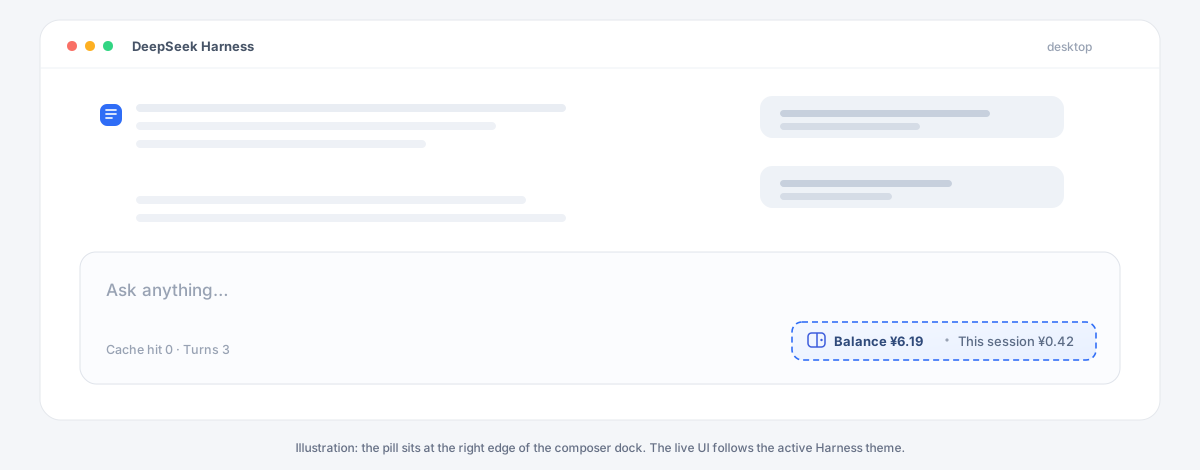
A small, always-visible readout in the DeepSeek Harness composer dock: the signed-in account's wallet balance and how much the wallet has dropped since the current session started.
Unofficial community plugin. Not affiliated with or endorsed by DeepSeek.
Preview
A text sketch of the composer dock. The live pill follows the active theme and locale.
  ┌─ composer ──────────────────────────────────────────────────────
  │ Ask anything…
  │
  │ Cache hit 0 · Turns 3        (o) Balance ¥6.19 · This session ¥0.42
  └─────────────────────────────────────────────────────────────────

  [ready]      (o) Balance ¥6.19 · This session ¥0.42
  [loading]    (o) Balance …
  [signed out] (o) Balance —
  [error]      (o) Balance — (http-503)

  ┌─ hover ───────────────────────────────────────────────────────
  │ Recharged ¥6.19 · Granted ¥0.00 · Updated 12:34:56
  │ Counting since 12:30:02
  │ Click to refresh
  └───────────────────────────────────────────────────────────────
The pill is one tabbable button: click to refresh, hover for the breakdown and the start time of the session total.
What it shows
| Reading | Meaning |
|---|---|
| Balance | Recharged wallet plus granted/bonus wallet, folded into one currency. |
| This session | Sum of wallet decreases observed since this session's first reading. |
- Hover the pill for the recharge/granted breakdown, the last update time, and when counting started.
- Click the pill to refresh immediately.
- The pill also refreshes every 60 seconds, when the window regains focus, and shortly after each completed turn. Two automatic readings are at least 15 seconds apart. Repeated failures back off at 120 s → 240 s → 300 s (capped).
- The last successful reading is reused for the first paint after a page reload, so the dock does not flash an empty value.
Install
Requirements:
- DeepSeek Harness Desktop or Web,
0.2.1-rc.2through0.2.x. - A signed-in DeepSeek account (the plugin reads the same wallet the account menu shows).
- The
deepseekAccountHost service. It ships with the desktop account stack; a headless composition without that service reportsaccount-unavailable.
Pick one source.
From npm
dsh plugin --profile web add dsh-balance-pill
Published as dsh-balance-pill
by the jayve-dev npm account. The package is unscoped, so the install path is
just the package name.
From GitHub
dsh plugin --profile web add github:Jayve/dsh-balance-pill
From a checkout
git clone https://github.com/Jayve/dsh-balance-pill.git
dsh plugin --profile web add ./dsh-balance-pill
web is the profile name used by the CLI Web app. The desktop app usually uses
desktop; substitute it in every command:
dsh plugin --profile desktop add dsh-balance-pill
After installation, restart the Harness process (Host code changes need a restart, not just a page reload), then reload the Web page. Verify that the bundle layer is present:
dsh --profile web --dump-config
Look for a # == dsh-balance-pill layer and a balance-pill row. If the plugin
is listed but the pill is missing, see Troubleshooting.
Uninstall
dsh plugin --profile web remove dsh-balance-pill
Migrating from a local build
If a development row such as @local/dsh-balance-meter is still active, remove
that bundle before adding this one. The two pills would otherwise render side
by side; the new row id is balance-pill, so no config row collides, but the
dock entry and polling would be duplicated.
How it works
The plugin has two halves:
- Client — mounts one entry into the
conversation.composer.dockslot, polls a local JSON route, and keeps the per-session running total inlocalStorage. - Host — serves
GET /dsh-balance-pill/stateon the Harness Web server. It asks the Host account service for the current wallet and returns only the aggregated amounts.
The browser never calls the account Remote namespace and never sees a token, an account id, or a Platform request header. This split exists because the account Remote call that works on the Host can fail from the desktop renderer; the local route is the stable path across Web and Desktop builds.
Route
GET /dsh-balance-pill/state?locale=<ui locale>&tz=<offset seconds>
The route accepts only loopback peers, a loopback Host authority, and only
GET. Responses are Cache-Control: no-store.
| Status | Body | Meaning |
|---|---|---|
200 | {"ok":true,"status":"ready","currency":"CNY","recharged":6.19,"granted":0,"total":6.19} | Wallet read succeeded. |
200 | {"ok":true,"status":"signed-out"} | No stored DeepSeek credential. |
200 | {"ok":true,"status":"failed"} | The Platform balance query failed. |
403 | {"ok":false,"error":"loopback-only"} | Non-loopback peer. |
403 | {"ok":false,"error":"host-not-allowed"} | Host is not 127.0.0.1, localhost, or [::1]. |
405 | {"ok":false,"error":"method-not-allowed"} + Allow: GET | Wrong method. |
502 | {"ok":false,"error":"…"} | Unexpected account service failure (message capped at 200 characters). |
503 | {"ok":false,"error":"account-unavailable"} | Composition has no account service. |
The full route and ledger contract is in docs/architecture.md.
Spend accounting
The plugin measures the wallet, not tokens or prices, so it works with every model and billing rule without a price table.
- A decrease between two readings adds to
This session. - A top-up or bonus only moves the baseline; it never produces negative spend.
- The baseline and running total are stored per session under
dsh.balance-pill/v1/<sessionId>. A page reload keeps the number; a new session starts at zero. - Switching the UI language or timezone does not reset the ledger.
- Switching accounts while the same session stays open reuses the previous
account's baseline. Sign out and start a new session, or remove that
session's
localStorageentry, if you need a clean count. - Multiple sessions on one account all observe the same wallet. Each session counts every other session's spend as its own. The plugin cannot attribute a wallet drop to a session.
- Platform billing can settle late; the reading lags by the same amount.
- Amounts below
0.01are shown with four decimals so a small turn does not look free. - An account holding both CNY and USD wallets gets one pill, preferring CNY.
Privacy and security
- The route is bound to the Harness Web server and rejects non-loopback peers.
- The
Hostheader must name a loopback authority (127.0.0.1,localhost, or[::1]). A public hostname that resolves to loopback is refused, which closes the DNS-rebinding path to this route. - The route has no additional authentication, like the other local plugin routes. Any process on the same machine can read the balance number. The response contains only currency amounts; it carries no account id, profile, token, or transaction list.
- The Client stores only the last summary and the per-session ledger in
localStorage, on the Harness origin. It contains no credentials. - The plugin sends no telemetry. The only network request is the Host account service call to the configured DeepSeek Platform origin, the same one the account menu performs.
- The browser bundle adds no remote content and no
eval.
Configuration
The shipped patch enables the plugin with defaults. Most users need no config.
clientVersion is the UI identity sent to the Platform account endpoint. By
default the plugin reports the running Web host's release version and falls
back to the version this release was tested against. Pin it only when a
composition hides the clientModules service or you need to reproduce a
specific Platform client identity:
- id: balance-pill
  name: dsh-balance-pill
  config:
    clientVersion: 0.2.1-rc.2
The refresh interval and the route path are fixed on purpose: they are security- and traffic-shaping constants, not deployment knobs.
Troubleshooting
| Symptom | Check |
|---|---|
| No pill at all | The bundle is not active. Run dsh --profile web --dump-config, confirm the dsh-balance-pill layer, then restart the Harness process and reload the page. |
Pill shows Balance — | The account is signed out, or the credential store is empty. Sign in from the account menu. |
Tooltip says Balance read failed | Hover for the short error code. http-503 means the composition has no deepseekAccount service; http-502 means the Platform query threw. |
| Number does not change | Billing may be delayed. Click the pill; a forced read still respects the in-flight guard. |
| Spend looks too high | Another session on the same account was spending, or the session was reused across accounts. The wallet cannot attribute spend. |
403 loopback-only | The page was opened through a LAN address. Use http://127.0.0.1:<port>/. |
403 host-not-allowed | The page was opened through a non-loopback hostname that resolves to this machine. Use 127.0.0.1, localhost, or [::1]. |
Compatibility
| Component | Supported |
|---|---|
| DeepSeek Harness | >=0.2.1-rc.2 <0.3.0 (declared as engines.dsh) |
| Surfaces | Desktop Web GUI; CLI web profile |
| Account service | deepseekAccount (DeepSeek account login) |
| Node (development only) | ^22.19.0 or >=24.0.0 |
The manifest declares engines.dsh, so an incompatible Harness release refuses
the bundle instead of loading it half-way. Removing that field is not a
supported workaround; open an issue with the Harness version instead.
Development
The package has no runtime dependencies and no build step.
npm test          # node --test; Host route, ledger, formatting, loader contract
npm run pack:check
Layout:
index.js              Host route and wallet folding
client.js             Client bundle (dock entry, polling, ledger)
test/host.test.mjs    Route and summary tests
test/client.test.mjs  Ledger, storage, and formatting tests
docs/                 Preview and architecture notes
To iterate against a real Harness install, add the checkout to the profile you use for the Web GUI (use a disposable profile when you do not want to disturb a daily setup), from the repository root:
dsh plugin --profile web add .
dsh web --profile web
Host edits require restarting the process. Client bundle edits require a page reload.
_internals on the client module is a test bridge, not public API. It exists
so the ledger can be tested without a browser or React renderer.
Releasing
- Update
CHANGELOG.mdand the version inpackage.json. npm test && npm run pack:check.- Commit, tag
vX.Y.Z, and publish:npm publish --access publicfrom thejayve-devnpm account- or push the tag and let
.github/workflows/release.ymlpublish with the repository'sNPM_TOKENsecret (a token from the same account).
License
MIT © 2026 Jayve
Comments
Loading…