
dsh-artifact
Manifest valid★ 1Claude-Code-style artifacts for DeepSeek Harness: an artifact tool, an authoring skill, and an in-app sandboxed HTML browser
dsh-artifact
English | 中文


Artifacts for DeepSeek Harness: the agent writes self-contained HTML documents, and you read them in a tab beside the conversation.
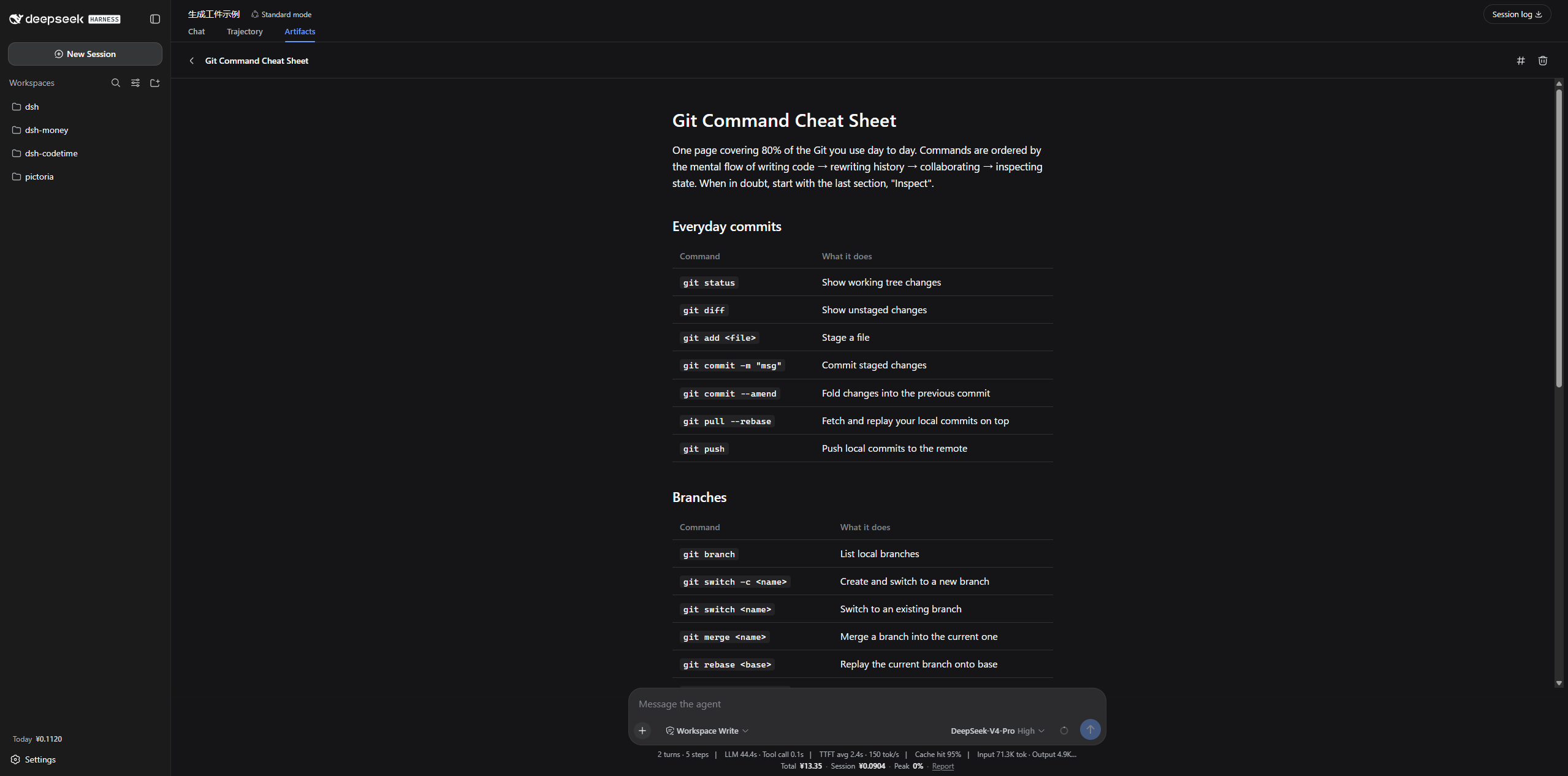
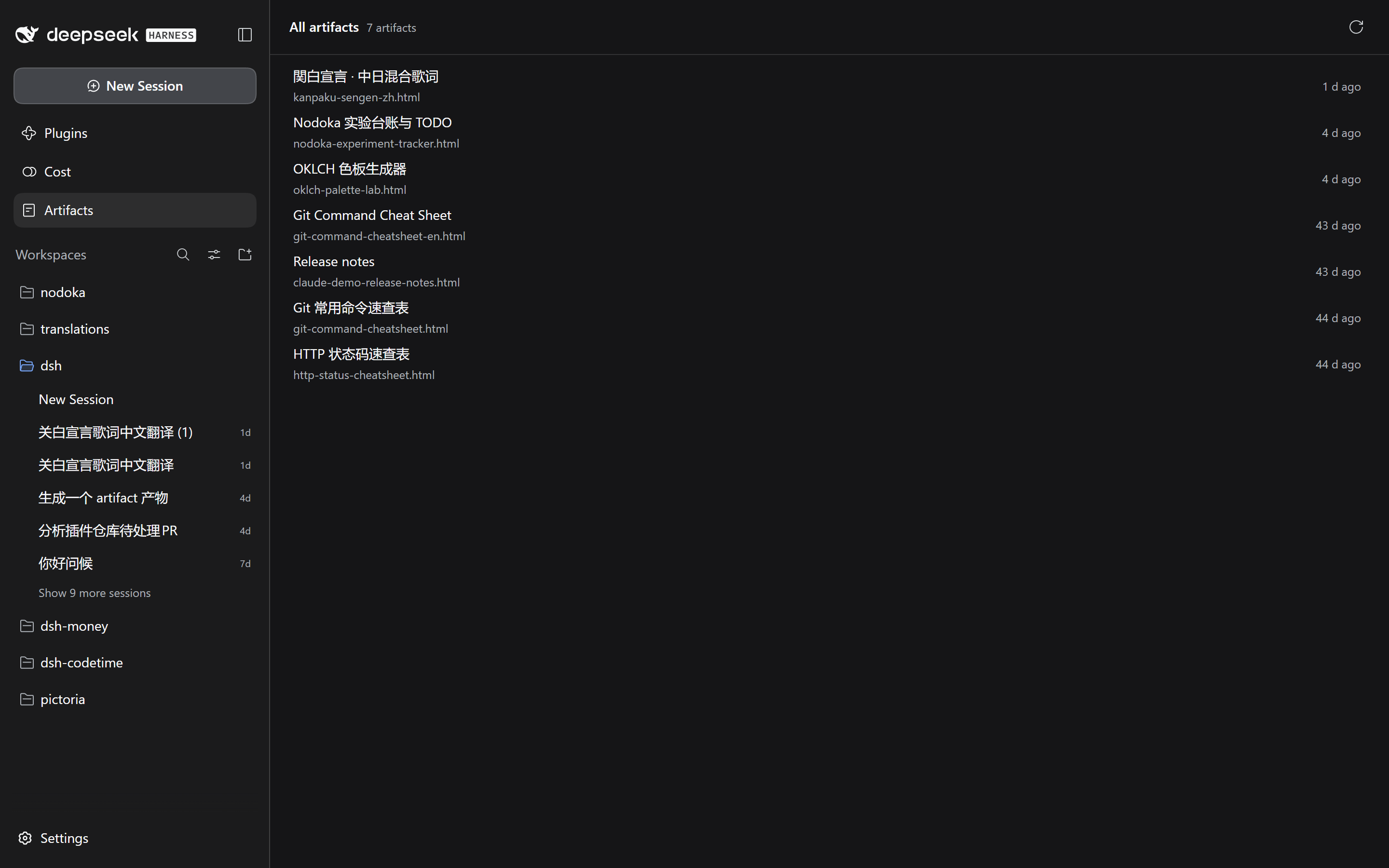
Without it, a report the agent produces either scrolls out of the chat or lands in your repository as a stray .html file nobody opens again. An artifact is stored outside the workspace, listed newest-first, and rendered in place — so it survives the conversation that produced it and follows you across projects.
Install
dsh plugin --profile web add dsh-artifact
Restart dsh web afterwards: plugins are composed at process start.
Getting started
Ask the agent for something worth keeping:
Summarize this week's benchmark results as a report.
It calls the artifact tool, and the document appears under the conversation's Artifacts tab, which lists what that session wrote. Every artifact, from any session, is in the Artifacts library opened from the sidebar icon beside Plugins (DSH 0.1.7+). Click through to read one, ‹ to go back.
Artifacts written before this version, or on a host older than DSH 0.1.7, carry no session and appear in the library only.
The agent also gets a writing-artifacts skill, so the HTML it produces is a real document — one reading column, semantic headings, tables that scroll on their own, a palette that follows your theme — rather than an app shell wrapped around three paragraphs.
The artifact tool
| Command | Arguments | What it does |
|---|---|---|
list | — | Every artifact, newest first |
read | path | One artifact's full HTML |
write | path, content | Create or replace an artifact |
delete | path | Remove an artifact |
path is relative to the store and the .html suffix is optional, so write path:"q3-report" produces q3-report.html. The store is a flat shelf: a path that escapes it, nests inside a subdirectory, or starts with a dot is rejected rather than saved somewhere the browser cannot list.
Revision history is deliberately not on this tool. The model just wrote the document and knows what it wrote; asking what changed is something a person does a day later, so the answer lives in the panel they are looking at.
Revision history
An artifact the agent rewrites keeps what it replaced. Open one that has been written more than once and a History button appears beside the title; it is absent entirely for an artifact written once, which is most of them.
The revisions sit on a timeline above the document. Pick one and it loads beside the current version rather than instead of it:
- In preview, hold Hold to see this one and the older revision takes the same place on screen — same size, same scroll position — so what changed jumps out instead of having to be hunted across two half-width columns.
- In source, the two are lined up as a diff, with long unchanged stretches folded away.
Restore this one makes an older revision current again. It needs no confirmation: the content it displaces is kept like any other overwrite, so a restore is undone by restoring.
Revisions are stored beside the artifacts, under .versions/, and the newest 20
per artifact are kept (maxVersionsPerArtifact). A rewrite that changed nothing
is not a revision. Deleting an artifact deletes its history with it.
Where artifacts live
$DSH_HOME/artifacts — by default ~/.dsh/artifacts, beside the sessions and storages the harness already keeps there.
Deliberately not the workspace: artifacts follow the person, not the project, and a repository should not fill up with generated HTML.
Rendering
Artifacts render in an iframe with allow-scripts and nothing else — no network, no same-origin. External stylesheets, CDN scripts, webfonts, fetch, localStorage and cookies are all unavailable, so an artifact inlines everything it needs. The bundled skill teaches this; you only notice it if you hand-write one.
The preview injects the app's live color tokens, so artifacts follow your theme — including a theme another plugin overrode.
Configuration
Override in your profile's cordis.patch.yml:
- id: artifact
  config:
    # Artifact directory. Omit or null for $DSH_HOME/artifacts.
    root: /absolute/path/to/artifacts
    # Maximum characters accepted in one write.
    maxArtifactChars: 400000
    # Superseded revisions kept per artifact. 0 turns history off entirely.
    maxVersionsPerArtifact: 20
    # Inject the system-prompt section about when to write an artifact.
    promptSection: true
    # Register the bundled writing-artifacts skill.
    skill: true
    # Colors handed to previewed artifacts, layered over the live theme.
    # A key without a leading `--` is read as an alias token.
    palette:
      state-business-primary: '#e0552b'
Notes
Implementation notes for other plugin authors — the slot contracts, the two-envelope wire protocol, and four traps worth knowing about — are in NOTES.md.
License
MIT
Comments
Loading…