

dsh-opencodego-usage
DiscoveredOpenCode Go subscription usage in the DeepSeek Harness composer: 5-hour, weekly and monthly windows with a click-open details panel. Zero configuration.
dsh-opencodego-usage






OpenCode Go subscription usage in the DeepSeek Harness composer. The 5-hour, weekly and monthly windows live in a compact pill in the composer tool row, inside the shared centered pill group; click it for a DSH-style details dialog with reset countdowns, colors and a manual refresh.
Zero configuration. The plugin uses the OpenCode Go provider key DSH already stores — no cookie, no workspace ID, no settings page.
Español → README.es.md
Project page → jmolo.es/proyectos/dsh-opencodego-usage
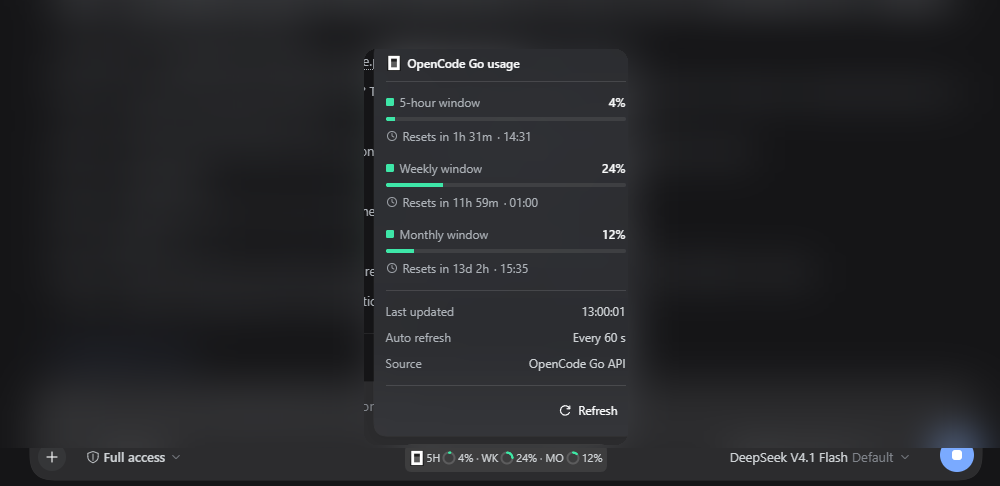
The details window: one percentage, one thin progress bar and one local reset countdown per window, followed by last update, auto-refresh cadence, source and a manual refresh. The chat background is blurred for privacy.

The compact pill: the OpenCode mark and three context-style rings separated by ·. It joins the shared centered pill group used by the other JaMoLpE88 plugins and is visible only with an OpenCode Go model; with several pills visible they sit side by side, centered, with a small gap.
What it does
- Shows the three OpenCode Go windows in one compact pill: 5-hour, weekly and monthly.
- Uses the same context-style rings as DSH's own context meter, with
·separators between windows. - Colors the ring and bar by severity: green below 50 %, amber from 50 % to 74 %, red from 75 % to 100 % (a rate-limited window is always red).
- Opens a native-looking details dialog on click: percentage, thin progress bar, reset countdown, local reset time, last update, auto-refresh cadence, data source and a Refresh button.
- Counts down every second while the dialog is open. When a reset reaches zero, it performs an automatic fresh read so the window resets without user action.
- Refreshes the percentages every 60 seconds and when the app window becomes visible again.
- Appears only while the active model belongs to the
opencode-goprovider. Other providers show nothing. - Appears in a new Session before the first prompt as well: while it records no model yet, the pill follows the model the composer displays, including the configured default.
- Needs no settings: the provider key DSH already has is the only credential.
- Joins the centered pill group shared with the other JaMoLpE88 composer plugins: with several pills visible they sit side by side, centered, with a small gap, and hide together when the row is too narrow.
What it does not do
- It does not read OpenCode console cookies or scrape HTML.
- It does not ask for a key or store one in the plugin.
- It does not keep usage history, telemetry or local storage.
- It does not add tools, commands or changes to the agent.
- It does not show anything when the active model is not from OpenCode Go.
Why there are no settings
If an OpenCode Go model is selected, the provider is configured and its key is already available to DSH. The plugin resolves that key on the Host side and reads the official usage API. If no OpenCode Go model is selected, the plugin has nothing useful to show and renders nothing.
There is no plugin config file, no key input, no threshold editor and no refresh preference. It is what it is: the subscription data the provider already knows about.
Requirements
- DSH Desktop
>= 0.2.1-rc.3, profiledesktop(tested on0.2.1-rc.3, Windows 11). - An OpenCode Go provider configured in Settings → Models, with a valid API key.
- Node 22+ (DSH ships its own runtime).
If the provider is not configured you cannot select one of its models, so the plugin never appears. That is intentional.
Install
From npm:
dsh plugin --profile desktop add @jamolpe88/dsh-opencodego-usage
From the repository:
dsh plugin --profile desktop add github:JaMoLpE88/dsh-opencodego-usage
From a local checkout, while developing:
dsh plugin --profile desktop add C:\path\to\dsh-opencodego-usage
Refresh the DSH window after installing. The pill appears in the composer of any session whose active model uses the opencode-go provider.
Usage
- Select a model from the OpenCode Go provider.
- The pill appears in the composer row, inside the shared centered pill group; other JaMoLpE88 pills sit beside it with a small gap.
- Click it to open the details dialog.
- Use Refresh for an immediate read; otherwise the plugin refreshes every 60 seconds, when the window becomes visible again, and automatically when a reset reaches zero while the dialog is open.
Click outside the dialog, press Escape, or click the pill again to close it. Reset times are shown in the browser's local time zone, and the countdowns update every second without any action.
How it works
The Host half calls the official OpenCode Go endpoint with the provider key:
GET https://opencode.ai/zen/go/v1/usage
Authorization: Bearer <OPENCODE_GO_API_KEY>
It returns the three windows:
{
  "usage": {
    "rolling": { "status": "ok", "percent": 4,  "resetsAt": "2026-10-25T13:31:58.000Z" },
    "weekly":  { "status": "ok", "percent": 24, "resetsAt": "2026-10-26T00:00:00.000Z" },
    "monthly": { "status": "ok", "percent": 12, "resetsAt": "2026-11-07T14:35:16.000Z" }
  }
}
- The key is resolved from DSH's credential service (
OPENCODE_GO_API_KEY) on each read;OPENCODE_GO_API_KEYin the process environment is the fallback. - Results are cached for 55 seconds so the 60-second poll and multiple windows share one upstream request.
- Upstream failures keep the last known percentages and mark them stale instead of blanking the pill.
- The browser half reads two same-origin routes:
/api/opencodego-usageand/api/opencodego-usage/refresh. The key never reaches the browser. - Visibility uses the live
modelSelectionprojection. Switching to another provider hides the pill immediately; switching back shows it again. - The Client formats reset timestamps with the browser's locale and time zone, re-renders the countdown every second while the dialog is open, and forces a fresh read when a countdown reaches zero (guarded so one reset cannot cause a refresh loop).
Diagnostics
With DSH running, on the same URL as the interface (the port changes on each start):
curl http://127.0.0.1:59863/api/opencodego-usage
It returns percentages, reset timestamps, an error code and a freshness flag — never the key:
{
  "updatedAt": 1793016001120,
  "windows": {
    "rolling": { "percent": 4, "resetsAt": 1793025060000, "status": "ok" },
    "weekly": { "percent": 24, "resetsAt": 1793059200000, "status": "ok" },
    "monthly": { "percent": 12, "resetsAt": 1794062116000, "status": "ok" }
  },
  "error": null,
  "stale": false
}
Use /api/opencodego-usage/refresh to skip the 55-second cache and force a read. When error is not null, stale tells you whether the percentages are the last good values or there are no values at all.
Compatibility
| DSH | >= 0.2.1-rc.3 (the only version tested by the author) |
| Node | >= 22 |
| OS | Windows 11 (tested); macOS and Linux untested |
| Profile | desktop |
| Provider | OpenCode Go configured in Settings → Models |
| Pill group | Shared with the other JaMoLpE88 composer pills (centered, side by side) |
| Catalog | listed on dsh-plugin.org |
| Project page | jmolo.es/proyectos/dsh-opencodego-usage |
Validation status: tested on Windows 11 with DSH Desktop 0.2.1-rc.3 (2026-10-25). The pill appears only with an OpenCode Go model, the details dialog opens, local reset times and countdowns update, the severity colors follow the thresholds, and manual refresh works. The automatic refresh at a reset is implemented with a one-shot guard; it is covered by the countdown path but was not observed during a live reset in this validation.
Not validated: macOS, Linux, other DSH versions, and the web profile.
Limits
- Windows 11 is the only tested platform. macOS and Linux are not validated.
- Shares the centered pill group. When the composer cannot fit every visible pill, the group hides together instead of overlapping the model selector.
- Only with OpenCode Go. Without that provider there is no useful data, so the plugin renders nothing.
- No settings. No threshold editor, refresh interval, show/hide preference or key input.
- No history or charts. Only the current windows and their resets.
- Depends on the OpenCode endpoint. If its shape changes, unrecognized windows are dropped and the pill reports a
parseerror. - No agent changes. No tools, commands or model providers are added.
Privacy
- No cookies, no browser session scraping, no workspace ID.
- The API key never leaves the Host process: the browser receives only percentages and reset timestamps.
- No configuration file, no local storage, no telemetry, no third-party requests beyond the official usage endpoint.
- The Host does not log the key or include it in error messages.
- The screenshots above were taken from a real session with the chat background blurred for privacy.
See SECURITY.md for the short policy.
Troubleshooting
The pill does not appear. Check that the active model belongs to the OpenCode Go provider. The plugin intentionally renders nothing for other providers.
The pill shows a red dot and an error. Open the dialog for the code and hint:
| Code | Meaning |
|---|---|
missing-key | DSH has no OPENCODE_GO_API_KEY for this profile. Configure the OpenCode Go provider in Settings → Models. |
invalid-key | The provider key was rejected (401). Re-check or replace it in Settings → Models. |
no-subscription | The key has no active OpenCode Go subscription (403). |
rate-limited | The usage API itself is rate limiting; try again shortly. |
timeout / network | The Host could not reach opencode.ai; retry with Refresh. |
parse | The response did not contain recognizable windows. |
The plugin has no settings of its own: provider problems are fixed in DSH's model settings.
Development
npm test        # node --test
npm run check   # syntax check for the Host and Client files
The tests cover the API parser, HTTP error mapping, the cache, the missing-key path and the stale-data fallback. The Client half is a plain client.js bundle (no build step) and is verified in the running Harness.
Local install:
dsh plugin --profile desktop add C:\path\to\dsh-opencodego-usage
Third-party marks
OpenCode and the OpenCode logo are trademarks of their respective owner. The logo is used only to identify the OpenCode Go service; it is not covered by the MIT license that applies to the source code. See NOTICE.
License
MIT © 2026 JaMoLpE88
Comments
Loading…
Similar plugins
by ColorlessBoy
Shows the remaining OpenCode Go quota (5-hour, weekly, monthly) in the DeepSeek Harness Web composer dock.
★ 0
MIT
JavaScript
Sep 26, 2026
dsh plugin --profile web add dsh-opencode-usageby v587d
A DeepSeek Harness (dsh) bundle that shows OpenCode Go subscription usage in the Web GUI's composer dock — the same seat as the built-in conversation stats line.
★ 11
↓ 22/wk
MIT
TypeScript
Aug 25, 2026
dsh plugin --profile web add dsh-ocgo-usageDeepSeek Harness插件,一个极简的浮窗同时显示 DeepSeek 官方余额与 OpenCode Go 的 5h/w/m 用量
★ 1
MIT
JavaScript
dsh plugin --profile web add dsh-opencode-go-usageby xueayi
OpenCode Go plan usage monitor for DeepSeek Harness: real-time 5h-rolling / weekly / monthly quota in a floating web dock
★ 4
↓ 25/wk
MIT
TypeScript
Aug 24, 2026
dsh plugin --profile web add @xueayi/dsh-opencode-go-usageby moondrop12138
OpenCode Go subscription usage page for the DSH Web UI: official 5h / weekly / monthly used-percent windows, reset countdowns and a local sampling trail.
★ 0
JavaScript
Oct 21, 2026
dsh plugin --profile web add dsh-opencode-go-usageby jiekesu967
Shows OpenCode Go subscription usage (rolling, weekly and monthly used and remaining percentage with reset times) in a floating panel anchored to the bottom-left of the session window.
★ 3
MIT
JavaScript
Sep 30, 2026
dsh plugin --profile web add dsh-plugin-opencode-usage