

dsh-connect
DiscoveredBridge DeepSeek Harness (DSH) agents to Feishu/Lark & DingTalk — chat, stream replies, and arrange work from your messaging app.
dsh-connect
English | 中文
Connect DeepSeek Harness (DSH) agents to chat platforms — Feishu / Lark, Telegram and DingTalk, in one plugin. Send tasks from your messaging app, watch the agent execute with live streaming output, keep multi-turn context, and get result summaries pushed back when a task finishes.
Features
- Bidirectional messaging: Feishu messages → DSH agent (
agent.followup); agent replies stream back to Feishu as typewriter-style cards. - Multi-turn context: each Feishu chat (DM or group) is bound to a DSH
Session, automaticallyresumed after a process restart. - Work arrangement: pushes a result-summary card when a task ends;
ctx.connect.notify()lets goals/jobs hooks push progress proactively. - Task-end stats: when a task finishes, a card reports the model used, input/output/cached tokens, step count, duration and context usage, with a
/compactsuggestion when the context is ≥ 75% full. - Notification levels:
full(stream everything) /important(key milestones) /result(answer only, the default — cards stay short) — switchable per chat via the settings menu or/notify, persisted across restarts. - Instant feedback + proactive progress: every task is acknowledged the moment it is received (“✅ 已收到,开始处理”, with the queued-message count when busy), key milestones (thinking, tool calls with step counters, questions, permissions) react live, and a configurable watchdog sends a standalone status card when a turn has been silent for too long (default 5 min, per-chat adjustable via
/progressor/settings). - First-time welcome: the first message in each chat triggers a one-time welcome card introducing the bot's capabilities and common commands.
- Actionable errors: failed tasks show a suggestion matched to the error — permission / network / model-quota problems each get their own fix hint instead of a bare error string.
- Safe destructive actions:
/clear,/newand the menu's “新建对话” ask for confirmation first, so history is never wiped by accident. - User choices & permission approvals in chat: when the agent asks a question (
ask_user_question) or requests a permission approval (sandbox escalation etc.), an interactive card with buttons appears right in Feishu — answer by tapping or by replying with text (number or option label); no need to open the Web GUI. - Security: groups require @mention by default; user/chat allowlists; per-channel credentials via environment variables, the config file, or the DSH credential store (written from the settings pane, never echoed back in the clear).
- Interactive menus:
/menuoffers hierarchical point-and-click navigation (workdir / chats / settings / plugins / compact, …) — the same card updates in place, supports back/exit, and stays usable across consecutive actions. - Smart image & file handling: images sent to the bot are downloaded automatically; if the main model supports vision it sees them directly, otherwise a vision-model sub-task describes them and the description is injected — so a text-only main model never stalls on images. Attached files/audio/video are also downloaded into the workdir.
- Web mirror: each chat can mirror its DSH session into the DSH Web GUI (
/mirror, or automatic viaautoMirror). The mirror lock is enforced only on the Feishu side (lockOwner): the Web GUI reads/writes the DSH session directly and never consults the lock, so mutual exclusion is one-sided (not fixable at the repository level — documented as-is)./new,/clearor switching sessions resets the mirror target;autoMirrorrebuilds it for new sessions. - Scheduled reminders:
/remind 10分钟 喝水(or2h/14:30) persists a chat-level reminder that fires without waking the agent — no model tokens spent — and survives process restarts./schedulelists these together with the agent's own in-session reminders. - Send files back to the chat:
/send <path>delivers a workspace file — images inline, other files as attachments (feishu / telegram). - Admin broadcast:
/broadcast <text>pushes a message to every bound chat across all channels (admins listed inallowUsers). - Thread isolation (feishu, optional):
threadIsolation: truekeeps each group thread in its own DSH session. - Local commands (no model tokens):
/status/task/chat/dir/workspace/workspaces/plugins/compact/history/export/goals/schedule/remind/send/broadcast/model/notify/progress/mirror/unlock/renew/new/clear/stop/settings/help. - All-in-one, multi-platform:
dsh-connectis the single plugin — the coreconnectservice plus every channel adapter (Feishu/Lark, Telegram, DingTalk) and the web-settings stack, all behind onechannelsselector. Enable exactly the channels you use.
Repository layout
packages/
  connect/           dsh-connect all-in-one plugin: core connect service + channel adapters + web-settings stack
    src/             core: agent runner, adapter registry/routing, binding store, commands
    src/channels/    per-channel adapters: feishu (Feishu long connection, normalization, streaming replies), telegram (Bot API long-polling, streaming edits), dingtalk (stream-mode bidirectional + webhook push), web (mirror monitor)
    src/settings/    web-settings stack: host RPC, credential store, secret-disclosure policy
    client/          web-settings frontend plugin, plus its dependency-free modules (locale.mjs, panel-state.mjs)
    docs/images/     settings-pane screenshots used by the READMEs
    test/            node:test suites
docs/
  QUICKSTART.md          step-by-step run guide (DSH side + platform side)
  config-reference.md    every plugin option, annotated
  feishu-setup.md        Feishu Open Platform configuration manual
  telegram-setup.md      Telegram BotFather setup manual
  dingtalk-setup.md      DingTalk group custom-robot setup manual
  PUBLISHING.md          naming + GitHub/npm discoverability guide
  all-in-one-and-web-settings.md
                         the consolidation + settings-stack design notes
  archive/               superseded per-package docs, kept for history
examples/
  profile-cordis.patch.yml
Every docs/*.md that a user needs has a .zh.md sibling.
Channel matrix
| Channel | Adapter (in dsh-connect) | Direction | Transport | Notes |
|---|---|---|---|---|
| Feishu / Lark | feishu channel | bidirectional | WebSocket long connection | full features (streaming, menus, images) |
| Telegram | telegram channel | bidirectional | Bot API long polling | full features (streaming edits, inline keyboards) |
| DingTalk | dingtalk channel | bidirectional (stream) / one-way push | stream gateway (STOMP over WebSocket) / group-robot webhook | stream mode: @-mention triggers the agent, replies & numbered-text menus; webhook mode: push service (sendMarkdown / sendText / @mentions) |
| Web mirror | web channel | outbound no-op | monitor | tracks mirror sessions for DSH Web GUI (no synthesized messages) |
All channels share the same dsh-connect core: commands, /menu, notification levels, the proactive progress watchdog, interactive choices & approvals, and per-chat settings work identically on every channel. Enable the channels you want via the channels selector; per-channel secrets can live in the DSH credential store.
The settings pane
dsh-connect adds its own page under Settings → dsh-connect, with a two-level navigation: a
primary strip (General first, Bot channels second) over the channel view's own tab strip of
collapsible cards. Each card's title row is a button, low-frequency fields hide behind a second-level
Advanced fold, and the save row is pinned to the bottom of the scroll area. Both strips are
pinned — position: sticky at the top of the scroll area, so content scrolls under them rather than
carrying them away. One setting per row: the field grid is a single column, so the label/control
pairs never reflow into two or three columns as the pane widens.
The pane opens on Bot channels, so the one-click Feishu button is zero clicks away; it sits at
the very top of the Feishu card body, above App ID / App Secret. General is the ten values that
used to be reachable only through chat commands — reply language, notification level, progress
watchdog, working directory and extra workspaces, the allow-lists, the agent preset, mirror and
heartbeat. They are editable here, but unlike channel settings they are read once when the plugin
loads: every field says so, and a change takes effect after dsh restarts. A key that
dsh.shared.config.json actually overrides carries a note saying the pane cannot win; the current
model is shown read-only, because DSH owns it and switching it belongs inside DSH.
| Channels & credentials | General |
|---|---|
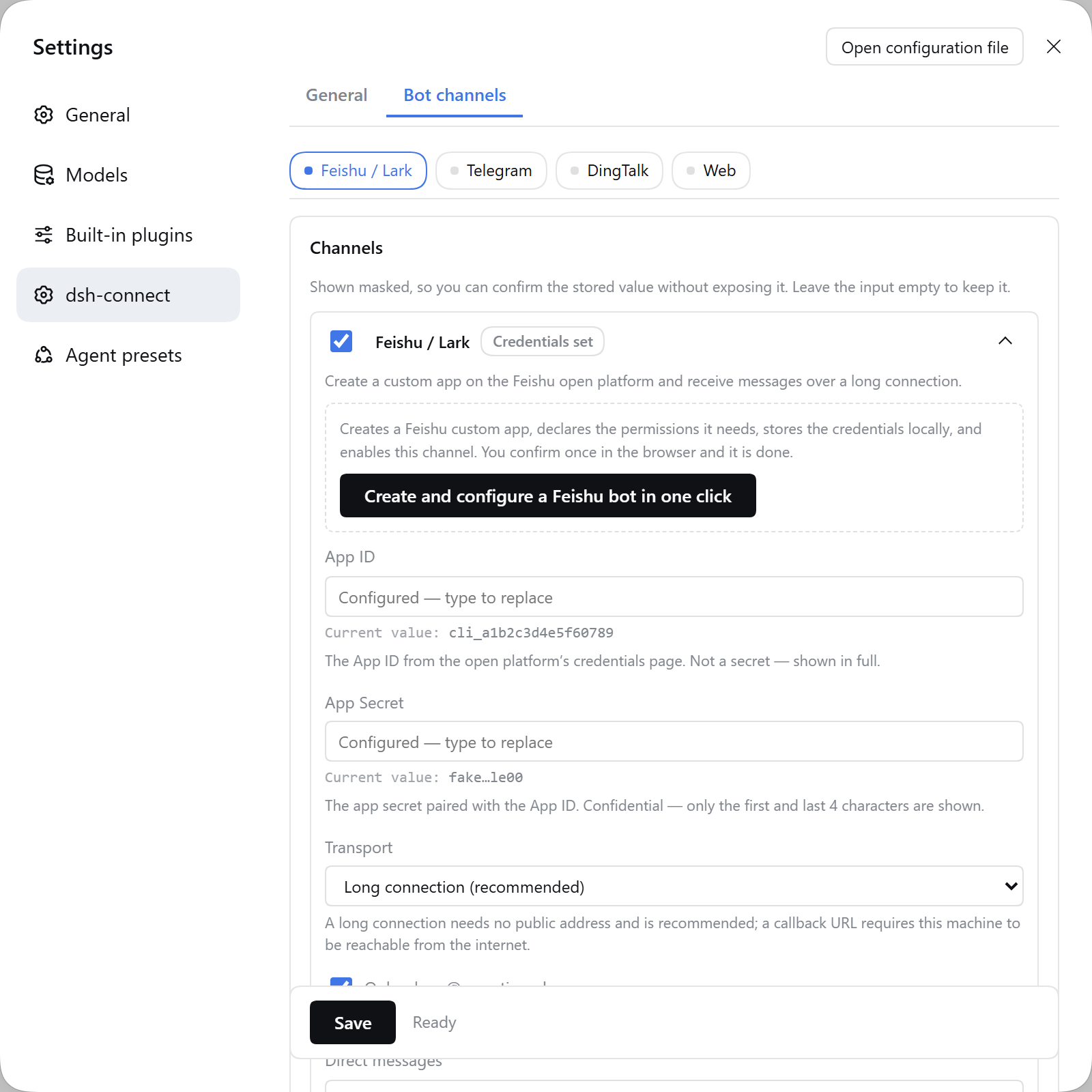 | 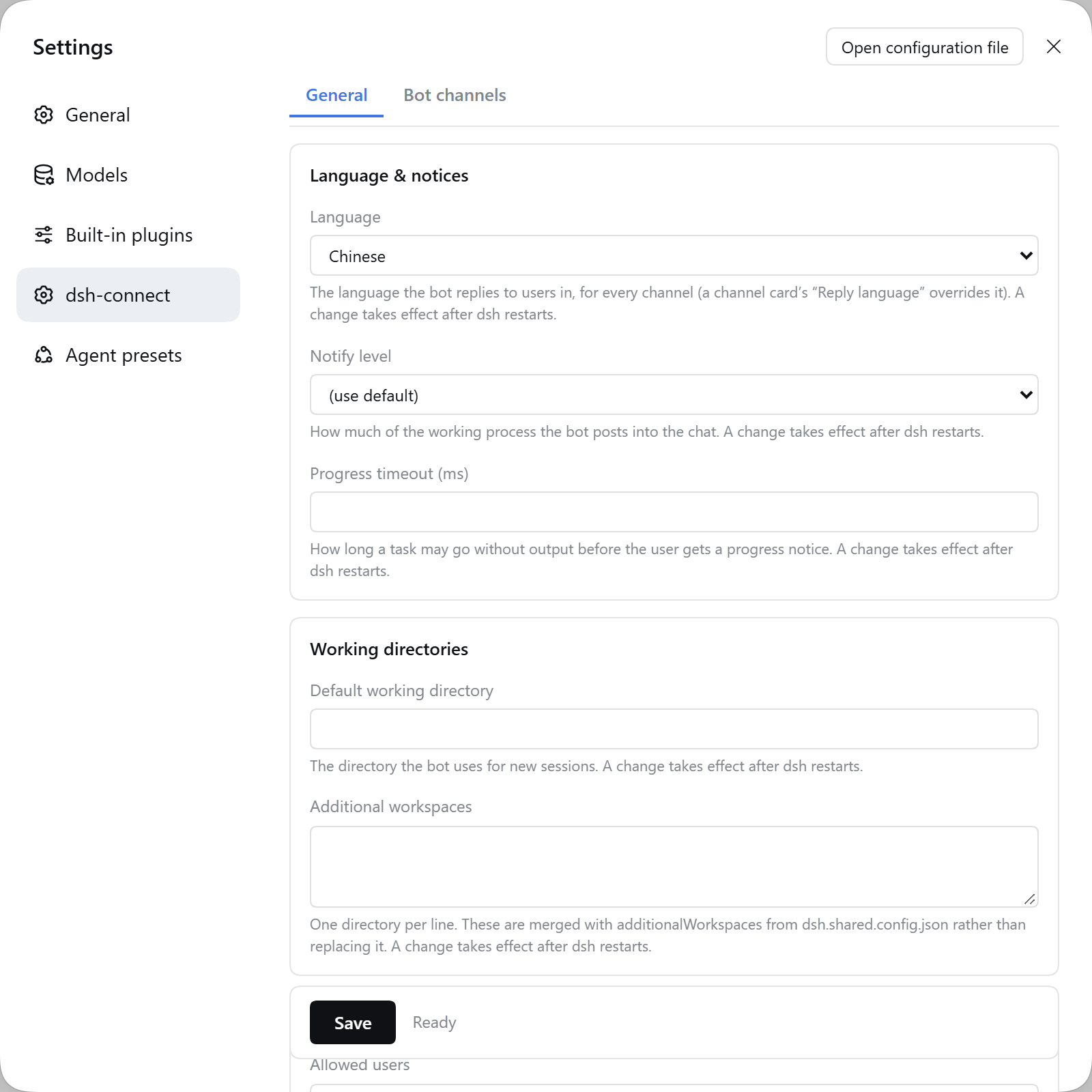 |
| General: the read-only model row | Advanced fold open |
|---|---|
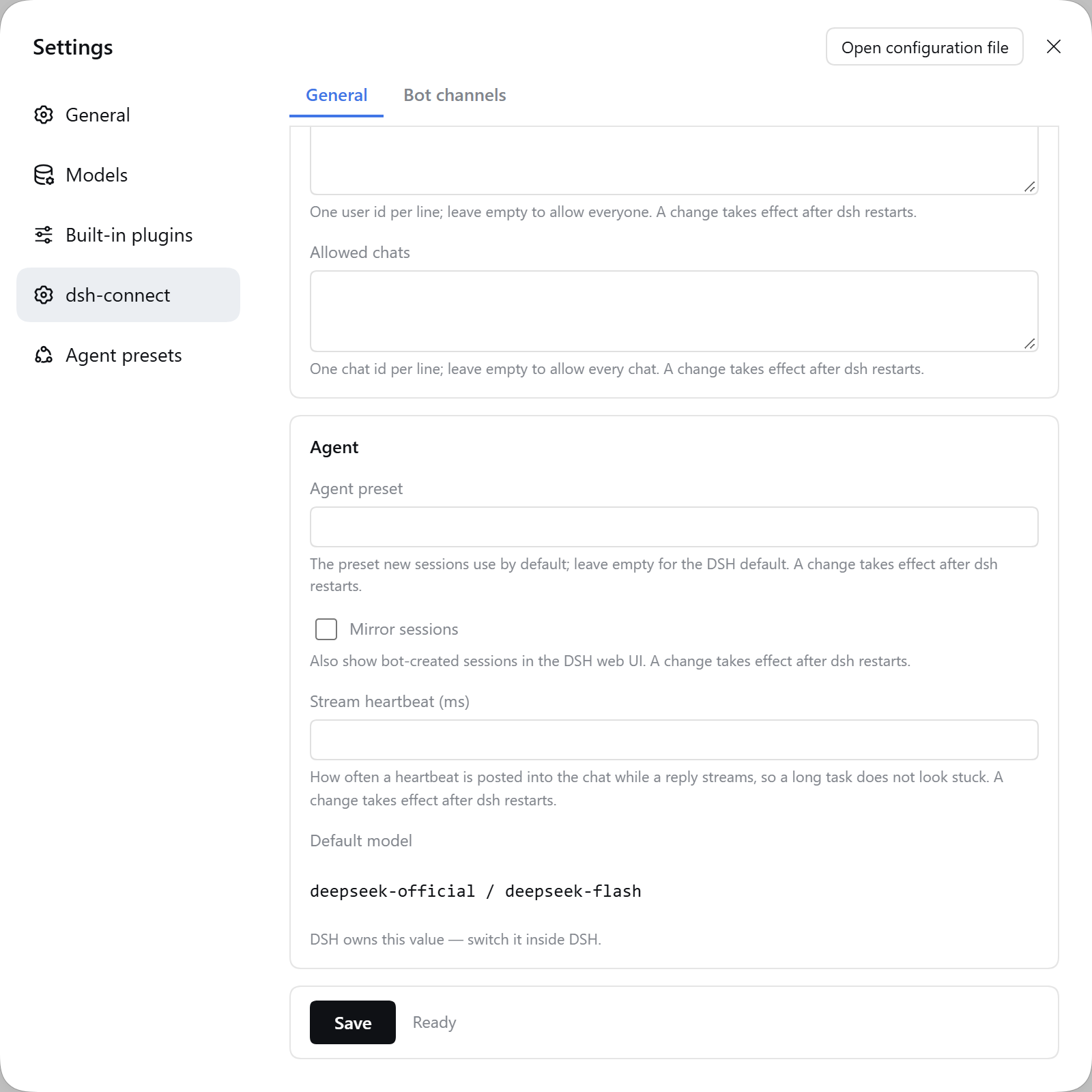 | 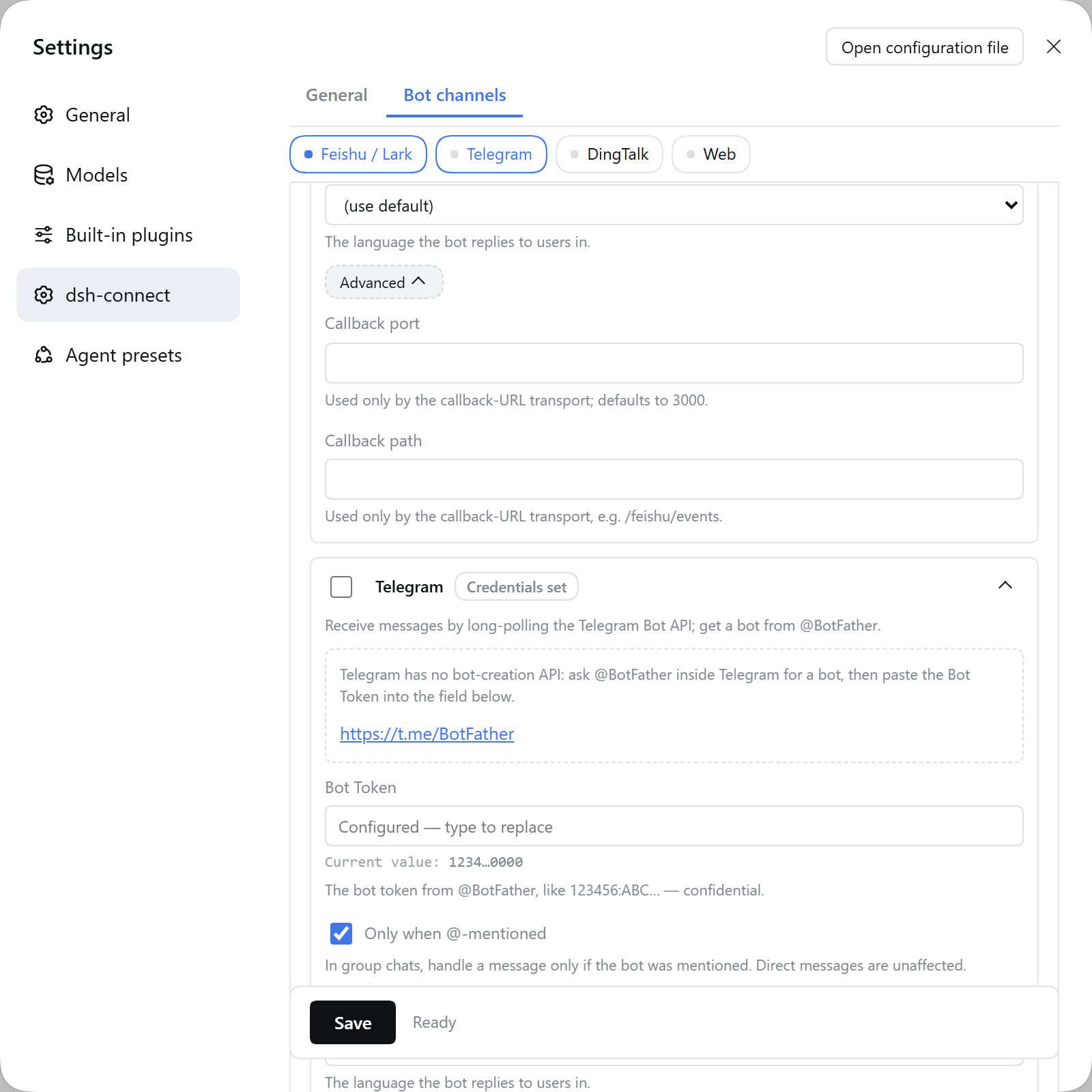 |
| Feishu card: credentials, one-click button above | Telegram card: official entry link |
|---|---|
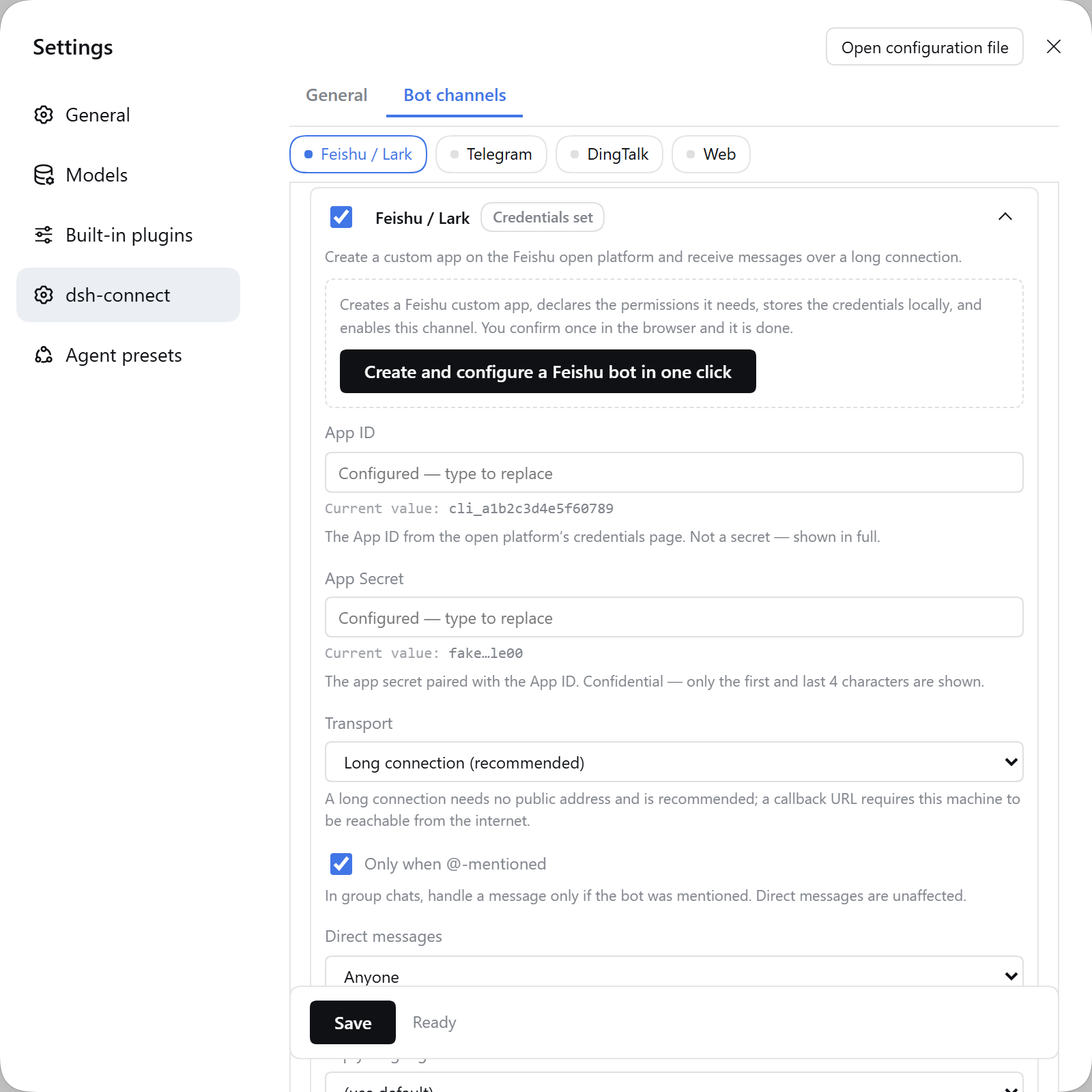 | 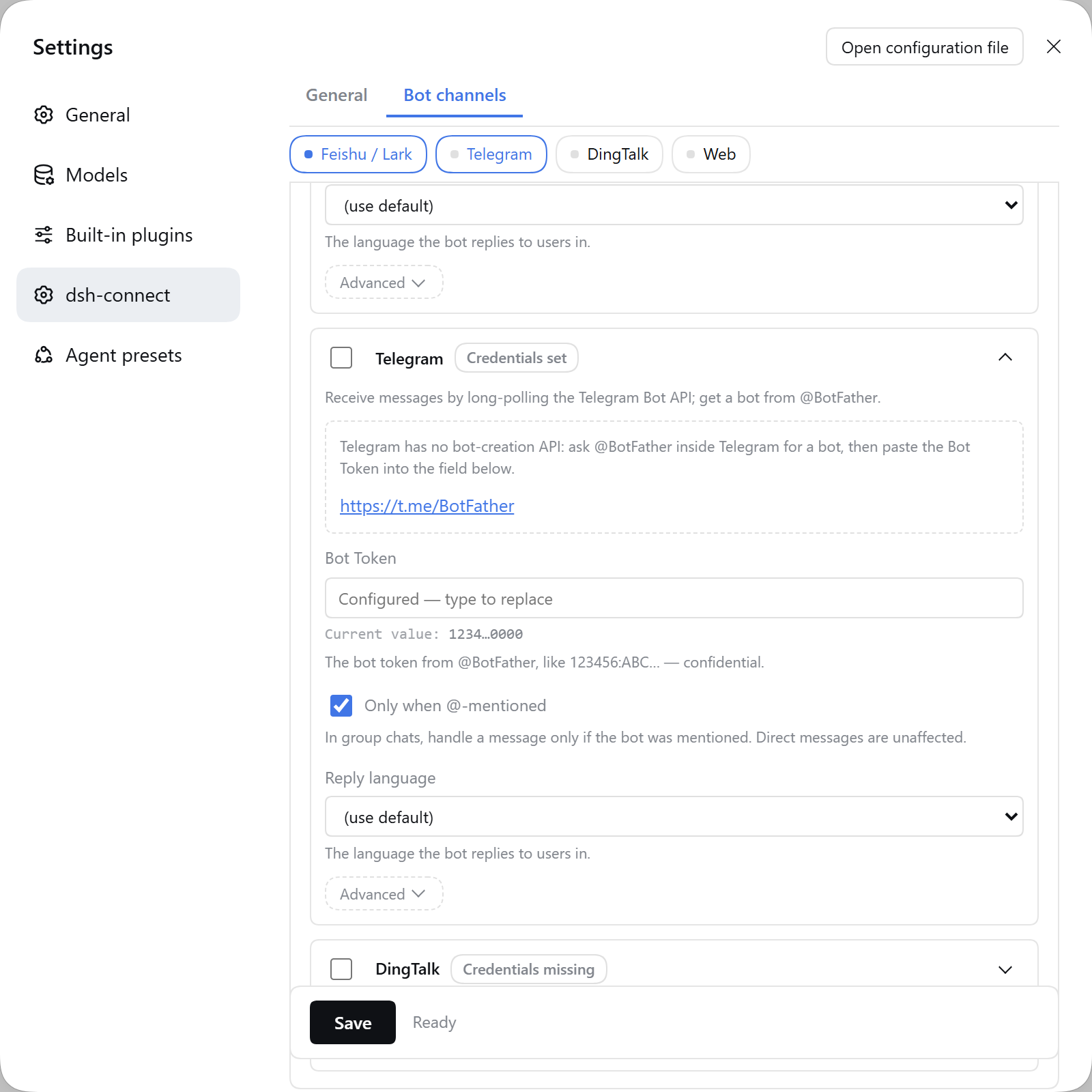 |
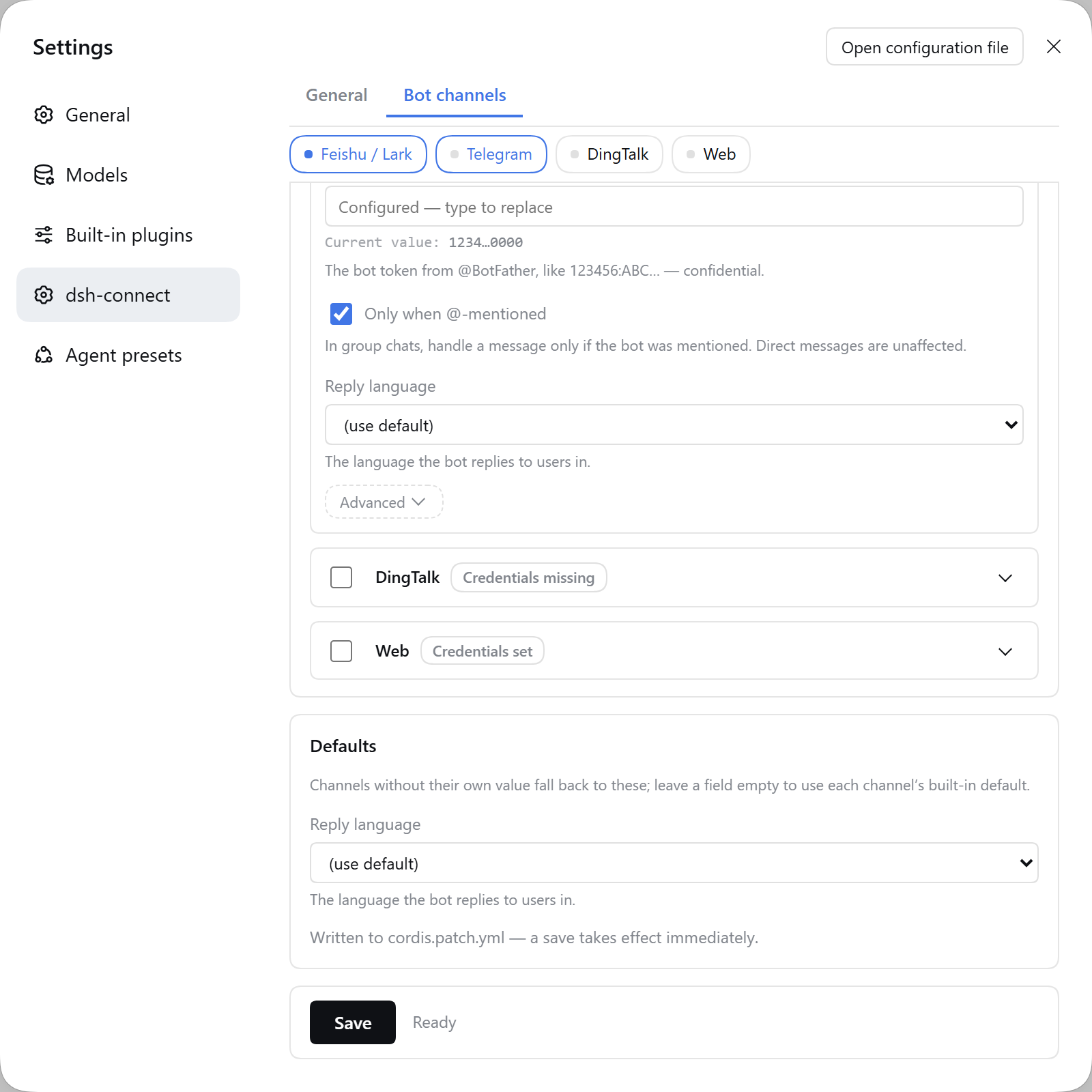
中文截图:概览 · 通用设置 · 通用设置·模型 · 高级 · 公共默认 · 飞书凭据 · 官方入口.


The shots come from a throwaway profile whose credentials are all placeholders. There is no real secret in frame — there cannot be: the host masks values before they reach the browser (see seeing and masking stored values).
Cards default to the channels you have enabled (or the first one, if none). Clicking a tab expands that card and scrolls it into view; it does not collapse the others — several open at once is a valid state. Collapsing unmounts the card body rather than hiding it, which is safe because a secret you typed but have not saved lives in the pane's own state, not in the card. Ticking a channel's enable box also expands it.
The Feishu card carries a Create and configure a Feishu bot in one click button (1.0.0). It runs
Feishu's official OAuth 2.0 device-authorization flow from the host: the button hands you a link to
open in a browser, the app is created there with permissions and the message-receive event preset,
the credentials go into the DSH credential store, and feishu is added to channels with
transport: websocket so the bot is reachable without a public URL. Telegram and DingTalk have no
equivalent API, so their cards show a link to the official creation page
(@BotFather / open-dev.dingtalk.com) and
an instruction to paste what it returns into the fields below — nothing about those two is
automated, and the pane does not pretend otherwise.
The result is reported as a list of separate facts, never a single "done": app created (with its
appId) / credentials stored / channel enabled / whether the running channels reloaded in place /
the event-subscription outcome / what is left for you to finish in the vendor console. Credentials
stored and channel-not-reloaded are always two lines, because a saved credential that the live
adapter has not picked up is a real state you need to know about — restart dsh to apply it. The
subscription patch is best-effort by design: the SDK notes it may apply only to apps created in the
developer console, and most configuration changes there need a published version before they take
effect. dsh-connect never publishes on your behalf and never claims the subscription is live.
Where settings live
The pane edits this plugin's entry in the active profile patch — the same
~/.dsh/profiles/<profile>/cordis.patch.yml you edit by hand — through DSH's first-party settings
service. That service writes atomically under a file lock and preserves your comments, and the loader
hot-reloads the result. Channel settings therefore take effect immediately; the general settings do
not — workDir, language, notifyLevel, progressTimeoutMs, workspaces, the two allowlists,
agentPreset and streamHeartbeatMs are read when the plugin loads, so they need a restart of dsh.
Every one of them says so on its own row in the pane. Values resolve in three layers, most
specific last:
- the plugin's built-in schema defaults;
- the config the plugin is composed with (its inherited entry);
- this plugin's entry in the active profile patch — both what you hand-write there and what the pane saves.
A save is projected onto the fields the pane declares, so an undeclared key — a credential,
settingsStatePath, something you added yourself — cannot reach the document even if a caller sends
it, and undeclared keys you hand-wrote in that entry are preserved across a pane save. The converse is
load-bearing too: the host resets a declared field an update omits to its inherited value, so a save
always writes the complete declared section.
Secrets never go into the profile patch. That is a plain document users are encouraged to paste
into issues; credentials live in the DSH credential store (ctx.credentials), which is also where
one-click onboarding and FEISHU_*-style environment variables write.
The legacy /dsh-connect HTTP RPC is kept for pane compatibility; it reads and writes the same
namespace and mirrors non-secret config to settingsStatePath for older panes.
Upgrading from 0.9.0 or 0.9.1? DSH 0.2 keeps per-plugin settings in the profile patch and does not know the old
dsh-connect:section of$DSH_HOME/settings.yaml, so the host's own migration drops it with a warning. 0.9.2 therefore imports that section (orsettings.yaml.imported, or the fallbackdsh-connect-settings.json) once on the first boot after the upgrade, projecting it onto the pane's fields and merging it over the current values — and it never deletes or renames anything. Nothing is lost if you never used the pane. Full detail in the package README and the 0.9.2 changelog entry.
Seeing and masking stored values
Every saved secret field has a read-only "current value" line under it (or "not set"), so you can
confirm what you configured without re-typing it. Masking happens host-side, from a single shared
policy table (src/settings/secret-disclosure.ts) that the host masks by and the pane renders input
types from — so the two cannot disagree.
| Field | How it is shown |
|---|---|
appId, clientId | In full. These are identifiers, not passphrases: they go out with every API call and are visible in the vendor console. Hiding them protects nothing. |
appSecret, clientSecret, botToken, secret | Head and tail only, e.g. a1b2…z9y8. Values too short for that to mean anything degrade to a fixed-length ••••••. |
webhookUrl (DingTalk) | URL-aware. Scheme, host, path and parameter names stay; only the token in the middle is masked — DingTalk puts it in the query string, and masking the whole URL (https…bcde) would let you confirm nothing. |
| anything else | Masked the most conservative way. |
Two properties hold regardless:
- A usable secret never crosses the wire. Values are masked before they leave the host, so a browser tab — and a screenshot of it — never holds a working credential.
- A mask can never be written back. Previews are text beside the input, not its
value. Inputs stay empty, and empty means "leave the stored value alone", so saving config alone writes no credentials.
The pane's own strings all come from client/locale.mjs, which ships both zh and en; a test
asserts the two key sets are identical, because the host resolves a missing key by silently falling
back to the other language.
Credential groups
A channel counts as configured when any one of its credential groups is fully satisfied —
all-of within a group, any-of across groups. A channel with no groups (web) is satisfied by
definition and never shows a warning badge.
Groups exist because a channel can have more than one mutually exclusive way to authenticate, and demanding all of them would report working bots as unconfigured:
| Channel | Groups |
|---|---|
feishu | app id + app secret |
telegram | bot token |
dingtalk | webhook URL + signing secret — or — stream-mode client id + client secret |
web | none |
So a DingTalk bot pushing via webhook only (no stream credentials) is correctly reported as configured, and so is a stream-only one.
Quick start
Install
The package is published to npm automatically on every GitHub Release — .github/workflows/publish.yml runs pnpm build + typecheck first, then publishes dsh-connect. Install it once — one plugin, one config block, and enable only the channels you use:
dsh plugin --profile web add dsh-connect
(Installing the single package pulls in the core connect service, every channel adapter, and the web-settings stack. Enable the channels you need via the channels selector.)
For local development (before the package is published), load the built package by absolute path as shown in docs/QUICKSTART.md.
When the install resolves to an older version
Two pnpm 12 behaviours bite a fresh install, and both look like a lie: the Desktop plugin list offers the newest version, yet what lands on disk is the one before it — or the install ends in ERR_PNPM_IGNORED_BUILDS while still leaving the dependency in package.json.
- pnpm's built-in 24-hour release cooldown.
minimumReleaseAgedefaults to 1440 minutes and is non-strict: a bareadd dsh-connectresolves to the newest release older than 24 hours. The version query the Desktop shows you is a read, not an install, so it is not subject to the policy — for one day after every publish the two legitimately disagree. - An undecided build script.
protobufjs, reached through@larksuiteoapi/node-sdk, has a build script pnpm 12 will not run until you decide about it. It reports that after writing the dependency, which is why the failure looks like a half-finished install.
Append this to the profile's pnpm-workspace.yaml ($DSH_HOME/profiles/web/pnpm-workspace.yaml; on Windows the Desktop app's profile is %USERPROFILE%\.dsh\profiles\desktop\pnpm-workspace.yaml), then install again:
minimumReleaseAgeExclude:
  - dsh-connect
allowBuilds:
  protobufjs: false
minimumReleaseAgeExclude exempts only this package; prefer it to minimumReleaseAge: 0, which turns the 24-hour supply-chain protection off for everything in the profile. allowBuilds is the spelling pnpm 12 accepts — onlyBuiltDependencies and ignoredBuiltDependencies no longer work and still fail with the same error.
The exemption cannot ship inside dsh-connect: a package cannot grant its own transitive build allowance from its own manifest, so the consuming profile is the only place it can live.
The two remedies are not interchangeable. Naming the version explicitly — dsh plugin --profile web add dsh-connect@<version> — does defeat the cooldown on its own, but it does nothing for the build script: that install still ends in ERR_PNPM_IGNORED_BUILDS, because allowBuilds is the only thing that decides protobufjs. If you would rather not edit the profile at all, the pin gets you the right version; it does not get you a clean exit.
Two more things worth knowing:
- Uninstall before reinstalling. DSH rejects a second
addof an installed plugin withalready-installed, so remove it first. - Restart
dsh(or the Desktop app) afterwards: host plugins load at process start.
Configure
Append to the profile's cordis.patch.yml ($DSH_HOME/profiles/web/cordis.patch.yml). The plugin registers itself automatically via its bundle manifest, so this file only overrides its config — do not insert it again (a duplicate id makes dsh refuse to boot with duplicate loader entry id):
- id: connect
  name: dsh-connect
  config:
    channels: [feishu, telegram, dingtalk]   # which channels to enable (default: all built-in)
    channelDefaults:
      language: zh                            # common keys inherited by every channel
    feishu:
      appId: cli_xxxx
      appSecret: cli_secret_xxxx
      transport: websocket
      requireMention: true
      dmMode: open
    telegram:
      botToken: "123456:ABC-YourBotToken"     # from @BotFather
      requireMention: true
    dingtalk:
      webhookUrl: "https://oapi.dingtalk.com/robot/send?access_token=xxx"
      # stream: { clientId: xxx, clientSecret: xxx }   # enable bidirectional stream mode
Credentials (
appSecret/botToken/clientSecret) can instead live in the DSH credential store and be written from the Web settings pane — see docs/config-reference.md.
Run
Restart dsh web (Host plugins require a process restart to load), complete the platform-side subscription per docs/feishu-setup.md, docs/telegram-setup.md or docs/dingtalk-setup.md, then chat with the bot.
Detailed step-by-step instructions (including Feishu-side setup and verification) are in docs/QUICKSTART.md.
Command list
| Command | Description |
|---|---|
/menu | Open the main menu (hierarchical point-and-click; the same card updates in place; back / exit supported) |
/settings (/set) | Settings: switch model / reasoning effort / notification level / config overview |
/model | Show the current model, tap to switch |
/notify (/notice) | Choose the notification level: full / important / result (takes effect immediately) |
/progress | Choose how long a silent task may run before a proactive progress card is sent (default 5 min; 关闭 disables) |
/mirror [--timeout N] | Create (or show) the Web mirror session for this chat; optional lock timeout in minutes |
/unlock | Manually release the session lock (Feishu/Web mirror scenario only) |
/renew (/renew-lock) | Renew the current session lock timeout |
/status | Session status, model, workdir, queue length, context tokens, session ID |
/task (/tasks /todo) | Show the current task list |
/schedule (/reminders) | Show scheduled reminders for this session |
/chat (/session /sessions) | List chats; tap to switch or create a new one |
/dir (/cd /pwd) | Switch workdir (tap to pick, or /dir <absolute path>) |
/workspace <absolute path> | Create a new workspace |
/workspaces | List all workspaces |
/plugins | List installed plugins |
/compact | Compact the current session context |
/history [count] | Show recent session messages |
/export [markdown] | Export conversation history as Markdown |
/goals | Show current goals |
/new (/reset) | Start a new conversation (asks for confirmation) |
/clear | Clear the current conversation (asks for confirmation) |
/stop (/cancel) | Stop the current task |
/help | List all commands |
All
/commands are executed locally by the plugin and consume no model tokens; any other text is sent to the DSH agent as a task.
Configuration
dsh-connect (core)
| Key | Default | Description |
|---|---|---|
agentPreset | unset = roster default | Agent preset used for each bound session (e.g. standard). Resolution degrades rather than throwing: the configured id is tried, then standard (or the roster's first mountable row), and if neither composes the agent is built without a preset so the turn still runs. A stale id is logged, not fatal. |
workDir | first DSH workspace | Agent working directory (absolute path, can be set explicitly) |
workspaces | [] | Workdirs listed in the /dir interactive picker |
visionModel | auto-detected | Vision model {provider, model} for the image sub-task; when unset, the first image-capable model is auto-detected |
language | zh | User-facing message language: zh (default) or en |
allowUsers | [] | Sender allowlist (empty = allow all) |
allowChats | [] | Chat allowlist (empty = allow all) |
stateDir | ./.dsh-connect | Directory for the binding route bindings.json |
autoMirror | true | Automatically create a Web mirror session for every new chat |
streamHeartbeatMs | 60000 | Streaming-card liveness heartbeat (ms); 0 disables it |
notifyLevel | result | Default notification level: full (stream everything) / important (key milestones) / result (answer only, the default); per-chat override via /settings or /notify |
progressTimeoutMs | 300000 | Proactive progress-notice interval (ms): when a turn has sent nothing for this long, a standalone status card is pushed; 0 disables; per-chat override via /settings or /progress |
Feishu channel (feishu)
| Key | Default | Description |
|---|---|---|
appId / appSecret | env FEISHU_APP_ID / FEISHU_APP_SECRET, or one-click onboarding | App credentials (when unset, onboarding mode starts and creates the app via QR scan) |
transport | websocket | websocket (default, long connection); webhook needs a public HTTPS callback URL — the adapter hosts its own HTTP service and auto-answers the url_verification challenge |
webhookPort | 9000 | HTTP listen port for webhook transport mode |
webhookPath | / | Feishu event callback path |
verificationToken / encryptKey | empty | Only needed for webhook mode |
requireMention | true | Groups only respond when the bot is @mentioned |
dmMode | open | DM policy: open / allowlist / pair / disabled (disabled = ignore DMs) |
language | zh | User-facing message language: zh (default) or en |
One-click onboarding, two entry points. From the Web settings pane (1.0.0), press Create and configure a Feishu bot in one click — see the settings pane. From the CLI, start the plugin without
appId/appSecretand it prints an onboarding link (valid ~10 minutes). Either way you open the link, confirm in Feishu, and the bot app is created automatically with permissions and event subscriptions preset; credentials are saved to the DSH credential store. (Before 0.9.0 they went to$DSH_HOME/.dsh-connect/feishu-credentials.json, which nothing read back — an existing install is backfilled from that file once on boot, then it is unused.) The CLI path only starts when it can actually be completed: it is skipped whenonboarding: falseor stdout is not a terminal, so a headless service process cannot begin a scan nobody can answer. That TTY gate is deliberate and unchanged — the pane button is the new entry point precisely because the pane has a human in front of it.
How it works
- Agent create/resume: reuses the standard DSH driving pattern (see
dsh-headless) —ctx.agents.create({ meta:{cwd, agentPreset}, agentOptions:{provider,model}, setup }); resume goes throughctx.agents.resume. Model selection per session is owned by the DSH api-proxy (selectionFor), so switching models in the Web GUI applies to the bound sessions. - Preset mounting:
setupmounts the configured agent preset (ctx.agentPresets.mount), giving bound sessions the standard toolset (bash/fs/…). The mount is best-effort — the configured id, thenstandard(or the roster's first mountable row), then no preset at all — because preset resolution happens before an agent exists, so a throw there would kill every turn of every bound chat with a raw host error instead of a reply. - Streaming: two feeds are bridged via
createAsyncQueueinto the channel's streaming card. The durablesession/eventstream carries turns, tool calls and settlement; the transientagent/assistant-streamframes carry the reasoning/text deltas. They are separate subscriptions because DSH0.1.5-rc.2deleted theassistant/chunksession event that used to carry both. Blocks are separated by blank lines, reasoning is streamed live, tool calls show a status line, and a configurable heartbeat keeps the card alive during long silent phases.turn/enddecides the turn outcome and posts the task-stats card. - Proactive progress: each message is acknowledged immediately; if no standalone card/text has been sent for
progressTimeoutMs, a status card reports the latest milestone (thinking / last tool call) so a long turn never looks frozen. - Interactive choices & approvals: the plugin listens on the host's own question and approval waterfalls (
user-questions/request,approval/request) and answers them from the chat. It must register with{ prepend: true }: the host's Web-GUI forwarder is also a listener on these events and parks the waterfall on a promise that never settles while no browser tab is connected, so a listener registered after it is never called at all. A request whose session is bound to a connect chat is rendered as a card — one button per option, orallow once/rejectfor an approval — and the tapped answer is returned as the waterfall's result; that session is then the chat's, and the Web GUI is unaffected for every other one. A request the bridge does not claim (an unowned session, a channel with no inbound face, one already cancelled, or a card that could not be delivered) callsnext()and reaches the host's normal path, which also keeps the Web GUI fully functional. - Serialization: one
AgentRunnerper chatKey — messages are queued and executed serially;agent.followupnaturally queues.
Testing
All suites are node:test, run through the consolidated runner (build lib/ first):
pnpm build        # build first (generates lib/)
pnpm test         # runs every suite via packages/connect/test/run-all.mjs
packages/connect/test/run-all.mjs: imports every suite in-process (see each suite below).packages/connect/test/unit.test.mjs+packages/connect/test/smoke.mjs(connect core suite): command parsing, binding persistence, async queue, turn outcome derivation; plus loading the plugins into a real Cordis context to verify the plugin contract, including theisChatAllowedallowlist pre-filter assertion.packages/connect/test/feishu.test.mjs: button grid, label alignment, filename sanitization, error extraction.packages/connect/test/telegram.test.mjs: HTML escaping, @mention detection, offset confirmation semantics.packages/connect/test/dingtalk.test.mjs: signature verification, retry/rate-limit, 20000-character truncation.packages/connect/test/web.test.mjs: mirror records, no-synthesized-message regression test.packages/connect/test/settings-*.test.mjs,rpc-client.test.mjs,credential-store.test.mjs,apply.test.mjs,web-settings-*.test.mjs,channels.test.mjs,channel-runtime.test.mjs,settings-namespace.test.mjs: the all-in-one config + web-settings stack (channel activation, host RPC, settings persistence, credential store, namespace registration, round-trip).packages/connect/test/runner.test.mjs+agent-scope.test.mjs: the bridge's core turn path — session-log and streaming-event handling, and agent-preset resolution including its degraded paths (a stale id recovers; a healthy resolution still mounts exactly the configured preset and logs nothing).- Three guards on the settings pane itself, added in 0.9.0:
secret-disclosure.test.mjspins the masking policy (full vs head/tail vs URL-aware, short values, unknown keys).locale.test.mjsassertszhandencover exactly the same key set — the host resolves a missing key by silently falling back toen, which is how a Chinese page ends up half-English with no error anywhere.client-bundle.test.mjsloads the builtclient/client.jsthrough a stubwindow.__ModuleLoader__, renders the pane in Node, and asserts the rendered inputtypes agree with the shared disclosure table, that every field's label and hint reach the DOM, and that no mask — or stored secret — is ever placed in an input. It also fails if the bundle was not rebuilt after editing its source. The card fold is pinned separately inpanel-state.test.mjs, as a pure module.
packages/connect/test/e2e-bridge.mjs: inbound message → agent turn → outbound reply, asserted offline against a scripted agent and against a livedshhost. The live leg self-gates and printsE2E SKIPwhen no launcher is present, so it can never pass by doing nothing.
Documentation
- Feishu Open Platform configuration (中文)
- Telegram setup (中文) · DingTalk setup (中文)
- Step-by-step run guide (中文)
- Full option reference
- Naming and GitHub/npm discoverability (中文)
- Example configuration
License
MIT
Comments
Loading…
Similar plugins
by JMOKSZ
Feishu (Lark) entry point for DeepSeek Harness: drive dsh agents from a Feishu bot with streaming cards, ask/approval buttons and attachments.
★ 4
↓ 29/wk
MIT
JavaScript
Oct 8, 2026
dsh plugin --profile web add @jmoksz/lark-bridgeby Qing45
Feishu (Lark) bot bridge for DeepSeek Harness: two-way chat with your agent, settings page for bot credentials and workspace routing. · 飞书机器人 ↔ DSH 双向聊天桥
★ 0
MIT
JavaScript
Aug 17, 2026
dsh plugin --profile web add dsh-feishu-chatby ChengqianHuang
Lark/Feishu bridge bundle for DeepSeek Harness: drive local dsh sessions from chat messages and reply in chat
★ 0
MIT
TypeScript
Oct 11, 2026
dsh plugin --profile web add dsh-larkby baisama-cloud
DeepSeek Harness(DSH)多通道消息桥:将微信(ClawBot/iLink)、QQ和飞书(Lark)聊天消息路由给DSH代理,并将代理的回复反馈给发送方。
★ 4
MIT
JavaScript
Sep 4, 2026
dsh plugin --profile web add dsh-omni-bridgeFeishu (Lark) IM bridge for DeepSeek Harness via `dsh plugin add`; one DM user to one persistent dsh session, with full debugging docs.
★ 0
↓ 21/wk
dsh plugin --profile web add dsh-feishuby bihangchi9-creator
A native DeepSeek Harness (dsh) plugin bridging dsh coding agents to Feishu/Lark group chats — one group, one project directory.
★ 36
NOASSERTION
TypeScript
Aug 24, 2026
dsh plugin --profile web add lark-agent-bridge