

dsh-local-plugins
Manifest validKeeps edited dsh plugins as local git repos; deploys committed snapshots via atomic symlink swap.
dsh-local-plugins

Customize any dsh plugin — even a built-in one — without losing your changes when things update, break or get reinstalled.
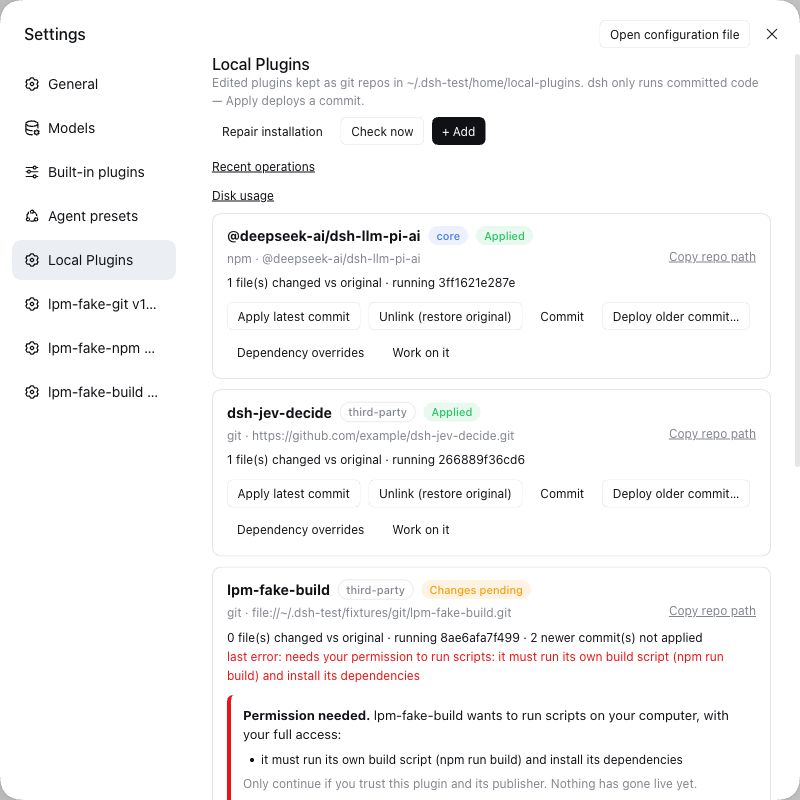
What you can do with it
| You want to… | You click | You get |
|---|---|---|
| Fix or tweak a plugin and keep the fix | + Add → Migrate, edit, Commit, Apply | Your change runs in dsh and survives updates and reinstalls |
| Take the author's new release without losing your tweaks | Update | The new version plus your changes; if both touched the same lines you are asked, and nothing breaks meanwhile |
| Go back when a change misbehaves | Deploy older commit… | The earlier version, instantly |
| Customize a built-in dsh feature (for example a model provider) | the same steps, on a built-in plugin | Your version runs; Unlink gives the original back |
| Let an AI agent change a plugin safely | Work on it | An agent opens inside that plugin's folder with the context filled in; it can't switch anything on — only you can |
| Recover after dsh was upgraded or reinstalled | Reapply all | Your customizations are switched back on |
| Try one exact version | + Add, name@1.2.3 (or …#v1.2.0) | That version, and it stays put |
| See what you changed versus the original | look at the card | "3 files changed vs original", and what is running right now |
| Stop customizing a plugin | Unlink, then Delete… if you like | The original is back; your work is kept in a trash folder you can restore |
| Keep your work somewhere else too | it is an ordinary git folder: ~/.dsh/local-plugins/<plugin> | add your own git remote and push |
And when something goes wrong, it tells you whether your setup is still safe and what to do next — it does not just say "failed".
Install (2 minutes)
- In a terminal (replace
webwith your profile name if you use another):dsh plugin --profile web add github:ishanshmalviya5/dsh-local-plugins - Restart dsh web.
- Open Settings → Local Plugins.
You need git, npm and Node 26 or newer, on macOS or Linux (details).
Your first customization
- + Add → Migrate and pick a plugin you already use. Anything you had already changed by hand is kept as your starting point.
- Make your change — edit the files in
~/.dsh/local-plugins/<plugin>, or press Work on it to have an AI agent do it with you. - Commit, then Apply, then restart dsh web.
That's the whole loop. Nothing changes in dsh until you click Apply, and if the new version can't be built or doesn't pass the checks, the old one simply keeps running.
More stories
The author released a new version
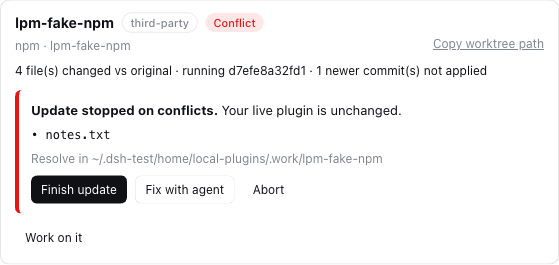
Press Check now (it also checks shortly after dsh starts). A plugin with news shows Update available; click Update. Your changes and the new release are combined for you. If you and the author changed the same lines, the card lists those files and you choose: fix them (or press Fix with agent) and Finish update, or Abort to forget the attempt. Your running plugin is untouched throughout; you decide when to Apply.
A change made things worse
Click Deploy older commit… and pick the version that worked. If dsh itself starts misbehaving right after you applied something, it notices, puts the last working version back, and shows a message — your edits are saved for you to fix with Work on it.
If dsh won't start at all, run this in a terminal to put every original plugin back: node ~/.dsh/local-plugins/.deployed/dsh-local-plugins/scripts/undo.mjs --all
I'm customizing a built-in plugin and want out
Unlink (restore original) gives dsh the original, untouched plugin again. Your version stays listed (as Not applied), so you can switch it back on with Apply whenever you like.
I want to remove a plugin from the list
Unlink it first, then Delete… and type its name. Your work is moved to ~/.dsh/local-plugins/.trash/, not erased. Move the folder back and press Repair installation to bring it back.
I don't know what state things are in
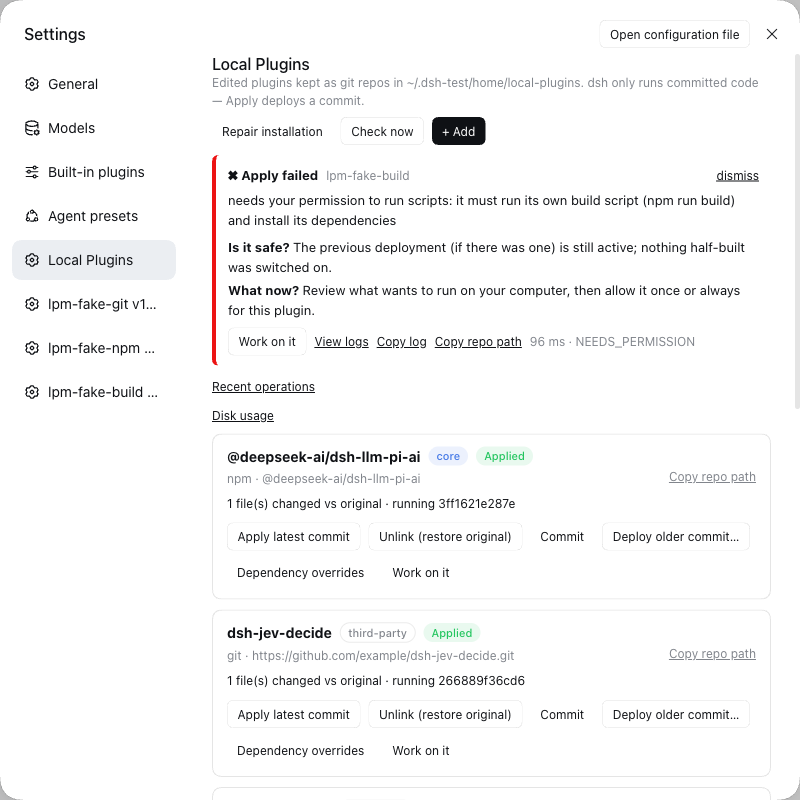
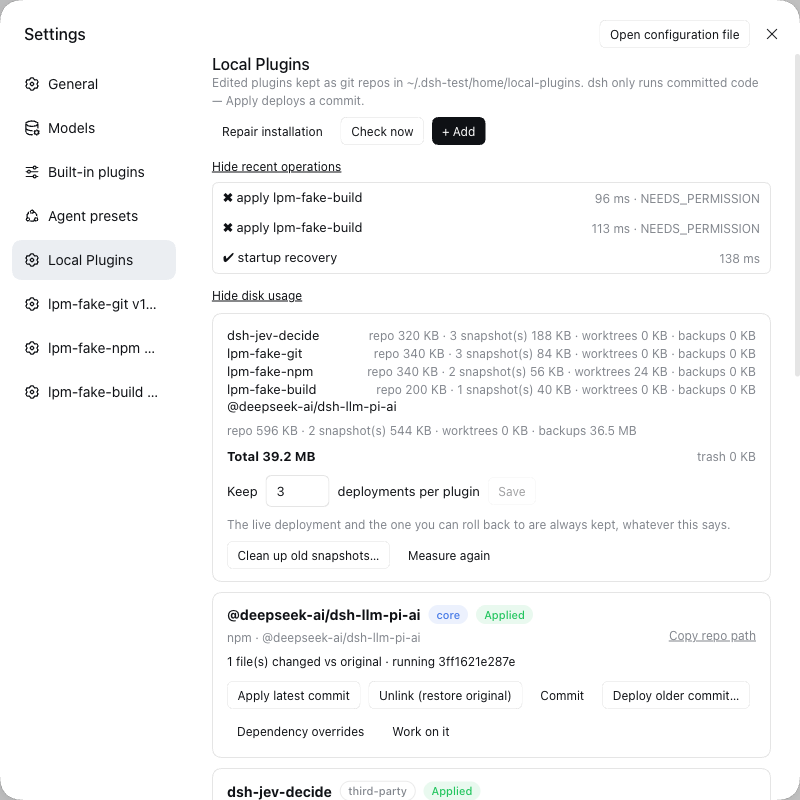
Press Repair installation. It looks for anything that doesn't add up (for example after a crash or a dsh upgrade), fixes what is safe, tells you about the rest, and never deletes your work. Recent operations shows what ran, how long it took, and the log; Disk usage shows space per plugin and lets you clean up old versions with a preview first.
Using an exact version
For npm plugins: name, name@1.2.3 or name@beta. For plugins from git: a web address, github:owner/repo or git@host:owner/repo, optionally ending in #v1.2.0 (a release), #branch, or #commit. A pinned release or commit never moves by itself.
What the labels mean
| Label | Meaning | Do this |
|---|---|---|
| Applied | dsh is running your latest version | nothing |
| Changes pending | you have newer or uncommitted work that isn't running | Commit, then Apply |
| Update available | the author has a newer version | Update |
| Conflict | an update needs your decision about some files | Finish update or Abort |
| Link lost / Reapply required | dsh was upgraded or reinstalled | Reapply all (safe to repeat) |
| Broken | the records and the files disagree | Repair installation |
| Disabled | it crashed dsh and was taken out so dsh could start | Work on it, fix, Commit, Apply |
| Not applied | you track it, but dsh uses the normal plugin | Apply when you want yours |
You stay in control
- Scripts need your OK. Some plugins want to run install or build scripts with your full access. That is off by default; you choose Allow this time or Always allow for this plugin, and it asks again if the publisher changes.
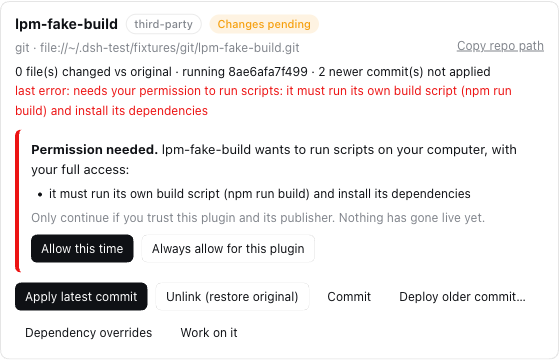
- Your work is never silently lost. Unlink, Delete, rollbacks and crash recovery all keep your edits somewhere you can get them back.
- Only a finished, checked version is ever switched on — never a half-done edit.
- It only talks to the sources you track (the plugin's git or npm origin).
How this is guaranteed: Security · Recovery · How it works.
Compatibility — dsh-local-plugins 0.2.1
| Where | Status |
|---|---|
| macOS (Apple silicon), Node 26 | ✅ Supported. Tested by hand end to end against a real dsh, and in CI |
| Linux (Ubuntu), Node 26 | 🟡 Lint, all unit tests and package checks pass in CI. Not yet tried end to end against a real dsh |
| Linux, Node 22 / 24 | 🟡 Same CI results, but outside the supported range (needs Node 26 or newer) |
| Windows | ❌ Not supported — it says so and doesn't start |
Built and tested against dsh 0.2.0-rc.2. Upgrading from version 0.1 needs nothing from you: your plugins stay exactly as they are (details in the CHANGELOG).
Good to know
- If a plugin crashes dsh before this one loads, it can't repair that itself — use the
undo.mjscommand above. - The check before going live confirms the files are complete and readable; it does not run the plugin first.
- Built-in plugins follow the version that ships with your dsh, not newer npm releases.
- It does one thing at a time; if you click while it is busy, it asks you to wait.
For developers
HTTP API · Status rules · Troubleshooting · Performance · Release checklist · Developing
Contributions are welcome, including AI-assisted ones: read CONTRIBUTING.md first (and AGENTS.md for coding agents).
License
MIT — see LICENSE.
Comments
Loading…