

dsh-agent-prompt
Manifest validEdit the AGENTS.md instruction files DeepSeek Harness actually loads - user-global and per-workspace - from a left-sidebar panel in the GUI.
dsh-agent-prompt
Edit the AGENTS.md instruction files DeepSeek Harness actually loads —
user-global and per-workspace — from a panel in the GUI's left sidebar.
English | 简体中文







Agent Prompt — edit the AGENTS.md instruction files DeepSeek Harness
actually loads, from a panel in the GUI's left sidebar.
DSH seeds every session with workspace guidance taken from AGENTS.md-compatible
files: one user-global file plus a project chain. Those files normally get edited
in an external editor, in a terminal, one path at a time. This plugin puts them
in one page: a tree of every global and per-workspace instruction file on the
left, a plain text editor on the right, and a Save button that writes the exact
bytes the agent will read next session.
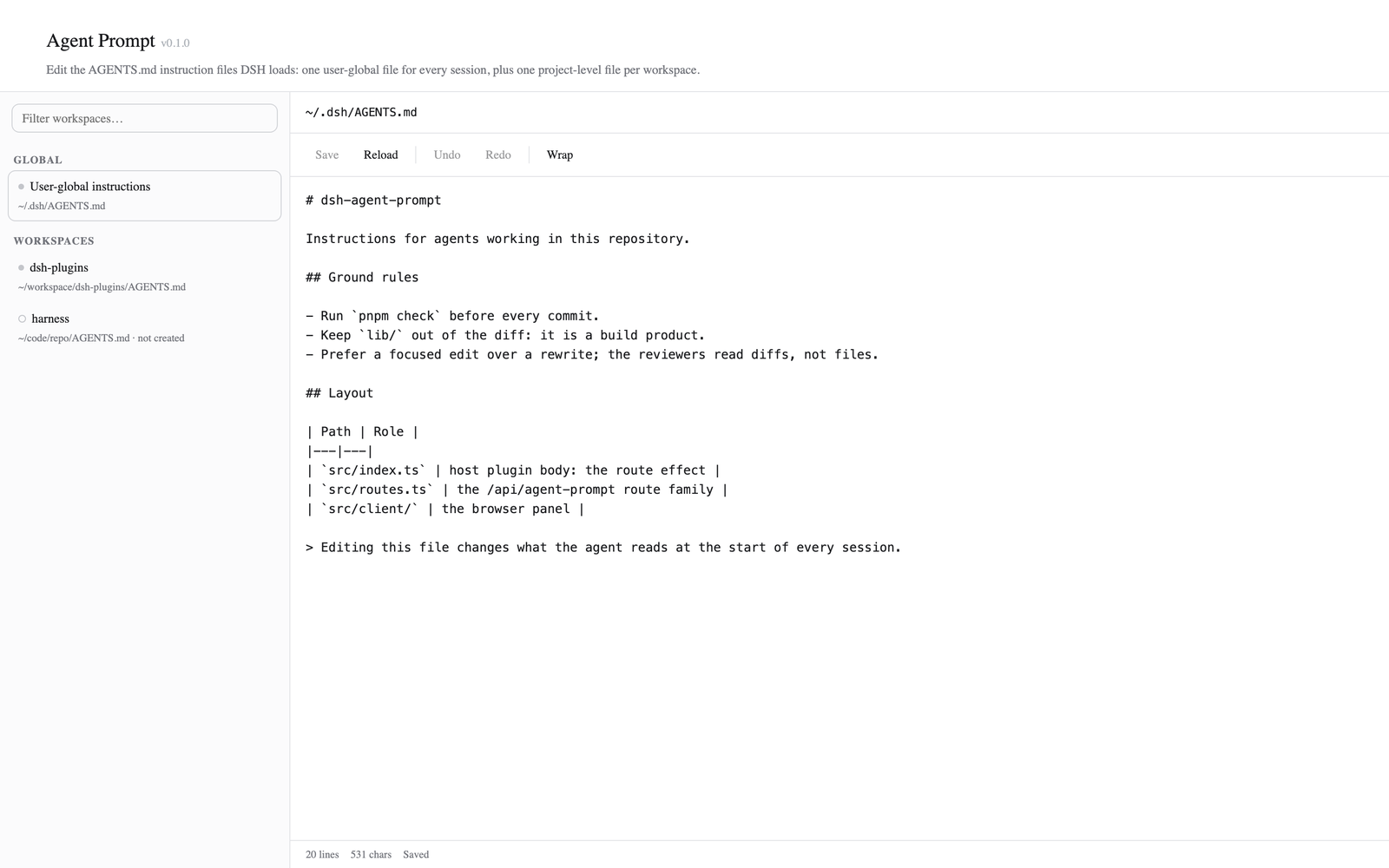
┌── Agent Prompt ────────────────────────────────────────────────────────────┐
│  Filter workspaces…    │  ~/workspace/dsh-plugins/AGENTS.md                │
│                        │    ┌───────────────────────────────────────────┐  │
│  GLOBAL                │    │ Save  Reload │ Undo Redo │ Wrap           │  │
│   ● User-global        │    ├───────────────────────────────────────────┤  │
│     ~/.dsh/AGENTS.md   │    │ # dsh-plugins                             │  │
│  WORKSPACES            │    │                                           │  │
│   ● dsh-plugins        │    │ Instructions for agents working in this   │  │
│   ○ harness  (new)     │    │ repository.                               │  │
│                        │    └───────────────────────────────────────────┘  │
│                        │      20 lines  531 chars                  Saved   │
└────────────────────────────────────────────────────────────────────────────┘
What it contributes
| Surface | What it does |
|---|---|
| Sidebar row Agent Prompt | a global panel row in the icon rail, directly under Schedules |
| The Agent Prompt page | left tree (global + one node per registered workspace, with a filter) and a right editor |
GET /api/agent-prompt/tree | the resolved file list with per-file existence, size and mtime |
GET /api/agent-prompt/file?key=… | read one instruction file |
POST /api/agent-prompt/file | write one instruction file, creating it and its directory when missing |
Which files it edits, and why those
The host half resolves paths with the same rules as
@deepseek-ai/dsh-agent-instructions,
the package that loads these files. Its shipped defaults are
projectRootMarkers: ['.git'], instructionFileCandidates: ['AGENTS.md', 'CLAUDE.md']
and dshHome: $DSH_HOME || ~/.dsh; the agent-instructions row in
@deepseek-ai/dsh-base sets only maxBytes, so no path in this deployment is
overridden.
| Node | Resolution |
|---|---|
| User-global | $DSH_HOME/AGENTS.md, falling back to ~/.dsh/AGENTS.md. An empty or blank $DSH_HOME counts as unset, matching the loader. |
| A workspace | Walk up from the registered workspace directory to the first ancestor containing .git; the file is <that directory>/AGENTS.md. With no marker anywhere the walk ends at the workspace directory itself. |
The tree shows the resolved absolute path for each node, and marks a file
not created when it does not exist yet — saving creates it. A workspace whose
project root differs from its directory (a monorepo package, say) is shown
against its repository root, not the package.
Only AGENTS.md is offered. The loader also accepts CLAUDE.md,
AGENTS.local.md and CLAUDE.local.md at every level of the project chain, and
edits them too. Those are out of scope here; this panel is deliberately one file
per scope.
The page
Registrations, both keyed agentPrompt:
| Slot | Registration | Effect |
|---|---|---|
sidebar.panellist | id: 'agentPrompt', order: 11 | the icon row |
main | key: 'agentPrompt' | the page the row opens in the centre column |
The page title carries the panel's version and the author credit — Agent Prompt v0.1.0 Author: icrefin [icrefinai@gmail.com] — as a muted tag beside the
20px/500 title, matching dsh-skill-mgr and dsh-mcp-mgr.
Unlike those two, the number is inlined into the browser bundle at build time
rather than fetched from the host. The two halves of a plugin do not update
together: the browser bundle is re-imported the moment its revision changes,
while the host half is a boot-time ESM import that keeps serving the code the
process started with. A host-sourced tag therefore goes blank as soon as the
client gets ahead of the running host — which is exactly how this panel once
rendered a bare v. tsdown.config.ts reads package.json and defines
__DSH_AGENT_PROMPT_VERSION__; src/client/version.ts exports it, and the tag is
skipped when it is empty.
Selecting the row is ctx.layout.selectPanel('agentPrompt'), a lookup in the
live main registry, so the two share the id by construction. dsh.client.inject
orders the bundle after dsh-client-ui-sidebar and dsh-client-ui-layout, the
packages that declare those two slots.
Editor commands
| Command | Shortcut | Notes |
|---|---|---|
| Save | ⌘S / Ctrl+S anywhere on the page | disabled until the draft differs from disk |
| Reload | — | discards the draft and re-reads the file; guarded by a confirm when dirty |
| Undo / Redo | ⌘Z / ⇧⌘Z (native) | a local history, since the platform stack cannot be driven from a button; a typing burst collapses into one step |
| Wrap | — | soft wrap on/off, remembered in localStorage |
The clipboard gets no buttons at all: ⌘X, ⌘C, ⌘V and ⌘A already reach
the focused textarea, and a toolbar duplicate of a working platform shortcut is
noise. What is left is exactly the set the textarea cannot reach by itself.
Style contract
The panel follows the workspace's STYLES.md:
- Colour is
--dsw-alias-*only — the stylesheet contains no literal hex and no non-alias token. State chips are their state colour on a 10%color-mix(… transparent)tint; surfaces arebg-layer-1(the tree column),bg-layer-3(the editor field) andbg-module-platform(the filter, chips). - Buttons are the contract's two families: neutral is a bare 8px/12.5px
control that fills with
interactive-bg-hover→-active, and the primary Save usesbutton-primary-fill/-hoverwithlabel-primary-foreground.brand-primaryappears only as the:focus-visibleoutline — never as a fill. - Type and geometry: 20px/500/28 title, 13px/20 intro, 11px chips; the header
owns
padding-top: 28pxplus--dsh-frame-top-clearanceunder Darwin, and the page's horizontal rhythm isclamp(24px, 4vw, 48px). color-scheme: light darkon the page root, with no dark-mode overrides: the tokens carry both modes.
The two-pane body is the one deliberate departure: the contract describes a centred 960px column page, which would starve a tree-plus-editor split. The header keeps the contract's inset so the title lines up with its sibling panels, and the body is full-bleed beneath it.
The editor is a plain monospace <textarea>: no Markdown preview, no syntax
highlighting. Switching files with unsaved changes asks first, and closing the
window with unsaved changes triggers the browser's own unload prompt. Saving or
reloading starts a fresh undo history, so Undo can never walk back to a body the
host never saw.
Install
The desktop profile is owned by the Electron application, so installs go through
Settings → Plugins (or the plugin-manager tool); dsh plugin add refuses that
profile.
pnpm install
pnpm build                              # tsc -> lib/, tsdown -> lib/client.js
npm pack --pack-destination dist        # dist/dsh-agent-prompt-0.1.0.tgz
Then add dist/dsh-agent-prompt-0.1.0.tgz from the Plugins page. The bundle is
recorded in the profile's dsh.profile.bundles and its cordis.patch.yml insert
row mounts the host half; the dsh.client manifest field loads the browser half.
Two operational notes:
- Reinstalling the same version is a no-op. pnpm sees an unchanged spec and
leaves the extracted copy in
node_modulesalone, so a rebuilt tarball at the same version does not reach the profile. Remove the bundle first, then install it again — or bump the version. - A first install needs no restart; an update of a loaded plugin does for
host-side changes. On the first install the host routes mounted and the browser
half registered as soon as the install finished, with no page refresh. After that
the two halves diverge: the browser bundle is re-imported on its new revision,
but the host half is a boot-time ESM import and keeps serving the code the
process started with. A host-side change — a new route field, say — reaches the
running app only on the next start; client-side changes never need one. This is
upstream behaviour, not this plugin's:
@deepseek-ai/dsh-hmrstates that "replacing installed package versions still requires a restart". Restart if an entry reportsfailed to import.
HTTP API
Both routes are registered on ctx.webServer and carry a loopback-only fence:
the write route rewrites a file the agent reads as instructions, so a
LAN-exposed dsh web deployment must not serve it. Requests are additionally
capped at 4 MiB.
GET  /api/agent-prompt/tree
     -> { dshHome, homeDisplay, global: Node, workspaces: Node[], skipped: string[] }

GET  /api/agent-prompt/file?key=global|ws:<workspaceId>
     -> { key, path, displayPath, exists, bytes, mtimeMs, content }

POST /api/agent-prompt/file   { key, content }
     -> the same payload, re-read from disk after the write
Target keys are global and ws:<workspaceId>. A workspace key must name a
registered workspace id — the panel cannot be pointed at an arbitrary path,
and an unknown id is a 404, not a filesystem probe. content is the whole file
body; a missing file reads as an empty string, and a write creates missing parent
directories.
Configuration
None. The plugin has no Loader config, no settings section and no stored state: the files on disk are the state.
Architecture
| Module | Role |
|---|---|
src/index.ts | host plugin body: one ctx.effect registering the route family |
src/routes.ts | the /api/agent-prompt routes, the loopback/method/body fences, target resolution |
src/files.ts | harness-home resolution, .git project-root walk, file stat/read/write |
src/protocol.ts | the wire contract both halves import (paths + JSON shapes) |
src/client/index.tsx | browser plugin body: locale dictionaries + the two slot registrations |
src/client/AgentPromptPanel.tsx | the page: draft, dirty flag, load/save, tree↔editor wiring |
src/client/PromptTree.tsx | the left tree and its filter |
src/client/PromptEditor.tsx | the textarea, its toolbar and its undo history |
src/client/version.ts | the build-time-inlined version the title tag shows |
src/client/api.ts, styles.ts, locales.ts, translate.ts | fetch wrappers, injected CSS, en/zh copy |
The workspace registry is read through ctx.get('workspaceRegistry') rather than
a hard inject: without it the routes still mount and the global file still works,
and only the per-workspace targets answer 503.
Develop
pnpm install
pnpm check     # tsc (host + client) then vitest
pnpm build     # tsc -p tsconfig.build.json && tsdown
pnpm test
lib/ and dist/ are build products and are not committed.
Preview harness
tools/preview.mjs renders the built client bundle outside the GUI and
screenshots it: it loads lib/client.js through a stub window.__ModuleLoader__,
calls the plugin's apply with a minimal fake client context, mounts the main
entry, and replays a captured tree through a stubbed fetch.
node tools/preview.mjs --out /tmp/ap-preview      # writes index.html + panel.png
node tools/preview.mjs --open                     # ...and opens the PNG
It needs Google Chrome (or Chromium/Edge) on the host, plus the react and
react-dom dev dependencies (the UMD builds the harness page loads). This is how
the panel's layout and stylesheet are checked without a browser session in the
running app.
Verification
Run on this host against dsh 0.2.0-rc.2 (desktop profile desktop).
| Check | Result |
|---|---|
pnpm typecheck — host half | clean |
pnpm typecheck — client half | clean; both slots.register calls are checked against the real SlotMap, so the main and sidebar.panellist ids, and the agentPrompt locale namespace, are compile-time facts |
vitest run | 25/25 pass |
live host: GET /api/agent-prompt/tree | 200, with the harness home resolved to ~/.dsh and one node per registered workspace carrying its real projectRoot |
live client: Cordis Inspect Slots → sidebar.panellist | occupant agentPrompt, order: 11, active: true |
live client: Cordis Inspect Slots → main | occupant agentPrompt, active: true |
| preview render | the title + version tag, the tree, the toolbar, the editor and the status bar paint as designed. The harness also fails the render when lib/client.js does not carry the manifest version, which is the only check on the inlining |
test/files.spec.ts (13 tests) exercises path resolution against a real temporary
filesystem — the $DSH_HOME precedence including the blank-string case, the .git
walk including the worktree .git-file form, and the missing-file/directory-in-file-
position cases. test/routes.spec.ts (10 tests) serves the real route handlers from
a real loopback HTTP server and drives them with fetch: tree shape, nested
workspace → repository root, read of a missing file, unknown target key, unknown
workspace, create-and-round-trip for both the global and workspace files, and the
method fence. Nothing about the handler bodies is stubbed. test/version.spec.ts
(2 tests) covers the one trap in the version module: it must stay importable where
the build-time define is absent.
Not covered by an automated test: an end-to-end write against the live host (the
route tests write into a temporary directory instead, so no real AGENTS.md is
touched), and the platform clipboard shortcuts, which belong to the browser
rather than to this plugin.
Caveats
AGENTS.mdonly —CLAUDE.mdand the.localoverlays are not offered.- No live reload of external edits. The page reads a file when you select it or press Reload. If something else changes the file while the page is open, saving overwrites it; there is no mtime check or merge.
- The routes are reachable by any local process, like every other
loopback-fenced plugin API in this composition. They are not covered by the web
app's
?token=launch token, because named routes are matched before the authenticated SPA fallback. - A pinned
dshHomein the agent-instructions config would diverge from the panel's$DSH_HOME || ~/.dshresolution. The shipped composition pins onlymaxBytes, so the two agree today.
Contributing
Issues and pull requests are welcome — see CONTRIBUTING.md for the development setup and the sign-off expectation. Please report security issues privately as described in SECURITY.md.
License
MIT — see LICENSE.
If this panel saves you a trip to an external editor, a ⭐ star helps other DSH users find it.
Comments
Loading…
Similar plugins
by svgop
Agent instruction manager for DSH — edit and template the AGENTS.md files the harness actually reads (global + per-workspace)
★ 0
MIT
JavaScript
Oct 5, 2026
dsh plugin --profile web add dsh-rich-contextby kingzhz
Global AGENTS-style rules as many independent markdown files, with a settings GUI — fills the gap left by DeepSeek Harness's single hard-coded global AGENTS.md.
★ 0
MIT
JavaScript
Sep 22, 2026
dsh plugin --profile web add dsh-global-rulesby Ytibu
在 DeepSeek Harness 设置面板里编辑与生成 AGENTS.md:改全局规则、改项目规则、按「合并全局规则」或「直接覆盖」生成项目级规则。仅适用于 DSH 0.2.0-rc.2。
★ 0
MIT
JavaScript
Oct 1, 2026
dsh plugin --profile web add dsh-agents-mdby Yazzyk
DeepSeek Harness (dsh) 插件:在 Web GUI 里手动点选文件或目录,屏蔽 agent 对它们的读取、搜索、写入与编辑。A dsh plugin that denies an agent read/search/write/edit access to chosen files and directories, picked from the plugin's own We
★ 2
MIT
JavaScript
Oct 10, 2026
dsh plugin --profile web add dsh-file-shieldby Bay-Zeddie
在 dsh Web 设置页里编辑原生 AGENTS.md 的面板:链上每层可点选编辑,三种生效范围,并可视化官方指令预算。
★ 1
MIT
JavaScript
Oct 1, 2026
dsh plugin --profile web add dsh-agent-instructionsby toolclub
Persistent multi-model workflow teams for DeepSeek Harness — dynamic lead planning, bounded DAGs, per-agent model/tools, Run Center and Token insights.
★ 283
MIT
TypeScript
Oct 8, 2026
dsh plugin --profile web add dsh-agent-team-gui