

oh-dsh
Manifest valid★ 323A DSH runtime delivering three development experiences: Desktop, Web, and TUI.
简体中文 · English

Oh-DSH
一套 DSH runtime,Desktop、Web 与 TUI 三种开发体验。
把 AI Agent、Workspace、本地工具与插件生态带到你习惯的界面。






Oh-DSH bundles DeepSeek Harness, Node.js, local development tools, and built-in plugins into installable Desktop, Web, and TUI distributions. Model services can still run in the cloud on demand; Workspace, terminal, Git Review, browser, file, session, and plugin states are unified and organized by the local workbench.
Key Capabilities
🖥️ 三种交互界面使用同一个 |
🧰 本地开发工作台内置 Workspace、PTY 终端、浏览器、文件浏览、Side chat 与 Trajectory;面板可以折叠、固定、分屏或全屏展开。 |
🔍 Git Review查看工作区改动与 commit diff,在代码行上添加 review comment,并在同一个侧边栏完成分支、提交和推送操作。 |
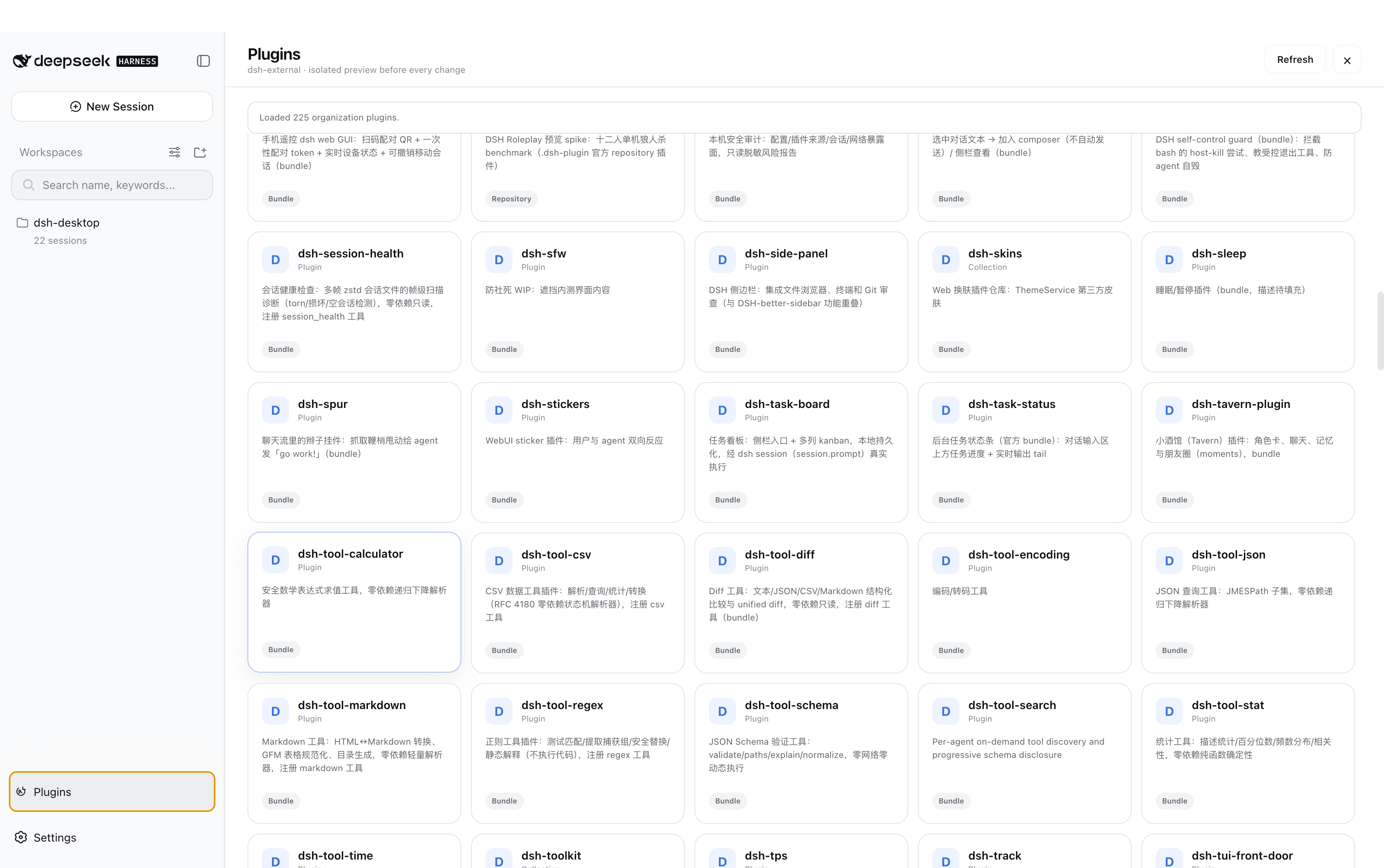
🧩 插件市场Desktop、Web 与 TUI 都能检索、预览和安装插件,并共享同一套交易与恢复状态。目录会标明插件实际生效的界面:安装可能在所有终端都成功,但某些插件只在 Web 或 Desktop 生效、在 TUI 不生效,界面上会明确区分。 |
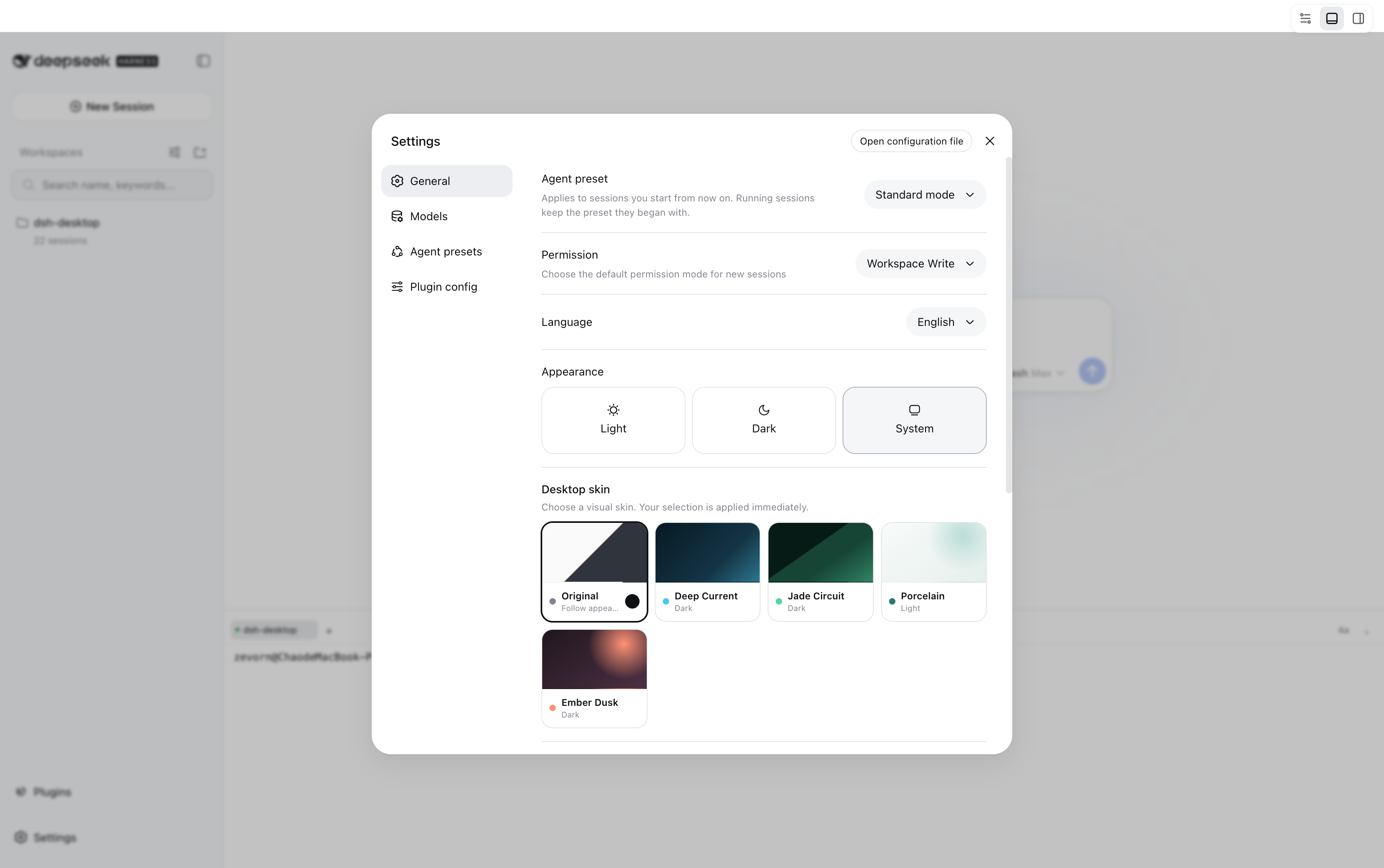
🎨 跨端皮肤
|
📦 可拆分发行按需安装完整版、Web-only 或 TUI-only。每种发行都自带固定版本的 DSH 与 Node runtime,不要求单独安装运行环境。 |
Download and Install
Command-line Installation
On Linux and macOS, use install.sh in the repository root to install the latest stable release. By default,
it installs the TUI and registers ohdsh to ~/.local/bin. Open a new terminal to get started:
curl -fsSL \
  https://raw.githubusercontent.com/hust-open-atom-club/oh-dsh/main/install.sh \
  | bash
To explicitly choose the Web or Desktop distribution form:
curl -fsSL \
  https://raw.githubusercontent.com/hust-open-atom-club/oh-dsh/main/install.sh \
  | bash -s -- --surface web

curl -fsSL \
  https://raw.githubusercontent.com/hust-open-atom-club/oh-dsh/main/install.sh \
  | bash -s -- --surface desktop
On Windows, use install.ps1 in the repository root; without arguments, it defaults to installing the TUI:
irm https://raw.githubusercontent.com/hust-open-atom-club/oh-dsh/main/install.ps1 | iex
Once installed, launch via the unified command:
# 终端界面
ohdsh tui

# Web 界面
ohdsh web

# Desktop 应用
ohdsh desktop
ohdsh only launches installed surfaces; the direct entry point for Desktop,
oh-dsh-desktop, is still available. On Linux/macOS, if the current terminal has not yet loaded the new PATH,
please reopen the terminal; on Windows, use a new terminal.
The installer will not touch an existing installation until the release's SHA-256 digest has been verified; a download failure, digest mismatch, or interrupted extraction all leave the original installation intact. Re-running the same command performs an in-place upgrade, and --uninstall removes it per surface. See the full options, environment variables, and surface matrix in the installation guide.
Manual Installation from GitHub Release
Choose the required distribution form from GitHub Releases:
| Distribution | Contents | Suitable for |
|---|---|---|
| Full | Oh-DSH Desktop, Web, TUI, Node runtime, and built-in plugins | Local development workstations |
| Web-only | Oh-DSH Web, Node runtime, and built-in Web plugins; excludes Electron | Browsers, servers, or lightweight installations |
| TUI-only | Oh-DSH TUI, Node runtime, and terminal plugins; excludes Electron | SSH and pure terminal environments |
- macOS: Open the DMG and drag Oh-DSH Desktop into Applications.
- Windows: Run the installer, or extract the portable version and launch it.
- Linux: Run the AppImage directly, or install the deb using
apt.
The install script is recommended; Release assets suit manual package selection or offline distribution.
Usage
ohdsh desktop          # 启动 Oh-DSH Desktop
ohdsh gui              # Desktop 的启动别名
ohdsh web              # 启动 Oh-DSH Web
ohdsh web --port 3080  # 指定 Web 端口
ohdsh tui              # 启动 Oh-DSH TUI
All three interfaces share ~/.ohdsh by default to store caches, configuration, sessions, credentials, and plugin state.
Set OH_DSH_HOME to uniformly change the data directory; run ohdsh web --help or
ohdsh tui --help to view interface-specific options.
Image inputs are processed directly by DSH native multimodal models (such as DeepSeek V4 Flash): copying, pasting, thumbnails, and submission are all handled by the native attachment rail, requiring no additional visual bridging plugins or separate API Keys. See Image Input Usage Instructions for details.
从源码运行
Node.js, pnpm, and platform build tools are required:
git submodule update --init --recursive
pnpm install
pnpm run build:dsh
pnpm run build
pnpm run stage:dsh
export PATH="$PWD/bin:$PATH"

ohdsh desktop
ohdsh web
ohdsh tui
For local development, use the root Makefile to launch a surface:
make build
make tui ARGS="--lang zh"       # 只暂存并启动 TUI
make web ARGS="--port 3080"     # 只暂存并启动 Web
make desktop                     # 只暂存并启动 Desktop
make tui defaults to inline mode, continuing rendering from the current terminal cursor position; pass ARGS="--fullscreen" when
alternate screen is required. Each Make target only stages the corresponding interactive interface's Oh-DSH package and does not include other interfaces in the development runtime. Make
uses ~/.ohdsh by default, but can be overridden: OH_DSH_HOME=/tmp/ohdsh make tui.
Desktop, Web, and TUI share the same set of Agent presets; among them, liangshen (Liangshen mode) maintains a Minimal dual-tool setup in the
first round, opens the full tool directory after the first tool call, and re-anchors after compression.
Web/Desktop can select from the Agent preset on the settings page; TUI can input /preset liangshen.
Use dist:mac, dist:linux, or dist:win for the corresponding platform to package the full version; use pnpm run dist:web to package
Web only; use pnpm run dist:tui to package TUI only.
更多界面
Plugin Marketplace
Oh-DSH Skins
Docs
Plugins
| Recommended Project | Description |
|---|---|
| DeepSeek Harness | DSH runtime, sessions, and plugin loader |
| dsh-TUI | Direct upstream plugin for Oh-DSH TUI, providing terminal rendering, interaction, and command system |
| DSH-better-sidebar | Git Review, file, and PTY Host capabilities |
| dshfind | DSH plugin marketplace and learning community, offering recommendations for plugins, ecosystem, and DeepSeek Harness peripherals |
Oh-DSH preserves upstream implementations and attribution, and provides a unified launcher, Profile, data directory, cross-platform skins, UI adaptation, and release packaging on top of it. See the Design Document for detailed boundaries.
License
Comments
Loading…
Similar plugins
by XMoon
A third-party TUI mode for DeepSeek Harness (dsh), built on a vendored fork of pi-tui
★ 21
↓ 488/wk
MIT
TypeScript
Oct 29, 2026
dsh plugin --profile terminal add @xmoon76/dsh-pi-tuiby boxeryao
DSH-TUI: a lightweight and fast terminal plugin connected directly to the DSH runtime.
★ 10
↓ 76/wk
MIT
TypeScript
Aug 16, 2026
dsh plugin --profile terminal add dsh-mini-tuiby orriduck
A small, session-aware terminal UI for DeepSeek Harness
★ 3
MIT
TypeScript
Aug 13, 2026
dsh plugin --profile web add dsh-tuiby Anestis271
Turn the official DeepSeek Harness WebUI into a natural desktop experience.
★ 7
↓ 85/wk
MIT
TypeScript
Aug 17, 2026
dsh plugin --profile web add @anestis271/dsh-desktopby rayafriandion
An opencode-inspired terminal UI (TUI) for DeepSeek Harness, shipped as a dsh profile app plugin. | DeepSeek Harness 的终端界面(TUI),受 opencode 启发,以 dsh profile 应用插件形式启动。
★ 9
NOASSERTION
JavaScript
Oct 19, 2026
dsh plugin --profile terminal add dsh-oc-tuiby gxinxing
Terminal-native interactive TUI for DeepSeek Harness (dsh) — built with Ink, React for terminals
★ 11
MIT
JavaScript
Aug 13, 2026
dsh plugin --profile web add deepseek-harness-tui