

screenshotpro
DiscoveredActual UI Screenshot: Capture a window or webpage, maintaining dimensions that exactly match the measured values, drawing bounding boxes, numbers, arrows, and pixelation effects with an accompanying legend, verified through 15 assertions. Suitable for use manuals, operation instructions, process documentation, software tool feature demonstrations, and other scenarios.
screenshotpro
Annotated UI screenshots whose coordinates are measured, not drawn by hand.
English | 中文
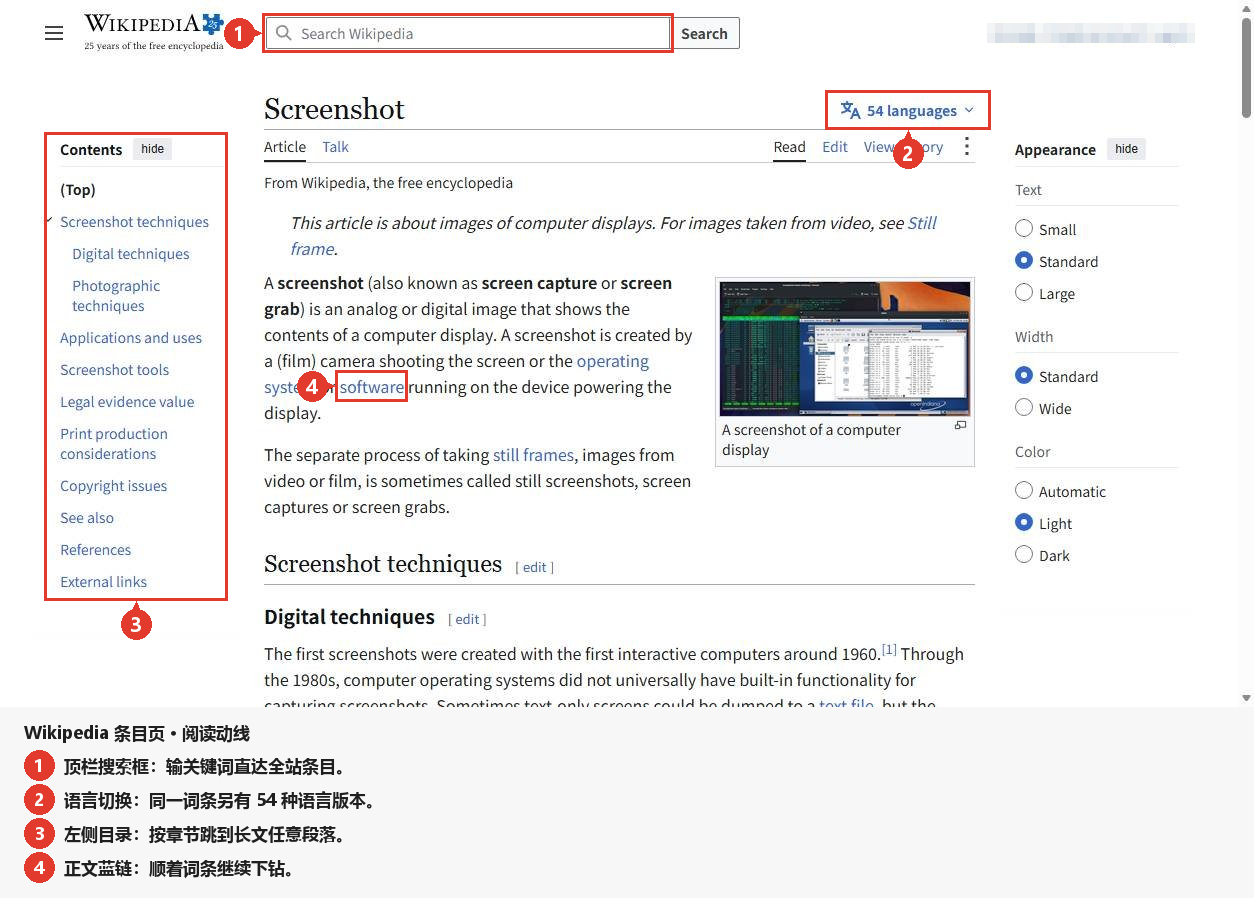
Every rectangle in that figure was measured, not drawn — and it only shipped because all 15 assertions passed.
You give it a Windows executable. It launches the app, captures the whole window with
PrintWindow, dumps the entire UI Automation control tree, and stores both. A JSON spec
then says which control to point at — never where it is. The renderer turns that into
a figure with boxes, numbered badges, arrows, pixelated secrets and a legend bar; the
verifier proves the figure with 15 assertions and exits non-zero if any of them breaks.
It ships as two things that do not depend on each other:
| Form | What you get | Needs DSH? |
|---|---|---|
| Standalone CLI | python tools/render.py + tools/verify.py (+ tools/measure_win.py on Windows) | No — Python 3.9+ and Pillow |
| DSH plugin bundle | A Screenshot Pro agent preset that mounts this skill and the tools it needs | Yes — any DSH host |
Demo figures
The two figures below were rendered from public web pages, and every rectangle came out of
the live DOM (getBoundingClientRect) — not one coordinate in either spec.json was typed by
hand. Both are reproducible offline from the files committed in demo/:
python tools/render.py demo/wikipedia/spec.json && python tools/verify.py demo/wikipedia/spec.json
python tools/render.py demo/mdn/spec.json       && python tools/verify.py demo/mdn/spec.json
Wikipedia — a reading path through an article
Four steps: the top-bar search box, the language switcher, the left-hand table of contents, and an inline link in the body text. The account area is pixelated. Notice where the text lives: the copy sits in the legend bar underneath, so the article itself is never written over.
MDN — search and navigation
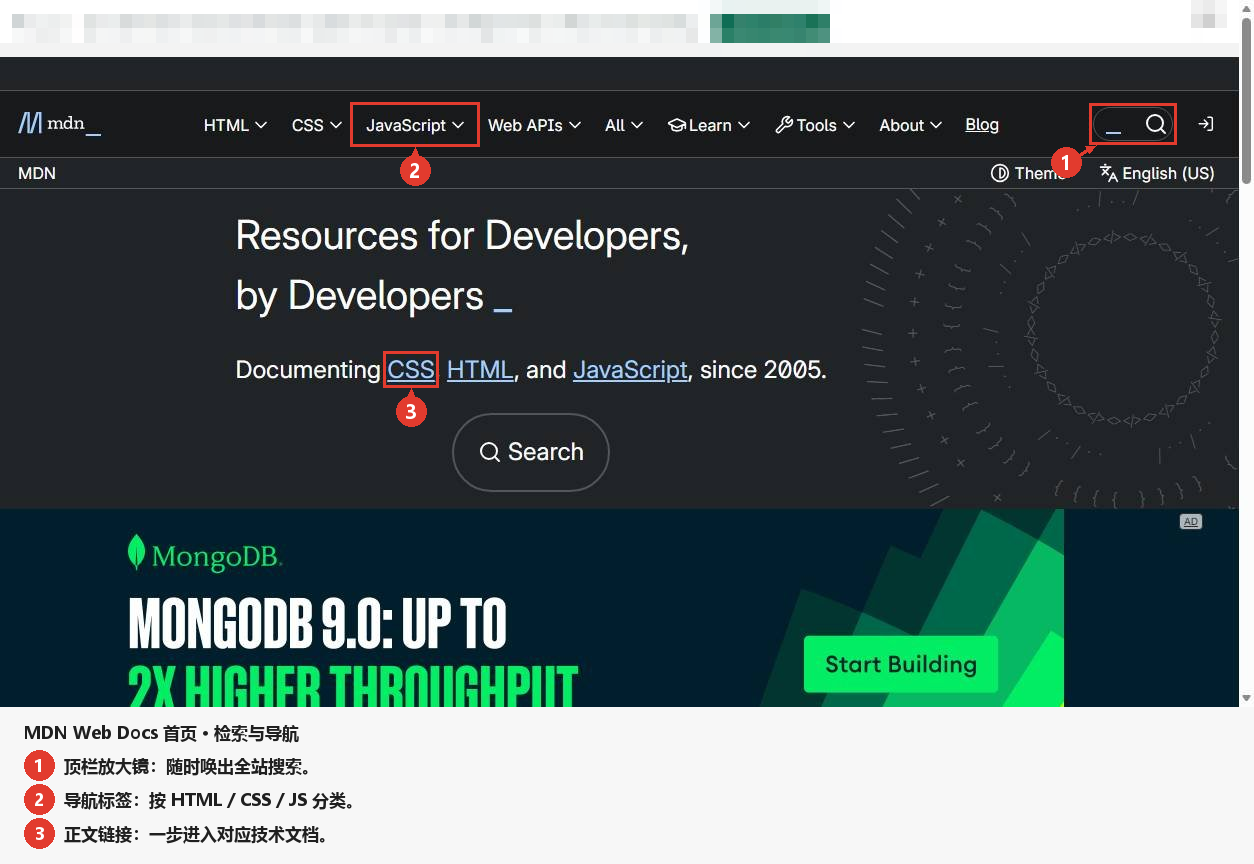
Three steps: the search pill, the JavaScript nav tab, and an inline link in the hero. The
third-party ad strip is pixelated. This figure was rendered with the opt-in
style.badge_avoid_dense_pixels switch on — see demo/README.md for why it helped here and
did not help on the Wikipedia figure.
The rule the whole repo is built around
Coordinates are measured, never estimated.
Every rectangle comes from UI Automation data in dump.json. Nothing is hand-tuned,
rescaled or nudged. If a rectangle is wrong, the bug is in the measurement step — not in
the spec, and never in the renderer. This is why the pipeline can be verified at all:
assertion 3 compares the report against the dump field by field, and assertion 8 fails
when a box lands on blank pixels, which is exactly what a guessed coordinate produces.
Capability table
| Stage | Standalone command | Reads | Writes | Contract |
|---|---|---|---|---|
| Measure | python tools/measure_win.py --exe <app.exe> --out figures/<name> | the running app (UI Automation) | shot.png, dump.json, measure-log.txt | dump.schema = uia-dump/1, shot size == window rect, image_rect == screen_rect - window origin |
| Annotate | python tools/render.py figures/<name>/spec.json | spec.json, shot.png, dump.json | out/<name>.png, out/render-report.json | spec.schema = annot-spec/1, output width == input width |
| Verify | python tools/verify.py figures/<name>/spec.json | the spec, the dump, the report, the rendered PNG | a PASS/FAIL table | exit 0 only when all 15 assertions pass |
| Self-test | python tests/run_tests.py | nothing — it builds its own synthetic fixture | fixture + figure in a temp dir | 15/15 PASS, plus a deliberately broken report that must FAIL |
Figure features: highlighted boxes with padding, numbered circular badges that avoid
collisions and refuse to cover a control, arrows from badge to box edge, pixelate
redaction of a measured control rect, and an auto-sized legend bar appended under the
screenshot (canvas width never changes).
Install
As a DSH plugin
pnpm add screenshotpro # from the npm registry (shortest)
Then, in the same profile directory (~/.dsh/profiles/<name>/):
- add
screenshotprotodsh.profile.bundlesinpackage.json - set the one
customSkillDirsline below to the absolute path of this package'sskills/
Restart DSH: the Screenshot Pro preset and the screenshot-pro skill show up in the catalog.
Nothing is compiled, nothing is bundled — the package is Python source plus one YAML patch.
package.json declares dsh.bundle.patch, and cordis.patch.yml inserts one agent preset
(Screenshot Pro) that mounts @deepseek-ai/dsh-persona, @deepseek-ai/dsh-tool-skill,
@deepseek-ai/dsh-skill-filesystem, a shell for the current platform, file/job/todo/ask-user
tools, and adds this repo's skills/ directory as a skill root.
You must edit one line before installing. dsh-skill-filesystem resolves every entry of
config.customSkillDirs with node:path.resolve(), so a relative path would resolve against
the DSH host's process cwd instead of this package, and no placeholder is expanded
(source: dsh-skill-filesystem/lib/index.js — customSkillDirs: z.array(z.string()) and
(config.customSkillDirs ?? []).map((root) => resolve(root))). Put the absolute path of
this repo's skills/ directory there:
          - id: skill-filesystem
            name: '@deepseek-ai/dsh-skill-filesystem'
            config:
              customSkillDirs:
                - '/home/me/screenshotpro/skills'   # <- your absolute path
After that the preset is complete; add it to a profile like any other bundle and the
screenshot-pro skill appears in the session catalog.
Minimal reproducible example
The smallest full loop needs no real application and no network. tests/run_tests.py does
exactly this, and you can do it by hand in three commands:
python tools/make_fixture.py /tmp/fx      # synthetic window + dump.json + spec.json
python tools/render.py       /tmp/fx/spec.json
python tools/verify.py       /tmp/fx/spec.json
Expected tail of the third command — fifteen rows, all PASS, exit code 0 (this is the
verifier's own output, verbatim; row 9 prints last because it reads the rows before it):
[PASS] 1 spec 内每个 target selector 在 dump.controls 中恰好命中 1 条 -- 5 个 selector 全部唯一命中
[PASS] 2 目标 control 的 image_rect 完全落在 shot 尺寸内 -- 5 个目标均在界内
...
[PASS] 13 legend.height 容得下所有行(最大行底 <= shot.h + legend.height <= 输出高) -- legend.height 120, 画布 760
[PASS] 9 退出码约定(全过 0 / 任一失败 1) -- exit 0 (0 项失败)

结果: 15/15 断言通过 -> PASS (exit 0)
The spec it renders is ordinary JSON (see examples/minimal-spec.json):
{
  "schema": "annot-spec/1",
  "figure": "main-window",
  "shot": "shot.png",
  "dump": "dump.json",
  "steps": [
    { "n": 1, "target": { "automation_id": "btnBrowse" }, "label": "Step 1: pick the input file." },
    { "n": 2, "target": { "automation_id": "btnRun" }, "label": "Step 2: start the run." }
  ],
  "redact": [ { "target": { "automation_id": "lblOutDir" }, "mode": "pixelate", "block": 12 } ],
  "legend": { "enabled": true, "title": "Operation order" },
  "output": "out/main-window.png"
}
spec.json reference
| Field | Type | Default | Meaning |
|---|---|---|---|
schema | string | required | must be annot-spec/1 |
dump | path | required | dump.json from the measure stage, relative to the spec |
shot | path | dump.shot.file | the screenshot, relative to the spec |
figure | string | "" | copied into the report for traceability |
output | path | required | rendered PNG, relative to the spec |
steps[].n | int | 1-based order | badge number, also the legend row id |
steps[].target | object | required | selector, exactly one key of automation_id / name / path / index — must match exactly one control |
steps[].label | string | "" | legend text; empty means no legend row for this step |
steps[].box | bool | true | draw the highlight box |
steps[].arrow | bool | true | draw the badge→box arrow |
redact[] | list | [] | {target, mode: "pixelate", block: 12} — mosaic a measured control |
legend.enabled | bool | true | append the legend bar |
legend.title / row_h / pad_x / pad_y / bg / text_color / max_text_w / font_size | — | see STYLE_DEFAULTS in tools/render.py | legend look |
style.* | — | see tools/render.py | font_path, font_size, badge_fill, badge_radius, box_color, box_width, box_pad, arrow_width, min_gap, ... |
dump.json reference
| Field | Meaning |
|---|---|
schema | must be uia-dump/1 |
window.screen_rect | window rect in screen pixels; its w/h must equal the image size |
shot | {file, width, height} for shot.png |
capture_check | {method, overlap, mean_abs_diff, suggested_offset} — proof the capture is not stale |
controls[] | one entry per UIA node: index, depth, type, name, automation_id, path, screen_rect, image_rect |
controls[].image_rect | pixels with the image top-left as origin; == screen_rect - window origin, never rescaled |
The 15 assertions
tools/verify.py prints one row per assertion and exits 1 if any row fails.
| # | Invariant | Guards against |
|---|---|---|
| 1 | each target selector hits exactly one control | a typo'd or ambiguous selector silently annotating the wrong widget |
| 2 | every image_rect lies fully inside the shot | a box clipped by the canvas edge |
| 3 | report image_rect == dump image_rect, field by field | a second coordinate conversion sneaking into the renderer |
| 4 | output PNG width == input width | the figure being scaled |
| 5 | badges never overlap (centre distance >= 2r) | two step numbers merging into one blob |
| 6a | badge/control overlap area <= threshold | a badge covering the very text it points at |
| 6b | reported overlap_controls matches the real overlap | an under-reported occlusion (hiding the problem) |
| 6c | no badge inside another step's box | the reader attributing a number to the wrong step |
| 7 | arrow tip within tolerance of its own box edge | an arrow pointing at empty space |
| 8 | annotated region pixel std > threshold | a box drawn over blank pixels — i.e. a guessed coordinate |
| 9 | exit code 0 only when every row passes | CI green-washing a broken figure |
| 10 | height == shot.h + legend.height, width unchanged | a legend that shifts or rescales the screenshot |
| 11 | legend row ids == ids of labelled steps | a missing, duplicated or orphaned legend row |
| 12 | legend text non-empty and fits canvas - 2*pad_x | text running off the canvas |
| 13 | legend.height fits every row | a clipped last row |
Layout
screenshotpro/
  cordis.patch.yml              DSH bundle: inserts the Screenshot Pro preset
  package.json                  npm metadata + dsh.bundle.patch
  tools/
    measure_win.py              launch exe -> shot.png + dump.json + measure-log.txt
    uia_dump.ps1                the PowerShell/UI Automation half of measure_win.py
    render.py                   spec.json -> annotated PNG + render-report.json
    verify.py                   15 assertions, PASS/FAIL table, exit 0/1
    make_fixture.py             synthetic window + dump + spec (no real app needed)
  skills/screenshot-pro/SKILL.md   the agent-facing manual
  tests/run_tests.py             offline round-trip: fixture -> render -> verify
  examples/                      minimal spec + dump shape, no screenshots
  demo/                          walkthrough figures rendered with these tools
Limits
- Windows only for the measure stage. Annotate/verify are portable Pillow code.
- No OCR, no image recognition. The tool never guesses what a control is; if UI Automation does not expose it, it is not annotatable — say so instead of drawing.
- No DPI scaling. The dump records pixels of the captured window; mixing DPIs across captures is a measurement bug, and the verifier will catch the symptom, not the cause.
- The default font is a Windows font (
msyhbd.ttc); passstyle.font_pathon any other platform or the renderer will complain about the missing font. - Everything here is offline. There are no network calls in any script.
完整中文版见 README.zh-CN.md。
License
MIT — see LICENSE. The bundled fixture is synthetic: no real application screenshot,
no real control names, no personal paths.
推荐项目
我其他的公开仓库:
| 项目 | 简介 |
|---|---|
| -uiautomator- | 基于uiautomator库对安卓设备进行自动化测试,模拟手动点击行为 |
| kenji-birthday-cake | 仟吉生日蛋糕定制Demo - 支持场景选择、蛋糕模板、配色/装饰/文字/尺寸/口味定制、预览下单 |
| Huace | (暂无简介) |
| FFood | 家庭食材新鲜管理系统 |
| dsh-chime | Task-completion notification chime for the DSH web GUI: beeps when an agent turn finishes, even in background tabs. 10 preset sounds + custom import + volume. |
| EnvSwitch | 免安装的环境切换启动器:一键切换多应用 × 线上/本地 × 多版本,只改配置文件里的少数键值且逐字节安全 |
Comments
Loading…
Similar plugins
by HsgtLgt
面向模型的「截图」工具插件(DeepSeek Harness,Windows 宿主)。 注册一个 screenshot 工具,让会话里的 AI 能真正「看见」并展示你的屏幕。
★ 0
MIT
JavaScript
Oct 8, 2026
dsh plugin --profile web add dsh-plugin-screenshotby deepseekbluefish
WeChat-style in-app screenshot button: drag a region, fine-tune with 8 resize handles, Enter to capture and Esc to cancel; auto-numbered PNGs plus a [Shot N HH:mm] marker written into the composer. Wi
★ 0
MIT
PowerShell
Aug 24, 2026
dsh plugin --profile web add dsh-screenshot-plugin在 DSH 输入面板下方添加截图按钮:点击调用系统自带截图工具(Windows/macOS/Linux),截图后 Ctrl+V 粘贴进输入框
★ 0
MIT
JavaScript
dsh plugin --profile web add dsh-screenshot-buttonby MuzeWinter
Windows desktop automation for DeepSeek Harness: 14 tools for real GUI input (click, type, keys, scroll, drag), occlusion-proof window screenshots and the accessibility tree.
★ 1
NOASSERTION
JavaScript
Sep 27, 2026
dsh plugin --profile web add dscomputer-controlWindows desktop control forked from computer-user: 13 computer_* tools. Image-capable routes get the screenshot as a real image with an exact image-to-screen mapping, so no external OCR; elements retu
★ 0
dsh plugin --profile web add computer-user-visionby ltmroberthk915
Windows Computer Use for DeepSeek Harness with screenshots, UI Automation, 18 desktop tools, per-Agent activation, human-input handoff, approval prompts and prebuilt native workers.
★ 5
↓ 2.7k/wk
MIT
JavaScript
Oct 19, 2026
dsh plugin --profile web add dsh-codex-style-computer-use