

deepseek-code
DiscoveredDeepSeek Code: Use the DeepSeek Harness via the Grok Build TUI
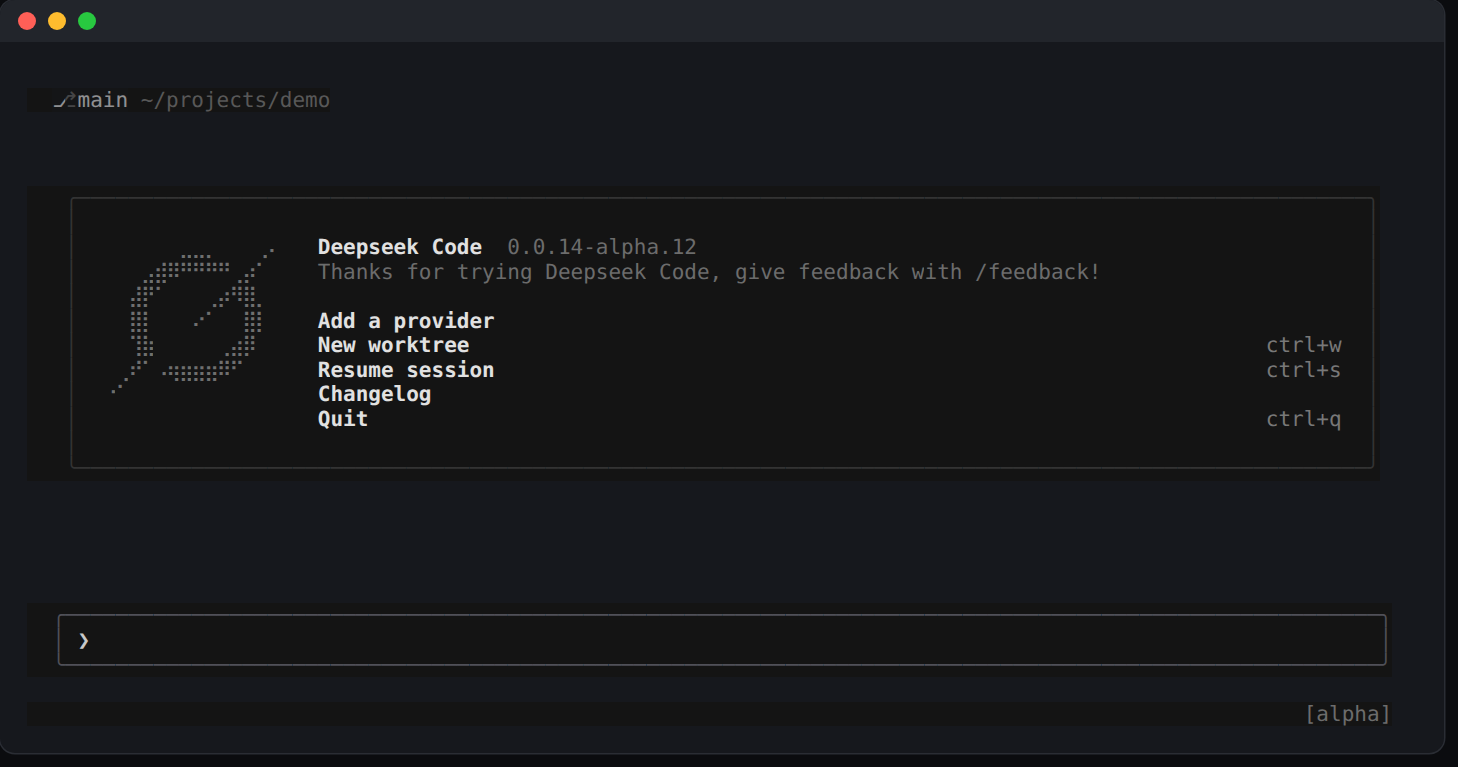
DeepSeek Code (dscode)
Terminal coding agent powered by DeepSeek Harness, with a Rust TUI and a managed runtime.
Personal project — not affiliated with or endorsed by DeepSeek or xAI.
Install
Requires macOS Apple Silicon or Linux x86-64, Node.js >=22.19.0, npm, and
GitHub access for the first install.
On Apple Silicon, use native ARM64 Node (node -p process.arch should print
arm64); x64 Node under Rosetta does not select the Mac ARM64 payload.
npx @hqzhao95/dscode@alpha
This page follows main, which ships on the alpha channel. Plain
npx @hqzhao95/dscode installs the stable channel, which can lag several
releases behind and lack features described here.
The launcher verifies and installs the matching TUI, bridge, and pinned DSH
runtime under ~/.dsh/profiles/dscode, then links ~/.local/bin/dscode. Add
~/.local/bin to PATH. No global DSH installation or compiler is needed.
Open /provider --add to configure a provider and paste its API key (the key
alone, not a NAME=value line), then /model to select a model. /provider
rows say when a key is missing or comes from the environment. Fresh sessions
use DSH's standard preset; /preset selects another preset and remembers it
for future sessions.
Use
dscode                              # interactive TUI
dscode "review this repository"     # start with a prompt
dscode -p "explain src/index.ts"     # headless single turn
dscode -c                           # continue the latest session for this cwd
dscode --resume <id-or-title>       # resume a session
dscode sessions list [--all]        # this cwd's sessions (all cwds); also `sessions search <q>`
dscode -w                           # new session in an auto-named worktree
dscode --worktree=feat "fix it"     # named worktree with an initial prompt
dscode worktree list                # inspect managed worktrees
--resume <id> --worktree=try forks a conversation into a worktree;
--worktree-ref <ref> selects its base. worktree rm checks for unsaved work
unless --force is explicit. Headless formats are plain, json,
streaming-json, and streaming-messages-json. Run dscode --help for all options.
| In the TUI | Action |
|---|---|
/model, /provider | Choose model, reasoning effort, and provider; selections persist |
/preset, Ctrl+Y | Choose an installed preset; /preset <id> switches directly |
/preset manage | Search, copy (c), view (v), or edit (e) presets; restart after editing |
/resume, /reference | Search sessions or insert a reference into the draft |
/compact, /goal | Use the selected preset's native compaction and goal controls |
/subagents, /inbox | Inspect children; queue, steer, edit, remove, or stop pending work |
/tasks, /workflows | Read jobs, child transcripts, workflow phases, and retained output |
/tasks terminals | Inspect persistent shells; i interrupts, x then Enter closes |
/loop [interval] <prompt> | Ask the model to set a recurring reminder (presets with scheduling, such as standard) |
/reminders | Schedule after 10m <text>, every 1h <text>, at <ISO time> <text>, daily 09:00 <text>, weekly mon,wed 09:00 <text> or cron "0 9 * * 1-5" <text> (local time zone) |
/skills, /mcps | Browse session skills and MCP servers; u inserts a selected skill |
/rewind, /undo | Continue from an earlier prompt in a new session |
/export [filename] | Copy/save Markdown; .zip exports logs, descendants, and attachments |
/team | Show the roster and task board of a teams session's Agent Team |
/browser | Turn the isolated headless browser on or off and edit its allowed origins |
/dsh plugins | List, switch, add and remove dsh plugins; see Plugins |
/dsh config | Read and change the settings loaded plugins serve; see Plugin settings |
/doctor | Check terminal, installation, and optional LSP/PTY dependencies |
Ctrl+P | Open commands while keeping the current draft; its Commands section lists the session's plugin commands |
Ctrl+S, Alt+S | Stash or restore one prompt draft |
Ctrl+T | View the native Todo list |
Enter in a block viewer | Quote the selection into the draft |
/dsh, /browser, /subagents, /goal and /preset entered bare, or picked
in Ctrl+P, open a picker of what they can do now instead of running: the
plugin verbs and then the bundles each applies to (or a settings namespace and
resets of its overridden fields), browser on or off, each child
and its controls, pausing, resuming or clearing the goal, and the presets with
the current one marked. The pick runs as the full command (/dsh enable <bundle>).
A preset can change in place only before a session has history; after that,
/preset opens the preset catalog, which starts a new session with the pick.
Paste or drag PNG, JPEG, WebP, or GIF images when the model supports image input.
A plugin command that takes no images, such as /dsh or /compact (/goal
takes them), keeps the draft and its images and says so instead of sending.
Completion offers /btw, /plan, /inbox, /reminders and /loop only in
presets whose agent can run them.
Completed child transcripts remain readable after restart. A reminder is
delivered while its session is open; one that falls due while it is closed
arrives when the session next opens.
Quitting takes a second Ctrl+C (or Ctrl+D) on an empty prompt. When your
sessions have work, the confirmation says what quitting affects, as the leader
counts it: press again to quit — stops 1 turn, 2 jobs (npm test, sleep 60); 1 reminder (stand-up) waits for the next open. Running turns, queued prompts,
background jobs and subagents stop with their sessions; reminders wait. Such a
confirmation stays up for 3 seconds; with nothing running it reads as before. Session ZIP export refuses existing files.
Native present deliveries appear as file links and survive transcript replay;
links open the current source file. /feedback <text> records native feedback
without a model turn and may share session context under DSH's telemetry policy.
Optional presets: history adds workspace-scoped session search tools;
terminal adds persistent shell/REPL tools; lsp adds code navigation and needs
typescript-language-server and typescript on PATH; teams (experimental)
replaces subagents and workflows with native Agent Teams: named teammates you ask
for, durable messages and a shared task board, all in one checkout. Pick it when
a session opens; see the Agent Teams notes.
Minimal follows DSH's shell-only configuration. See the
DSH feature coverage for
native DeepSeek-V41-Flash setup and platform/UI limits.
The browser is off by default. /browser on --origin https://example.com gives
open and new sessions a private headless Chrome or Chromium that may open only
the listed origins; /browser origins add <origin> extends the list for browsers
started afterwards.
Every browser action asks for your approval and shows what it will do, so
always-approve mode refuses browser actions. It is not an OS network or host
sandbox; see the browser notes for browser
discovery, the Chromium sandbox and origin filtering.
Plugins
dscode runs as a DSH profile, and its plugins are DSH bundles: npm packages whose
patch layer adds or changes rows (components) of that profile. /dsh plugins
lists them as DSH's own Plugins page does: title and one-line description
(in the language of LC_ALL, LC_MESSAGES or LANG when the bundle has it,
else English), package and version, on or off, kind (core, official · optional,
installed, removable, experimental) and the rows by state (18 rows · 17 running · 1 off), then the reason for each problem bundle. The pinned runtime
ships three official bundles switched off: Agent Teams, Voice input and Auto
Authorization Review.
| Command | Action |
|---|---|
/dsh plugins | The table above |
/dsh enable <bundle>, /dsh disable <bundle> | Select or deselect a bundle; its package stays installed |
/dsh enable <bundle>#<row>, /dsh disable <bundle>#<row> | Switch one component of a bundle that is on |
/dsh inspect <bundle> | Its components, their state and the services they provide |
/dsh add [--trust] <package>, /dsh remove <bundle> | Audit and install with npm, or uninstall |
Switches go through DSH's plugin manager and apply to the running leader at
once. The reply uses the Plugins page's outcomes: applied, saved but overridden
by a higher-priority configuration (a cordis.patch.yml in the DSH home or a
--patch overlay), or could not enable with the reason. A bundle or component
whose rows do not start is switched off again, so the next start is unaffected.
dscode's own bundles (@deepseek-ai/dsh-base, @hqzhao95/dscode) stay on;
their rows follow the commands that own them, such as /browser and
/provider. Agent Teams gives every session Team tools, which /doctor warns
about; /preset teams mounts them in one session instead.
dscode keeps this profile with npm. Add and remove its plugins with /dsh add
and /dsh remove only: dsh plugin --profile dscode … and DSH's plugin manager
install with pnpm, and /doctor warns when the profile holds a pnpm-lock.yaml.
A bundle that cannot load is skipped at startup: dscode starts without it and
the next session you open says which one and why. /doctor and
dscode doctor --runtime report skipped bundles, rows that failed or wait for a
service, and the leader log. If a plugin keeps dscode from starting at all, the
TUI ends its error with If a plugin broke startup, run dscode doctor --reset-plugins. That safe mode backs up the profile's cordis.patch.yml,
selects only dscode's shipped bundles and keeps installed packages; it prints
what changed and the mv command that restores the patch. Row switches (the
native DeepSeek route llm-deepseek from /provider, /browser on), provider
and model settings, /dsh config changes, MCP servers and a remote workspace
live in that patch and are off until you restore it; API keys are kept.
Plugin settings
/dsh config reads and changes plugin settings through DSH's settings service,
the one DSH's own Settings pages use. It serves each loaded row's live fields
(a namespace per row: bash-sandbox, web-search-deepseek, subagent, …).
| Command | Action |
|---|---|
/dsh config | Each namespace, the plugin it belongs to, its fields and how many you override |
/dsh config <namespace> | Each field: its value, its default, and overridden when your profile sets it |
/dsh config set <namespace> <field> <value> | Set a field (limits.maxUses, or ["a.b","c"] for keys with dots) |
/dsh config reset <namespace> <field> | Return an overridden field to its default |
A value is JSON (30000, true, "text", {"A":"1"}); text that is not JSON
is taken as a string. Objects and arrays show as compact JSON, clipped when wide.
The service validates each change against the plugin's schema, writes the
profile's cordis.patch.yml and applies it to the running leader at once; the
reply says so, or that a restart applies it. A rejected value is shown with the
service's error and changes nothing, and a change made elsewhere since the
namespace was read is refused: run /dsh config <namespace> again. Secret fields
show only as set or unset and are never set here, since the value would stay
in the transcript: name a credential in the field beside it (such as
apiKeyEnv) or use the plugin's own flow, such as /provider.
Remote workspace over SSH (experimental)
A remote workspace is its own dscode home: every tool, shell, file edit and
code run happens on one POSIX host over SSH, while the TUI, model access and
session history stay on this computer. The host needs Node 22 or newer and this
dscode's DSH release of @deepseek-ai/dsh-ssh and
@deepseek-ai/dsh-ptc-runtime-node npm-installed in one directory; init
checks the host before it writes anything and prints the install command when
they are missing. See the
remote workspace notes.
DSH_HOME=~/.dsh-remote/build dscode remote init --host build --workspace /srv/work \
  --node /opt/node/bin/node --dsh /opt/dscode-dsh
DSH_HOME=~/.dsh-remote/build dscode        # sessions open in build:/srv/work
DSH_HOME=~/.dsh-remote/build dscode remote status --check
The host alias must already work with ssh -o BatchMode=yes <alias> and a
known host key. The header shows ssh build:/srv/work. Session paths are
remote, so the TUI never links, opens or previews them here, and it does not
use this directory's project settings or worktrees. The connection does not
reconnect: after it drops, restart dscode. dscode remote remove makes the
home local again.
Per-run configuration
DSCODE_CONFIG='{"models":{"default_reasoning_effort":"high"}}' dscode
DSCODE_CONFIG_PATH=./dscode-overlay.toml dscode
DSCODE_CONNECT_UI_TIMEOUT_SECS=60 dscode
Inline configuration is JSON; files accept JSON or TOML. These temporary
overrides cannot set credentials, providers, plugins, MCP servers, or command
hooks. Ambient GROK_CONFIG, GROK_CONFIG_PATH, and
GROK_CONNECT_UI_TIMEOUT_SECS are ignored.
Update and uninstall
dscode update --check              # read-only; add --json for structured output
dscode update                      # remembered/current channel
dscode update --stable             # stable releases
dscode update --beta               # beta or stable releases
dscode update --alpha              # alpha or stable releases
dscode update --version <version>  # exact version
dscode doctor --runtime            # diagnose even when normal startup fails
dscode doctor --reset-plugins      # safe mode: only dscode's shipped plugins
dscode uninstall
DSH checks every profile bundle's @deepseek-ai/dsh* peers against the running
runtime and skips an incompatible one at startup, so an update to a new DSH can
turn off a third-party bundle that pins the old one. dscode doctor --runtime
and /doctor list such bundles. Inside dscode, /dsh add refuses them before
changing the profile, and /dsh allow-version <package@version> --accept-risk
grants an exact-version exemption.
Uninstall removes the product binaries and keeps profile sessions, settings and shared DSH data. Use dscode uninstall --remove-dsh to also remove the global DSH package.
Updates install the matching bridge, TUI, and runtime together and save the
channel only after success. Failed validation or ordinary commit errors retain
the previous installation. Fresh prerelease installs use
npx @hqzhao95/dscode@beta or npx @hqzhao95/dscode@alpha.
An installation older than 0.0.14-alpha.4 predates the dsh native helper
package rename and cannot validate a current runtime; re-run
npx @hqzhao95/dscode@<channel> once to re-bootstrap, then dscode update
keeps working.
Maintainers
Comments
Loading…
Similar plugins
by cogine-ai
Claude-Code-Styled TUI for DeepSeek Harness
★ 8
↓ 126/wk
MIT
TypeScript
Sep 17, 2026
dsh plugin --profile web add dsh-claude-tuiby xiaoshihou514
DeepSeek Harness: TUI
★ 3
↓ 527/wk
MIT
TypeScript
Aug 22, 2026
dsh plugin --profile web add dsh-tuiby orriduck
A small, session-aware terminal UI for DeepSeek Harness
★ 3
↓ 535/wk
MIT
TypeScript
Aug 13, 2026
dsh plugin --profile web add dsh-tuiby XMoon
A third-party TUI mode for DeepSeek Harness (dsh), built on a vendored fork of pi-tui
★ 19
↓ 823/wk
MIT
TypeScript
Oct 4, 2026
dsh plugin --profile terminal add @xmoon76/dsh-pi-tuiby tomowang
An open-source terminal front door for DeepSeek Harness (dsh).
★ 20
↓ 377/wk
MIT
TypeScript
Sep 28, 2026
dsh plugin --profile web add @tomowang/dsh-tuiby dsh-tui
Claude Code-style terminal UI for DeepSeek Harness agents, as an out-of-tree dsh plugin bundle
★ 35
NOASSERTION
TypeScript
Aug 14, 2026
dsh plugin --profile web add @dsh-tui/dsh-tui