

dsh-startup
Identified★ 1DeepSeek Harness's Deep-Sea Descent Startup Splash Screen: Depth Gauge and Probe, Character Intro Video, Seabed Terrain and Coral Reefs, Bubbles and Bioluminescence
dsh-startup
给 DeepSeek Harness 做的一次深海下潜式启动动画:深度尺与探测器、鲸鱼娘出场视频、海底地形与珊瑚礁、气泡与生物荧光。
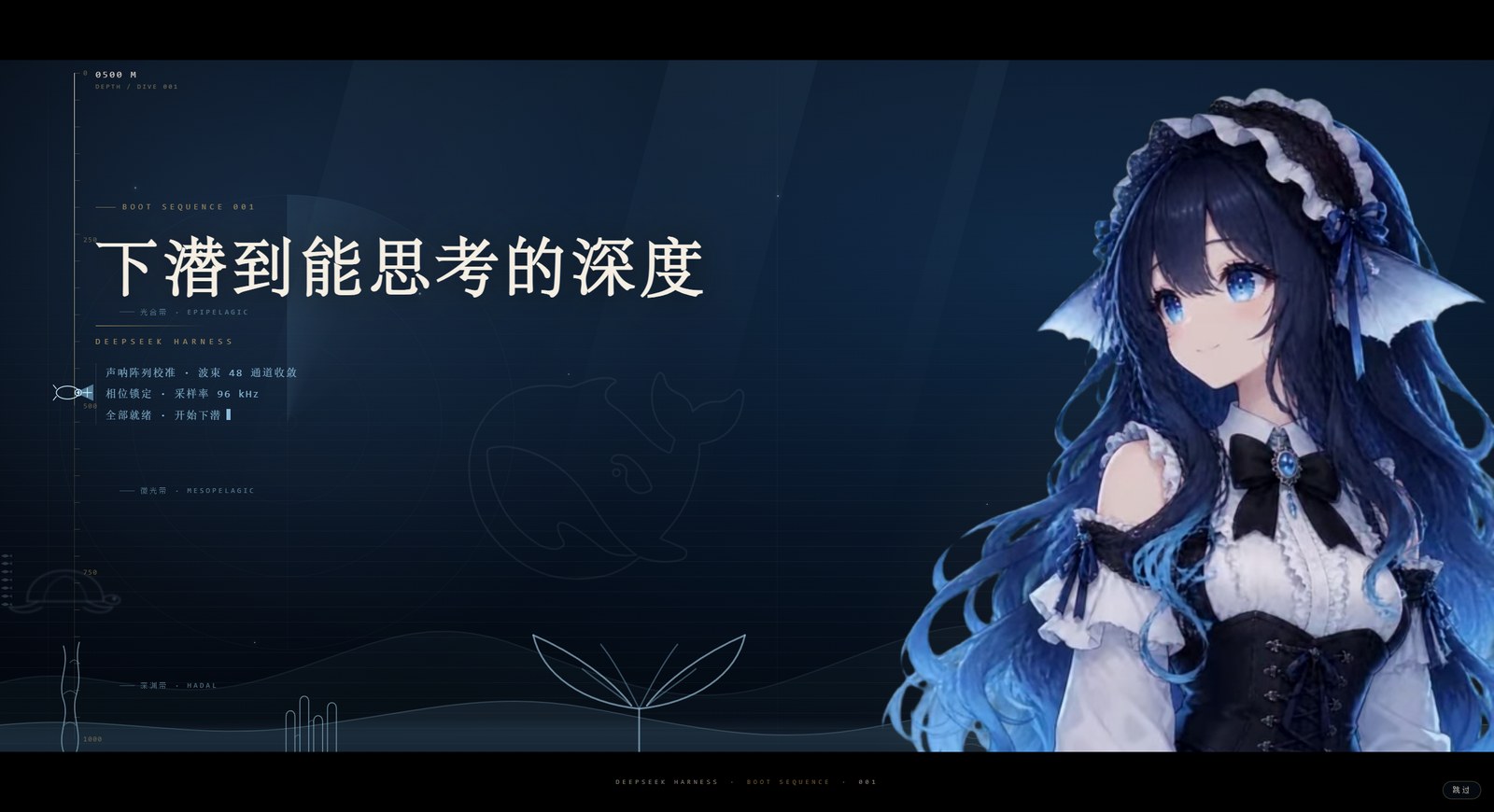
A deep-sea dive splash screen for DeepSeek Harness — depth gauge, submersible probe, a character reveal video, seafloor relief, coral reef and bioluminescent particles. Pure HTML/CSS/JS, no build step, no framework.
它长什么样
整段约 9.4 秒,然后自动消失:
0.0s  黑场淡出,海底背景亮起
1.0s  主标题「下潜到能思考的深度」以字距收紧 + 模糊对焦浮出
1.6s  第一行读数:声呐阵列校准 · 波束 48 通道收敛
2.4s  金色细线扫开
2.55s 她的出场视频切到无缝循环段 —— 之后一直在动
2.6s  第二行读数:相位锁定 · 采样率 96 kHz
3.6s  第三行读数:全部就绪 · 开始下潜
4.6s  深度走到 1000m,探测器停在尺底
9.4s  收尾
深度是有意义的:左侧深度尺的读数决定出现什么生物。
| 深度带 | 生物 |
|---|---|
| 0–250m 光合带 | 海龟(远处的影子) |
| 250–600m 微光带 | 鱼群 |
| 600–1000m 深渊带 | 海马 |
珊瑚礁、气泡、浮游、海雪、体积光则一直在。
安装
适用于 DSH Desktop(Windows),不需要 Node、npm 或 git。 前提:DSH Desktop 已经安装过、并且至少启动过一次(这样 profile 目录才存在)。
第 1 步:把插件文件放到本地
A. 下载 ZIP(推荐,不用命令行)
-
点右上角绿色的
Code→Download ZIP -
解压到任何一个长期保留的目录 —— 盘符随意(C/D/E 都行),例如:
D:\dsh-startup
E:\apps\dsh-startup
C:\Users\<你的用户名>\dsh-startup
⚠️ 别放在「下载」「桌面」「Temp」这类会被清理的地方。 安装只是建一个指向这份代码的链接,这份目录被删掉或挪走,插件就失效了。 路径里最好别带空格和中文,能少一类麻烦。
B. 用 git(如果你已经装了 git)
git clone https://github.com/holy-ovo/dsh-startup.git D:\dsh-startup
下面所有命令里的 D:\dsh-startup 都只是示例,换成你自己的实际路径即可。
解压/克隆完成后,打开这个文件夹,你应该能看到:
install.ps1 uninstall.ps1 package.json splash.html client.js index.js assets\
看不到
install.ps1说明解压层级错了(有的解压工具会多套一层dsh-startup-master),进到真正含package.json的那一层再继续。
第 2 步:运行安装脚本
方法 A:在文件夹里开终端
- 打开你解压出来的那个文件夹(例如
D:\dsh-startup) - 在地址栏里输入
powershell回车(会在当前目录开一个 PowerShell 窗口) - 粘贴下面这行并回车:
powershell -ExecutionPolicy Bypass -File .\install.ps1
方法 B:已经在 PowerShell 里
cd D:\dsh-startup        # 换成你的实际目录
powershell -ExecutionPolicy Bypass -File .\install.ps1
看到下面三行就是成功了:
✓ 链接已建立: ...\profiles\web\node_modules\@klasjdfkl\dsh-startup
✓ 已登记到 package.json(备份: package.json.bak-install)
装好了。**完全退出 DSH Desktop 再打开**
脚本具体做了三件事(都可以撤销):
| 动作 | 位置 |
|---|---|
| 建一个目录链接,指向你解压的这份代码 | %APPDATA%\dsh-desktop\harness\profiles\web\node_modules\@klasjdfkl\dsh-startup |
| 登记依赖 | 同目录 package.json 的 dependencies |
| 加入加载列表 | 同目录 package.json 的 dsh.profile.bundles |
改 package.json 之前会自动备份成 package.json.bak-install。
第 3 步:完全退出 DSH Desktop,再重新打开
这一步不能跳过,也不能用“刷新页面”代替。
- 关闭主窗口后,检查右下角系统托盘还有没有 DSH 图标 → 右键 → 退出 / Quit
- 或者在任务管理器里结束
DSH Desktop
原因:插件的清单只在客户端启动时读取一次;只刷新网页不会重新读 bundles。
第 4 步:确认装上了
两个验证点,任一个成立就说明成功:
- 打开客户端时能看到深海下潜的开屏动画;
- 设置 → 插件 → 已安装 列表里有
@klasjdfkl/dsh-startup 0.1.0。
开屏只在启动时出现一次,持续约 9.4 秒;右下角有「跳过」按钮。
卸载
cd D:\dsh-startup
powershell -ExecutionPolicy Bypass -File .\uninstall.ps1
然后同样退出客户端再打开。
它会删掉那个目录链接,并把包名从 dependencies 和 dsh.profile.bundles 里移除。
不会删除你解压的代码目录。
常见问题
| 现象 | 原因与解决 |
|---|---|
无法加载文件 ...install.ps1,因为在此系统上禁止运行脚本 | 少了 -ExecutionPolicy Bypass。用文档里完整的命令,不要直接双击 |
找不到 profile 目录:... | DSH Desktop 从没启动过,或装的不是 Windows 桌面版。先正常打开一次客户端再试 |
在 ... 里找不到 package.json | 你在错误的目录执行了脚本。cd 到含 package.json 的那一层 |
| 脚本成功,但打开客户端没反应 | 没有完全退出再打开(只刷新页面无效),或托盘里还有旧进程 |
| 插件列表里没有它 | 同上;也可能被杀毒软件删掉了目录链接,重跑一次脚本 |
| 想立刻撤销 | 跑 uninstall.ps1,或用 package.json.bak-install 覆盖回 package.json 再重启 |
手动安装(不想运行脚本时)
如果你想自己看清楚每一步,等价于脚本所做的三件事:
# 1. 建目录链接
mkdir "%APPDATA%\dsh-desktop\harness\profiles\web\node_modules\@klasjdfkl"
mklink /J "%APPDATA%\dsh-desktop\harness\profiles\web\node_modules\@klasjdfkl\dsh-startup" "D:\dsh-startup"

# 2. 编辑 %APPDATA%\dsh-desktop\harness\profiles\web\package.json
#    a) dependencies 里加:      "@klasjdfkl/dsh-startup": "link:D:/dsh-startup"
#    b) dsh.profile.bundles 里加:"@klasjdfkl/dsh-startup"

# 3. 退出并重开 DSH Desktop
它怎么工作(给改代码的人)
DSH 的插件是宿主半边:通过 webServer 注册路由,再往首页注入两行。
// index.js
export default {
  name: 'dsh-startup',
  inject: ['webServer'],
  apply(ctx) {
    // 1) 视频路由(带 Range,<video> 才能 seek)
    ctx.webServer.register({ kind: 'exact', path: '/dsh-startup/intro', handler: createVideoHandler(ASSET) })
    ctx.webServer.register({ kind: 'exact', path: '/dsh-startup/idle',  handler: createVideoHandler(ASSET_IDLE) })

    // 2) 首页注入:一行 html(结构 + 样式)+ 一行 script(驱动)
    ctx.on('webserver/index-inject', (table) => {
      table.push({ kind: 'html',   placement: 'body', html: readText('splash.html') })
      table.push({ kind: 'script', placement: 'body', text: readText('client.js') })
    })
  },
}
三个刻意的设计:
- 必须发生的事全部由纯 CSS 完成。 开屏的消失是一条 CSS 动画
(
@keyframes dsh-sp-hide),脚本挂了、视频挂了,它照样在 9.4 秒后收掉。 脚本只做增强。 - 每次渲染首页时重读
splash.html/client.js。 改样式只要刷新页面, 不用重启宿主(只有index.js的改动才需要重启)。 - 时间锚点 kill switch。 一旦
<html>被打上dsh-splash-done, 之后任何重复注入的副本都会直接不可见,不会再播一遍。
可调参数
| 项 | 位置 | 当前值 |
|---|---|---|
| 开屏时长 | splash.html 的 animation: dsh-sp-hide 9.4s | 9.4s |
| 切到循环段的时刻 | client.js 的 SWITCH_AT | 2.55s |
| 深度带阈值 | client.js 的 setZone()(0.25 / 0.6) | 250m / 600m |
| 深度推进节奏 | client.js 的 DROPS | 4 个落点,每行 250m |
| 气泡数量 | splash.html 的 .sp-bubbles | 28 颗 |
| 鲸鱼线稿 | splash.html 的 .sp-mark | 19vw / 6% |
已知限制
- 视频分辨率:538×646,在 2K 屏上会被放大近 2 倍,边缘偏软。
要更清晰需要重出 1080×1296 的素材,改
assets/即可,代码不用动。 - 生物是手绘路径:海龟、海马、鱼群是手写的 SVG 曲线,做了模糊 + 降透明度的 "远处影子"处理。近看仍然能看出是手绘。
- Windows 合成层:视频和文字层都加了
translateZ(0),否则 Electron 里 硬件解码的视频可能跑到 overlay 平面、盖住文字。 - 每次刷新都会播:目前没有"每次启动只播一次"的节流。
开发
index.js          宿主半边:两条路由 + 注入行
splash.html       结构与全部样式(单文件,无构建)
client.js         切段 / 深度尺 / 深度带 / 收尾
assets/           intro.webm(出场 4.04s)· idle.webm(循环 2.92s)
改完 splash.html 或 client.js → 刷新页面即可看到。
改 index.js → 需要重启宿主。
License
Comments
Loading…
From the same category
by awesome-dsh-plugin
A curated list of plugins for DeepSeek Harness (dsh) · DeepSeek Harness 插件精选列表
★ 20.7k
CC0-1.0
Python
Oct 25, 2026
by 0xsline
DeepSeek Harness (DSH) ecosystem: curated plugins, tools, and infrastructure from dsh-external/hub and the public dsh-plugin topic.
★ 1.3k
CC0-1.0
Python
Oct 16, 2026
by pax-beehive
Open-source CLI, schemas, resolver, and DSH agent tools for DSH Plugin Hub
★ 277
MIT
TypeScript
Oct 20, 2026
by xiajiajun516
DeepSeek Harness (DSH) backup & restore plugin — export, import, migrate and sync your complete DSH configuration, plugins, MCP servers, skills and workspace. One-click migration to another machine.
★ 245
MIT
TypeScript
Oct 25, 2026
dsh plugin --profile web add dsh-config-managerby Yuuyuko-uu
DSH 鱼的记忆:给会话一份会淡忘的长期记忆,每条都带时间
★ 210
MIT
JavaScript
Oct 25, 2026
dsh plugin --profile web add dsh-fish-memoryby yjh051108
推荐组件(非必须):DeepSeek Harness 运行时注入器;已随 dsh-routing-suite 单仓库化保留,本仓库继续维护/发布。
★ 167
TypeScript
Oct 16, 2026
dsh plugin --profile web add @dsh-external/dsh-super-injector