

dsh-settings-arranger
Manifest validdsh-settings-arranger


English | 中文
中文
设置页左侧那一列分区导航,插件装多了就变成一长条:顺序由各插件注册时写死、不能改,官方分区和一堆插件分区混在一起。这个插件给它加上拖拽排序和自定义分组,排布按浏览器保存,刷新不丢。
功能
- 拖拽排序:任意分区条目拖到任意位置,分组与普通条目混排也行。
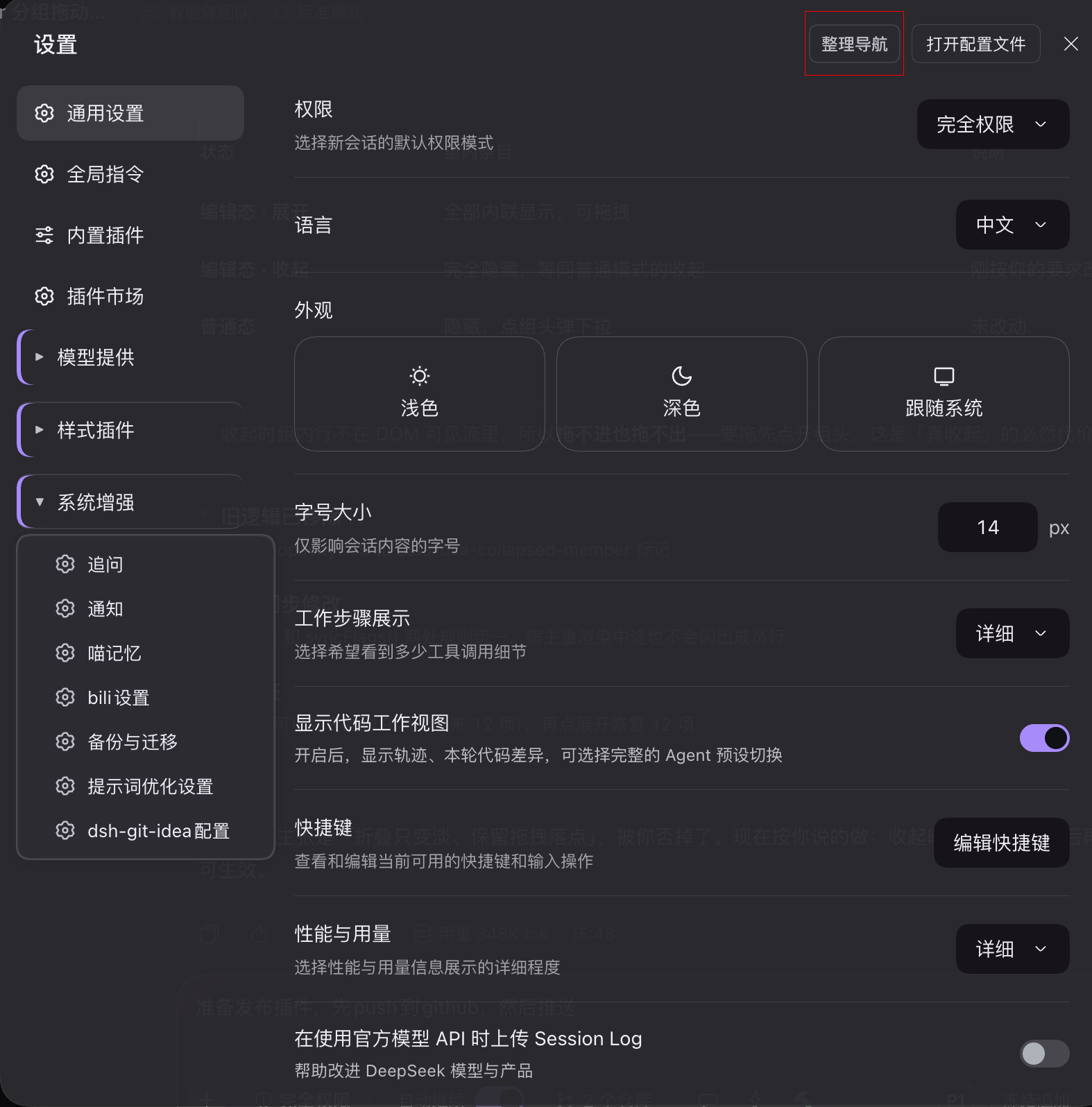
- 分组:把相关分区收进一个组(比如把「追问 / 通知 / 喵记忆」收成「系统增强」),点组头展开。
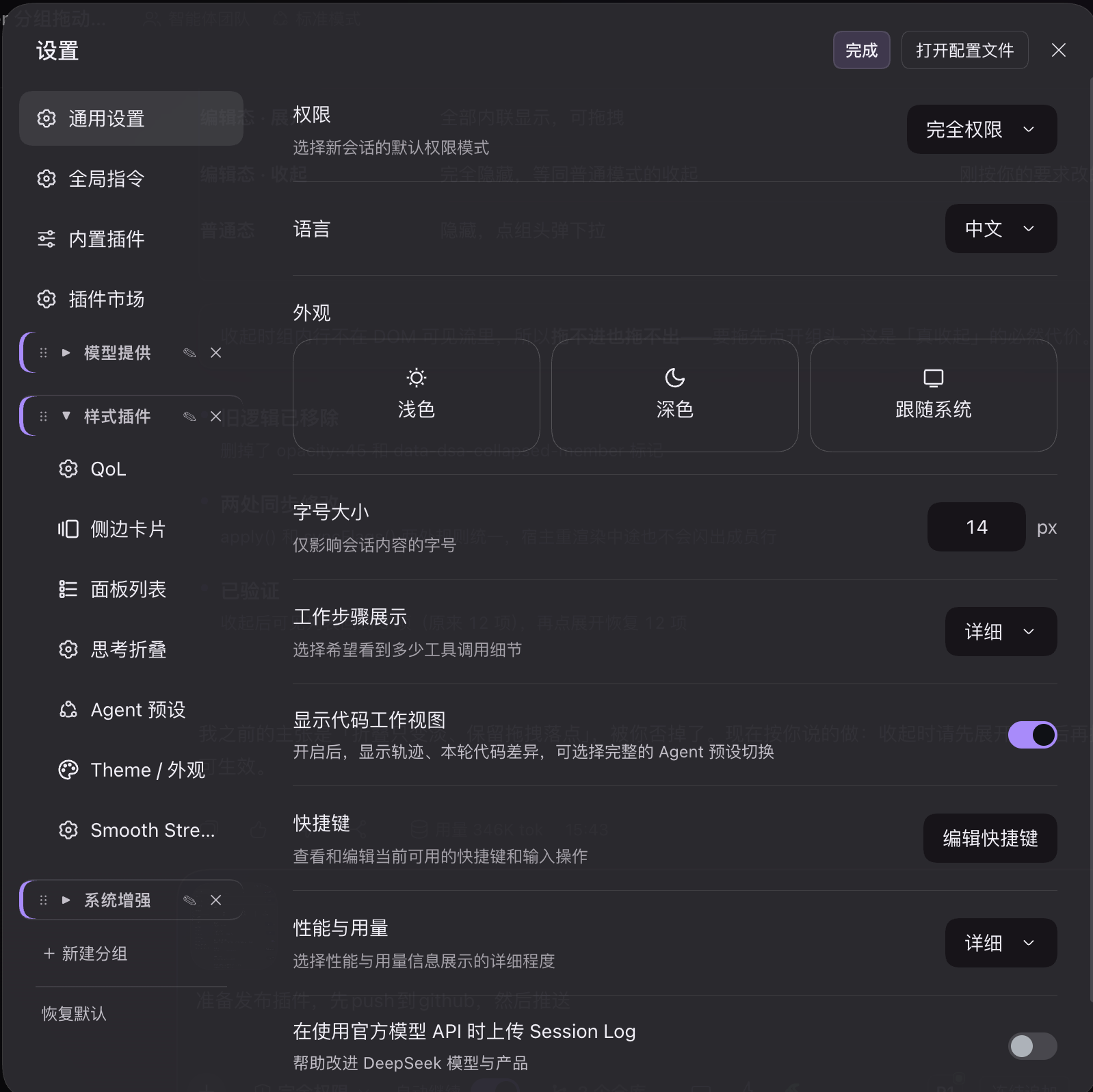
- 组内排序 / 跨组移动 / 拖出一级:整理模式下组内条目同样能拖,可拖进别的组,也可拖回一级。
- 新建 / 重命名 / 删除分组,同名会就地报错。
- 恢复默认:一键清空排布,回到原生顺序(二次确认)。
- 两套视图:平时收起成组头、点开是下拉菜单;点「整理导航」进整理模式,组内条目全部内联铺开,方便拖。
效果图
日常使用:分组收起成一行,点开是带图标的浮动下拉菜单。
整理模式:点右上角「整理导航」,组内条目全部铺开,可直接拖动排序。
安装
dsh plugin --profile web add dsh-settings-arranger
装完刷新 Web GUI(或重启 dsh),bundle 会随包里的 cordis.patch.yml 自动注册。
用 GitHub 源安装:
dsh plugin --profile web add github:HelloQingTao/dsh-settings-arranger
用法
- 打开 设置,点右上角的 整理导航。
- 点 + 新建分组 起个名字。
- 把条目拖进组里,或把分组头拖到别的位置;组内条目可以再拖去别的组,或拖出一级。
- 点 完成 退出整理模式,点分组头就能展开下拉菜单。
排布存在浏览器的 localStorage 里(键 dsh.settings-arranger.v1),按浏览器与站点隔离,换浏览器或换端口要重新整理。
兼容
- dsh
0.2.0-rc.2实测通过。 - 纯客户端插件,只操作 DOM,不改任何其它插件的代码;同名的分区顺序仍由各插件自己的
order决定,本插件只是在渲染后再重排。
许可证
English
The settings dialog's left nav grows into an unmanageable list once you install a few plugins: order is baked in at registration time and official sections sit interleaved with plugin ones. This plugin adds drag-to-reorder and custom groups, persisted per browser.
Features
- Drag to reorder any section, mixing groups and plain rows freely.
- Groups: collect related sections into one group (e.g. put "Follow-up / Notifications / Meow Memory" under "System"). Click the group head to expand.
- Reorder inside a group, move across groups, drag back out — all available in arrange mode.
- Create / rename / delete groups, with inline duplicate-name validation.
- Reset to default — clears the layout and returns the native order (with confirmation).
- Two views: normal mode collapses groups into heads with a floating dropdown; clicking 整理导航 (Arrange) switches to edit mode where every member is laid out inline for dragging.
Screenshots
Normal mode — groups collapse into a single row; clicking one opens an icon-carrying dropdown.
Arrange mode — click "整理导航" in the top-right corner; all members expand inline and can be dragged.
Install
dsh plugin --profile web add dsh-settings-arranger
Refresh the Web GUI (or restart dsh); the bundle registers itself through the shipped cordis.patch.yml.
From GitHub:
dsh plugin --profile web add github:HelloQingTao/dsh-settings-arranger
Usage
- Open Settings and click 整理导航 in the top-right corner.
- Click + 新建分组 and name the group.
- Drag entries into it, or drag the group head elsewhere; drag members across groups or back to the top level.
- Click 完成 (Done) to leave arrange mode, then click a group head to open its dropdown.
The layout lives in the browser's localStorage (key dsh.settings-arranger.v1), so it is per browser and per origin — a different browser or port starts fresh.
Compatibility
- Tested with dsh
0.2.0-rc.2. - Pure client-side: it only touches the DOM and never modifies other plugins' code. Section order is still declared by each plugin; this plugin simply re-lays-out the rendered nav.
License
Comments
Loading…