

dsh-text-explain
Manifest validHighlight-to-Explain: When the AI is mumbling some gibberish you can't make sense of, have it explain it itself.
dsh-text-explain
简体中文 | English
Made for people who don't speak AI. Select a passage in a DeepSeek Harness conversation — a term, an error message, a wall of jargon — and get it explained in plain words, right where you are reading.
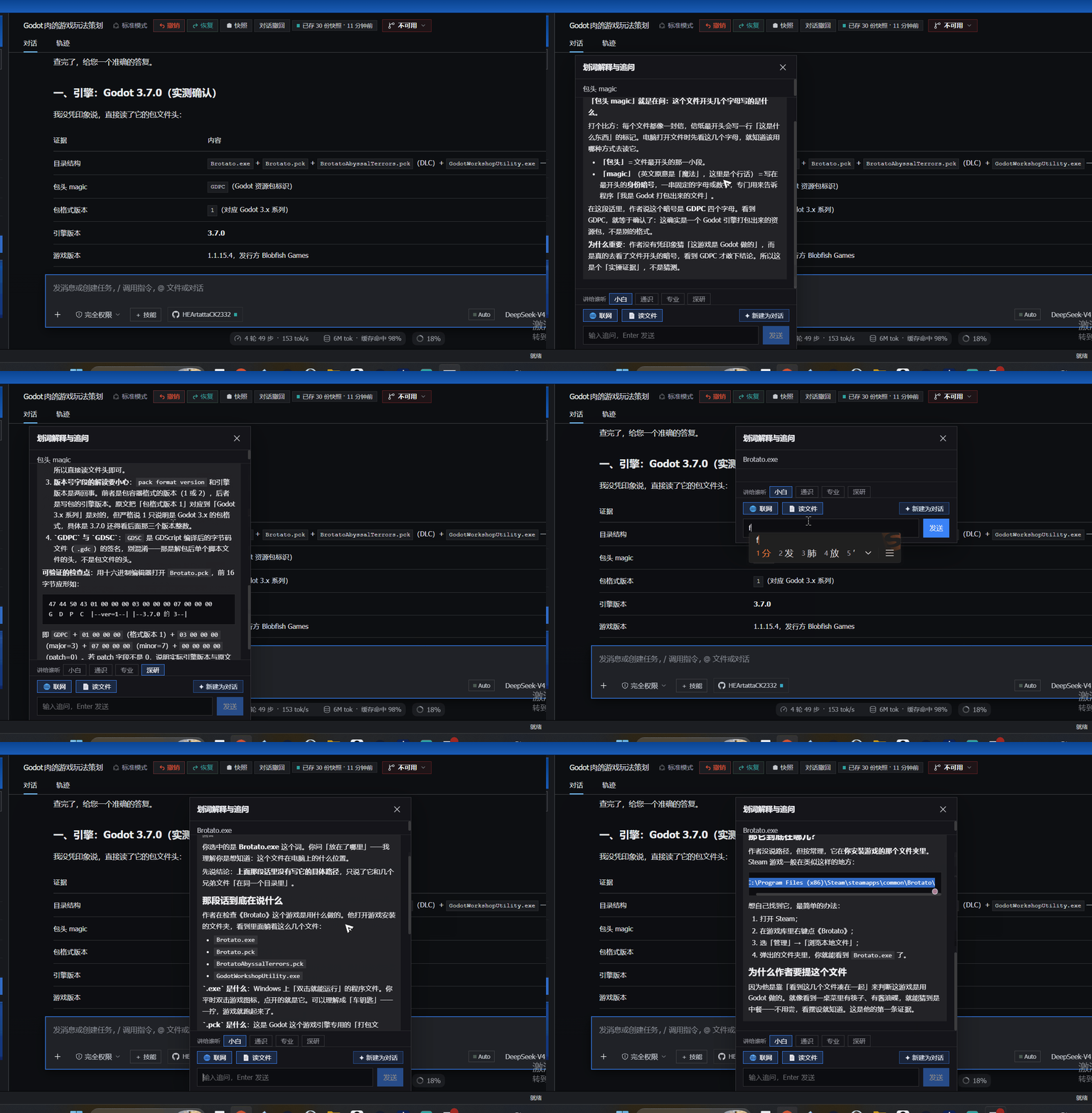
40 seconds, unedited: a Godot build file explained as 「.exe is the cow, .pck is the suitcase — the cow and the suitcase have to travel together」, followed by two follow-up questions.
Why this exists
AI output is full of words you are expected to already know. The usual advice is "just ask the model" — but you have to know what to ask, and the answer often comes back in the same jargon you were stuck on.
This plugin removes that step: select the confusing part, click once, read the plain-words version. No prompt engineering, no second tab, no API key.
Features
- Context-aware. When you select text, it also grabs the whole message the passage came from and hands both to the model. "It will transfer the funds at the end" is ambiguous — until the model can see that "it" means the finance department.
- Depth knob (讲给谁听). Three depths — Plain / General / Pro, defaulting to Plain. Switch one and it re-explains the current question on the spot: the same sentence goes from kitchen-table analogy to engineering vocabulary. A switch in the popup lasts that popup only; set a default in Settings and press Save.
- Standby handoff (✦ New session). The button packs the selection, its source message and everything already asked into a handoff document, drops it into a fresh session and jumps you there. The new session answers with a single line — "背景已了解,等你开口" — and waits: no summary, no questions, no expansion. You already had your explanation; the new session is for what comes next.
- Markdown rendering. Answers render with headings, lists, quotes, code blocks, tables and links — via a hand-written, dependency-free renderer built from React elements (so it is XSS-safe by construction).
- Web search and local files (optional). Two toggles let the model call
web_search/web_fetchfor current information, andsearch_files/read_fileto look things up in your local docs.
Install
dsh plugin --profile web add github:HEArtattaCK2332/dsh-text-explain
Then restart the Web profile so the new bundle layer is loaded.
From a local checkout instead
dsh plugin --profile web add file:<path-to-dsh-text-explain>
Usage
- Select text in any conversation message. The popup automatically carries that message along as context.
- Click AI 解释 to explain it, or 追问 to ask a question about it.
- Read the streamed answer. Type a follow-up and press Enter to keep the same thread; close the window with ✕.
- Switch depth with 讲给谁听 at the bottom of the popup. Changing it re-explains the current question immediately.
- Toggle 🌐 联网 / 📄 读文件 before asking, if you want the model to search the web or read local files.
- Click ✦ 新建为对话 when the thread is worth pursuing: the whole exchange lands in a new session as a handoff, which opens automatically and waits for you to speak.
- Open 设置 → 划词解释 for defaults: which workspace a new session lands in, the default depth, and (under 高级设置) whether the two toggles start on.
Settings
Settings live on the host, in <DSH_HOME>/text-explain/settings.json
(DSH_HOME defaults to ~/.dsh). The settings page keeps a draft: every
click only edits that draft, 保存 writes the whole file, 刷新 throws the
draft away and re-reads what is stored. Nothing you did not save is ever
written to disk — not to the config file, not to browser storage (this plugin
stores nothing in the browser at all).
Browser extension
The same backend also powers a browser extension: select any passage on any web
page and read the explanation in a floating panel (three depths, switchable on
the spot). Source lives in extension/ with its own
README.
Load it unpacked: open chrome://extensions/, turn on Developer mode, click
Load unpacked, and pick the extension/ folder.
Use it from other apps
The host half also speaks the OpenAI chat-completions protocol, so any client that accepts a custom API base URL can use this plugin as its backend — Obsidian plugins, browser extensions, your own scripts.
Base URL : http://127.0.0.1:3080/api/text-explain/v1
API key  : anything (or leave it empty)
Model    : text-explain-plain | text-explain-general | text-explain-pro
GET /modelslists the three depths.POST /chat/completionstakes the standard shape and supportsstream: true(SSE).- The model name picks the depth:
text-explain-plainis the default voice (for people who don't speak AI),text-explain-prothe most technical. - A
systemmessage from the caller is ignored on purpose — the whole point of this plugin is that the explanation style is not up to the caller. - Callers without an
Originheader (curl, local scripts) work out of the box. Callers with one must be listed inallowedOrigins(see Design notes) — desktop apps included: Obsidian sendsOrigin: app://obsidian.md, so that exact line belongs in the allowlist.
Tests
Three stub-based self-check suites ship in the box. They need nothing but Node's
built-in modules — no test framework, no npm install:
node test/run-all.mjs # all three; or run any single file
test/host.test.mjs— drives the real HTTP endpoints against a fakellm/webServer: the three depths must produce three different system prompts; an unknownlevelmust fall back toplain(never an error); context must still be injected; an empty selection must be rejected. It also checks the settings endpoint creates no file until you save, sanitizes dirty input, and leaves stored settings untouched on a bad payload. Everything is written to a tempDSH_HOME, never your real one.test/settings.test.mjs— loadslib/client.jsagainst React / fetch stubs: module shape, slot registration, settings normalization, cache behaviour, failure fallbacks, and the rule that matters — only Save issues a POST. Thewindowstub deliberately has nolocalStorage, proving browser storage is really gone.test/render.test.mjs— renders both components on a React stub: the settings page (loading / ready / error, collapsed and expanded) and the popup with a full Markdown answer, exercising the hand-written renderer.
Design notes
- The selected text goes to
deepseek-official/deepseek-v4-flashby default; no separate API key is stored by this plugin. - Intentionally dependency-free and hand-written: no build step.
- Host half (
lib/index.js) registersPOST /api/text-explainandGET/POST /api/text-explain/settingsas exact routes. The four depth prompts share one skeleton (「语境」/「格式」are common; only 「读者 + 怎么讲」 differ), so a single code path serves all four. - Context comes from the DOM: the client walks up from the selection anchor to the outermost ancestor that still fits the same message (capped at 4000 characters). If that walk fails, the explanation still works — just without context.
- Web search uses Bing's RSS endpoint (
format=rss) — no API key, and reachable on networks where DuckDuckGo is not.web_fetchstrips HTML to plain text; it works for static pages, not JavaScript-rendered ones. search_filesreturns only document files (README / SKILL.md / package.json / …) and skips runtime directories such asundo,snapshotsandlogs.read_filerefuses files over 512 KB, truncates long text, and never writes.- Cross-origin calls (the door for a future browser extension): the endpoint
inspects
Originfirst. No origin, or same-origin as the host, behaves exactly as before; only origins listed in theallowedOriginsallowlist get CORS headers, everything else gets a flat 403 — so a random web page cannot burn your quota. The allowlist defaults to an empty array, so the default behaviour is unchanged.
License
MIT — see LICENSE.
Comments
Loading…
Similar plugins
by yfwu2020
DSH 划词解读:选中文字浮出按钮,点击弹窗流式显示专业中英翻译 + 该文字在当前上下文中的含义详解
★ 2
MIT
JavaScript
Sep 25, 2026
dsh plugin --profile web add @yfwu2020/dsh-selection-explainby Rice00
Select text in a DSH conversation and explain it in a floating window — independent channel, no session pollution, can be saved as a real session. / 划词解释浮窗:选中即弹、不污染主会话、可保存成正式会话。
★ 1
↓ 559/wk
MIT
JavaScript
Sep 30, 2026
dsh plugin --profile web add dsh-loupeby KLAX54ix
DSH 插件:选中回答里的文本就地解释,解释不进入主对话上下文;卡片内可继续选中追问,支持拖拽、指向线与三级嵌套。
★ 0
MIT
JavaScript
Oct 5, 2026
dsh plugin --profile web add dsh-explain-selectionby webkubor
Let the AI know you. 让模型主动记下你的判断依据(原则/红线/工作方式),跨会话复用 —— 有容量、会遗忘、每条都说得出为什么记。
★ 17
↓ 369/wk
MIT
JavaScript
Oct 5, 2026
dsh plugin --profile web add @dsh-plugins/dsh-user-mirrorby weilantianhai
/skills command for DSH — list skills with auto-translated descriptions (zh↔en)
★ 3
MIT
JavaScript
Sep 10, 2026
dsh plugin --profile web add dsh-command-skill-listby suiyideali
在 DeepSeek Harness 会话里划选文本,选区上方浮现一个小工具栏: 复制 · 引用 · 询问 · 解释 · 翻译 · 总结 · 自定义。 所有 AI 动作都复用当前会话——选中文本作为普通用户消息注入当前对话, 模型带着完整上下文作答。
★ 4
MIT
JavaScript
Oct 7, 2026
dsh plugin --profile web add dsh-selection-toolbar