
wechat-ocr
Manifest validLocal WeChat OCR tool for DSH: `wechat_ocr_recognize` returns recognized text and the engine structured result for a local image path.
wcocr: demonstrate how to use WeChatOCR.exe
Great thanks to IEEE by his Project IEEE/QQImpl] and article.
This project is based on it and reduced the product size by using protobuf-lite instead of protobuf.
This project provided a direct Python interface for calling in sync mode as well as other languages support including but not limited with c++/java/c#.
DeepSeek Harness plugin
This repository can be installed as a DeepSeek Harness plugin:
dsh plugin add github:hawkhai/wechat-ocr
It registers wechat_ocr_recognize, a model-facing tool that accepts a local image path and returns recognized text together with WeChat OCR's structured result. OCR runs locally; the image is not sent to an external OCR service.
Configure wechatOcrPath (the WeChat 3.x WeChatOCR.exe, WeChat 4.x wxocr.dll, or Linux OCR binary) and wechatPath (the matching WeChat runtime directory) in the plugin row. You may instead set WECHAT_OCR_PATH and WECHAT_PATH. The default python must match one of the bundled Windows extension builds (CPython 3.7, 3.11, or 3.12); pythonBin and moduleDir are configurable.
Prepare for usage
To work with this project, you need to prepare the wechat OCR binary and the wechat runtime folder.
For wechat 3.x, the wechat OCR binary is wechatocr.exe, it might be:
C:\Users\yourname\AppData\Roaming\Tencent\WeChat\XPlugin\Plugins\WeChatOCR\7061\extracted\WeChatOCR.exe
and the wechat runtime folder might be:
C:\Program Files (x86)\Tencent\WeChat\[3.9.8.25]
Wechat 4.0 is now supported!
For wechat 4.0, the wechat OCR binary is wxocr.dll, it might be:
C:\Users\yourname\AppData\Roaming\Tencent\xwechat\XPlugin\plugins\WeChatOcr\8011\extracted\wxocr.dll
and the wechat runtime folder might be:
C:\Program Files\Tencent\Weixin\4.0.0.26
Warning
WeChat 4.0 OCR binary is wxocr.dll, but this project built a DLL named wcocr.dll
Their names are similar, DO NOT confuse them.
Linux is now supported
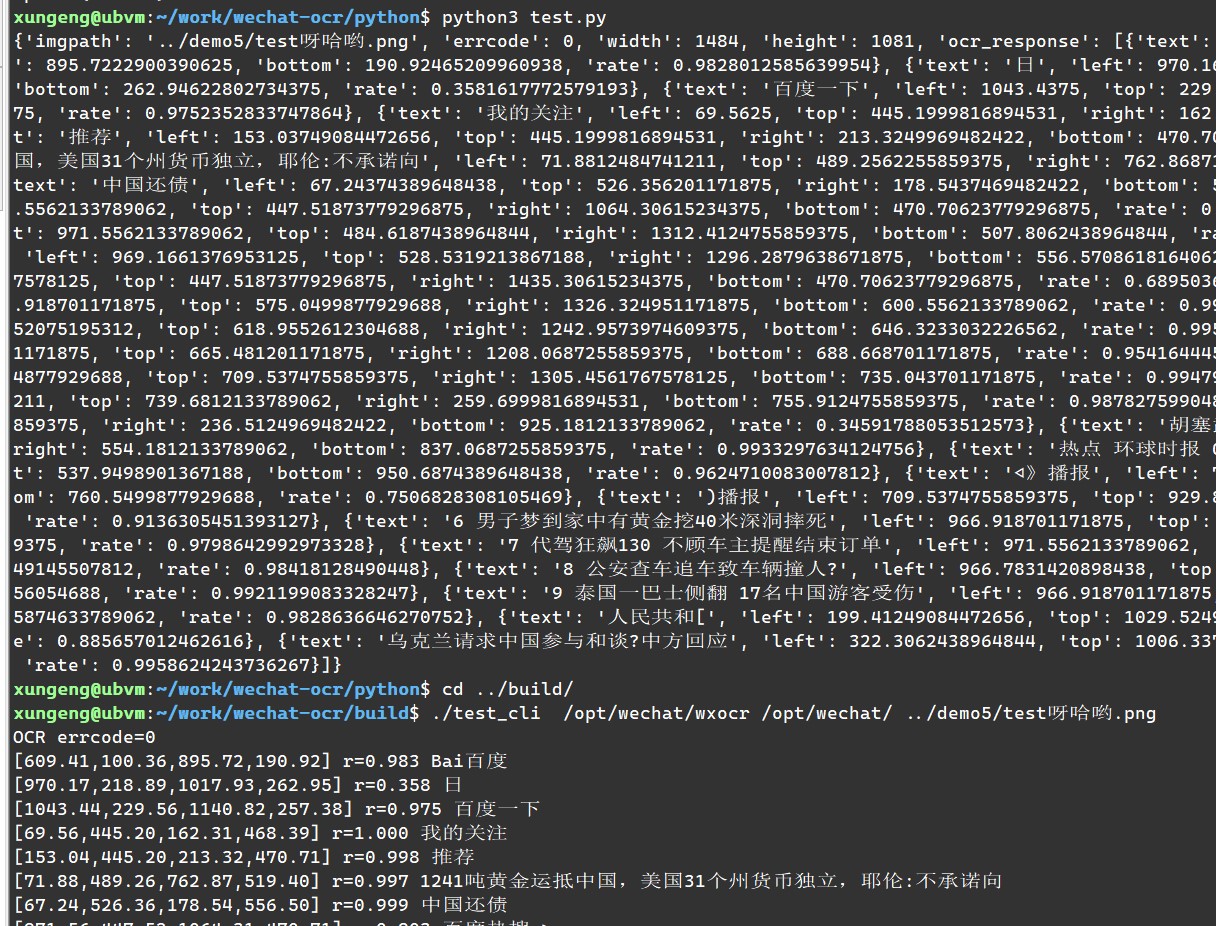
Typically, You should use /opt/wechat/wxocr as the OCR exe path and /opt/wechat/ as the WeChat folder path.
The other usages are similar to those on Windows.
C++ interface
You can use the following code to test it:
CWeChatOCR ocr(wechatocr_path, wechat_path);
if (!ocr.wait_connection(5000)) {
	// error handling
}
CWeChatOCR::result_t result;
ocr.doOCR("D:\\test.png", &result);
You can also pass nullptr to the second parameter of doOCR to call in async mode and wait the callback.
In this case, you need to subclass CWeChatOCR and implement the virtual function OnOCRResult.
Python interface
Rename the built wcocr.dll to wcocr.pyd and put it in the same directory as test.py.
You can use the following code to test it:
import wcocr
wcocr.init(wechatocr_path, wechat_path)
result = wcocr.ocr("D:\\test.png")
Currently, the python interface only supports sync mode.
Java interface
- see java/Test.java
- I'm not so familiar with java and don't know how to pass complex data structures, so I just passed a JSON string from cpp to java.
- The added DLL export function
wechat_ocrcan also be used in other scenarios.
C Sharp (C#) interface
- see
c_sharpfolder. - It's important to ensure the built dll is copied to the folder test_cs.exe in! always copy the 64bit version dll!
- It's ok to built a 32bit test_cs.exe and copy the 32bit dll, you can try.
Comments
Loading…
Similar plugins
by maxwell-feng
Local OCR for attached images via Tesseract: only the recognized text is sent to the model, never the image bytes; vision passthrough is opt-in.
★ 4
MIT
TypeScript
Sep 13, 2026
dsh plugin --profile web add dsh-tesseract-ocrby br1nosense
Give DSH text-only models vision: an image/OCR/document recognition skill (race pool → custom channels → local) plus an idempotent host patch so image messages reach the model.
★ 0
PowerShell
Aug 17, 2026
dsh plugin --profile web add @dsh-user/dsh-vision-solutionby Daive1119
Offline local OCR skill for DSH/agents - Windows native engine first, zero cloud cost
★ 1
MIT
Python
Oct 11, 2026
dsh plugin --profile web add dsh-local-ocrby GooDAnDReaDY
Routes images to a vision model of your choice - auto-rewrite, explicit tools, or hybrid - so a text-only chat model does not fail a turn that contains a picture.
★ 2
↓ 600/wk
MIT
JavaScript
Sep 26, 2026
dsh plugin --profile web add @goodandready/dsh-vision-bridgeLocal Windows 11 OneOCR tool for DSH: `oneocr_recognize` returns OCR text and structured line/word polygons, confidence, rotation, and handwriting style.
★ 0
dsh plugin --profile web add dsh-win11-oneocrby maxwell-feng
dsh plugin: OCR attached images locally with the built-in Windows OCR engine — text-only models can see, privacy-first
★ 8
↓ 239/wk
MIT
TypeScript
Sep 13, 2026
dsh plugin --profile web add dsh-windows-ocr