

dsh-plugin-control-your-capture
Discovered★ 4DSH Plugin for Physical-Pixel Screenshots/Screen Recording | Native-pixel screenshots and screen recording for DSH

dsh-plugin-control-your-capture
把高清截屏与录屏装进 DSH:按物理像素采集,按目标尺寸缩放。





简介
高 DPI 屏上截图发虚,通常不是编码问题,而是采样问题:屏幕的物理像素远多于逻辑像素。
在一台 3072×1920、系统缩放 200% 的 Windows 上实测:未声明 DPI 感知的进程只能采到 1536×960, 再放进 1080p 成片就必须放大,文字锐度实测相差 8 倍;同一块屏幕上 gdigrab 录屏只有约 19 fps, 而 Desktop Duplication 可以跑到约 58 fps。
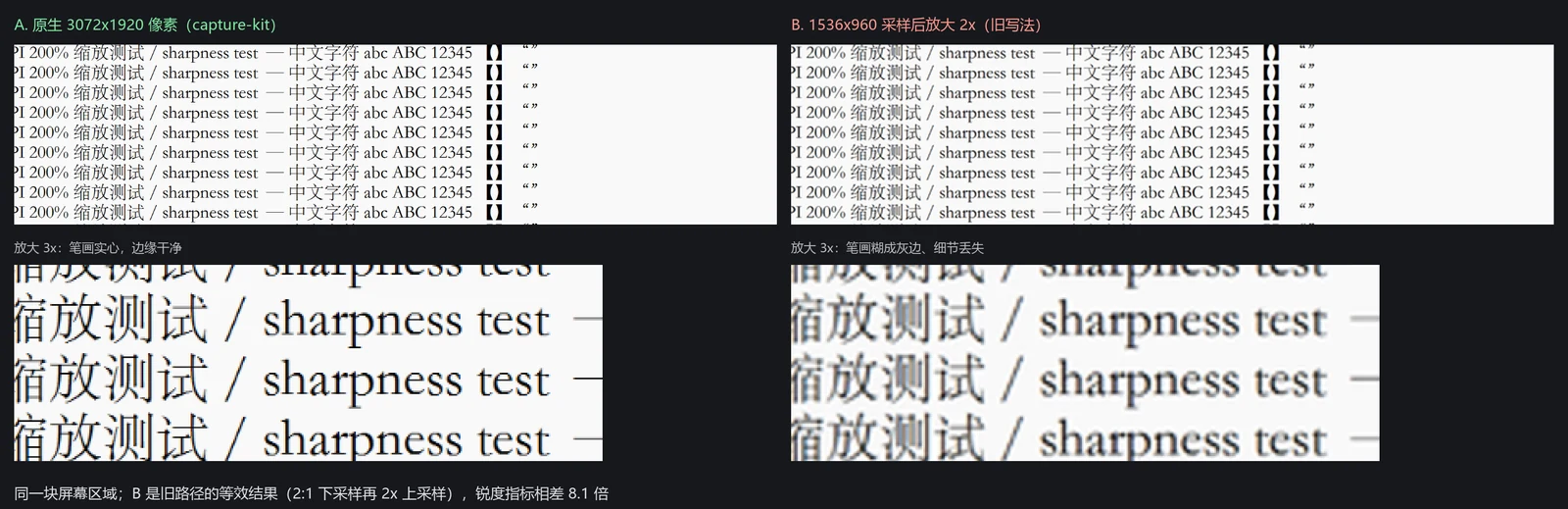
本插件把这件事固定成脚本与技能:挂载时把 capture-sharp 安装到 DSH 全局技能目录, 之后任何工作区、任何会话都能直接用;agent 照着脚本调,不必每次重新发明采集方式。
核心特性
- 按物理像素截图:Windows 走 .NET GDI+,macOS 走 screencapture,Linux 走 grim / gnome-screenshot / ImageMagick;支持全屏、窗口、客户区、区域与高质量缩放。
- 录屏保原生分辨率与高帧率:Windows 优先 ddagrab(Desktop Duplication),失败回退 gdigrab 并如实报帧率;macOS 用 avfoundation,Linux 用 x11grab。
- 网页按目标尺寸光栅化:用 --target-width 表达目标宽度,缩放由「目标宽 / CSS 宽」推导,不写死倍数。
- 一条命令自检:probe 输出屏幕物理尺寸、DPI、VIDEO_BACKEND 与 DDAGRAB,先确认能力再拍。
- 缺 ffmpeg 时优雅降级:截图与网页截图照常工作,只有录屏不可用,并给出三平台安装命令。
- 零运行时依赖:只用 Node 内置模块,不注册第二个 skill provider,装完即用。
平台与依赖
| 能力 | Windows | macOS | Linux | 无 ffmpeg |
|---|---|---|---|---|
| 截图 | .NET GDI+ | screencapture | grim / gnome-screenshot / ImageMagick | 正常 |
| 网页截图 | Chrome/Edge + Node | 同左 | 同左 | 正常 |
| 录屏 | ffmpeg | ffmpeg | ffmpeg | 不可用 |
| 缩放 | 内置 | sips | ImageMagick 或 ffmpeg | Linux 需 ImageMagick |
采集能力在 Windows 10/11 上实测通过;macOS 与 Linux 路径已实现但未在真机验证, 脚本会先运行 probe 报告可用工具,缺什么直接说明。
安装
前提:已安装 DSH;网页截图需要 Node 18+ 与 Chrome/Edge;录屏需要 ffmpeg(可选)。
dsh plugin add dsh-plugin-control-your-capture
安装后重启一次 DSH。插件挂载时会把技能复制到 $DSH_HOME/skills/capture-sharp,
任何工作区、任何会话都能看到它。
使用方式
装好后可以直接用自然语言触发:「截个图」「录一段屏」「这个画面好糊」「给演示视频抓点素材」。
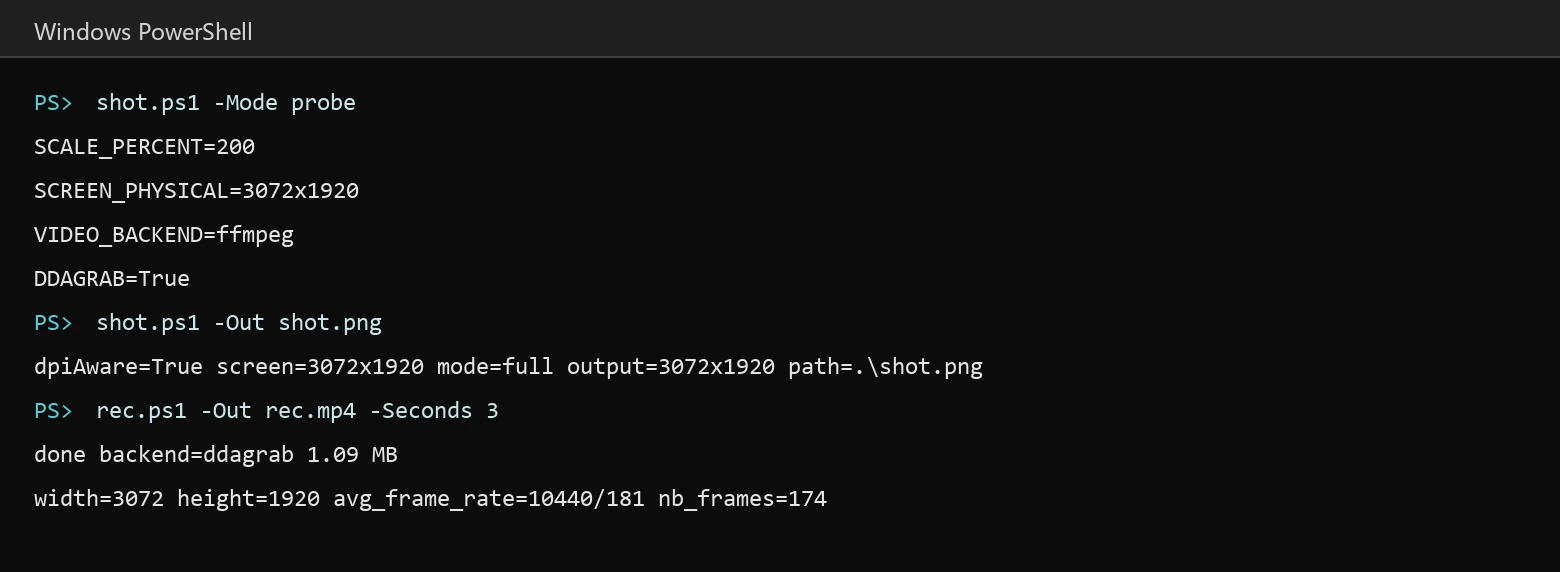
# Windows:先自检,再截图
powershell -File "$DSH_HOME\skills\capture-sharp\scripts\shot.ps1" -Mode probe
powershell -File "$DSH_HOME\skills\capture-sharp\scripts\shot.ps1" -Out .\shot.png
# macOS / Linux
bash "$DSH_HOME/skills/capture-sharp/scripts/capture.sh" probe
bash "$DSH_HOME/skills/capture-sharp/scripts/capture.sh" shot --out ./shot.png

# 网页截图(全平台)
node "$DSH_HOME/skills/capture-sharp/scripts/page.mjs" --url https://example.com \
  --out ./page.png --width 960 --height 540 --target-width 1920
# 录屏:原生分辨率;需要 1080p 时按比例缩进目标框
powershell -File rec.ps1 -Out .\rec.mp4 -Seconds 20
powershell -File rec.ps1 -Out .\rec1080.mp4 -Seconds 20 -ScaleTo 1920x1080
完整的命令表、验收方式与排错见技能内的 SKILL.md 与 references/troubleshooting.md。
配置
默认安装到 $DSH_HOME/skills。要换位置,二选一:
- 环境变量
DSH_CAPTURE_SKILL_ROOT - cordis.patch.yml 里给本插件行加
config: { skillRoot: '...' }
升级时整目录替换,避免旧脚本残留;已存在但非本插件安装的同名技能不会被覆盖。
项目结构
lib/index.js            插件入口:挂载时安装配套技能
cordis.patch.yml        插件行声明
skill/capture-sharp/    随包技能(SKILL.md、scripts、references)
更新与发布
版本记录见 CHANGELOG.md。
许可证
MIT。
Comments
Loading…
Similar plugins
by Silentforfar
DSH bundle: capture a screen region with QQ's screenshot tool and hand the image to the model.
★ 0
MIT
JavaScript
Oct 21, 2026
dsh plugin --profile web add @silentforfar/dsh-qq-screenshotby Link-h1j
给 DSH 桌面版输入框加「录屏」「截图」两个按钮:把「说不清」的界面问题变成能直接发给模型的视频 / 图片证据,减少人机沟通的来回损耗。欢迎官方收录进桌面版本体。Screen capture & recording evidence for better human-agent communication.
★ 0
MIT
JavaScript
Oct 21, 2026
dsh plugin --profile web add dsh-screen-capture-record-desktopby HsgtLgt
面向模型的「截图」工具插件(DeepSeek Harness,Windows 宿主)。 注册一个 screenshot 工具,让会话里的 AI 能真正「看见」并展示你的屏幕。
★ 0
MIT
JavaScript
Oct 8, 2026
dsh plugin --profile web add dsh-plugin-screenshotby deepseekbluefish
WeChat-style in-app screenshot button: drag a region, fine-tune with 8 resize handles, Enter to capture and Esc to cancel; auto-numbered PNGs plus a [Shot N HH:mm] marker written into the composer. Wi
★ 0
MIT
PowerShell
Aug 24, 2026
dsh plugin --profile web add dsh-screenshot-pluginby XWIDE
DeepSeek Harness plugin: pasted screenshots become numbered image references, with a composer-dock thumbnail panel, an @-menu image source, and optional auto-insert of the reference at the caret.
★ 1
MIT
JavaScript
Oct 9, 2026
dsh plugin --profile web add dsh-picflowby JohnXu22786
dsh plugin: desktop control - screen capture, pointer/keyboard injection, accessibility-tree semantic actions, with emergency stop, allow/deny rules, confirmation flow and idle standby
★ 0
MIT
Python
Sep 29, 2026
dsh plugin --profile web add dsh-computer-control