

dsh-cost-meter
Manifest valid★ 569DeepSeek Harness session cost meter plugin: session/daily cost, budget, history, OpenCode Go quota, official & custom-provider balance, Codex-like token heatmap, peak/off-peak pricing with pre-switch
dsh-cost-meter
DeepSeek Harness session cost statistics plugin (bilingual CN/EN UI)
This session's cost · daily cost · OpenCode Go subscription quota display · budget and used percentage · official account balance · custom Provider balance query (any HTTP endpoint configurable) · balance 3-segment progress bar · history · peak/off-peak pricing window display (UTC 01:00–04:00 and 06:00–10:00 are peak windows; from 2026-08-23 weekends are all off-peak, shown as "Weekend window — all off-peak pricing") · popup and system notification reminder before peak/off-peak switch (position/lead time/reminder type configurable) · one-click official price sync · Codex-style token usage heatmap · multi-vendor, multi-model price billing (90+ model price catalog built in with auto-matching) · mainstream Coding Plan quota query and display (nine vendors: Anthropic / Z.ai / MiniMax / Kimi / OpenRouter / SiliconFlow / CommandCode / SCNet / Volcano Ark, including Volcano Ark AK/SK signing) · Plan/API dual-track billing (subscription quota and pay-as-you-go amounts tracked separately, per 1% quota and full-window token/equivalent-amount estimation plus day/week/month curves) · quota bar above the input box (budget/Go/Coding Plan usage shown in a single horizontal row, toggleable)

v1.7.28: MiniMax quota query now prefers www.minimax.cn by default, and a new saveable HTTPS query domain has been added; once manually specified, only that domain is accessed, and updating the plugin preserves the configuration. See configuration docs.





English | 中文

Feature Overview
| Feature | Location | Description |
|---|---|---|
| Per-model cost card | Sidebar / bottom-right dock (configurable) | Disabled by default; expand Top-N, others summary, share and optional tokens in place; supports today / last 90 days, expand memory and a Top-1 badge; see usage guide |
| This-session cost | Below input area / session title bar | Real-time cumulative cost + input/cache/output tokens; position configurable |
| Official balance | Sidebar top / settings page (configurable) | Total balance / gifted / recharge; auto refresh + manual refresh; optional three-segment progress bar (blue/orange/gray); the today segment counts only official-channel costs (excludes Coding Plan / custom Providers) |
| Custom Provider balance | Sidebar / settings page (configurable) | Configurable HTTP query for any Provider balance (LiteLLM, etc.); Chinese/English names, currency, extract rules (dot-path / numeric constant / add / subtract / divide, divide adapts to quota endpoints like NewApi, see example below); collapsible config in the same section as Coding Plan |
| OpenCode Go quota | Sidebar / settings page / bottom-right (dock, configurable) | Rolling 5-hour / this-week / this-month usage percentages and reset times; three tiers each switchable independently; can also show budget used %; Key auto-discovered (dedicated reference / official Go route apiKeyEnv / environment variable / opencode login state) or entered manually |
| Coding Plan quota | Sidebar / settings page (configurable per vendor) | Multi-vendor coding plan subscription quota queries (Anthropic Claude Pro/Max, Z.ai/GLM, MiniMax Token Plan, Kimi Code weekly/5-hour quota (falls back to PAYG balance when no subscription key), OpenRouter credits, SiliconFlow balance, CommandCode 5h/weekly window and monthly Credits balance, Volcano Ark 5h/weekly/monthly three tiers (requires AK/SK management-plane HMAC signature, needs ArkReadOnlyAccess + BillingCenterReadOnlyAccess)); each vendor has its own enable switch, credentials, display location and refresh interval (same sidebar card and Go-quota style, collapsed narrow-rail shows percentage); defaults to official endpoints, MiniMax can configure a trusted query domain; no credentials / no subscription shows a neutral notice; SCNet Super Computing Internet Token Plan supports external console quota snapshot; without a valid snapshot, monthly usage is estimated from the local ledger via the official Credits deduction table (no credentials required) |
| Quota strip | Above input box (show setting toggleable) | A single horizontal row of chips that shows in real time budget used % / Go main window / each enabled Coding Plan usage window (short label + mini progress bar, ≥80% warning, ≥100% over budget, hover to see reset time); clicking any chip refreshes the corresponding data source (budget→status, Go→Go quota, vendor→all of that vendor's windows), multiple windows of the same vendor are merged into one chip shown in segments; first update pops a guided card so the user decides whether to switch; auto-hidden when no data is available |
| Click to refresh now | Sidebar balance/quota boxes | Official balance / custom balance / Coding Plan boxes (including collapsed narrow-rail state): clicking triggers one query, a breathing blink during refresh, on failure the original value is kept and a hover tip explains; keyboard Enter/Space can also trigger; a guided hint on first entry after an update |
| Simplified sidebar display | Settings → Cost → Display | Optional; prompt to choose on first update; compresses cards and details; panel height limited to 38% of the viewport and not exceeding 320 pixels; retains amounts, quotas, click-to-refresh and hover details; restoring original layout when off. Usage guide |
| Today's cost | Sidebar bottom (above settings button) | "Today ¥x"; hover to see call count and token breakdown |
| Budget box | Sidebar bottom (between balance row and settings button) | Rounded-square box: budget, used %, progress bar, today's cost and its share of budget, used/limit; ≥80% warning, ≥100% over budget |
| Summary cards | Settings page | Today / this-month / cumulative costs and call counts |
| Token usage stats | Settings page (cost settings) | Historical cumulative total tokens (input/cache/output/calls) + a Codex-style 26-week daily usage square heatmap, spanning the full settings page width; hover to see that day's details |
| Token Plan usage stats | Settings page (usage) | Per enabled Coding Plan (including Go), the "per 1% quota" and "full window 100%" corresponding token counts and equivalent-amount estimates (sampling delta / current usage conversion), plus daily/weekly/monthly usage curves; Plan-type call amounts are recorded as equivalent value only, not real money (issue #64) |
| Today's session details | Settings page | Per-session call counts, input/cache/output tokens and cost |
| History | Settings page | Aggregated by day; retention period configurable (default 180 days) |
| Historical per-model stats backfill | Settings page (per-model stats) | Old ledger entries from before per-model stats went live are automatically replayed through host session logs to rebuild per-model token/cost splits (old calls at their base price at the time); the portion of logs that has been cleaned up is grouped into an "early unsplit-model" residual row |
| Import pre-install history | Automatic on first start | On first start after install/upgrade, automatically replays the host's full session logs to import conversations from before the plugin was installed into the ledger (whole days with missing dates are rebuilt entirely, existing dates only fill in unknown sessions, idempotent and does not double-count with real-time billing; amounts back-calculated from historical prices at the event time); a manual re-run entry remains in the settings page |
| Budget settings | Top of settings page | Limit, period (today/this-month/cumulative/custom date range), used % |
| Price table | Settings page | Two price tiers per model off-peak/peak (input/output shorthand supported, cache price auto-filled); free add/delete/edit |
| Peak/off-peak pricing window display | Settings page / budget / today's cost | Shows UTC peak windows 01:00–04:00, 06:00–10:00 and the current tier; from 2026-08-23, weekends (Saturday and Sunday, Beijing time) are billed all-day at off-peak price and displayed as "Weekend window — all off-peak"; expanded state shows peak/flat window bars (current window + countdown), collapsed (rail) state shows a vertical peak/off-peak progress bar, each independently toggleable |
| Peak/off-peak switch popup reminder | Global overlay | A full-screen color-bar badge popup when less than the configured lead time (default 2 minutes, configurable 1-30) before entering a peak/off-peak window (reminder color distinguishes entering peak/off-peak); popup position optional bottom-right / screen center, reminder type optional (enter peak / enter off-peak / both), each switch point reminds only once; optionally send a browser (system) notification in sync (received even when the page is minimized, requires notification permission); configured in the settings page peak/off-peak pricing panel, with a one-click popup preview (real component rendering, text/position/notification fully consistent with the actual trigger) |
| Official price sync | Settings page | Scrapes and parses the official pricing page, one-click apply; optional official price currency (USD · English official page / CNY · Chinese official page); CNY prices are converted at the display exchange rate and recorded, matching the official statement when displayed in CNY |
| UI language | Settings page → display settings | Simplified Chinese / English / follow browser (auto); switch takes effect instantly and auto-saves |
| Hide official balance / hide today's cost | Settings page → display settings | Two independent switches: when on, the corresponding UI block (sidebar balance row and panel / today's cost row, budget details, overview today card, etc.) is no longer rendered as a whole, while token and call-count stats are unaffected; for screen sharing / screenshot leak prevention |
| AI price sync | Prompt | DeepSeek official sync; other providers use verified official price catalogs and manual configuration |
| Model & Plan adaptation notes | Adaptation doc | Vendor model billing and the adaptation matrix for 8 Coding Plans, auto-matching mechanism and price sources (English) |
| Peak/off-peak switch reminder illustrated guide | Reminder doc | Complete illustrated guide of the popup and system notification before peak/off-peak switches: effect screenshots (CN/EN), setting explanations and usage suggestions (English) |
| Token Plan usage stats illustrated guide | Panel doc | The meaning of the four columns for per-1% and full-window estimates, the first-to-last delta estimation method and precision notes, scope boundaries (only counts calls inside dsh) and usage curve explanations (English) |
| Multi-provider billing | Settings page / ledger | Supports input/output, cache and reasoning token prices for providers such as OpenAI, Anthropic, Google Gemini, Mistral; billing isolated by provider+model |
| Auto model name matching | Settings page / ledger | Unknown model ids auto-matched to the price table: ignore case/spaces/hyphens/dots and parenthesized notes; a normalized equivalent or a request name containing a table model name hits (e.g. gpt5.6 luna(go)); under routing providers (opencode/zen, etc.) a cross-vendor full-library search is done; can be disabled to exact-only; unmatched models can be manually assigned a billing entry |
| Extended price table | Settings page → extended price table | Built-in reference price catalogs per vendor, classified by model family (click to expand, vendors collapsed by default); one-click mount to join billing, mounted third-party models default into the editable table; per-model "show directly in cost settings" switch to pick which models (including DeepSeek) display directly in the "Price table" section |
Custom Provider Balance Configuration Example (NewApi Template)
Qwen / Alibaba Cloud funding account balance can be queried directly by clicking "Add Qwen / Alibaba Cloud balance", using RAM AccessKey signature queries, displaying the available amount and currency returned by the API; see Qwen balance notes for configuration steps, required permissions and scope.
Qwen Token Plan can select official CLI subscription quota within the card; the CLI must be installed on the DSH host under the same system account and qianwen auth login must have been run. Local estimation is retained by default; CLI mode displays the account's current Credits and does not modify the local ledger.
Qwen Token Plan's local Credits only count qwen, qwen-tokenplan, qianwen-tokenplan, qwen-token-plan, qianwen-token-plan subscription providers (case-insensitive, may carry an llm- prefix); calls explicitly categorized as API are not counted. The qianwen pay-as-you-go provider is not counted into subscription quota even when using the same model name. Custom channel names must use one of the subscription names above; when a model is not in the deduction table, three fee rates must be supplied.
The CLIProxyAPI gateway source card can check "Show Gemini quota only", affecting only that source's Antigravity group. All groups are shown by default; when nothing is visible after filtering an empty list is shown, parse errors are still reported separately.
The extract rules for custom Provider balance support four forms: numeric constant, dot-path string, add/subtract multi-path arithmetic, divide scaling by a by divisor. divide applies to endpoints like NewApi that measure in integer quota (1 USD = 500000 quota, the same conversion as cc-switch).
unit: "CREDITS": non-currency counting endpoints can optionally useCREDITS, with display set by decimal precision and labeled as Credits. Dollar cost is not converted to credits, and neither is any today-credits consumption derived from it; the progress bar only uses the credit limit returned by the API, and the global currency budget does not apply.- Local loopback endpoints support plaintext HTTP: when the endpoint host is
127.0.0.1/localhost/[::1],http://is allowed (traffic stays on the network card), for local read-only routes that listen on loopback only and do not provide TLS (such as/plugins/dsh-workbuddy-connect/statusofdsh-workbuddy-connect). Non-loopback hosts still enforce https; plaintext requests are always rejected.
WorkBuddy Credits Example (Local Plugin Route)
When dsh-workbuddy-connect is installed, its Web status route returns aggregated credits directly, with no credentials to copy:
{
  "enabled": true,
  "display": "sidebar",
  "refreshMinutes": 15,
  "label": "WorkBuddy 积分",
  "labelEn": "WorkBuddy Credits",
  "unit": "CREDITS",
  "request": { "url": "http://127.0.0.1:3080/plugins/dsh-workbuddy-connect/status", "method": "GET", "headers": {} },
  "extract": { "remaining": "credits.total" }
}
Adjust ports and response fields for your local service. The example needs the matching plugin route; redirects are refused, host allowlist active.
Taking NewApi's GET /api/usage/token as an example (response { "code": 200, "data": { "total_granted": ..., "total_used": ..., "total_available": ..., "unlimited_quota": false } }):
{
  "enabled": true,
  "display": "both",
  "refreshMinutes": 15,
  "label": "NewApi",
  "labelEn": "NewApi",
  "unit": "USD",
  "request": {
    "url": "https://你的NewApi域名/api/usage/token",
    "method": "GET",
    "headers": { "Authorization": "Bearer {{NEWAPI_API_KEY}}" }
  },
  "extract": {
    "remaining": { "op": "divide", "path": "data.total_available", "by": 500000 },
    "maxBudget": { "op": "divide", "path": "data.total_granted", "by": 500000 },
    "spend": { "op": "divide", "path": "data.total_used", "by": 500000 },
    "unit": "USD"
  }
}
{{NEWAPI_API_KEY}}is resolved from the DSH credential store or environment variables (only request headers support placeholders; the URL must be written as a full literal address);- Unlimited-quota tokens (
unlimited_quota: true) have nototal_available, soremainingcannot be extracted, and the query reports "remaining is missing or not numeric" — use a limited-quota token instead, or convert at a middle-layer endpoint; - Configuration entry: Settings → Cost (quota tab) → expand "Custom Provider Balance"; or edit
config.customBalanceinstorages/cost-meter/ledger.jsondirectly.
Credentials & Security
- Variable naming rules: the reference form of
{{VAR_NAME}}is<ROUTE>_API_KEY—<ROUTE>corresponds to the Provider ID on the DSH model configuration page (Settings → Models): uppercase the ID and replace non-alphanumeric characters with underscores, e.g.openai→{{OPENAI_API_KEY}},anthropic→{{ANTHROPIC_API_KEY}},abc23-d→{{ABC23_D_API_KEY}}. Sharing the same variable name as the model page means custom balance queries and model calls share the same key (both resolved from the DSH credential store). This explanation is also displayed above the "Request headers (JSON)" input box on the settings page. - Credential input fields: after expanding an entry's config, the "Credential input" section shows one write-only input field for each
{{VAR}}placeholder that appears in the request headers; the key is stored directly in the DSH credential store (never written to disk, never echoed back, not routed throughledger.json), so you no longer need to hand-edit environment variables or credential files. - Plaintext keys auto-migrated: older versions wrote
Bearer sk-…in plaintext in request headers and persisted it in plaintext; the plugin automatically imports such plaintext into the DSH credential store on startup and replaces the header value with a{{CUSTOM_BALANCE_KEY_…}}placeholder (name derived from the entry's host + header name, stable across restarts), with no impact on functionality. From then on,ledger.jsonand the config delivered to the browser never contain plaintext keys — any key-like header (Authorization / X-Api-Key / Bearer / sk- prefix / long opaque string) is blanked out, while placeholders and ordinary headers are preserved as usual. - Credential whitelist
allowedHosts: when a request header carries a key (placeholder or plaintext), the outbound host must hit this whitelist, otherwise it is rejected outright — used to prevent keys from being exfiltrated when "importing someone else's config". If no whitelist is configured, requests are allowed and a one-time log warning is emitted. The settings page entry panel has a "Credential whitelist hosts" input box (comma-separated). - Mixed credential templates: when the same header value contains both a static key and a dynamic placeholder, it cannot be auto-migrated as a whole into nested credentials. The plugin flags it as pending and blocks that value from being persisted/delivered; save the static part as a separate credential and use a pure reference combination instead. Normal
Bearer {{VAR}}or{{USER}}:{{PASS}}are retained.
CLIProxyAPI Gateway Quota & WorkBuddy Credits (Issue #87)
Supports connecting to a locally or LAN-deployed CLIProxyAPI proxy gateway, with centralized observation of quota across the proxy's multiple Provider accounts and WorkBuddy plugin credits:
- Native multi-Provider account support: Automatically discovers accounts via the CPA Management API, and connects to official native quota/usage endpoints for Antigravity, Claude, Codex, Kimi, and xAI (Grok). Uniformly normalizes them into usage-percentage windows such as 5h / 7d / weekly / monthly and ISO reset times.
- WorkBuddy plugin credits: Read-only integration with the WorkBuddy plugin
/v0/management/plugins/workbuddy/creditsroute, displaying total account credits, used/remaining, and plan period, with a dedicated account card. - Zero-billing side-effect guarantee: No operations that generate billing consumption are ever performed — the Codex reset-credit consume endpoint is not called, no token-consuming chat probes are sent to xAI, and no mutating POST routes on WorkBuddy are invoked.
- Strict credential isolation and security gates:
- The Management Key is held in the DSH credential store (
CLIPROXYAPI_MANAGEMENT_KEY_<SOURCE_ID>_<HASH>) in write-only form, and is never written to config files, ledgers, or browser state. - Request paths are strictly restricted to three fixed management paths (
/v0/management/auth-files,/v0/management/api-call,/v0/management/plugins/workbuddy/credits); arbitrary URL concatenation is forbidden. - Strict outbound allowlist (
allowedHosts): non-loopback sources must exactly match the allowlist, and non-loopback HTTP requiresallowInsecureHttpto be explicitly enabled. - HTTP redirects are strictly prohibited (
redirect: 'manual', 3xx status codes are firmly rejected), preventing gateway redirect hijacking or credential exfiltration. - Account privacy and metadata filtering: the auth-files response extracts only the required fields, stripping raw tokens / cookies / ID claims; email addresses in the display layer are automatically masked (
s***@domain).
- The Management Key is held in the DSH credential store (
Bilingual UI
The plugin UI (session badge, sidebar balance & budget boxes, and all settings page text) supports Simplified Chinese and English:
- Language can be set to Simplified Chinese / English / Follow browser (automatic);
- The default is "Follow browser": automatically detects the browser language (
zh*→ Chinese, otherwise → English) and writes the detected result back to the config, keeping server-side messages (balance queries, price sync, etc.) consistent with the UI language; - Switch under Settings → Cost → Display Settings → UI Language; the entire plugin UI updates immediately after switching and is auto-saved; the section tabs on the left of the settings page switch accordingly (Cost / Cost);
- Prompts returned by the server (balance refresh, official price sync, config validation errors, etc.) are also output in the current language.
Illustrated Demo
All screenshots are from a real DeepSeek Harness instance and are shown with the Chinese UI by default; the plugin UI itself is bilingual and can be switched to English in the settings.
主页面
侧边栏底部(自上而下:官方余额 → 额度 / 预算图框 → 设置按钮):
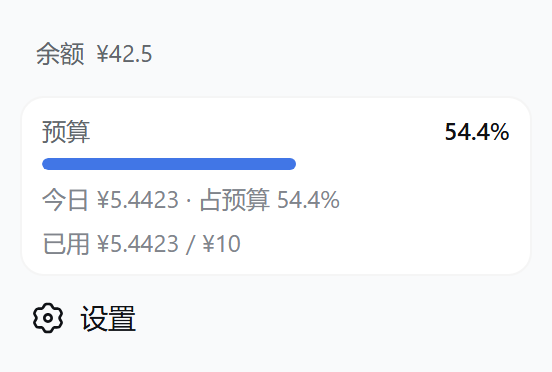
- 余额行显示官方开放平台总余额,悬停可见赠送/充值拆分;开启「余额进度条」后以三段图框展示(蓝=余额,橙=当日,灰=已用);
- 自定义 Provider 余额(如 LiteLLM)可配置 HTTP 查询,侧边栏与设置页同图框样式;
- 未启用预算时,该位置显示「今日 ¥x」徽章。
余额进度条与自定义 Provider 配置:
| 侧边栏进度条 + 显示设置 | 自定义 Provider 余额面板 |
|---|---|
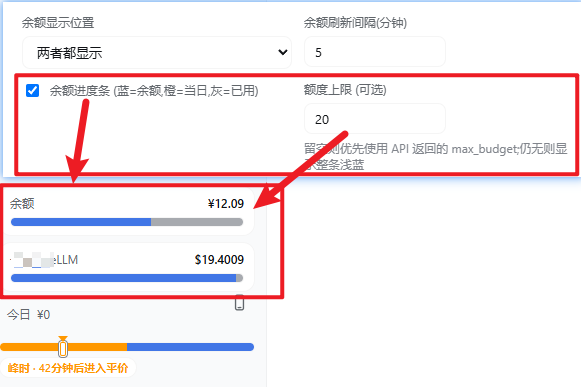 | 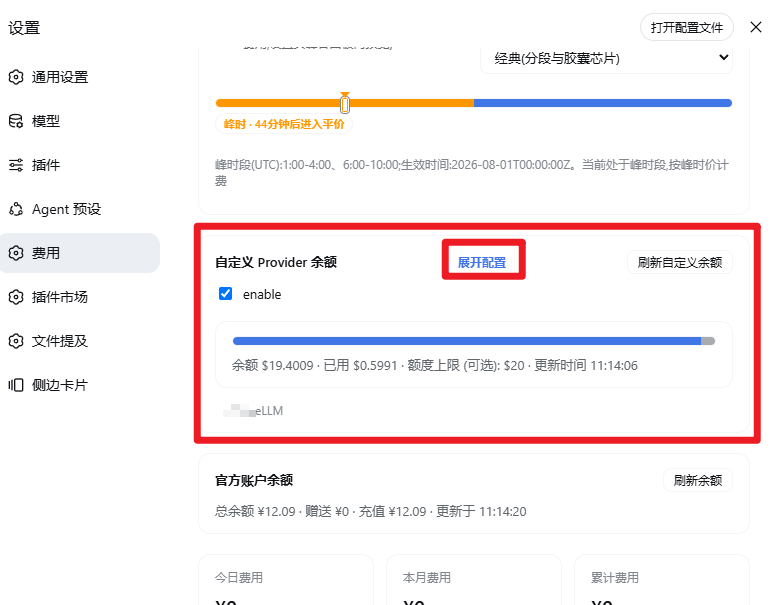 |
- 显示设置 →「余额进度条」全局开关;可选「额度上限」覆盖 API 的
max_budget; - 设置 → 费用 →「自定义 Provider 余额」:展开后编辑 URL / Headers(JSON) / extract(JSON)、中/英名称与币种。
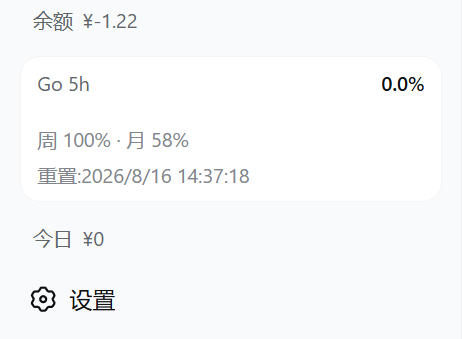
额度 / 预算图框三态(OpenCode Go 额度与预算各自独立开关,同款圆角图框;两者同时开启时自动合并为一张卡片,Go 在上、预算在下,细分隔线、各自保留预警色;「图框详细信息」开关可收起次要行,只保留 标签 + 已用% + 进度条):
| 仅 OpenCode Go 额度 | 仅预算 | 两者合并 |
|---|---|---|
 | 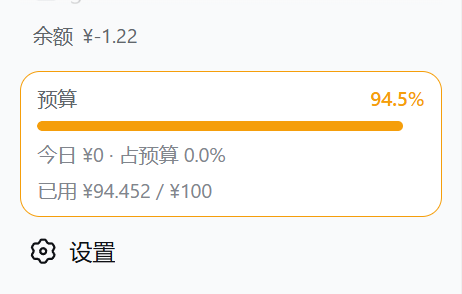 | 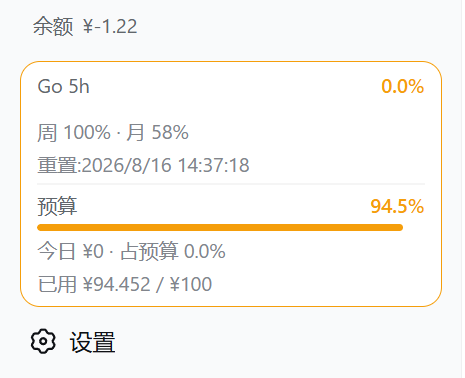 |
- 预算图框显示「预算 · 已用% · 进度条 · 今日费用与占预算% · 已用/额度」,≥80% 预警、≥100% 超支;窄栏(rail)模式收窄为百分比方块;
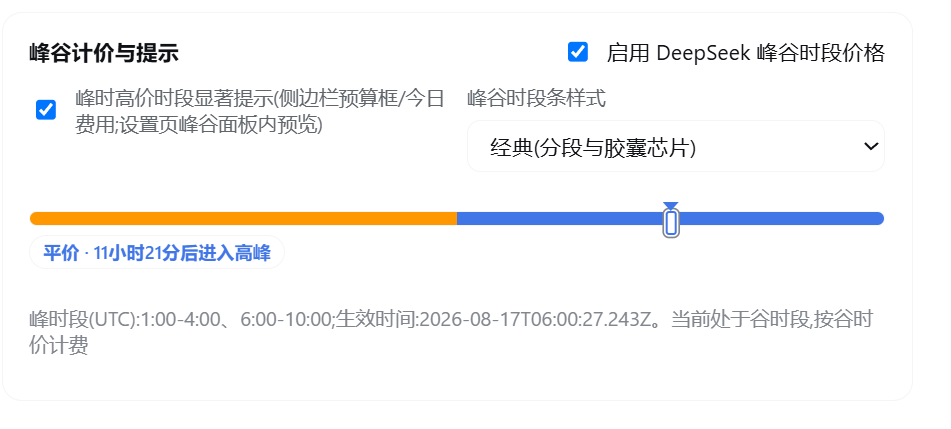
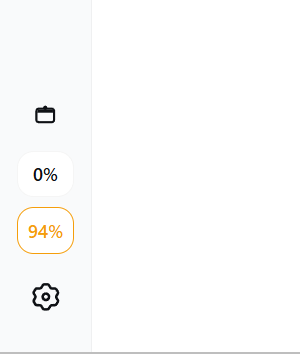
- 峰谷计价时段显示 UTC 峰时段 01:00–04:00、06:00–10:00 与当前档位;预算框与今日费用区域显示单行紧凑时段条——细轨道左橙右蓝、标记线指向当前时段,右侧文字为当前时段与距下次切换的倒计时(30 秒刷新),不显示价格;可在设置中单独关闭,并在「峰谷时段条样式」中切换简洁/经典两种样式;rail 窄栏显示同构的竖向时段条,下方横排短词「峰时 / 平价」,倒计时与完整文案悬停可见;
峰时/平价时段条与收起态竖向进度条:
| 设置页峰谷面板(提示开关/样式切换/预览) | 设置页右下角(dock)显示与图框详细信息 |
|---|---|
 |  |
时段条与收起态竖向条真实 DSH 侧边栏实拍(现行样式),按 UI 类型分组(图示为峰时):
不收起(展开态)——预算框 / 今日费用区域显示单行时段条:
| 简洁 | 经典 |
|---|---|
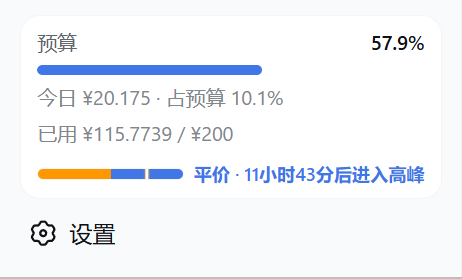 | 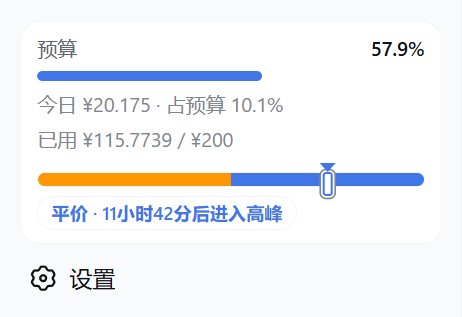 |
- 简洁:细轨道左橙右蓝、标记线指向当前时段,右侧短文案「峰时 · N小时后进入平价」;
- 经典:同款轨道与标记线,右侧完整文案「峰时 · 距平价 HH:MM:SS」倒计时(30 秒刷新),不显示价格。
收起(rail 窄栏)——侧边栏底部堆叠竖向时段条,与百分比方块居中对齐:
| 简洁 | 经典 |
|---|---|
 | 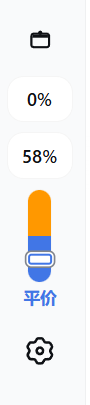 |
-
简洁:竖向条下方仅横排短词「峰时 / 平价」;
-
经典:竖向条下方竖排完整文案,含距下次切换的倒计时;两种样式下完整文案均悬停可见。
-
提示遵循
peakNotice/peakEnabled/peakEffectiveAt/peakWindows门控,按 UTC 峰时窗口显示; -
设置 → 费用 → 峰谷计价 下可单独开关「峰时高价时段显著提示」,关闭后展开态时段条与收起态竖向条同时隐藏;
-
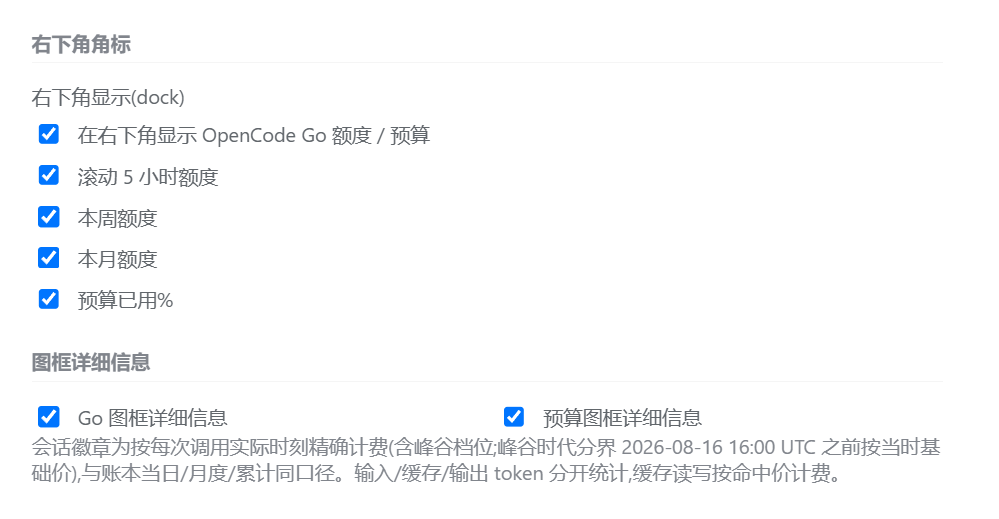
上方第一张为设置页峰谷面板截图(提示开关、样式切换与实时预览);时段条与收起态竖向条的实拍效果见上述分组配图;右下角(dock)各项开关与图框详细信息开关见第二张截图。
-
Go 图框按主档位(默认滚动 5 小时,可在显示设置切换周/月)显示已用% 与进度条,下方一行展示其余两档与重置时间:
右下角(dock)额度 / 预算 chips(显示设置中开启,四项独立开关:5h / 周 / 月额度 + 预算已用%):
| 右下角实际显示 | 显示设置(开关位置) |
|---|---|
 | |
本会话费用(两个位置,可在设置中切换):
| 输入区下方 | 会话标题栏 |
|---|---|
 |  |
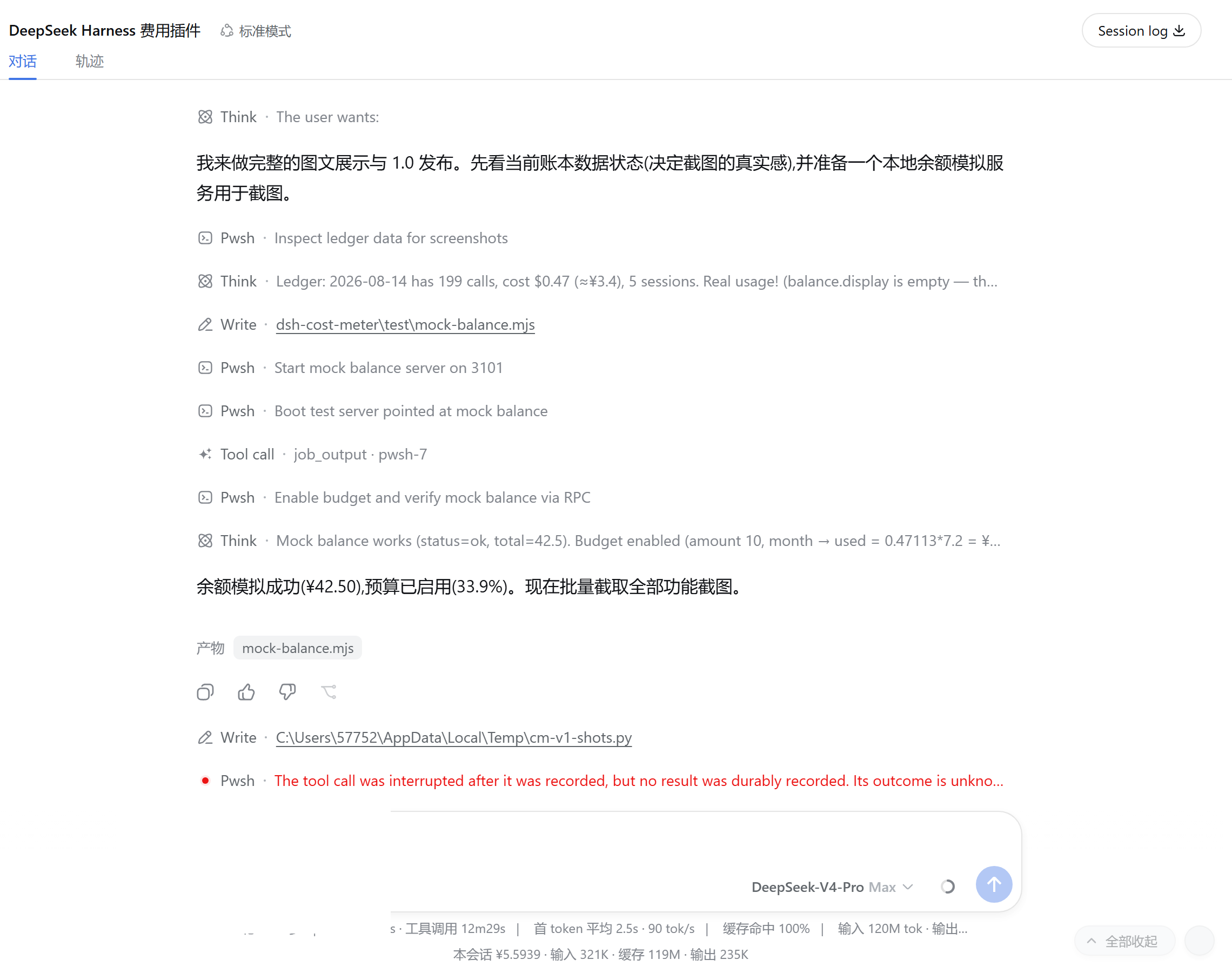
上图:本会话 ¥5.5939 · 输入 321K · 缓存 119M · 输出 235K;右图:标题栏徽章「费用 ¥6.1606」(真实会话截图)
设置 → 费用
概览(OpenCode Go 额度 → 预算 → 余额 → 汇总卡片 → 今日会话 → 历史记录 → 显示设置 → 价格表 → 数据与同步):
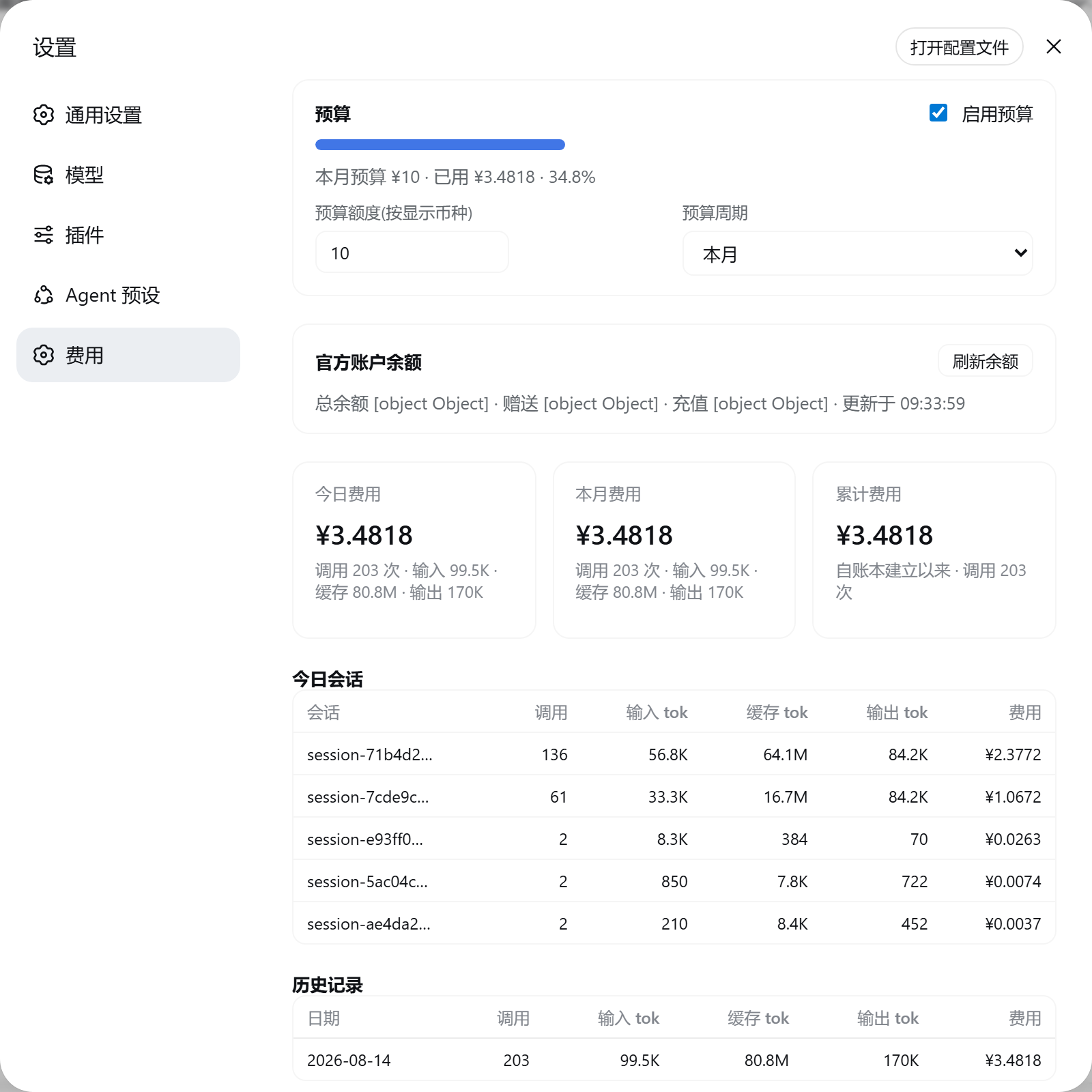
OpenCode Go 额度面板(设置页最顶部:三档进度条,主档位高亮,手动刷新;未订阅时为中性提示,可一键关闭):
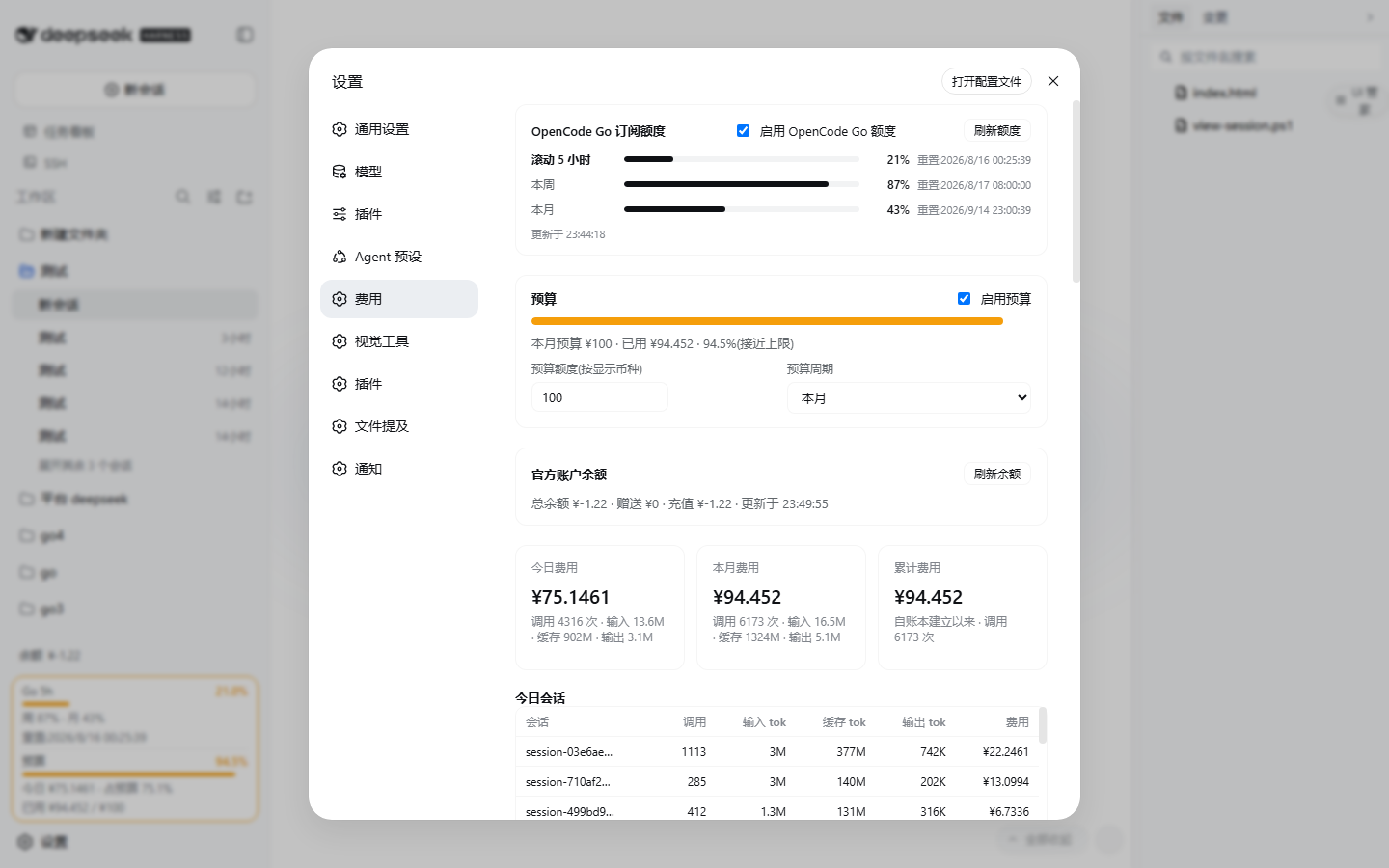
预算面板(含自定义日期区间):
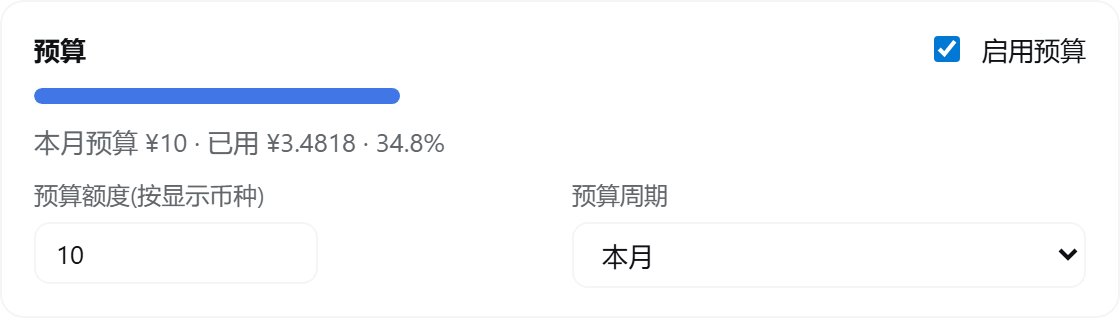
余额面板(总余额/赠送/充值 + 手动刷新):

显示设置(Go 主档位与 Key、右下角 chips、图框详细信息等):
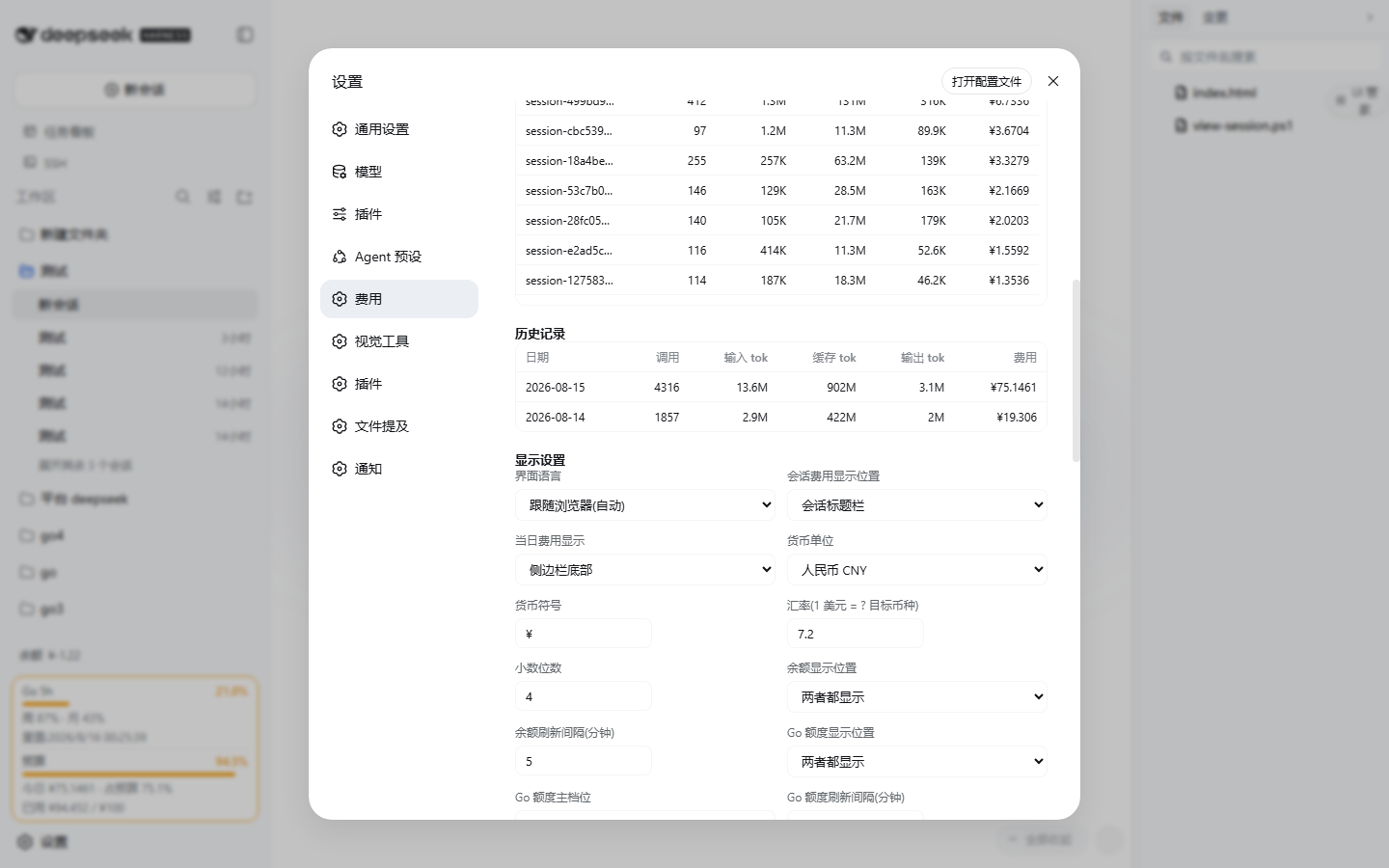
汇总卡片:
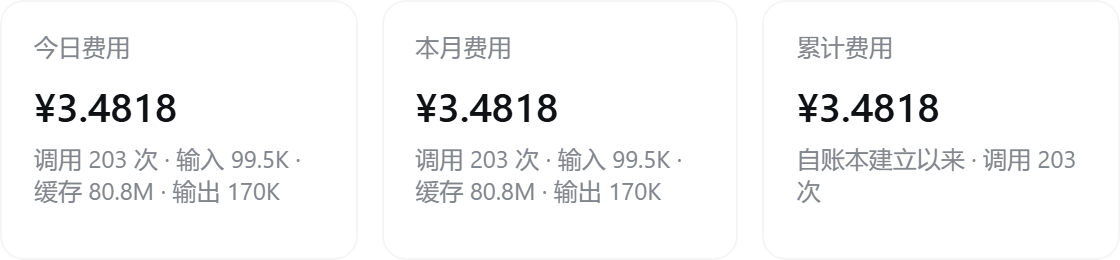
Token 用量统计(历史累计总量 + 类 Codex 的 26 周方格热图,横向铺满设置页宽度;无用量日为半透明玻璃格):
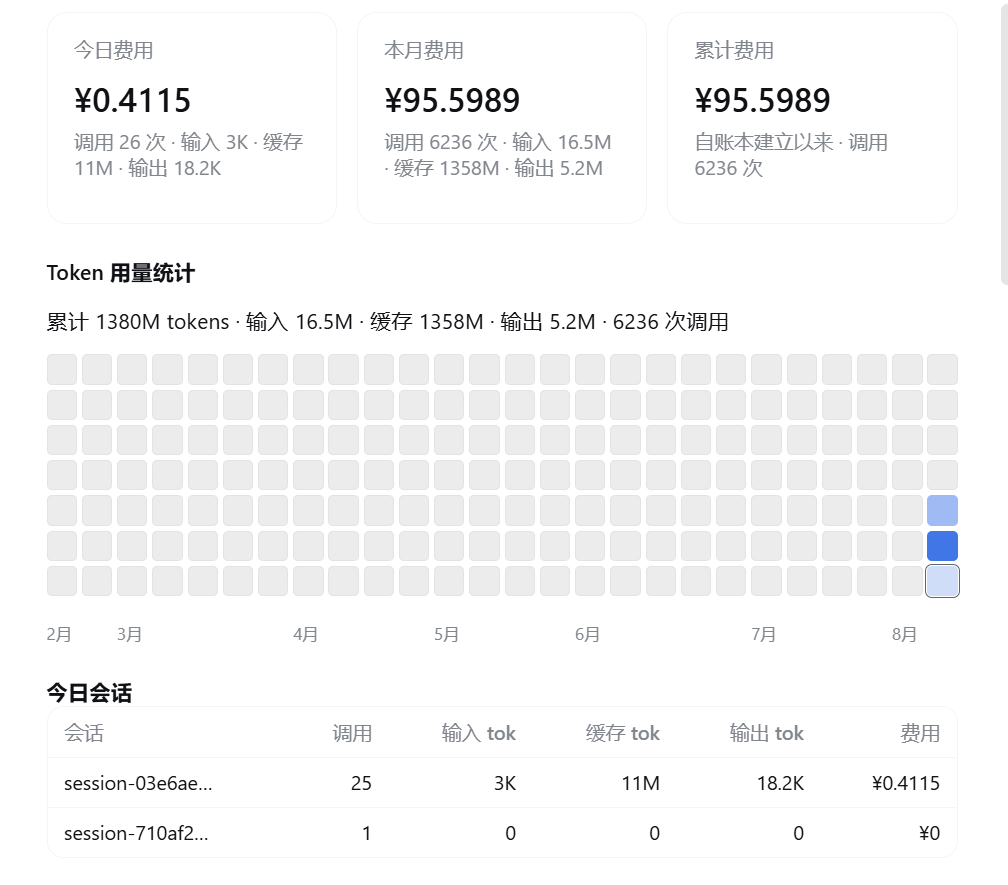
今日会话 / 历史记录(输入、缓存、输出 token 分列):
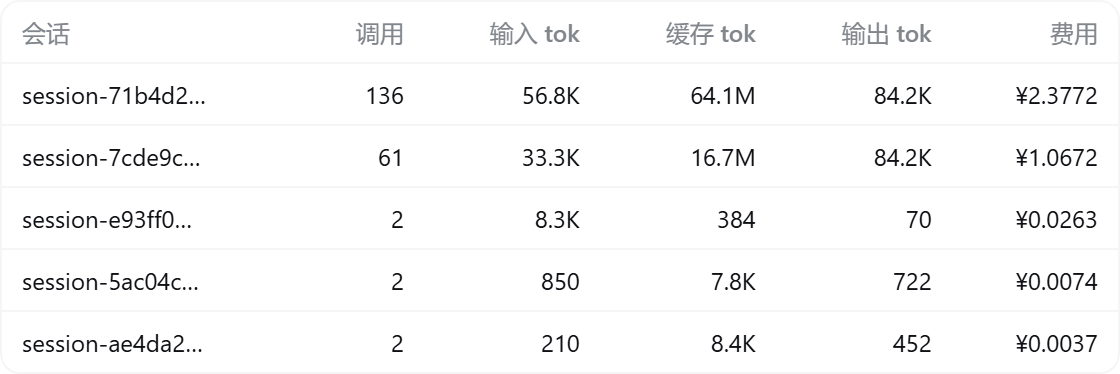

价格表(谷时/峰时两档,支持 input/output 简写,美元 / 1M tokens):
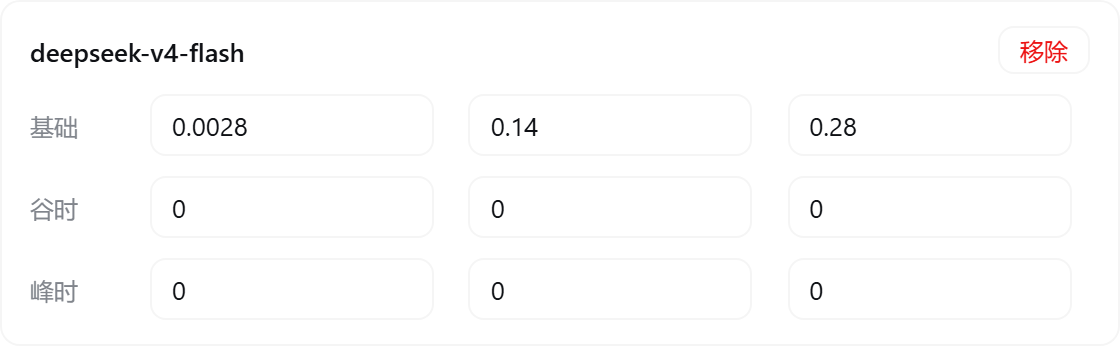
数据与同步(配置即时自动保存 + 官方价格同步 + 清除历史):

安装
需求:Node.js ≥ 20 + DeepSeek Harness(带
dsh plugin命令的版本,npm install -g @deepseek-ai/dsh)。
一键安装(推荐)
npm 包名安装(已发布到 npm registry,始终跟随最新版本;无需 git):
dsh plugin --profile web add dsh-cost-meter
PowerShell 一键脚本(复制整行粘贴回车;自动补齐 pnpm、自动探测 git,无需克隆仓库;安装链固定到发布 tag v1.7.28,建议先下载审阅再运行):
irm https://raw.githubusercontent.com/Han-1413141/dsh-cost-meter/v1.7.28/install.ps1 | iex
或直接命令行(机器上需已有 pnpm 与 git;同样固定到 tag):
dsh plugin --profile web add github:Han-1413141/dsh-cost-meter#v1.7.28
没有 git 时可用 GitHub tag 打包直链:
dsh plugin --profile web add https://github.com/Han-1413141/dsh-cost-meter/archive/refs/tags/v1.7.28.tar.gz
安装后重启 dsh web(插件行、Typert 清单与客户端 bundle 均在启动时扫描):
dsh web
安装排障:ERR_PNPM_MINIMUM_RELEASE_AGE_VIOLATION
症状:dsh plugin --profile web add 阶段安装失败,pnpm 报 [ERR_PNPM_MINIMUM_RELEASE_AGE_VIOLATION] N lockfile entries failed verification。
原因:你的环境(pnpm 配置或上层安装器自带策略)启用了「最小发布年龄」供应链保护——lockfile 中发布时间距今小于阈值的包一律拒绝。插件引入依赖精确锁版之前的历史版本,生产依赖是浮动区间,首次安装会解析到当时最新发布版(实测 ^0.1.0-rc.6 漂到仅发布一周左右的 rc.8),在该策略下即被拒绝。
处理:
- 升级插件并使用宿主插件安装器:独立运行依赖
zod保持精确锁版;@deepseek-ai/dsh-credentials、@deepseek-ai/dsh-home-paths改由宿主通过 peer dependency 提供,避免另装旧版宿主包触发依赖预检(issue #106)。精确锁版能防止版本漂移,但不能保证满足任意年龄阈值; - 若仍出现年龄限制,可等待该版本达到阈值,或在核实报错中的具体包与版本后,由你决定是否在 profile 的
pnpm-workspace.yaml(默认$DSH_HOME/profiles/web/pnpm-workspace.yaml)加入单项排除:
minimumReleaseAgeExclude:
  - '<报错中的包名>@<版本>'
宿主适配验证覆盖 DSH 0.1.2-rc.1、0.1.3-alpha.2、0.1.5-alpha.1 的安装、启动、模块复用和卸载;0.1.3-alpha.1 在此前核查中无可获取的官方 npm 版本,暂标记为未知。验证环境及边界见兼容记录。
更新 / 卸载
# 更新:发布新版后用新版 install.ps1 重跑(脚本内固定版本随之更新)
dsh plugin --profile web remove dsh-cost-meter  # 卸载
开发者本地调试
git clone https://github.com/Han-1413141/dsh-cost-meter.git
cd <克隆目录的父目录>
dsh plugin --profile web add link:./dsh-cost-meter  # 符号链接,改 lib/client.js 后刷新页面即生效
计费规则
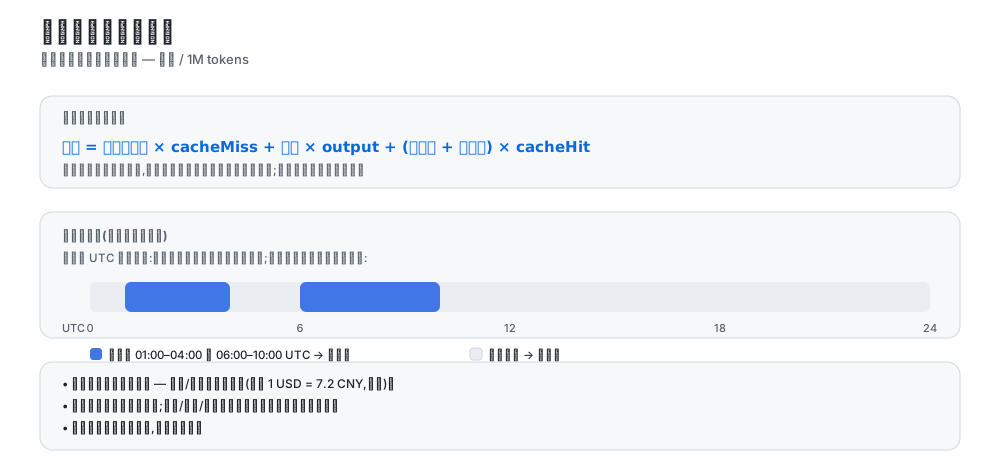
- 价格单位与官方文档一致:美元 / 1M tokens;
- 成本 = 未命中输入 × cache-miss + 输出 × output + (缓存读 + 缓存写) × cache-hit(缓存写沿用官方历史规则按命中价计费);
- 纯峰谷两档计价(2026-08 起官方方案):峰时段(01:00–04:00、06:00–10:00 UTC)按峰时价,其余按谷时价(谷时价 = 峰时价的一半);基础档与谷时档同价,未启用峰谷时按谷时价计;设置页实时显示当前档位(峰时段/谷时段);预算与今日费用区域显示峰时/平价时段条(当前/下一时段与倒计时),收起态显示竖向峰谷进度条;
- 周末全谷价新规(官方通知,2026-08-23 00:00 北京时间起):周末(周六及周日,按北京日历)全天不再区分峰谷,统一按谷价计费;时段条显示「周末时段——全谷价」并倒计时至下周一首个峰时段;该时刻之前的费用仍按原峰谷规则结算(首个受覆盖的周末仅周日全天);
- 历史计费正确性:2026-08-16 16:00 UTC(峰谷时代分界)之前的调用按当时的基础价计费,之后的调用按峰谷两档;
- 账本金额恒以美元存储,币种/汇率仅影响显示(默认 1 USD = 7.2 CNY,可改);
- 会话徽章与当日/月度/累计、预算一样,按每次调用的实际时刻精确计费(宿主导出的逐次成本);
- 计费来源为通过宿主
llm/stream上报的 usage 块,包含隔离 LLM 服务中的子代理、压缩、标题等辅助调用。子会话按自己的sessionId记录,不并入父会话徽章;无sessionId的后台调用只计入日/月/累计总额。记忆等插件若直接请求外部 API、未向宿主上报 usage,本插件无法统计该部分消耗; - 峰谷档位按请求发起时刻判定:流式调用可能跨峰谷边界整点,以完成时刻归档会把数分钟前发起的请求算进另一个峰位;
- 峰谷生效时刻锚定:官方价格页已不再标注生效时间,价格同步不再把峰谷生效时刻重置为「同步时刻」——历史重算(会话投影回放 / 按模型回填)一律按 2026-08-16 16:00 UTC 分界判档,峰时历史事件不再被按谷价半价重算;此前被污染的存量账本升级时自动钳制修复(幂等迁移);
- 币种切换即全量换基准:「价格币种」切换并同步后,历史账目按新价目在后台整体重算(会话日志覆盖完整的日子整体替换,日志已清理的会话保持原口径),历史与官方账单同基准,完成后有提示;升级到本版时,此前切换过币种而新旧口径并存的存量账本自动重算一次;
- 官方账单对齐口径:① 与官方实时数字存在分钟级时差属预期——账本 2 秒防抖落盘,关停瞬间仍在途的流会被服务端照常扣费而 usage 块无人接收(缺口集中在缓存命中列);② reasoning tokens 由 API 单独上报且不计费,token 列为五桶合计,与官方「三列」天然对不齐,对账请以金额为准;③ 「价格币种」设为人民币时按官方 CNY 价目直计入账,与人民币账单币种一致(CNY 计价账号推荐);设为 USD 时显示金额经固定汇率折算,与 CNY 直计存在结构性细差(两套价目比值非均匀);
- 预算与超支提示仅提醒,不阻止调用。
- Plan/API 双轨计费(issue #64):订阅制渠道(MiniMax / Codex 手动标记等)的调用金额只记「等值」,预算/今日费用/概览卡片等金额展示仅统计按量计费(API)部分;
- 「含 Plan 总额」开关:概览页汇总卡片下的快捷开关切换全部金额展示口径——关闭时仅计真金白银(API 渠道),开启后显示含 Plan 等值的总金额;网关路由(provider 缺失)调用的第三方目录模型自动归入对应订阅归类,无模型明细的历史残差计入 API 口径;设置 → 用量 的 Token Plan 统计面板提供每 1% 额度与满窗的 token/等值金额估算与日/周/月曲线;分类可在配置中按厂商或 provider:model 级覆盖。
- 全仓安全审计修复:账本退出丢写(close/flush 次序)、发版脚本命令注入、面板空指针崩溃(Go 月窗空值)3 项高危,及路由调用小时桶漏记、官方余额对账告警失效、自定义余额提取失败误显 $0、计费流中断泄漏等 30 余项中低危问题全量修复;账本损坏自动备份、写失败重试、配置补丁原子性、原型链与凭据处理加固。逐项清单见 CHANGELOG.md。
数据存储
- 账本:
$DSH_HOME/storages/cost-meter/ledger.json(原子写入 + 2 秒防抖;按historyDays保留,每日最多 200 个会话明细); - API Key 不落盘:所有密钥(OpenCode Go Key、各 Coding Plan Key、火山 AK/SK)只存入 DSH 凭据库,账本文件与设置页回传均不含明文;设置页输入框为 write-only,保存后不可回显;
- 所有设置修改即时自动保存(600ms 防抖),无需手动保存;
- 删除账本文件即可清零,或使用设置页「清除全部历史」;
- 隐私边界:余额/额度类端点(官方余额与各 Coding Plan)仅在用户显式启用对应 Provider 时才会出站请求,未启用不产生任何网络流量。
架构
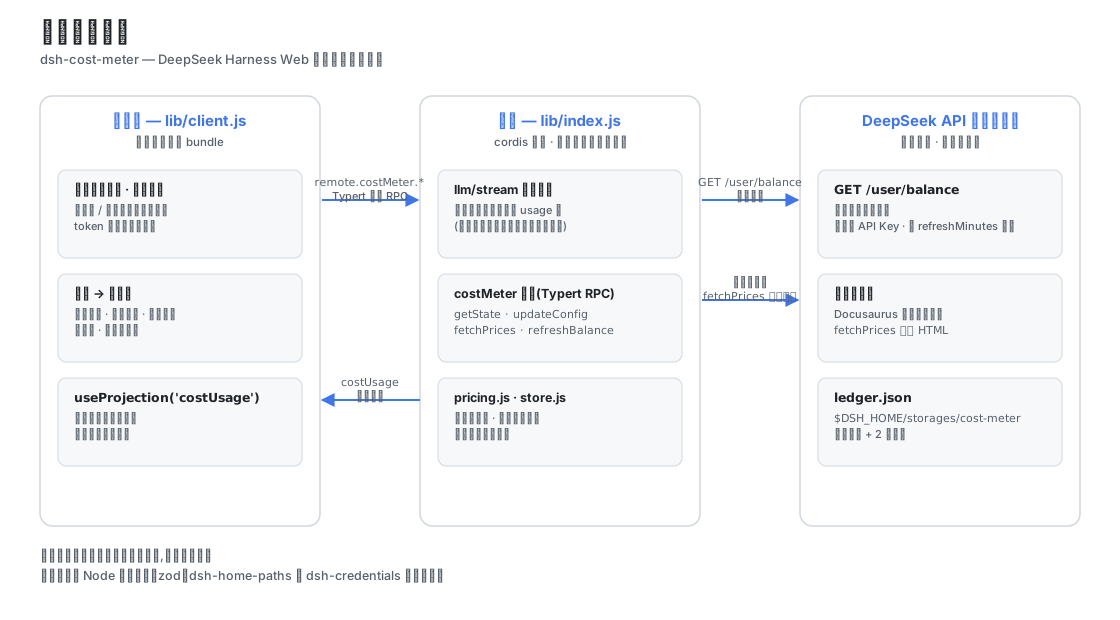
dsh-cost-meter
├── cordis.patch.yml        # bundle 补丁:向 web profile 插入 cost-meter 行
├── install.ps1             # 一键安装/更新脚本(irm … | iex)
├── .github/workflows/      # CI:install-smoke 一键安装冒烟验证
├── package.json            # dsh.bundle 补丁声明 + dsh.client 浏览器声明
└── lib/
    ├── index.js            # 宿主插件:llm/stream 计费包裹、costUsage 会话投影、
    │                       #   costMeter 服务(手写 typertRemote 绑定)、余额查询
    ├── backfill.js         # 历史账本按模型回填:回放会话日志重建旧账本缺失的
    │                       #   byProviderModel(拼接 zstd frame 扫描 + 逐帧解压)
    ├── pricing.js          # 官方价格表、官方页面 HTML 解析、峰谷计费数学
    ├── store.js            # 账本持久化与配置管理($DSH_HOME/storages/cost-meter)
    ├── typert.host.js      # ./typert 导出:Typert 清单(typert-loader 自动注册)
    └── client.js           # ./client 导出:浏览器单文件 bundle(徽章/图框/设置页)
数据通道:
- 本会话费用:宿主注册
costUsage会话投影(纯 token 桶 + 按模型拆分),浏览器经useProjection('costUsage')读取并按当前价格表计价; - 全局账本 / 预算 / 余额 / 配置:
costMeter/getState | updateConfig | fetchPrices | refreshBalance | resetHistory,经 Typert 网关 RPC(remote.costMeter.*); - 余额:调用官方
GET {baseURL}/user/balance,复用模型请求的同一把 API Key(凭证服务/环境变量),进程内缓存按refreshMinutes过期。
插件不导入 cordis/dsh 的 Service/Context 运行时类(仅 Node 内建模块、zod、dsh-home-paths、dsh-credentials 的纯函数),与宿主共享同一运行时实例,无重复依赖风险。
官方价格同步原理
fetchPrices 抓取官方定价页(Docusaurus 服务端预渲染;英文页为美元价、中文页为人民币价,由「官方价格币种」设置决定,币种按页面金额符号自动检测,高峰时段中文页按北京时间 −8h 折算为 UTC),解析:
- 基础价格表(转置布局:首行 MODEL + 模型 id,价格行标签后紧跟价格);
- 峰谷价格表(每模型两行:OFF-PEAK / PEAK);
- 生效时间(take effect at …)与峰时段窗口(Peak hours are …)。
解析结果写入价格表并持久化;页面结构变化时同步报错并保留原价格,可手动编辑兜底。
AI 价格同步
docs/AI-PRICE-SYNC-PROMPT.md(中文)与 docs/AI-PRICE-SYNC-PROMPT.en.md(English) 提供可直接复制给任意 AI 的提示词: AI 自主读取官方定价 → 输出多模型、分时(基础/谷时/峰时 + 生效时间)价格 JSON → 人工核对后应用(设置页 / RPC / 文件三选一)。适合官方价格变动时自主同步。
开发与验证
corepack pnpm install                                   # 依赖
node --check lib/index.js && node --check lib/pricing.js \
  && node --check lib/store.js && node --check lib/typert.host.js \
  && node --check lib/client.js                         # 语法检查
node test/verify.mjs                                    # 纯模块验证(解析/计费/账本/配置)
node test/mock-balance.mjs                              # (可选)本地余额接口模拟:3101
dsh --profile web --dump-config                         # 组合树校验
dsh --profile web --port 3099                           # 真机启动(观察启动日志与 UI)
已知限制
- 历史按模型回填依赖宿主会话日志仍在盘:日志已被清理的早期调用无法逐模型重建,只能以「未分模型」残差行计入当日合计;
- 官方页面解析依赖当前页面结构;改版后「从官方文档同步价格」会报错,可手动编辑价格表兜底;
- 会话徽章在账本数据不可用时的回退估算按「当前时刻」的价格档位给该会话全部调用定价(含 Plan 类会话):跨峰谷时段的会话在峰时会高估其谷时部分,精确费用以账本为准(账本按每次调用的发起时刻逐笔计价);
- 价格同步会覆盖官方页面列出的同名模型价格,自定义模型条目不受影响;
- 余额查询需要可访问 api.deepseek.com 的网络与有效 API Key;API Key 只会发往官方域名(baseURL 指向非官方域名时余额查询拒绝请求,模型请求不受影响);
- OpenCode Go 额度接口为 opencode.ai 官方端点(社区文档);接口结构变化时设置页会显示错误,可在显示设置中关闭该显示;
- Token Plan 统计的「每 1% 额度/满窗」为估算值:各家额度接口只返回百分比且读数存在个位级量化(显示 1% 的真实值可能在 0.5%~1.5%),插件以连续可信段的首尾差分推算以压低量化误差(跨度不足 5 个百分点时标注「读数精度受限」,样本超 7 天回退当前用量折算,窗口边界按小时对齐);服务端百分比统计的是该账号全部用量——同一 Key 在其它机器/CLI 的消耗不在本地账本,估算偏低属预期,仅供跨套餐横向比较;
- Plan/API 双轨分类基于渠道与配置推断,混合订阅/按量使用同一厂商 Key 的场景(如 Kimi 订阅 + PAYG 混用)可在设置中按 provider:model 手动覆盖。
- 安装/更新插件后需重启
dsh web生效。
更新历史
各版本更新总览与社区 issue 处理记录见 docs/UPDATE-HISTORY.md;逐条开发记录见 CHANGELOG.md。
License
MIT © 2026 dsh-cost-meter contributors
Compatibility
Versions
| Latest version | Published | Size |
|---|---|---|
| 1.6.5 | — | — |
| 1.6.6 | — | — |
| 1.6.7 | — | — |
| 1.6.8 | — | — |
| 1.6.9 | — | — |
| 1.6.10 | — | — |
| 1.6.11 | — | — |
| 1.6.12 | — | — |
| 1.7.7 | — | — |
| 1.7.6 | — | — |
| 1.7.21 | — | — |
| 1.7.8 | — | — |
| 1.7.15 | — | — |
| 1.7.9 | — | — |
| 1.6.13 | — | — |
| 1.7.17 | — | — |
| 1.8.6 | — | — |
| 1.7.22 | — | — |
| 1.7.26 | — | — |
| 1.6.4 | — | — |
Comments
Loading…
Similar plugins
by YZz-S
Community plugins for DeepSeek Harness (DSH) Web GUI: session token cost meter with official dynamic pricing, DeepSeek & Volcengine billing balance, and update checker. Plain JavaScript, no build requ
★ 3
MIT
JavaScript
Aug 15, 2026
dsh plugin --profile web add dsh-token-cost-meterby xyzs996
DeepSeek Harness (dsh) plugin to compare LLM API cost across models and providers: prices the current session on the model that ran it, then reprices the same token counts against 15 routes on file. D
★ 0
MIT
JavaScript
Aug 24, 2026
dsh plugin --profile web add dsh-switch-costby TwotwoPiggy
dsh余额插件. A DeepSeek Harness plugin for real-time token tracking and highly accurate session cost estimation, featuring dynamic peak/off-peak pricing support.
★ 11
↓ 331/wk
JavaScript
Oct 12, 2026
dsh plugin --profile web add dsh-balanceby mike-lee0120
Cost dashboard for DeepSeek Harness: aggregates model input/output/cache tokens across all local sessions, prices them with a builtin table (including DeepSeek peak/off-peak), and shows daily trends p
★ 4
JavaScript
Sep 25, 2026
dsh plugin --profile web add dsh-cost-dashboardby bjzkhy
Cost panel for DeepSeek Harness: meters every request from session events, prices it against a built-in catalog of 136 models across 16 providers, and shows the current model, account balance, session
★ 2
↓ 147/wk
MIT
JavaScript
Aug 30, 2026
dsh plugin --profile web add dsh-token-ledger-proby doubsumi
Live per-session cost badge for DeepSeek Harness (top-right), with peak/off-peak (time-of-day) pricing.
★ 0
MIT
JavaScript
Oct 18, 2026
dsh plugin --profile web add dsh-plugin-cost-meter