

dsh-sticky-wall
Manifest validdsh插件-便签墙

dsh-sticky-wall
A paper sticky-note wall in the DeepSeek Harness sidebar. / DeepSeek Harness 侧边栏里的纸便签墙。
中文说明 · Appearance · Install · Data
What it does
- Adds a sticky wall icon to the left sidebar panel list (order 30); the wall opens in the main column.
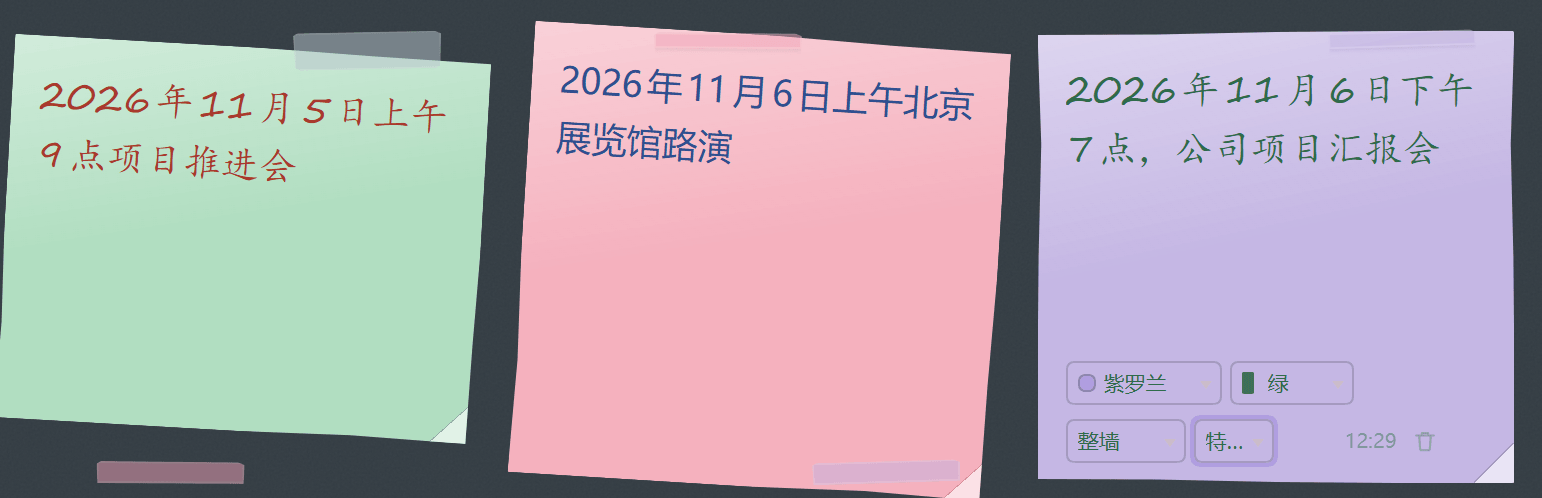
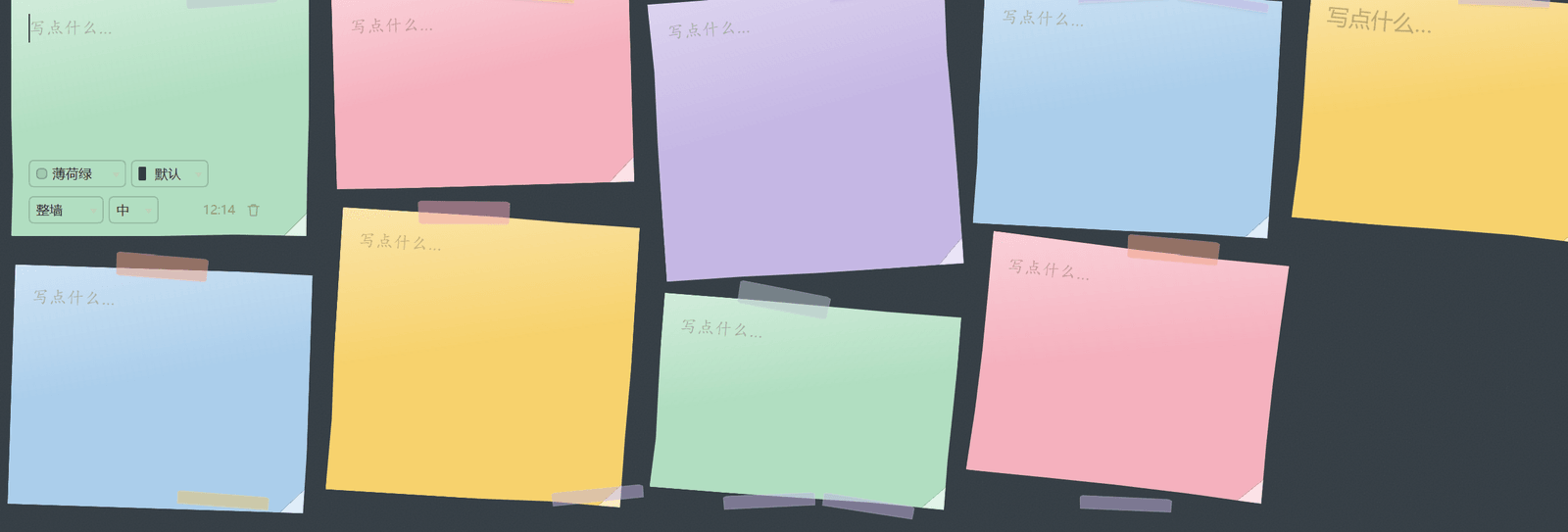
- Notes look like stationery, not UI cards — four paper stocks, three sizes, a folded corner on every sheet, and a silhouette that bows slightly along each edge (
clip-path, derived from the note id). Sheets lean up to ±3° (±7° for Post-its) and line up into ragged columns, not a grid. A focused note straightens and lifts; its controls only appear on hover or focus. - Fastened the way you like — washi tape (sometimes two corners), a bent paper clip, or a thumb tack.
- New note — creates a blank note, focuses it, and picks one of five colours (amber, rose, sky, mint, violet).
- Edit in place — every note is a borderless text area; typing saves on the spot.
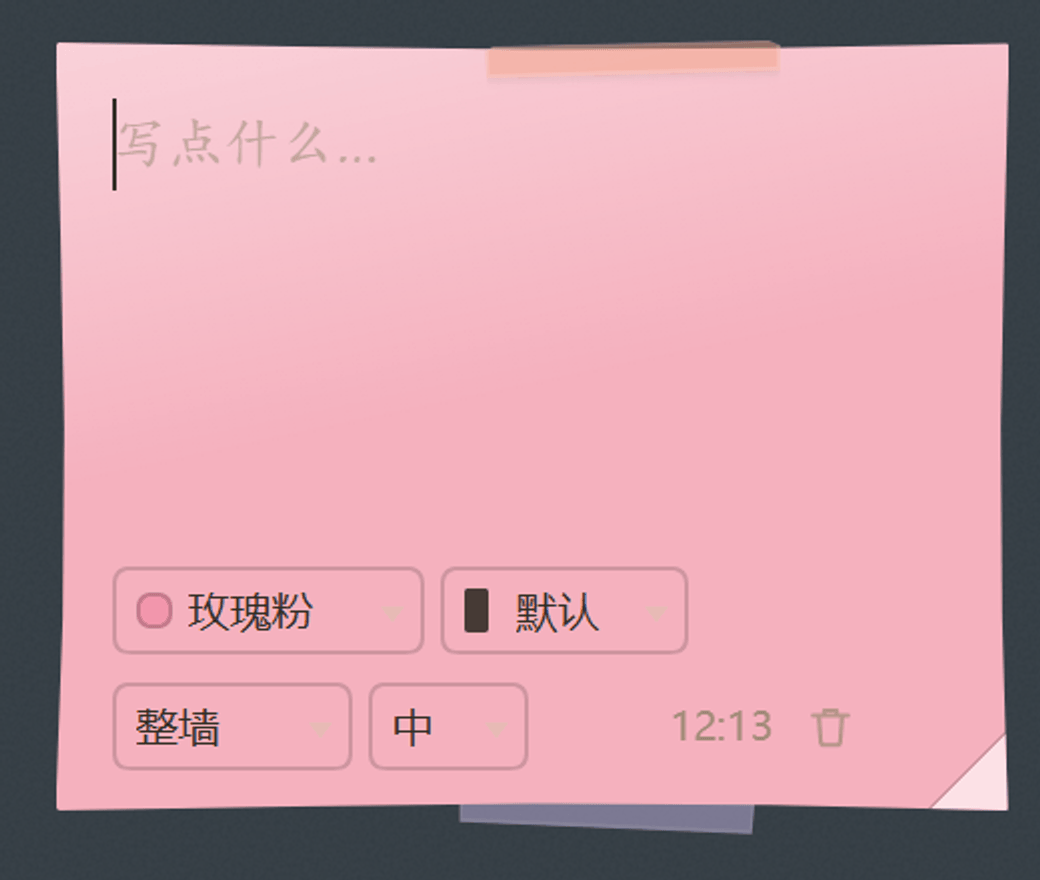
- Recolour — two dropdowns at the bottom of each note, one for paper colour and one for ink: paper tints the sheet, ink colours the writing (and dims the stamp and controls to match).
- Per-note typeface and size — two small dropdowns in a note's footer pick that note's typeface (
Wallfollows the panel) and its text size. A four-line note and a single word no longer have to share a look. - Delete in two steps — a non-empty note turns its bin red and asks for a second click; an empty note goes immediately.
- Saves itself — the wall is written to the browser's
localStorageunderdsh.sticky-wall.v1. No save button, no server, no network request.
Screenshots
Appearance
The sliders button in the panel header opens an appearance panel. Paper and fastening are four-way segmented switches; typeface and text size are dropdowns, because seven options in a row of buttons is a guessing game. All four are remembered per browser:
| Paper | What it looks like |
|---|---|
Post-it sticky | Saturated stock, a printed sheen, a folded corner, and the strongest lean |
Ruled ruled | White pad with printed rules and a red margin line; the text line-height is pinned to the rule spacing so writing sits on the lines |
Graph graph | 16px graph grid over a faint paper grain |
Kraft kraft | Brown kraft board with a vertical crease and coarser grain |
| Fastened with | |
|---|---|
Tape tape | Crooked strip of washi in a colour of its own — sometimes two, at opposite corners |
Clip clip | Bent wire clip hanging over the top edge |
Pin pin | Round-headed thumb tack, red / blue / green / purple / brass |
None none | Just the sheet |
| Ink | |
|---|---|
| Black / blue / red / green / violet | A pen colour per note, chosen from the ink dropdown in its footer. Ink only changes the writing; the paper keeps its own colour. Every ink is dark enough to read on all four stocks, and the stamp and controls dim to match it. The first entry, Default, keeps each stock's own ink |
| Typeface | Stack |
|---|---|
Default ui | The host UI font |
Hand hand | Segoe Print → Bradley Hand → Ink Free → 楷体 → cursive |
Kai kai | 楷体 / Kaiti SC → STKaiti → BiauKai → serif |
Round round | 圆体 / Yuanti SC → 幼圆 → Hiragino Maru Gothic → Microsoft YaHei |
Serif serif | 宋体 / Songti SC → SimSun → Noto Serif SC |
Sans sans | PingFang SC → Microsoft YaHei → Noto Sans SC |
Mono mono | ui-monospace → Cascadia Code → Consolas → SF Mono |
No font files are shipped: the typeface setting is a system font stack, so the exact glyphs follow what the machine has installed (Windows and macOS both land on a real handwriting face; a bare Linux may fall back to the default for hand). Preference is stored under dsh.sticky-wall.prefs.v1 — one person's paper, fastening, handwriting and size never changes anyone else's.
Per-note typeface and size
The panel sets the wall's default; a single note can step away from it. Two dropdowns in a note's footer choose that note's typeface — Wall follows the panel — and its size. S / M / L / XL scale whichever typeface the note ended up with by 0.86 / 1 / 1.16 / 1.36 — so Hand at L is bigger than Mono at L, and every note still sits on the ruled lines of the ruled pad (that stock pins line-height to the rule spacing).
Install
Search for dsh-sticky-wall on the Plugins / Discover page, or:
dsh plugin --profile <profile> add dsh-sticky-wall
Then restart, or refresh the page. The panel shows up in the left sidebar at order 30 (after the Context panel, before the MCP connector).
Where the data lives
Notes live in the browser profile that runs the harness UI — localStorage, key dsh.sticky-wall.v1; appearance preferences sit beside them under dsh.sticky-wall.prefs.v1. They are not written to the session log, not sent to a model, and not synced between browsers or machines. Clearing site data removes them, and that is the only copy.
How it is built
Two files, no build step, no dependencies:
index.js— the Host half. The bundle patch inserts one plugin row; the row itself does nothing.client.js— the browser half. It registers asidebar.panellistentry for the icon and amainpanel keyed by the same id, registers itsen/zhdictionaries with the client locale service, and renders the wall with the React the host's module table already provides. Paper grain is a tiledfeTurbulenceSVG in a data URI, so there is no image asset and nothing to download; paper tints usecolor-mixover the theme surface.
"dsh": {
  "bundle": { "patch": "./cordis.patch.yml" },   // makes it installable
  "client": { "platform": "web", "immediately": true }
}
Compatibility
engines.dsh: >=0.2.1-rc.2. It needs the sidebar.panellist and main slots plus the client locale service from that release. Web UI only — there is no terminal or agent-tool surface.
Known limits
These are design choices, not bugs — listed here so the same question does not have to be answered twice.
- Typefaces are system fonts. Nothing is bundled, so
handneeds a handwriting face installed (Windows and macOS both have one; a bare Linux may fall back to the UI font). 圆体/宋体/黑体 likewise depend on the machine. If a face is missing you get the next entry in the stack, never an error. - Notes live in one browser. They sit in
localStorage, so a different browser, a different machine, or cleared site data means an empty wall. There is no sync, no export and no backup yet. - The wall is not searchable. No filter, no tags, no sorting — it is a wall, not a notes app.
- Plain text only. The text area does not render Markdown, and there are no checkboxes or attachments.
- One wall. No boards, columns or folders.
License
MIT. See LICENSE.
中文说明
侧边栏里的纸便签墙:随手记下一个念头,自动保存在本机浏览器里。
- 左侧工具栏多一个便签墙图标(排在 30),点开占满主内容区。
- 便签是文具,不是卡片:四种纸面、三种尺寸,每张都有折角,纸边沿自身 id 生成的内凹弧线(
clip-path),不是标准矩形。纸张最多歪 ±3°(便利贴到 ±7°),排成参差的栏而不是网格;点到哪张,哪张扶正、抬起,底部控件只在悬停或编辑时才浮现。 - 固定方式随便挑:和纸胶带(有时是对角两段)、弯折的回形针、圆头图钉。
- 新建便签:创建一张空便签并聚焦,从五种颜色里轮换(琥珀黄、玫瑰粉、天空蓝、薄荷绿、紫罗兰)。
- 就地编辑:便签本身就是无边框文本框,边写边存,没有保存键。
- 改颜色:便签底部两个下拉框,一个选纸张颜色(只染纸),一个选墨色(只染字,连时间戳和控件一起变暗);墨色第一项「默认」= 各纸面自带的墨。
- 单张字体与字号:便签底部两个小下拉框,分别选这一张的字体(「整墙」= 跟随面板)和字号。四行笔记和两个字不必挤在同一个字号里。
- 两步删除:有内容的便签第一次点垃圾桶变红、要求再点一次;空便签直接删。
- 自动保存:写入浏览器
localStorage(键dsh.sticky-wall.v1),不发网络请求、不写会话日志、不跨设备同步。
外观
标题栏右侧的滑杆按钮打开外观面板,四个独立选择,按浏览器记住:
- 纸张:便利贴(饱和纸色、折角、歪得最厉害)、横线纸(白纸 + 印刷横线 + 红色边线,正文行高锁到线距)、方格纸(16px 方格 + 细微纸纹)、牛皮纸(棕色粗纹 + 一道竖向折痕)
- 固定方式:胶带 / 回形针 / 图钉 / 无
- 字体:默认(界面字体)、手写、楷体、圆体、宋体、黑体、等宽 —— 七种
- 字号:小 / 中 / 大 / 特大,按所选字体自身的基准尺寸乘 0.86 / 1 / 1.16 / 1.36 倍
面板里的四项是整墙默认值(纸张和固定方式是四格开关,字体和字号是下拉框——七种字体排成一排按钮是让人猜);单张便签底部四个下拉框分别管纸色、墨色、字体、字号。墨色(黑 / 蓝 / 红 / 绿 / 紫)只做单张,没有整墙默认——因为它的用途就是标记某一条和别的不一样。
不打包任何字体文件:字体是系统字体栈,实际字形取决于这台机器装了什么(Windows 与 macOS 都能落到真实的手写体;裸 Linux 的「手写」可能退化成默认)。偏好都存在 dsh.sticky-wall.prefs.v1,各人各一套,互不影响。
已知边界
这些是设计取舍,不是 bug —— 写在这里,省得同一个问题回两遍。
- 字体是系统字体:不打包字体文件,所以「手写」要求机器上有手写体(Windows 与 macOS 都有,裸 Linux 可能退化成界面字体);圆体 / 宋体 / 黑体同理,缺了就沿字体栈往下掉,不会报错。
- 便签只在一个浏览器里:数据在
localStorage,换浏览器、换机器、清站点数据都会变空墙。目前没有同步、导出、备份。 - 墙不可搜索:没有筛选、没有标签、没有排序——它是一面墙,不是笔记应用。
- 只有纯文本:不渲染 Markdown,没有勾选框、没有附件。
- 只有一面墙:没有多板块、分栏、文件夹。
安装:在插件页 / 发现页搜 dsh-sticky-wall,或
dsh plugin --profile <profile> add dsh-sticky-wall
兼容性:engines.dsh: >=0.2.1-rc.2,仅 Web 端。数据只在跑界面的那个浏览器里,清站点数据就没了 —— 那是唯一一份。
Comments
Loading…
Similar plugins
by usssserd
DSH插件test
★ 0
JavaScript
Sep 18, 2026
dsh plugin --profile web add my-dsh-pluginby monk233
DSH 插件管理, 一键启用/禁用插件
★ 4
MIT
JavaScript
Aug 14, 2026
dsh plugin --profile web add @dsh-external/dsh-plugin-managerby Sean-Gao
DSH插件
★ 0
MIT
JavaScript
Aug 15, 2026
dsh plugin --profile web add dsh-plugin-key-infoby chenqaq123
deepseek harness的remote-ssh插件
★ 0
MIT
JavaScript
Oct 15, 2026
dsh plugin --profile web add dsh-ssh-remoteby uckkk
墙面修补
★ 0
MIT
JavaScript
Aug 20, 2026
dsh plugin --profile web add dsh-wall-fixby runfali
dsh 登录门卫插件:让只监听本机的 dsh Web UI 安全地对外开放——登录墙 + 全量反代,零依赖、零侵入。
★ 4
MIT
JavaScript
Sep 24, 2026
dsh plugin --profile web add dsh-login-gateway