

opc-nexus
Identified★ 235Open-source, enterprise-grade digital employee workbench. OPC-Nexus (One Person Company Nexus) is a local-first desktop AI Agent manager. It provides a unified AI digital employee management platform for solo founders / indie developers — covering Agent creation, task orchestration, multi-engine integration, messaging channel integration, workflow automation, and expert team collaboration, all in one place.
OPC-Nexus · Digital Employee AI Box
A local-first AI workbench for solo studios and small companies: the boss orders, Hermes understands and dispatches, digital employees execute, and the system delivers.


Current Version
| Component | Version | Notes |
|---|---|---|
| OPC-Nexus Desktop | 2.0.1 | Windows 10/11, Ubuntu 22.04+ |
| Hermes Runtime | 0.19.0 | The sole Quest scheduling engine, pinned fork and upstream commit |
| Android Bridge | 0.4.3 | Optional phone-based execution employee, not involved in Quest scheduling |
2.0.1 is a runtime-enhanced release under the Hermes architecture, incompatible with the 1.x Nexus scheduler. Back up user data before upgrading; the app migrates old data directories and does not re-activate old DSH scheduling state as a second control plane.
Release packages may include fixed-version Codex CLI and Pi Agent runtimes, placed in the app resource directory and invoked with priority by the main process. The source repository does not commit node_modules or native binaries; run npm run agents:prepare before release and npm run agents:verify after installation.
How It Works
老板
  -> Quest / Hermes 对话
  -> 澄清(复杂需求才需要)
  -> 计划草案与员工分工
  -> OPC-Nexus Main 校验、审批、派工
  -> Codex / Claude / Pi / Hermes Worker / 手机员工
  -> 项目目录、预览、运行命令、截图和渠道回执
- Hermes handles conversational understanding, clarification, memory, planning content, and delegation suggestions.
- OPC-Nexus Main handles project scope, employee allowlists, permissions, budgets, task/Run state, approvals, cancellation, resumption, delivery, and auditing.
- Digital employees are independent entities. Projects can use a dynamic employee pool or a fixed employee scope; one-to-one binding is not required.
- DSH is no longer used as a scheduler or a second web workbench; if the CLI is retained, it may only serve as an execution layer governed by Main.
Hermes Project Workbench
Every project needs a real, accessible working directory. You can select a directory in Quest, or use the default:
%USERPROFILE%/opc-nexus/projects/<project-name>-<id>/
Each project runtime owns its own HERMES_HOME, loopback port, short-lived auth lease, session, and memory directory. The Hermes Web UI is embedded in Quest, does not expose the service token to the Renderer, and does not allow cross-project access to files, sessions, or memory.
Connecting a Provider
In Quest's "Connection Settings", fill in the Provider's Base URL, model, and API Key, then click "Read Models" and "Test". The API Key goes only into Electron safeStorage; it is not written to the README, logs, Renderer state, or Hermes memory.
Checks run before Hermes starts:
- The project working directory exists and is not a symbolic link.
- The Provider has a decryptable API Key, Base URL, and model.
- Both the Dashboard and API Gateway pass the 0.19.x health check.
Failure shows the real reason and a link to Connection Settings; "online" or "task completed" is never faked.
Key Capabilities
- Quest embeds Hermes Chat, clarification, plans, employee progress, acceptance, and delivery panels.
- Simple requests get direct answers; complex ones follow "clarify -> plan -> approve -> dispatch -> deliver".
- Dynamic scheduling or fixed employee scope per project; supports
@员工, sub-Agent teaming, and independent acceptance employees. - Codex, Claude Code, Pi, Hermes CLI Worker, and Android Worker connect via a unified execution policy.
- Project-level MCP/Skill selection; the capability center does not re-register legacy DSH plugins.
- Delivery Manifest, directory open, Markdown/file preview, launch commands, run URLs, screenshots, and channel dispatch.
- Hermes mobile web access, reusing TLS, one-time pairing codes, and viewer/operator roles.
- WeCom, Feishu, and WeChat iLink Bot channels can be bound to project sessions; remote approvals, pauses, and cancellations are audited.
- Debug mode writes desensitized JSONL to user data
logs/for troubleshooting startup, proxy, Gateway, task, and channel issues.
v2.0.1 Usage Workflow
Recommended order for a complete task:
项目 -> Provider -> Quest -> 澄清(必要时) -> 计划 -> 批准 -> 派工 -> 验收 -> 交付
- In project settings, select a real working directory. Projects are not forced to bind a single employee; simple tasks can
@a specific employee, while complex tasks have Hermes dynamically form teams based on capabilities, permissions, and budgets. - Configure the Base URL, API Key, and model in Quest's Connection Settings, then run "Read Models" and "Test". Without a real Provider or execution engine, dispatch will be blocked.
- Send the boss's instruction. Hermes will pose persistable clarification questions when needed, then generate a plan draft; after the plan is confirmed, Main creates the formal version and dispatches it to Codex, Pi, Claude, Hermes Worker, or mobile Worker.
- In Quest's right-hand governance panel, view employee progress, tool calls, acceptance, and the delivery Manifest. Files in the delivery directory can be previewed, the directory opened, launch commands copied, or sent to bound channels.
- Scanning a QR code from a phone only connects to the current project's Hermes conversation; it does not open the Android console or access other projects. Mobile viewer/operator permissions match the desktop side.
Simple Q&A returns directly; complex tasks require planning and approval. If any service, Provider, employee, or permission is unavailable, the UI shows the real error and recovery entry—no mock employees, fake success, or fabricated deliverables.
UI Preview
The screenshots below are from real Quest/Hermes acceptance runs, showing teaming, delivery, and mobile sessions:
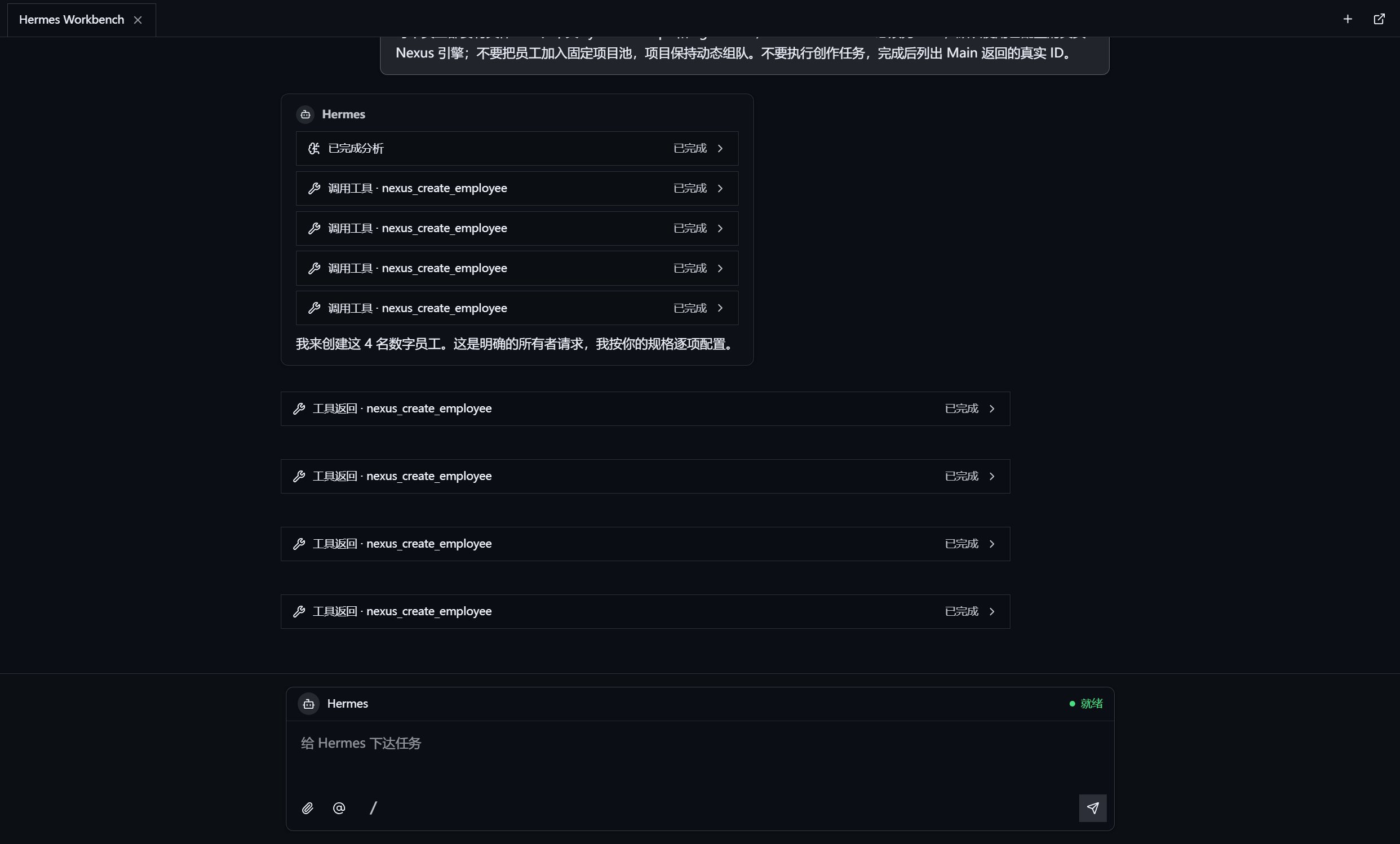
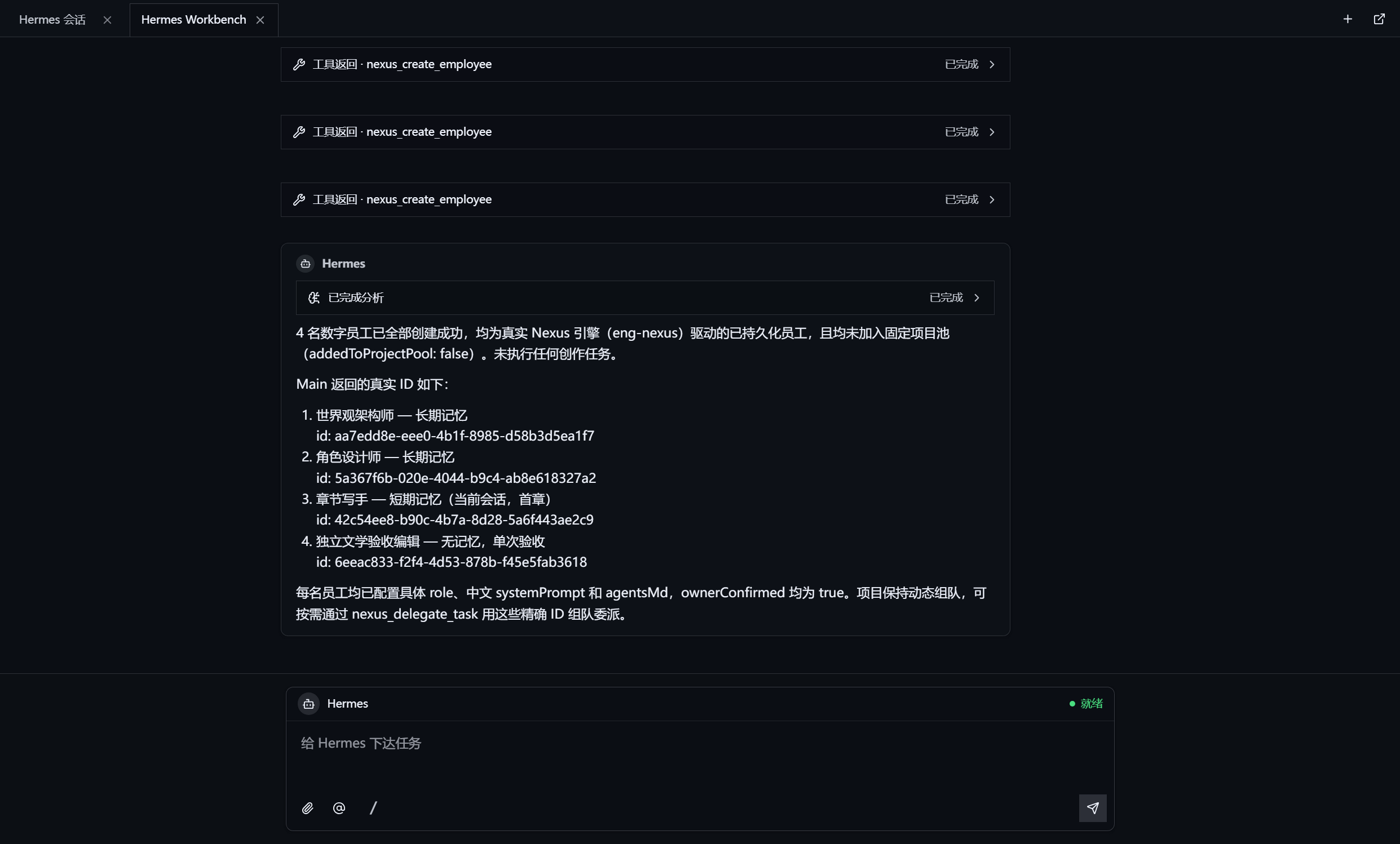
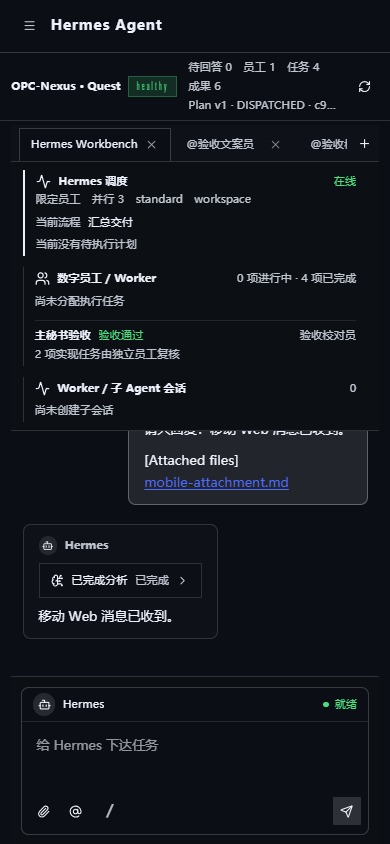
Acceptance Scope
v2.0.1 has passed type checks, unit tests, production build, Hermes runtime smoke tests, and desktop UI smoke tests. The full "boss issues order -> Hermes forms team -> Codex/Pi multi-employee execution -> independent acceptance -> complex delivery" flow remains a release gate; the full writing of two 300,000-character novels is not yet complete, so this scenario cannot be claimed as delivered. Release notes will document the actual artifacts, elapsed time, and blocking reasons for each scenario.
Dev & Verify
Requires Node.js 20+, npm 10+, Python 3.11 (the Hermes preparation scripts use uv).
npm ci
npm run hermes:prepare
npm run typecheck
npm test
npm run hermes:verify
npm run hermes:smoke
npm run build
Dev mode:
npm run dev
Windows/Linux packaging:
npm run pack:win
npm run pack:linux
GitHub Actions will repeatedly run type checks, unit tests, Hermes runtime preparation, health smoke tests, and production builds on Windows and Ubuntu; Release additionally verifies the Hermes runtime inside the packaged directory.
Security Scope
contextIsolation: true,nodeIntegration: false; the Renderer must not call Node.js APIs.- The Renderer can only invoke Main through the type-safe preload API; no generic
ipcRendereris exposed. - API Keys, tokens, and channel credentials exist only within the Main/safeStorage boundary.
- All tasks must pass project directory, employee, permission, budget, and engine availability checks.
- When a Hermes process, proxy, or Gateway crashes, the UI shows offline/error and stops the relevant queues; it does not display success.
Docs
License
MIT © Senke
Comments
Loading…
Similar plugins
by Ianzhyh
把本机 WorkBuddy 桌面端已登录的模型(DeepSeek / GLM / Kimi / MiniMax 等)变成本地的 OpenAI 与 Anthropic 兼容接口 —— Claude Code / opencode / Cursor / Trae / Cherry Studio / LobeChat 等任意支持自定义 Base URL 的客户端可直连。附网页控制台与 DeepSeek
★ 41
MIT
JavaScript
Oct 28, 2026
dsh plugin --profile web add workbuddy-to-dshby zbzbhs
Turn another computer into a remote Agent teammate: the worker runs its own DSH and a full Agent loop locally, so dispatched tasks keep running when the link drops and its model credentials never leav
★ 4
↓ 2.5k/wk
MIT
JavaScript
Oct 21, 2026
dsh plugin --profile web add dsh-remote-agentby agentrq
AgentRQ: Human-in-loop realtime conversational task manager for AI Agents. Self-hosted! Control your own agents from wherever you want Mobile, Web, Desktop. Designed to work well with your own Claude
★ 1.2k
↓ 26/wk
Apache-2.0
JavaScript
Oct 28, 2026
dsh plugin --profile web add @agentrq/dsh-plugin-agentrqby EternalNight996
🧑💼为 DeepSeek Harness Web 主窗口添加「工作角色」页签 + 「像素办公室」浮层:内置 508 张完整角色卡(The Agency 255 + agency-agents-zh 253),支持搜索 / 中英切换 / 分部分类选人;Canvas 2D 像素小人可站立、打字、踱步,浮层可拖动折叠缩放,选人即入列;闲聊台词可接 AI(内置或外部接口,20 字内中文)。npm 双
★ 6
↓ 142/wk
MIT
JavaScript
Sep 3, 2026
dsh plugin --profile web add dsh-ui-agents-pixeby 01men
榕器 · 企业 AI 资源统一管理平台 —— dsh/cordis 插件化(IAM/OIDC/MCP/Skill 市场/Agent/审计/用量计量/模型网关/流程编排),私有化年费 + 治理包,对外只呈现用量透明与内部成本穿透
★ 10
MIT
TypeScript
Sep 23, 2026
dsh plugin --profile web add dsh-enterprise-opsby 01men
榕器定制轨(01门)· AI 代理与人类协作前台——行业 AI 工作台(IAW)与一线面板/看板:dsh 一键插件化(班组长工作台/执行卡/Skill 点名直调/钉钉桥),上游 01men/ybkk-AIOS
★ 1
↓ 20/wk
MIT
JavaScript
Sep 12, 2026
dsh plugin --profile web add @ybkk/gate-01