

dsh-ollama-cloud-provider
Manifest validOllama Cloud LLM provider plugin for DeepSeek Harness (dsh).
📦 @goodandready/dsh-ollama-cloud-provider
Ollama Cloud LLM Provider for DeepSeek Harness



|
⭐ If you like this plugin, please star it on GitHub — it shows me that the plugin is useful to you and motivates me to keep developing it.
🐛 If you find a bug or would like to request a feature, open a GitHub issue in any language — I will review your proposal and implement useful suggestions in a future plugin version. |
Ollama Cloud provider plugin for DeepSeek Harness (dsh).
It registers one native LLM route, ollama-cloud, served by https://ollama.com, with two wire protocols:
| Transport | Endpoint | When |
|---|---|---|
native (default) | POST /api/chat | thinking, tool calls, usage counters |
openai-chat | POST /v1/chat/completions | OpenAI-compatible deployments and fallback |
Requests resolve the key per call, so a changed credential reaches the next request without a restart.
Architecture
graph LR
    subgraph DSH["DeepSeek Harness Core"]
        Agent["DSH Agent / Chat"]
        Creds["Credentials / launch env"]
    end

    subgraph Plugin["dsh-ollama-cloud-provider"]
        Router{"Route: ollama-cloud"}
        Pool["Account pool<br/>rotation, cooldowns, sticky"]
        Catalog["Live catalog<br/>/v1/models + /api/tags"]
        Usage["Balance & usage<br/>/api/balance + /api/usage"]

        subgraph Transports["Wire protocols"]
            T1["Native /api/chat (NDJSON)"]
            T2["OpenAI /v1/chat/completions (SSE)"]
        end
    end

    subgraph Ollama["Ollama Cloud"]
        Chat["ollama.com/api/chat"]
        OpenAI["ollama.com/v1/chat/completions"]
        Billing["/api/balance, /api/usage"]
    end

    Agent --> Router
    Creds -.-> Pool
    Router --> Pool
    Pool --> Transports
    T1 --> Chat
    T2 --> OpenAI
    Catalog --> Router
    Usage --> Billing
Features
- Two wire transports chosen per model: the native Ollama API (NDJSON) and the OpenAI-compatible gateway (SSE).
- Text, thinking, tool calls, images, usage and finish reasons on both transports.
- Live catalog from
GET /v1/models, enriched with capability flags fromGET /api/tags. - Accurate limits for the dsh picker: context window, input modalities, reasoning levels and their default, tool support, and API visibility.
- Balance and usage from the official
/api/balanceand/api/usageendpoints: included credits, purchased credits, 24-hour / 7-day / 30-day spend, and spend by model. - Multi-account rotation before any content is streamed: 401/403/429 and quota rejections mark a key and retry with the next one. Cooldowns persist across restarts.
- Sticky accounts per conversation, plus model → account glob rules.
- Price estimates from the published Ollama pricing table, including off-peak rates, with per-model overrides.
- Browser UI:
- Settings → Ollama Cloud: key, balance, accounts, rules, model allowlist, per-model transport, connection settings.
- Sidebar quota card (off by default, and it does not poll
/statewhile disabled): a ring with the highest used window and rows with remaining credits or legacy windows; an optionalplanLabelis shown next to the provider name. - Center quota panel: spend windows, spend by model, accounts, routing trace, usage analytics and a request heatmap.
/ollamacommand for status, usage, balance, accounts, models, rules andtest [model].- TUI settings section for terminal profiles.
- One-click plugin update in Settings → Ollama Cloud.
Install
Build and pack first:
npm install
npm run build
npm pack
Install the published package:
dsh plugin --profile web add @goodandready/dsh-ollama-cloud-provider@0.1.7
# DSH Desktop:
dsh plugin --profile desktop add @goodandready/dsh-ollama-cloud-provider@0.1.7
Or install the packed tarball into a profile:
dsh plugin --profile web add /absolute/path/to/goodandready-dsh-ollama-cloud-provider-0.1.7.tgz
# DSH Desktop:
dsh plugin --profile desktop add /absolute/path/to/goodandready-dsh-ollama-cloud-provider-0.1.7.tgz
Restart dsh (or DSH Desktop), then pick Ollama Cloud in the model picker.
Use the tarball, not the directory. On dsh 0.2.1-rc.2 the Desktop CLI aliases a local directory passed to
dsh plugin addand overwrites the target'spackage.json.
Configure
- id: llm-ollama-cloud
  name: "@goodandready/dsh-ollama-cloud-provider"
  config:
    apiKeyEnv: OLLAMA_API_KEY      # default
    # apiKey: ...                  # composition only, never commit
    transport: native              # native | openai-chat
    requestTimeoutMs: 300000
    streamIdleTimeoutMs: 300000
    visibleModels: []
    modelTransports: {}
    # contextWindowOverrides: { "model-id": 131072 }
    # maxOutputTokens: 32768
    accounts:
      - label: Work
        apiKeyEnv: OLLAMA_API_KEY_2
    activeAccount: ''              # label or credential name to pin
    stickySession: true
    showSidebarQuota: false
    planLabel: ''                  # optional, e.g. PRO
Every field except apiKey is volatile and appears in dsh settings.
Keys
config.apiKey(composition only,role('secret')).- The dsh credential seam under
apiKeyEnv(defaultOLLAMA_API_KEY). - The launch environment (process, project
.env,$DSH_HOME/.env).
Create a key at https://ollama.com/settings/keys. Keys do not expire; x-api-key is not accepted, only Authorization: Bearer.
Accounts and rotation
Add a second account in Settings → Ollama Cloud → Accounts: give it a name and a credential reference (for example OLLAMA_API_KEY_2), paste its key, then Save. The default account always serves first unless activeAccount pins another one.
Rotation happens before any content is streamed. When the serving key is rejected with an invalid credential, a rate limit or an exhausted quota, the adapter marks that key and retries the same request with the next usable account. A request that already started streaming is not replayed. Cooldowns are stored in ~/.dsh/storages/dsh-ollama/cooldowns.json keyed by a SHA-256 fingerprint — raw keys are never written.
Model → account rules
Pin a model to a preferred account with a glob. The first matching rule wins; * and ? are supported and matching is case-insensitive. Other accounts remain fallbacks.
modelAccountRules:
  - pattern: "*flash*"
    account: "Work"
Balance and usage
The plugin uses the documented cloud endpoints:
GET /api/balance→included.balance_usd/included.allowance_usd/included.periodandpurchased.balance_usd. Legacy accounts returnincluded.session.remaining_percentandincluded.weekly.remaining_percent; both formats are displayed.GET /api/usage?range=24h|7d|30d&group_by=model→ totals and per-model groups with request count, USD, input, cached input and output tokens.
/api/usage is limited to 10 requests per minute per user, so the reader caches each range (balance 60 s, usage 120 s, failures 30 s) and never polls in the background. Quota failures are fail-open: chat never depends on them.
Settings page
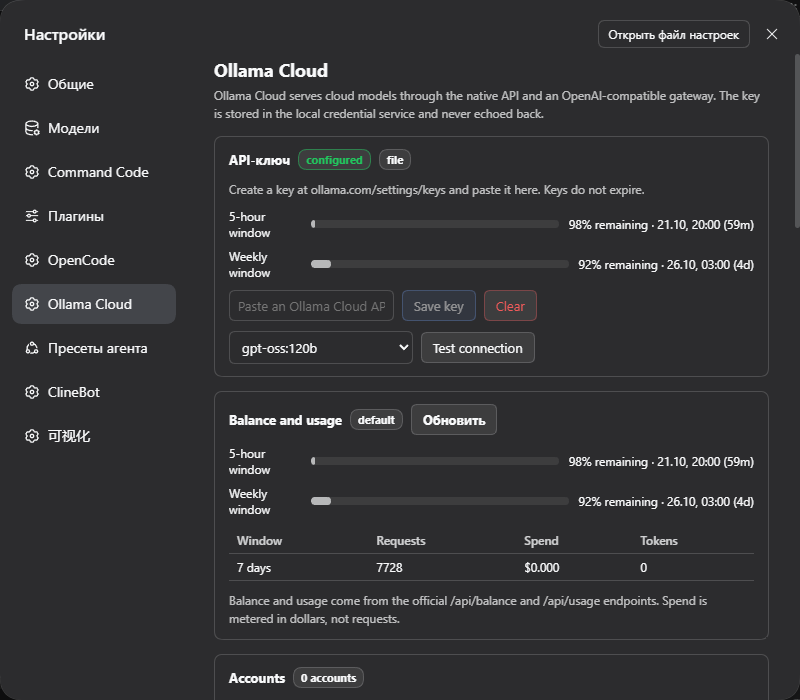
Open Settings → Ollama Cloud:
- Key — status, paste a key, clear it, run Test connection against a chosen model. The probe disables thinking so the reply is visible.
- Balance and usage — credit bar or legacy windows, spend windows, warning at 80 % and exhausted at 95 %.
- Accounts — extra keys, per-account spend, pin, remove, set a key.
- Model → account rules — glob rules.
- Routing — sticky session per conversation.
- Models — search, refresh the live catalog, hide models, override the wire transport per model, see price, context and capabilities.
- Connection — native and OpenAI bases, usage and balance endpoints, transport, timeouts, output cap and context override.
- Sidebar — show or hide the quota card, and an optional plan label (for example
PRO) shown next to the provider name. - Plugin update — current/latest version and Update now.
The Host serves /dsh-ollama/state, /health, /analytics, /usage, /balance, /config, /key, /key/clear, /refresh, /models/refresh, /test and /update. Writes require JSON, an Origin or Referer matching Host (the Desktop renderer is identified by its dsh-auth-* cookie and desktop user agent when both headers are absent), and are restricted to loopback (127.0.0.1 / ::1); a write without any source identity is rejected with 403.
Command
/ollama status            # provider, accounts, quota and model count
/ollama usage             # 7-day spend windows and spend by model
/ollama balance           # included and purchased credits
/ollama accounts          # labels, source, active/cooling, 7-day spend
/ollama models            # ids, price, context, capabilities
/ollama rules             # model → account rules
/ollama test [model]      # minimal real request
Verified API facts
Checked live on 2026-10-21:
GET https://ollama.com/v1/modelsis public and returnsdata[]plus a non-standardmodels[]array carryingcontext_window,max_context_window,input_modalities,supported_reasoning_levels,default_reasoning_level,visibilityandsupported_in_api.GET https://ollama.com/api/tagsis public and is the only per-model source ofcapabilities(completion,tools,thinking,vision).- The live catalog returned 23 cloud models.
- Native
/api/chatstreams NDJSON and reportsprompt_eval_count,prompt_eval_cached_count,eval_countanddone_reasonin the final line. - OpenAI
/v1/chat/completionssupports streaming, tools, vision,reasoning_effortandstream_options.include_usage. - Anthropic compatibility (
/v1/messages) exists but is partial; this plugin does not use it.
Development
npm run typecheck
npm test
npm run build
npm run check         # typecheck + tests + build
npm run release       # check + packed tarball
node scripts/probe.mjs
scripts/probe.mjs is read-only against the public catalog; with OLLAMA_API_KEY set it also probes chat, balance and usage and prints the raw shapes.
Visual verification
The Ollama Cloud settings page in DSH Desktop (dark theme): configured credential, balance and usage, and the connection probe.
Limitations
- Cloud only. Local
http://localhost:11434is not registered as a route. - Embeddings are not exposed: no cloud model in the live catalog advertises the
embeddingcapability. - File attachments are forwarded as deterministic handle text, not inline bytes.
- The usage endpoint is limited to 10 requests per minute; caches and the UI account for that.
- Cost values are estimates from the published table (including off-peak rates); the gateway is the authority.
- Automatic update requires the DSH CLI entry in the runtime.
- The UI requires a web profile; the TUI keeps the
/ollamacommand and the model route.
License
MIT © GooDAnDReaDY. See LICENSE and NOTICE.
Comments
Loading…
Similar plugins
by NOirBRight
Native Ollama Cloud provider and Web configuration plugin for DeepSeek Harness
★ 9
↓ 13/wk
MIT
TypeScript
Sep 29, 2026
dsh plugin --profile web add dsh-llm-ollamaby orzgithub
A plugin to use ollama in Deepseek Harness.
★ 0
GPL-3.0
JavaScript
Sep 30, 2026
dsh plugin --profile web add dsh-ollamaby NOirBRight
OpenCode Go LLM provider plugin for DeepSeek Harness
★ 4
↓ 233/wk
MIT
TypeScript
Sep 29, 2026
dsh plugin --profile web add dsh-llm-opencode-goby wertyBSd
Local LLM integration plugin for DeepSeek Harness
★ 0
MIT
TypeScript
Aug 26, 2026
dsh plugin --profile web add dsh-local-llmby 173787247
DeepSeek Harness WSL plugin (dsh-wsl-ollama)
★ 1
MIT
JavaScript
Sep 30, 2026
dsh plugin --profile web add dsh-wsl-ollamaOllama Cloud provider for DeepSeek Harness: one-click provider setup with per-model reasoning-effort control and account usage in the Models page and sidebar.
★ 0
dsh plugin --profile web add dsh-ollama-cloud