

dsh-client-ui-wallpaper
Manifest valid★ 1A client plugin that uses local images/videos (Dynamic Wallpaper.app assets) as wallpapers for the DSH desktop client · Wallpaper/image background plugin for the DeepSeek Harness desktop client
dsh-client-ui-wallpaper


把本地图片 / 视频(例如 Dynamic Wallpaper.app 播放列表里的素材) 用作 DSH 桌面客户端的背景:整窗铺满、背景模糊、面板与左右侧栏透明度分别可控,字色跟着壁纸明暗自动切换。
这是
~/.dsh/profiles/desktop/plugins/dsh-client-ui-wallpaper的完整项目版:含挂载声明、安装脚本、自检脚本与文档;已发布到 npm(dsh-client-ui-wallpaper)。
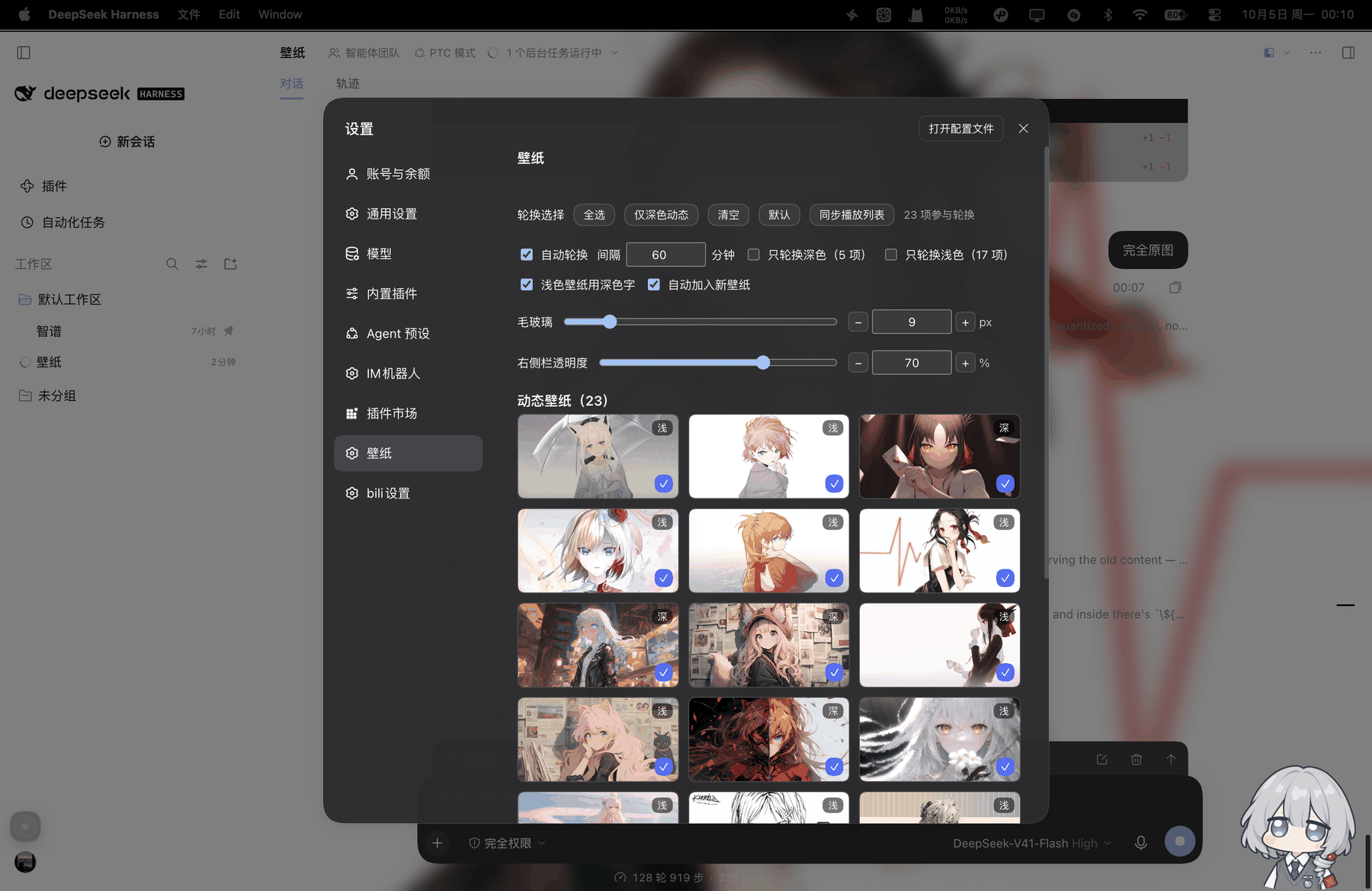
上图为真实运行截图(macOS 客户端,设置 → 壁纸):轮换选择与「23 项参与轮换」、自动轮换间隔 60 分钟、只轮换深色 5 项 / 浅色 17 项、浅色壁纸用深色字、自动加入新壁纸、毛玻璃 9px、右侧栏透明度 70%,下方是动态壁纸缩略图网格(每格右上角标注该壁纸的明暗判定)。截图为整幅实拍原图(未裁切、未遮挡、未修饰),仅等比缩放到 1800px 宽。
功能
背景
- 图片或视频铺满整窗(
object-fit: cover),面板半透明让壁纸透出来;弹窗保持不透明 - 背景模糊可调(0–60px);可选纱层(浅色外观白纱 / 深色外观黑纱)
- 静态与动态分开:图片可配「同名视频」,网格里用 ▶ 动态 一键切换
- 轮换:间隔 15 秒–24 小时可调;支持「全选 / 仅深色动态 / 清空 / 默认」
可读性(墨水)
- 按壁纸亮度自动切深/浅字(含代码块、行内 code、气泡、工具栏、输入框与 caret)
- 代码块只跟外观走:浅色外观浅底深字、深色外观深底浅字(绕开
pre.shiki透明背景导致的误判) - 设置弹窗内的字色复位为「该外观本来的值」,不被壁纸影响
面板与控件(设置 → 壁纸)
| 控件 | 说明 |
|---|---|
| 壁纸网格 | 静态/动态分组,缩略图 + 深/浅角标 + ✓/+ 轮换勾选 + 当前/播放中标记 |
| 背景模糊 | 滑块 + − [数字框] + 精确步进(0–60,居中、无原生箭头) |
| 右侧栏透明度 | 0–100% 线性,独立于面板;左栏保持原透明观感 |
| 只轮换深色 / 只轮换浅色 | 优先用缩略图实测亮度判定,未采样时按配置名单取反 |
| 自动加入新壁纸 | 新丢进目录的素材自动入库并追加进轮换 |
| 自动轮换 / 间隔 | 秒数可调;可勾「随机轮换」(不会连续两次同一张) |
| 视频省电暂停 | 窗口不可见时暂停播放,回到前台自动续播(隐藏期间不切新壁纸) |
| 轮换过渡 | 交叉淡入淡出 0.7s;系统开启「减少动态效果」或窗口隐藏时直接切换 |
| 首帧就绪再淡入 | 新壁纸等首帧解码完成(视频 loadeddata、图片 load/decode,最多等 600ms)才开始淡入,避免大视频「先透明后硬切」 |
| 浅色壁纸用深色字 | 关掉就固定用浅色字 |
| 同步播放列表 | 一键把 Dynamic Wallpaper.app 播放列表里的素材同步进来 |
| 删除(缩略图悬停) | 移到「废纸篓」(可恢复)+ 删缩略图缓存 + 从轮换移除 + 记入同步跳过名单 |
| 侧栏小圆钉 | 与头像中心对齐的收起按钮,点空白处自动收回 |
安装
三种方式任选一种;装完刷新页面(或重启 DSH),打开 设置 → 壁纸:
A. 从 npm 装(dsh-client-ui-wallpaper)
npm i dsh-client-ui-wallpaper
# 装进某个 profile(默认 desktop);会先备份该 profile 的 cordis.patch.yml
node node_modules/dsh-client-ui-wallpaper/scripts/install.mjs --profile desktop
B. 从源码装
git clone https://github.com/gnk478/dsh-client-ui-wallpaper.git
cd dsh-client-ui-wallpaper
node scripts/install.mjs --profile desktop
C. 用 DSH 插件管理器(把 clone / 解压好的目录挂进去)
dsh plugin --profile desktop add link:/绝对路径/dsh-client-ui-wallpaper
快速开始
素材二选一:
- 什么都不用做:默认直接读 Dynamic Wallpaper.app 的素材库
~/Library/Containers/whbalzac.Dongtaizhuomian/Data/Documents/{Wallpaper,Videos} - 用自己的目录:在 config 里写绝对路径(插件不做
~展开),例如imageDir: /Users/you/.dsh/wallpapers、videoDir: /Users/you/.dsh/videos
mkdir -p ~/.dsh/wallpapers ~/.dsh/videos
cp ~/Pictures/some.jpg ~/.dsh/wallpapers/          # 静态壁纸
cp ~/Movies/some.mp4  ~/.dsh/videos/               # 动态壁纸

node scripts/check.mjs                             # 自检
配置
config(cordis.patch.yml 的 ui-wallpaper 行,见 examples/profile-cordis.patch.yml)
| 键 | 默认 | 说明 |
|---|---|---|
imageDir / videoDir | Dynamic Wallpaper.app 素材库的 Wallpaper/ 与 Videos/(lib/index.js:37-39) | 素材目录,必须是绝对路径(插件不做 ~ 展开) |
mode | image | image / video / rotate |
image / video | '' | 固定的文件名 |
live | false | 图片有同名视频时用视频做动态壁纸 |
rotateSeconds | 300 | 轮换间隔(秒) |
shuffle | false | 随机轮换(不会连续两次同一张) |
blur | 8 | 背景模糊(px) |
panelOpacity | 0 | 面板不透明度(0 = 全透) |
windowOpacity | 0.96 | 弹窗不透明度 |
dim | 0 | 纱层强度 |
autoInk | true | 按壁纸亮度自动切字色 |
autoInclude | true | 新素材自动加入轮换 |
only / darkVideos | [] | 深色壁纸 / 深色动态白名单 |
state(~/.dsh/wallpaper-state.json,面板里改的都落这里)
mode、image、video、live、rotation、only、videoPool、blur、panelOpacity、sidebarOpacity(null = 跟随面板)、autoInk、autoInclude、knownFiles、lastAdded、rotateSeconds、shuffle
# 直接读/写状态(调试用)
curl -s  http://127.0.0.1:19387/wallpaper/state
curl -s -X POST -H 'content-type: application/json' \
     -d '{"sidebarOpacity":0.35}' http://127.0.0.1:19387/wallpaper/state
与 Dynamic Wallpaper.app 同步
app 的播放列表在:
~/Library/Containers/whbalzac.Dongtaizhuomian/Data/Documents/
  ├── Videos/                播放列表素材
  ├── Wallpaper/             静态壁纸
  └── Setting/Preferences.json   playlist_array(播放列表)
两种同步方式(都只增不删;读取该目录需要给 DSH「完全磁盘访问权限」):
# 面板:设置 → 壁纸 → 同步播放列表
# 或命令行
./sync-wallpaper-playlist.sh            # 只同步播放列表里的视频
./sync-wallpaper-playlist.sh --stills   # 连静态壁纸目录一起
同步会跳过 ~/.dsh/wallpaper-sync-skip.txt 里列出的文件名(删除过的素材会自动写进去,防止被拉回)。
目录结构
dsh-client-ui-wallpaper/
├── lib/
│   ├── index.js                 宿主:路由 / 扫描 / 状态 / 抽帧 / 同步 / 删除
│   └── client.js                客户端:注入样式 / 铺背景 / 面板 UI / 墨水判定
├── scripts/
│   ├── install.mjs              安装进 profile(备份 + 复制 + 写 insert 行)
│   └── check.mjs                静态自检(语法 + 路由 + 样式常量 + 控件)
├── docs/ARCHITECTURE.md         架构、路由表、样式常量、踩坑记录
├── .github/workflows/           check.yml(自检)+ publish.yml(npm 可信发布)
├── examples/profile-cordis.patch.yml  带完整配置的挂载示例
├── examples/github-workflow-publish.yml  publish.yml 副本(方便复制)
├── cordis.patch.yml             本插件的挂载声明
├── CHANGELOG.md / PROVENANCE.md / LICENSE
└── README.md
开发
-
宿主是普通 cordis 插件,改完由 DSH 的 HMR 重载;客户端
lib/client.js改动会被热替换(注意:热替换会重置模块级变量,需要跨次保留的数据要放window/ sessionStorage) -
自检:
node scripts/check.mjs
node --test                                          # 行为测试(mock ctx:路由 / 回收站 / 缩略图 GC / 随机轮换 / crossfade / 首帧就绪),1.1.1 起共 19 例
curl -s http://127.0.0.1:19387/wallpaper/_client | python3 -m json.tool | head -40   # 客户端自报状态
curl -s http://127.0.0.1:19387/wallpaper/_hits                                        # 各路由请求计数
发布与打包
npm 发布走可信发布(Trusted Publishing / OIDC),不需要 token:
- 改
package.json的version、更新CHANGELOG.md - 在 npm 包设置里配 Trusted Publisher:GitHub Actions → Organization
gnk478、Repositorydsh-client-ui-wallpaper、Workflowpublish.yml,Allowed actions 勾上npm publish - 推 tag 或手动触发
.github/workflows/publish.yml:
git tag v1.1.1 && git push origin v1.1.1   # tag 触发
gh workflow run publish.yml                 # 或手动触发
工作流里 permissions: id-token: write 是关键(OIDC 身份);npm publish 会自动带 provenance。
本地手工发布仍然可用,但需要一个开了 Bypass 2FA 的 Granular Access Token:npm login && npm publish(prepublishOnly 会先跑 scripts/check.mjs 与 node --test)。
Release 附件:
git archive --format=zip -o dsh-client-ui-wallpaper-1.1.1.zip HEAD
gh release create v1.1.1 dsh-client-ui-wallpaper-1.1.1.zip
CI:.github/workflows/check.yml 在 push / PR 时跑 node scripts/check.mjs 与 node --test,也是顶部徽章的来源;两个工作流的副本放在 examples/ 下方便复制。
故障排查
| 症状 | 原因 / 处理 |
|---|---|
| 壁纸没铺满 | 面板里确认已选壁纸;检查 /wallpaper/list.json 是否有素材 |
| 侧栏/右栏透明度拖了没反应 | 常见于「透明化扫描」清掉了底色;本版本已对右栏跳过扫描并直接写 background-color。若自行改过选择器,核对 SIDEBAR_CSS / SIDEBAR_LEFT_CSS |
| 代码块字看不清 | 代码块应「只跟外观走」;检查 CODEFIX_CSS 是否注入 |
| 视频缩略图一直是灰的 | 首次访问 /wallpaper/thumb/<name> 会调 qlmanage 抽帧,稍等再刷新;检查 ~/.dsh/wallpaper-thumbs/ |
| 换壁纸没有淡入效果 | 首次绘制、重绘同一张、窗口隐藏、或系统开了「减少动态效果」(prefers-reduced-motion: reduce)时都是直接切换,不做 0.7s 过渡。1.1.1 起淡入会先等新壁纸首帧就绪(最多 600ms),大视频不会再看成「秒切」;用 /wallpaper/_probe 的 switches(lastReason / waited)可确认最近一次为什么没淡 |
| 新素材不出现 | 刷新面板(宿主目录扫描有 4 秒快照缓存,见 lib/index.js:229);确认扩展名在白名单(图片 jpg/jpeg/png/webp/gif/avif/bmp,视频 mp4/webm/mov/m4v) |
| 改了 profile 文件不生效 | DSH 运行中会用内存配置回写 profile 文件;完全退出后再改,或改用「设置」界面 |
| 面板打不开 / 报错 | 看 /wallpaper/_client 的 lastError,以及宿主日志 |
已知限制
- 与 DSH 的布局类名(
_6Qf49G_*)和色板 token(--dsw-*)耦合,DSH 升级后可能需要同步调整 - 播放列表同步依赖 macOS 的 TCC 权限(完全磁盘访问)与
qlmanage(缩略图抽帧) - 删除会移到
~/.Trash(可恢复);素材与废纸篓不在同一卷时rename失败,会回退为真删,面板提示「已永久删除」
License
Comments
Loading…
From the same category
by awesome-dsh-plugin
A curated list of plugins for DeepSeek Harness (dsh) · DeepSeek Harness 插件精选列表
★ 18.3k
CC0-1.0
Python
Oct 10, 2026
by 0xsline
DeepSeek Harness (DSH) ecosystem: curated plugins, tools, and infrastructure from dsh-external/hub and the public dsh-plugin topic.
★ 1.2k
CC0-1.0
Python
Oct 10, 2026
by pax-beehive
Open-source CLI, schemas, resolver, and DSH agent tools for DSH Plugin Hub
★ 450
MIT
TypeScript
Oct 6, 2026
by xiajiajun516
DeepSeek Harness (DSH) backup & restore plugin — export, import, migrate and sync your complete DSH configuration, plugins, MCP servers, skills and workspace. One-click migration to another machine.
★ 176
MIT
TypeScript
Oct 8, 2026
dsh plugin --profile web add dsh-config-managerby yjh051108
推荐组件(非必须):DeepSeek Harness 运行时注入器;已随 dsh-routing-suite 单仓库化保留,本仓库继续维护/发布。
★ 164
TypeScript
Sep 18, 2026
dsh plugin --profile web add @dsh-external/dsh-super-injectorby jigjoy-ai
A CLI that turns a goal into a pull request - and a sandbox for testing concurrent AI coding agents on the Mozaik runtime.
★ 124
MIT
TypeScript
Oct 2, 2026