
dsh-zcode-memory
IdentifiedDeepSeek Harness 插件。移植了ZCode的记忆功能到DSH。
dsh-zcode-memory
ZCode-compatible project memory, a post-turn changed-files panel with review/open actions, and a memory settings page for DeepSeek Harness (dsh).
Compatibility: dsh >=0.2.1-rc.3 <0.3.0-0 (plugin v0.2.0; declared via engines.dsh and verified against 0.2.1-rc.3). The installer refuses to run against an incompatible dsh. For dsh 0.1.x use plugin v0.1.0.
Features
- ZCode-compatible project memory — per-project memory directories whose names follow the exact same encoding rule as ZCode (
basename slug+-+ first 16 hex of SHA-256 over the normalized absolute path, lowercased on Windows). Copy ZCode'smemories/projects/tree into this plugin's memory root and every project resolves to the same directories, ready to reuse and maintain. Each agent session receives one context injection teaching the model the memory protocol (four memory types, frontmatter format,MEMORY.mdindex rules) plus the project's current index; writes inside the memory root are sandbox-auto-allowed, mirroring ZCode's memory file permission. - Post-turn changed files — on dsh 0.1.x, plugin v0.1.0 rendered a turn-tail panel with a Review button (inline +/- diff) and an Open button. On dsh 0.2.x the official
dsh-workspace-changes+ deliverables UI provides this natively (turn tail with per-file diff and open actions), so this plugin no longer ships its own panel and defers to it. - Settings page — a dedicated "ZCode Memory" section in the web settings:
- view/edit the memory root (persisted to
<dsh-home>/dsh-zcode-memory.json); a Browse… button opens the host's native directory chooser; an Open folder button reveals the effective root in the OS file manager; the default root<dsh-home>/memoriesis created at startup when missing. - per-project memory statistics (file count, index presence, total size, last modified) in height-capped scrolling lists; inside a project, the file list has a top-right search box matching file names AND document content (content hits show a match count and context snippets); clicking a file shows its content preview below (5 MiB cap, same as ZCode).
- view/edit the memory root (persisted to
- Import from ZCode — one-click migration from the settings page: scan the ZCode memory root (
~/.zcode/cli/memories), diff it against the current root, confirm, then execute — projects missing in the target are copied whole; new files in existing projects are copied;MEMORY.mdindexes present on both sides are merged line-by-line (existing lines preserved, new lines appended, exact dedupe — minimal change); same-name files with different content are kept and reported. The import also flags ZCode-only references (.zcodepaths,zcodeCLI calls) with per-item fix suggestions for the user to decide; indexes modified by a merge are backed up to<dsh-home>/dsh-zcode-memory/import-backup/<timestamp>/.
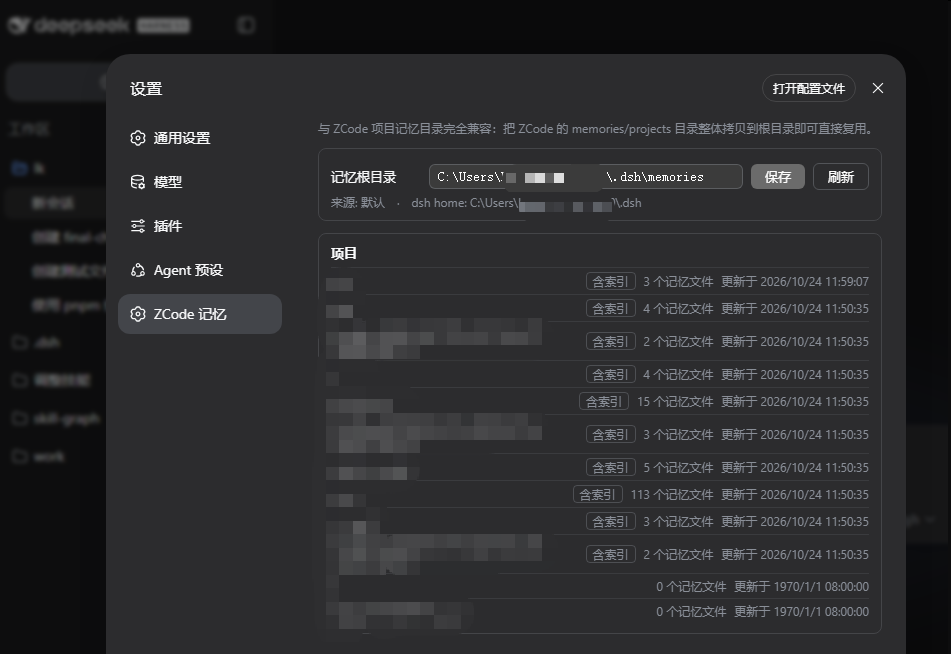
Fully compatible with ZCode project memory directories: copy ZCode's
memories/projectstree into the memory root and it is reused as-is.
Install
Prerequisites: Node.js ≥ 20 with npm (dsh and pnpm are located automatically — no PATH setup needed).
From the release archive (one line)
tar -xzf dsh-zcode-memory-0.1.0.tgz && node dsh-zcode-memory/install.mjs
install.mjs registers the plugin into the web profile via the official dsh plugin add flow and links every peer dependency to the running dsh installation, so the plugin and the host share one module instance. Options: --profile <name> (default web), --home <dsh-home> (default $DSH_HOME or ~/.dsh), --dsh <dir> (override auto-detection).
From a git clone
git clone https://github.com/gniquil123/dsh-zcode-memory.git
node dsh-zcode-memory/install.mjs
Desktop app profile
The desktop profile is managed exclusively by the Electron app — the CLI refuses dsh plugin add there. Install manually (same pattern as any third-party desktop bundle):
- Edit
~/.dsh/profiles/desktop/package.json: add"dsh-zcode-memory": "link:<path-to-clone>"todependenciesand"dsh-zcode-memory"todsh.profile.bundles. - Run
pnpm installin that directory. - Restart the DeepSeek Harness desktop app.
Then restart the profile: dsh web. The settings page gains a "ZCode Memory" section.
Migrate existing ZCode memories
# Windows (PowerShell)
Copy-Item -Recurse "$env:USERPROFILE\.zcode\cli\memories\projects" "$env:USERPROFILE\.dsh\memories\projects"
# macOS / Linux
cp -r ~/.zcode/cli/memories/projects ~/.dsh/memories/projects
Memory root defaults to <dsh-home>/memories; projects live at <root>/projects/<project-key>/memory/. Keys are computed exactly like ZCode's, so the copy is recognized as-is.
Configuration
Edit the profile's user patch layer (~/.dsh/profiles/web/cordis.patch.yml):
- id: zcode-memory
  config:
    enabled: true            # false disables injection and the remote service
    memoryRoot: ""           # non-empty overrides the root (wins over the settings page value)
    memoryWriteAllow: true   # widen the sandbox to danger-full-access for writes inside the memory root only
Runtime changes made on the settings page persist to <dsh-home>/dsh-zcode-memory.json; a patch-configured memoryRoot always wins.
Security notes
memoryWriteAllowwidens the sandbox policy only forwriteText/editTextcalls whose resolved target lies inside the memory root — the equivalent of ZCode's auto-allowed memory writes. Bash and all other paths keep the session's standing mode. Set it tofalseif you prefer approving memory writes manually.- Injected memory content is model-readable context, exactly like ZCode: memory files are written by the model, and consumers must verify freshness before recommending from them (the injected protocol includes that instruction).
Known issues
-
$DSH_HOME/.credentials.yamlwritten by a newer dsh desktop build uses a rich format that0.1.0-rc.6's flat parser rejects. If you run both, point the web profile'scredentialsrow at a separate file via the user patch layer:- id: credentials config: path: '<dsh-home>/.credentials-web.yaml' dshHome: '<dsh-home>'
Implementation notes
- Host half (
lib/index.js): injects the memory context once per session onagent/pre-step(mid-session re-injection would wake the agent loop into a spurious reply); wrapsctx.fs.writeText/editTextfor the memory-root allowance; registers a Typert Remote gateway. - Remote channel:
lib/typert.host.jsis a hand-written generator-format Typert contract (dsh-typert-loaderauto-registers any mounted package's./typertexport); the client half mounts its descriptors through the publicctx.remote.$mount. Self-mounted namespaces must NOT be declared in the module'sinject(that deadlocks the boot waiting on a service only the module itself creates) — calls resolve throughremote.namespaces. - Changed-files: pure client-side derivation over the conversation event stream, following the official deliverables plugin's accumulator pattern. The turn tail is a chain slot electing the first non-null selector in ascending
priority; this panel registers atpriority: -1so it wins when diffs were captured and defers to the official produced-files panel otherwise. lib/project-key.jsis ported 1:1 from ZCode (zai-org/ZCode,apps/zcode-cli/packages/core/src/memory/project-root.ts, Apache-2.0, marked changed); prompts are adapted from ZCode's provider-visible memory prompts. SeeLICENSEfor third-party notices.- Plain JS, no build step;
lib/client.jsis hand-rolled in dsh ModuleLoader's lazy-CJS factory format. Caveat: the dsh 0.2.x client runtime drops a primitive-stringchildrenpassed insidecreateElement(type, { children })(arrays and the third-argument form are fine) — always pass text children as the third argument (createElement(type, props, text)), or the element renders empty.
Changelog
v0.2.2 (2026-10-28)
- Settings page rework — top-right search box on the file list (file name AND content search with match counts and context snippets); height-capped scrolling project/file lists; content preview below the list on click; Browse… (native directory chooser via the host's
remote.directoryPicker) and Open folder (file-manager reveal via the officialsession/openWorkspacePath) buttons on the memory-root row. - Import from ZCode — scan
~/.zcode/cli/memories→ show the diff plan (whole-project copies / new-file copies / line-merged indexes / name conflicts) → confirm → execute. Index merging is a deterministic line union (existing lines preserved, new lines appended, exact dedupe — minimal change, no model call); conflicting same-name files are kept and listed; ZCode-only references (.zcodepaths,zcodeCLI calls) are reported with fix suggestions for the user to decide; merged indexes are backed up to<dsh-home>/dsh-zcode-memory/import-backup/<timestamp>/. - Default memory root auto-created —
<dsh-home>/memories/projectsis ensured at plugin startup and after saving a new root from the settings page. - Fault tolerance end to end — gateway calls never reject (not-mounted/timeout/throw all fold into
{ok:false,error}); every settings-page action has its own try/catch feeding the error card; the store survives vanishing files, bad mtimes, and invalid paths; host-side store creation or feature installation failures log instead of taking the profile down. - Added
node test/smoke.mjs(store, import pipeline, typert schema validation; isolatedDSH_HOMEso the real configuration is never touched).
v0.2.1 (2026-10-26)
- Fix model-call failure on dsh 0.2.x —
format v4 message requires a producer-owned source kind: the v4 session format retired the genericsource: { kind: "plugin" }wrapper, so injected memory context now carries the producer-owned kinddsh-zcode-memory/memory-context. Session log export no longer fails with HTTP 500 on sessions created by this version. (Sessions whose logs were written by v0.2.0 contain the retired kind and still fail export/replay on 0.2.x — delete those sessions.)
v0.2.0 (2026-10-26)
- Support dsh 0.2.1-rc.3 — compatibility moved to
>=0.2.1-rc.3 <0.3.0-0; the typert contract was rewritten for the newcreateTypertRemoteInfo+ lazycreate()zod-factory format (the oldschemafield fails at boot on 0.2.x). - Installer version gate — the installer reads the installed dsh version and refuses to install when it does not satisfy
engines.dsh(dependency-free semver range evaluation); dsh CLI's own plugin gate acts as a second layer. - Changed-files panel handed to the official UI — dsh 0.2.x ships
dsh-workspace-changes+ the new deliverables surface (turn tail with per-file diff and open actions) natively, so this plugin no longer carries its own 0.1-era client accumulator. - Desktop profile install documented — the
desktopprofile is managed exclusively by the Electron app; see the install section for the manual manifest + pnpm steps. - Verified against dsh 0.2.1-rc.3: plugin v0.2.0 active, the ZCode Memory settings section renders, and the remote gateway round-trips (11 ZCode-migrated projects listed).
v0.1.0 (2026-10-24)
- Initial release for dsh 0.1.0-rc.6: ZCode-compatible project memory, client-side post-turn changed-files panel with review/open, memory settings page.
License
Comments
Loading…