

dsh-reveal-in-explorer
Manifest validdsh-reveal-in-explorer
dsh-reveal-in-explorer



在 DeepSeek Harness 聊天里悬停蓝色文件引用,一键用系统文件管理器定位该文件。
English · 中文
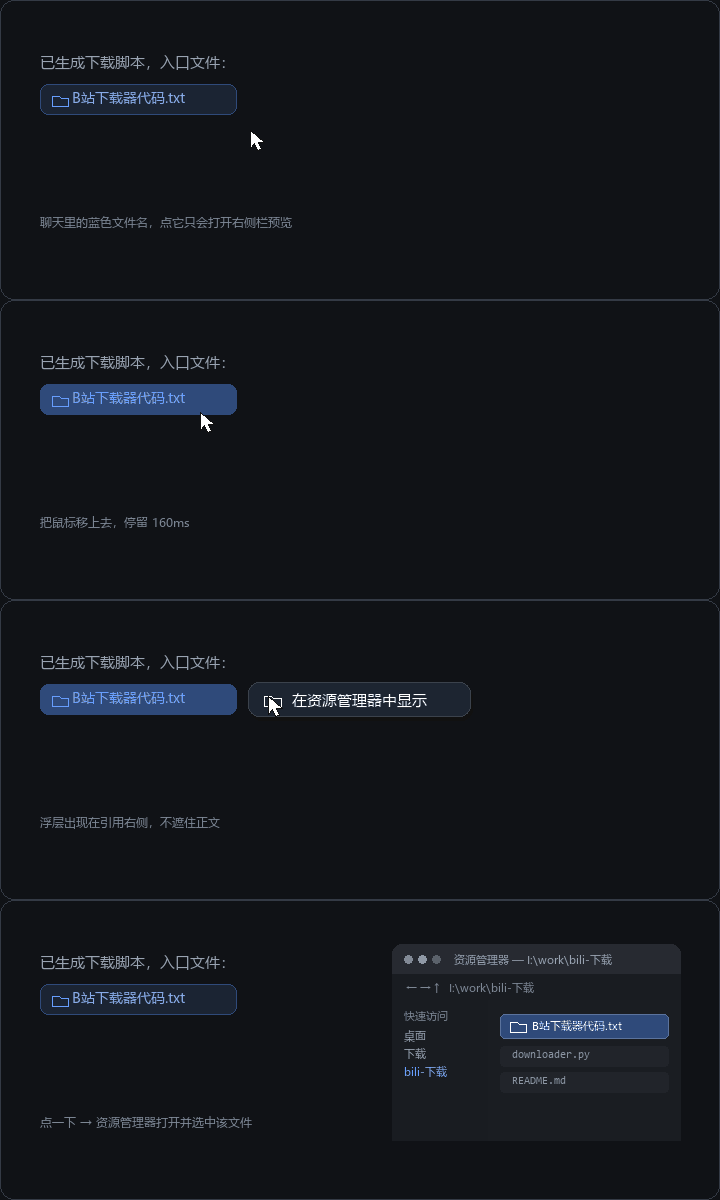
默认点击文件引用仍然走 Harness 原生行为(在右侧栏预览),本插件只在悬停时多给一个入口:直接打开资源管理器 / Finder / Linux 文件管理器并选中该文件。
已在 DSH 0.2.1-rc.2(Windows / DeepSeek Harness Desktop)上实测:悬停出浮层、点击跳转资源管理器均正常。其他版本请以 engines.dsh 范围为准,见兼容性。
功能
- 悬停即出:指针在文件引用上停留 160ms,浮层在引用右侧弹出「📂 在资源管理器中显示」;右侧空间不足时依次退到下方、上方,并始终夹在视口内。
- 默认行为不变:点击引用依旧在右侧栏预览,不劫持任何原生交互。
- 平台自适应:由宿主
open-in-app/native-command决定落点——Windowsexplorer.exe /select,,macOSopen -R,Linux 打开所在目录。 - 相对路径补全:
docs/a.md这类工作区相对路径会用当前会话的cwd补成绝对路径。 - 安全边界:路径由宿主
remote.session.openWorkspacePath({ action: 'reveal' })校验,插件本身不 spawn 进程、不读文件内容。 - 失败可见:宿主拒绝(路径不存在、无权限、没有桌面文件管理器)时,浮层保持打开并把宿主给的原因显示在按钮第二行,同时
console.warn一条带路径与原因的日志,方便开 Issue 时直接贴。 - 中英双语、跟随宿主主题 token、键盘可达(
focusin同样触发,Esc关闭)。
覆盖的引用类型
| 位置 | DOM 形态 |
|---|---|
| 助手回复中的内联代码文件引用(蓝色文件名) | code > button[title] |
| Markdown 链接形式的文件路径 | button.fileLink[title] |
| 输入框 / 用户消息中的文件 chip | [data-ref-chip="file"][title] |
| 交付文件卡片 | [data-presented-file] button[title] |
| 其它带路径 tooltip 的聊天内控件 | [data-chat-flow] button[title] / a[title] |
最后一条是兜底:tooltip 看起来像路径(含分隔符,或形如 name.ext)才认,Copy、Open in sidebar 这类动作文案会被排除。
安装
dsh plugin --profile web add dsh-reveal-in-explorer
尚未发布到 NPM 时,直接从本仓库源码安装:
dsh plugin --profile web add github:Ghdhdhhake/dsh-reveal-in-explorer
或从本地目录安装:
dsh plugin --profile web add /path/to/dsh-reveal-in-explorer
把 web 换成你自己的 profile 名即可(如 desktop)。安装后刷新页面即可;Client 改动热加载,无需重启。
手动挂载(离线环境)
本机网络策略可能拦下 pnpm 访问 registry。此时把目录以 link: 依赖装进 profile,再让 profile 的 bundle 栈挂载它:
-
profile 的
package.json:"dependencies": { "dsh-reveal-in-explorer": "link:/path/to/dsh-reveal-in-explorer" } -
pnpm-lock.yaml的importers['.']下补:dsh-reveal-in-explorer: specifier: link:/path/to/dsh-reveal-in-explorer version: link:/path/to/dsh-reveal-in-explorer -
dsh.profile.bundles追加dsh-reveal-in-explorer,然后:pnpm install --offline --ignore-scripts --config.trust-lockfile=true
卸载
在 设置 → 插件 中停用并移除 dsh-reveal-in-explorer,或从 profile 的 dependencies / dsh.profile.bundles 删除后重新安装依赖。
开发
node scripts/build.mjs      # 由 src/ 生成 lib/index.js 与 lib/client.js
node scripts/check.mjs      # 清单、资源、选择器契约与发布文件一致性
npm test                    # 单元测试(Node 内置 test runner,无依赖)
或一次跑完:npm run verify。全部零依赖、不联网,Windows PowerShell 里可直接运行。lib/ 是提交进仓库的构建产物,安装时不会执行任何构建脚本。
npm test 显式列出四个测试文件(Node 20 不支持 --test 的 glob,cmd.exe 也不会展开 *),scripts/check.mjs 会校验「test/ 下每个 *.test.mjs 都在脚本里」——新增测试文件忘了登记会直接失败,而不是静默不跑。
测试覆盖
| 文件 | 覆盖内容 |
|---|---|
test/paths.test.mjs | 路径拼接核心:Windows 盘符/UNC、macOS/Linux 斜杠、绝对路径优先、空工作区、CJK 与空格文件名 |
test/selectors.test.mjs | 选择器契约:用 test/fixtures/chat-transcript.html 校验每个 SELECTORS 仍能命中,DSH 升级改名时 CI 立刻失败 |
test/behaviour.test.mjs | 注册契约、inject、Host 请求参数、失败原因透传、console.warn 日志、浮层定位 |
test/render.test.mjs | 浮层各状态渲染:空闲/忙碌/成功/失败(含错误原因第二行)、主题 token、视口内夹取 |
test/fixtures/chat-transcript.html 是从 DSH 0.2.1-rc.2 客户端产物里核对过的结构快照(内联代码引用、Markdown 文件链接、@ chip、交付文件卡片、以及 Copy/Retry 这类不该响应的干扰项)。宿主改结构时先改这个 fixture,测试会指出是哪条选择器失效。
目录
src/index.js           Host 入口(空实现,仅给 bundle 一个 Host 行)
src/client/index.js    Client 实现(CJS factory 源码,含 SELECTORS 契约表)
lib/index.js           构建产物:Host 入口
lib/client.js          构建产物:带 __ModuleLoader__ 外壳的 client bundle
cordis.patch.yml       bundle 补丁:插入 reveal-in-explorer 行
dsh.plugin.json        插件清单(name / entry / client.platform)
locale/{en,zh}.json    插件市场展示用的标题与描述
icon.svg               插件图标
docs/demo.gif          README 顶部演示动图(docs/render-demo.py 可重新生成)
test/                  单元测试、DOM fixture 与极简选择器引擎
scripts/               构建与静态检查
.github/workflows/ci.yml  CI:Node 20/22/24 × ubuntu/windows
兼容性
engines.dsh:>=0.2.0-rc.1 <0.3.0(写在package.json,DSH 安装前会据此校验;不满足时安装被拦下而不是装上再崩)。- 实测版本:
0.2.1-rc.2(Windows / DeepSeek Harness Desktop)。CI 在 Ubuntu 与 Windows 的 Node 20/22/24 上跑构建、清单检查与全部单测。 - 依赖宿主已装配的
remote.session(@deepseek-ai/dsh-api-remotes)与shell.overlay槽位。缺失时插件降级为无操作,不会让页面报错。 - 宿主没有桌面文件管理器(例如纯服务器部署)时,浮层会出现但点击会在第二行显示失败原因,不会假装成功。
已知限制
- 文件引用的识别依赖宿主当前渲染出的 DOM 形态;选择器集中在
SELECTORS一处,宿主改结构时只需改那里并同步test/fixtures/chat-transcript.html。 - 浮层按引用元素的包围盒定位;引用被裁剪或滚出视口时浮层会关闭而不是跟随。
- Linux 上没有通用的“选中文件”协议,宿主会打开所在目录(这是 DSH
native-command的既定行为)。
License
MIT
Versions
| Latest version | Published | Size |
|---|---|---|
| 0.1.0 | — | — |
Comments
Loading…
Similar plugins
by Xstone1129
dsh-plugin
★ 0
MIT
JavaScript
Sep 15, 2026
dsh plugin --profile web add dsh-model-cascadeby Huauauaa
dsh-privacy-mask
★ 0
JavaScript
Aug 20, 2026
dsh plugin --profile web add dsh-privacy-maskby usssserd
DSH插件test
★ 0
JavaScript
Sep 18, 2026
dsh plugin --profile web add my-dsh-pluginby XGrin
A tiny DeepSeek Harness (DSH) plugin
★ 3
↓ 5/wk
MIT
JavaScript
Aug 22, 2026
dsh plugin --profile web add dsh-search-routerby haimuhaimu
My first DeepSeek Harness plugin (dsh-plugin)
★ 0
JavaScript
Aug 19, 2026
dsh plugin --profile web add dsh-hello-pluginby 1847123733
DSH Web plugin: web ui
★ 6
↓ 48/wk
MIT
JavaScript
Sep 7, 2026
dsh plugin --profile web add dsh-prompt-optimize