
dsh-codex-mcp
Manifest validMCP bridge that lets Codex start and resume DSH headless sessions through three tools: dsh_env, dsh_run and dsh_resume.
dsh-codex-mcp
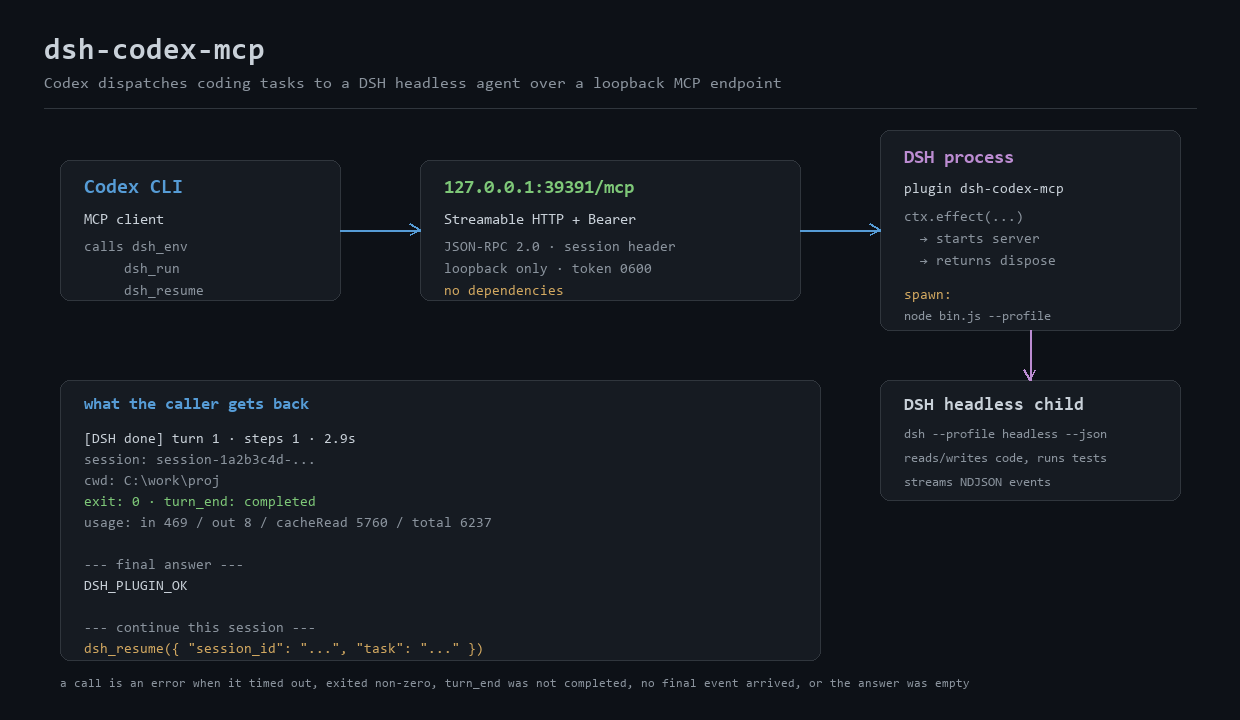
A DSH host plugin that runs a loopback-only Streamable HTTP MCP server inside the DeepSeek Harness process, so Codex can dispatch coding work to DSH over MCP — no shell wrapper, no per-call script.
中文说明 · MIT · zero runtime dependencies
Codex CLI
  └─ MCP (Streamable HTTP + Bearer token)      http://127.0.0.1:39391/mcp
       └─ DSH host plugin dsh-codex-mcp        (lives inside the DSH process)
            └─ node <dsh install>/lib/bin.js --profile headless --json
                 └─ DSH reads/writes code, runs commands, streams NDJSON events
DSH is still the agent that writes the code. Codex only dispatches the task, reads back a structured result, and re-runs the acceptance command itself.
Why a plugin and not a DSH tool
A regular DSH agent tool (ctx.tools) is visible only to DSH's own model — Codex cannot see it. To be callable from another agent, the capability has to leave the process. This plugin therefore:
- starts an HTTP MCP endpoint on
127.0.0.1when the DSH host loads it, and closes it when the plugin unloads (ctx.effectreturns a disposer); - speaks the MCP Streamable HTTP transport and legacy JSON-RPC directly — the package deliberately has no dependencies, so there is no MCP SDK or
@deepseek-ai/*package to resolve inside a profile; - reuses the DSH install that hosts it: it finds
@deepseek-ai/dsh'slib/bin.jsnext toresources/app, or whereverDSH_APP_ROOT/dshClipoints.
Features
- Three MCP tools —
dsh_env,dsh_run,dsh_resume. New sessions and follow-ups both carry the session id back to the caller. - Structured results — final answer,
session,cwd,exit,turn_end, per-turn token usage, step count, duration; failures also return the stderr tail and a classified reason. - Honest failure — a call is an MCP error when: it timed out, the child exited non-zero,
turn_endwas notcompleted, nofinalevent arrived, or the final answer is empty. DSH's own "I'm done" is never taken at face value by the plugin. - Process-tree kill on timeout (
taskkill /T /Fon Windows, process group elsewhere), so no orphaned agents. - Concurrency cap (
maxConcurrentRuns, default 4) — extra calls fail fast instead of queueing silently. - Loopback-only + Bearer token — token generated on first start (
32random bytes,0600), compared with sha256 +timingSafeEqual, path$DSH_HOME/codex-mcp.tokenby default. - Bounded NDJSON parsing — malformed lines are counted, not fatal; event count, line size and stderr tail are all capped.
- Bilingual tool descriptions (
locale/en.json,locale/zh.json) so the calling model reads instructions in its own language.
Requirements
| DSH | Desktop or CLI install whose @deepseek-ai/dsh supports --profile headless --json |
| Node | `^22.19.0 |
| DSH credentials | a model API key already stored in your ~/.dsh profile (the GUI Models page or the credentials service) |
| DSH profile | a headless profile; the desktop profile rejects --json and is managed by the desktop app |
Install
# from GitHub (recommended)
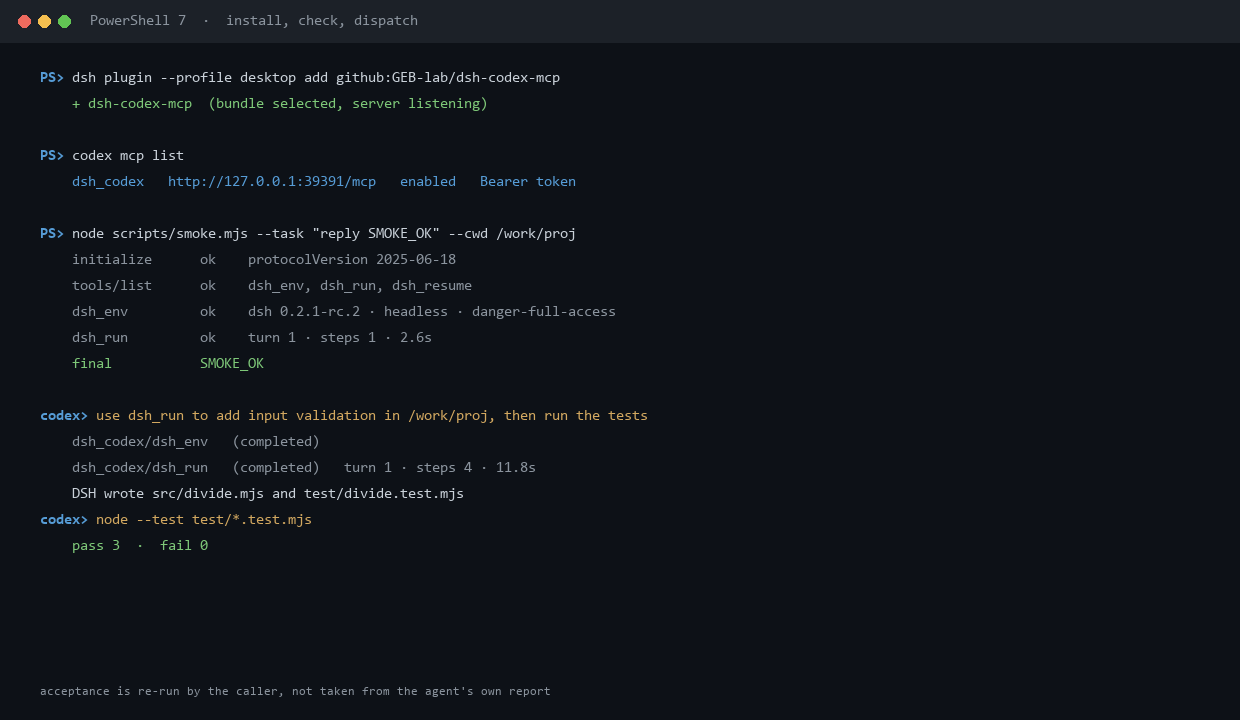
dsh plugin --profile desktop add github:GEB-lab/dsh-codex-mcp

# from a release tarball
dsh plugin --profile desktop add https://github.com/GEB-lab/dsh-codex-mcp/releases/latest/download/dsh-codex-mcp.tgz

# local checkout, for development (changes apply after a host restart)
dsh plugin --profile desktop add link:/absolute/path/to/dsh-codex-mcp
dsh plugin is the DSH plugin command: it forwards to the profile's package manager, then selects the new bundle in dsh.profile.bundles. If HMR is on, the plugin loads immediately; otherwise restart DSH.
Check that it came up:
curl -i http://127.0.0.1:39391/mcp -X POST \
  -H "authorization: Bearer $(cat ~/.dsh/codex-mcp.token)" \
  -H "content-type: application/json" \
  -d '{"jsonrpc":"2.0","id":1,"method":"initialize","params":{"protocolVersion":"2025-06-18","capabilities":{}}}'
or, without curl:
node scripts/smoke.mjs                        # protocol + dsh_env only, spends no tokens
node scripts/smoke.mjs --task "reply SMOKE_OK" --cwd /path/to/project
The smoke script prints the exact config.toml block for your machine.
Codex configuration
~/.codex/config.toml:
[mcp_servers.dsh_codex]
url = "http://127.0.0.1:39391/mcp"
http_headers = { Authorization = "Bearer <contents of $DSH_HOME/codex-mcp.token>" }
startup_timeout_sec = 30
tool_timeout_sec = 3600
enabled = true
codex mcp list should then show dsh_codex … enabled Bearer token.
Then, from Codex:
Use
dsh_runto have DSH, inC:\work\proj, add typed input support tosrc/sum.mjsplus threenode:testcases; only touchsrc/andtest/. After it returns, runnode --test test\*.test.mjsyourself and report the result.
Tool reference
dsh_env()
No side effects, no tokens spent. Returns JSON: plugin{name,version,pid,startedAt}, mcp{url,token,tokenFile}, dsh{cli,version,profile,dshHome,permissionMode,node,nodeVersion}, defaults{cwd,timeoutSec}, runtime{activeRuns,maxConcurrentRuns}, and a ready-to-paste codexConfig snippet.
dsh_run(task, cwd?, timeout_sec?, include_events?)
Starts a new headless session. task is sent on stdin (no quoting problems, no argv length limit). On success the text result looks like:
[DSH done] turn 1 · steps 1 · 2.9s
session: session-1a2b3c4d-...
cwd: /work/proj
exit: 0 · turn_end: completed
usage: in 469 / out 8 / cacheRead 5760 / total 6237

--- final answer ---
DSH_PLUGIN_OK

--- continue this session ---
dsh_resume({ "session_id": "session-1a2b3c4d-...", "task": "<next task>" })
dsh_resume(session_id, task, cwd?, timeout_sec?)
Continues an existing session. It must run in the same cwd as the original, otherwise DSH refuses before starting (and the plugin says so).
Failure payloads carry the classification (timed out, exit code N, turn_end was X, no final answer, empty final answer), the stderr tail, event counts, and a next-step hint for the usual causes (missing credentials, wrong profile, unknown session, cwd mismatch, unauthorized).
Configuration
All keys live under this entry's config in cordis.patch.yml (bundle default) or in ~/.dsh/profiles/<profile>/cordis.patch.yml (your override):
- id: dsh-codex-mcp
  name: dsh-codex-mcp
  config:
    port: 39400
    defaultCwd: 'D:\code'
| key | default | meaning |
|---|---|---|
host | 127.0.0.1 | bind address; non-loopback is refused unless allowNonLoopback: true |
port | 39391 | 0 picks a free port (dsh_env reports the real one) |
path | /mcp | endpoint path |
tokenFile | $DSH_HOME/codex-mcp.token | Bearer token; created when missing |
regenerateToken | false | rotate the token on next start |
dshHome | $DSH_HOME or ~/.dsh | child DSH_HOME |
profile | headless | child DSH profile |
permissionMode | danger-full-access | child DSH_PERMISSION_MODE |
defaultCwd | host cwd | used when a call omits cwd |
defaultTimeoutSec | 3600 | per-call timeout |
maxConcurrentRuns | 4 | parallel headless tasks |
dshCli | auto-detected | explicit path to …/@deepseek-ai/dsh/lib/bin.js |
nodePath | auto-detected | explicit Node executable |
locale | zh | en or zh for MCP tool text |
includeEvents | false | append the raw NDJSON event tail to results |
~/, relative paths and $DSH_HOME are expanded; unknown keys are ignored.
Security model
- Binds
127.0.0.1by default. Requests whose peer is not loopback are rejected even if you widen the bind, unless you opt in withallowNonLoopback: true. - Every request needs the Bearer token; the endpoint returns
401withWWW-Authenticate: Bearer realm="dsh-codex-mcp"otherwise. Token comparison is constant-time over SHA-256 digests. - Request bodies are capped at 4 MiB; JSON-RPC batches are supported; unknown methods get
-32601. - The child process runs with
DSH_PERMISSION_MODE=danger-full-accessbecause headless DSH is unattended — it really can edit files and run commands with your user's rights. Always pass acwdinside the project you mean to change, and keep the token out of repositories and screenshots. - The token file is created with mode
0600; rotate withregenerateToken: true(then update Codex's config).
Troubleshooting
| symptom | cause / fix |
|---|---|
codex mcp list shows the server but calls fail | nothing listening, or token mismatch. Run node scripts/smoke.mjs; a 401 means copy the token again |
EADDRINUSE | another process owns the port — change port |
MISSING_CREDENTIAL: … no API key for provider route | the headless profile cannot see your key; enable the credentials/authorization providers in ~/.dsh/profiles/headless/cordis.patch.yml |
unknown option '--json' | the child ran a non-headless profile; keep profile: headless |
session … does not exist / cwd mismatch | resume must use the original cwd; otherwise start a new dsh_run |
| plugin edits do not take effect | the host already loaded the module — restart DSH (config changes behave the same way) |
| agent cannot be found | set dshCli explicitly to <dsh install>/node_modules/@deepseek-ai/dsh/lib/bin.js |
Development
npm test            # node --test test/*.test.mjs — 19 cases, no network, uses a fake dsh CLI
node scripts/smoke.mjs --url http://127.0.0.1:39391/mcp --task "reply SMOKE_OK"
node index.js       # standalone server, no DSH host needed
The test suite covers auth (401 / wrong token), session headers, batching, notifications, unknown methods and paths, SSE keep-alive, DELETE, tools/list, dsh_env contents, a successful run, malformed event lines, resume argument passing, non-zero exit with diagnostics, empty answers, turn_end other than completed, and timeout kill.
Limitations
- One plugin instance per host; the endpoint is local-only by design.
- Config or code changes need a host restart to take effect.
- No streaming progress to the caller — a
dsh_runcall returns when the task finishes (bounded bytimeout_sec). - DSH's sandbox profile decides what the child can do; this plugin does not add isolation of its own.
License
MIT
中文说明
一句话:在 DSH 宿主进程里起一个只监听回环地址的 Streamable HTTP MCP 服务,让 Codex 通过 MCP 把开发任务派给 DSH headless agent 执行,不再需要 PowerShell 包装器。
为什么做成插件:DSH 的普通 agent 工具只对 DSH 自己的模型可见,Codex 看不到。要让另一个 agent 调用,能力必须暴露到进程外——所以插件在宿主里起 HTTP MCP 端点,卸载时由 ctx.effect 注册的清理逻辑关掉。
安装:
dsh plugin --profile desktop add github:GEB-lab/dsh-codex-mcp
Codex 侧(~/.codex/config.toml):
[mcp_servers.dsh_codex]
url = "http://127.0.0.1:39391/mcp"
http_headers = { Authorization = "Bearer <token 文件内容>" }
tool_timeout_sec = 3600
enabled = true
token 默认在 ~/.dsh/codex-mcp.token(首次启动自动生成,权限 0600)。
三个工具:
dsh_env()— 查 dsh 版本、CLI 路径、profile、权限模式、token 位置,并给出可直接粘贴的 Codex 配置片段;dsh_run(task, cwd?, timeout_sec?)— 开新会话,任务走 stdin,回传最终答案 + session + cwd + 退出码 +turn_end+ token 用量;dsh_resume(session_id, task, cwd?, timeout_sec?)— 同一 cwd 续跑上一个会话。
失败判据(插件内建,调用方不必自己判断):超时 / 非零退出 / turn_end 不是 completed / 没有 final 事件 / 最终答案为空 —— 任一命中都返回 MCP 错误,并附 stderr 尾部与下一步提示。超时会 taskkill /T /F 杀掉整棵进程树。
安全:只绑 127.0.0.1,Bearer token(sha256 + 定时安全比较),请求体上限 4 MiB;子进程以 danger-full-access 运行(headless 无人值守必须如此),所以派任务时把 cwd 限定在项目目录内,别把 token 提交进仓库。
自测:npm test(19 个用例,用假 dsh CLI,不联网)、node scripts/smoke.mjs(像 Codex 一样连端点跑一轮)。
局限:单实例;改配置/改代码需重启宿主生效;不给调用方推送流式进度(调用在任务结束时返回)。
Comments
Loading…
Similar plugins
by appthin
MCP management page in DSH Settings: list, enable/disable, restart and delete MCP servers, edit them in form or JSON mode, expand a server to see the tools it registers, and paste-import MCP configs f
★ 11
↓ 569/wk
MIT
JavaScript
Oct 15, 2026
dsh plugin --profile web add dsh-mcp-manager-plusby dingguangyi0
Migrate WorkBuddy sessions, memories, MCP drafts, and automation tasks into DSH — preview-first, read-only on the source
★ 0
TypeScript
Sep 12, 2026
dsh plugin --profile web add dsh-plugin-migration-workbuddyby jiezeng2004-design
MCP bridge that lets ChatGPT web create, view, continue, and control DeepSeek Harness (DSH) agent sessions.
★ 22
↓ 478/wk
MIT
JavaScript
Oct 8, 2026
dsh plugin --profile web add dsh-chatgpt-bridgeby andyfan1094
DSH bundle that bridges the Codebase Memory MCP code knowledge graph into DSH via the official @deepseek-ai/dsh-mcp-client.
★ 4
JavaScript
Aug 26, 2026
dsh plugin --profile web add dsh-codebase-memoryComposes tools, skills and MCP servers into switchable per-session sets, shrinking the resident tool surface and the system prompt on demand.
★ 0
dsh plugin --profile web add dsh-capability-composerby Walvez
The ultimate 2-way bridge between OpenAI Codex and DSH: bidirectional chat sync, live Skills mount & auto MCP mirroring.
★ 28
↓ 251/wk
MIT
JavaScript
Oct 5, 2026
dsh plugin --profile web add dsh-codex-sync