
dsh-branchnest
Manifest validProject canvas for DSH sessions, with linked conversation cards, text-selection follow-up branches, notes, and a document-style reader.
BranchNest for DSH · 分支探索
在 DeepSeek Harness 的项目里,用无限画布管理对话、追问和笔记。
每个项目有一张画布。已有对话会作为独立卡片出现;选中回答中的文字发起追问,会创建保留来源的新对话,主线和分支可以各自继续。
直接使用 DSH 的会话、模型、权限和存储
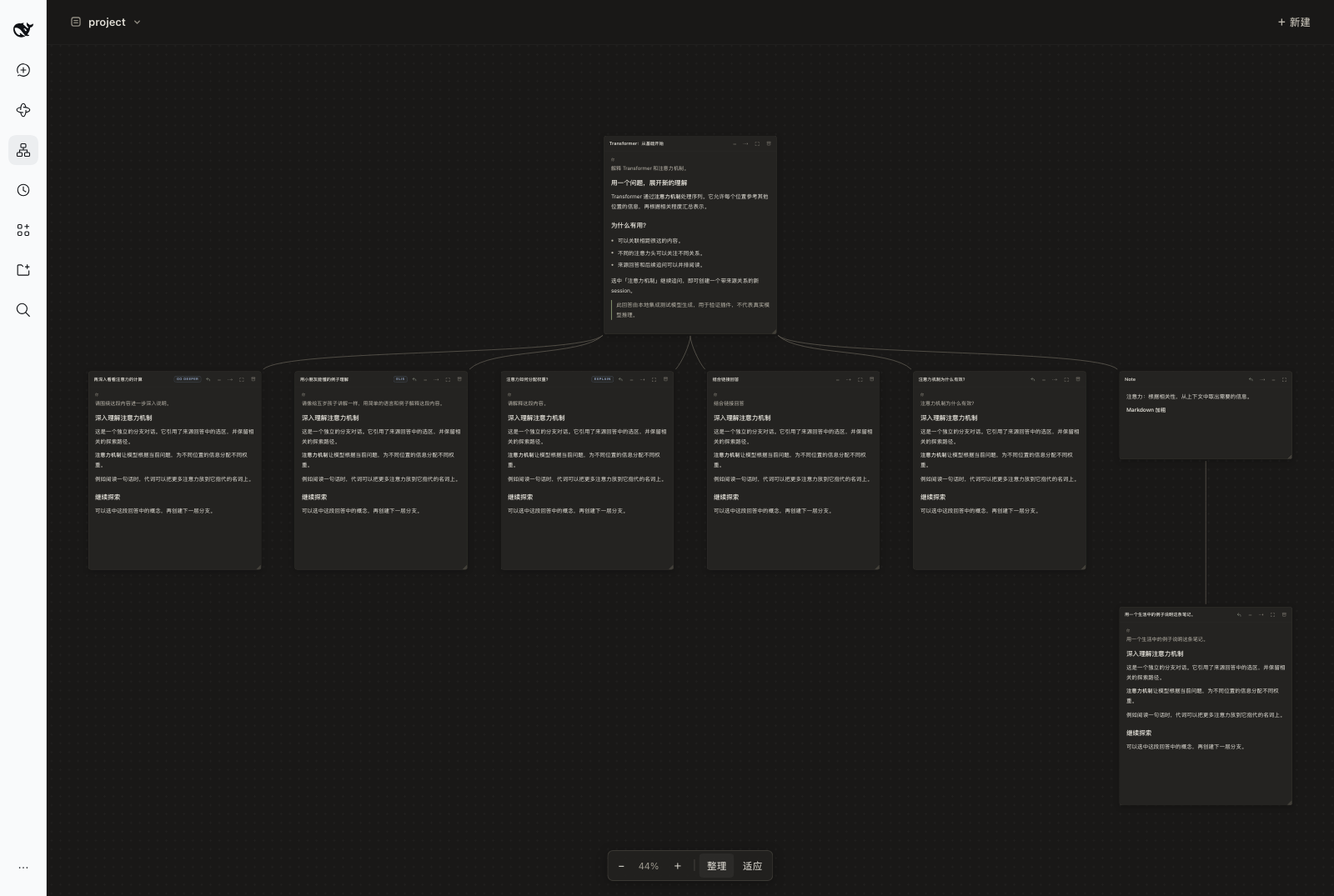
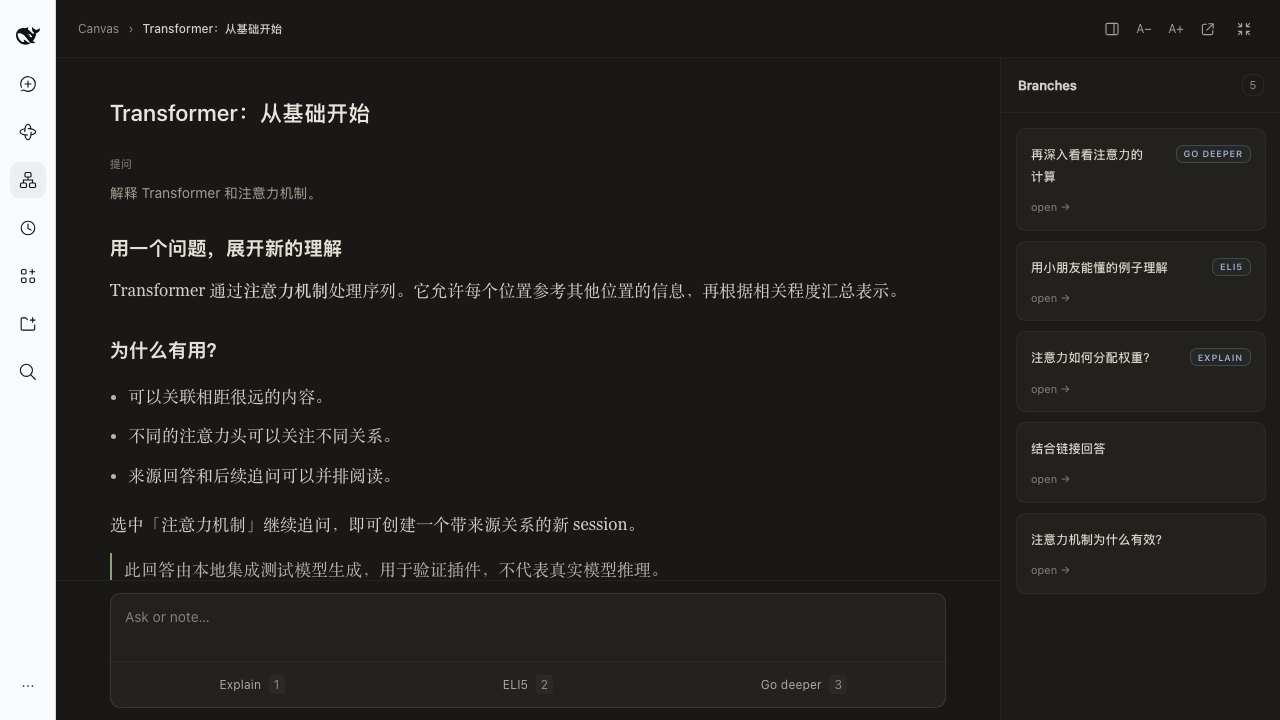
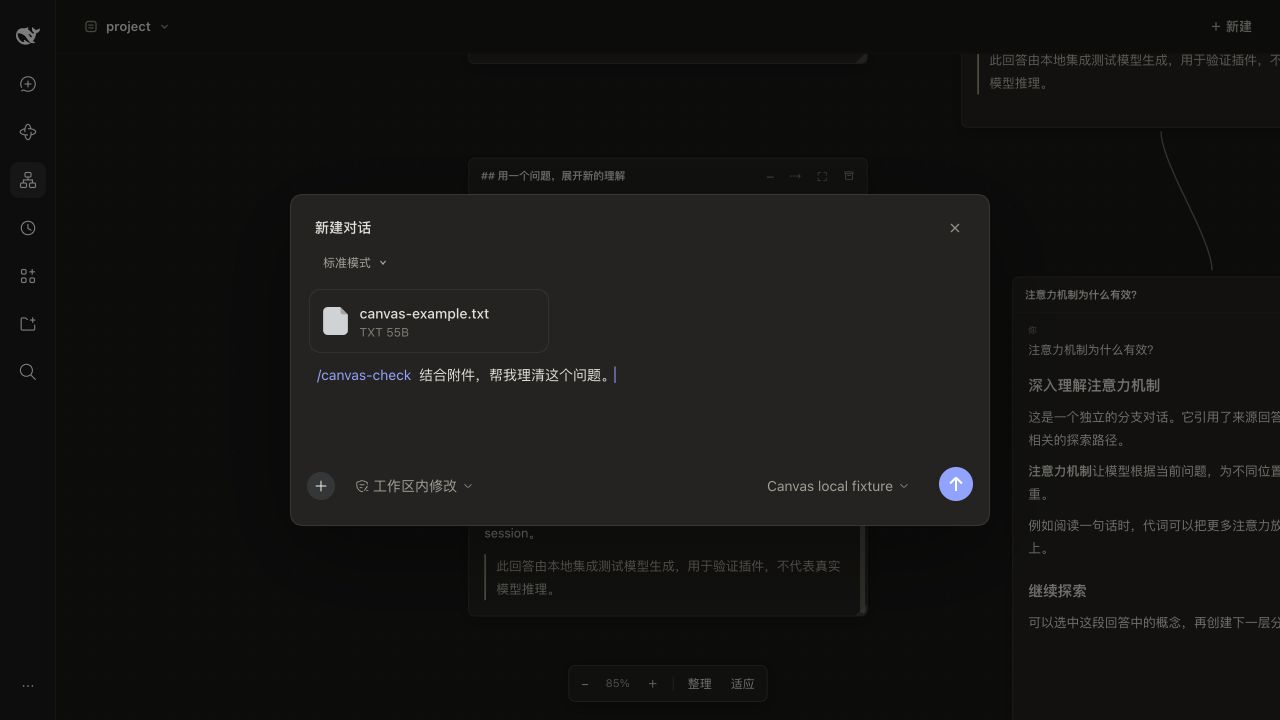
| 阅读页 | 新建对话 |
|---|---|
 |  |
安装
目前已验证 macOS · DeepSeek Harness Desktop 0.2.1-rc.3。
当前版本为 0.4.4。从 GitHub Release 下载 dsh-branchnest-0.4.4.tgz,然后将安装包装入 Desktop:
"/Applications/DeepSeek Harness.app/Contents/Resources/runtime/cli/bin/dsh" \
  plugin --profile desktop add ./dsh-branchnest-0.4.4.tgz
也可以从源码构建(需要 Node.js 22.18 或更高版本):
git clone https://github.com/ForsakenDelusion/dsh-branchnest.git
cd dsh-branchnest
npm ci --legacy-peer-deps
npm run build
npm pack --ignore-scripts
生成的 .tgz 按上面的命令安装。
完全退出并重新打开 DSH Desktop,在左侧导航选择 分支探索。安装包包含构建产物,安装包的使用者无需再次编译。
更新时安装新的 .tgz 并重启 Desktop。卸载插件:
"/Applications/DeepSeek Harness.app/Contents/Resources/runtime/cli/bin/dsh" \
  plugin --profile desktop remove dsh-branchnest
开始使用
完整操作说明见 docs/usage.md。五个常用动作:
- 管理项目对话:切换项目查看对应画布,拖动卡片和空白区域;底部可缩放、整理和适应全部内容。
- 从内容继续追问:选中回答中的文字,或点击卡片底部的 Ask or note。Ask 创建独立分支,Note 留下一张笔记。Explain、ELI5 和 Go deeper 可直接发起快捷追问。
- 阅读与编辑:点击卡片右上角的展开按钮进入阅读页;双击 Note 正文即可编辑,点击外部自动保存。
- 新建对话:右上角 + 新建 支持原生附件、
/技能和命令、@文件或对话引用,以及模型和权限选择。MCP 使用 DSH 中已配置的工具。 - 明确引用其他卡片:从标题栏的 ⇢ 拖向另一张卡片,之后的 Ask 会带入被引用内容;提交前可以排除本次不需要的引用。
数据与边界
聊天记录保存在 DSH 原生 session 中,画布布局、笔记和来源关系保存在 DSH 的 project_canvas 存储域。同一画布上的独立对话不会自动共享历史;分支携带选区、来源问答和必要祖先内容。
归档对话前会二次确认;归档保留聊天记录与布局,取消归档后可以恢复。权限遵循 DSH 的设置。
未发送的新建对话草稿可在当前客户端关闭重开、切换项目后继续;刷新、插件重载或退出后不保证保留。正在生成的回答需完成后才能作为分支来源。PDF 卡片、跨项目分支和导出暂未提供。
开发与反馈
需要 Node.js 22.18 或更高版本。构建、验证和 dev / main 发布流程见 CONTRIBUTING.md,更新记录见 CHANGELOG.md。
反馈问题时请附上 DSH 版本、插件版本、系统和复现步骤,也可以使用仓库的 Issue 模板。
致谢与许可
交互与视觉参考自 Rabbithole(Shlok Khemani,MIT 许可)。本项目是独立的非官方实现,与原作者没有隶属或背书关系。
本项目采用 MIT License,第三方版权与许可见 THIRD_PARTY_NOTICES.md。
Versions
| Latest version | Published | Size |
|---|---|---|
| 0.4.4 | — | — |
Comments
Loading…
Similar plugins
A Codex-style right side panel for the DSH Web UI — session artifacts browser (live file tree, scan include, preview, reveal) plus a side chat that forks the current session with a model picker, human
★ 0
dsh plugin --profile web add dsh-sidepanelby PhysicalAI-0
Paper reading workbench: a paper library, the PDF beside Markdown notes and one dedicated AI session per paper. Highlights and region screenshots go straight into notes; select-to-ask sends the passag
★ 3
MIT
JavaScript
Sep 29, 2026
dsh plugin --profile web add dsh-paperforgeby xindong
A persistent shared canvas for DSH Web and its agent, with a browser UI and tools to organize media, nodes, and connections.
★ 0
MIT
JavaScript
Oct 21, 2026
dsh plugin --profile web add @xindong/dsh-client-canvasby RyanZeeee
A visual, non-linear conversation canvas for DeepSeek Harness (DSH) — every turn is a node, every question grows a branch. DSH 插件:把线性聊天记录变成一张可以看、可以点的对话地图,每轮问答是一个节点,每次提问都是一条新分支。
★ 4
MIT
JavaScript
Sep 13, 2026
dsh plugin --profile web add dsh-chattreeby Timebro9999
Manage your whole workspace in the DeepSeek Harness sidebar: a pinned band for projects and conversations, a bell activity view with answer previews, per-project emoji icons, and collapsible 置顶/项目/组件 sections. On npm as dsh-session-deck. Bilingual (EN/中文).
★ 0
MIT
JavaScript
Oct 1, 2026
dsh plugin --profile web add dsh-session-deckby huangfuren
Conversation outline panel for the DSH web surface: user questions as root nodes (index, time, tool count and text volume per turn) with the Markdown headings of assistant replies hanging beneath them
★ 2
MIT
JavaScript
Oct 15, 2026
dsh plugin --profile web add dsh-conversation