
dsh-webannotate
Manifest validAnnotates pages inside the built-in browser: click an element, write a comment, and send the batch to the conversation as one message, with a cropped screenshot per note where the element can be locat
dsh-webannotate
在 DeepSeek Harness 的内置浏览器里给网页做批注:点元素 → 写一句要怎么改 → 「发送全部」→ 批注作为一条消息进当前对话,每条附一张该元素的截图。
装插件即用,不改被标注项目的任何代码,本地 dev 站点和已部署的线上站点都能标。
它解决什么
网页上的问题(间距不对、这个按钮太挤、这段文案换个说法)用文字描述很难指清楚,尤其页面有很多子页面时。这个插件把「指哪改哪」变成两步:点一下元素、写一句话,然后整批发给对话里的 agent。
和「在页面里引入标注脚本」的区别
DSH 桌面版的内置浏览器用 Electron <webview> 承载页面,页面处在独立 origin,GUI(插件运行的地方)无法直接访问它的 DOM。所以常见的注入式方案(Agentation 之类)需要往每个项目里加依赖和 <script>。
这里换了个方向:插件的 client 半就跑在 GUI 页面里,和 <webview> 元素同处一个文档,于是可以
webview.executeJavaScript(overlay)   // 注入批注层
webview.executeJavaScript(outbox())  // 每 700ms 取回批注
webview.capturePage()                // 每条批注截一张图
不需要反向代理、不需要 CDP、不需要改站点,任意 URL 都能用。
安装
从 npm 装:
dsh plugin --profile desktop add dsh-webannotate
或者直接从 GitHub 装:
dsh plugin --profile desktop add github:FleatherYu/dsh-webannotate
安装后完整退出并重启一次 DSH(插件的 client 半在 host 启动时组装),然后在右侧栏打开内置浏览器、访问任意页面。
本地开发用 link: 挂自己改的目录:
dsh plugin --profile desktop add "link:/路径/dsh-webannotate"
用法
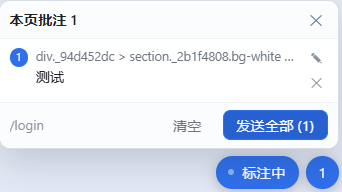
- 在内置浏览器打开页面,右下角出现「批注」按钮。
- 点它进入标注模式,鼠标移到元素上会高亮,点一下就弹出评论框。
- 写一句要怎么改,
Ctrl+Enter或「保存」;保存后元素右上角出现编号。 - 继续标下一条;数字按钮显示本页批注数量,点开是列表(定位 / 编辑 / 删除 / 清空)。
- 点「发送全部」,批注作为一条消息进入当前对话,每条配一张该元素的截图。
批注按「页面」分开存(sessionStorage,key 是 origin + pathname):同一页刷新或来回切标签页仍在,跳到别的页面则各存各的,跳回去还能看到。
消息长什么样
【网页批注】2 处 · 预算
页面:http://localhost:5173/budget
截图:2 张(编号对应)

1. 「保存」 字号大一点
   源码:src/pages/Budget.tsx:42
2. 「年 · 月」 排到上面去
   组件:BudgetPage > MonthSwitch
- 元素可见文本 + 你那句话:定位靠截图和这一行。
源码:只在开发模式(有 React_debugSource)时出现;组件:是压缩名过滤后的组件链。原始 CSS 选择器只在有id/data-testid/aria-label/name时附带。- 元素量不出位置(弹层已关、列表重渲染)时这条静默跳过截图,文字照常发送。
结构
| 文件 | 作用 |
|---|---|
index.js | Host 半:GET /dsh-webannotate/overlay.js(现读文件,改完不用重启)、POST /report、/batch、GET /status 诊断,和 webannotate_status 工具。 |
client.js | Client 半:扫描 <webview>、注入 overlay、轮询批注、截图、把批次作为一条消息发进当前会话。 |
web/overlay.js | 注入页面里的批注层(纯 IIFE、Shadow DOM 隔离,无依赖)。 |
已知限制
- 只能标顶层文档:跨域 iframe 内的元素标不到。
- 内置浏览器面板关掉后
webview不在 DOM 里,批注层随之暂停。 - SPA 内部路由切换后,旧的编号可能定位不到原来的元素(列表里会提示)。
- 每条最多一张截图、单批最多 6 张,超出部分不发图。
开发
node --check client.js
node --check web/overlay.js
改 web/overlay.js 后刷新被标注页面即可(host 每次请求现读文件);改 client.js 后刷新 DSH 页面;首次新增或修改 package.json 的 dsh.client 声明需要重启 DSH。
更细的排障记录见 HANDOFF.md。
License
MIT
Comments
Loading…
Similar plugins
by cslkkl
Annotate pages and ask questions inside the existing DeepSeek Harness Browser.
★ 0
MIT
TypeScript
Oct 3, 2026
dsh plugin --profile web add dsh-web-annotatorby feifiefei
DSH right-sidebar file helper: annotate a selection in the document preview (text lines / Excel ranges / Word-PDF pages) or right-click a file, then send the quote plus your note into the current chat
★ 0
MIT
JavaScript
Oct 19, 2026
dsh plugin --profile web add dsh-file-to-chatby zengxiaolou
Annotation browser in the DSH sidebar: a real Chrome page streamed over CDP with input forwarded, where picking an element or selecting text attaches its source location, component stack, styles and a
★ 1
MIT
JavaScript
Oct 26, 2026
dsh plugin --profile web add dsh-annotate-browserby latte03
Select text in the dsh web conversation to attach it as an annotation to your next message. The source text keeps a dashed highlight with an ordinal badge in place, and the composer summary lists, edi
★ 3
MIT
TypeScript
Oct 29, 2026
dsh plugin --profile web add dsh-select-quoteby Shuffle-1992
DSH built-in browser enhancement kit: element annotations (multi-window shared sessions), screenshot feedback, device traffic observation, and an implementation-session command channel.
★ 0
Apache-2.0
JavaScript
Oct 29, 2026
dsh plugin --profile web add dsh-browser-kitAnnotate on selection, persist through refresh; send the notes with your message and the model answers each one.
★ 0
↓ 69/wk
dsh plugin --profile web add dsh-inline-comments