

dsh-prompt-predict
Manifest valid★ 2Predicts the user's next prompt after each assistant reply and shows it as gray ghost text inside the composer; accept it whole with Tab, accept it piece by piece with Alt+→, reroll it, or dismiss it
dsh-prompt-predict
After each reply, your next prompt is ghosted right into the composer — Tab to accept, Esc to dismiss, start typing and it's gone







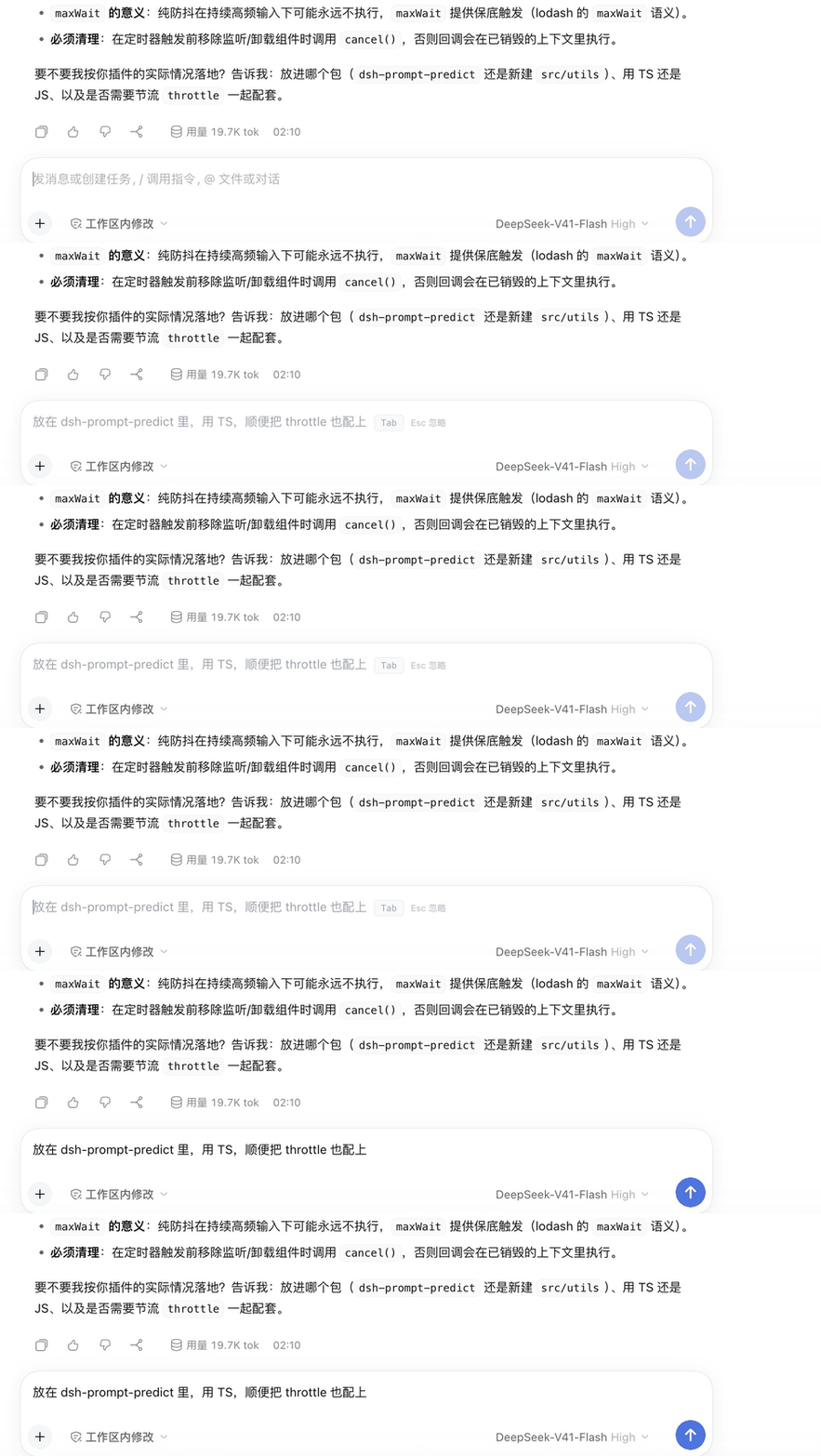
dsh-prompt-predict is a DeepSeek Harness plugin: after every assistant turn it predicts the message you are most likely to type next and floats it into the composer as gray ghost text. The suggestion never enters the editor — only pressing Tab inserts it, and even then it stays undoable — so a wrong prediction costs you nothing.
📑 Table of Contents
- ✨ Features
- 🚀 Installation
- ⌨️ Usage
- ⚙️ Settings
- 🔌 HTTP API
- 🧩 How it works
- 🛠️ Development
- 🔐 Security and cost
- ⚠️ Known limitations
- 📄 License
✨ Features
- A suggestion the moment a reply ends — gray ghost text rendered at the composer's first character, matching the editor's caret position, font size and line height
- Four interactions —
Tabto accept,Alt+→to accept piece by piece,↻for a different suggestion,Escto dismiss; typing hides it, and clearing the draft brings it back - Lightweight context — only the most recent user/assistant text; tool results, attachments and system prompts never leave your machine
- Follows the current session model by default — nothing is hard-coded to a provider, the prediction call reuses whatever model the session itself uses; you can also pin a cheaper model
- No repeats, no dead ends — a repeat of the previous suggestion triggers an automatic "give me a different one"; a reasoning level the real model doesn't support falls back automatically, so you never hit "settings look fine but no suggestion ever appears"
- Everything is adjustable — on/off, provider / model, response timeout, context size and budget, output cap, reasoning effort; changes apply immediately, no DSH restart
- The UI follows your language — switch Settings → Language to 中文 and the whole plugin UI changes at once, including the ghost hint above the composer and the validation errors inside Settings (those are produced by the host, which answers in the language the client sends); no reload needed, and it falls back to Chinese when no locale service is present
- Zero runtime dependencies — plain ESM on both the host and client side
🚀 Installation
The plugin is published on npm. Options are ordered by convenience.
Install inside DSH (recommended)
GUI: open the plugins page → Add plugin → enter the package name dsh-prompt-predict → install.
Or the dsh CLI — pin any published version with pnpm's @version syntax:
dsh plugin --profile desktop add dsh-prompt-predict@0.2.4
Replace --profile with your own profile (usually desktop on the desktop app, web for the web build), then restart DSH.
⚠️ The CLI only installs the package. DSH loads a plugin only when it is also listed in
dsh.profile.bundlesinside~/.dsh/profiles/<profile>/package.json. Verified: with the package installed but not in that list, the plugin's routes answer404and nothing loads. The GUI route above handles it for you; with the CLI add"dsh-prompt-predict"to that array yourself, or just runscripts/install.shbelow, which does both steps.
You'll find the switch and all parameters under Settings → Prompt Suggestions.
Install from a release tarball
Every release carries the exact
tarball that is on npm (shasum matches the registry), which is handy for offline machines or for
pinning an artifact you can verify:
gh release download v0.2.4 --repo ferrisching/dsh-prompt-predict --pattern '*.tgz'
dsh plugin --profile desktop add ./dsh-prompt-predict-0.2.4.tgz
Same caveat as the CLI route above: add "dsh-prompt-predict" to dsh.profile.bundles yourself,
or run scripts/install.sh instead.
Install from source
git clone https://github.com/ferrisching/dsh-prompt-predict.git
cd dsh-prompt-predict
bash scripts/install.sh
The script packs this repo on the fly, installs it into the profile's node_modules, and adds dsh-prompt-predict to dsh.profile.bundles. The default target is ~/.dsh/profiles/desktop; for another profile:
bash scripts/install.sh ~/.dsh/profiles/web
Restart DSH afterwards, then look under Settings → Prompt Suggestions.
Manual install
cd ~/.dsh/profiles/desktop
pnpm add dsh-prompt-predict              # from npm
# or link local source (symlink — handy while developing):
pnpm add /path/to/dsh-prompt-predict
Then open that profile's package.json and add "dsh-prompt-predict" to the dsh.profile.bundles array, and restart DSH.
Requirements
- Verified on DSH
0.2.1-rc.2(web build; the desktop app runs the same host and client code) node/pnpm: the install script prefers DSH's own runtime under~/.dsh/dsh-runtimes/*/dependenciesand only falls back toPATH- macOS / Linux; Windows untested
⌨️ Usage
- Chat normally, wait for the assistant to finish its turn, and leave the composer empty
- About 350 ms later a gray suggestion appears, with
Tab/↻/Escon its right - Pick what you need:
| Action | Effect |
|---|---|
Tab | Accept the whole thing (only now is it inserted, and it stays undoable) |
Alt+→ | Accept piece by piece — a couple of characters at a time in CJK, one word in Latin; the rest keeps floating, stop whenever you like |
↻ (button on the right) | Reroll — ask the model for a different suggestion |
Esc | Dismiss this one |
| Just start typing | It disappears; clearing the draft brings it back (only Esc is a permanent dismissal) |
Suggestions only appear when the composer is empty and the session isn't running. Switching sessions or interrupting a reply clears any pending suggestion.
⚙️ Settings
Settings → Prompt Suggestions:
| Setting | Description | Default |
|---|---|---|
| Enable predictions | Master switch | On |
| Provider / model | Model used for the prediction call; pick "Follow current session model" to reuse the session's own model | Follow current session model |
| Response timeout (advanced) | 1–60 seconds | 12 seconds |
| Context size (advanced) | Small 3 / Standard 8 / Large 12 messages | Standard 8 |
| Context budget (advanced) | Character cap sent to the helper call, 1000–20000 | 6000 |
| Output cap (advanced) | Token cap per suggestion, 16–512 | 64 |
| Reasoning effort (advanced) | Options are generated from the model actually in use (the session's model when following it); unsupported levels never appear | Off (fastest, cheapest) |
The bottom of the settings page shows a last prediction line: time, model, latency, whether the reasoning level was auto-downgraded or a reroll happened, and the reason when it failed — no more guessing why nothing appeared.
- Changes take effect immediately — no DSH restart
- Settings are stored at
~/.dsh/dsh-prompt-predict/config.json(mode 600) - Precedence: user-saved settings > cordis patch deploy defaults > built-in defaults
🔌 HTTP API
The plugin registers a same-origin prefix route /dsh-prompt-predict on DSH's web server; both the settings page and the composer suggestion go through it. Every endpoint is authenticated with DSH's browser cookie (connection.requestRejection) — off-machine callers get 401/403.
| Method | Path | Description |
|---|---|---|
| GET | /dsh-prompt-predict/status | Current session model, effective settings, saved overrides, deploy defaults |
| GET | /dsh-prompt-predict/catalog | All providers and models (for the dropdowns) |
| GET | /dsh-prompt-predict/efforts?provider=&model= | The reasoning levels that model actually supports |
| POST | /dsh-prompt-predict/settings | Save settings; { "reset": true } restores defaults |
| POST | /dsh-prompt-predict/suggest | { sessionId } → one suggestion |
Every endpoint accepts an optional x-dsh-locale header (zh / en, default Chinese) deciding which language validation errors and prediction failures come back in. The client sends the active UI language automatically.
🧩 How it works
Host side (lib/)
lib/index.jsis the plugin entry point and registers the same-origin HTTP route- On
suggest,lib/predict.mjstrims the session down to the most recent user/assistant plain text — walking backwards under both a message-count limit and a character budget - That trimmed history is framed as a single request-only user input before it reaches the helper model: DSH assistant messages must carry a full
stream/replayState, so a trimmed fragment cannot masquerade as one (same approach session-title uses) - The streamed reply is normalized (code fences,
Suggestion:prefixes and wrapping quotes stripped, newlines collapsed) and returned to the client
For model selection, provider / model set to auto means "follow the session": no route is hard-coded onto the helper call, and predictNextPrompt inherits whatever the session itself selected.
Client side (client/)
- Injects into the
conversation.composer.dock(lifecycle mount point next to the composer) andsettings.sectionslots - The ghost text is an overlay — it is never written into the Lexical editor; only accepting goes through
inputActions.insertText
🛠️ Development
git clone https://github.com/ferrisching/dsh-prompt-predict.git
cd dsh-prompt-predict
npm test        # 71 cases: 51 host-side + 20 client render smoke tests
.
├── lib/                 Host side (plain ESM, no build step)
│   ├── index.js         Plugin entry point, registers the HTTP route
│   ├── host-route.mjs   Same-origin API: status / catalog / efforts / settings / suggest
│   ├── predict.mjs      Session trimming, helper-model call, suggestion normalization
│   ├── messages.mjs     User-facing host copy (Chinese + English)
│   └── config.mjs       User settings persistence
├── client/
│   └── client.js        Client: composer ghost-text overlay + settings page
├── test/
│   ├── predict.mjs      51 cases: trimming, cleanup, route inheritance, settings validation, degrade-retry, dedup, bilingual errors, HTTP end-to-end
│   └── client-render.mjs  20 cases: renders the ghost overlay and settings page through a tiny React stand-in, incl. both locales and dictionary self-checks
├── scripts/
│   └── install.sh       One-shot install / upgrade
├── cordis.patch.yml     Plugin mount patch
└── package.json
test/client-render.mjsis the only automated safety net for the client side: no browser needed — a tiny React stand-in expands the components into a plain object tree so the test can assert that the ghost shows up and thatTab/↻/Escare all there. It exists because of a real incident: the overlay referenced a variable it never read from props, the render threw, React's error boundary swallowed it, and the symptom was "the API returns a suggestion but nothing ever appears" — while every host-side test was green.
The tests need no DSH runtime: a fake ctx plus a local HTTP server cover route registration, settings validation, route inheritance and end-to-end calls.
🔐 Security and cost
- One small helper call per assistant turn by default (
maxTokens: 64); an extra attempt only happens when the reasoning level needs downgrading or a suggestion needs rerolling — three calls is the hard ceiling, and they share a single timeout budget - Suggestions are not written to the session log; only after you accept with
Taband send does the text become a real message - Only trimmed user/assistant plain text is sent — tool results, attachments and system prompts never leave the machine
- Both the settings page and the suggestion endpoint sit behind DSH's own browser-cookie authentication
⚠️ Known limitations
- Verified only on DSH
0.2.1-rc.2; other versions untested - Depends on the host's
conversation.composer.dockandsettings.sectionslot names — a major DSH update may require adapting - Predictions consume quota on the selected model; pinning a fast small model is cheaper than following a reasoning model
📄 License
MIT © ferrisching
Free to use, modify and distribute, including in closed-source commercial projects — just keep the copyright notice and license text.
See CHANGELOG.md for the change history (中文).
Comments
Loading…
Similar plugins
by dsh-plugin-collection
给 DSH 输入框加上输入预测:回合结束后自动建议你的下一句话,Tab 一键采纳;输入时按会话历史做前缀补全。输入预测 / 自动补全。
★ 3
MIT
JavaScript
Oct 16, 2026
dsh plugin --profile web add dsh-suggest-ghostby ChuanTianML
Automatic ghost suggestions and one-click next-message drafting for the DeepSeek Harness composer.
★ 4
↓ 388/wk
MIT
JavaScript
Sep 19, 2026
dsh plugin --profile web add dsh-prompt-for-meby WuJiaoJue
Input prediction for the DSH Web GUI: after each turn an auxiliary LLM call suggests the next prompt rendered as ghost text in the empty input box, and history prefix completion fills in while typing,
★ 0
MIT
TypeScript
Sep 16, 2026
dsh plugin --profile web add dsh-suggest-ghostby xiaoshengliang2002
Enhance the composer draft before sending: a sparkle button in the DSH web GUI rewrites your prompt in a structured or light mode, with an original-versus-enhanced preview.
★ 0
MIT
JavaScript
Sep 15, 2026
dsh plugin --profile web add dsh-prompt-boost-proby zzy6-a
DSH 输入框旁的一键提示词增强:把口语化的一句话改写成目标明确、细节完整的任务说明,可一键撤销;五种改写风格、模型可跟随或固定,含 @引用/命令芯片时自动置灰保护。
★ 1
↓ 2.7k/wk
MIT
TypeScript
Sep 14, 2026
dsh plugin --profile web add dsh-prompt-enhanceby FeatherHunter
Right-side prompt toolbox panel with 24 built-in deep templates plus user-defined ones, accessible via the /prompt slash trigger and a context-aware floating suggestion card; one-click inserts the sel
★ 47
↓ 2.1k/wk
MIT
JavaScript
Oct 18, 2026
dsh plugin --profile web add dsh-prompt