
dsh-best-workspace
Manifest validCodex-style left sidebar for the dsh web client: a project/session tree with grouping, pinning, drag reordering, unread and archive state, context menus for both project and session rows, and up/down
DSH Best Workspace
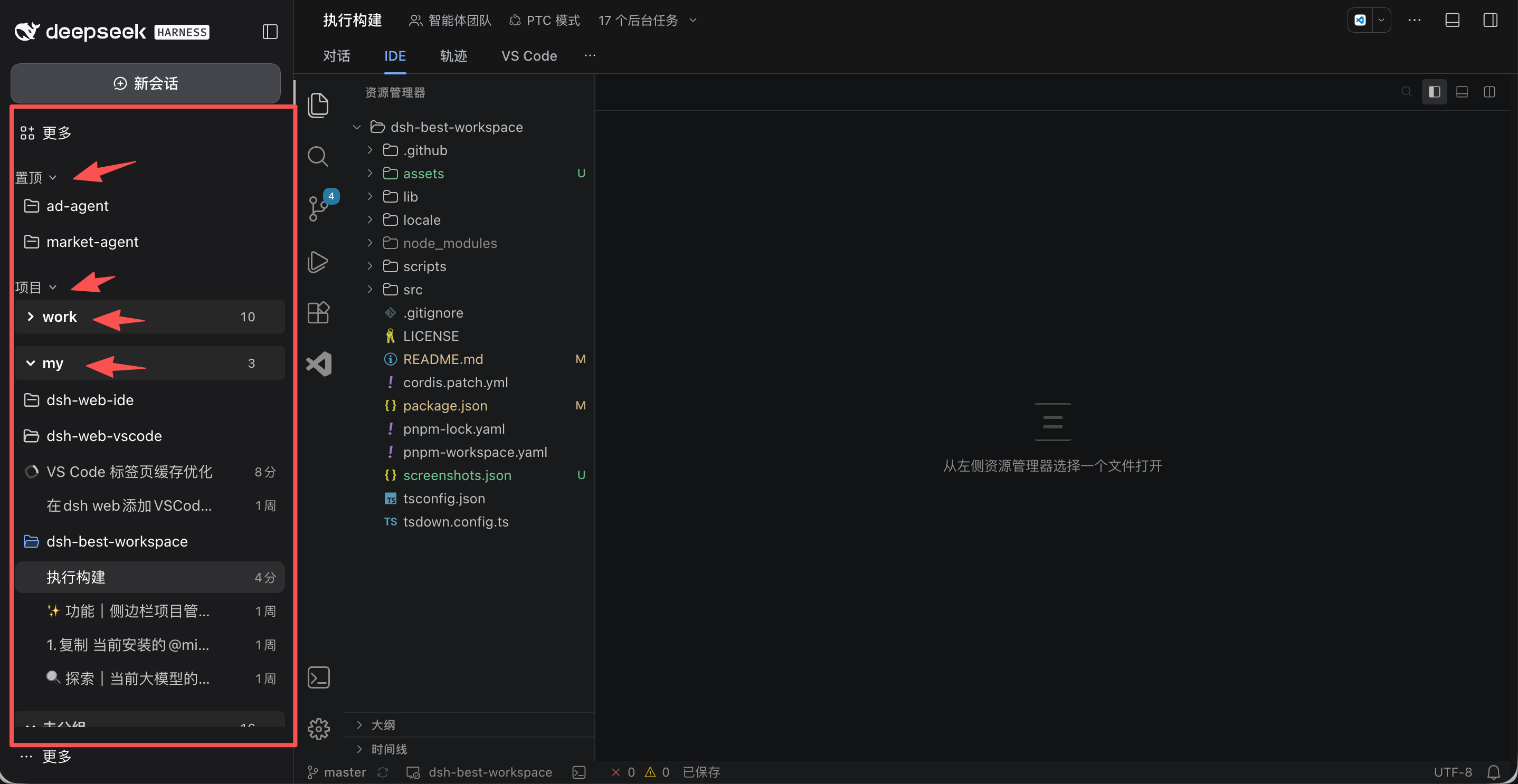
把 DSH Web 的左侧栏变成 Codex 风格的项目 / 会话树



社区维护的 DeepSeek Harness(DSH)界面插件,不是 DeepSeek 官方产品。
插件只做两件事:重绘 DSH Web 的左侧栏(Codex 风格的项目 / 会话树),以及给会话输入框加上 ↑↓ 翻历史。对话视图、右侧栏和宿主渲染的其他区域保持原样。
功能
左侧栏
- 项目 / 会话树:会话挂在所属项目之下,并行多个仓库时依然清晰。
- 三个可折叠分区:置顶、项目、最近,各自记住展开状态。
- 项目分组:新建、重命名、删除分组,项目可在分组间移动;不属于任何分组的归入未分组。
- 拖拽排序:项目、项目内会话、分组都可拖动重排,拖进置顶即置顶,落点有指示线。
- 会话实时状态:运行中指示、未读圆点、待处理警告徽标(审批 / 回答 / 计划审阅),并显示相对时间与项目副标题。
- 右键菜单:
- 会话:重命名、标记已读 / 未读、归档、分叉、移动到其他项目、打开工作目录、复制 ID / 标题 / 路径、删除。
- 项目:置顶 / 取消置顶、重命名、移动到分组、打开项目目录、归档全部会话、删除项目。
- 搜索:悬停项目分区标题行出现放大镜,点击展开搜索框,按标题实时过滤项目与会话(
Esc关闭)。 - 长列表分页:会话超过首屏后通过展开显示加载。
- 主题跟随:配色全部取自宿主主题令牌,浅色 / 深色自动切换。
- 设置持久化:置顶与分组保存在宿主侧,重启、换浏览器都不丢。
输入框
- ↑↓ 翻历史:输入框为空时按 ↑ 召回上一条已发送消息,↓ 往回翻,翻到底自动回到原始草稿。
- 按目录独立记录:同一目录下的所有会话共享一份历史,每个目录最多保留 200 条(最多 20 个目录,总量 1 MB)。
- 不打扰原生交互:中文输入法组词、光标在文本中间、按住 Ctrl / Cmd / Alt / Shift、消息提交中、有附件、菜单打开时,按键行为保持原样。
- 视觉提示:占位符右侧显示「↑↓ 翻历史」,窄屏自动隐藏。
安装
交给 agent 安装(推荐)
把下面这句话发给任何能在你机器上执行命令的 agent,把 web 换成你的 profile 名:
把 DSH 插件 @zhaoyang10/dsh-best-workspace 安装到我本地的 web profile 中,执行:dsh plugin --profile web add @zhaoyang10/dsh-best-workspace@latest --registry=https://registry.npmjs.org/。然后运行 dsh --profile web --dump-config,确认合成后的配置里包含 dsh-best-workspace 一行,并说明如何重启 DSH 以及如何使用这个侧栏。
手动安装
dsh plugin --profile web add @zhaoyang10/dsh-best-workspace@latest --registry=https://registry.npmjs.org/
dsh --profile web --dump-config | grep dsh-best-workspace
重启 dsh web,然后硬刷新浏览器标签页(Cmd+Shift+R)。卸载同样简单:
dsh plugin --profile web remove @zhaoyang10/dsh-best-workspace
冲突与共存
插件独占 sidebar.workspaces 槽位,同一 profile 只能启用一个侧栏树插件。安装前请先停用或卸载其他同类插件:
dsh plugin --profile web remove ds-bot # 以及其他接管左侧栏的插件
停用而不卸载也可以。占用右侧栏或其他槽位的插件(如 dsh-better-sidebar)不冲突,可继续使用。
安装后插件会向 profile 的插件树增加一行,并应用 cordis.patch.yml:
- 挂载
dsh-best-workspace,接管sidebar.workspaces; - 向
sidebar.panellist.actions贡献菜单项; - 停用
directory-picker(macOS + loopback 下原生osascript可能挂死),改用官方directory-picker-browse后端与界面。
因此添加工作区打开的是进程内目录浏览器,而非系统对话框。
使用
| 目标 | 操作 |
|---|---|
| 打开会话 | 在树中点击该会话 |
| 搜索 | 悬停项目标题行,点击放大镜输入关键词 |
| 置顶项目 | 拖进置顶分区,或右键选择置顶 |
| 分组项目 | 从项目分区标题新建分组,再用移动到分组 |
| 调整顺序 | 拖动项目、会话或分组 |
| 重命名 | 对项目、分组或会话使用重命名 |
| 清理项目 | 右键项目 → 归档全部会话 或 删除 |
| 翻历史 | 输入框为空时按 ↑ / ↓ |
数据与隐私
- 置顶与分组通过宿主端点
/api/dsh-best-workspace/preferences(GET/HEAD/PUT)持久化,写入 profile 目录下的.dsh-best-workspace-preferences.json,串行写入 + 原子重命名,请求体上限 32 KB,字段逐个校验。 - 旧存档迁移:升级后首次启动会自动把旧文件名(codex-ui 时代)里的置顶与分组复制到新文件,旧文件保留不删——降级回旧版本时配置依然在。浏览器 localStorage 的置顶、分组、展开状态同理,均按需迁移。
- 未读标记与输入历史只存在当前浏览器的
localStorage,不跨浏览器 / 机器同步。输入历史按会话目录分桶,可随时清除浏览器数据。 - 搜索完全在本地完成,不发请求、不写偏好文件。
- 插件不写会话记录,也不改动项目文件;归档、删除、分叉、移动都是宿主公共服务操作。
- 偏好端点复用宿主
connection服务的 host / origin 校验,服务不可用时直接拒绝而非放行。
常见问题
置顶和未读能跨重启保留吗? 置顶与分组在宿主侧,重启、换浏览器都保留;未读和输入历史在浏览器本地。
删除项目会删磁盘文件吗? 不会,只是从侧栏移除,项目目录与会话都还在。
安装后界面没变化? 依次确认:profile 是否一致、是否重启过 dsh web、标签页是否硬刷新。再执行 dsh --profile web --dump-config 确认存在 dsh-best-workspace 一行。
为什么「添加工作区」是应用内浏览器? 见上面的 macOS 兼容处理说明。
已发送的消息没有被记进历史? 历史在发送成功后采集;升级后需要先发一条新消息,或清空输入框后按 ↑ 验证。
开发
src/
  index.ts                 Host 侧:工作区偏好端点
  client/
    index.ts               客户端入口:导出 apply / inject
    sidebar/legacy-app.ts  侧栏与输入历史实现(槽位、树、菜单、键位)
locale/{en,zh}.json        DSH 插件设置页展示的元数据(meta.title / description)
cordis.patch.yml           profile 启动时应用的 bundle 补丁
pnpm install
pnpm run build        # tsc --noEmit && tsdown
构建产出 lib/index.mjs、lib/index.d.mts、lib/client.js。lib/ 提交进仓库,CI 会在重新构建结果与提交内容不一致时失败。React 与 @deepseek-ai/dsh-client-ui-primitives 不打包,运行时由宿主模块表提供。
DSH 包版本只在 pnpm-workspace.yaml 的 catalog: 中声明一次,升级 DSH 只改这一处。
本地试用当前代码:
dsh plugin --profile web add link:"$PWD"
端到端校验(隔离 profile + Chrome 驱动):
node scripts/verify-directory-flow.mjs # 需要 playwright 与本地 Chrome
新增能力请复用 DSH 现有的槽位与公共服务,不要读取宿主私有 DOM,也不要直接写会话记录。
许可证
Comments
Loading…
Similar plugins
A Codex-style right side panel for the DSH Web UI — session artifacts browser (live file tree, scan include, preview, reveal) plus a side chat that forks the current session with a model picker, human
★ 0
dsh plugin --profile web add dsh-sidepanelby NianjunZou
Codex-style left session manager for DSH — a reversible left-workspace UI overlay with a pinned section, project-session grouping and status dots.
★ 0
MIT
JavaScript
Nov 9, 2026
dsh plugin --profile web add @pianner/dsh-session-managerby drscrewdriver
Arrow-key navigation for the DSH Web GUI: Up/Down switch sessions inside the current workspace and Left/Right switch workspaces, reading session identity from the client controllers rather than the DO
★ 3
↓ 3.4k/wk
NOASSERTION
TypeScript
Nov 16, 2026
dsh plugin --profile web add dsh-arrowkey-navby Timebro9999
Manage your whole workspace in the DeepSeek Harness sidebar: a pinned band for projects and conversations, a bell activity view with answer previews, per-project emoji icons, and collapsible 置顶/项目/组件 sections. On npm as dsh-session-deck. Bilingual (EN/中文).
★ 0
MIT
JavaScript
Oct 1, 2026
dsh plugin --profile web add dsh-session-deckLow-code project workspace for the DSH web UI. A multi-level file tree with a push-status ledger, in-panel source view and edit, pre-push static checks, and a scaffold for an empty workspace. Requires
★ 0
NOASSERTION
JavaScript
dsh plugin --profile web add dsh-project-panelby EugeneVl
Session folders for the DSH web sidebar: one-level named folders per workspace, drag-and-drop or context menu to group sessions, server-side persistence. No harness changes.
★ 10
↓ 148/wk
MIT
JavaScript
Oct 22, 2026
dsh plugin --profile web add dsh-session-folders