
dsh-md-live-edit
Manifest validEdit Markdown right in the sidebar preview — click a block to edit it in place, ⌘/Ctrl+Enter writes it back to the file, and the built-in read-only view stays one menu pick away. Its HTTP routes have
@fanfan4589/dsh-md-live-edit



English | 中文
Edit Markdown files directly in the sidebar preview: click any rendered block, edit that block's Markdown source in place, and save the whole document back to disk. No code mode, no separate editor.
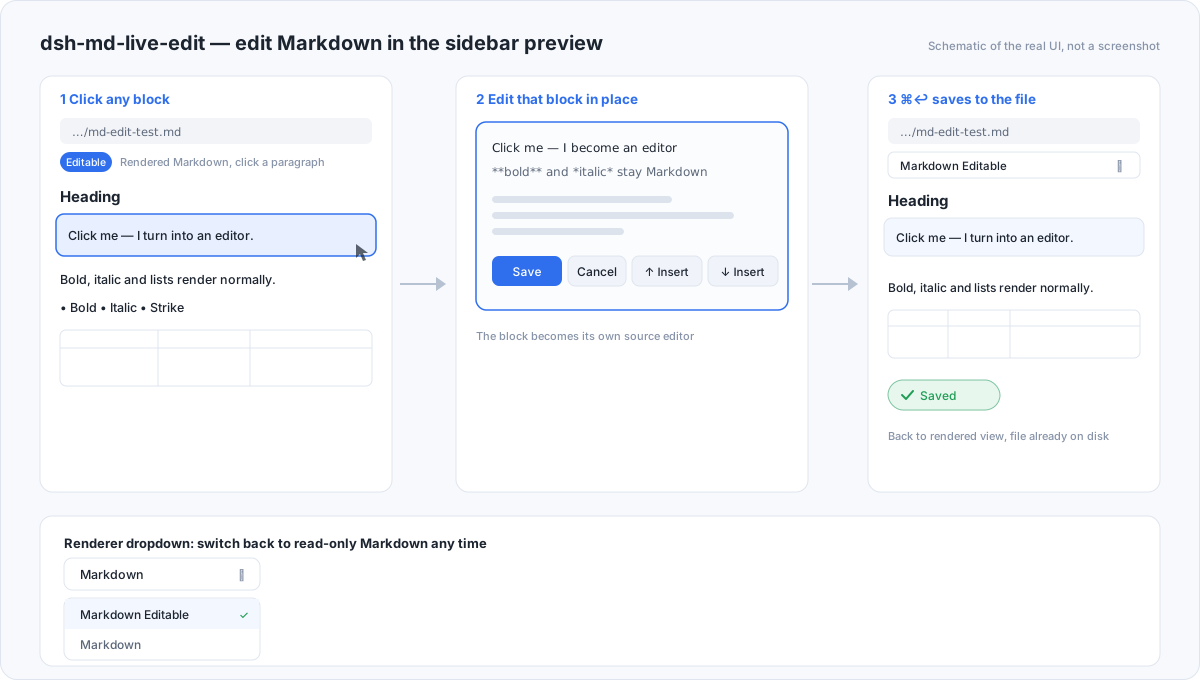
Scope: a small, restrained patch. It adds one preview implementation and one write route. It does not replace built-in slots or layout, does not change kernel behaviour, and does not touch other plugins' data. Turning it off returns the sidebar to the official read-only preview.
What it solves
The built-in sidebar preview is view-only (dsh-client-ui-sidebar-documentpreview
documents "Preview, not editing"). To change a word you had to leave the rendered
view, find a text editor, and lose the context of the surrounding document.
This plugin registers an extension-band Markdown preview with the same
extensions (md, markdown). It ranks above the built-in renderer and is
selected by default; the renderer dropdown still offers the built-in read-only
Markdown, Code, and Plain text views at any time.
How to use
- Open any
.mdfile in the right Sidebar (file tree, orMod+P→ files page). - The document renders as blocks. The header shows the Markdown 可编辑 / Editable Markdown renderer, and the body carries a green 可编辑 chip.
- Click a block → it becomes a small editor holding that block's exact Markdown source. Everything else stays rendered.
- Press
⌘/Ctrl + Enter(or click Save) to write the document back.Esc/ Cancel discards the edit for that block. - The editor toolbar also inserts a block above or below, and deletes the block (an emptied block is deleted; a deletion collapses the blank line it leaves). A + Add block affordance sits at the end of the document.
- The header reports save state: saving / saved / failed (with retry). If the file changes elsewhere while you edit, a conflict banner lets you reload the disk version or keep yours.
Frontmatter (--- blocks) is editable like any other block.
Editing a table
A table block opens as its own Markdown table. Add a row by adding one line:
| Capability | Status | Note |
| --- | --- | --- |
| In-place edit | ✅ | click any block |
| Save | ✅ | ⌘↩ |
Save, and the rendered table updates.
Advantages
- Stay in the rendered view. No mode switch, no full-document source view.
- Source fidelity. Every block keeps its exact source lines; editing one block rebuilds the file byte-for-byte around it, so untouched formatting, frontmatter, and spacing survive.
- Whole-document safety. Large files are completed page by page before editing is allowed, so a save can never write back only the first page.
- Sandbox respected. Writes go through the composed
fswith the session's own policy (sandboxPolicy.resolve({ session })); aread-onlysession is refused rather than widened. - Admission-gated route. The write route asks
connection.requestRejection(Host/Origin fence + browser session) before it reads a body; a rejected request touches neither the body nor the filesystem. - Matches the host. Theme tokens only; bilingual (English / 中文); follows
ctx.localeand switches live.
Limitations (honest)
- Block source editing, not rich text. You edit the block's Markdown source (a table opens as a table). It is not a Word/Excel-style direct surface; there is no cell-by-cell table editing.
- No new files, no renames. It edits the open file only; creating files and renaming stay in the files panel.
- Rendering is a deliberate subset. ATX/Setext headings, fenced code, GFM tables, lists, blockquotes, rules, frontmatter; inline bold/italic/strike/code/ links/images. Nested lists render at one level, and math or nested-quote styling is not rendered — the source is still intact and editable.
- Whole-file writes. A save rewrites the file; concurrent external writes are detected while you edit and surfaced as a conflict, but there is no per-line patch transport.
- Version floor. Requires DSH
>=0.2.2-rc.1(the release line whoseconnectionservice exposesrequestRejection). On an older Host the route fails closed with401rather than serving an unguarded write. - Save mode follows the session. In
read-onlysessions the preview is editable locally but the save is refused with the sandbox reason.
Capability matrix
| Area | Supported |
|---|---|
| File types | .md, .markdown |
| Block editing | headings, paragraphs, lists, blockquotes, fenced code, tables, rules, frontmatter |
| Inline rendering | bold, italic, strikethrough, inline code, links, images |
| Block actions | edit, delete, insert above, insert below, append at end |
| Save | ⌘/Ctrl+Enter, Save button; whole document |
| Conflict handling | external-change banner, reload or keep |
| Renderer | default; dropdown switches to built-in Markdown / Code / Plain text |
| Locales | English, 中文 |
Install
Add the local directory
git clone https://github.com/feifandiv/dsh-md-live-edit.git
Then add it as a bundle in DSH (Settings → Plugins → add/clone the directory, or
plugin_manager with install_bundle and the absolute package path). The
bundle row is md-live-edit.
From npm
npm pack @fanfan4589/dsh-md-live-edit
tar -xzf fanfan4589-dsh-md-live-edit-*.tgz
# add the extracted package directory as a bundle in DSH
Development
npm test # node --test test/*.test.mjs — 34 cases
| Path | Responsibility |
|---|---|
index.js | Host half: the admission-gated POST /dsh-md-live-edit/api/write route |
client.js | Client half: preview metadata, keyed document body, block parser and in-place editor |
test/gate.test.mjs | Route admission, body/fs isolation on rejection, sandbox policy |
test/client.test.mjs | Module identity, registration metadata, parser round-trip, text transforms |
test/render.test.mjs | End-to-end body rendering under a VM timeout |
test/inline.test.mjs | Inline renderer termination, watched in a child process |
test/labels.test.mjs | Localized labels, no raw locale keys in the UI |
See CONTRIBUTING.md and RELEASING.md.
License
MIT © feifandiv
Comments
Loading…
Similar plugins
by 3361805598-gif
DSH Markdown sidebar viewer and editor with block- and text-range annotations for structured revision requests.
★ 4
MIT
JavaScript
Sep 13, 2026
dsh plugin --profile web add dsh-md-annotatorby zhxnix
WYSIWYG Markdown notes editor in the DSH right sidebar, with tabbed documents, table editing, chat integration, assistant read/write tools, and local file export.
★ 0
MIT
JavaScript
Nov 1, 2026
dsh plugin --profile web add dsh-madedownOutline notes with a live mind-map view in a sidebar page, stored as local JSON with autosave, daily backups and Markdown/OPML import and export. Its HTTP routes have no DSH access check, so a web pag
★ 0
MIT
TypeScript
dsh plugin --profile web add @huoweifang/dsh-mindmapby 2017java
DSH web 插件:在 dsh-better-sidebar 侧边栏内把 Markdown 富渲染为预览(代码高亮 / 目录 / 一键复制)。
★ 0
MIT
JavaScript
Aug 25, 2026
dsh plugin --profile web add dsh-md-viewerby caihua8669
Document review workbench: select text in a Markdown file, leave comments saved as MRSF sidecar files next to it, and let the agent read them with doc_review_* tools and propose edits you accept or re
★ 1
MIT
JavaScript
Oct 17, 2026
dsh plugin --profile web add @caihua/dsh-doc-reviewdsh的diff审核
★ 1
MIT
JavaScript
dsh plugin --profile web add dsh-diff-review