
dsh-theme-paper-warm
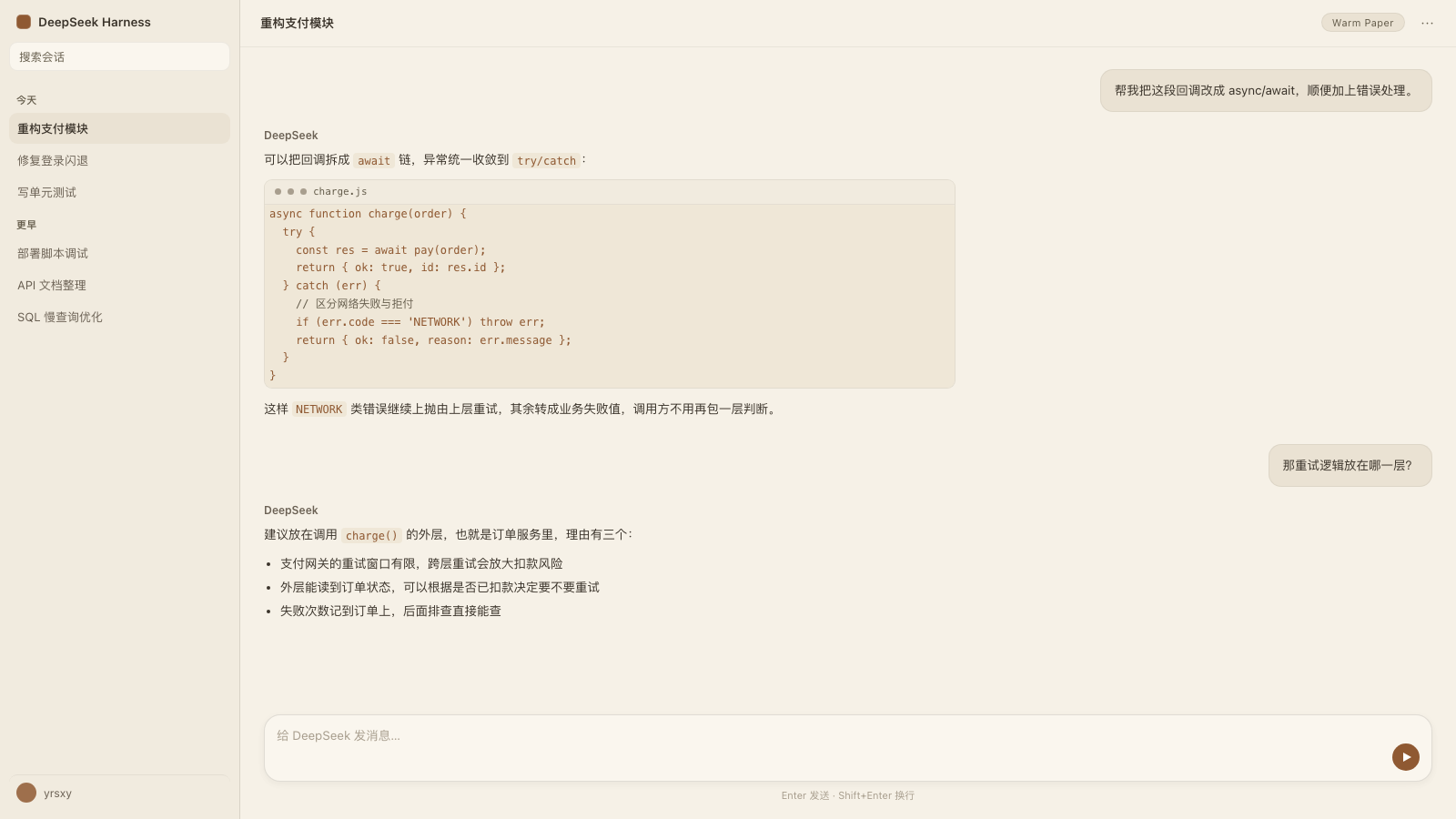
Manifest validEye-care warm paper theme for the DSH Web GUI: overrides canvas, surface, text, border and scrollbar tokens to a warm palette (canvas #F2F0E5, ink #100F0F) and adds a toggle row in Settings → General.
dsh-theme-paper-warm · 护眼暖纸主题
Eye-care warm paper theme for the DeepSeek Harness (DSH) Web GUI: canvas #F2F0E5, ink #100F0F, sidebar painted the same warm paper, font stack led by Segoe UI. It registers as a third-party theme (paper-warm) and adds its own toggle row to Settings → General; the choice persists across reloads and restarts. Search keywords: eye-care, eye-friendly, warm paper, 护眼, 暖纸.
给 DeepSeek Harness Web GUI 的护眼暖纸主题:画布 #F2F0E5,正文 #100F0F,侧栏与画布同色,字体栈以 Segoe UI 打头。以「第三方主题」形式注册(id paper-warm),并在「设置 → 通用」里自带一行开关;选择跨刷新、跨重启保留。搜索关键词:护眼、暖纸、暖色、纸张配色。

安装 / Install
- 插件市场:本插件已投稿 awesome-dsh-plugin 精选列表;合并后即可在 DSH 的 插件 → 插件市场(dshmarket)搜索
paper-warm一键安装。收录合并前请用下面两种方式。 - 命令行:
dsh plugin --profile <profile> add dsh-theme-paper-warm,刷新页面即可。 - 本仓库源码:
dsh plugin --profile <profile> add github:factyy163/dsh-theme-paper-warm。
卸载即恢复原生外观;主题选择存在浏览器 localStorage,卸载后重新安装会自动恢复上次的选择。
它做什么
- 通过
ctx.theme.register()注册主题paper-warm(colorScheme: light),token 覆盖整套暖色阶:画布、侧栏(--dsw-specific-sidebar-fill,与画布同为#F2F0E5)、卡片/侧栏层、弹层、正文与次级文字、描边、悬停态、代码块、滚动条。 - 另叠一层
theme.overrideTokens()的{ light, dark }配对覆盖层,深色基础配色下同样成立(画布#100F0F、正文#F2F0E5)。 - 覆盖
--dsw-font-family为"Segoe UI", -apple-system, BlinkMacSystemFont, "PingFang SC", "Hiragino Sans GB", "Microsoft YaHei", "Helvetica Neue", Helvetica, Arial, sans-serif。DSH 默认栈本身就含 Segoe UI,但排在-apple-system/BlinkMacSystemFont之后,本主题把它提到首位;CJK 字体保留,中文不会掉到兜底字形。 - 在「设置 → 通用」增加一行
暖纸 / 原生的开关。 - 选择存在浏览器
localStorage(键dsh.theme.paper-warm),下次打开页面自动恢复,并顶住宿主设置的下发与重连重读(见下节);只有本行的「原生」会结束这个选择。 - 附带侧栏恢复层:侧栏折叠后左上角始终有一个重新展开的按钮(Windows 下折叠会留下零宽轨道、原生重开控件全部藏在其中),并把第三方侧栏(
--dcu-*)的冷色调色板映射到同一套暖色。
三个必须知道的机制约束
- 第三方主题 id 跨不过内置设置 schema。
ui-theme的preference字段是封闭枚举light | dark | system,ThemeRuntime.setTheme()对非内置 id 不写 Host 设置。所以本插件不写ui-theme,而是自己持久化选择。 - 本行才是持久开关,原生「外观」是当次会话的覆盖。 在原生「外观」里点浅色/深色/跟随系统,暖色即时下线、本行回到「原生」,但已存选择不动,所以重载或重启后仍回到「暖纸」;要长期回到原生,点本行的「原生」。
- 宿主设置的下发永远顶不掉已存选择。
ThemeRuntime先以 schema 默认值(system)对外提供快照,之后在设置文档到达浏览器时采纳其中的持久preference——启动时一次,此后每次设置失效重读/重连再来一次;每次都发theme/change。这些下发没有可用于区分「用户选择」的标记,所以本插件反过来做:只要已存选择还在,凡是内置值的变化一律重新断言它;只有紧跟在一次「外观开关按压」之后的那个变化才算用户的选择(原生三个方块与本行按钮都是aria-pressed按钮,插件在 capture 阶段记录按压时刻,窗口 750ms)。任何一次误判都不会把主题永久弄丢。
覆盖的 token
| 类别 | token |
|---|---|
| 字体 | --dsw-font-family |
| 画布 / 侧栏 | --dsw-alias-bg-base、--dsw-specific-sidebar-fill |
| 表面层级 | bg-layer-1..3、bg-overlay、bg-module-platform、bg-multi-select、bg-document-preview、bg-skeleton |
| 文字 | label-primary、label-secondary、label-tertiary、label-caption、menu-icon |
| 描边 / 交互 | border-l1..l4、interactive-bg-hover、interactive-bg-active、interactive-bg-hover-solid |
| 控件 | button-floating-fill / -hover、button-elevated-fill、button-ghost-active-fill / -hover |
| 代码 / 滚动条 | markdown-code-block、markdown-code-block-banner、scrollbar-bg-l1、scrollbar-bg-l2 |
深色基础配色下的对应值:画布与侧栏 #100F0F,正文 #F2F0E5,层级与描边按同一暖色调推导。
改色
改 lib/client.js 顶部的 PALETTE(light / dark 两组,两边 token 名必须一一对应,PALETTE_OVERRIDE 会自动转置),改完刷新页面即可。字体改 PALETTE 上方的 FONT_STACK。
结构
| 文件 | 作用 |
|---|---|
lib/index.mjs | 宿主半边,空实现;存在的意义是让 loader 有一条声明了 dsh.client 的条目,客户端模块系统据此把浏览器 bundle 提供给页面 |
lib/client.js | 浏览器半边(预构建 bundle):注册主题、覆盖层、设置行、侧栏恢复层 |
cordis.patch.yml | bundle 补丁:插入 loader 条目 theme-paper-warm |
locale/*.json | 插件管理器显示的标题与描述(en / zh) |
test/boot-race.test.mjs | 回归测试:锁住「宿主设置下发 vs 已存选择」的启动竞态 |
回归测试
node test/boot-race.test.mjs
在不启动 GUI 的情况下复现并按真实顺序驱动客户端半边(插件 apply 先恢复已存选择 → 宿主设置稍后下发),断言最终仍是暖纸,同时覆盖原生「外观」选择、本行开关、以及取不到设置服务时的降级行为。
更新日志 / Changelog
- 0.1.1(2026-11-16):备注与描述改为「护眼暖纸主题 / eye-care warm paper」便于插件市场搜索索引;声明
engines.dsh(>=0.2.1-rc.2 <0.2.2-0 || >=0.2.2-rc.1 <0.3.0-0,适配 0.2.2-rc 系列新版本 Harness);按升级指南v0.2.2-rc.1/window-drag-regions为侧栏重开按钮声明data-window-drag-exclude,保证 macOS Desktop 上浮层按钮可交互。 - 0.1.0(2026-11-13):首次发布(npm + GitHub + awesome-dsh-plugin 收录)。
License
MIT
Comments
Loading…
Similar plugins
 7
No screenshots
by yrsxy
Five warm, low blue-light color themes that retint the whole DSH interface, including the sidebar, popups and shadows, without touching layout.
★ 0
MIT
JavaScript
Nov 10, 2026
dsh plugin --profile web add dsh-warm-theme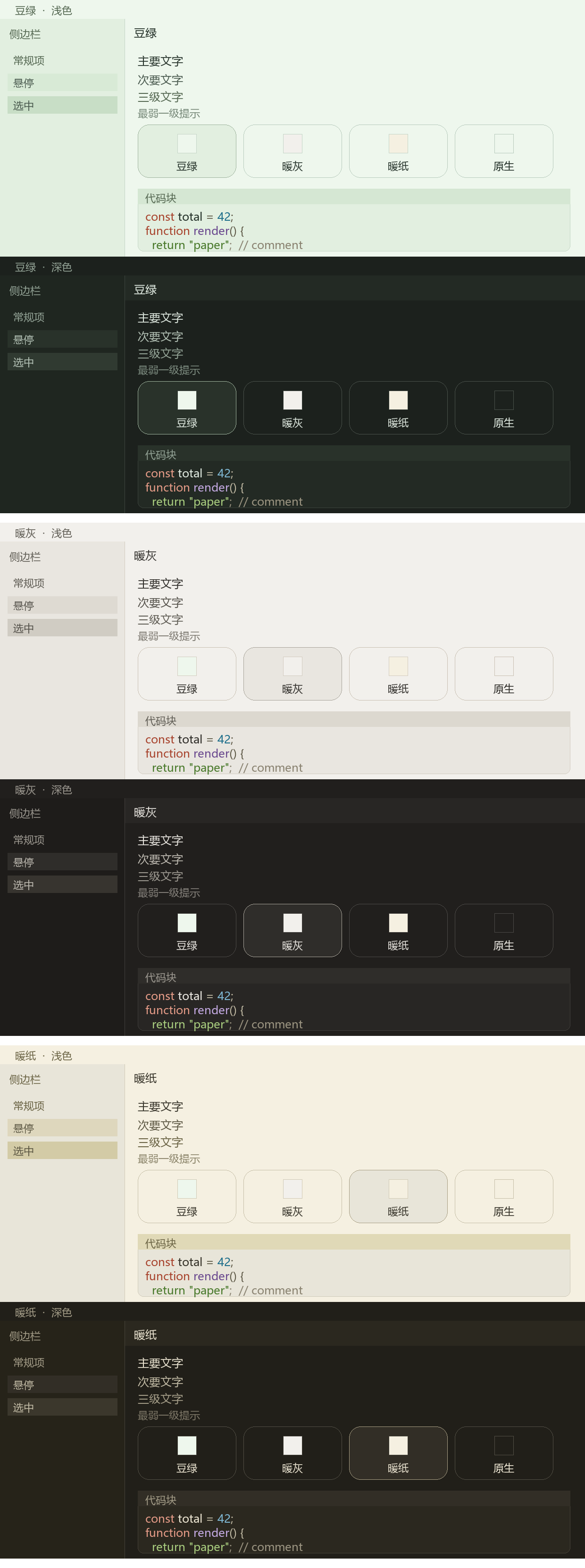
No screenshots
by xiaotuchu
Three switchable low-glare themes (Warm Paper, Sage Green, Warm Grey) for the DeepSeek Harness GUI, each a full alias-token layer with a light and a dark face.
★ 4
↓ 764/wk
MIT
JavaScript
Nov 4, 2026
dsh plugin --profile web add @xiaotuchu/dsh-theme-eye-careby Anionex
Warm light, warm dark, and system-aware eye-care themes for DSH Web
★ 3
↓ 121/wk
MIT
TypeScript
Sep 3, 2026
dsh plugin --profile web add @anionex/dsh-eye-careby WitchKlee
暖纸 Warm Paper:米杏纸色 × 宋体 × 砖红的手记风 DSH Web 主题(DeepSeek Harness)
★ 0
MIT
JavaScript
Oct 21, 2026
dsh plugin --profile web add dsh-theme-warm-paperby yunliya-cuter
DSH Web GUI 暖色主题 + 液态玻璃材质 + 输入栏工具行整形(客户端插件包)
★ 0
MIT
JavaScript
Nov 1, 2026
dsh plugin --profile web add dsh-warm-ui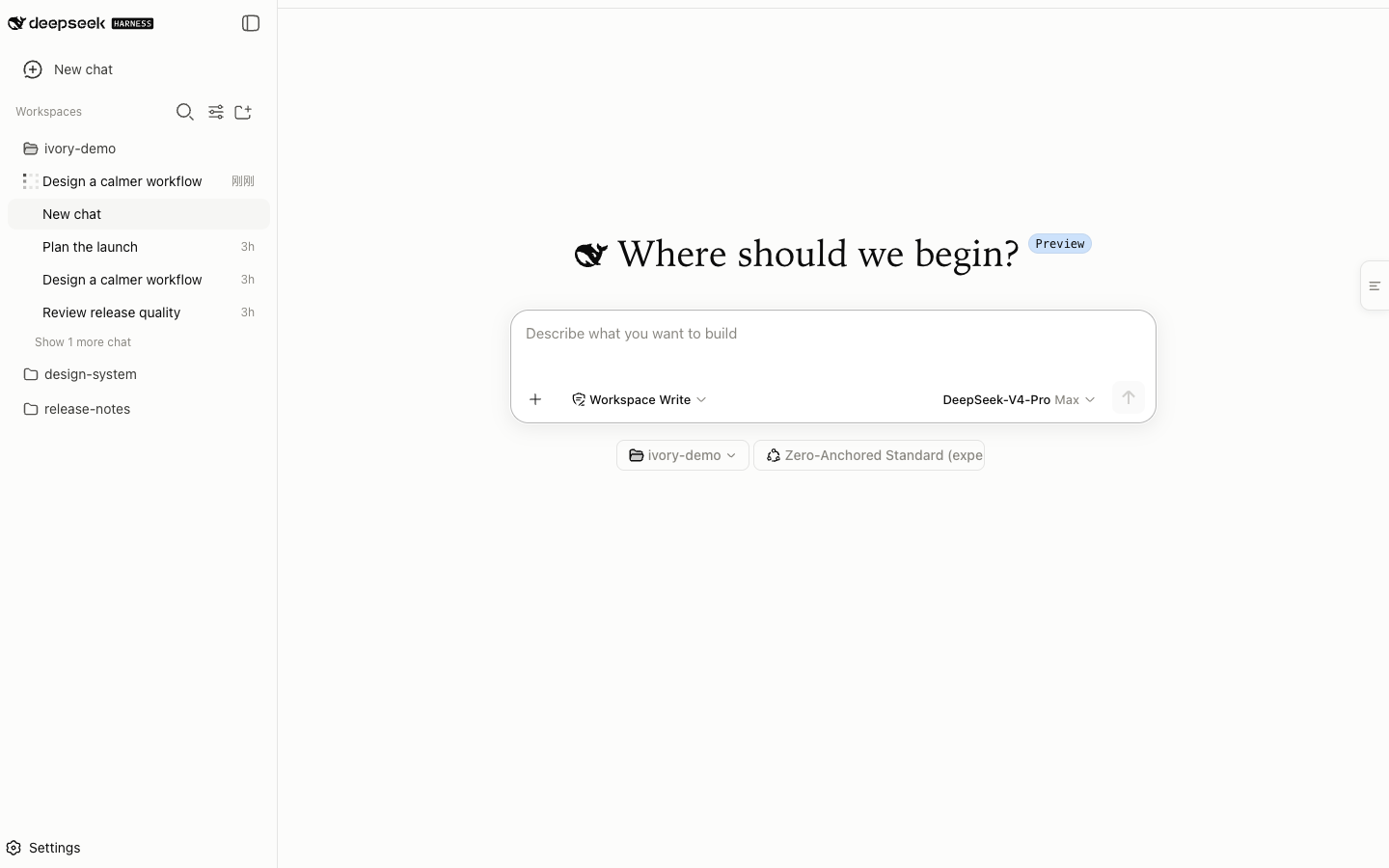 3
No screenshots
by ZJUZhiyuCai
Warm light and dark theme for DSH Web with responsive layout, bilingual settings, safe Markdown preview, per-block copy controls, and no telemetry.
★ 1
↓ 323/wk
MIT
JavaScript
Nov 8, 2026
dsh plugin --profile web add dsh-ivory