

dsh-matlab-feedback
DiscoveredDSH plugin: capture live MATLAB/DPABI/DPARSF/SPM QC window screenshots and command-window text into the DeepSeek Harness conversation
dsh-matlab-feedback



MATLAB 实时反馈 · DeepSeek Harness 插件
把正在运行的 MATLAB 桌面(含 DPABI / DPARSF / SPM 的 QC 窗口)的真实窗口截图和命令行窗口文本直接取进 DeepSeek Harness 对话,让你可以直接问 Agent:
“看一下现在 DPARSF 的 QC 界面,这个配准/阈值结果有什么问题?”
Agent 拿到的是真实截图 + 当前命令行输出,而不是凭记忆猜测。需要让它写 MATLAB 代码时,它可以把单行代码放进命令窗口但不会执行——由你检查后手动按 Enter(Esc 丢弃)。
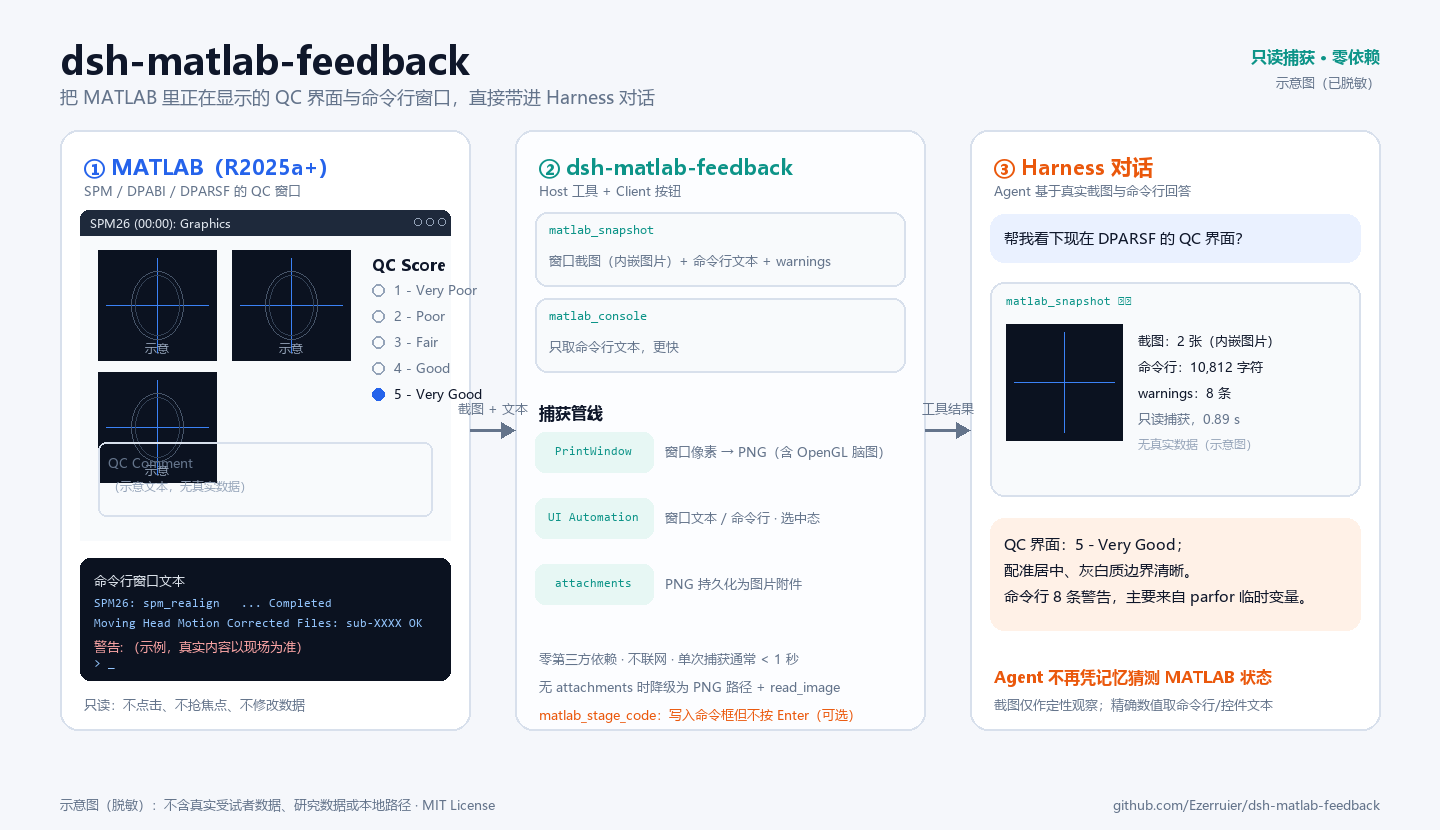
示意图为流程示意,使用虚构文本绘制,不含真实受试者数据、研究数据或本地路径。
功能
| 能力 | 说明 |
|---|---|
matlab_snapshot 工具 | 抓取所有可见 MATLAB 窗口:截图作为图片附件内嵌在工具结果中,同时返回窗口清单、命令行窗口文本(尾部)、警告/错误摘要 |
matlab_console 工具 | 只读命令行窗口文本,参数 lines(10–400,默认 120);不截图、更快 |
matlab_stage_code 工具 | 把单行 MATLAB 代码写入已打开的 Command Window(绝不自动回车);你检查后自行按 Enter 执行,Esc 丢弃 |
| 输入框按钮 | 聊天输入框左侧的「MATLAB 快照」按钮:点击后向输入框插入一条预置提示词,补充问题后发送即可 |
| 捕获引擎 | scripts/matlab-feedback.ps1(Windows PowerShell 5.1):Windows UI Automation 读取 CEF 桌面/图窗文本,PrintWindow 截图,输出 manifest.json + PNG |
| 只读、无侵入 | 不点击、不键入、不抢焦点、不移动/恢复窗口、不修改 MATLAB/SPM/DPABI 数据,也不安装任何 MATLAB 侧代码 |
不需要官方 MATLAB MCP,不需要 MATLAB 里运行任何脚本,不需要改 MATLAB 设置。
架构
Agent 工具 matlab_snapshot / matlab_console
        │
        ▼
Host 半侧 (index.mjs):创建 run 目录 → spawn PowerShell 捕获脚本 → 解析 manifest
        │                                   │
        │                                   ▼
        │                      PrintWindow(hwnd, PW_RENDERFULLCONTENT) → PNG
        │                      UI Automation:窗口文本 / 命令行窗口文本 / 单选状态
        │                                   │
        ▼                                   ▼
attachments.saveImage → 工具结果内嵌图片块   <workspace>/.dsh-matlab-feedback/<runId>/

matlab_stage_code ── 剪贴板 + Ctrl+V → 命令窗口输入行(不发送 Enter,执行由你手动确认)
        │
        ▼
Client 半侧 (client.js):输入框「MATLAB 快照」按钮 → inputActions.insertText 预置提示词
安装
前置条件:
- Windows 10/11,Windows PowerShell 5.1(系统自带);
- MATLAB R2025a 及以上(桌面为 CEF 渲染,才能读文本;更老版本只能截图);
- DeepSeek Harness Desktop /
dsh0.2.1-rc 系列 profile(开发验证:0.2.1-rc.3)。
安装方式(任选其一):
- 使用 DSH 的插件管理器安装本目录(
plugin_manager的install_bundle,target 指向本目录绝对路径); - 手动复制到 profile 并加入
package.json的dsh.profile.bundles(不推荐)。
安装后无需重启:工具 matlab_snapshot / matlab_console / matlab_stage_code 出现在 Agent 工具表,输入框左侧出现「MATLAB 快照」按钮。若页面未刷新出按钮,刷新一次页面。
使用
对 Agent
matlab_snapshot            # 截图 + 命令行 + warnings(0.3–3 秒,取决于 MATLAB 负载)
matlab_console {lines: 80} # 只取命令行尾部 80 行(更快)
matlab_stage_code {code: "disp('hi')"}  # 只写入命令框、不执行;你手动按 Enter
matlab_snapshot 返回内容:
- 最多 4 张窗口截图(优先级
qc-figure > pipeline-gui > figure > desktop),以图片附件内嵌; - 窗口清单:角色、标题、尺寸、是否最小化、文本来源与摘要;
- 命令行窗口文本尾部(默认 ≤6000 字符,超限注明截断并给出完整
manifest.json路径); - warnings:从命令行/窗口文本提取的警告、错误行(去重,≤40 条)。
对用户
点击输入框左侧 MATLAB 快照 按钮,输入框会插入:
请调用 matlab_snapshot 抓取当前 MATLAB 的窗口截图和命令行窗口,概述你看到的界面状态(若在 DPARSF QC 流程,说明 QC 界面的关键信息),然后回答我的问题:
补充你的问题后回车发送即可。
让 Agent 写代码(可选执行)
当你说“把这段代码写到 MATLAB 里”或“帮我在命令窗口设置 xxx”,Agent 会调用 matlab_stage_code 把单行代码写入命令窗口:
- MATLAB 窗口会切到前台,命令窗口里出现待执行的代码;
- 你检查无误后按 Enter 执行(按 Esc 丢弃);
- 执行完让 Agent 抓取结果(它会用
matlab_snapshot/matlab_console读取命令行输出)。
工具本身从不执行代码,也不接受多行代码(多行粘贴可能被 MATLAB 执行)。
安全与隐私
- 只读捕获:只做窗口枚举、
PrintWindow截图和 UI Automation 文本读取;不点击、不键入、不切换焦点、不移动/恢复/关闭窗口、不终止 MATLAB 进程。 - 不联网:插件自身不发起任何网络请求;截图/文本只写入本机磁盘与当前 Harness 会话。
- 代码暂存不执行:
matlab_stage_code只把单行代码粘贴进命令窗口,从不发送 Enter/Return,并拒绝多行输入(防止多行粘贴被执行);它会短暂把 MATLAB 窗口切到前台以便你检查。是否执行完全由你决定。 - 截图包含窗口当前显示的像素,可能含研究数据、受试者编号、本地路径;命令行文本也可能含路径与报错。它们会作为工具结果进入当前会话,并随模型请求发送给所配置的模型服务商——分享会话记录或截图前请自行评估敏感性。
- 每次捕获在工作区
.dsh-matlab-feedback/<runId>/下写manifest.json与w-*.png;历史 run 目录最多保留 20 个,旧的自动清理。
已知限制
- 仅 Windows;依赖 Windows PowerShell 5.1 与 .NET UI Automation。
- 文本读取依赖 MATLAB R2025a+ 的 CEF 桌面;老版本 MATLAB 或
-batch/-nodisplay无窗口模式只有截图(若仍有窗口),没有文本。 - 最小化到任务栏的窗口不截图(避免恢复窗口打扰用户),但尽量读取文本。
- MATLAB 对超长行会显示“输出已截断。文本超出命令行窗口显示的最大行长度。”,这是上游限制。
- 个别超链接文本会被 UI Automation 拼出
link … out of link之类的装饰噪声,不影响信息本身。 - 单个窗口截图失败不会导致整次捕获失败(该窗口
screenshot: null)。 - 若当前会话没有 attachments 服务,工具降级为纯文本并给出 PNG 绝对路径,Agent 可用
read_image读取。 matlab_stage_code需要能把 MATLAB 主窗口切到前台;若命令窗口已有未执行文本(会混入你的输入)或无法聚焦,会拒绝写入并提示你清理后重试。- 本机 Windows COM(
MATLAB.Application)未注册,且 COM 无法连接已打开的桌面会话,因此不提供 COM 通道;暂存通过键盘级剪贴板粘贴实现。
开发与测试
纯 Node(无第三方依赖),捕获脚本为 Windows PowerShell 5.1。CI 由 GitHub Actions 执行(Node 22/24):语法检查、JSON 校验与单元测试。
node --check index.mjs
node --check client.js
node --test tests/host/unit.test.mjs      # 35 个 fixture 单测,不需要 MATLAB
node tests/host/dry-run.mjs               # 真实 MATLAB 端到端 dry-run(需要 MATLAB 已打开)
powershell -NoProfile -ExecutionPolicy Bypass -File tests/capture/smoke-test.ps1
tests/host/:Host 逻辑单测(参数拼装、manifest 归一化/降级、图片选取、渲染格式、超时/退出码、run 目录清理);tests/capture/smoke-test.ps1:对当前 MATLAB 做一次真实只读捕获并校验manifest.json与 PNG 尺寸;docs/DESIGN.md:捕获原理、manifest 契约、工具/Client 契约与设计取舍。
许可证与声明
MIT License,见 LICENSE。版本更新记录见 CHANGELOG.md。
本项目是社区插件,与 MathWorks、DeepSeek 均无隶属关系。MATLAB® 是 The MathWorks, Inc. 的商标;DeepSeek Harness 为 DeepSeek 的产品。使用时请自行遵守 MATLAB 许可条款与所在机构的数据管理规定。
Comments
Loading…
Similar plugins
by machine202502
Screen and window capture for DeepSeek Harness: monitors, regions, background windows, thumbnails in chat
★ 0
MIT
JavaScript
Nov 8, 2026
dsh plugin --profile web add dsh-screenshootby 12138hao
Screenshot directly into the chat composer for DeepSeek Harness — click the scissors, drag a region, the image lands in the input box.
★ 0
MIT
JavaScript
Nov 6, 2026
dsh plugin --profile web add dsh-snapby EasySSHCN
Screenshot capture plugin for DeepSeek Harness (DSH): region/window/fullscreen capture with a fullscreen overlay selector, the screenshot tool, the /shot command, a Ctrl+Alt+A global hotkey and a comp
★ 0
MIT
C#
Nov 4, 2026
dsh plugin --profile web add dsh-shotby JackEngineer
One-click DSH screenshot: capture the DeepSeek Harness window (or the whole desktop) and drop the PNG straight into the composer draft
★ 0
MIT
JavaScript
Oct 17, 2026
dsh plugin --profile web add dsh-quick-screenshotby JD579g
DeepSeek Harness (DSH) plugin: one-click MCP deployment + built-in MCP toolkit + doctor. Windows-first, connects without restarting.
★ 0
MIT
JavaScript
Sep 28, 2026
dsh plugin --profile web add dsh-mcp-hubby Huangzihengcmd
DSH plugin: drive DeepSeek Harness from WeChat — scan a QR code, send instructions from WeChat, get results back in the same chat.
★ 0
MIT
JavaScript
Oct 31, 2026
dsh plugin --profile web add dsh-wechat-assistant