

Invoice-Downloader
Manifest valid★ 527E-Invoice Organization and Reimbursement Preparation Tool: Batch collect PDF/OFD/XML invoices from your email inbox; OCR recognition, classification and archiving, and Excel summary generation; available as a Windows/macOS desktop version and a DSH plugin.
InvoiceFlowAI — E-Invoice Organization & Reimbursement Preparation Tool
English | 中文





Organizes PDF, OFD, and XML e-invoices plus invoice download links from your email into categorized files and an Excel reimbursement summary.
For individuals, freelancers, and small teams who gather multiple e-invoices monthly. Once you connect your QQ or 163 mailbox, you can batch-collect invoices, OCR them, categorize, archive, and generate a summary; low-confidence results are kept for manual review.
Download: Latest Windows (installer / portable) and macOS (Apple Silicon) builds
Emails and invoices are processed locally. With GLM OCR / vision enabled, invoice images are sent to your model provider for extraction.

DeepSeek Harness Plugin
@ethanyoq/dsh-invoice-downloader brings local IMAP invoice download, OCR, archiving, and Excel summary generation into the right sidebar of DeepSeek Harness. It suits reimbursement workflows where repetitive organizing is delegated to local automation while manual review is retained.
dsh plugin --profile web add @ethanyoq/dsh-invoice-downloader
dsh web --profile web
Open the "Invoice Download" entry in the right sidebar, choose a save location, and install the local engine once, then enter the IMAP authorization code for your QQ or 163 mailbox. The first install requires an internet connection to download Python dependencies and Chromium; the pip wheel for rapidocr-onnxruntime ships with the default PP-OCRv3 model, so no separate model download is needed. Invoice files are OCR'd locally; the OCR text is sent to the currently selected DeepSeek model for field extraction. The plugin supports Windows x64 and macOS Apple Silicon. Authorization codes are stored by the DSH credential service and are never written into plugin settings or scan logs.
✨ Key Highlights
| Feature | Description | |
|---|---|---|
| 🔒 | One-Click Run, Out of the Box | Runs immediately after extraction, no Python or dependency installation required |
| 🤖 | Dual-Engine AI Recognition | Track A (precise OCR flow) + Track B (vision fallback flow), auto-switching, no manual intervention |
| 🔍 | Four-Layer Smart Funnel | Whitelisted domains → subject keywords → body detection → QR-code scanning, precisely filtering out non-invoice emails |
| 📄 | Automatic Recovery of Linked Invoices | Playwright automatically opens Baiwang Cloud and tax-platform links to download the official PDF for archiving |
| 🧾 | Automatic Invoice & Voucher Matching | Accommodation invoices/hotel folios and ride invoices/itineraries are auto-paired and archived with adjacent names |
| 🪟 | Quiet Background Processing | URL-recovery workers, Node and Chromium run hidden end-to-end, no more mass pop-up of console windows |
| 🗂️ | Natural-Language Classification Rules | Supports custom rules such as "Didi over 100 yuan goes to large-amount" |
| 📊 | One-Click Excel Report | Auto-generates summary_report.xlsx, covering full invoice lists and amount summaries |
🏗️ Overall Workflow
flowchart LR
    A["📧 QQ / 163\n邮箱 IMAP"] --> B["📥 邮件抓取\nEmailFetcher"]
    B --> C{"🔍 四层\n智能漏斗"}
    C -->|"通过"| D["📎 附件提取\nZIP 递归解包"]
    C -->|"丢弃"| X["🗑️ 非发票邮件"]
    D --> E{"附件类型?"}
    E -->|"PDF/OFD/XML"| F["🤖 AI 提取引擎"]
    E -->|"URL 链接"| G["🌐 PDF 恢复\nPlaywright"]
    G --> F
    F --> H{"提取\n成功?"}
    H -->|"✅"| I["📂 智能分类\n规则重命名"]
    H -->|"❌"| J["📁 Manual_Check"]
    I --> K["🗂️ 本地归档"]
    K --> L["📊 Excel 报表"]
🤖 Dual-Engine AI Extraction Architecture
The system uses a Track A + Track B + Local Fallback three-tier defense; whichever tier succeeds first is adopted, ensuring an extremely high recognition rate.
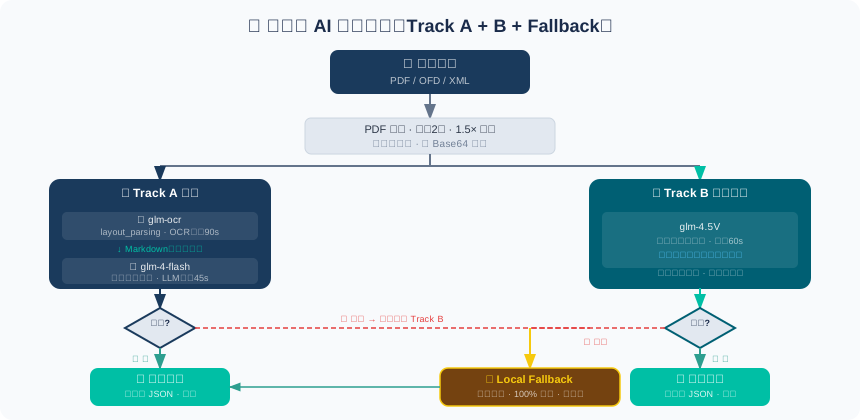
Why designed this way?
- Track A (OCR + LLM): Highest accuracy — extracts text structure first, then understands it
- Track B (glm-4.5V vision): Looks at the image directly, suitable for complex layouts or image-based invoices
- Local Fallback: Local regex rules, works offline, zero API cost
🔍 Four-Layer Smart Screening Funnel
AI isn't called on every email; a four-layer funnel judges first, cutting misrecognitions and API costs.
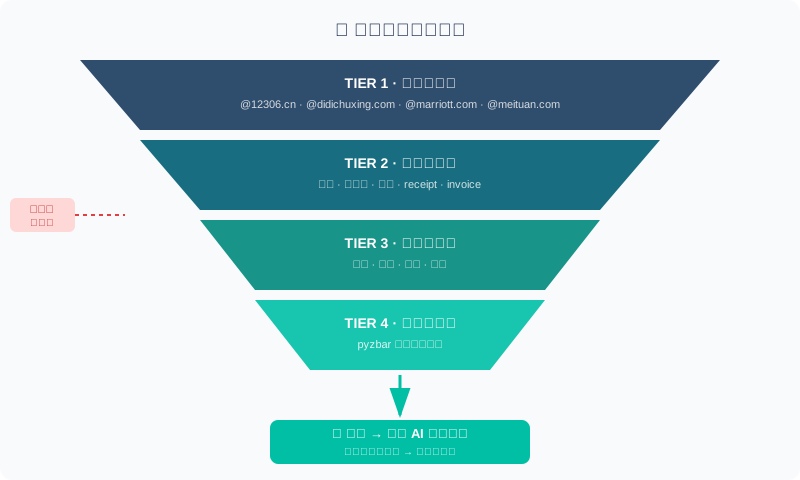
After screening, attachments go through three levels:
| Level | Trigger | Handling |
|---|---|---|
| 🗑️ Level A (discard) | Tracking pixel, logo, decorative image (≤32px) | Skipped directly |
| 📦 Level B (hold) | Attachment >5MB, ZIP unpack failure | Retained but not processed |
| ✅ Level C (archive) | Regular PDF/OFD/XML | Proceeds to AI extraction |
🌐 Three-Tier PDF Recovery Plan
Invoice emails often have only a "Download" link; the system picks the best method:
flowchart TD
    Link(["🔗 邮件中的发票链接"]) --> Detect{"识别链接平台"}
    Detect -->|"百望云"| BW["🏢 Playwright 自动化\n登录 → 点击下载 → 捕获文件\n字段匹配验证"]
    Detect -->|"国税·诺诺·航信"| DI["📥 HTTP 直接下载\n识别发票族群\n本地字段校验"]
    Detect -->|"未知网页"| Generic["🌐 网页转 PDF\n检测登录/验证码\nA4 格式渲染"]
    BW & DI & Generic --> Final(["📄 本地 PDF"])
    Final --> AI(["🤖 AI 提取流程"])
⚙️ Configuration Guide
Configure once on first use; on every subsequent scan just click Run.
Step 1 · Enable IMAP on 163 Mailbox
📖 点击展开 163 邮箱详细步骤
Server Parameters
| Parameter | Value |
|---|---|
| IMAP server | imap.163.com |
| Port | 993 (SSL/TLS) |
Enabling Steps
- Log in to mail.163.com and click the "Settings" button at the top right
- From the dropdown menu, select "POP3/SMTP/IMAP"
- Under "IMAP/SMTP Service", click the "Enable" button on the right
- An "Account Security Verification" window appears:
- Scan code method (recommended): Scan the QR code with your phone; a verification SMS is sent automatically
- Manual method: Follow the prompt to send an SMS manually to the specified number
- After the SMS is sent, click "I Have Sent It"
- The system generates a 16-character authorization code (a combination of letters, shown only once — be sure to copy and save it immediately)
⚠️ This code is not your mailbox password. It's a separate password for third-party clients, case-sensitive.
Step 2 · Enable IMAP on QQ Mailbox
📖 点击展开 QQ 邮箱详细步骤
Server Parameters
| Parameter | Value |
|---|---|
| IMAP server | imap.qq.com |
| Port | 993 (SSL/TLS) |
Enabling Steps
- Log in to mail.qq.com and click the "Settings" icon at the top right
- Select the "Account" tab
- Under "POP3/IMAP/SMTP/Exchange/CardDAV/CalDAV Services", find the section
- Click "Manage Services" → "Enable Service"
- Click "Generate Authorization Code" and complete identity verification:
- Scan code method (recommended): After scanning with your phone, a verification SMS is sent automatically
- Manual method: Send "配置邮件客户端" from your QQ-bound phone to 1069070069
- Click "I Have Sent It"; after verification, the authorization code is generated immediately (save it right away)
⚠️ Changing your QQ password voids the code automatically; you must regenerate it.
Step 3 · Get a Zhipu GLM API Key
📖 点击展开 GLM API 配置步骤
The system uses GLM-4.5V (multimodal vision) and GLM-OCR to recognize invoice content.
Steps
- Visit open.bigmodel.cn and register an account
- Go to the Console → API Keys → Create API Key
- Copy and save the key (format:
xxxxxxxx.xxxxxxxxxxxxxxxx)
Pricing Reference
| Scenario | Description |
|---|---|
| 🎁 New-user perk | 5 million GLM-4 tokens granted (valid for 30 days) |
| 💰 Recommended top-up | Within ¥5, pay-as-you-go |
| 📊 Usage estimate | Each invoice consumes roughly 1,000–3,000 tokens; 200 invoices per month means ¥5 lasts about 12 months |
🚀 Quick Start
Windows (installer / portable)
- Installer: run
InvoiceFlowAI-*-windows-x64-setup.exe; portable: extractInvoiceFlowAI-*-windows-x64-portable.zipto a regular folder (avoid cloud-sync directories) and keep the_internalfolder in the same directory asInvoiceFlowAI.exe. - Double-click
InvoiceFlowAI.exe; the settings screen pops up automatically on first launch. - Enter your mailbox address and authorization code (QQ or 163) and the GLM API Key, save, then click "Start Scan". Invoices are automatically archived to the "Invoices" folder on the desktop.
macOS (Apple Silicon)
- Open
InvoiceFlowAI-*-macos-arm64.dmgand dragInvoiceFlowAIinto the "Applications" folder. - The settings screen pops up automatically on first launch. This build is unsigned and unnotarized; if macOS blocks it, confirm to open anyway in "System Settings → Privacy & Security".
- Enter your mailbox address and authorization code (QQ or 163) and the GLM API Key, save, then click "Start Scan".
📁 Output Directory Structure
发票整理/
├── 火车票/
│   └── 20260315-北京-上海-火车票.pdf
├── 机票/
│   └── 20260301_机票_1280.00_中国国际航空.pdf
├── 住宿发票/
│   ├── 20260310-住宿-01-发票_888.00元.pdf
│   └── 20260310-住宿-01-水单_888.00元.pdf
├── 打车/
│   ├── 0312-滴滴-01-发票_45.50元.pdf
│   └── 0312-滴滴-01-行程单_45.50元.pdf
├── 餐饮/
├── 待人工复核/        ← 无法可靠确认的材料,需人工处理
├── 非目标公司发票/
└── summary_report.xlsx
❓ FAQ
Q:软件启动后白屏或无响应?
- Make sure the entire archive is extracted; the
_internalfolder must be in the same directory asInvoiceFlowAI.exe - Avoid placing the software in directories with Chinese characters or spaces in the path
Q:扫描完发票数量很少?
- In the app's time-range setting, set the start date to more than 180 days back
- Some mailboxes only pull emails from the last 30 days by default; select "Receive all emails" in the mailbox's IMAP settings
Q:授权码填写后提示认证失败?
- QQ mailbox: Must be obtained from the "Manage Services → Generate Authorization Code" flow, not your QQ password
- 163 mailbox: Must be generated from the "Enable IMAP Service" popup, not your mailbox login password; note case sensitivity
- After changing your QQ password, the authorization code must be regenerated
Q:GLM API 报错余额不足?
Log in to open.bigmodel.cn → Billing Center → Top up. A ¥5 top-up is recommended; pay-as-you-go.
Q:部分发票进入 Manual_Check 文件夹?
Normal. When AI confidence is low, the invoice is auto-moved to the Manual_Check queue for manual confirmation (usually blurry images, non-standard receipts, or encrypted PDFs).
🛡️ Privacy & Security
- All emails and invoice files are processed locally and are not uploaded to any server
- Mailbox credentials are encrypted and stored via DPAPI on Windows and via Keychain on macOS
- The GLM API only receives invoice images (Base64) for text recognition; original email contents are never sent
⚠️ Disclaimer
By using this software you agree to the following.
Compliant use · Accesses mailboxes read-only via IMAP; no sending, deleting or modifying. You must be authorized to use the mailbox.
Purpose · For invoice email download, recognition, classification and archiving automation only.
Accuracy & compliance · No guarantee on accuracy, completeness, legality, tax/financial/accounting compliance of results. You must verify all invoices, reimbursements, tax, accounting and compliance outputs yourself.
Data · When calling the GLM API, invoice images are sent to Zhipu AI servers for recognition, subject to the Zhipu AI Privacy Policy; the original email content is not sent.
Limitation of liability · Author not liable for loss, omission, errors, failed reimbursements, tax risk, compliance issues or data loss from using this software.
Third-Party Services
| Service | Purpose | Provider |
|---|---|---|
| Zhipu GLM API | Invoice OCR and visual recognition | Beijing Zhipu Huazhang Technology Co., Ltd. |
| QQ Mail IMAP | Email reading | Tencent Technology (Shenzhen) Co., Ltd. |
| 163 Mail IMAP | Email reading | NetEase (Hangzhou) Network Co., Ltd. |
📜 License
This project is licensed under the Apache License 2.0. Commercial use, modification, distribution and closed-source integration are permitted, provided that upon redistribution the copyright notice, license notice and the author attribution in NOTICE are retained.
Made with ❤️ by EthanYoQ / Yong Qi
Report an issue · Zhipu AI Open Platform · 163 Mail Help · QQ Mail Help
Compatibility
Versions
| Latest version | Published | Size |
|---|---|---|
| 0.1.0 | — | — |
| 0.1.1 | — | — |
Comments
Loading…
Similar plugins
by 988hj7tczd-oss
Parse Chinese e-invoice PDFs (XML attachment first, text-layer regex fallback) into structured JSON with amount cross-check, and generate expense reports (Markdown / xlsx).
★ 2
↓ 95/wk
MIT
TypeScript
Aug 24, 2026
dsh plugin --profile web add dsh-invoice-toolsby jiekesu967
Adds a markitdown tool that converts PDF, Word, Excel, PowerPoint, HTML, CSV, EPUB and URLs to Markdown, using a real Microsoft MarkItDown installation when one is reachable and a bundled dependency-f
★ 0
↓ 283/wk
MIT
TypeScript
Sep 13, 2026
dsh plugin --profile web add dsh-markitdownby Jannchie
Cost tracking priced from an online catalogue (models.dev + OpenRouter, 8000+ models, each call priced at its own instant): a per-turn cost line, a Cost tab attributing spend to tool output / model ou
★ 8
↓ 857/wk
MIT
JavaScript
Oct 23, 2026
dsh plugin --profile web add dsh-billby 17897693
DSH 办公文档插件:docx/xlsx/pptx/pdf/odf/csv/html 读写改与互转 + 离线 OCR(自用为主,不承诺维护)
★ 3
↓ 147/wk
MIT
JavaScript
Oct 9, 2026
dsh plugin --profile web add dsh-wenElectrical and electronics calculation plugin for DeepSeek Harness: every computation runs through dedicated tools on self-describing complex value objects in SI base units, with an isolated calculati
★ 0
↓ 378/wk
dsh plugin --profile web add dsh-electro-labby wly8691-jpg
Windows-native real-Office automation plugin (DSH). Contract, task-level, fault-injection and process-leak regressions covered; real-Office tests must be run on the target machine.
★ 6
↓ 248/wk
MIT
JavaScript
Oct 25, 2026
dsh plugin --profile web add @eqman00003/dsh-office-com