

AI-Novel-Writer
Manifest valid★ 452AI Novel Writing Software: Organizes inspiration, characters, worldbuilding, outlines, chapter drafting, review, and revision into a controllable workflow; provides Windows/macOS desktop versions, along with Ollama and DSH plugin previews.
English | 中文

AI 小说作家 / AI Novel Writer
English | 中文
面向AI长篇小说创作的桌面工作台。它把“前提 → 角色 → 世界观 → 章节蓝图 → 草稿 → 审稿 → 修稿 → 定稿”组织为一条可追溯的创作流程;模型由你自行配置,项目资料留在你的电脑上。
下载桌面版(Windows / macOS) · 安装 DeepSeek Harness Web 插件
DeepSeek Harness plugin note: The
0.1.0preview is frozen in maintenance; no near-term feature expansion. It covers under 10% of the desktop version's capabilities and cannot replace it. For a full project tree, batch workflows, a mature editor, or auto-proofreading, use the desktop version above.

v1.1.0
- Provenance-tagged continuity: Author-entered character data, model-derived state, and unknown-source info from older projects are no longer mixed as one fact type; writing now prefers source-tagged finalized text.
- Layered chapter material: Tasks, pending plans, finalized history, and candidate drafts are presented separately; related source keeps adjacent paragraphs to carry cross-sentence info (injury causes, negations, item handoffs).
- Reliable draft context: Consecutive drafts reuse the version and body actually saved in this batch, clearly marked as unfinalized.
- Per-item target proofreading: Key events show "done / not done / to verify" with text evidence, so promises aren't counted as completions.
- Author-driven target revision: "To verify" does not pass; incomplete or unverified targets require explicit author selection before revision, reducing model misjudgment rework.
- Update, export, and notification fixes: No duplicate update checks mid-download, Markdown exports use a separate directory, workflow notifications keep full titles.
These reduce the risk of wrong summaries or stale state affecting later chapters, but don't replace author review, nor guarantee zero model drift or exact word counts.
Retained 1.0.0 Features
- Writing Skills install independently and work at the planning, drafting, proofreading, or polishing stage.
- Storyline view shows main/subplot progress and can jump to chapter evidence.
- Planning materials import into a project so blueprints and writing share the same settings.
- Character sheet accepts newly confirmed characters from the blueprint and tracks character states.
- Chinese long-form workflow chains blueprint, draft, proofread, revise, and finalize.
- Windows and macOS both show and launch the correct update for your machine.
The 1.0.0 fixes for multi-draft saving, overwriting of old requests, source recovery, export, and installation checks are still retained; see 1.1.0 bilingual release notes for item-by-item details. The official installers are authoritative, see GitHub Release.
DeepSeek Harness Plugin (Early MVP)
In addition to the Windows and macOS desktop versions, this repository also keeps the @ethanyoq/dsh-ai-novel-writer 0.1.0 development preview. This plugin is currently frozen in maintenance mode; no feature expansion is planned in the near term. The DeepSeek Harness V2 workspace is an intentionally scoped early MVP, and its current capabilities are less than 10% of the desktop software version; it does not read desktop-version .vela projects, nor can it replace the desktop version's project tree, batch workflows, mature editor, or automatic proofreading.
V2 provides only a minimal human-review chain: project setup → story architecture → character design → full-book outline → per-chapter blueprint → per-chapter body. Model suggestions hit the Proposal inbox, are filled into the right-side workspace form for review, and only a user-applied Proposal changes project state.
This plugin is not part of the official desktop Releases, but has been published as an independent npm package with its own lockfile, CI, and MIT license; the repository root remains the GPL-3.0 desktop application. Install it into DeepSeek Harness's web profile:
dsh plugin --profile web add @ethanyoq/dsh-ai-novel-writer
dsh --profile web
Source-code development, fixed-tarball installation, and the Windows path-with-spaces limitation are maintained separately in the plugin installation guide; the root README does not duplicate these frequently changing maintainer steps.
After launching Web, open "Novel Workspace" and install the "AI Novel Writer V2" Preset; then create a new session and select that Preset. V2's AI drafting results are first backfilled into the local editing form of the right-hand workspace for human editing and review; only clicking "Apply Proposal" writes to the project. For full features, project format, validation scope, and uninstallation, see the plugin documentation. Do not use dsh plugin add github:EthanYoQ/AI-Novel-Writer: the repository root package is the desktop application, not an activatable DSH bundle.
Positioning
AI Novel Writer is not a model service or online platform. It provides a creative orchestration layer: storing project state, organizing prompts/context, managing blueprints and drafts, chaining generation, proofreading, and revision.
Connect local or cloud models; the software doesn't provide or host model quotas. For long-form work it builds context from the current chapter blueprint, relevant characters, worldbuilding, history summaries, and optional style references — not the whole novel in one chat.
flowchart LR
  A[创作前提] --> B[角色与世界观]
  B --> C[情节大纲与章节蓝图]
  C --> D[章节草稿]
  D --> E[审稿报告]
  E --> F[修稿与定稿]
  F --> G[下一章的项目上下文]
UI Preview
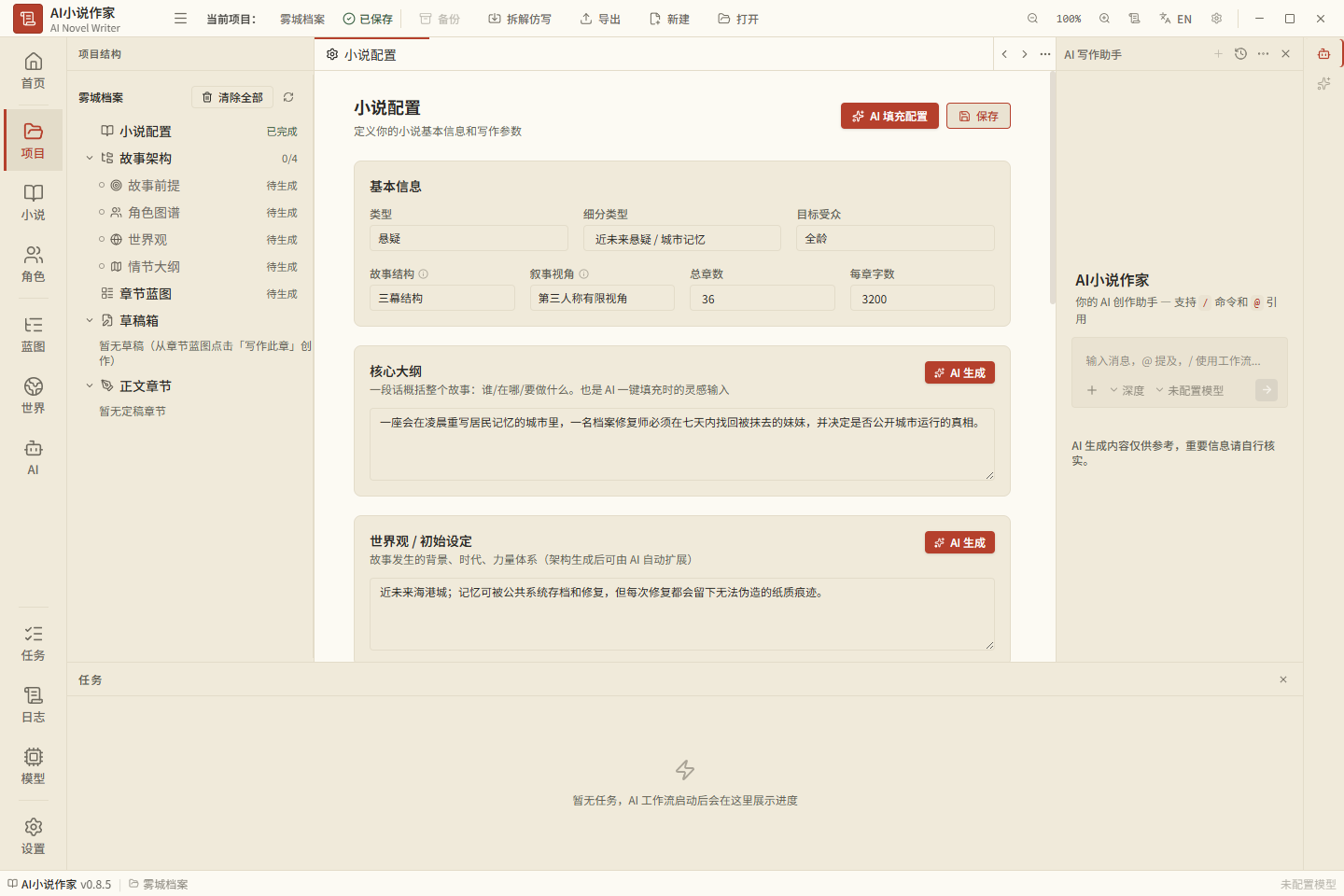
Core Capabilities
| Capability | Description |
|---|---|
| Structured pipeline | Organizes assets by stage: premise, characters, world, blueprints, drafts, proofread, revision, finalization. |
| Chapter-level generation | Context built from current blueprint and related material, reducing cross-chapter drift. |
| Failure recovery | Failed chapters with visible text are saved as recovery candidates; not formal drafts, invalidated by blueprint/draft changes, discardable. |
| Proofread & revision | Structured proofreading info for drafts, report used as revision input. |
| Character cards & project data | Manages characters, world, blueprints, drafts, finalized text; session isolation prevents stale writes. |
| Plot tree & threads | Main/subplot progress on chapter track; read-only rebuildable snapshot, never overrides author facts. |
| Writing Skills & templates | Bind methods per stage, customize EN/CN guidance; language/structure/protocols guarded by hidden contract. |
| Style control | Finalization doesn't auto-rewrite style config; manual edit or run style analysis / import novel for imitation guide. |
| References & knowledge base | Import common formats; without embedding, SQLite FTS full-text search available. |
| Batch tasks | 1–10 chapters, pause/cancel supported; post-processing failure stops remaining chapters. |
| EN/CN UI | First launch follows system language; manual choice persisted. |
When generating a plot outline, you can specify the chapter range in "AI Architecture Generation"; projects over 20 chapters default to chapters 1–20. After a batch, continue from the next chapter; if interrupted with a valid checkpoint, resume from it. If you modified the original outline or source settings, the old checkpoint won't connect to new content—regenerate the range.
Model Config
Two protocols supported:
- OpenAI-compatible: Works with OpenAI, DeepSeek, Ollama, NovelAI presets, and other Chat Completions-compatible services.
- Gemini native protocol: Works with Google Gemini-compatible endpoints.
"Custom API" means customizing the endpoint address, model ID, and credentials within the protocols above; it is not an arbitrary HTTP protocol or executable script editor. Anthropic, Azure, KoboldAI native, and other interfaces need dedicated adapters — URL swapping alone cannot guarantee compatibility.
Ollama
Recommended: connect via Ollama's OpenAI-compatible service:
Provider:  Ollama(本地)或自定义
Protocol:  OpenAI-compatible
Base URL:  http://127.0.0.1:11434/v1
API Key:   可留空;若界面要求,可填任意本地占位值
Model:     你的 Ollama 模型名,例如 qwen3:14b
Use /v1 for embedding models too. Do not set the Base URL to http://127.0.0.1:11434/api: /api is Ollama's native path, not the OpenAI-compatible embedding path this app uses.
NovelAI (Minimal Compatibility)
Select the NovelAI preset in Settings; the default address is https://text.novelai.net/oa with the OpenAI-compatible protocol. Use your own Persistent API Token and fill in the model ID per your account's available models.
This project applies minimal parameter compatibility for this preset: it does not send a standard response_format, and thinking parameters use its compatibility branch. Since maintainers don't have a user's NovelAI Token, the full creative flow hasn't been verified on a real account; for account permissions, model names, or interface differences, refer to NovelAI's official documentation.
Data, Privacy & Boundaries
| Data or Behavior | Default Location / Destination |
|---|---|
| Novel projects, characters, blueprints, drafts, and finalized works | Your project directory and local SQLite database. |
| Recovery candidates from failed generations | Stored only in the current project's local SQLite database; they do not automatically become drafts, finalized works, or continuity facts. |
| Imported reference materials | Kept within the local project scope unless you send the content to a cloud model yourself. |
| Local model requests | Sent to the local or LAN inference service you configure. |
| Cloud model requests | When you select OpenAI, DeepSeek, Gemini, or another cloud endpoint, prompts and context are sent to that provider. |
| Model configuration & API keys | Currently stored in the local user directory ~/.vela/models.json; protect your operating system account and do not share this file. |
| App preferences & update deferral settings | Stored in ~/.vela/config.json. |
The app provides no model accounts, cloud services, or push notifications. Update checks only read public GitHub Releases; you can check manually or defer reminders.
Install & Update
Windows x64
The official release uses a Windows NSIS installer:
ai-novel-writer-setup-<版本号>.exe
- Download official installers only from GitHub Releases.
- The installer updates the app and should not delete projects, character cards, or settings; still back up important works before upgrading.
- After install, use "Check for Updates" on the welcome page; the app also checks once daily. When an update is found, a prompt appears first; download starts only after you click "Download Update"; upon completion you choose "Restart Now / Later".
- Older portable ZIPs cannot self-update to the first updater version; install the official installer manually once. New portable ZIPs will no longer be maintained.
The current installer has not yet been code-signed. Windows may display publisher or reputation warnings; please confirm that the download page belongs to this project's official GitHub Release before continuing.
macOS (Apple Silicon & Intel)
Download the installer corresponding to your Mac's architecture from GitHub Releases:
ai-novel-writer-mac-arm64-<版本号>-installer.dmg
ai-novel-writer-mac-x64-<版本号>-installer.dmg
arm64is for Apple Silicon Macs (M1, M2, M3, M4, etc.);x64is for Intel Macs.- After dragging the app from the DMG into the "Applications" folder, launch it. The app can check for the latest official GitHub release and display a reminder, but it will not download or replace the application within macOS; the update action only opens the official Release page, and the user must manually download the subsequent version for the corresponding architecture.
- Both installers are ad-hoc signed and neither uses Developer ID signing or notarization. If Gatekeeper prevents opening, confirm the source is this project's official GitHub Release, then in Finder hold Control and click the app and select "Open", or allow it in "System Settings → Privacy & Security".
Limitations
- We do not guarantee that any third-party API can be connected with just a URL and key; only the behavior within implemented protocols and presets is guaranteed.
- Does not replace the author's creativity, fact-checking, or copyright judgment; AI output requires author review.
- No online publishing, reading community, or cloud model accounts are provided.
- Official installers are built in the cloud by GitHub Actions; Windows, macOS ARM64, and macOS x64 will each pass eligibility checks before being included in the same GitHub Release.
Dev & Architecture Docs
For the documentation authority hierarchy, ADRs, research, Agent rules, and task handoff entry points, see docs/README.md. The DeepSeek Harness plugin has its own plugin documentation and does not serve as a source for desktop version behavior.
License
Compatibility
Versions
| Latest version | Published | Size |
|---|---|---|
| 0.1.0 | — | — |
Comments
Loading…
Similar plugins
by watersxya
AI 编译纯文本小说工作台 for DSH:大纲导入、道藏/大世界设定、卷与章节规划、逐章 AI 生成 3000-4000 字、九维审稿、全书质检、全本导出。AI novel writing workbench (text-only).
★ 4
↓ 268/wk
Apache-2.0
TypeScript
Oct 17, 2026
dsh plugin --profile web add @waterwx/dsh-novel-forgeby shiyan688
禁AI腔清单能让模型不像 AI,这个工作台让它像你:标好/坏段落 → 压成写作规律(只有规律进写稿上下文)→ 开新章(方向/候选/选段/合并定稿)→ 批注式微调(只改你标过的段,逐字核对)→ 张力曲线与账目体检。dsh 插件,775 条断言。
★ 10
↓ 362/wk
MIT
JavaScript
Oct 23, 2026
dsh plugin --profile web add dsh-novel-craftby siweina
给网文作者的本地章节体检:16 个工具做句式/情感/风格基线分析,24MB 模型本地跑、零 API 花费、不上传正文。DSH / DeepSeek Harness 插件。Local novel-writing assistant for DSH: on-device sentence/emotion/style-baseline analysis, zero token cost.
★ 24
↓ 704/wk
MIT
JavaScript
Oct 29, 2026
dsh plugin --profile web add dsh-novel-writerby peterwangze
DSH (DeepSeek Harness) 自动化小说写作发布流水线插件:claude-writing-workflow 迁移版 agent 预设 + 小说工作台(可视化/实时渲染/章节编辑)+ 多平台发布配置与数据驱动优化闭环
★ 8
NOASSERTION
JavaScript
Oct 22, 2026
dsh plugin --profile web add dsh-novel-writingby akira399
大肥鱼的小说工坊 — DSH 网络小说创作插件:九阶段门禁式创作流程 + 世界书设定注入 + 本地书籍导入 + AI 一键润色 + 去AI味 + 黄金三章诊断 + 百万字一致性 + 市场调研与模板复制。
★ 103
MIT
TypeScript
Oct 6, 2026
dsh plugin --profile web add @dsh-external/dsh-novel-writerby micellince
长篇中文小说工作台:章节/时间线/事实账本/伏笔/冲突/人物/高光/审稿/提案/对齐/9 Agent 分工/名家风格预设,AI 可直接生成与审稿。
★ 4
MIT
JavaScript
Oct 27, 2026
dsh plugin --profile web add dsh-long-novel-workbench