

dsh-plugin-ideas-manager
Manifest validCapture ideas, anywhere: the Ideas manager brings an idea backlog straight into the DSH Web GUI.
dsh-plugin-ideas-manager
The Ideas manager brings an idea backlog straight into the DSH Web GUI. It's
a generic, self-contained backlog: an AI agent captures ideas, each one becomes a
card on a kanban, gets scored and ranked, flows through a lifecycle, and can be
run as a real execution with one click. It also bridges to the
TaskBoard plugin
(@linxin666/dsh-client-ui-task-board,
by linxin666 — third-party, not affiliated) when present.
A Host-authoritative /api/ideas ledger keeps everything consistent and lets an
agent write cards directly over HTTP — no UI needed. Fully usable without
TaskBoard: zero hard dependency on it.
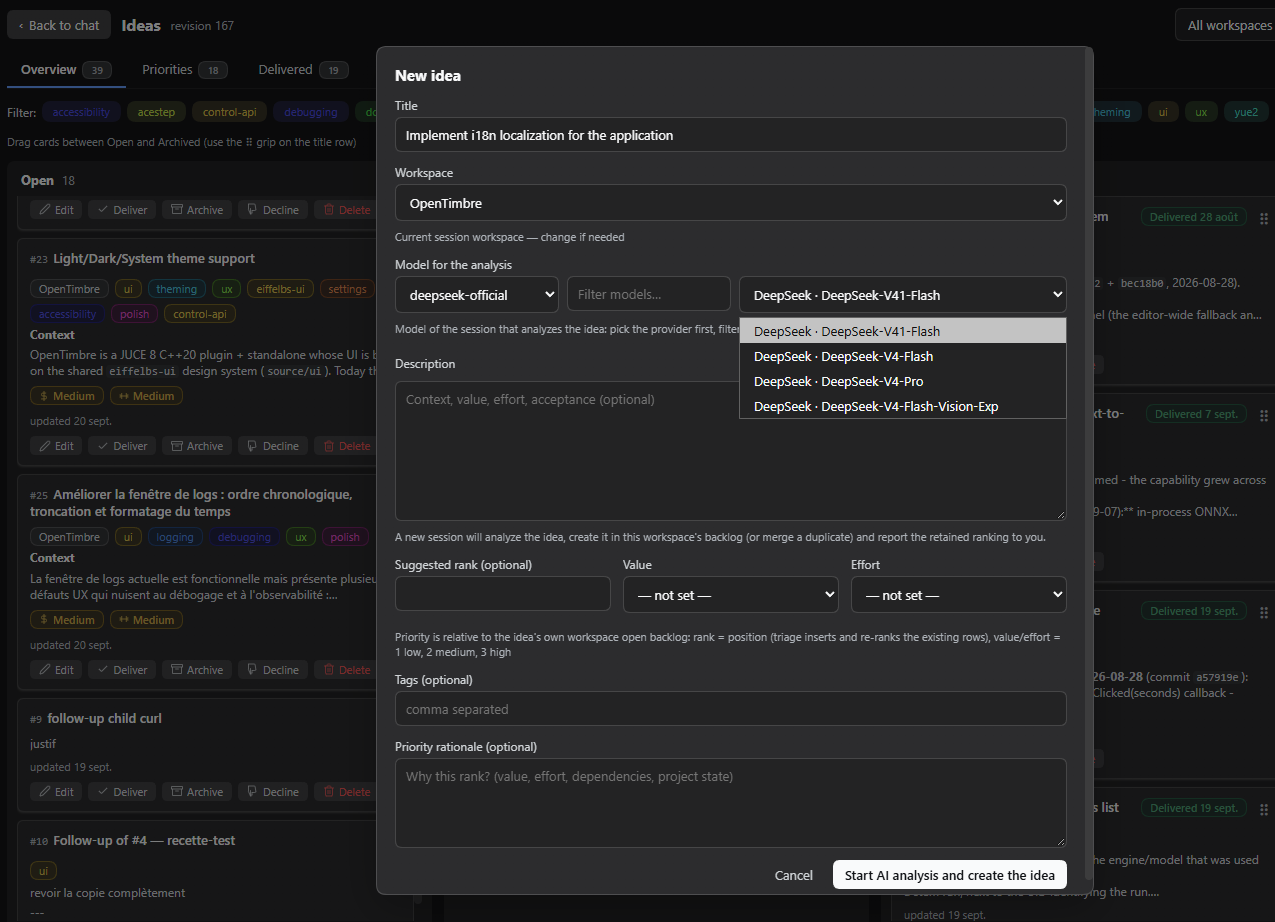
What it does for you
Capture ideas, anywhere
- A panel row beside Task Board and Plugins (under New Session) opens the board, and switching to another panel closes it like every other one.
- Capture an idea with the New idea button or the quick-add row at the top of the Open column — a Title is the only required field.
- Optional description (markdown), tags, workspace and a Suggested rank.
- The AI capture button opens a session that analyzes the draft, creates/merges the idea in the backlog, and reports the retained ranking.
A 4-column kanban
Open · Under review · Archived · Declined.
- Drag & drop moves cards between columns and reorders them; the columns auto-scroll when you drag toward an edge.
- Search and a conjunctive tag filter narrow the whole board — all three tabs (Overview columns, Priorities ranking, Delivered log) share both filters.
- Click a card title or its description to open the editor (raw text or rendered markdown). It edits the whole body, fetched on demand, and is titled with the card number it is editing.
- Every card shows its stable
#Nnumber, workspace chip, tags, value/effort badges and update date.
Scoring & ranking
- Each idea carries Value and Effort (low / medium / high), shown as color-coded badges.
- The Suggested rank is the position in the open backlog of its workspace; entering one re-ranks that backlog (existing rows shift).
- A dedicated Priorities tab ranks the open ideas per workspace, with ↑/↓ buttons and drag & drop to re-rank.
The lifecycle
- Deliver ✓ archives the idea with a green Delivered {date} stamp.
- Under review is the review gate: finished work lands there, and each card offers Approve (deliver), Follow-up needed (creates a linked open child plus a justification, archives the parent) and Decline.
- A Task failed badge marks an idea whose execution failed. It deliberately stays in the backlog — a failed run delivered nothing, so there is nothing to review — and you retry or adjust the idea. The badge follows the last status observed and clears itself when the task is retried.
- The Delivered tab shows the exit log (delivered vs. manually archived).
- Restore, archive and delete are one click away on each card.
Run an idea
An open idea that has a workspace and no run in flight offers a Launch execution button — on the card, and in the editor. The editor matters: it is the surface you reach from the Priorities and Delivered tabs, so you never have to hunt the card back in the Overview to start a run.
- Click Launch execution, pick a model (or keep the session default) and confirm. DSH tells you which of the two ways it will run before you commit.
- With the TaskBoard plugin installed, the run goes through that idea's board card. Without it, DSH opens a brand-new chat session in the idea's workspace instead. Either way you get a real execution, and the board needs no extra plugin for the feature to work.
- The run happens in the background: closing the tab, or restarting the web instance, does not lose it and DSH keeps watching it for you.
- While it runs, the card shows a blue Running pill and an Open session link — one click lands you in the execution, which is the only way to watch a session DSH started on your behalf. The same pills now ride the Priorities and Delivered rows too, in the row's top-right corner exactly like on the card, so the "is this one already being worked on?" answer is available on the list you actually read, without opening the card.
- When it finishes, the idea moves to Under review for your verdict. If it failed, it stays in the backlog behind the Task failed badge.
A run takes a while, and the board reflects the result within roughly half a minute of the session finishing.
A direct session inherits your normal DSH permissions. TaskBoard's own run options (such as a confirmation prompt) are not applied to it.
Workspaces
- A header selector scopes the board to one workspace (or all / none).
- New ideas default to the current session's workspace when not scoped.
- The New/Edit modal carries a workspace field, so a capture lands in the right place and an idea can be moved to another workspace.
Settings
The plugin contributes an Ideas board section to the DSH Settings modal:
- Visible tag-filter lines (
tagRows, 1–5, default 3): how many rows of tags the board shows under the tabs before the zone scrolls. The sticky header (label + search + clear) always stays visible. Applied immediately, stored per DSH profile. - Interface language (
language, defaultauto): the panel's own language, independent of the DSH shell setting.autofollows the shell, anden/fr/zhpin the panel to one dictionary. Applied immediately. Dictionaries: English (default fallback), French, Simplified Chinese. - Open column order (
openOrdering, defaultcreatedAt): how the Overview's Open column is laid out.createdAtshows the oldest idea first,createdAtDescthe newest first, andrankthe ranking you set by hand. - Show running ideas at the top (
runningFirst, on by default): floats the ideas whose run is in flight above whichever of the three orders is selected, without changing that order. A failed run keeps its red tag but stays where the selected order puts it.
Both are a view only — neither stores anything, so the 2.5 s poll can never
overwrite the ranking you chose, and the move arrows in the Priorities tab still
write the rank you edit there. While either one reorders the Open column, its drag
grip is off (the position you see is not the rank you would be writing); the card
buttons still move an idea to another column, and choosing rank with the float
off brings the grip back. The Priorities tab always stays on the stored rank —
it prints a position number and its arrows write one rank step.
Deployments without a settings service keep the defaults; the board never depends on the settings surface. Options are stored per DSH profile and never leave your machine.
TaskBoard integration
When the TaskBoard plugin
(@linxin666/dsh-client-ui-task-board,
repo: zhu1090093659/dsh-web) is
present, the Ideas manager mirrors its ledger onto TaskBoard's backlog so
both tools stay in sync — one-way (Ideas → TaskBoard). If TaskBoard is
absent, the Ideas manager simply works standalone.
| Ideas action | TaskBoard mirror |
|---|---|
| Create idea | New read-only card in backlog (bound to the idea) |
| Update idea | Card updated |
| Decline / drag to Archived | Card archived |
| Restore | Card restored |
| Delete | No-op (closing to done stays manual) |
| Launch execution | The card runs it |
The run reaches done | Idea auto-moves to Under review (the review gate) |
Triage (scores, rationale, rank) is ideas-only and is never mirrored — it's a backlog opinion, not a board state. After a run, the card's content is frozen, so later edits to the idea no longer replicate to it.
Host compatibility
- Requires Host >= 0.1.5 (see
dsh.engines.dshinpackage.json). - The settings section, the board and both execution backends work on current hosts; older combinations degrade rather than break (for example, a very old TaskBoard without a run action simply means runs are started as sessions, or no Launch button is offered at all when neither route is available).
Install & update
From npm (recommended):
dsh plugin --profile web add dsh-plugin-ideas-manager
Pinned to a version:
dsh plugin --profile web add dsh-plugin-ideas-manager@0.7.0
From a local checkout (no registry needed):
dsh plugin --profile web add link:/path/to/dsh-plugin-ideas-manager
From a git URL (fallback, pinned to a released tag):
dsh plugin --profile web add github:EiffelBS/dsh-plugin-ideas-manager#v0.7.0
dsh plugin runs pnpm add in the profile directory, then reconciles
dsh.profile.bundles: because this package declares a dsh.bundle, it is
auto-appended as a profile layer. Restart the web instance (or open a fresh page
session) for the bundle change to take effect.
Verify installation:
dsh web --profile web --no-open # then look for the Ideas entry in the sidebar
To pick up a newer revision after a release:
dsh plugin --profile web add dsh-plugin-ideas-manager@latest
then restart the web instance.
Uninstall / disable:
dsh plugin --profile web remove dsh-plugin-ideas-manager
For agents and integrators
The board is one HTTP surface away. Scripts and agents can read the state and write ideas without any UI:
| Route | Purpose |
|---|---|
GET /api/ideas/state | Full snapshot of the board |
GET /api/ideas/state?view=summary | Bounded reads: filters, pagination, selected fields, body-byte caps |
GET /api/ideas/idea?id=<id> | One complete idea |
POST /api/ideas/action | create, update, move, decline, deliver, followUp, triage, restore, delete, reanalyze, reorder, import, export |
POST /api/ideas/launch | Start an idea's execution { ideaId, model? } |
GET /api/ideas/events | Server-sent change notifications |
Actions are deduplicated by requestId (fresh id per call). The routes sit
behind a same-origin fence (loopback socket or browser).
SKILL.md— the full wire contract: verb table, read-query fields, mirror mapping, PowerShell gotchas.docs/agent-write-channel.md— the write channel in depth, including the launch route.docs/architecture.md— how the plugin is built (ledger, mirror, execution backends, performance work).CHANGELOG.md— what changed in each release.
Development
pnpm run typecheck   # tsc --noEmit
pnpm test            # vitest
pnpm run build       # types -> lib/types, bundles -> lib/index.js + lib/client.js
The browser half is served at /plugins/<id>/client.js (re-resolved per
request); the host half registers the /api/ideas routes at boot. Data lives in
~/.dsh/ideas/ledger-v2.json.
Maintainers: this README describes what an installed user sees — keep it user-facing (no internal issue numbers, no design archaeology) and update it with the user-visible changes on every release. Implementation detail belongs in
docs/. The release gesture is: write theCHANGELOG.mdentry, bumpversion, tag — the GitHub Release body is that changelog section, so the two always tell the same story.
License
MIT — see LICENSE.
Comments
Loading…
Similar plugins
by LSAI2023
dsh-ide-context — DeepSeek Harness bundle: inject your IDE's open files and current selection into each turn (IntelliJ IDEA & VS Code).
★ 0
MIT
TypeScript
Aug 16, 2026
dsh plugin --profile web add @deepseek-ai/dsh-ide-contextby ly028716
Intelligent memory system for DSH - Track user preferences, tool usage, and project context to provide personalized recommendations
★ 0
MIT
JavaScript
Sep 28, 2026
dsh plugin --profile web add @ly028716/dsh-memory-pluginby winyh
dsh-idea 是一个面向外部机会、市场变化和真实需求发现的 DeepSeek Harness 插件包。 dsh-idea is a DeepSeek Harness bundle for evidence-backed external opportunity discovery and product discovery.
★ 0
MIT
TypeScript
Sep 22, 2026
dsh plugin --profile web add dsh-ideaby BertramWang12399
Project mode plugin for DSH Web GUI: sidebar entry, full-screen project manager, live per-project context injection (instructions + refreshable memory), session badge
★ 7
MIT
JavaScript
Sep 3, 2026
dsh plugin --profile web add dsh-projects-modeby relaxyabc
一个类似 intellij-idea 中 Git 插件UI 的 dsh git 插件
★ 0
MIT
JavaScript
Sep 29, 2026
dsh plugin --profile web add github:relaxyabc/dsh-GitPanelby yuioi666
Model Capability Manager for DSH Web: thinking levels, context window, output caps, input modalities, gateway compat presets, EN/中文 UI.
★ 7
↓ 408/wk
MIT
JavaScript
Sep 27, 2026
dsh plugin --profile web add dsh-plugin-model-capability