
dsh-zoteroplugin
Manifest validZotero plugin for DeepSeek Harness: browse and search your library, read PDFs with annotations and highlights in a right-sidebar tab, export BibTeX and RIS citations, and drive the same actions throug

DSH Zotero Plugin
English | 简体中文






A standalone Zotero plugin for DeepSeek Harness (DSH). It adds a right-sidebar tab in DSH for browsing and working with your local Zotero library — search, item details, a PDF reader with annotations and highlights, citations — and exposes 19 agent tools so the chat assistant can do the same on your behalf.
Features
- Library browsing — personal and group libraries, collection tree, saved searches, sorting and pagination.
- Search — metadata (
titleCreatorYear) and full-text (everything) modes, tag filters, ranked results. - Item details — creators, fields, abstract, tags, child notes (sanitized), attachments, and PDF annotations with page jumps.
- PDF reader — rendered in the sidebar with page navigation, zoom, page labels, user annotations, and agent highlights overlaid in the same layer; select text to quote it into the chat as a citation.
- Chat integration — Add to chat inserts a compact reference chip (one chip per selection, e.g. "3 Zotero items") into the current draft without sending it; the full structured text is expanded at send time, so the model still receives titles, creators and PDF keys. Ask submits a question about the selected item. Both use DSH's official session input interface and fall back to plain text when the host lacks it.
- Bibliography export — BibTeX and RIS via Zotero's own exporter,
downloadable in the browser or written to the workspace as
.bib. - Metadata import — create items from a DOI or arXiv identifier (fetched from doi.org / arXiv after approval), with optional PDF download.
- Deep links — open items in Zotero or jump to a PDF page via
zotero://links (server-constructed, platform allow-listed commands). - UI languages — Simplified Chinese and English, following the DSH host language.
Screenshots
Real captures from DSH Desktop 0.2.2 with the plugin installed — light and dark themes, no mockups.
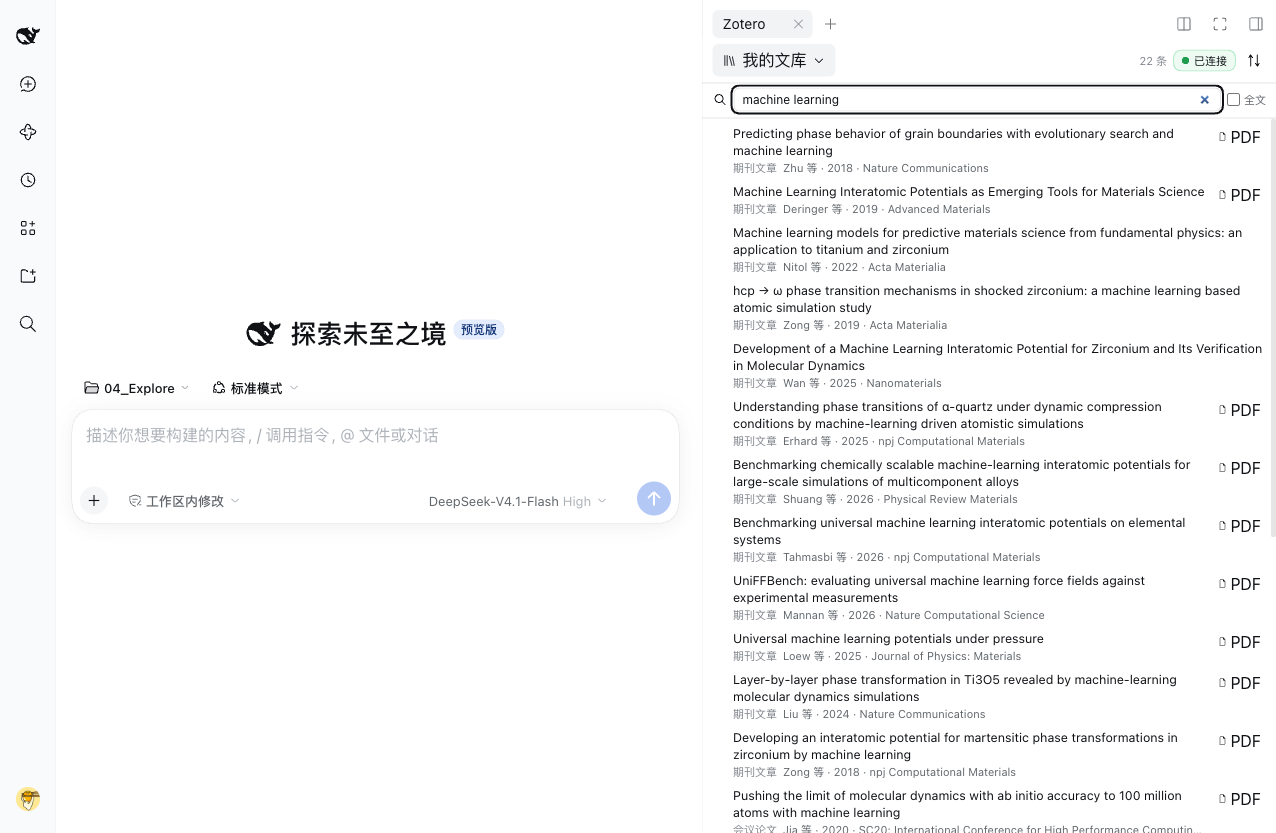 Search metadata or full text from the right-sidebar tab; the tab bar shows the Zotero connection status.
 Ask the assistant to open a paper and highlight a passage — the quote lands in the PDF reader as a session highlight next to the chat.
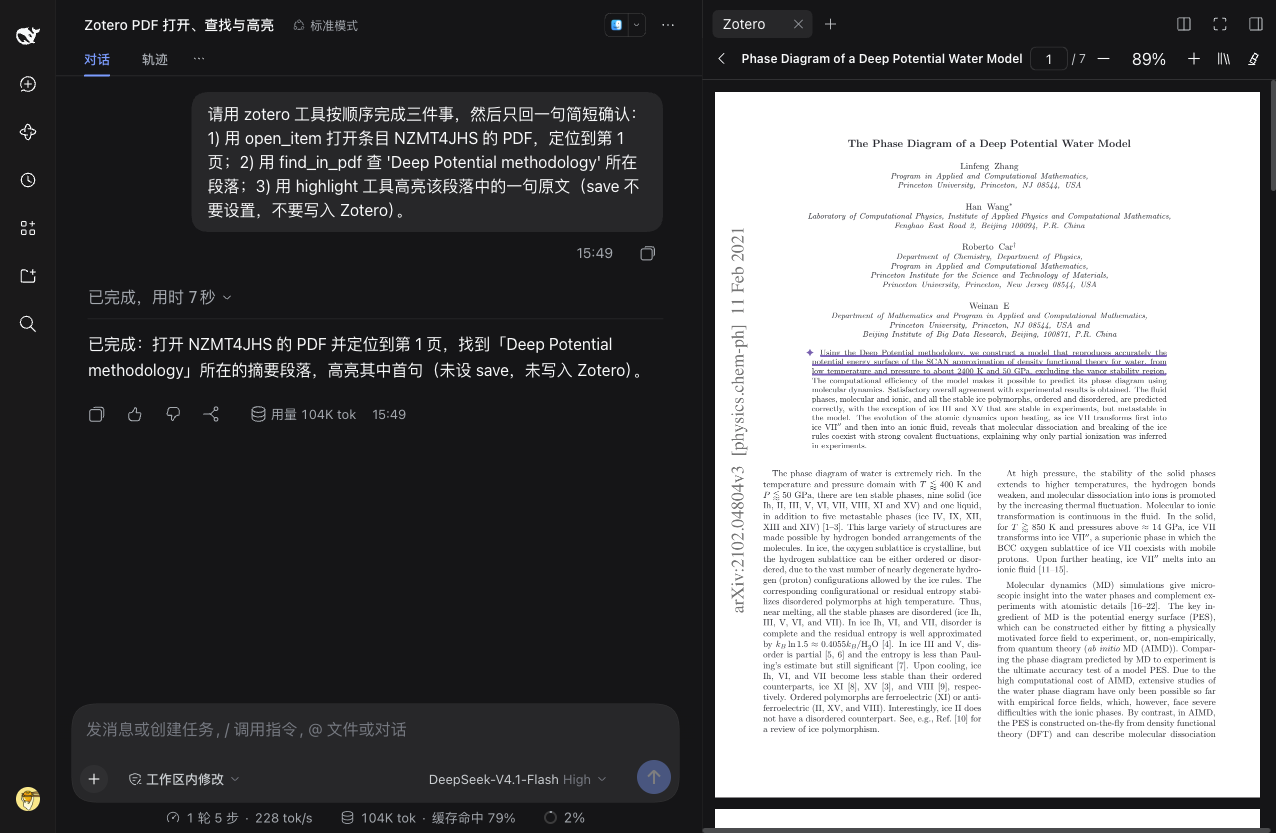 The same reader with the DSH dark theme; highlights, annotations, and page controls stay in place.
Requirements
- DSH Desktop
>=0.2.1-rc.1 <0.3.0-0 - Zotero 10 or later, with the local API enabled (see Quick Start)
- The plugin is designed to be cross-platform; only macOS has been verified on real hardware so far (see Verification Status).
Installation
From npm (recommended):
dsh plugin --profile desktop add @hanxu131/dsh-zotero
From a local checkout (symlink install; the mapping lives in cordis.patch.yml):
dsh plugin --profile desktop add link:/path/to/dsh-zoteroplugin
After installing, fully quit DSH and start it again so the plugin's host half (agent tools and routes) is loaded. Uninstall or disable it from the DSH plugin management page.
Quick Start
- In Zotero, open Settings → Advanced and enable "Allow other applications on this computer to communicate with Zotero". Keep Zotero running.
- Install the plugin as shown above, then fully quit and restart DSH.
- In DSH, open the right-panel guide page and click the Zotero library entry. The tab shows the connection status first; if Zotero is not reachable, it walks you through the steps above.
- Browse, search, and read. Reads never modify your library. Agent-initiated writes go through two gates: a DSH approval prompt first, then Zotero's own authorization dialog on first use. Explicit write actions you take in the sidebar (such as saving highlights) skip the approval prompt but still pass through Zotero's authorization.
The UI language (中文 / English) follows the DSH host language.
Configuration
The plugin has a single setting:
| Setting | Default | Description |
|---|---|---|
localApiBaseUrl | http://127.0.0.1:23119 | Base URL of the Zotero local API. Loopback addresses only; other hosts are rejected. |
The default is set in cordis.patch.yml, which mounts the plugin into a DSH profile. There is nothing else to configure.
Agent Tools
19 tools are registered with the DSH agent. Read tools never change your library; view tools drive the sidebar UI; write tools require a DSH approval prompt and, on first use, Zotero's authorization dialog.
Read-only
| Tool | Description |
|---|---|
list_collections | List the collection tree and saved searches of a library. |
search_library | Search items (metadata or full-text mode) with tag filters, sorting, and pagination. |
get_item | Fetch full metadata of one item: creators, fields, abstract, tags, attachments, notes. |
search_annotations | Search the PDF annotations of an item by text or tag. |
cite | Format a citation (APA) or return a BibTeX entry. |
read_fulltext | Read a PDF's extracted text with page markers and a per-call character budget. |
find_in_pdf | Find a word or phrase in a PDF and report physical page, page label, and context. |
export_bib | Export BibTeX/RIS as text; optionally write a workspace-relative .bib file after approval. |
View (drive the sidebar UI)
| Tool | Description |
|---|---|
open_item | Open an item or its best PDF in the panel, optionally at a page or quote. |
show_items | Show a list of items in the panel. |
highlight | Highlight a quoted passage in the reader as a session highlight; save: true also writes it to Zotero (write approval). |
clear_highlights | Remove session highlights only. Never deletes annotations in Zotero. |
Write (DSH approval + Zotero authorization)
| Tool | Description |
|---|---|
save_highlights | Save session highlights as Zotero annotations. |
add_item | Create an item from structured fields or a DOI/arXiv identifier; optionally download and attach a PDF. Duplicate DOIs are detected. |
update_item | Update fields of an existing item. |
add_note | Add a child note to an item. |
create_collection | Create a collection. |
attach_pdf | Attach a PDF to an item from a local path, an SSRF-guarded URL, or inline bytes. |
authorize_writes | Request or verify Zotero write authorization. |
Security
- Loopback only. The Zotero base URL is validated to be a loopback address; the client never holds credentials and never talks to Zotero directly — all traffic flows through the plugin's authenticated host routes inside DSH.
- Two gates on agent writes. Agent-initiated writes require an explicit DSH approval prompt and then Zotero's own authorization dialog (see ADR 0003). Explicit UI actions in the sidebar skip the approval prompt but still pass through the same Zotero authorization.
- File safety. PDF paths come only from Zotero-resolved attachment
keys — the routes never accept arbitrary paths; symlink-swap races are
mitigated with double resolution plus
realpathcomparison, and files are validated (%PDF-magic, size cap) and read in chunks.export_bibcan only write workspace-relative.bibfiles; absolute paths,..segments, and symlink escapes are rejected. - SSRF guard. External downloads (DOI/arXiv metadata, PDF URLs) allow only public http(s) URLs; DNS results are classified per-address and loopback/private/link-local ranges are rejected before connecting, with per-hop re-checks on redirects plus size, timeout, and file-magic limits.
Verification Status
Honest summary; the full development and acceptance log (in Chinese) is in docs/development-status.md.
- Automated: the repository ships a vitest suite (fake Zotero HTTP
server, injected filesystem/spawn/network seams) plus a smoke script;
npm run verifyruns typecheck, tests, build, and smoke together. - Verified on real hardware (read-only): macOS with DSH Desktop 0.2.1-rc.5 — library browsing (803 items), search, item details, PDF rendering, and draft insertion were exercised against a real Zotero library without writing to it.
- Automated coverage only, not yet exercised on real hardware: real
Zotero writes and the authorization dialog, an actual Ask send, live
DOI/arXiv imports,
zotero://deep links, real workspace export, and write-upload endpoints. - Windows/Linux: not verified on real machines.
Development
Requires Node ^22.19.0 || >=24.
npm install
npm run verify     # typecheck && test && build && smoke
npm run watch      # incremental client-side bundle build
Individual steps: npm run typecheck, npm run test, npm run build,
npm run smoke.
Documentation
| Document | Contents |
|---|---|
| docs/implementation-spec.md | Full implementation spec: feature list, DSH/Zotero contracts, test seams, milestone acceptance matrix, non-goals. |
| docs/adr/ | Three architecture decisions: local API + Zotero 10 (0001), two-half plugin + webServer + single right tab (0002), differentiated write approval (0003). |
| docs/development-status.md | Detailed development record: implementation notes, milestone log, real-machine acceptance status, load-contract and troubleshooting notes (Chinese). |
| THIRD_PARTY_NOTICES.md | Apache-2.0 notices and third-party material registry. |
Troubleshooting
- The tab loads but shows "cannot reach the plugin host routes": the host half needs the plugin to be reloaded — fully restart DSH.
- Connection status says Zotero is unreachable: make sure Zotero 10+ is running and the local API setting (Quick Start step 1) is enabled.
node scripts/probe-desktop.mjs [port]is a read-only diagnostic that checks the running Desktop's/dsh-zotero/health,/status, and bundle URLs (loopback GET requests only).
License
Apache-2.0. Parts of the data layer and metadata import were
ported and adapted from the official ZCode Zotero plugin
(zai-org/zcode-plugins
ui-plugins/zotero, Apache-2.0, modifications noted); the rest is original.
See THIRD_PARTY_NOTICES.md for details.
Comments
Loading…
Similar plugins
by Hongcheng-LI
Zotero tools for DeepSeek Harness: search library, read metadata/fulltext, list attachments, download PDFs, manage notes via the Zotero local API
★ 27
↓ 3.1k/wk
MIT
TypeScript
Nov 5, 2026
dsh plugin --profile web add dsh-zoteroby 520limited
DeepSeek Harness plugin: sync conversation documents (Markdown/PDF/Office) into your local Zotero library via its built-in connector. No API key, no Zotero add-on.
★ 0
MIT
JavaScript
Oct 30, 2026
dsh plugin --profile web add dsh-zotero-syncby 1-CellBio
DeepSeek Harness plugin: turn research PDFs into a citable OKF markdown library, with full-text & semantic search, knowledge graph, and survey writing.
★ 4
↓ 211/wk
TypeScript
Aug 21, 2026
dsh plugin --profile web add dsh-okfby Aik358
DSH Literature 文献侧窗插件:在 DeepSeek Harness 侧边栏识别 DOI/arXiv/标题、抓取元数据与全文、写入本地文献库或导出目录,内置 PDF 阅读器。
★ 8
↓ 468/wk
MIT
JavaScript
Sep 16, 2026
dsh plugin --profile web add @a9i5k4/dsh-literatureby poco-ai
给 DeepSeek Harness 用的科研文献库插件:搜论文、带出处、审批入库、把笔记线索交给同会话其他插件。Academic research library for DSH — search, cite, approve imports, hand off notes.
★ 232
↓ 348/wk
TypeScript
Nov 12, 2026
dsh plugin --profile web add @poco-ai/agentero-dshby Vncntvx
Zotero toolkit for DeepSeek harness; Turn your Zotero library into an evidence store for agents.
★ 80
↓ 2.5k/wk
MIT
TypeScript
Nov 17, 2026
dsh plugin --profile web add dsh-zotero