
dsh-genshin-lisa-notice
Manifest validPlays a voice alert and a browser notification when a turn finishes, asks for input, or fails, and can push the same summary to a Feishu bot webhook as a card.
dsh-genshin-lisa-notice
DeepSeek Harness 插件:每次执行完成播放音频提醒,内置多款原神角色语音;agent 向你提问、等待输入时也会提醒。
A DeepSeek Harness plugin that plays an audio alert when an execution completes — or when the agent asks for your input, with a built-in library of Genshin Impact character voices.
关于名字 / About the name
插件名叫 dsh-genshin-lisa-notice(即 lisa-notice)。最初只是想用原神·丽莎的语音做个单纯的"执行完成提醒",所以按角色名(Lisa)起了名。后来一个版本一个版本地迭代,功能越来越多:加了交互提醒、配置文件、下拉选择内置语音库、自定义音频上传……但懒得改名字了,就一直沿用至今。名字里的 lisa 更多是个"起源彩蛋",并不代表现在只支持丽莎这一个语音。
The package is named dsh-genshin-lisa-notice (i.e. lisa-notice). It started as a plain "execution-complete reminder" using Genshin Impact Lisa's voice, named after that character. Over many releases the scope grew — interaction alerts, a settings page, a built-in voice library with a dropdown, custom audio upload — but the name stuck because renaming it was never worth the churn. The lisa in the name is now more of an origin easter egg than a statement that only Lisa's voice is supported.
功能 / Features
- 任意会话的执行完成(回合即将关闭)时,在浏览器中播放一次音频提醒,并发送浏览器系统通知(含任务完成摘要);可选飞书 webhook 推送
- agent 调用提问工具(
ask_user_question)向你请求输入时,同样播放提醒并发送通知(+ 飞书) - 模型故障也会提醒:请求失败导致回合报错时(欠费 / 鉴权失败 / 限流 429 / 服务端 5xx / 网络异常 / 超时),发送声音 + 系统通知 + 红色飞书卡片,并带上具体 HTTP 状态码、错误码与原始信息
- 声音 / 系统通知 两种方式默认开启,可在 插件 → dsh-genshin-lisa-notice 的配置卡片里分别用开关关闭;飞书通知默认关闭,需填 webhook 地址并开启
- 两种提醒可分别配置语音:内置语音库(完成默认"丽莎姐姐聊聊天"、交互默认"罗莎莉亚不加班",另有兹白·无须言语 / 罗莎莉亚·还不走吗 / 胡桃·晒太阳月亮歌 / 系统音效 1-3)在配置卡片里下拉选择,也可一键恢复默认,并支持试听
- 也支持上传自定义音频(显示原文件名),并可随时回退到内置语音
- 多次完成会合并为一次播放,避免刷屏
- 音频素材随包分发,无需外部路径依赖
- Plays an alert per completed execution (any session) and when the agent asks for your input, plus a browser system notification with the task summary, and an optional Feishu/Lark webhook push. Sound and system notification are on by default and each can be toggled; the Feishu push is off by default and needs a webhook URL. Completion and interaction voices are selectable separately from a built-in library (defaults: "丽莎姐姐聊聊天" / "罗莎莉亚不加班") via a dropdown, plus custom upload; the audio assets ship inside the package.
安装 / Install
已同时发布到 npm 与 GitHub,优先用 npm(预构建包,无需构建授权、升级更简单):
dsh plugin --profile web add dsh-genshin-lisa-notice
不想经过 npm 也可以从 GitHub 源码安装:
dsh plugin --profile web add github:EagleClark/dsh-genshin-lisa-notice
装完重启 dsh web,刷新页面生效(客户端 bundle 随启动图注入)。
升级到 0.10.0 之后(配置模型迁移到 dsh ≥ 0.1.7-rc.2 的 Config / configForms),需要重新执行一次上面的安装命令再重启——profile 里记录的是安装时的快照。
使用方法 / Usage
1. 触发提醒 —— 装好后无需任何操作,两种时刻会自动提醒:
- 🏁 执行完成:任意会话的回合结束,播放"完成提醒语音" + 系统通知 + 飞书(若开启)
- 💬 等待输入:agent 通过
ask_user_question向你提问时,播放"交互提醒语音" + 系统通知 + 飞书(若开启)
2. 配置通知 —— 打开侧边栏的 插件,在「已安装」里点开 dsh-genshin-lisa-notice,页面里的 Genshin通知提醒 就是配置卡片:
- 声音 / 系统通知 默认开启,飞书通知 默认关闭,各自一个开关可随时切换
- 完成/交互各一个下拉框,点开可选内置语音(显示友好名)
- 选「自定义音频…」可上传你自己的 mp3(之后显示原文件名)
- 飞书 Webhook 地址:填入飞书群自定义机器人的 webhook 并开启「飞书通知」,即可推送到群
- 飞书消息是交互卡片:顶部彩色标题条(完成绿色 / 提问橙色),任务与结果(或问题)分区展示并以分隔线隔开,底部注脚带插件名 · 会话号 · 时间;正文按 webhook 30KB 体积上限自适应,尽量保留完整内容(卡片被拒时会自动退回纯文本)
- 卡片使用 Card JSON 2.0(
schema: "2.0"),因此正文里的 markdown 表格会变成飞书的原生table组件:灰色表头、自适应列宽、每页 10 行分页、超长单元格省略可悬浮查看;#标题转粗体,源码里原有的代码块保持不变 - 单卡最多 5 个表格组件(第 6 个起回退为等宽代码块),整卡体积超 26KB 时先降级表格再按比例收缩文字,卡片被拒时自动退回纯文本
- 点 确认 保存并立即生效;取消 丢弃未确认的选择;恢复默认 一键回到内置默认
- 配置即时生效,无需重启
3. 听不到声音? 浏览器自动播放策略要求页面有过一次用户交互(点击/按键)。重启后第一次提醒若被拦截,点一下页面任意处后下次提醒即可正常出声。系统通知需在首次交互时允许浏览器通知权限。
配置 / Configuration
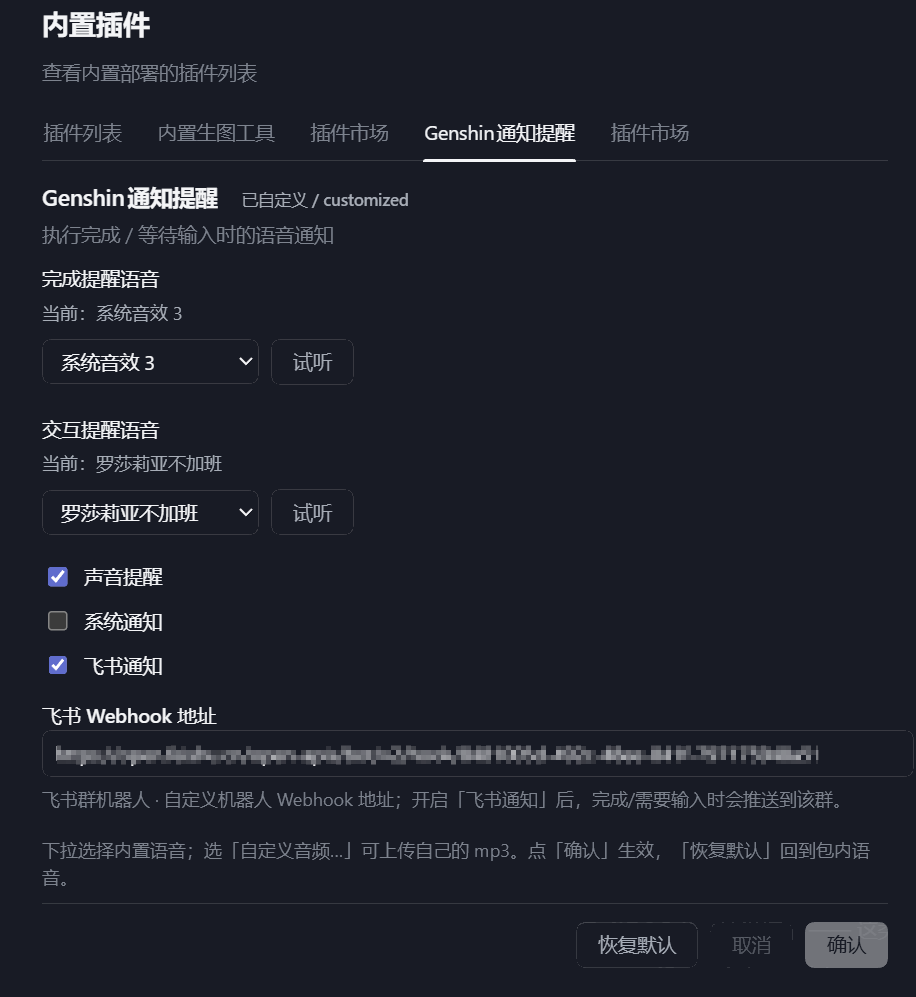
打开侧边栏的 插件,在「已安装」里点开 dsh-genshin-lisa-notice,页面里的 Genshin通知提醒 即配置卡片(见下方截图):
- 完成提醒语音(默认:丽莎姐姐聊聊天)/ 交互提醒语音(默认:罗莎莉亚不加班):各一个下拉框,内置语音为:
- 丽莎姐姐聊聊天
- 罗莎莉亚不加班
- 兹白·无须言语(附加)
- 罗莎莉亚·还不走吗(附加)
- 胡桃·晒太阳月亮歌(附加)
- 系统音效 1 / 系统音效 2 / 系统音效 3(附加)
- 每个下拉框旁的 试听 按钮可立即试听当前选择(未保存也能听:内置语音走
/voice.mp3,本地文件直接播放,无需先上传) - 下拉选「自定义音频…」上传自己的 mp3(显示原文件名)
- 通知开关:声音提醒 / 系统通知(默认开)、飞书通知(默认关)
- 飞书 Webhook 地址:填飞书群自定义机器人 webhook;开启「飞书通知」后,完成/需要输入时会推送到该群
- 「确认」生效并立即播放;「取消」丢弃未确认选择;「恢复默认」回包内默认
- 自定义上传文件保存在
$DSH_HOME/data/dsh-genshin-lisa-notice/ - 配置本身写进 该 profile 的
cordis.patch.yml($DSH_HOME/profiles/<profile>/cordis.patch.yml里dsh-genshin-lisa-notice行下的config:),与 dsh ≥ 0.1.7-rc.2 的插件配置模型一致
需要 dsh ≥ 0.1.7-rc.2:该版本用插件自身的 Config +
ctx.configForms取代了旧的settingsScope设置命名空间。旧版 dsh 上插件会因等待settingsScope而无法激活。
截图 / Screenshots
配置界面(插件 → dsh-genshin-lisa-notice 页内的 Genshin通知提醒 卡片;截图为旧版位置,内容一致):
更换音频 / Swap the audio
- 内置语音:把 mp3 放进
assets/(文件名即下拉选项的 key,-会显示为·;已知语音的友好名在lib/index.js的VOICE_LABELS里),重新提交/发布即可 - 只改本机:用上面的配置界面下拉选择内置语音或上传自定义音频,无需改包
工作原理 / How it works
| 端 | 职责 |
|---|---|
Host (lib/index.js) | 监听 agent/turn-stopping(执行完成)与 tools/pre-execute 中的 ask_user_question(提问分发时触发,早于提问 UI 出现);事件沿作用域链向上流动,根级插件可收到所有会话的事件。导出本插件自己的 Config(语音 key/路径 + 通知开关 + 飞书 webhook,全部 volatile(),写入即生效、无需重载)。通过 webServer 提供 /voices、/voice.mp3(单条内置语音,供试听)、/alert.mp3、/interaction.mp3(按配置读取对应音频)、/upload(存自定义 mp3)与 /poll(返回计数 + 完成摘要);在 agent/status idle 时取最后一条助手消息作摘要并发送飞书交互卡片 |
Client (client/client.js) | 每 700ms 轮询 /poll,分别对完成/交互:声音(每次播放新建 Audio 元素,反映最新配置)+ 浏览器系统通知(含摘要);受「声音/系统通知」开关控制。首个用户手势解锁自动播放、申请通知权限,被拦截的提醒在点击/按键时补播。通过 ctx.configForms 绑定本条目,并用 whileServed 把配置卡片注册到三个席位(新版 settings.plugins.tab 页 + plugins.bundle.config bundle 页,旧版 settings.plugin.item),内容为语音下拉 + 试听 + 自定义上传 + 三路通知开关 + 飞书 webhook + 恢复默认,写入按 settings 文档的 revision 栅栏提交 |
发布 / Publish
- ✅ 源码仓库:https://github.com/EagleClark/dsh-genshin-lisa-notice
- (可选)
npm publish发布到 npm(需先npm adduser登录) - 上架社区市场:向 awesome-dsh-plugin 提 PR,在列表加一条,收录后 dshmarket 即可一键安装
注意 / Notes
- 内置语音素材版权归原版权方所有;仅供个人使用,公开分发前请确认素材使用许可(本仓库不保证素材可再分发)。
- 浏览器自动播放策略要求页面有过用户交互,首次执行完成后即可听到声音。
Comments
Loading…
Similar plugins
Desktop and webhook alerts on macOS, Linux and Windows when an agent finishes a turn, errors, or waits for approval — zero-dependency native notifications (osascript / notify-send / PowerShell toast)
★ 2
↓ 695/wk
MIT
JavaScript
dsh plugin --profile web add dsh-notificationby kaixinbaba
Sound + popup when a task completes: a Web Audio chime, an in-page toast, and a system notification while the page is in the background (browser-only, cross-platform).
★ 3
↓ 286/wk
MIT
JavaScript
Aug 23, 2026
dsh plugin --profile web add dsh-complete-notifyby CAOGGL
Notifies you when a conversation finishes: plays a sound and shows a Windows notification when the agent goes idle (configurable sound file, volume, debounce/throttle).
★ 12
↓ 449/wk
MIT
JavaScript
Aug 21, 2026
dsh plugin --profile web add dsh-dingby yangyongzhen
Task-completion notifications via ServerChan / DingTalk / Feishu / generic webhooks.
★ 1
↓ 203/wk
TypeScript
Aug 14, 2026
dsh plugin --profile web add dsh-notifyby NattoCB
Adds a Settings card that pops a system notification and optional chime when a conversation turn completes.
★ 1
MIT
JavaScript
Aug 21, 2026
dsh plugin --profile web add dsh-plugin-notificationsby liujianqiao701
DSH web GUI plugin: a bottom-right reminder card when the agent is blocked waiting for your answer, plus a desktop notification and a flashing tab title when you are on another tab.
★ 0
MIT
JavaScript
Sep 24, 2026
dsh plugin --profile web add dsh-ask-notify