

dsh-date-model
Manifest validlol
dsh-date-model
A playful composer widget for the DeepSeek Harness Web UI. Pick two numbers, a "weather" tier and a date, and it builds a fake model name such as deepseek-v4.1-fog-1217 — then writes that name into the system prompt, so the assistant answers "who are you?" with it.
⚠️ Not a real model selector.
v4.1is just two numbers you rolled, the weather is a cosmetic tier, and the date is invented. It never changes the real model, its parameters, the context window, or billing. Use/model(or the eye toggle described below) for the real thing.
| DSH | >= 0.2.2-rc.5 < 0.3.0 (verified on 0.2.2-rc.5) |
| Platform | Web client (dsh.client.platform: web) |
| Package | dsh-date-model · Host row id date-model |
| License | MIT |
Screenshots
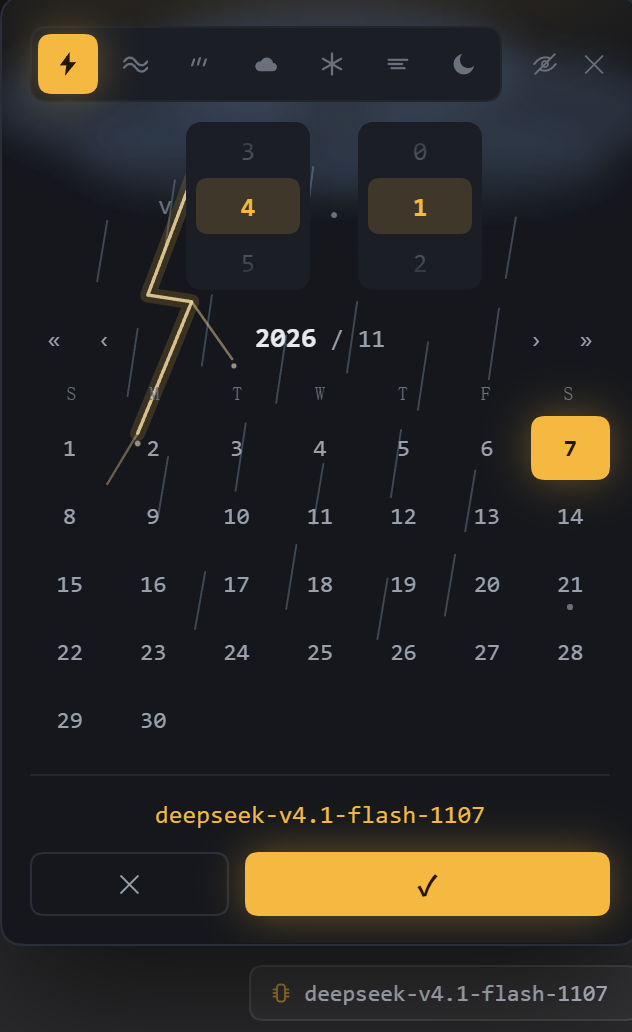
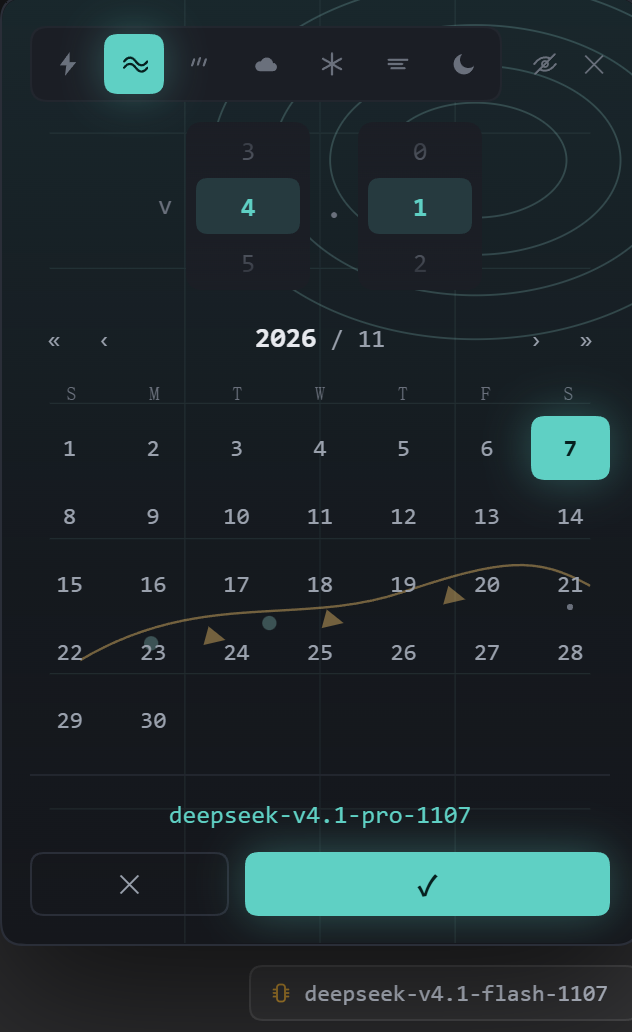
Both screenshots are from the current version: the eye button and the unbounded wheels are the ones described below.
Features
1. A model seat in the composer
The plugin registers into the composer's model seat slot (conversation.input.right). It shows a chip with the currently applied fake name, for example deepseek-v4.1-flash-1107.
- Click the chip → the panel opens above it.
- The real model selector is hidden while the chip is present, so the fake seat is the only model control you see. The eye toggle (feature 6) brings it back on demand.
- The chip keeps its own accent per weather tier, and its
aria-labelis the fake name for screen readers.
2. Two unbounded number wheels
The panel's top row is v + wheel + . + wheel.
- No 24/60 limit. The wheels are not a clock: any non-negative integer works, and there is no upper bound. Scroll down for a while and you will pass
23,59,477,1000… - Each wheel renders a 240-value window and silently re-centers when you approach its edge, so endless scrolling stays smooth.
- Scroll snapping, a highlighted center band and gradient fades make it feel like a native picker; clicking a number jumps straight to it.
- The values are stored as plain integers (0, 1, 2, …), not as a time of day.
3. Calendar
«/»change the year,‹/›change the month (years 1970–2100).- Click any day to select it; today is marked separately from the current selection.
- The selected month/day become the last four digits of the name:
MMDD.
4. Seven weather tiers (icon-only)
The top strip is a tier selector. It shows icons only, no text; each button carries its name in title and aria-label.
| Icon | Tier | Meaning |
|---|---|---|
| ⚡ | flash | thunderstorm (雷阵雨) |
| 🌤 | pro | weather chart — isobars and a front line (prognostic chart) |
| 🌧 | rain | rain |
| ☁️ | cloudy | clouds |
| ❄️ | snow | snow |
| 🌫 | fog | fog |
| 🌙 | clear | clear night |
5. Themes that recolor the whole panel
Selecting a tier repaints the entire panel: accent color, control highlights, and a background illustration drawn as an inline SVG (rain streaks and a lightning bolt for flash, concentric isobars plus a front with triangles for pro, and so on). The panel follows the app's light/dark theme automatically.
6. The eye toggle — show/hide the real model selector
The eye button sits in the panel header, left of the close button.
- Default: hidden. The real model seat is hidden (display only, with a marker attribute so it can be restored) so the composer shows a single model control.
- Click the eye → the real selector appears next to the chip; click again → it hides again.
- The state is remembered in
localStorage(dsh-date-model/reveal) and survives reloads. - Nothing is destroyed: disabling or uninstalling the plugin restores the real seat.
This is the intended way to compare the fake name against the real model, or to switch the real model through the UI without uninstalling.
7. Hover tooltip shows the real model name
Hovering the chip shows a native tooltip with the currently active real model (for example deepseek-account/deepseek-flash), not the fake name.
- It reads the text of the real model seat, which is the value the app itself displays.
- It stays live: switching the model with
/modelupdates the tooltip within a moment (the plugin watches that row's DOM and also polls every 2.5 s as a fallback). - If the seat text cannot be read, it falls back to the profile's configured default model, and finally to the fake name.
- The accessible name (
aria-label) stays the fake name; only the hover tooltip shows the real model.
8. The name goes into the system prompt
Pressing ✓ in the panel:
- saves the selection to
localStorage; - writes the name into the plugin's volatile config (
identity), which is silent — no chat row, no user message, nothing appended to the transcript; - shows a small toast with the new name.
The Host half registers a system-prompt section (date-model-identity, order 9500, after the tool sections) whose text is a function, so it re-reads the config on every request:
Your name is
deepseek-v4.1-fog-1217. When the user asks who you are or what model you are, answer with exactly that name.
Details:
- the value must match
^[A-Za-z0-9][A-Za-z0-9._-]{0,63}$, otherwise it never reaches the prompt; - config writes go to the profile's
cordis.patch.yml(date-modelrow), so the name survives a restart; - a failed write logs a
console.warnand leaves the UI working (only the prompt name does not update); - scope: the whole profile — the section is registered by the plugin, so every session and subagent in this profile answers with that name, not only the session where you clicked
✓.
9. Persistence
- Selection (year/month/day, both numbers, tier) →
localStoragekeydsh-date-model/selection. - Eye state →
localStoragekeydsh-date-model/reveal. - Injected name → the plugin's config in the profile.
Name format
deepseek-v  4  .  1  -  flash  -  1107
            ↑     ↑     ↑        ↑
      first number  second  tier   month/day
deepseek-v<major>.<minor>-<tier>-<MMDD>;- the year is used only to navigate the calendar and never appears in the name;
- both numbers are unbounded (0, 1, 2, …).
Install
Through the plugin manager (recommended): install the bundle from npm or a local directory, then enable the dsh-date-model row.
With the CLI:
dsh plugin add dsh-date-model          # from npm
dsh plugin add <path-to-checkout>      # from a local directory
Manually — add the package to a profile and to its bundle list, then restart Harness:
cd ~/.dsh/profiles/<profile>
pnpm add -D dsh-date-model
# add "dsh-date-model" to dsh.profile.bundles in package.json
After installation, the chip appears in the composer of every session in that profile.
Uninstall
Remove the bundle row (plugin manager → disable/remove, or drop it from the profile's dependencies and dsh.profile.bundles). The plugin restores the hidden real model seat when it is disposed, and the injected system-prompt section disappears with it.
Two gotchas
- Only
✓applies the name. Scrolling the wheels, switching the weather tier and picking a date are a preview — the chip, the saved selection and the injected prompt name change only after you press✓. Closing the panel with unsaved changes now shows "改动未应用:按 ✓ 保存" (not applied, press ✓ to save). - After a fresh install or a restart, the first write may not land. The settings namespace can be unavailable for the first moment of a page load; the plugin retries for about 30 seconds, and if it still fails it shows "名字已保存,但没能写进提示词" (the name was saved, but it could not reach the prompt). Fix: disable and re-enable the plugin row once, or restart Harness — the UI itself keeps working. Verified path: 0.1.2 and later retry with backoff; 0.1.3 adds the unsaved-changes warning.
Compatibility and known risks
- Requires DSH
>= 0.2.2-rc.5 < 0.3.0. The plugin uses internal APIs: theconversation.input.rightslot,ctx.systemPrompt.section,ctx.remote.settings, and.volatile()config fields. A DSH upgrade may break it — run the self-checks after upgrading. - Hiding the real model seat is DOM surgery. There is no public API for it, so the plugin locates the seat by structure (a sibling in the composer row that has text and a button) and hides it with
display: none, marking it withdata-dsh-date-model-hiddenso it can be restored. A composer layout change can make it hide the wrong element; in that case remove the plugin. - The hover tooltip also depends on the DOM: it reads the real seat's text. If the seat structure changes, the tooltip falls back to the configured default model.
- The injected name is profile-wide, as described above. That is a deliberate simplification: the section API does not expose a stable per-session identifier to scope it.
- Pressing
✓or mounting the chip writes the profile config (same-value writes are skipped). If you do not want a plugin touching your profile config, do not install it. - The fake names can be confused with real models. They are not real; please do not use them to impersonate one.
Files and self-checks
| File | Purpose |
|---|---|
package.json | dsh.bundle.patch, dsh.client, exports["./client"], engines.dsh |
cordis.patch.yml | inserts the Host row (id: date-model) into the profile |
index.js | Host half: volatile Config.identity + the systemPrompt.section |
client.js | the whole UI (native DOM popover attached to document.body), config push, hover tooltip |
docs/*.png | screenshots |
screenshots.json | screenshots declared for plugin storefronts |
scripts/check.mjs | browser-less self-check: registration, wheels, calendar, tiers, eye toggle, identity push, hover tooltip |
scripts/host-check.mjs | Host self-check: Config (when available), section text, dirty-value filtering |
.github/workflows/publish.yml | on a tag: run both self-checks, then stage the package on npm |
node --check client.js && node --check index.js
node scripts/check.mjs
node scripts/host-check.mjs
License
MIT © 2026 dynasturn
Comments
Loading…
Similar plugins
by fegnze
DSH output style plugin
★ 0
Zlib
JavaScript
Oct 19, 2026
dsh plugin --profile web add dsh-codex-styleby realpkuasule
dsh-session-handoff
★ 0
MIT
JavaScript
Aug 31, 2026
dsh plugin --profile web add dsh-session-handoffby Sean-Gao
DSH插件
★ 0
MIT
JavaScript
Aug 15, 2026
dsh plugin --profile web add dsh-plugin-key-infoby Xstone1129
dsh-plugin
★ 0
MIT
JavaScript
Sep 15, 2026
dsh plugin --profile web add dsh-model-cascadeby Huauauaa
dsh-privacy-mask
★ 0
JavaScript
Aug 20, 2026
dsh plugin --profile web add dsh-privacy-maskby usssserd
DSH插件test
★ 0
JavaScript
Sep 18, 2026
dsh plugin --profile web add my-dsh-plugin