
dsh-remote-deck
Identified★ 2SSH workspaces for DeepSeek Harness: multi-host connections, remote workspaces, terminal, port forwarding.
Remote Deck
SSH workspaces for DeepSeek Harness — one window, local and remote conversations side by side.
Remote Deck connects your DSH desktop app to any number of SSH machines and turns a remote folder into an ordinary DSH workspace. Inside that workspace the agent reads, writes, searches, runs commands, opens a terminal and forwards ports on the remote host — while the UI stays the same window you already use.
- Conversation first. A compact status chip, a few badges, and a console that only appears when you open it. Nothing competes with the chat.
- Many machines at once. Every host has a colour identity, its own connection, and its own group of workspaces and sessions.
- No agent on the server. Only
sshd: SFTP for files, exec channels for commands and search, a PTY for the terminal,direct-tcpipfor port forwarding.
Screens
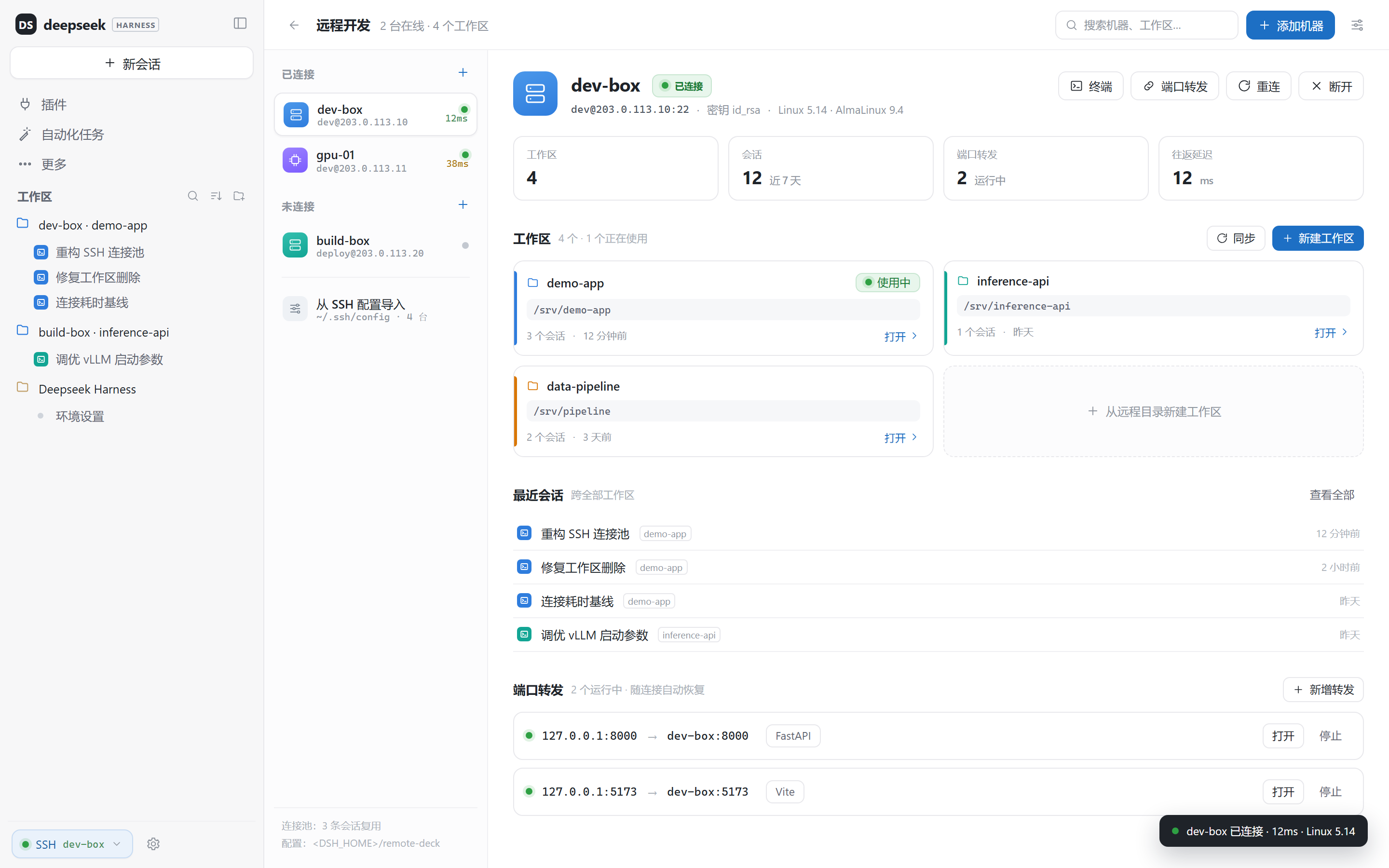
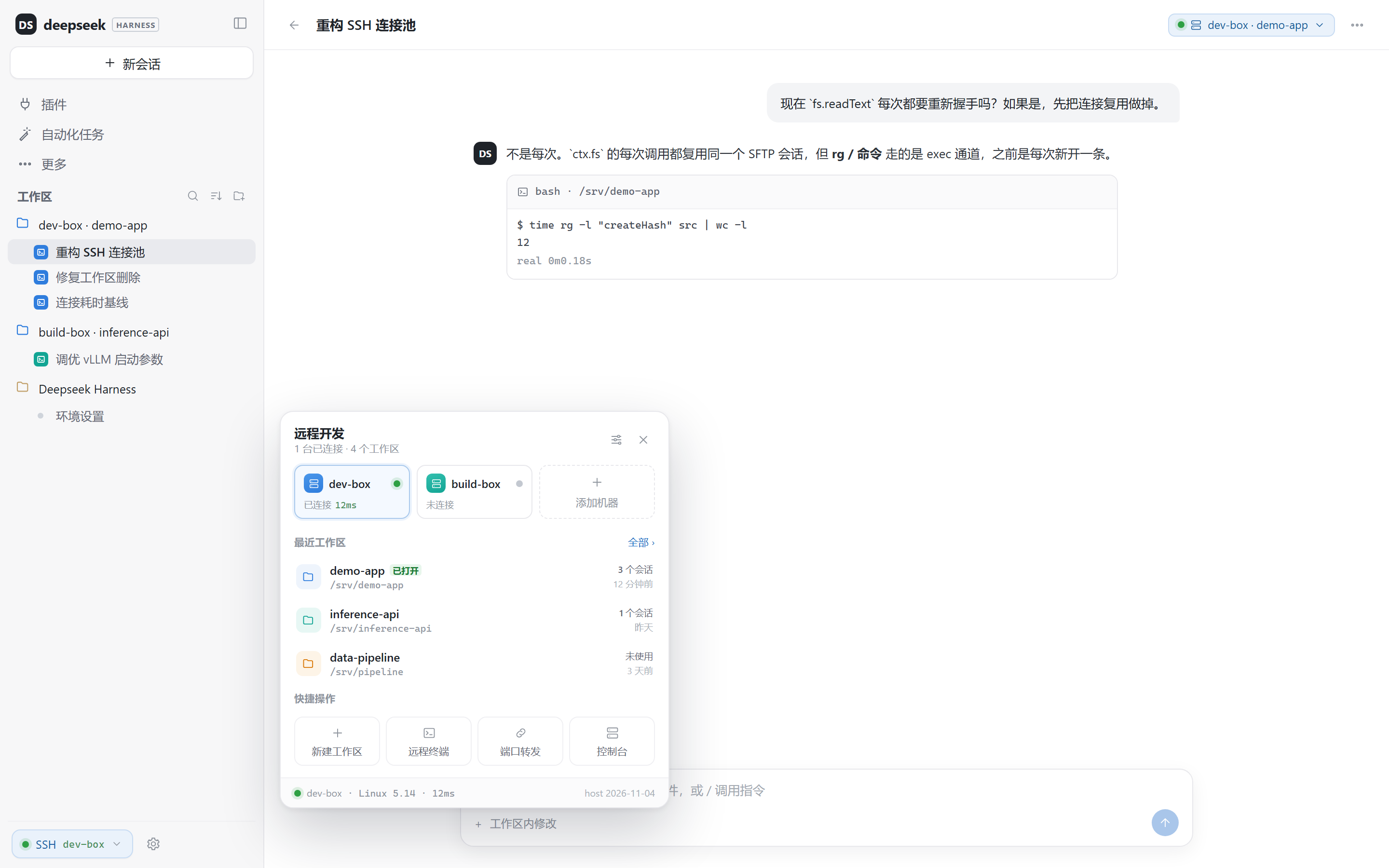
| Console | Quick panel |
|---|---|
 |  |
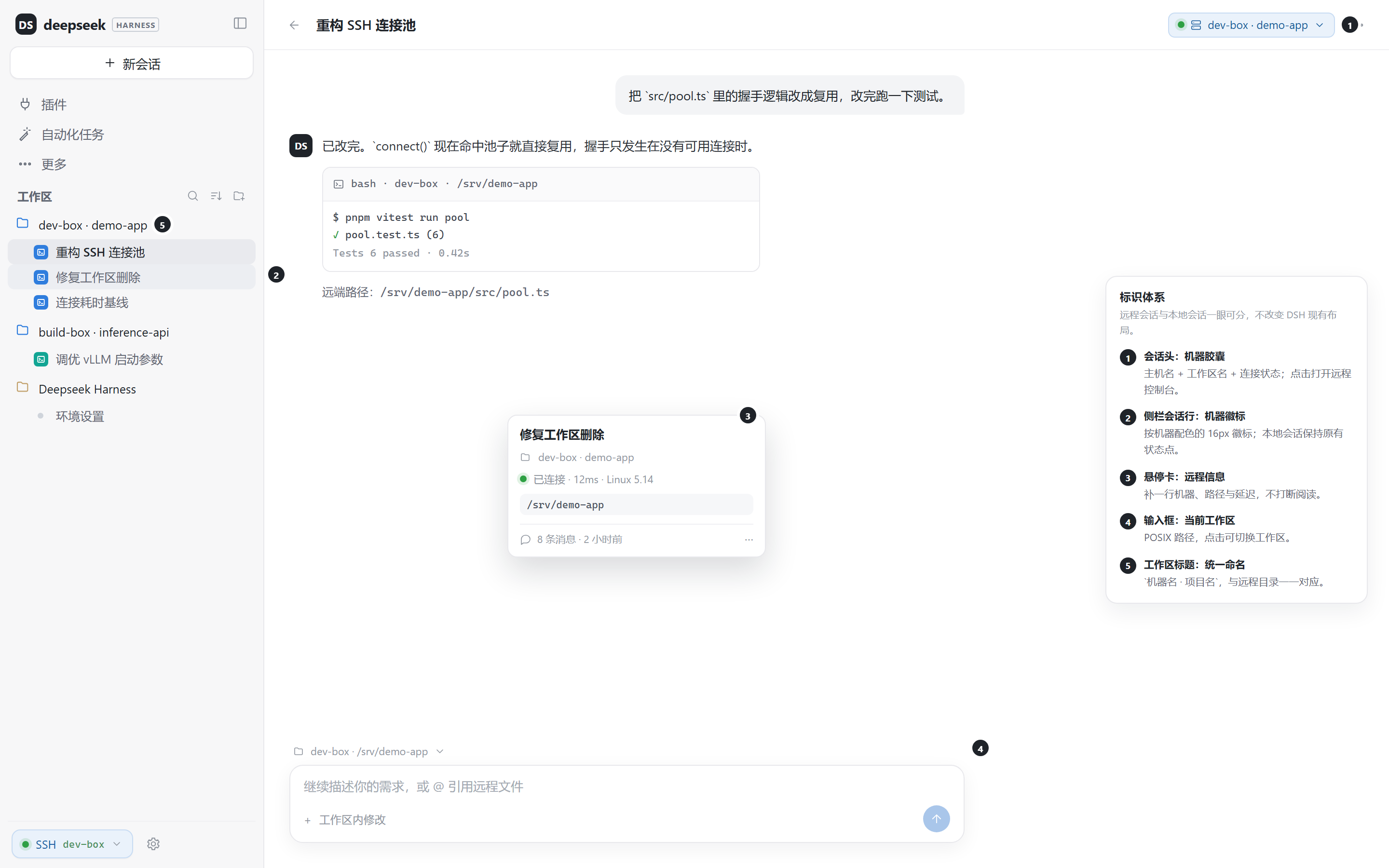
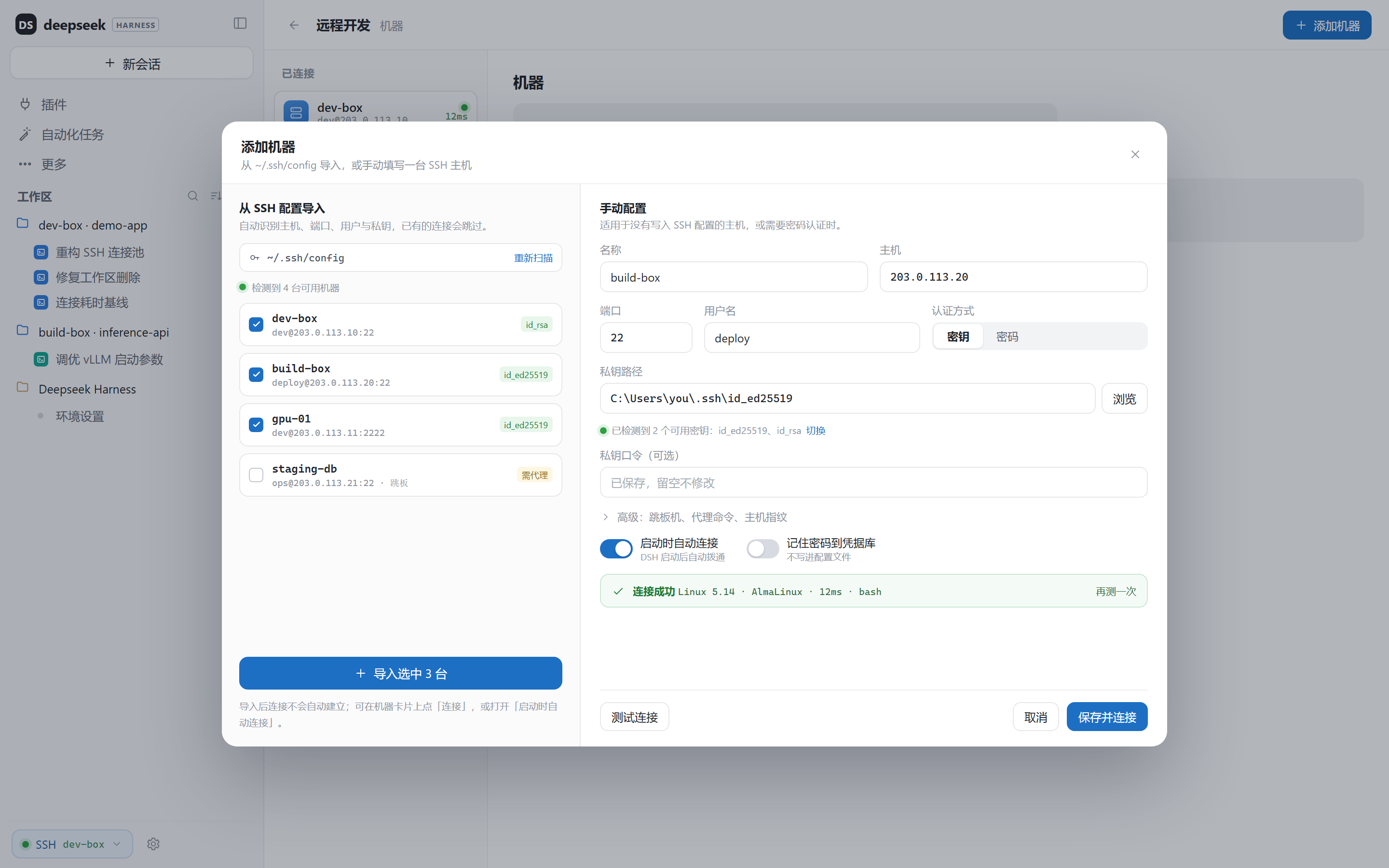
| Session identity | Add a machine |
|---|---|
 |  |
| New workspace | Terminal and ports |
|---|---|
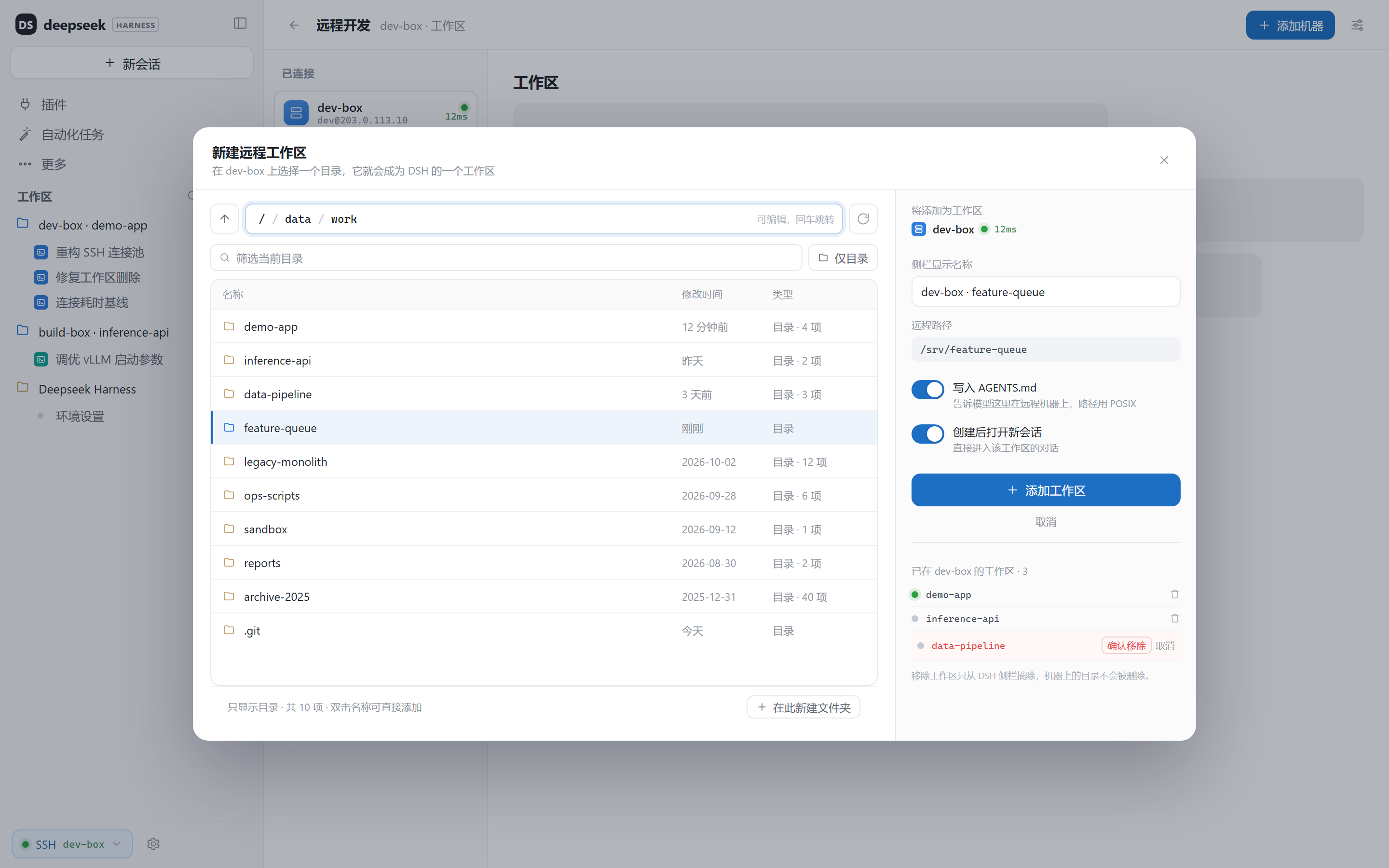 | 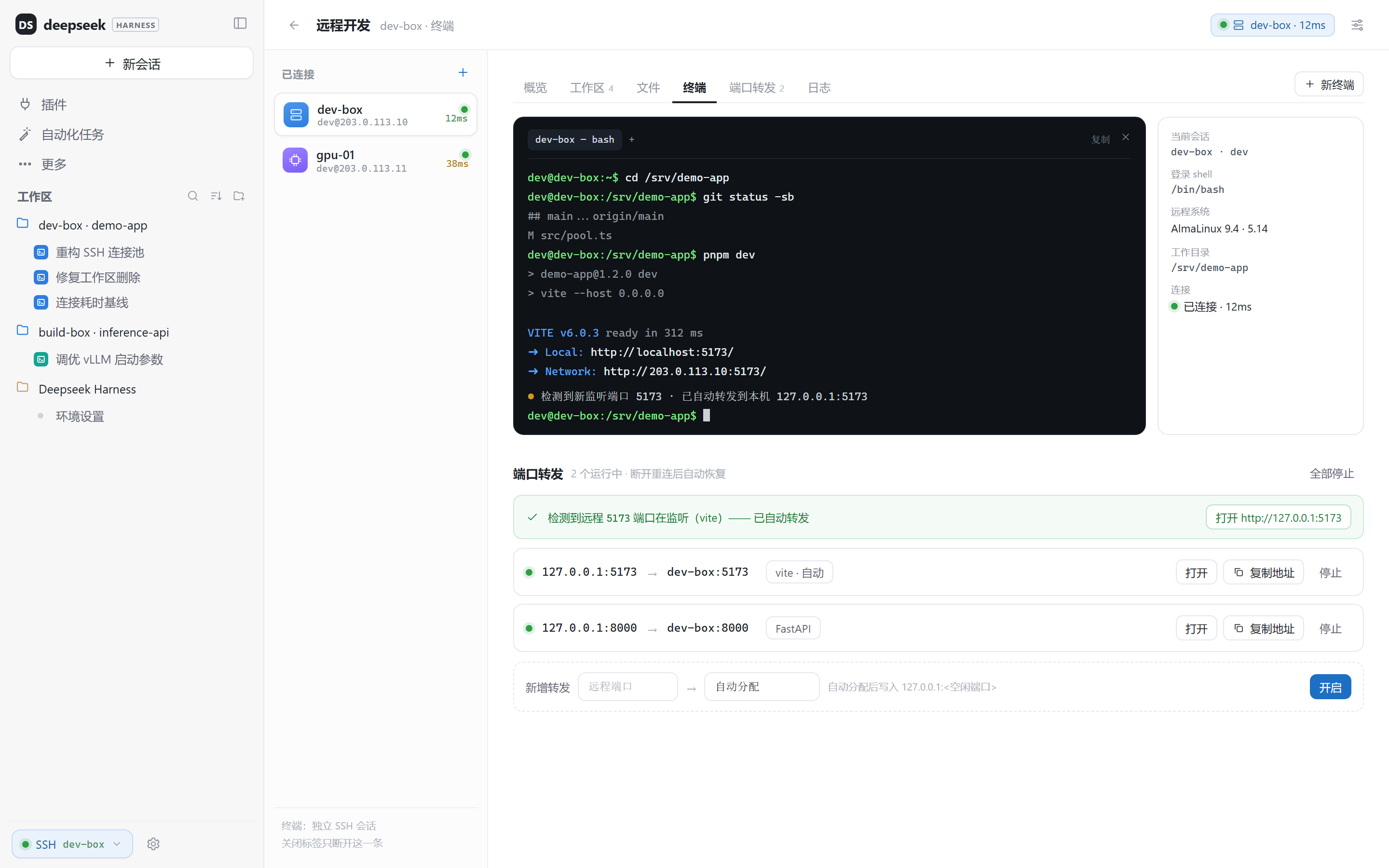 |
Screenshots are rendered from the sanitized design mockups in docs/design/v2/. Host names,
addresses and paths are demo data (dev-box, 203.0.113.10, /srv/demo-app).
Features
| Area | What you get |
|---|---|
| Connections | Multiple hosts, key or password auth, ~/.ssh/config import, connection test with OS/latency, per-host auto-connect (off by default; toggle in the dialog, quick panel or console), keepalive and backoff reconnect |
| Workspaces | Browse remote folders with breadcrumbs, filters and keyboard navigation; add one as a DSH workspace; custom sidebar name; remove locally without touching the remote directory |
| Sessions | Remote sessions get a header pill, a colour-coded sidebar badge and a hover line; local sessions are unchanged |
| Console | Machine rail, host overview, stats, workspace cards, recent sessions, search, and a remote file browser with download / save-to-local / reveal |
| Terminal | Remote PTY in a full xterm.js terminal: colours, cursor, full-screen programs, paste and replay buffer |
| Ports | Automatic discovery of remote listening ports, one-click forwarding, persistence and restore on reconnect |
| Theme | Light and dark, driven by DSH theme tokens |
Install
From the plugin market (after listing) or npm:
dsh plugin add dsh-remote-deck
From GitHub:
dsh plugin add git+https://github.com/dsh-plugins-cn/dsh-remote-deck.git
In mainland China, use the GitHub proxy:
dsh plugin add "git+https://ghproxy.laiyouxi.com/https://github.com/dsh-plugins-cn/dsh-remote-deck.git"
From a checkout:
git clone https://github.com/dsh-plugins-cn/dsh-remote-deck.git
cd dsh-remote-deck
powershell -ExecutionPolicy Bypass -File .\install.ps1 -Profile desktop
Restart DSH (or press Ctrl+R) after installing; the SSH chip appears at the bottom of the
sidebar and 远程开发 appears in the sidebar navigation.
The plugin has no npm dependencies: ssh2 and its small dependency tree are vendored under
vendor/node_modules, and the terminal assets under vendor/xterm. Installation therefore never
runs package build scripts.
Migrating from dsh-remote-ssh
Remote Deck is the successor of dsh-remote-ssh.
-
On first load it copies connections from
<DSH_HOME>/remote-sshand reuses existing workspace stubs in place, so workspaces and sessions keep their place in the sidebar. -
The old plugin keeps working until you remove it. Use one profile at a time: both plugins patch
ctx.fs, so only one of them should be enabled in a profile. -
Cut over in one command (backs up
package.jsonfirst and keeps the old plugin files for rollback):.\install.ps1 -Profile desktop -RemoveOld -
Roll back at any time:
.\install.ps1 -Rollback # restores package.json.bak-before-deck
Data stays in <DSH_HOME>/remote-deck and survives plugin reinstalls.
How it works
┌────────────────────────────── DSH desktop ──────────────────────────────┐
│ conversation · sidebar · Remote Deck console                            │
│        │ ctx.fs / ctx.shell / ripgrep / tools                            │
│        ▼                                                                │
│ host half: connection pool, workspace stubs, loopback API               │
└────────┬────────────────────────────────────────────────────────────────┘
         │ SSH (ssh2): exec channels · SFTP · PTY · port forwarding
         ▼
   remote host: sshd only (Linux / macOS)
A remote workspace is a marked stub directory under <DSH_HOME>/remote-deck/workspaces; the
marker records the connection id and the remote POSIX path. Every path under a marked workspace
resolves through SFTP; commands run through an exec channel with the remote cwd; ripgrep moves to
the host; the terminal is one PTY channel; forwarding is one local listener per port.
Remote bash behaviour
- Every call runs as a DSH background job. The foreground wait defaults to 10 minutes
(
DSH_REMOTE_DECK_FOREGROUND_TIMEOUT_MS); when it expires the command keeps running in the background and the tool returns its job id — it is never killed on timeout. Follow it with the built-injob_output/job_listtools and stop it withjob_kill. run_in_background: truereturns a job id immediately, for servers and long acceptance runs.- The remote stdin is closed immediately. Interactive prompts (for example
psqlwithoutPGPASSWORD) fail fast with their own error instead of blocking the turn forever. - The working directory is strict. Relative paths resolve against the session workspace; a missing directory fails the command instead of silently falling back to the home directory.
- Output is capped at 4 MiB per stream (
DSH_REMOTE_DECK_MAX_OUTPUT_BYTES) and marked[output truncated; …]when it exceeds the cap. - Stopping the tool or calling
job_killsignals the recorded remote pid (TERM, then KILL). Processes detached withsetsid/double fork may survive; usetimeoutfor those.
Security
-
Remote commands run on the SSH host outside the local DSH sandbox/approval layer; the remote account is the execution boundary. Pin the host key with
hostKeyFingerprinton the connection record and use a restricted account for untrusted repositories. -
apply_patchis not supported on remote workspaces yet; useedit/write. -
A remote Session routes POSIX paths to the SSH host and drive/backslash paths (
C:\\...,E:\\...) to the local machine, so remote development can still use local Windows files/resources. Both worlds are intentionally reachable; review remote-sourced content before letting it touch local paths. -
The loopback API accepts the desktop
dsh-app://apporigin and loopback HTTP(S); every route still requires the per-session token. -
Passwords and key passphrases live in the DSH credential store, never in
connections.json. -
The browser half talks to the host over a loopback HTTP server guarded by a per-session token.
-
The terminal and forwarding endpoints are behind the same token.
-
Removing a workspace only unregisters it locally; remote files are never deleted by the plugin.
Requirements
- DeepSeek Harness desktop 0.2.x or newer.
- Node 20+.
sshdon the remote host; Linux or macOS; remote shellbash.
Known limits
- The terminal ships a vendored xterm.js build (colours, cursor, full-screen programs). If the asset loader is blocked, the plugin falls back to a plain line renderer.
- The UI is Chinese-first; English strings land in v1.1.0.
~/.ssh/configimport covers Host/HostName/Port/User/IdentityFile/ProxyJump; proxy commands and host-key pinning are not wired into the connection dialogs yet.ssornetstatis required for automatic port discovery; manual forwarding still works.
Development
npm run check        # syntax + manifest
npm test             # parser unit tests
npm run pack:dry     # inspect the published file list
Design mockups and their sanitized renders live in docs/design/v2/; acceptance runs are
recorded in the CHANGELOG. The version plan is in ROADMAP.md, release steps in
PUBLISH.md, and the iteration runbook in docs/MAINTENANCE.md.
License
MIT
Release policy
See RELEASE-POLICY.md: batch fixes, test before publishing, and use semantic versions (patch = bugfix, minor = capability).
Comments
Loading…