

dsh-acp-paseo
Discovered★ 13dsh (DeepSeek Harness) ⇄ Paseo ACP integration bundle: auto-discovered model catalog, plan/execute modes, thinking levels, and native dsh slash commands in Paseo.
dsh-acp-paseo
DeepSeek Harness in Paseo. Add the DSH bundle and the Paseo plugin from npm, then use DSH models, tools, reasoning, questions and one-shot approvals inside Paseo's normal chat UI.
English · 中文 · 日本語 · Français · 한국어
npm: @ds-hu/dsh-acp-paseo · @ds-hu/dsh-acp-plus
English
What you get
- DeepSeek Harness joins Paseo's provider list, and the models from your DSH profile appear automatically.
- Tool calls, reasoning, diffs and token usage use Paseo's normal timeline.
- DSH questions become native Paseo cards. Tool approvals apply to one action only.
- Sessions keep their DSH session id, so they reopen after a reload.
- Paseo Web, Desktop and mobile all drive the same daemon.
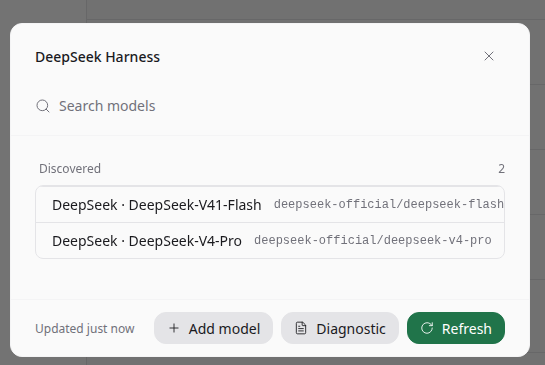
The models exposed by the DSH profile are ready to pick.
How to use
-
Create the DSH
acp-plusprofile once, then add the npm bundle:dsh plugin --profile acp-plus add @ds-hu/dsh-acp-plus -
Install the Paseo plugin from npm:
paseo plugin install npm:@ds-hu/dsh-acp-paseo -
Add the provider entry under
agents.providersin~/.paseo/config.json:"deepseek-harness": { "command": ["dsh", "--profile", "acp-plus"] } -
Enable the plugin in Settings → Plugins, then choose DeepSeek Harness in a new agent.
The acp-plus profile is a one-time setup. The exact profile, build commands
and test matrix are in the technical guide.
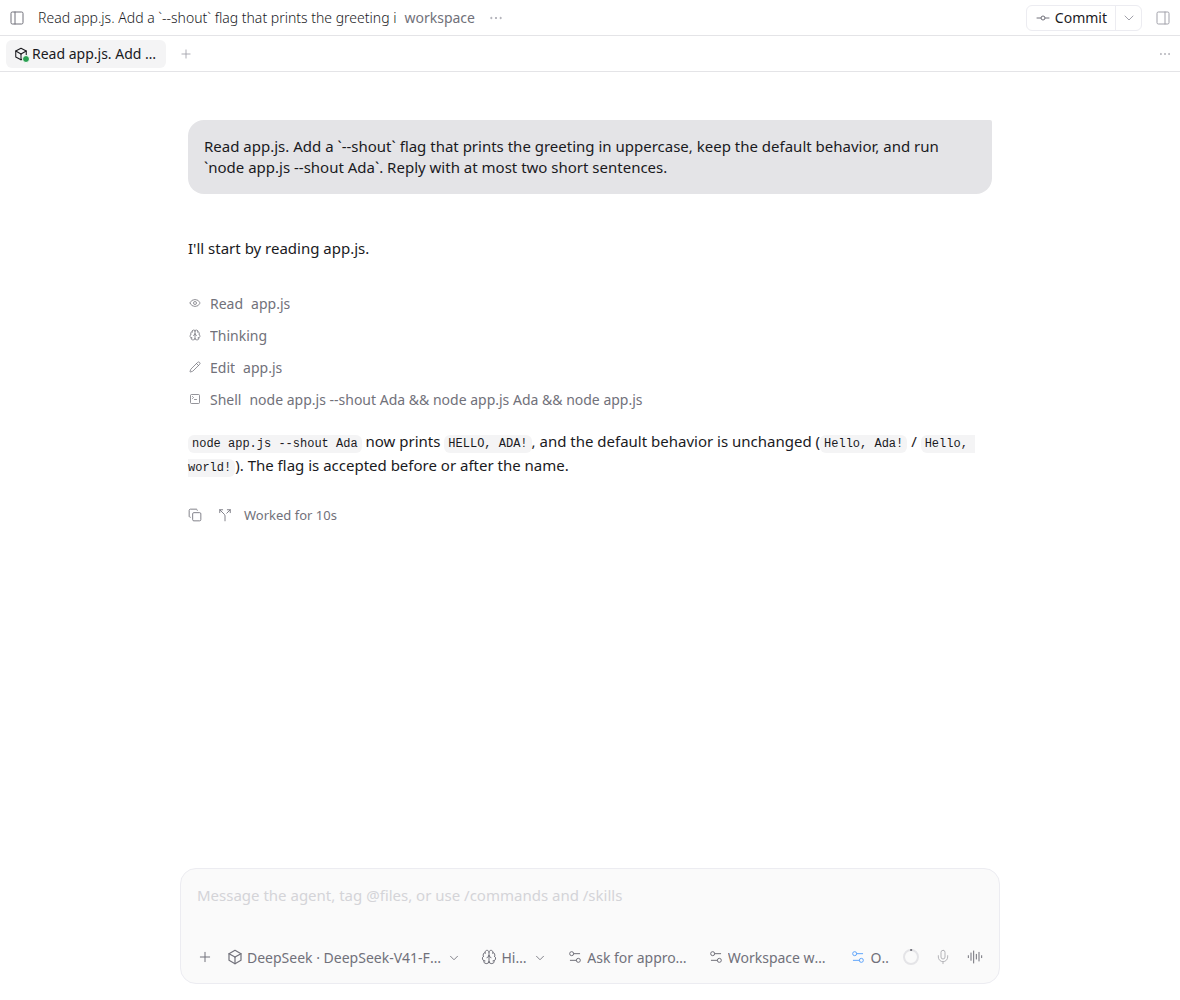
A real turn: shell tool call, reasoning, answer, token usage and session controls.
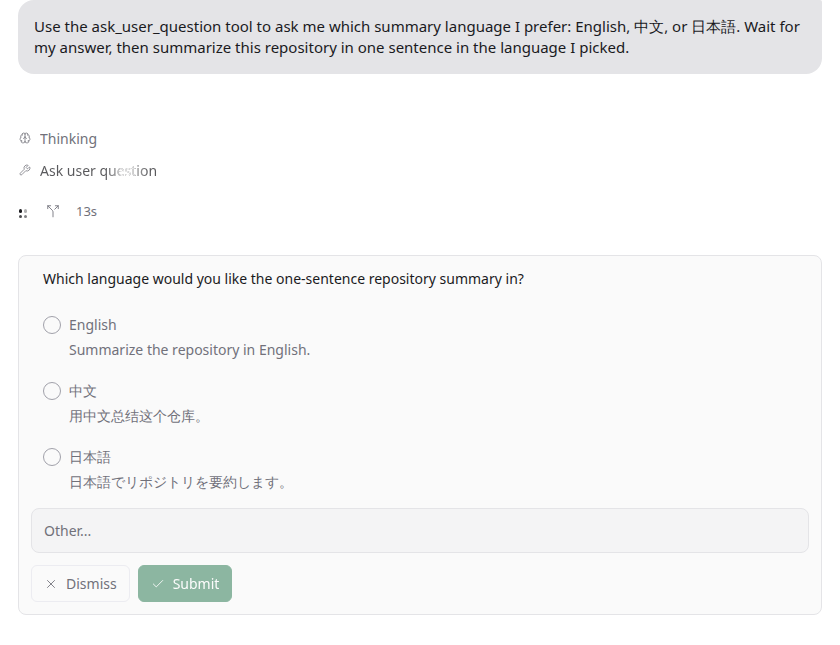
DSH asks, and Paseo shows its own card with options, free text and Submit.
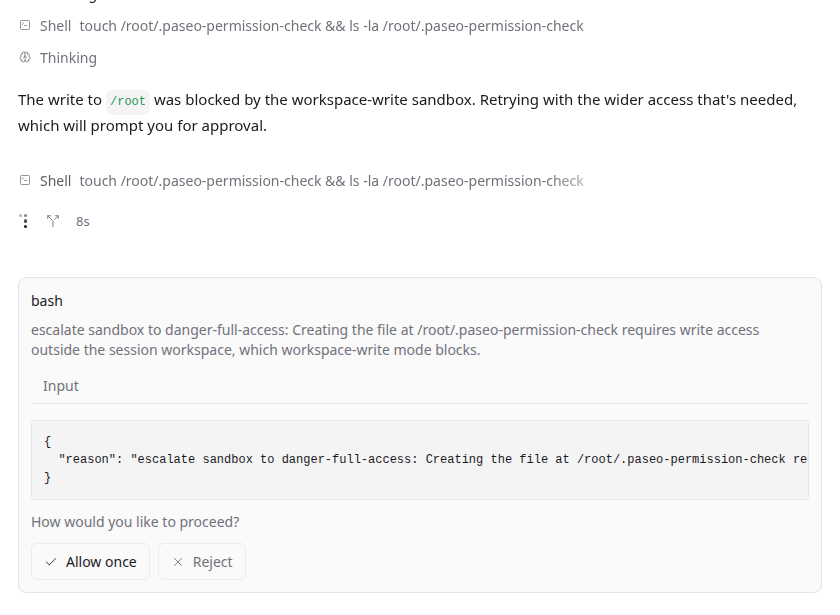
A command outside the workspace waits for approval. Allow once, or reject and keep the workspace unchanged.
中文
带来什么
- Paseo 的 Provider 列表新增 DeepSeek Harness,DSH profile 里的模型会自动出现。
- 工具调用、思考过程、Diff 和 Token 用量直接进入 Paseo 原有时间线。
- DSH 的提问变成 Paseo 原生问题卡片;工具审批只对当前操作生效。
- 会话保留 DSH 的 session id,刷新页面后可以接着聊。
- Paseo 网页版、桌面版和手机版共用同一个 daemon。
插件安装后自动发现 DSH profile 提供的模型,直接在选择器里使用。
怎么用
-
按技术文档创建一次 DSH 的
acp-plusprofile,然后加入 npm 包:dsh plugin --profile acp-plus add @ds-hu/dsh-acp-plus -
从 npm 安装 Paseo 插件:
paseo plugin install npm:@ds-hu/dsh-acp-paseo -
在
~/.paseo/config.json的agents.providers下加入:"deepseek-harness": { "command": ["dsh", "--profile", "acp-plus"] } -
打开 Settings → Plugins 启用插件,新建 Agent 时选择 DeepSeek Harness。
acp-plus profile 只需配置一次,完整步骤见技术文档。
真实对话:Shell 工具调用、思考过程、回答、Token 用量和会话控制都在同一屏。
DSH 发起提问,Paseo 用原生卡片展示选项、自由输入和提交按钮。
工作区之外的命令会等待审批。允许一次,或者拒绝并保持工作区不变。
日本語
できること
- Paseo のプロバイダー一覧に DeepSeek Harness が加わり、DSH プロファイルのモデルが自動で見つかります。
- ツール呼び出し、思考、差分、トークン使用量は Paseo のタイムラインにそのまま表示されます。
- DSH の質問は Paseo の質問カードになり、ツール承認は1回の操作だけに適用されます。
- セッションは DSH の session id を保持し、再読み込み後も続きから使えます。
- Paseo の Web、デスクトップ、モバイルは同じ daemon につながります。
プロバイダーを追加すると DSH プロファイルのモデルが見つかり、そのまま選べます。
使い方
-
技術ガイドの手順で DSH の
acp-plusプロファイルを一度作成し、npm パッケージを追加します:dsh plugin --profile acp-plus add @ds-hu/dsh-acp-plus -
npm から Paseo プラグインをインストールします:
paseo plugin install npm:@ds-hu/dsh-acp-paseo -
~/.paseo/config.jsonのagents.providersに追加します:"deepseek-harness": { "command": ["dsh", "--profile", "acp-plus"] } -
Settings → Plugins で有効にし、新しい Agent で DeepSeek Harness を選びます。
acp-plus プロファイルの作成は初回のみです。詳細は技術ガイドにあります。
実際の会話: シェルツール、思考、回答、トークン使用量、セッション操作が1画面に収まります。
DSH の質問を Paseo のカードで表示し、選択肢、自由入力、送信をそのまま使えます。
ワークスペース外のコマンドは承認待ちになります。1回だけ許可するか、拒否して変更を残さないかを選べます。
Français
Ce que vous obtenez
- DeepSeek Harness rejoint la liste des fournisseurs Paseo, et les modèles de votre profil DSH sont détectés automatiquement.
- Les appels d'outils, le raisonnement, les diffs et l'usage des tokens restent dans la timeline habituelle de Paseo.
- Les questions DSH deviennent des cartes Paseo. Les approbations d'outils valent pour une seule action.
- Les sessions gardent leur identifiant DSH et reprennent après un rechargement.
- Paseo Web, Desktop et mobile utilisent le même daemon.
Les modèles exposés par le profil DSH sont prêts à être choisis.
Utilisation
-
Créez une fois le profil DSH
acp-plus(voir le guide technique), puis ajoutez le paquet npm :dsh plugin --profile acp-plus add @ds-hu/dsh-acp-plus -
Installez le plugin Paseo depuis npm :
paseo plugin install npm:@ds-hu/dsh-acp-paseo -
Ajoutez l'entrée sous
agents.providersdans~/.paseo/config.json:"deepseek-harness": { "command": ["dsh", "--profile", "acp-plus"] } -
Activez le plugin dans Settings → Plugins, puis choisissez DeepSeek Harness dans un nouvel agent.
Le profil acp-plus se configure une fois. Le profil complet, les commandes
de build et la matrice de tests sont dans le guide technique.
Une conversation réelle : appel shell, raisonnement, réponse, usage des tokens et contrôles de session.
DSH pose une question ; Paseo affiche sa carte avec options, texte libre et validation.
Une commande hors du workspace attend une approbation. Autorisez une fois, ou refusez sans modifier le workspace.
한국어
제공하는 것
- Paseo 공급자 목록에 DeepSeek Harness가 추가되고 DSH 프로필의 모델이 자동으로 검색됩니다.
- 도구 호출, 사고 과정, diff, 토큰 사용량이 Paseo의 기존 타임라인에 그대로 표시됩니다.
- DSH의 질문은 Paseo 질문 카드로 표시되고, 도구 승인은 한 번의 작업에만 적용됩니다.
- 세션은 DSH session id를 유지하므로 새로고침 후에도 이어서 사용할 수 있습니다.
- Paseo Web, 데스크톱, 모바일은 같은 daemon을 사용합니다.
공급자를 추가하면 DSH 프로필의 모델이 자동으로 검색되어 바로 선택할 수 있습니다.
사용 방법
-
기술 문서의 절차로 DSH
acp-plus프로필을 한 번 만든 뒤 npm 패키지를 추가합니다:dsh plugin --profile acp-plus add @ds-hu/dsh-acp-plus -
npm에서 Paseo 플러그인을 설치합니다:
paseo plugin install npm:@ds-hu/dsh-acp-paseo -
~/.paseo/config.json의agents.providers에 항목을 추가합니다:"deepseek-harness": { "command": ["dsh", "--profile", "acp-plus"] } -
Settings → Plugins에서 플러그인을 켜고 새 Agent에서 DeepSeek Harness를 선택합니다.
acp-plus 프로필은 한 번만 설정하면 됩니다. 전체 절차와 빌드, 테스트
방법은 기술 문서에 있습니다.
실제 대화: 셸 도구 호출, 사고 과정, 답변, 토큰 사용량, 세션 제어가 한 화면에 표시됩니다.
DSH가 질문하면 Paseo 카드에서 선택지, 직접 입력, 제출을 그대로 사용할 수 있습니다.
작업 공간 밖의 명령은 승인을 기다립니다. 한 번만 허용하거나 거부해 작업 공간을 그대로 둘 수 있습니다.
Technical details
Build steps, profile setup, the test matrix and design records: docs/TECHNICAL.md.
MIT licensed. See LICENSE and THIRD_PARTY_NOTICES.md.
Comments
Loading…
Similar plugins
by openma-ai
ACP server implementation for DeepSeek harness. dsh-acp
★ 42
↓ 1.4k/wk
NOASSERTION
TypeScript
Oct 17, 2026
dsh plugin --profile web add @openma/deepseek-harness-acpby grunmin
Enhanced ACP (Agent Client Protocol) server for DeepSeek Harness (dsh) — drop-in bridge for the Zed editor: block-level streaming, usage/stat telemetry, model & reasoning-effort switching, permission
★ 7
↓ 634/wk
MIT
JavaScript
Oct 1, 2026
dsh plugin --profile web add dsh-acp-enhancedby dushaobindoudou
Agent Client Protocol (ACP) server plugin for the DeepSeek Harness (dsh) - drive dsh agents from Zed, any ACP v1 client, or the built-in web UI over stdio / HTTP+SSE, with sessions, jobs, goals, skill
★ 9
↓ 485/wk
MIT
TypeScript
Oct 14, 2026
dsh plugin --profile web add dsh-acp-serverby leeyoung1
Pairs the running executor with a stronger reviewer model through zero-parameter advisor() calls and step-based patrol checks, returning plan, correction, or stop guidance.
★ 3
↓ 386/wk
MIT
TypeScript
Sep 11, 2026
dsh plugin --profile web add dsh-advisor-pluginby ZSeven-W
DeepSeek Harness (DSH) plugin: a read-only ledger for the plugins you already have installed — a capability inventory with file:line evidence, declared-vs-detected reconciliation, cross-profile versio
★ 24
↓ 39/wk
MIT
JavaScript
Oct 19, 2026
dsh plugin --profile web add @zseven-w/dsh-harborby Enderfga
DeepSeek Harness bundle: register Claw Orchestrator as an ACP subagent provider — delegate a dsh subagent to a multi-engine council across Claude Code, Codex and Cursor.
★ 0
MIT
Aug 20, 2026
dsh plugin --profile web add @enderfga/dsh-clawo