
dsh-model-advanced
IdentifiedPer-model default reasoning effort and image handoff for text-only models. A DeepSeek Harness plugin.
dsh-model-advanced
Per-model default reasoning level and image handoff for text-only models — added to the existing Settings → Models page.
Model adapters describe a model once, provider-wide and statically. Two things an agent actually needs cannot be expressed that way:
- The level a conversation should start at, per model. A fast model and a reasoning model on the same provider usually want different defaults, but an adapter exposes a single provider-wide effort.
- What happens when a text-only model is handed an image. Today the image is dropped or the turn fails. It should be read by a model that can see, and the reading should stay in the conversation.
This plugin adds a card at the bottom of the Models page that configures both, and implements the runtime behaviour behind them.
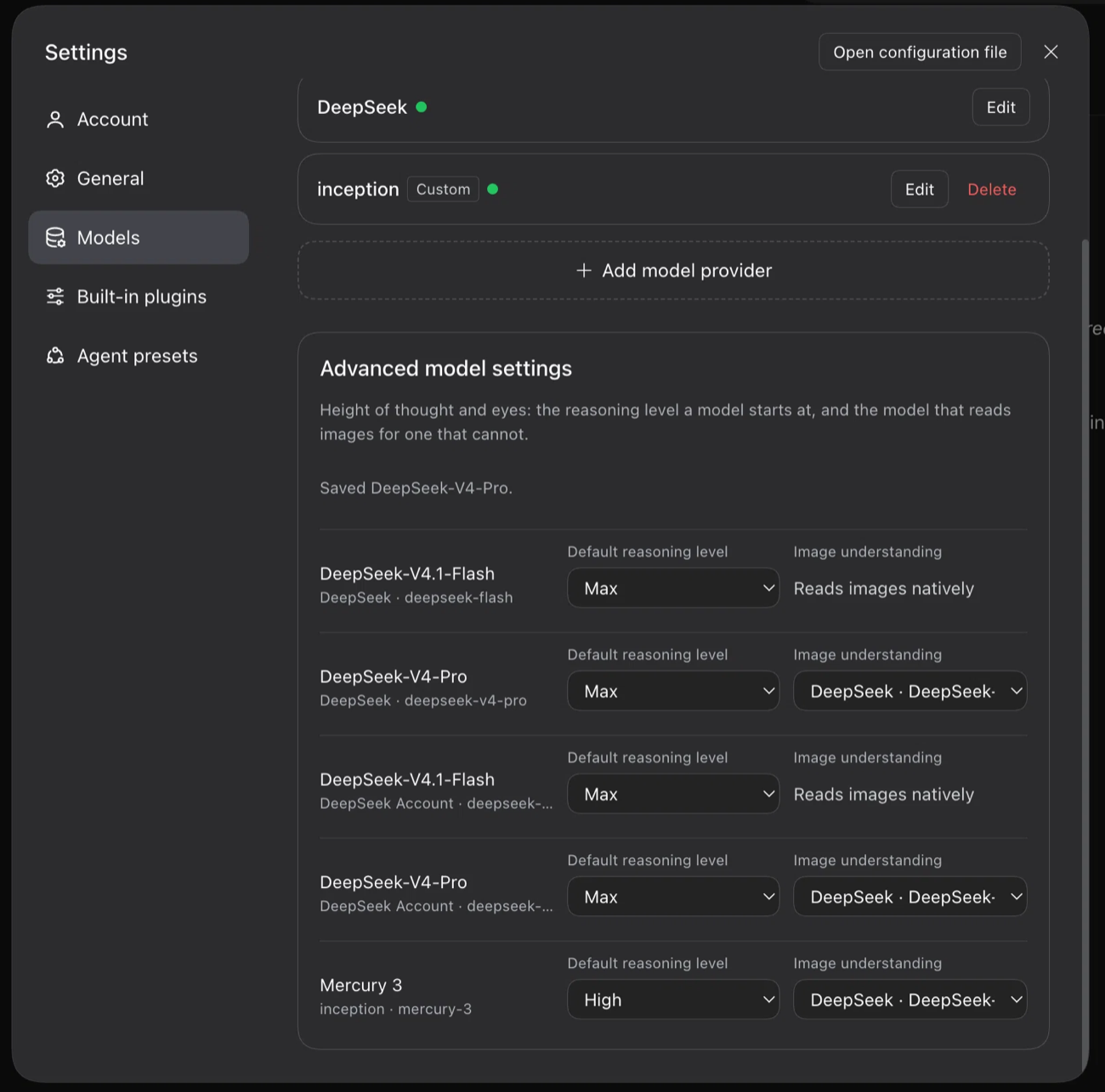
The card this plugin adds, at the bottom of Settings → Models: a starting reasoning level for each model, and — for a model that cannot see — the model that reads images on its behalf.
Install
Requires a DeepSeek Harness install with the plugin manager.
dsh plugin --profile desktop add github:drm-nz/dsh-model-advanced
Then restart the app. This plugin has a host half (lib/index.js) and a browser
half (lib/client.js); the host half loads at boot, and the browser half is served
from the installed package, so neither picks up without a restart.
From a local checkout
dsh plugin --profile desktop add link:/absolute/path/to/dsh-model-advanced
or add the link: dependency to the profile's package.json, run pnpm install there,
and restart. A linked package resolves its dependencies and peers from its own
directory, so they must be installed there too.
The shipped cordis.patch.yml names its entry bare (dsh-model-advanced), not
relatively. A link: install's real directory sits outside node_modules, and this
plugin imports Harness packages, so a bare name resolves through the profile's
dependency mapping — a relative name would bypass it and the import would fail.
To remove it:
dsh plugin --profile desktop remove dsh-model-advanced
Requires the Harness packages it builds on (@deepseek-ai/dsh-llm,
@deepseek-ai/dsh-tools, @deepseek-ai/schemastery) to resolve from the profile, and
they should match the running Harness version — the plugin decorates runtime
prototypes, so it is version-coupled by nature. See Compatibility below.
The card
One row per configured model, under the model list:
| Column | What it sets |
|---|---|
| Model | The model's name, provider, and id |
| Default reasoning level | The level a conversation starts at when it has not picked one. Empty option = no override |
| Image understanding | For a model that cannot read images: the configured model that reads them on its behalf |
Both choices are stored in this plugin's own settings namespace (model-advanced),
keyed provider/model — not in the adapters'. That is what keeps two models on one
provider independent, and what lets a model the adapters cannot describe still get a
default.
How the default reasoning level is applied
Four seams, because a level can be chosen — or never chosen — in several places:
resolveModelInfois decorated so the model catalogue states the configured level, and so the composer's Effort menu opens on it.prepareCallis decorated so a call that names no level is prepared with the configured one.configure(controls, modelInfo)is the Harness's own seam for choosing request controls; it runs after the agent loop has fixed and validated the step's route and effort, which is why the default belongs there.resolveCallConfigis decorated so a caller that resolves a selection without naming a level (the Session controller validating a model switch, for instance) sees the configured level instead of the adapter's own default.- A startup reconciliation (once, after the composition transaction settles) aligns the global default selection with the configured level.
Do not fill the level from an agent/request listener. The agent loop fixes a
step's route and effort before that waterfall and rejects a result that names a
different effort (… proposed reasoning effort "high" after step preparation fixed "adapter default"; use agent.model.select() before step preparation). That rejection
fails the whole turn before dispatch. Applying the level in prepareCall is equivalent
for what is sent, and leaves the validated proposal untouched.
All three prototype decorations are restored on dispose. A caller that picks its own level — the session-title service does — keeps precedence, and a configured level the model no longer offers is ignored instead of failing the call. Because the prepared header names the level explicitly rather than as an adapter default, the session's recorded model selection adopts it, so later steps do not depend on the seam at all.
How image handoff works
Configure a delegate for a model that does not read images. Then, when a turn carries an image:
- The delegate is called once, with a layout-preserving transcription instruction: a one-line summary, reading order, every text region with its approximate bounding box on a 0–1000 scale, tables as GFM, and notes for diagrams and UI state.
- The result is appended to the step as an image transcript note naming the image id.
- That note carries a
[dsh-image-handoff:<id>]marker which is read back from session history, so retries and later turns never re-bill the delegate. - The image itself stays in the conversation; the wire to the text-only model still carries a placeholder, never the image. The transcript is what the model reads.
For follow-up questions the model calls:
inspect_image(image_id, question)
which hands the same image to the delegate again with the question. This exists so a text-only model is not stuck with a single fixed reading of an image forever.
A delegate failure does not end the turn — it becomes a note in the transcript saying what could not be read.
Discovering which models read images
Capability is resolved in this order, cheapest first:
- The provider's own configuration — the model's declared input modalities in its settings namespace.
discoverModels, asked only for models the configuration does not describe, so an ordinary page load stays offline.- Inference from the same model id served by another configured route.
- A checkbox — "This model reads images" — when all of the above are unknown, which pins the answer for that model.
Configure by hand
The card writes this namespace; it can also be edited directly.
- id: model-advanced
  config:
    modelDefaults:
      "deepseek/deepseek-chat": high
    imageDelegates:
      "deepseek/deepseek-chat": { provider: openai, model: gpt-5-mini }
    imageCapable:
      "openai/o4-mini": true
| Key | Shape | Meaning |
|---|---|---|
modelDefaults | provider/model → effort id | Starting reasoning level for that model |
imageDelegates | provider/model → { provider, model } | The model that reads images on this one's behalf |
imageCapable | provider/model → true | Pins image capability when it cannot be discovered |
Effort ids must match the adapter's own level ids; the card lists them, so pick from there rather than guessing.
Startup self-check
Every boot, after the composition settles, the plugin appends one line to
~/.dsh/health.log — the one place a silent degradation becomes visible:
2026-11-01T02:00:42Z dsh-model-advanced ok   patch=live effort=live tool=live defaults=2/2
2026-11-01T02:00:42Z dsh-model-advanced warn patch=live effort=live tool=live defaults=1/2 stale=deepseek/old-model
patch— the catalogue and config-resolution decorations are still the functions this plugin installed.deadmeans a Harness internal moved and the defaults stop applying.effort— theprepareCalldecoration is live: calls that name no level get the configured one.deadmeans the default is not reaching dispatch.tool—inspect_imageregistered.defaults— how many configured defaults were read back fromresolveModelInfoand found to name a level their model still offers.stale=names the ones that do not, which is what a renamed effort id looks like.
Read it with:
tail -n 2 ~/.dsh/health.log        # both plugins, when both are installed
grep -v ' ok ' ~/.dsh/health.log   # only problems
Set DSH_HEALTH_LOG to write somewhere else. A diagnostics failure never stops the
plugin from loading.
The warning you see in the app
A failed check is also raised in the client: the composer shows a warning toast — the same primitive the app's own notices use — saying how many defaults are not applying. It appears once per page load, retires on its own, and renders nothing at all when the plugin is healthy.
The client decides this from the model catalogue rather than from a log: the host half
reports the configured level as reasoning.defaultEffort, so a default that is
configured but not reported means the decoration is gone. A model that is no longer
in your configuration is ignored — that is stale configuration, not a broken seam.
To see the warning deliberately, set a default to a reasoning level its model does not offer (the card lists only valid levels, so edit the settings document directly) and restart. Remove the entry and restart again to clear it.
Verified on a real boot of DeepSeek Harness 0.2.1-rc.5 (macOS desktop profile) on 2026-11-01, with five configured model defaults:
2026-11-01T02:03:32Z dsh-model-advanced ok patch=live tool=live defaults=5/5
That line is the compatibility datapoint worth checking after you upgrade: it names the
Harness version this plugin was last confirmed against. It predates 0.1.1, which added
the effort= token when the level moved to the prepareCall seam — after Harness
0.2.2 builds started rejecting an effort change proposed from agent/request.
Compatibility
This plugin reaches into Harness internals rather than wrapping a public extension point, which is a deliberate trade: there is no public seam for "change this model's default effort" or "read this image for a model that cannot".
What that means in practice:
- It fails soft, and silently. Every decoration and hook is wrapped so that a
failure leaves the turn exactly as it would have been. If a future Harness release
renames
resolveModelInfo,resolveCallConfig, orprepareCall, the card still renders and saves settings, but the defaults stop being applied — with no error in the UI. The startup self-check is the detector: look forpatch=deadoreffort=deadin~/.dsh/health.logfirst. - It is version-coupled. Tested against the Harness build it was developed on. The
agent/requestseam it used through 0.1.0 was rejected by 0.2.2 builds; 0.1.1 moved toprepareCall. - Only the effort seam has automated tests.
node --testcovers theprepareCalldecoration against a faithful fake of the runtime's prepare contract (explicit choices win, unsupported levels are ignored, unconfigured routes keep the adapter default). The rest of the behaviour depends on a live composition (LLM runtime, settings documents, agent sessions) and is still verified by hand after an upgrade.
Known limits
- DeepSeek's adapters register no model discovery, so their models report image capability only through provider configuration (API-key routes) or the adapter's own catalogue (account route, when the app has it). For a model whose capability is genuinely unknown, use the pin checkbox.
- The composer's Effort menu lists the adapter's level names. The card uses the same names deliberately, so the two never disagree.
- Defaults changed while the app runs align the global default selection at the next start (or after re-picking the model).
- Multi-model routes take reasoning-level names from each model, but the stored default is always per model.
- A delegate call is a real model call — it costs tokens. It is made once per
image per session, plus once per
inspect_imagecall.
Layout
| Path | Purpose |
|---|---|
lib/index.js | Host half: config schema, prototype decorations, handoff, inspect_image |
lib/effort-default.js | The prepareCall decoration that applies a configured default level |
test/effort-default.test.js | Unit tests for that decoration's prepare contract |
lib/client.js | Browser half: the card in the Models page footer slot |
cordis.patch.yml | Bundle patch that inserts the plugin row |
docs/advanced-model-settings.png | Screenshot of the card, shown at the top |
License
MIT.
Comments
Loading…