
dsh-mcp-center
Manifest valid★ 1Connect any MCP server to your DeepSeek Harness — point, click, done.
MCP Center
English | 中文
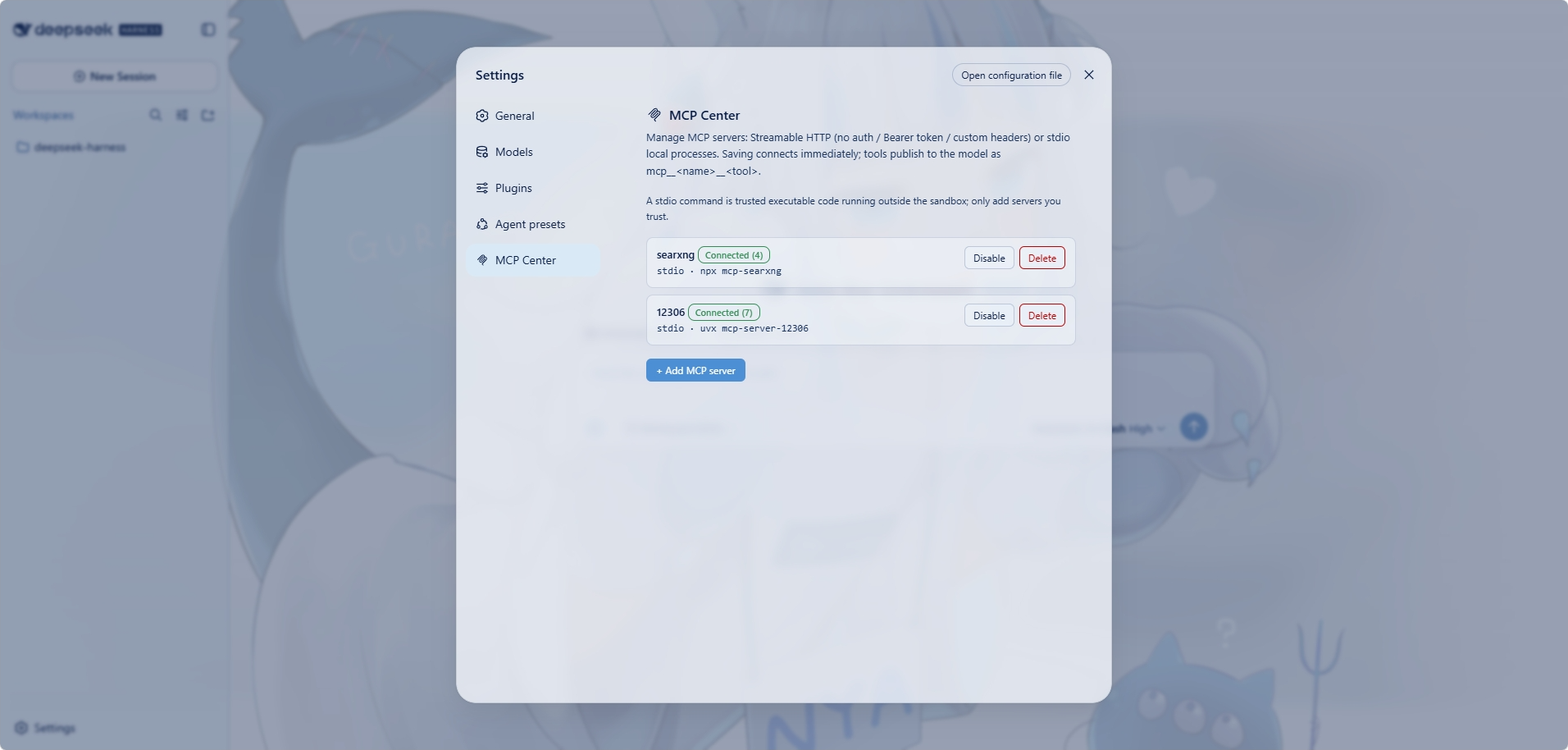
Connect any MCP server to your DeepSeek Harness — point, click, done. MCP Center is a settings-driven MCP server manager. Register servers (Streamable HTTP or local stdio processes) on the dedicated Settings → MCP Center page; save and they connect immediately, their tools becoming first-class, model-callable tools in every session.
Why use it
- No code, no config files — everything happens in the Settings UI.
- Both MCP server types supported:
- Streamable HTTP — remote MCP endpoints, with optional auth (none / static Bearer token / custom headers).
- stdio — local processes (
npx,uvx,python, …).
- Tools are instantly usable — each connected server's tools appear as
mcp__<name>__<tool>and can be called by the model in all sessions. - Zero-dependency install — the client transport is implemented in the plugin itself (no external MCP SDK), so the plugin adds no peer-dependency chain to your profile.
- Per-server on/off — disable a server to unregister its tools and drop the connection; the config is kept.
Requirements
- DeepSeek Harness with the
webprofile - Node.js
^22.19or>=24
Quick start
1. Install the plugin
The package is published on npm as dsh-mcp-center:
# install from the npm registry
dsh plugin --profile web add dsh-mcp-center
Prefer installing from source? See Development.
2. Restart and open the settings page
Restart dsh web, open Settings → MCP Center, and click + Add MCP server:
- Streamable HTTP: name (the
mcp__<name>__*prefix), URL, and auth mode (none / Bearer token / custom headers). - stdio: name, command (e.g.
npx), args (space-separated; quote args containing spaces), optional env (JSON object) and working directory.
3. Save — and it's connected
The server connects as soon as you save. Status badges show Connected (N tools) / Connecting / Error / Disabled. Per server you can enable/disable, delete, and (for Bearer servers) re-token.
The model can use it right away
Tools from connected servers are first-class to the model. For a server named web:
mcp__web__ping mcp__web__shout
Tool results are rendered as native text; isError results surface through the registry's error path.
The plugin depends only on
@deepseek-ai/cordis(peer) and React (client half). No MCP SDK, no settings-service coupling, no fallback-tree resolution of MCP peer packages.
Configuration storage
Server configs live in ~/.dsh/mcp-center.json:
{
  "servers": [
    { "id": "…", "name": "web", "type": "http", "url": "http://localhost:3000/mcp", "authMode": "none" },
    { "id": "…", "name": "fs", "type": "stdio", "command": "npx", "args": ["-y", "@modelcontextprotocol/server-filesystem", "/tmp"] }
  ]
}
⚠️ Bearer tokens are stored here in plain text — treat this file as a secret.
How it works
| Piece | Mechanism |
|---|---|
| Settings page | settings.section slot entry (MCP Center tab) |
| API | Same-origin JSON under /mcp-center/api/* (ping, servers CRUD, connect, enabled) |
| HTTP transport | Streamable HTTP: JSON-RPC over POST, Mcp-Session-Id, JSON or SSE responses (each SSE frame is parsed separately, so one stream may carry several messages) |
| stdio transport | child_process.spawn a local command, JSON-RPC over stdin/stdout (newline-delimited); reconnect reaps the old process first |
| Tool schema | Server JSON Schemas sanitized to the registry's supported raw subset (unsupported vocabulary degrades to unconstrained) |
| State | ~/.dsh/mcp-center.json, written atomically with owner-only permissions |
Current limitations
- Only
toolsare bridged;resourcesandpromptsMCP capabilities are not. - Bearer tokens and custom auth headers live in the state file under
~/.dsh, in plain text under owner-only permissions — treat it as a secret. - A config that exists but cannot be parsed fails the plugin load instead of starting with no servers, because the next save would otherwise overwrite that file and lose every stored server.
- Request bodies are capped at 1 MiB (answered as 413) and one stdio server's undecoded stdout at 4 MiB; exceeding the latter fails that server's pending calls and stops its process.
- stdio servers run as long-lived child processes tied to the plugin lifecycle;
argsare whitespace-tokenized (quotes protect args with spaces) with no shell expansion — write absolute paths or env vars yourself for~,$VAR, pipes, etc. - No automatic reconnect after a crash in this version; re-enable or restart the server to reconnect.
Development
pnpm install
pnpm build      # tsdown: lib/index.js (node) + lib/client.js (browser)
pnpm typecheck
Comments
Loading…