

deepseek-harness-intelligent-ui
Manifest valid★ 8Generative, interactive UI for DeepSeek Harness (DSH): declarative components and sandboxed live widgets streamed in chat.
English · 中文







Demo · Quick start · How it decides · Components · Widgets · Extending · Security · Configuration · Quality · Develop
Generative, interactive UI for DeepSeek Harness (DSH). Ask in plain language and the agent decides on its own how to answer:
- plain text when that reads best;
- native components: dashboards, data grids, charts, scatter plots and heatmaps, timelines, live function plots, KaTeX math, Mermaid diagrams, code diffs, file trees, JSON trees, forms and choice cards;
- a fully custom sandboxed live widget: Three.js scenes, canvas simulations, mini-apps.
The UI renders progressively while the answer streams. Sorting, filtering, sliders, rotation, zoom and tabs respond instantly in the browser. Only explicit actions (a button, a form, a choice, Bridge.sendPrompt) go back to the agent, either in the current session or in a new one.
It ports the ideas of CopilotKit's OpenIntelligentUI (Open Generative UI + A2UI-style declarative components) onto DSH's own extension points, with no CopilotKit, LangGraph or external router.
✨ Highlights
🧠 Decides by itselfNo command needed. Each turn the agent picks text, native components or a live widget, guided by a system-prompt section. |
⚡ Streams progressivelyComponents appear while the JSON streams. Widgets morph into one iframe and finalize in place: no rebuild, no flash. |
🖱️ Local firstSort, search, filter, page, export, hover, sliders, rotation and tabs run in the browser and never call the model. |
🧩 26 componentsFrom cards and tabs to data grids, |
🔒 Sandboxed by defaultOpaque-origin iframe, strict CSP, token-checked messages and a rate-limited bridge, all verified in a real browser. |
💾 State that survivesTabs, sort, filters, form values, sliders and |
🎬 Demo
The real DeepSeek model, end to end
https://github.com/user-attachments/assets/e4eb0adc-659e-4c80-b473-449aa42ca00f

All 11 browser cases of the quality baseline, generated live by deepseek-flash in DSH Web 0.2.0-rc.1 (2026-10-16): text, chart, table, form round trip, Plot, Three.js with "Ask to fix", stop → regenerate, two in-place edits, Fast 3G, CDN offline and phone width. Failures are left in and marked ✗. The DeepSeek whale girl (鲸鱼娘) narrates (credits). Full video: docs/assets/real-model/demo.mp4 (2 min 27 s).
🖼️ Results at a glance (screenshots per case)
| Multi-series chart: ✗ (call cut off mid-stream) | Two in-place edits with ui_patch: ✓ |
|---|---|
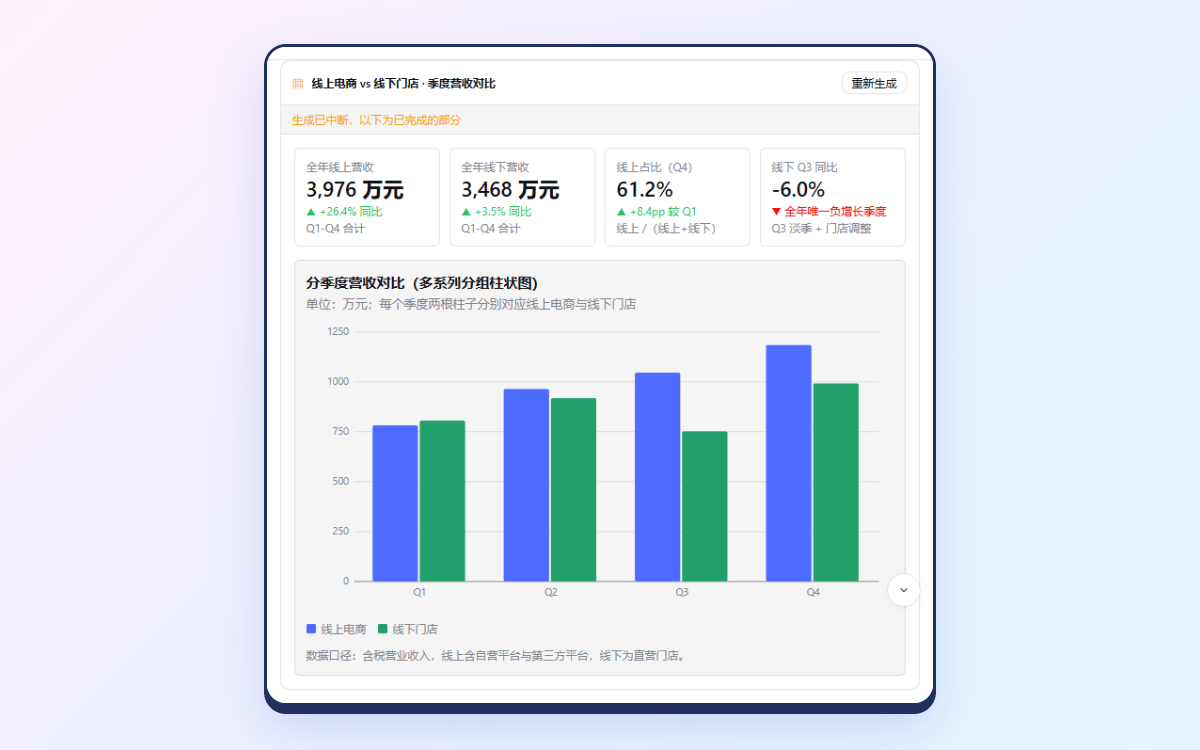 | 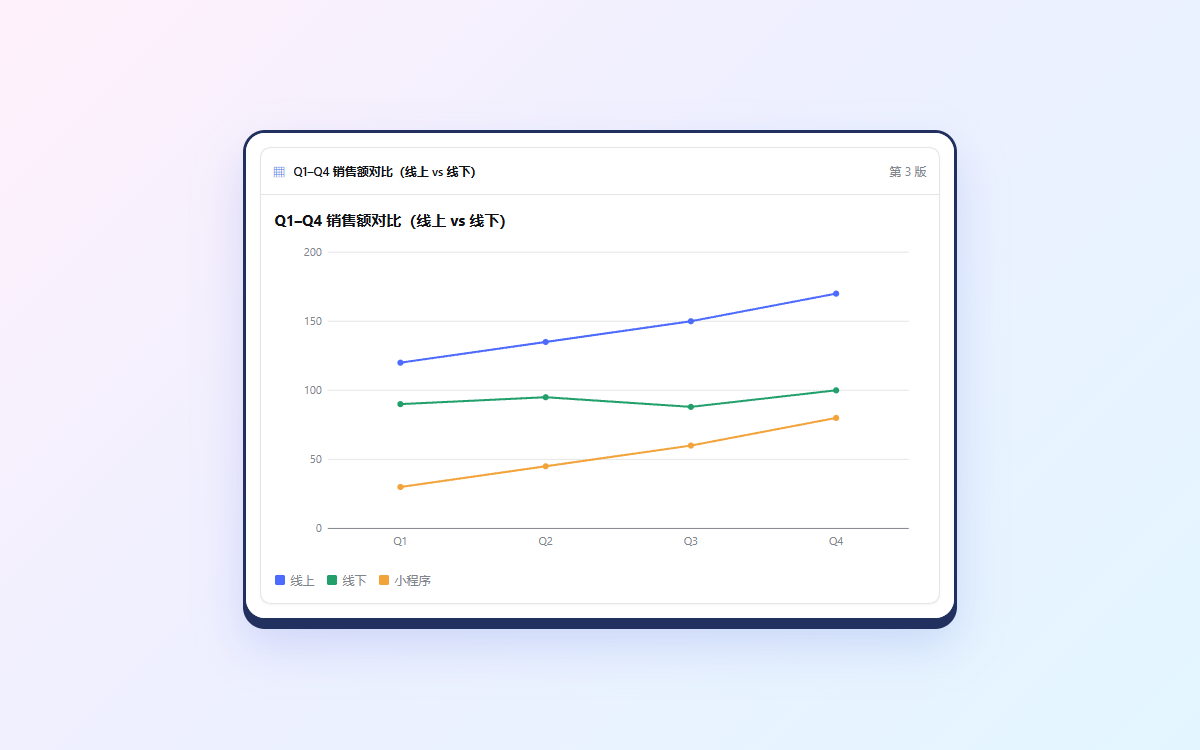 |
| The chart is right, but the card says "generation interrupted" | "Make it a line chart", then "add 小程序 30/45/60/80": one card, version 3 |
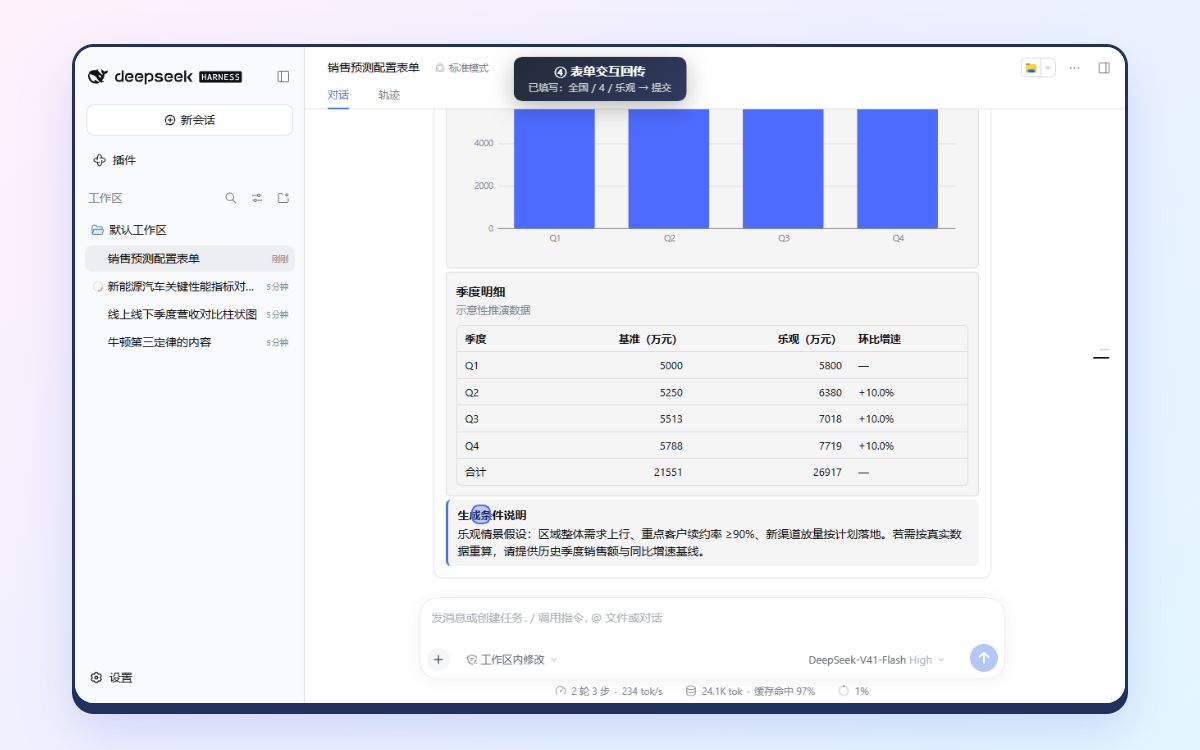
| Form submit → the agent uses the values: ✓ | Damped oscillation Plot with live sliders: ✓ |
 | 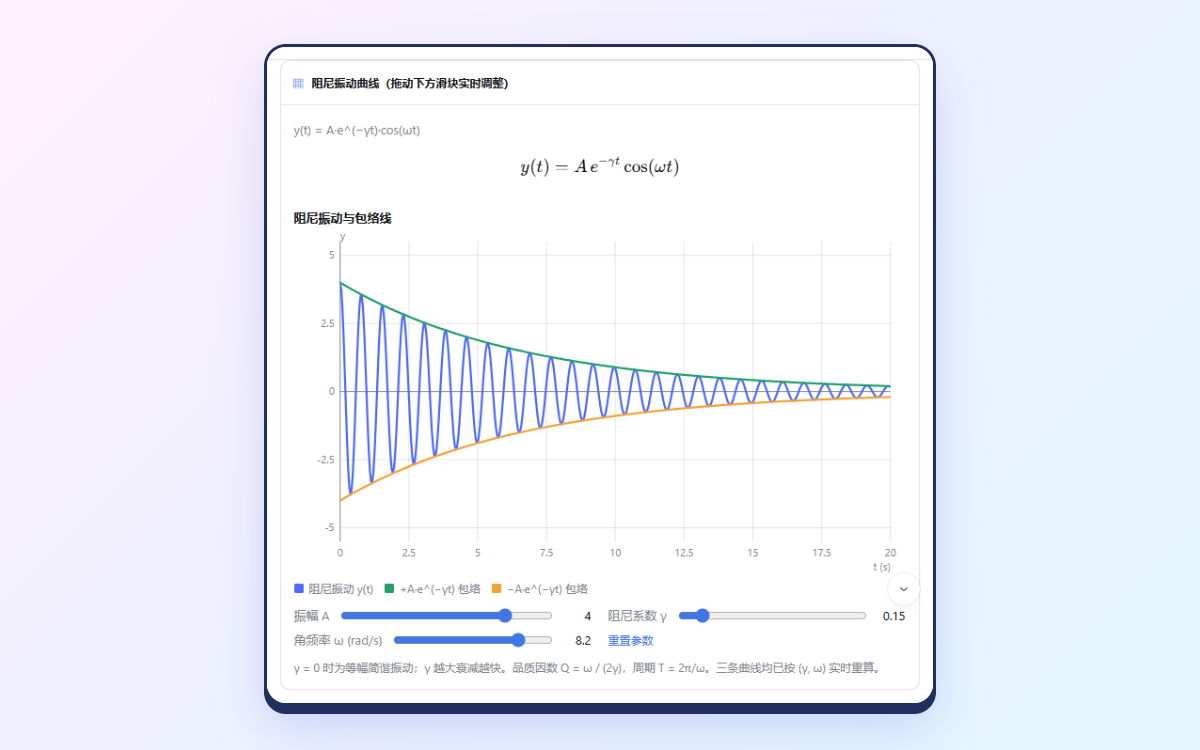 |
| Three.js: ✗, then repaired with "Ask to fix" | Stopped mid-stream → regenerated: ✓ |
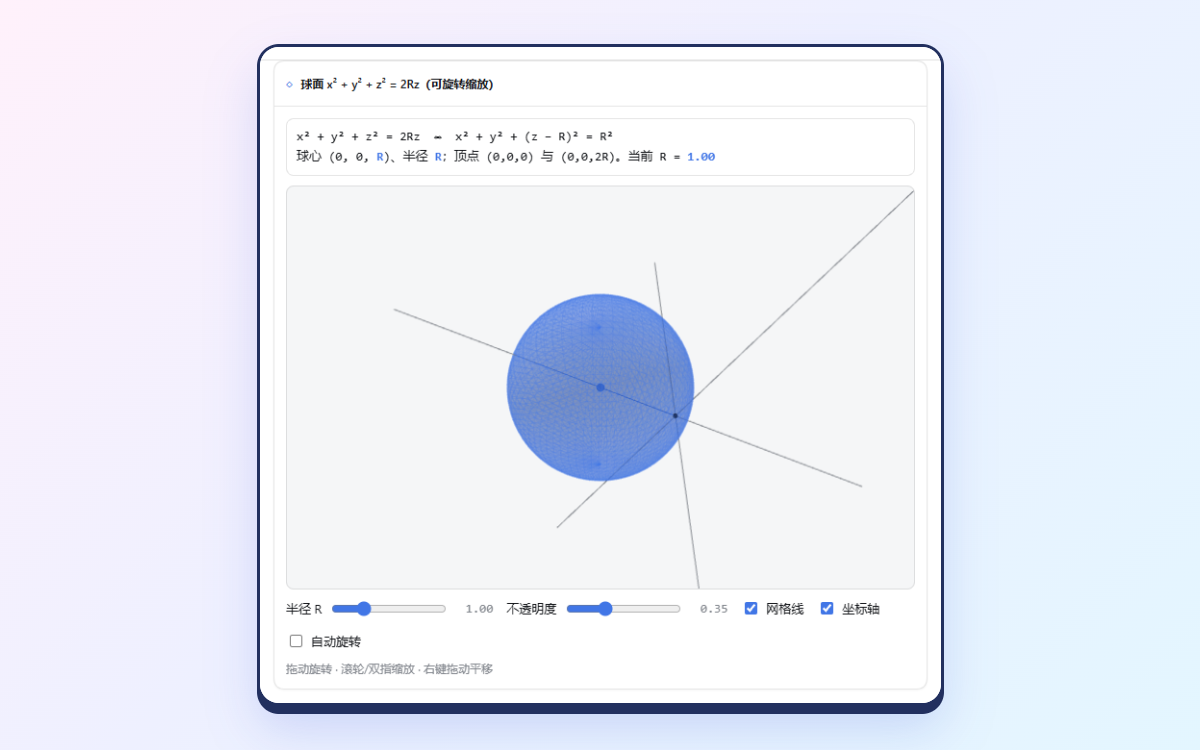 | 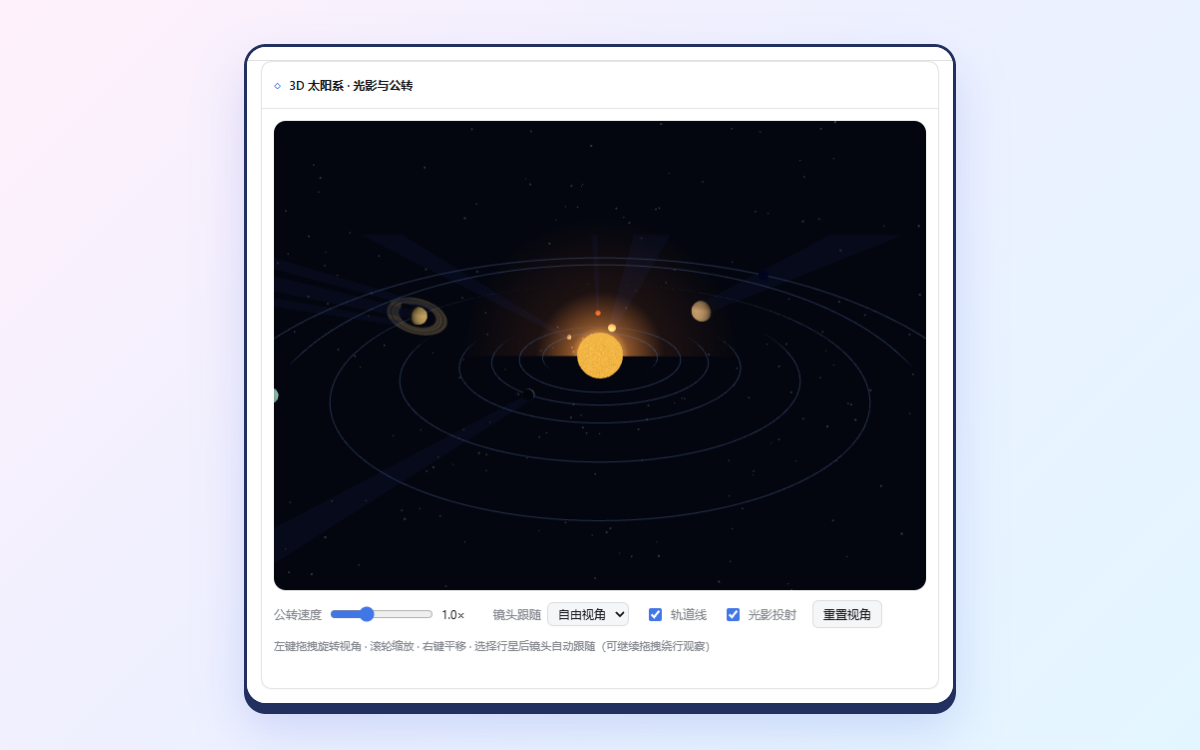 |
| Fast 3G, cache off: ✓ | CDN unreachable: ✓ (degrades as designed) |
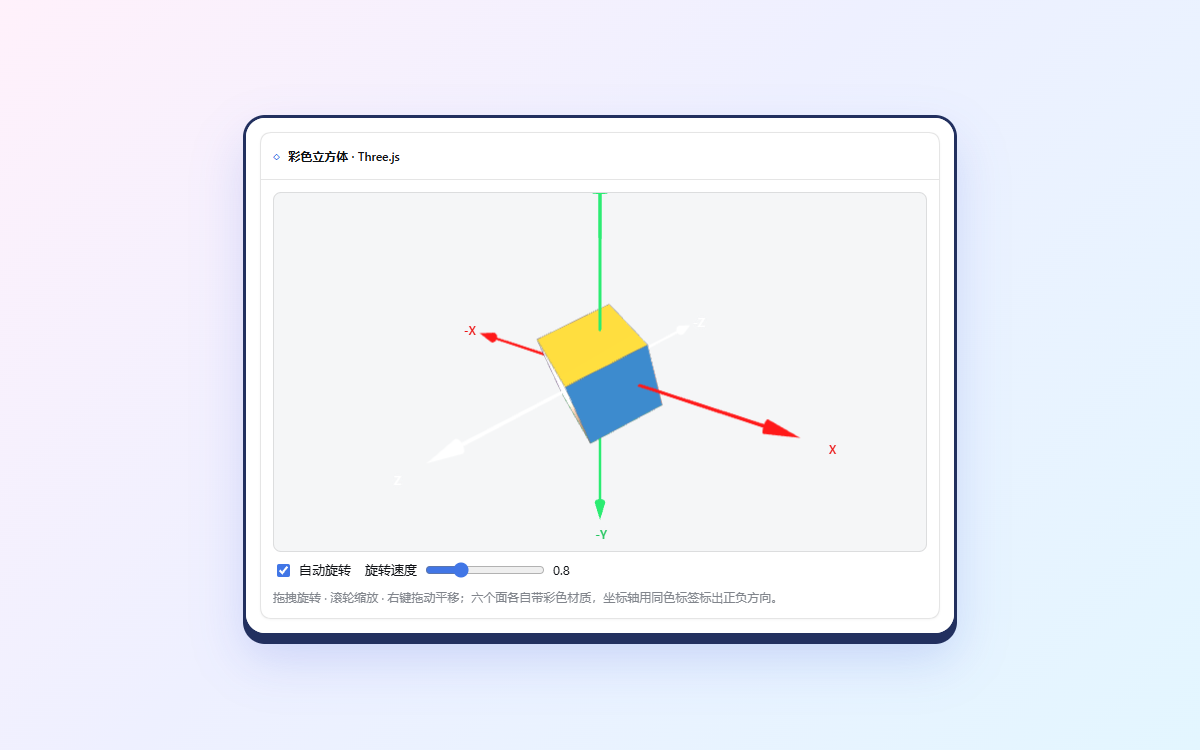 | 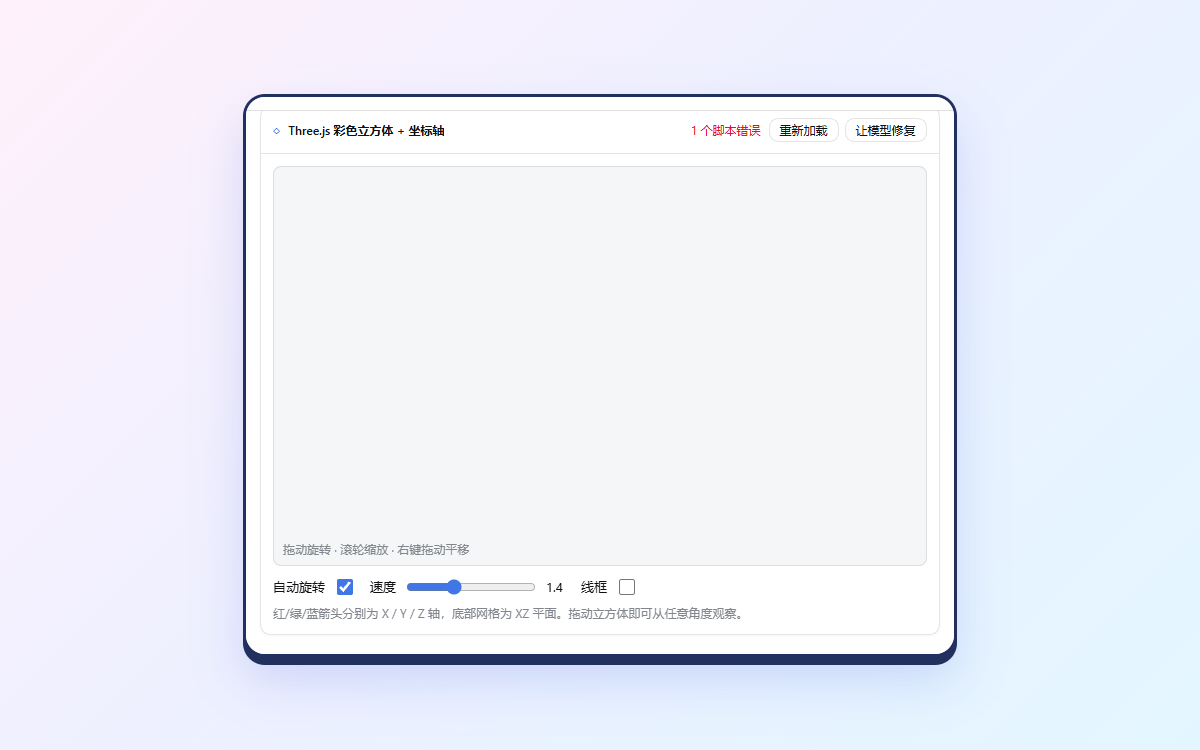 |
| Phone width (390 px): ✓ | Sortable table: ✗ (agent researched instead) |
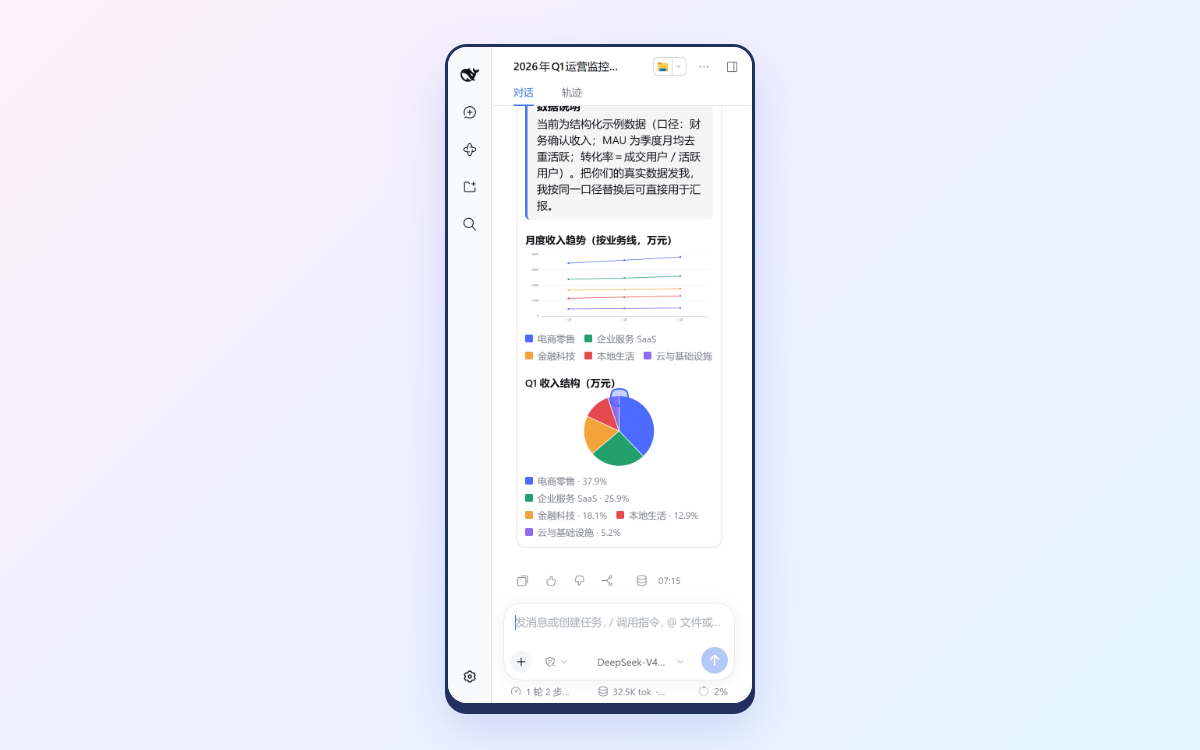 | 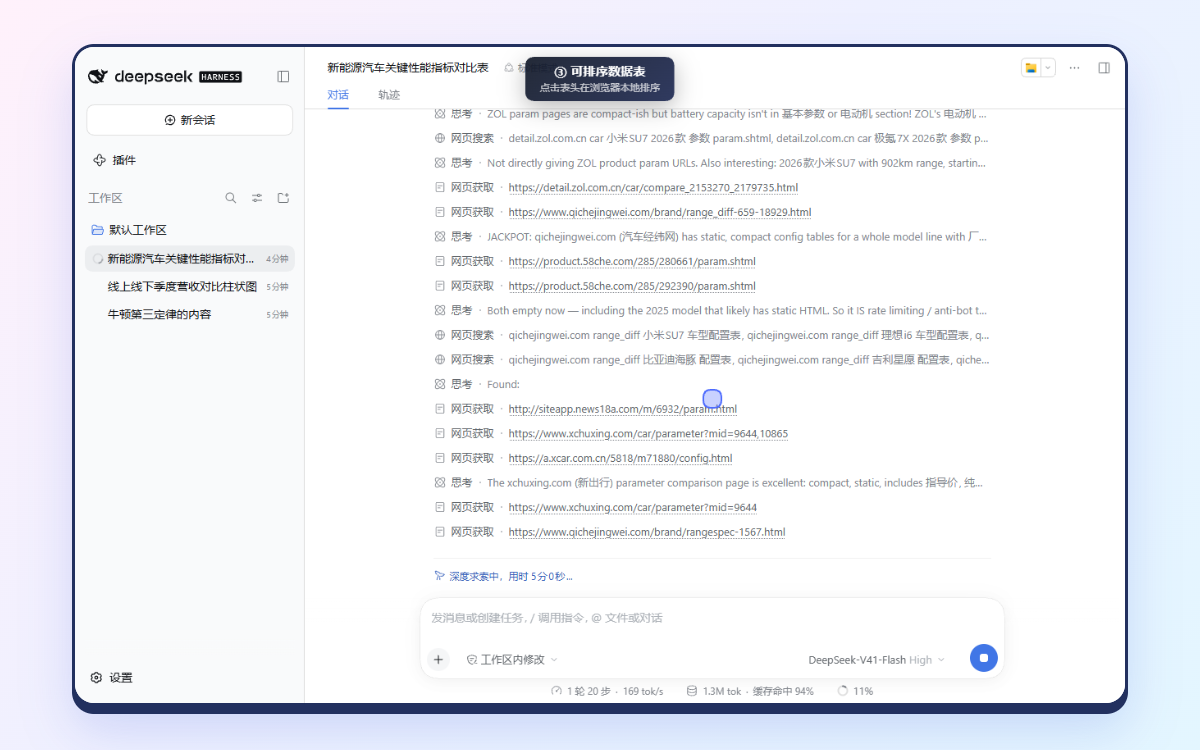 |
GIF version for viewers that cannot play video (e.g. npm): demo.gif.

Feature tour
Recorded live in the DeepSeek Harness desktop app with real DeepSeek models through the magpie gateway; nothing is scripted. The camera follows the cursor and zooms into each interaction; waits for the model are fast-forwarded (the badge shows the speed).
Choice: pick one option, continue here or start it in a new session · DeepSeek-V4.1-Flash
https://github.com/user-attachments/assets/1317993c-17b1-4fca-9356-c365afcc6101
Table as a data grid: typed sorting, search, per-column filters, paging, CSV export · DeepSeek-V4.1-Flash
https://github.com/user-attachments/assets/be9c74e4-2ed3-402c-bd08-d57ea8516eec
Scatter and Heatmap: hover, tap and keyboard inspection; missing data hatched, never 0 · DeepSeek-Flash
https://github.com/user-attachments/assets/cb575946-bab5-4551-9621-489dee55df07
CodeDiff, FileTree and JsonView: code as text, collapsible context, JSONPath copy · DeepSeek-Flash
https://github.com/user-attachments/assets/75900041-3880-4e21-97f8-21bfd41872ad
🚀 Quick start
You need DeepSeek Harness 0.1.7 – 0.2.x (>=0.1.7-rc.1 <0.3.0) and Node.js ≥ 22.13, on Windows, Linux or macOS. Nothing is compiled during install: the package ships its prebuilt browser bundle and has no install scripts.
dsh plugin --profile web add deepseek-harness-intelligent-ui
Restart DSH Web (dsh web) and ask for something visual, for example "compare Q1–Q4 revenue by channel" or "let me explore x²+y²+z²=2Rz in 3D". In the desktop app, use Plugins → Add plugin with the same package name.
The guided installer checks Node, the dsh version, pnpm and the profile first, then runs the same dsh plugin add:
npx deepseek-harness-intelligent-ui install     # --profile <name>, --dsh <path>, --dry-run
npx deepseek-harness-intelligent-ui doctor      # diagnose only
| Task | Command |
|---|---|
| Upgrade | dsh plugin --profile web add deepseek-harness-intelligent-ui@latest |
Try a prerelease (when a next dist-tag exists) | dsh plugin --profile web add deepseek-harness-intelligent-ui@next |
| Pin a version | dsh plugin --profile web add deepseek-harness-intelligent-ui@0.2.7 |
| Uninstall | dsh plugin --profile web remove deepseek-harness-intelligent-ui (or npx deepseek-harness-intelligent-ui uninstall) |
| From a checkout | dsh plugin --profile web add file:/path/to/deepseek-harness-intelligent-ui |
🩺 Troubleshooting
pnpm was not found: DSH installs plugins with pnpm. Runcorepack enable(it ships with Node) ornpm i -g pnpm.… is incompatible with dsh X: your DSH is outside the supported range. Upgrade DSH (npm i -g @deepseek-ai/dsh@latest) or check compatibility for a plugin release that supports it.- Upgrading from 0.1.x (
dsh-intelligent-uiviafile:): rundsh plugin --profile web remove dsh-intelligent-uifirst. Both packages insert the sameintelligent-uirow, anddoctorreports the conflict. - The UI does not appear: restart DSH Web after installing, and make sure you started the profile you installed into.
Compatibility. CI installs the packed plugin and runs the full browser E2E on Windows, Linux and macOS against DSH 0.1.7-rc.2, 0.2.0-rc.1, latest, next and alpha, on every push and nightly, so new DSH releases are caught early. Details and local verification history: docs/compatibility.md.
🧠 How the agent decides
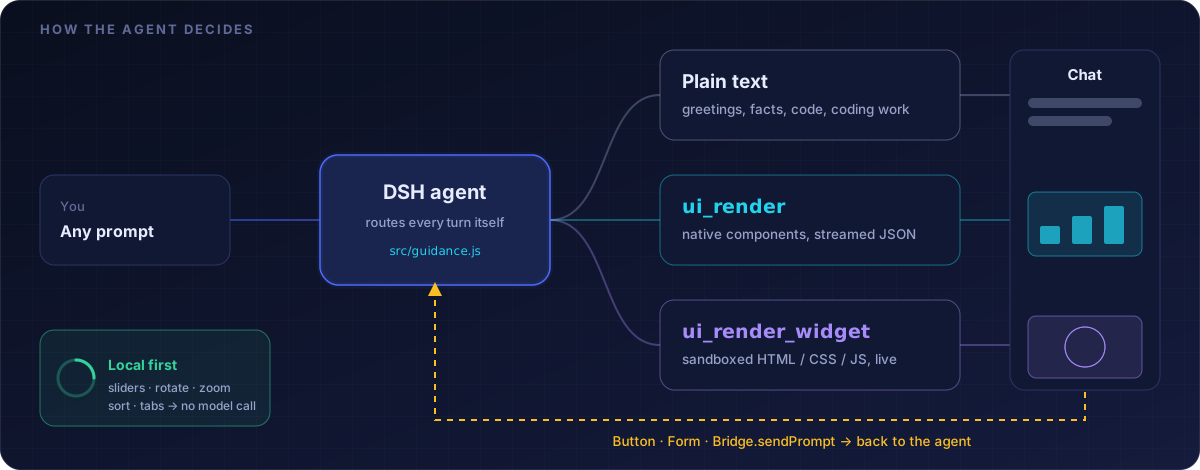
The plugin injects a system-prompt section (src/guidance.js) so the model routes each turn itself:
- Plain text for greetings, short facts, explanations, code to copy, and workspace/coding work.
ui_renderfor structured answers: comparisons, data to explore, dashboards, processes, formulas, functions, code reviews, choices between alternatives, input collection.ui_render_widgetfor what the catalog cannot draw: 3D, simulations, animations, games, custom tools.- Local first: anything computable in the browser must update instantly without a message to the model.
/ui <request> forces a UI answer.
| Tool | Use it for | Rendering |
|---|---|---|
ui_render | Structured answers | Native React components from a fixed catalog, rendered progressively as the JSON streams |
ui_patch | Changing a UI shown earlier | Component-level operations; untouched components keep their state (details) |
ui_render_widget | Custom visuals, 3D, simulations, mini-apps | HTML/CSS/JS in an opaque-origin sandboxed iframe: CSS first, HTML morphed in live, JS last, all in one iframe |
🧩 Component catalog (ui_render)
| Category | Components |
|---|---|
| Layout | Card, Stack, Grid, Tabs (keyboard navigable) |
| Text & callouts | Text (markdown subset), Code, Alert, Badge, Divider |
| Data | Stat, Progress, List, Timeline, Table as a data grid: typed sorting (numbers, ISO dates, booleans), search, per-column filters, paging, CSV/Markdown export |
| Charts | Chart (bar / line / area / pie, stacked, legend toggles, hover/tap/keyboard tooltips, data export), Scatter (continuous x/y), Heatmap (sequential or diverging scale, explicit missing cells) |
| Math & diagrams | Plot (y = f(x) with sliders that redraw instantly; a safe expression compiler, never eval), Math (KaTeX), Mermaid |
| Code & structure | CodeDiff (multi-file before/after or unified patch), FileTree (status badges), JsonView (JSONPath, copy) |
| Interaction | Button, Choice (single-choice card), Form (text, number, range slider, select, checkbox, date, textarea) |
- Validated before it renders. A UI travels as a flat node list with id references (DSH's tool schema has no recursion). The Host rejects unknown types or props, dangling or duplicate ids, cycles, shape mismatches (chart series, heatmap rows), non-finite numbers, uncompilable
Plotexpressions and oversized data, returningok:falsewith paths so the model fixes and retries. - Text, never HTML. Cells, code, JSON and labels render as React text. CSV export neutralises spreadsheet formula injection and is RFC 4180 with a UTF-8 BOM.
- Accessible and responsive. Charts are focusable and keyboard-inspectable, trees use
role=tree, touch targets grow on coarse pointers, and charts lay out at the card's real width so axis text stays legible on phones. MathandMermaidrender in the same sandbox as widgets from the CDN allowlist, with a static fallback when the CDN is unreachable, or fully offline with the offline resource package.
Choice and new sessions
Choice shows a question with option cards and two buttons. Continue in this session sends the picked option's prompt as your next message. Start new session creates a session in the same workspace, submits that prompt there and opens it; nothing from the current conversation is copied, so each option's prompt is self-contained. Button can do the same with sessionTarget: "new". The launch is idempotent: a double click, a retry after a failure or a reload never starts the task twice.
Roadmap and design notes for upcoming components (Map, Calendar): docs/component-roadmap.md.
🔁 Updating a UI in place (ui_patch)
When the user asks to change a UI shown earlier ("make that bar chart a line chart; leave the rest"), the agent patches it by component id instead of re-sending the whole tree.
- Identity: every
ui_renderresult reports the UI'suiIdandversion1; each accepted patch reports the new version and anid:Typeoutline. - Operations:
setProps(merge,unsetto remove),replaceNode,insertChildandremoveNode, applied in order and all-or-nothing. The next version then passes the same checks as a freshui_render. - Concurrency:
baseVersionis required; a stale patch is refused with the current version, and patches never run in parallel. - Scope: the Host stores nothing. It rebuilds the current version by replaying the conversation's own history, so a patch can only address UIs of the same conversation.
- State: components keep their ids across versions, so untouched components keep their sort, filters, tab, form input, submitted lock and slider positions. A replaced component starts fresh.
- Display: while a patch streams, the previous version stays live. On success the new version renders beneath the reply and the older copy collapses to "Updated to version N". Refused, failed or stopped patches change nothing.
- Widgets are re-rendered rather than patched, and keep their
UI.state.
🪟 Sandboxed widgets (ui_render_widget)
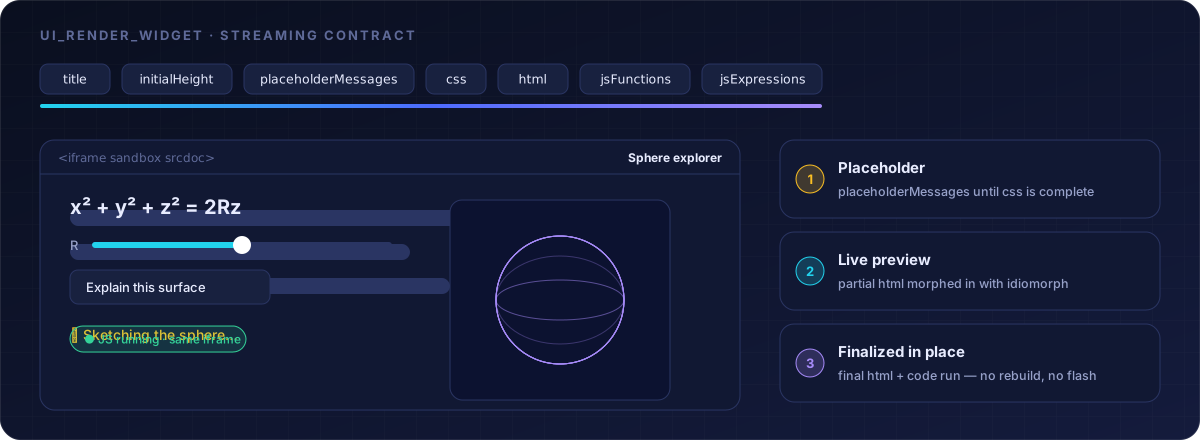
Fields follow the OpenIntelligentUI streaming contract, in this order: title, initialHeight, placeholderMessages, css, html, jsFunctions, jsExpressions. Placeholder lines show until css is complete; then a preview frame opens and the partial html is morphed in (idiomorph); when the arguments are complete, the same frame is finalized in place and the code runs.
| Runtime helper | What it does |
|---|---|
UI.three(el, { camera, target, autoRotate }) | Renderer, scene, lights and OrbitControls (drag rotates, wheel/pinch zooms); renders on demand and handles resize |
UI.canvas(el, draw) | HiDPI 2D canvas, redrawn on resize and theme change |
UI.state / UI.setState() | Persisted state; inputs with an id are persisted and restored automatically |
UI.color('accent') / UI.css() | Opaque theme color for three.js/canvas / raw CSS value |
UI.onTheme(cb), UI.scheme, UI.reducedMotion | React to theme and motion preferences |
.ui-row, .ui-control, .ui-card, .ui-stage | Helper classes |
- Bridge:
Bridge.sendPrompt({ text })disables the clicked control until the host answers;Bridge.openLink({ url })opens links;Websandbox.connection.remote.*is kept for OpenIntelligentUI compatibility. - Libraries: an importmap maps
three,three/addons/…,d3,chart.js/auto,gsapandcanvas-confettito esm.sh. - Recovery: script errors show a count with Reload and Ask to fix (which sends the errors to the agent).
Where the UI appears, and what survives
- While a turn runs, the UI renders inline in the tool call; one component instance spans preparing → running → result.
- When the turn ends, DSH folds tool calls into the "process" section, so the plugin re-presents each UI beneath the reply and the inline copy shrinks to a pointer.
- Interaction state is kept per UI in memory and in
localStorage(bounded), so moving beneath the reply or reloading restores it. The UIs themselves are rebuilt from the durable session log. - A stopped generation keeps the finished part (a static widget preview or the completed components) with a notice and Regenerate, even when DSH dropped a call that was still streaming.
🔌 Extending
| Third-party components | Trusted companion plugins register versioned, namespaced components with shared Host/browser props validation, React renderers and disable/uninstall lifecycle. Model output can never register or load code. Extension API and GitDiffViewer template |
| Controlled data and actions | Table and Chart can share a scoped, read-only dataRef with local search/filter/sort/paging. Trusted hosts register schema-checked actions that run only after a native click, with permission checks, write approval and idempotent receipts. Integration guide |
| Portable renderer | renderer/renderer.js renders accepted ui_render, ui_patch and widget artifacts outside DSH Web, e.g. in a mobile WebView. Remote-client contract |
| Offline resources | An optional tarball embeds locked KaTeX/fonts, Mermaid, Three.js, D3, Chart.js and canvas-confetti, so formulas, diagrams and standard 3D scenes work without a CDN. Offline package |
🔒 Security model
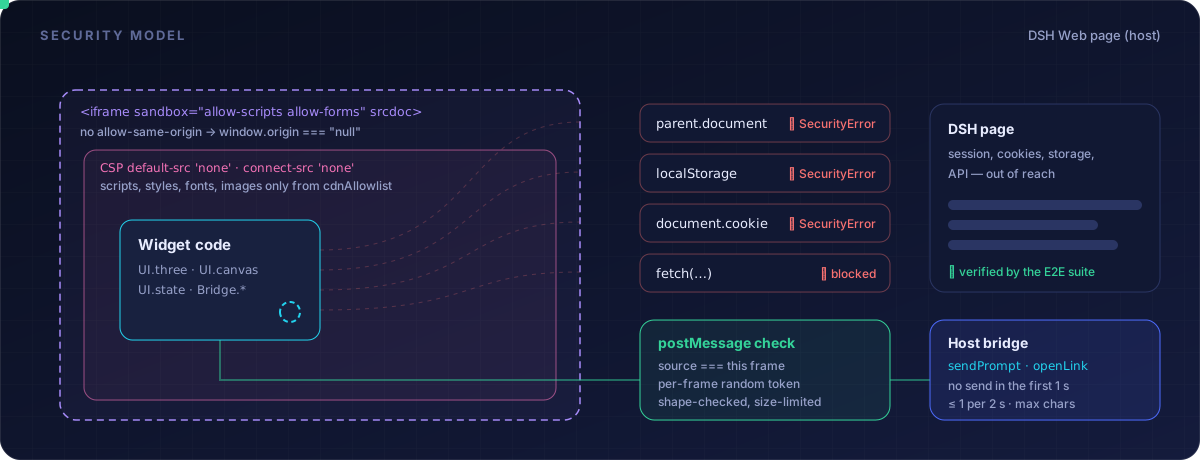
- Widget isolation:
<iframe sandbox="allow-scripts allow-forms">withsrcdocand noallow-same-origin. The E2E verifies in a browser thatparent.document,localStorageanddocument.cookiethrowSecurityError,fetchis blocked, andwindow.origin === "null". - CSP:
default-src 'none'; scripts, styles, fonts and images only fromcdnAllowlist;connect-src 'none'unlessallowNetwork;form-action 'none';base-uri 'none'. - Messages: accepted only from the frame's own
contentWindowwith a per-frame random token and a valid shape; forged messages are dropped (verified in E2E). sendPromptlimits: refused for 1 s after mount, at most one per 2 s, capped atsendPromptMaxChars, queued as a normal user message.openLink: https only, optionally restricted toopenLinkAllowedOrigins.- Catalog: text renders as React elements, never raw HTML;
Plotexpressions are compiled over a fixed math table with noeval,Functionor property access; new-session launches and host actions need an explicit native click.
⚙️ Configuration
The bundle patch inserts the plugin row automatically. To change settings, add to your profile's cordis.patch.yml:
- id: intelligent-ui
  config:
    allowNetwork: true
    cdnAllowlist: [https://esm.sh, https://cdn.jsdelivr.net]
| Option | Default | Meaning |
|---|---|---|
enableCatalog | true | Register ui_render and ui_patch |
enableWidget | true | Register ui_render_widget |
injectGuidance | true | Add the "when to use UI" system-prompt section |
cdnAllowlist | esm.sh, jsdelivr, unpkg | Origins widgets (and Math/Mermaid) may load resources from |
allowNetwork | false | Let widgets fetch and use WebSocket to those origins |
maxWidgetHeight | 2400 | Maximum frame height (px) |
maxWidgetBytes | 400000 | Reject larger widgets |
sendPromptMaxChars | 4000 | Longest message a widget, button, form or choice may send |
openLinkAllowedOrigins | [] | If non-empty, the only origins openLink may open |
📊 Real-model quality baseline
A tool call whose arguments parse is not the same as a UI the user can use. npm run eval:real measures three layers separately; a pass in one is not evidence for another.
| Layer | What it proves | Latest · 2026-10-16 · deepseek-flash |
|---|---|---|
| Mock E2E | Rendering, streaming, interaction, persistence and isolation, with scripted answers | 30 / 30 |
| Real model · API | Right tool, valid arguments on the first try, and the rendered UI contains the requested components and data | 30 / 32 (94%) |
| Real model · browser | What the model generated works in real DSH Web + Chrome: renders, interacts, survives stop/resume and bad networks, no console errors | 9 / 11 automated 8 / 11 after review |
| Timing (real model) | p50 | p95 |
|---|---|---|
| First visible UI preview | 7.6 s | 70.2 s |
| UI generation complete | 11.8 s | 73.4 s |
| Browser-side execution after the stream | 26 ms | 2.9 s |
The long tail comes from large Three.js widgets (10–20 KB of code before the preview starts). The failures are real model and agent behaviour: a call cut off mid-stream, an agent that researched on the web instead of rendering, Three.js scope slips repaired with "Ask to fix", and invalid first attempts the model fixed on retry. Each case, its checks and the full findings: docs/real-model-eval.md.
▶️ Run it
The key is read from the environment only, and the run refuses to write a report that still contains it.
export DEEPSEEK_API_KEY='<your-key>'               # PowerShell: $env:DEEPSEEK_API_KEY = '<your-key>'
npm run eval:real                                   # mock E2E + API + browser; exits 1 on any failure
npm run eval:real -- --repeat 3                     # per-case success rates and p50/p95
npm run eval:real -- --record && npm run eval:demo  # record and cut the demo video
| Option | Effect |
|---|---|
--stage mock,api,browser | Run only some layers (all by default); A/B/C/D selects API categories |
--only B3,R-chart | Run only these cases |
--keep-other-layers | Keep the layers or cases this run did not execute, each with its own date |
--append | With --only: add the rerun as extra samples; a failure is never replaced by a lucky retry |
--rescore | Re-judge the last API run from its saved transcripts with the current assertions, no model calls |
DEEPSEEK_EVAL_MODEL | Model id (default deepseek-flash) |
The Real-model eval workflow runs the same command on demand with the DEEPSEEK_API_KEY secret; a full run costs about ¥1.5 with deepseek-flash.
🔬 What each case checks
API stage (scripts/eval/api-stage.mjs, 16 cases, assertions v3; every criterion is its own check):
- Plain text (A1–A4): no UI tool, a substantive answer.
- Charts/tables (B1–B3, B5): KPI tiles named by meaning; a sortable table with all five requested columns; a bar chart with Q1–Q4 and both an online and an offline series; a chronology with 4+ milestones.
- Forms (B4, D1): range, checkbox and select fields; D1 submits like the browser and requires the follow-up to use the submitted values.
- Math Plot (C2): three sliders, every one used in the expression, an
exp(…)·sin/cos(…)shape. - Three.js and widgets (C1, C3, C4):
UI.three()orimport("three"), animation, lights, start/pause and parameter controls. - Multi-turn edits (D2, D3): a new column with every value correct and old values kept; bar → line, then a third series with exact values.
Browser stage (scripts/eval/browser-stage.mjs, 11 cases, each in a new conversation): plain text creates no card; chart legend, Q1–Q4 and local hover; table re-sorts without a model call; a form filled and submitted with real mouse and keyboard; Plot slider redraws; Three.js canvas drawn (pixel statistics) and draggable, with "Ask to fix" on failure; stop → preview → Regenerate; two in-place edits; Fast 3G; CDN blocked; 390 px phone width. Console errors are recorded per case, and every screenshot is reviewed by hand.
🛠 Develop and verify
npm install
npm run build            # client-src/ → client/client.js and renderer/renderer.js
npm test                 # unit and component tests (vitest)
npm run typecheck
npm run e2e:all          # build → install into a temp DSH home → scripted model + real DSH Web → browser checks
npm run e2e:controlled   # controlled data/actions in real Chromium
npm run e2e:extensions   # third-party component template in real Chromium
npm run e2e:offline      # offline resource package with the network cut
npm run smoke -- --spec ./deepseek-harness-intelligent-ui-<v>.tgz   # install smoke test of a packed tarball
npm run demo:features    # re-record the feature-tour videos in the DSH desktop app
npm run docs:art         # regenerate the README illustrations
- Layout:
src/is the Host half (plain ESM, no build);client-src/is the browser half (TSX, bundled with esbuild).client/client.jsandrenderer/renderer.jsare committed and published so npm,file:and git installs need no build step; CI fails if they are stale. Never add aprepare/postinstallscript: DSH's pnpm blocks plugin build scripts. - E2E needs Chrome (
CHROME_PATHto override),dshon PATH (DSH_BINto override) and runs on Windows, Linux and macOS.--spec <tgz>tests a packed tarball,--recordre-records the scripted demo,E2E_DATA_ONLY=1/E2E_SESSION_ONLY=1run one group. - Feature-tour videos: start the desktop app with
--remote-debugging-port=9333, select the model, thennpm run demo:features(scripts/demo/).
✅ What the browser E2E checks (scripts/e2e/browser.mjs)
- Plain Q&A stays text; the dashboard streams progressively.
- Chart hover, table sort and tabs are local; a form round trip returns a new UI.
ui_patchturns a chart from bar to line: an invalid first attempt is refused, the old copy collapses, state is kept, including after a reload.- The widget preview is finalized in the same iframe; the Three.js scene renders, rotates and zooms; the R slider is local;
Bridge.sendPromptround-trips. - KaTeX and Mermaid render; Plot sliders are local; earlier UIs keep their state.
- Stop → static preview → Regenerate; dark theme; phone width without overflow; a reload restores every UI and its state.
- The sandbox is isolated and forged messages are ignored.
- Data tools: search plus range and date filters, CSV contents and formula neutralisation, scatter hover, heatmap keyboard with 0 vs missing data, CodeDiff without HTML execution, and no model calls for any of it.
- New sessions: a native button starts exactly one independent session, without copied history.
- No plugin errors in the console.
📦 Releasing (maintainers)
- Open a
chore: prepare x.y.z releasePR: add a## [x.y.z]section to CHANGELOG.md, runnpm version x.y.z --no-git-tag-versionandnpm run build, update the pinned version in the READMEs, and check withnpm run release:check. - Merge it once CI is green.
- Tag the merge commit
vx.y.zand push the tag. The Release workflow runs the CI matrix, publishes to npm through Trusted Publishing with provenance (nextfor prereleases), smoke-tests the published package on all three OSes and creates the GitHub Release from the changelog section.
OIDC and repository settings: docs/releasing.md.
📚 Documentation
| Document | Contents |
|---|---|
| compatibility.md | Supported DSH, Node and OS versions; what CI tests |
| component-roadmap.md | What issue #17 shipped; Map and Calendar proposals |
| component-extensions.md | Third-party component API and template |
| controlled-data-actions.md | Host data binding and schema-checked actions |
| portable-renderer.md | Rendering artifacts outside DSH Web |
| offline-resources.md | Offline KaTeX/Mermaid/Three.js package |
| real-model-eval.md | Real-model evaluation: cases, checks, findings |
| releasing.md | Release integrity and npm Trusted Publishing |
| CHANGELOG.md | Changes per release |
Limitations
- The default online package needs reachable CDN resources for Math/Mermaid and imported widget libraries. The offline package covers Math, Mermaid and standard Three.js scenes; other addons, GSAP and external media are not included. Library failures show an explicit fallback or script error.
- Interaction state is per browser (
localStorage), not synced across devices. - A call dropped while streaming is matched to its turn by start/end time; a large clock offset between a remote DSH host and the browser could hide that card.
Credits
Concepts, the streaming widget contract and parts of the prompt guidance come from CopilotKit/OpenIntelligentUI (MIT); see THIRD_PARTY_NOTICES.md.
The DeepSeek whale girl (鲸鱼娘) who narrates the end-to-end demo, in 26 poses, is by Sutera-Diffusus/dsh-whale-musume (MIT © Sutera-Diffusus; illustrations by @SuteraWu). The unmodified files and licence are in scripts/eval/demo/assets/whale/ and are not part of the npm package.
Licensed under MIT.
Versions
| Latest version | Published | Size |
|---|---|---|
| 0.0.0-stage | — | — |
| 0.2.1 | — | — |
| 0.2.2 | — | — |
| 0.2.3 | — | — |
| 0.2.4 | — | — |
| 0.2.5 | — | — |
| 0.2.6 | — | — |
| 0.2.7 | — | — |
Comments
Loading…
Similar plugins
by my-dsh
Intelligent UI for DeepSeek Harness: the model answers with an openui-lang program and the Web GUI renders it as a live, interactive UI inside the chat
★ 7
↓ 68/wk
MIT
JavaScript
Oct 17, 2026
dsh plugin --profile web add dsh-intelligent-uiby MindLab-Research
Generative UI for DeepSeek Harness — the agent writes TSX and the web UI compiles every frame as it streams, so a card renders while its JSX is still unclosed. Inline in the conversation, or in a side
★ 22
↓ 531/wk
Apache-2.0
TypeScript
Oct 20, 2026
dsh plugin --profile web add dsh-generative-uiby gulagala001
让 DSH 回答变成可操作的界面:计算、图表、表单、模拟与小游戏。独立 DSH 插件 | Interactive answers for DeepSeek Harness: calculators, charts, forms, simulations and games.
★ 16
↓ 246/wk
MIT
JavaScript
Oct 20, 2026
dsh plugin --profile web add dsh-intelligent-uiby omdsh-dev
GenUI for DeepSeek Harness: interactive UI components rendered inline in assistant replies via the dsh-ui fence — layout, charts, plots, forms, quizzes, mermaid, 3D scenes, and an action event loop ba
★ 701
↓ 9.2k/wk
MIT
TypeScript
Oct 20, 2026
dsh plugin --profile web add @changfenhuang/dsh-genuiby Weihong-Liu
Live HTML preview inside DeepSeek Harness conversations: a render_html tool plus an inline, sandboxed, auto-sized renderer.
★ 0
MIT
JavaScript
Sep 30, 2026
dsh plugin --profile web add dsh-html-live-previewby yunyv
DSH 插件:生成式界面 / Generative UI for DeepSeek Harness。模型写声明式 DSL,无 DOM Worker 沙箱里执行,宿主用原生 DOM 画成真界面;另有一条自包含文档的逃生舱。原地改写、版本历史、跨重启可 patch。对标 ChatGPT Intelligent UI 与 Claude Artifacts。
★ 4
↓ 246/wk
MIT
TypeScript
Oct 17, 2026
dsh plugin --profile web add dsh-intelligent-ui