

dsh-session-manager
Manifest valid★ 102DSH session manager plugin: delete (trash restore/purge), stats, continue/pause, open log folder, conversation top drawer, workspace grouping and sorting, context compression threshold settings.
dsh-session-manager
English | 中文
这可能是目前功能最全的 DSH 会话管理插件:在 DeepSeek Harness Web 界面中全面管理会话,设置页与对话顶部均提供入口——删除(回收站可恢复或彻底清除)、恢复已归档会话、近期活动统计、继续/暂停会话、打开日志目录、未读/已读标记、新聊天中继续(fork)、工作区分组与排序管理、上下文压缩阈值设置,不修改 DSH 核心代码。
本项目由 dsh + Deepseek-V4-Flash0731 独立完成
如果觉得有用,欢迎点个 ⭐ Star,谢谢支持!
功能
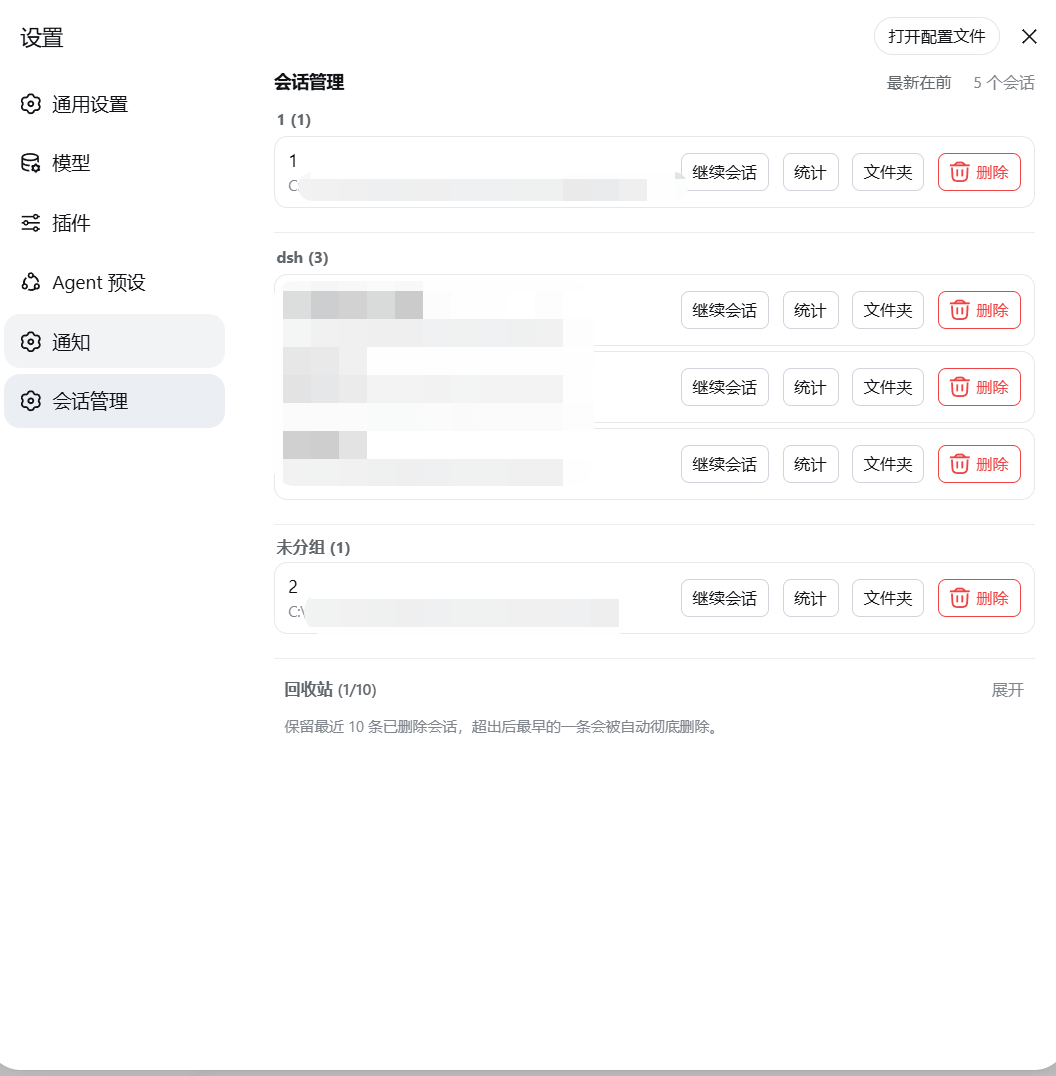
- 设置页新增独立的「会话管理」分栏(与 Notifications 同级的设置分区)
- 面板列出全部会话(标题 / 工作目录),底部折叠区单独展示已归档会话,支持一键恢复回到会话列表
- 回收站:删除的会话移入回收站(保留最近 10 条,超出自动清除最早一条),可恢复或彻底删除
- 统计:每个会话可在居中弹窗中查看完整近期活动统计(轮次 / 用户消息 / 助手消息 / 全部工具调用 / 活动窗口)
- 继续会话:一键打开会话并关闭面板;暂停:停止正在运行会话的当前回合
- 未读 / 已读:会话行标题旁显示状态点——手动未读为蓝色、官方等待输入为琥珀、官方完成提醒为绿色、运行中为转圈;点击官方状态点就地已读(不跳转),点击蓝色点清除未读,打开会话自动已读;官方侧边栏的对应会话行旁同步显示蓝色未读点
- 新聊天中继续:每个会话一键 fork 子会话(官方
sessions.fork)并打开 - 文件夹:在系统文件管理器中打开会话日志目录
- 删除本对话:对话顶部右侧红色按钮,一键删除当前对话(Session log 左侧)
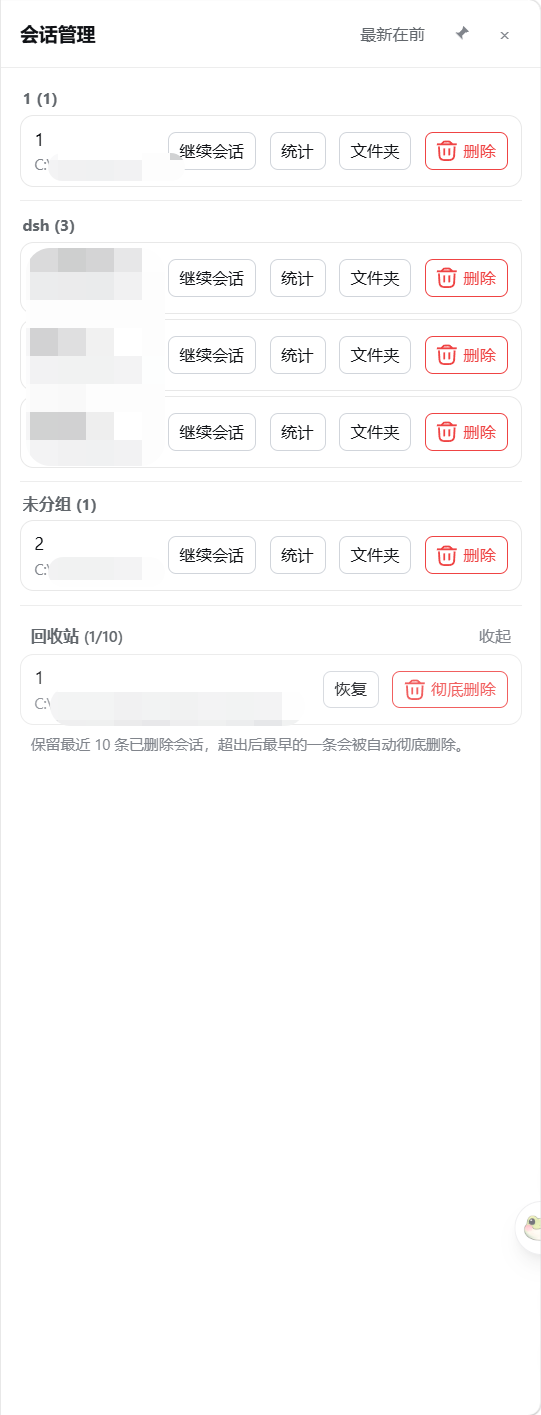
- 对话管理 / 回收站:对话顶部入口,打开自绘右侧抽屉(图钉固定常驻、点击外部自动收起),行内「更多」悬浮菜单收纳统计 / 文件夹 / 新聊天中继续
- 工作区管理:会话按工作区分组展示,组内按最后使用时间排序(可切换最新/最旧);拖拽工作区标题即可调整顺序(插入 / 交换 / 拖到末尾);悬停标题出现置于顶部 / 重命名 / 删除按钮(删除按官方定义:仅移出列表,文件夹与会话记录保留,会话归入「未分组」)
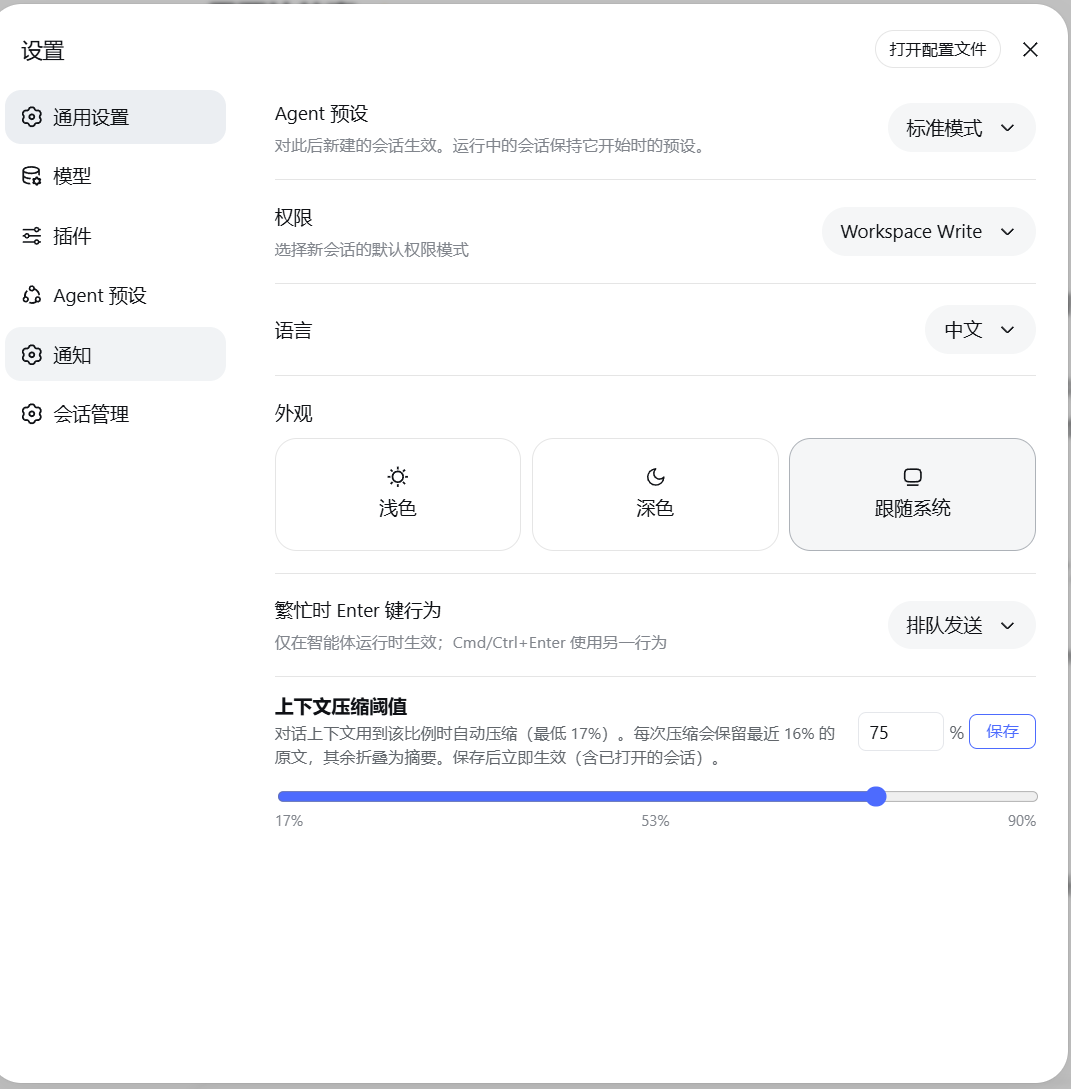
- 上下文压缩阈值(通用设置):设置对话上下文用到模型窗口(100 万 token)的多少比例时自动压缩(17%–90%),每次压缩保留最近 16% 原文;对所有 Agent 预设的会话统一生效(保存即时 + 持久化 + 重启自动应用)
- 删除限制:仅禁止删除「正在思考」的会话;当前打开的会话(空闲)可删除
- 子代理(subagent)会话支持删除(非运行中):即使主会话已删除、子代理成为「孤儿」,也能在会话管理中直接清理
- 中英文界面自适应(跟随页面语言)
安装
从 GitHub
dsh plugin --profile web add 'github:dream12347/dsh-session-manager#v0.2.2'
# CMD
dsh plugin --profile web add github:dream12347/dsh-session-manager#v0.2.2
从本地目录
dsh plugin --profile web add /absolute/path/to/dsh-session-manager
从 tarball
pnpm pack
dsh plugin --profile web add /absolute/path/to/dsh-session-manager-0.2.2.tgz
安装完成后重启 dsh web(host 插件与客户端 bundle 需要重启加载)。
截图
设置页「会话管理」分栏(工作区分组、行操作与回收站):
对话顶部快捷入口(对话管理 / 回收站 / 删除本对话):

会话管理抽屉(工作区分组、图钉固定、点击外部收起):
通用设置「上下文压缩阈值」(17%–90%,滑块刻度):
使用
设置页会话管理
- 打开侧边栏底部 设置(齿轮图标)
- 设置页面左侧导航出现独立的 会话管理 分栏,点击进入
- 主列表为未归档会话;底部「已归档会话」折叠区可展开查看、恢复或删除归档会话
- 删除会话 → 进入底部「回收站」折叠区(保留最近 10 条)
- 回收站内可 恢复(回到会话列表)或 彻底删除(永久清除,不可恢复)
- 每行操作:继续会话(打开并进入对话)、暂停(停止正在运行的回合)、统计(展开近期活动)、文件夹(打开日志目录)、删除
- 工作区标题右侧(悬停显示):置于顶部(挪到最前)、重命名、删除(红色,二次确认)
- 拖拽工作区标题可调整顺序:放到某个工作区上方/下方插入,放到标题上交换位置,拖到最下方即移到末尾
- 排序按钮(最新在前 / 最旧在前)切换组内会话的排列顺序
通用设置:上下文压缩阈值
- 打开 设置 → 通用设置(General)
- 找到「上下文压缩阈值」:滑块 / 输入框设置 17%–90%
- 保存后立即生效(含已打开的会话);配置对所有 Agent 预设统一生效,重启后依然有效
对话顶部快捷入口
任意对话页右上角(Session log 左侧):
- 对话管理:打开会话管理抽屉(完整列表 + 已归档 + 回收站),图钉可固定常驻,点击外部自动收起
- 回收站:打开抽屉并直接展开回收站
- 删除本对话(红色):确认后删除当前对话(移入回收站)
未读 / 已读状态点
会话行标题旁的圆点表示四种状态:蓝色=手动标记未读、琥珀=官方等待输入、绿色=官方完成提醒、转圈=运行中。点击琥珀 / 绿色点就地标记已读(不跳转,仅清除官方提醒);点击蓝色点清除未读;点击空白位置标记未读;打开会话自动已读。官方侧边栏的会话行旁同步显示蓝色未读点(按标题文本匹配,重复标题会话会共享该点)。
工作原理
| 层 | 实现 |
|---|---|
| Host | src/index.ts 注册 7 条路由:POST /delete(归档 + 非 live 会话文件移入回收站 + 记录条目)、POST /restore(文件移回 + 取消归档 + 删除条目)、POST /purge(清除回收站与原位置文件 + 删除条目)、GET /trash(回收站列表)、POST /open-folder(打开日志目录)、POST /pause(暂停运行中会话)、`GET |
| Client | src/client/index.ts 通过官方 settings.section 插槽注册独立分栏,用 useSessions / useWorkspaces 标准数据源列出会话(含归档/回收站分组),删除/恢复/彻底删除调用 host 路由;抽屉通过 sessions.list(ObservableSnapshot)订阅实时列表;彻底删除的会话 id 记录在浏览器 localStorage,避免 live 会话删除后刷新「复活」 |
- 未读机制:手动未读集保存在浏览器 localStorage 的共享 key
dsh.session-unread.v1({version:1, ids:[]}格式,与其他会话管理插件互通);官方状态点(琥珀/绿色/转圈)由官方SessionSummary的pendingInteraction/completed/running字段驱动,点击就地已读通过清除官方提醒标记实现,无需打开会话;侧边栏的蓝色未读点由 MutationObserver 装饰官方树节点(官方行元素没有会话 id 属性,故按标题文本匹配) - 压缩阈值全局生效:保存在存储域(
dsh_delete_session的thresholdRatio);如果默认 Agent 预设是用户预设,则同时写入 agent-presets 服务解析出的agent.cordis.yml,系统预设文件保持只读。host 在每个agent/pre-step钩子里把阈值写入所有预设的压缩引擎配置,因此对所有 Agent 预设的会话统一生效,重启后依然有效 - 删除时先走官方归档通道:侧边栏立即隐藏该会话
- 回收站条目持久化在 DSH 存储域(
~/.dsh/storages/dsh_delete_session.json),文件在~/.dsh/dsh-delete-session-trash/ - 工作区记账(
sessionIds槽位)在下次启动时由 registry 重建索引自动对账,无需手动编辑文件 - 无系统提示词改动、无模型工具新增,对 token 与模型行为零影响
限制
- 不能删除正在运行的会话(按钮禁用并拒绝删除),多标签页场景请先在别处确认该会话已停止
- 子代理会话可删除(非运行中),包括主会话已删除的「孤儿子代理」——不会再有无法清理的残留会话
- live 会话(当前进程内打开的会话)删除后,其内存状态由 DSH 在重启时彻底清理
- 已彻底删除的会话 id 会保留在浏览器 localStorage(防止刷新后重新出现)与归档集合中(无害残留,不显示)
- 侧边栏未读点按标题文本匹配,存在重复标题的会话时两者会共享同一个点(会话管理抽屉内不受影响,按真实会话 id 精确标记)
兼容性
当前版本适配 DSH 0.1.1-rc.1(依赖 settings.section / settings.general.item / conversation.session.header.utilities 插槽与 ctx.sessionPersistence / ctx.workspaceRegistry / ctx.agents / ctx.storageDomain / ctx.agentPresets 服务)。DSH 版本升级后如插槽或服务 API 变化,需要同步适配。
开发
pnpm install        # 安装依赖(@deepseek-ai 系列为 link 本地开发依赖)
pnpm run check      # typecheck + test + build
lib/ 为提交的构建产物,修改源码后必须重新构建并提交 lib/。
Compatibility
Versions
| Latest version | Published | Size |
|---|---|---|
| 0.4.0 | — | — |
| 0.4.1 | — | — |
| 0.4.4 | — | — |
| 0.4.6 | — | — |
| 0.4.7 | — | — |
| 0.4.9 | — | — |
| 0.1.1 | — | — |
| 0.6.2 | — | — |
| 0.4.10 | — | — |
| 0.4.11 | — | — |
| 0.5.1 | — | — |
| 0.5.2 | — | — |
| 0.5.3 | — | — |
| 0.1.0 | — | — |
| 0.1.2 | — | — |
| 0.5.4 | — | — |
| 0.6.1 | — | — |
| 0.6.3 | — | — |
| 0.6.4 | — | — |
| 0.7.0 | — | — |
Comments
Loading…
Similar plugins
by TOBYCAI
DSH 会话管理插件:设置面板 + 侧边栏双入口,归档/恢复/跨工作区移动/软删进回收站;回收站可恢复·批量清空·7/30/90 天自动清理,按标题·会话 ID·工作区搜索,带磁盘与血统详情;已适配 DSH 0.1.5(v3 日志,被打开着的会话支持排队移动)。Session Manager for DeepSeek Harness — archive/restore/move/trash lif
★ 36
↓ 321/wk
MIT
JavaScript
Oct 27, 2026
dsh plugin --profile web add dsh-sessions-managerby lxchapu
DSH(DeepSeek Harness)插件:把会话从磁盘上彻底删除。任意会话的「…」菜单里可删单条,侧边栏切到「仅显示已归档」时可一键删除全部已归档会话;两者都先弹二次确认,正在运行的会话会被拒绝删除。
★ 1
MIT
JavaScript
Oct 3, 2026
dsh plugin --profile web add @lxchapu/dsh-session-purgeby Vim0x3c
DeepSeek Harness 会话管理设置面板:列出本机全部会话(运行中/空闲/已归档),支持继续会话、预览大纲、删除会话 | Session management settings section for dsh web: resume, outline, and delete any session
★ 5
↓ 4.2k/wk
MIT
TypeScript
Aug 21, 2026
dsh plugin --profile web add dsh-session-managerby drscrewdriver
DSH Web 插件:会话管理台(原名 dsh-session-steward)—— 活跃/归档会话统一管理(浏览、筛选、收藏、批量归档/取消归档/清理),外加四门会话体检;入口自适应顶栏工具行或底栏。不含搜索/索引、不依赖 DRS(搜索在 dsh-search-index)。
★ 1
MIT
TypeScript
Oct 25, 2026
dsh plugin --profile web add dsh-manage-sessionby sailoumili
DSH 插件:侧栏会话行菜单增加「删除对话」与「批量删除」,把对话及其子代理会话移入 Windows 回收站,可从回收站还原。 | DSH plugin: adds Delete conversation and Batch delete to the sidebar session menu; a conversation and its subagent sessions move to the Windows recycle bin and can be restored.
★ 2
↓ 92/wk
MIT
JavaScript
Oct 25, 2026
dsh plugin --profile web add dsh-session-removerby lanlandeli
DeepSeek Harness 会话管理插件|归档与恢复、批量操作、工作区分组、子代理关系、活动详情、记录目录与安全文件清理
★ 2
↓ 20/wk
NOASSERTION
TypeScript
Aug 18, 2026
dsh plugin --profile web add dsh-conversation-manager